
Short description of your GUI tool

Project description
Plot Extractor / Curve Digitizer
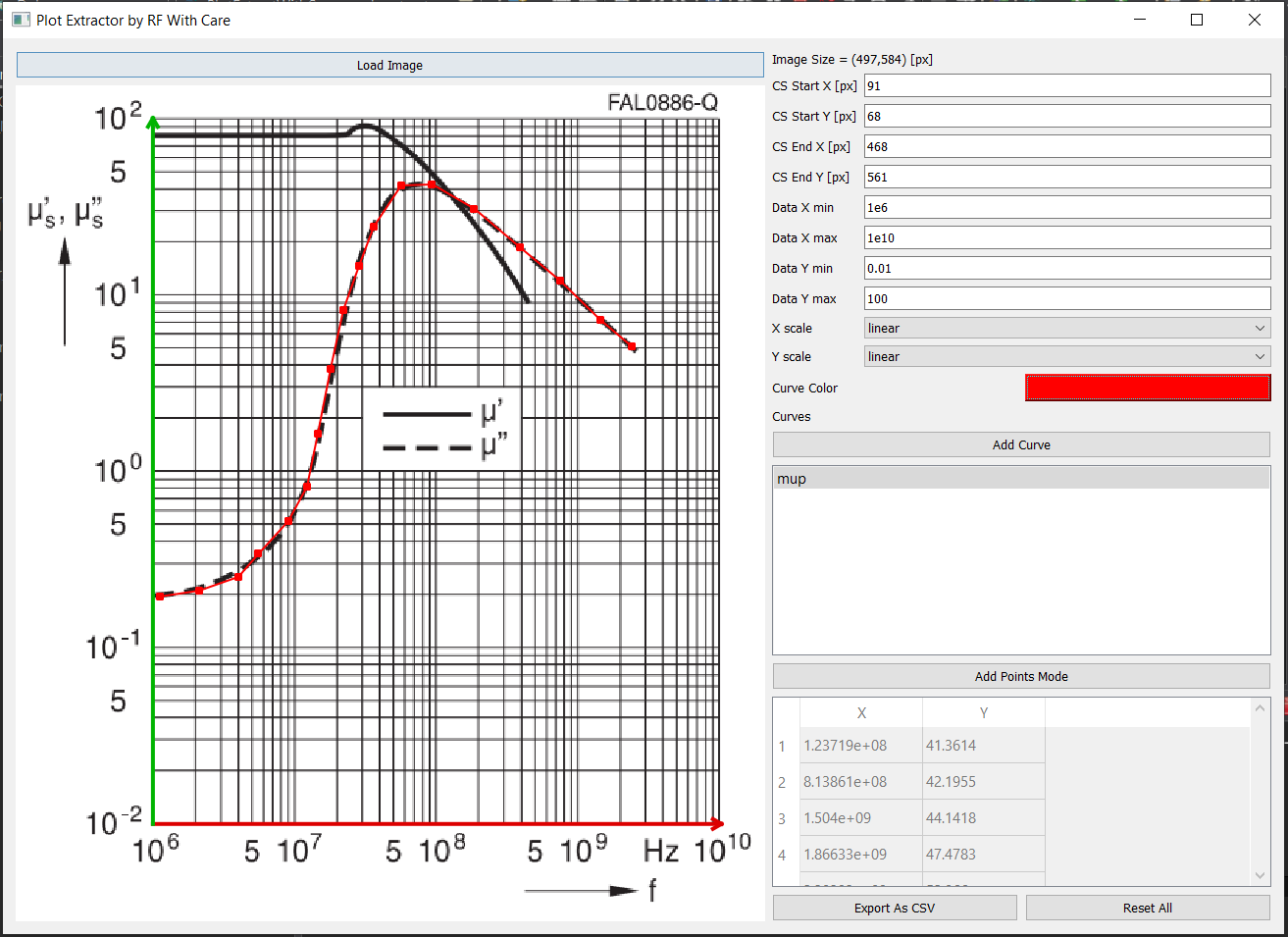
Plot Extractor (with care) is a simple PyQt-based tool that allows you to digitize data points from plotted curves inside images. Load a graph image, define the coordinate system, add curves, and click points — the tool converts pixel clicks into real-world X/Y values (linear or logarithmic) and exports them to CSV.
✨ Features
✔ Load an image file (JPG/PNG/BMP etc.)
✔ Define the chart coordinate system manually (in pixels)
✔ Support for linear or logarithmic X/Y axes
✔ Add multiple curves with names & colors
✔ Click to create ordered data points per-curve
✔ Optional point-editing mode
✔ Normalizes pixel coordinates properly even if the window is resized
✔ Export curve data to CSV files
✔ Last-saved folder remembered when exporting
🖥️ Screenshot
🚀 Installation
Requirements
-
Python 3.8+
-
PyQt5
-
NumPy
Install dependencies:
pip install pyqt5 numpy
(Add others like matplotlib if you later use them.)
🧰 Installing
pip install -e <Repository Dir>
Example:
pip install -e C:\Repos\PlotExtractWithCare\
▶️ Running the Application
python -m plotextractwithcare
📌 How It Works
Load an image
Enter the pixel locations of the origin and axis endpoints
Enter the real-world coordinate values (min/max for X and Y)
Choose whether X and Y are linear or log scale
Add a curve and begin clicking points
Export your data to CSV when done 🎉
Points are always kept sorted by X-value automatically.
📝 CSV Export Format
Exports contain two columns:
x,y 1.23,4.56 ...
⚠️ Disclaimer
Curve Digitizer is provided without any warranty. See the license section for more details.
📄 License
Plot Extractor (with care)
Copyright © 2026 Gadi Lahav — RF With Care Contact: gadi@rfwithcare.com
This program is free software: you can redistribute it and/or modify it under the terms of the GNU General Public License as published by the Free Software Foundation, version 3 (GPLv3) or (at your option) any later version.
You should have received a copy of the GNU General Public License along with this program. If not, see: https://www.gnu.org/licenses/
🤝 Contributing
Pull requests and feature suggestions are welcome!
🙏 Acknowledgements
Thanks to the open-source community for the tools and libraries that make this possible
Release history Release notifications | RSS feed


Download files
Download the file for your platform. If you're not sure which to choose, learn more about installing packages.
Source Distribution
Built Distribution
Filter files by name, interpreter, ABI, and platform.
If you're not sure about the file name format, learn more about wheel file names.
Copy a direct link to the current filters
File details
Details for the file plotextractwithcare-0.1.1.tar.gz.
File metadata
- Download URL: plotextractwithcare-0.1.1.tar.gz
- Upload date:
- Size: 22.4 kB
- Tags: Source
- Uploaded using Trusted Publishing? No
- Uploaded via: twine/6.2.0 CPython/3.13.7
File hashes
| Algorithm | Hash digest | |
|---|---|---|
| SHA256 |
93c7c25f43af0d4f2dfab09e4378a15d0268dfadad8683b55fd45be701157b3f
|
|
| MD5 |
d7ef3b0b7e2ee329682a95a9d486d51f
|
|
| BLAKE2b-256 |
14c8f50f00944f8ef0a74463bca1d2bda29e94155385bdf2be290783e9851663
|
File details
Details for the file plotextractwithcare-0.1.1-py3-none-any.whl.
File metadata
- Download URL: plotextractwithcare-0.1.1-py3-none-any.whl
- Upload date:
- Size: 23.4 kB
- Tags: Python 3
- Uploaded using Trusted Publishing? No
- Uploaded via: twine/6.2.0 CPython/3.13.7
File hashes
| Algorithm | Hash digest | |
|---|---|---|
| SHA256 |
cb7dfc9a55106ca074cfef8f9fcfa15fc05c46fc2d184693ca0cc14788bddfd9
|
|
| MD5 |
f6bde82fe8c6451165b4c21dd7816d3f
|
|
| BLAKE2b-256 |
da9a4665863bb771d949105bd4cacc855132c93bb7c0abbf539494470f95a5e1
|






