
Plot Whole genome-wide Hi-C contact heatmap

Project description
PlotHiC
PlotHiC is used to visualize whole genome-wide contact heatmaps after genome scaffolding.
If you have any questions, please Open Issues or provide us with your comments via the email below.
Email: jzjlab@163.com
Content
Introduction
PlotHiC is utilised for the purpose of visualising genome-wide interaction heatmaps subsequent to de novo genome assembly. The software is compatible with both .hic and bed formats, and it is capable of adding chromosome names and custom visualization areas.
Installation
- Dependency :
python = "^3.10"
pip
# pip install
pip install plothic
conda
# create plothic enviorment and install plothic
conda env create -n plothic -c bioconda  -c conda-forge plothic

# mamba env create -n plothic -c bioconda  -c conda-forge plothic
Usage
If you want to see detailed usage and documentation of plothic, you can get it from wiki.
A simple example of PlotHiC use .hic(from Juicer/3D-DNA)and bed(from HiCPro)format is presented below.
.hic format
- Input file:
genome.hic
This file is taken directly from 3d-dna, you need to select the final hic file (which has already been error adjusted and chromosome boundaries determined).
- Input file:
chr.tx(3 columns as follows, use "\t" as separator)
- This file is used for heatmap labeling. The first column is the name of the chromosome.
- The second column is the length of the chromosome (this length is the length of the hic file in Juicebox and can be manually determined from Juicebox).
- The third column is the order in which the chromosomes are placed, which is used to customize the arrangement of chromosomes (for example, from max to min).
Note: the length is in .hic file, not true base length (example as below).
# name length index
Chr1	24800000	5
Chr2	44380000	4
Chr3	63338000	3
Chr4	81187000	2
Chr5	97650000	1
- Example
# Default order (left)
plothic -hic genome.hic -chr chr.txt -r 100000

# -hic > .hic file
# -chr > chromosome length (in .hic file)
# -r > resolution to visualization


# Custom order (right )
plothic -hic genome.hic -chr chr.txt -r 100000 --order

# --order > Sort by the order in chr.txt(index)
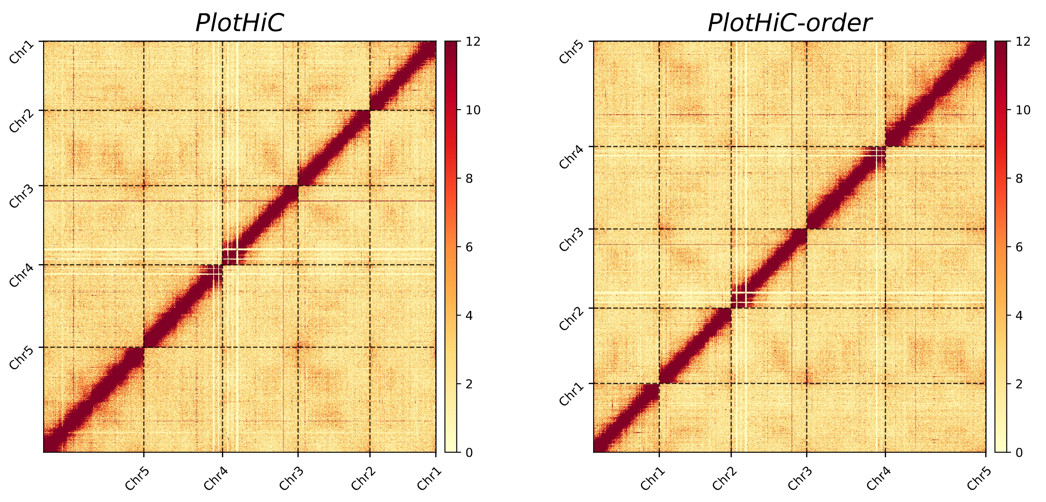
If the color performance is not to your liking, you can set parameters --bar-max to adjust it, which is very useful.
HiCPro format
- Input file:
genome.matrix - Input file:
genome_abs.bed
Both files are output from HiCPro. You can select a specific resolution based on your needs.
- Input file (optional):
order.txt, the content and format as follows:
# chr_name order
NC_003070.9	1
NC_003071.7	4
NC_003074.8	3
NC_003075.7	5
NC_003076.8	2
- Example
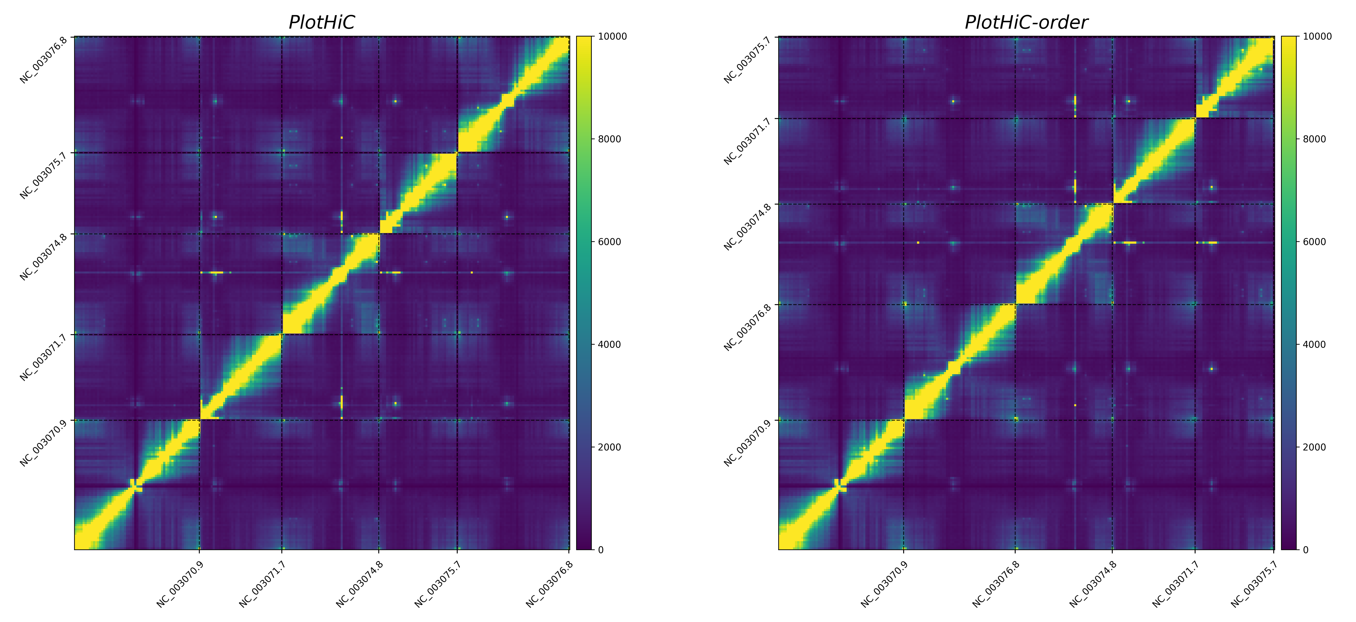
# Default order (left)
plothic -matrix sample_500000.matrix --abs-bed sample_500000_abs.bed -format png -cmap viridis --bar-max 10000 -g PlotHiC

# -matrix > matrix file
# --abs-bed > abs bed file
# -format > result format
# -cmap > viridis color
# --bar-max > max contact to show
# -g > Genome name to show top

# Custom order (right )
plothic -matrix sample_500000.matrix --abs-bed sample_500000_abs.bed -format png -cmap viridis --bar-max 10000 -g PlotHiC-order --abs-order order.txt

# --abs-order > Sort by the order in order.txt
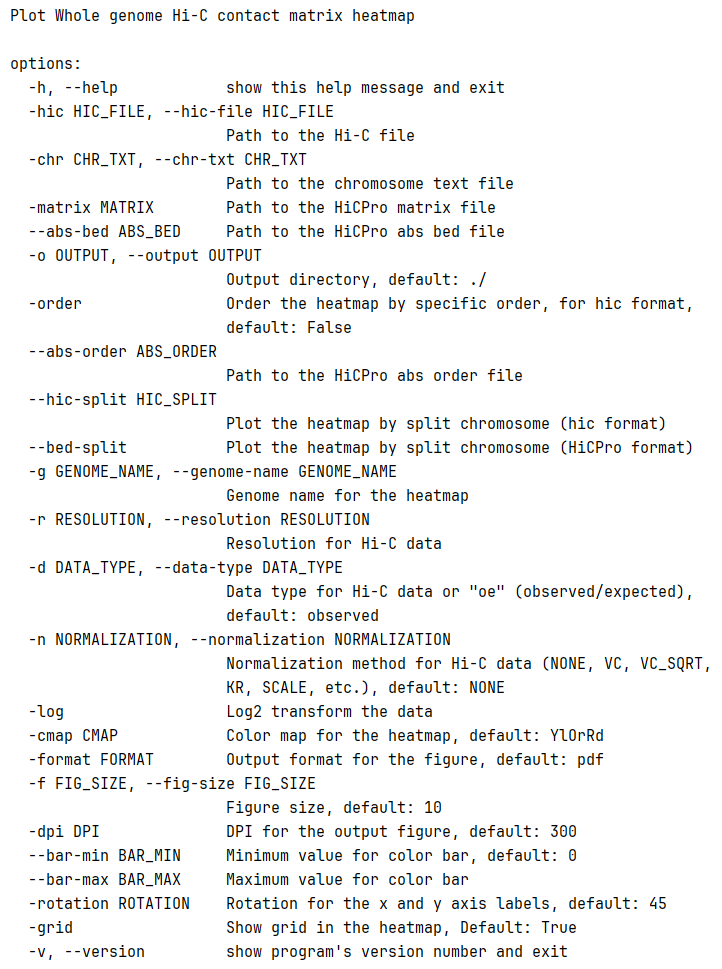
other parameter
Color map
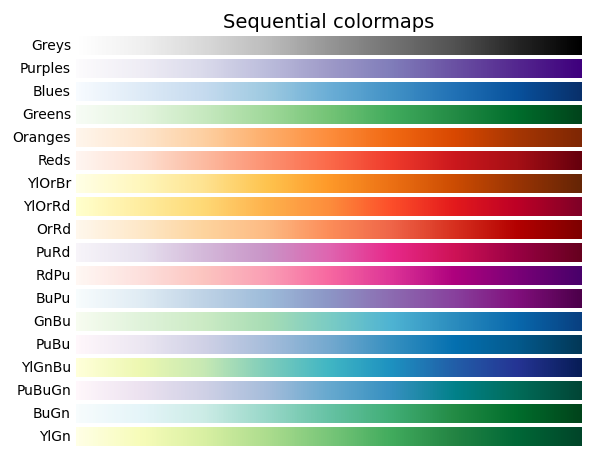
PlotHiC uses YlOrRd by default, you can choose more colors from Matplotlib.
Citations
If you used PlotHiC in your research, please cite us:
Zijie Jiang, Zhixiang Peng, Zhaoyuan Wei, Jiahe Sun, Yongjiang Luo, Lingzi Bie, Guoqing Zhang, Yi Wang, A deep learning-based method enables the automatic and accurate assembly of chromosome-level genomes, Nucleic Acids Research, 2024;, gkae789, https://doi.org/10.1093/nar/gkae789
Release history Release notifications | RSS feed


Download files
Download the file for your platform. If you're not sure which to choose, learn more about installing packages.
Source Distribution
Built Distribution
Filter files by name, interpreter, ABI, and platform.
If you're not sure about the file name format, learn more about wheel file names.
Copy a direct link to the current filters
File details
Details for the file plothic-0.4.19.tar.gz.
File metadata
- Download URL: plothic-0.4.19.tar.gz
- Upload date:
- Size: 24.2 kB
- Tags: Source
- Uploaded using Trusted Publishing? No
- Uploaded via: twine/3.8.0 colorama/0.4.4 importlib-metadata/8.5.0 keyring/24.3.1 pkginfo/1.11.2 readme-renderer/34.0 requests-toolbelt/1.0.0 requests/2.32.3 rfc3986/1.5.0 tqdm/4.57.0 urllib3/1.26.5 CPython/3.10.12
File hashes
| Algorithm | Hash digest | |
|---|---|---|
| SHA256 |
877cd3839c4855e01b45226eb75656c0c80b8b5f6c1ce453bba7020cc15bcfb6
|
|
| MD5 |
0fc450666e2c17cda064e86c13a52215
|
|
| BLAKE2b-256 |
50e49e3db11161a95d1698006846aa3900685e3492f3e8a2c3560308154edd26
|
File details
Details for the file plothic-0.4.19-py3-none-any.whl.
File metadata
- Download URL: plothic-0.4.19-py3-none-any.whl
- Upload date:
- Size: 24.7 kB
- Tags: Python 3
- Uploaded using Trusted Publishing? No
- Uploaded via: twine/3.8.0 colorama/0.4.4 importlib-metadata/8.5.0 keyring/24.3.1 pkginfo/1.11.2 readme-renderer/34.0 requests-toolbelt/1.0.0 requests/2.32.3 rfc3986/1.5.0 tqdm/4.57.0 urllib3/1.26.5 CPython/3.10.12
File hashes
| Algorithm | Hash digest | |
|---|---|---|
| SHA256 |
97ff46f255accef813019d2c9cd746b32d40ece26a5c256592b7fd89a44838cd
|
|
| MD5 |
ee9a9bbdc8320e9cd8973c0a4ff209a4
|
|
| BLAKE2b-256 |
1e494d2b8f404eb50a739a41c33b94316252b8e44ddec15c0a3dec239602bb5e
|






