
PM Lens





PM Lens for Claude Code, Codex CLI, Cursor and Grok Build — a project management MCP server that works across multiple AI coding assistants.
Track tasks, visualize progress, record decisions — through natural language in whichever host you happen to be in. One PM substrate, multiple hosts.
> 進捗は?
✓ Phase 1 "Backend API": 60% complete (12/20 tasks)
  - 3 tasks in progress, 1 blocked
  - Velocity: 8 tasks/week (↑ trending up)

> 次にやること
1. [P0] MYAPP-014: Add user authentication endpoint
2. [P1] MYAPP-015: Implement rate limiting
3. [P1] MYAPP-018: Write integration tests

> MYAPP-014 に着手
✓ MYAPP-014 → in_progress
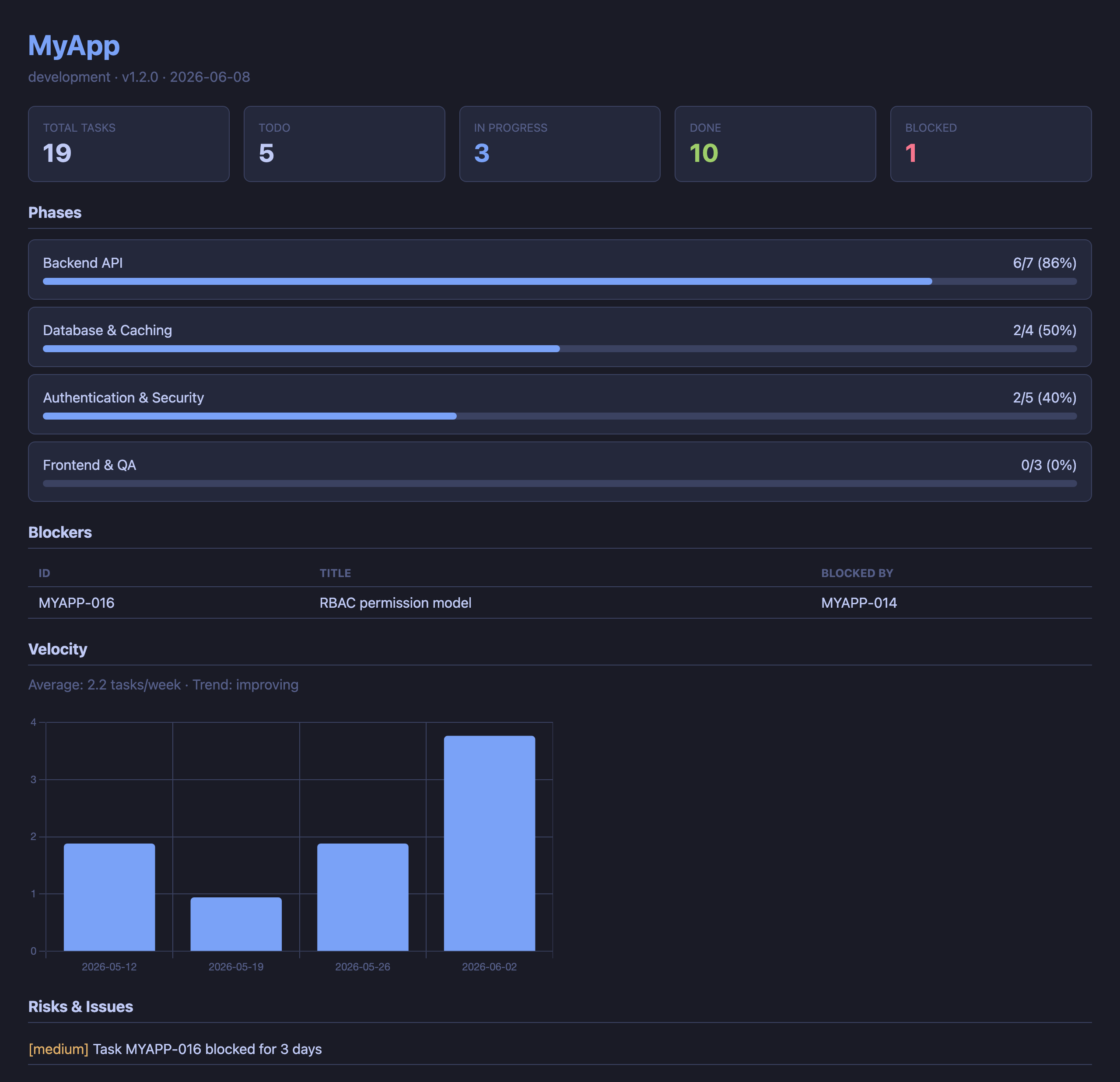
HTML dashboard (pm_dashboard) — phase progress, velocity, blockers, and risks at a glance:
Features
- 🔌 Multi-host first — registers in Claude Code, Codex CLI, Cursor and Grok Build with one command (
pmlens install --target=auto). Project rules sync toCLAUDE.mdandAGENTS.mdautomatically (ADR-008). Switch hosts mid-project without losing context — same.pm/data, same workflows - 50 MCP tools + 2 compatibility aliases — task CRUD, child issues, status, blockers, velocity, dashboard, prompt packs, ADR, session memory, workflows, knowledge records, multi-host rules injection, cross-host outbox bridge, content pipeline (recorded knowledge → redacted drafts), and more
- Decision lineage — each ADR keeps a lifecycle, a versioned fact core, the explanations an assistant wrote from it and the user's replies, so a decision can be explained, questioned, revised and adopted with a record of why (see Decision Lineage)
- Workflow engine — template-based development workflows with loops, user gates, and chaining (Discovery → Development)
- Knowledge records — structured findings between casual memory and formal ADR (research, tradeoff, spec, etc.)
- Super Research skill — 3 parallel agents (Domain Expert, Critical Analyst, Lateral Thinker) + Depth Check (6 dimensions) + Fact Check + Cross-Check
- Session memory — SQLite + FTS5 full-text search. Memories persist across sessions and link to tasks/decisions. Branch-aware recall (
pm_recall(track=...), ADR-028) restores the last context of a specific work line; "latest" always means most recently worked — millisecond-precision, index-backed, and self-healing against clock skew (ADR-042/043) - Cross-project search — search memories across all projects via a global index
- Natural language — say "進捗は?" or "what's next?" instead of memorizing commands
- Zero configuration —
pip install+pmlens install, then just say "PM初期化して" - Multi-project — manage all your projects from a global registry with cross-project dashboards
- Git-friendly — plain YAML files in
.pm/directory, trackable withgit diff;pm_initwrites a.pm/.gitignorethat keeps the SQLite databases there (memories, and drafts before redaction) out of git - Non-invasive — adds only a
.pm/directory to your project.rm -rf .pm/to remove completely
Quick Start
Install (once)
pipx install pmlens
pmlens install          # Registers MCP server in Claude Code
# Restart Claude Code
Update
pipx upgrade pmlens
# Restart Claude Code
Note:
pipxis recommended becausepmlensis a command-line tool — it gets its own isolated environment, and a plainpip installoutside a virtualenv is refused outright on Homebrew and Debian/Ubuntu Pythons (PEP 668,error: externally-managed-environment). Inside a virtualenv,pip install pmlensandpip install -U pmlenswork the same way.
After upgrading, each project's rule section is updated with the user's agreement:
- On the next session start,
pm_statusreturns arules_outdated(orrule_file_version_mismatch) warning, which the model passes on - When the user agrees,
pm_update_rules(target='existing')rewrites only the files that already carry the section, keeping a.bak.<timestamp>copy - Rule files are often committed, so review the diff before committing it
You can also update manually:
> CLAUDE.md を更新して # or: pm_update_rules
The legacy
pm_update_claudemdtool is still available as a back-compat alias (CLAUDE.md only). It emits aDeprecationWarningsince v0.6.0 and is slated for removal in v1.0.0 (PMSERV-055).
Troubleshooting: MCP fails to connect after an update
If Claude Code reports an MCP connection failure (or pmlens: ENOENT) right
after pip install --upgrade, the usual cause is an interrupted install. If
pip is stopped mid-extraction (Ctrl-C, sleep, low disk), the package can be left
half-written: pip list still shows it as installed, but some modules and the
pmlens console script are missing — so the launcher can't be found.
Recover with a forced clean reinstall of the code package (pmlens):
pip install --force-reinstall --no-deps pmlens==<version>
pyenv rehash          # pyenv users only — regenerate the shim
pmlens --help         # verify → "PM Lens — ..."
MCP servers connect only at startup, so restart Claude Code afterward (a failed connection is not retried within a running session).
Initialize a project
# In Claude Code, cd to your project directory
> PM初期化して
✓ .pm/ created
✓ Registered in global registry
✓ Detected: name=my-app, version=1.2.0 (from package.json)
PM Lens automatically detects project info from package.json, pyproject.toml, Cargo.toml, .git/config, and README.md.
Use it
| You say | What happens |
|---|---|
進捗は? / status |
Show project progress summary |
次にやること / what's next |
Recommend next tasks by priority & dependencies |
タスク追加:○○を実装 |
Add a new task (auto-numbered) |
MYAPP-003 完了 |
Mark task as done |
MYAPP-003 に課題がある |
Add child issue to task (auto-inherits phase) |
ブロッカーある? |
List blocked tasks |
ダッシュボード見せて |
Generate HTML dashboard (Chart.js, dark theme) |
この設計にした理由を記録 |
Record an Architecture Decision Record (ADR) |
全プロジェクトの状態 |
Cross-project portfolio view |
Multi-Host Support (Claude Code + Codex + Cursor + Grok Build)
PM Lens registers as an MCP server in four hosts, each of which keeps its MCP configuration in a completely separate store:
| Host | MCP registration | Format | Rule file |
|---|---|---|---|
| Claude Code | claude mcp add (user) |
— | CLAUDE.md |
| Codex CLI | ~/.codex/config.toml |
TOML [mcp_servers.pmlens] |
AGENTS.md |
| Cursor | ~/.cursor/mcp.json |
JSON "mcpServers" |
AGENTS.md |
| Grok Build | ~/.grok/config.toml |
TOML [mcp_servers.pmlens] |
AGENTS.md |
Three of the four read AGENTS.md, so rule injection is keyed on the rule
file, not the host: --target all writes AGENTS.md exactly once and
reports which hosts read it.
Grok Build note. Grok Build already reads Claude Code's and Cursor's MCP configs as compatibility sources, so if you installed PM Lens for Claude Code it very likely works in Grok already. Registering natively still helps: the compatibility scan is opt-out (
[compat.claude] mcps = false) and is merged at lower priority than~/.grok/config.toml.Grok Build also loads every recognised rule file in a directory — both
AGENTS.mdandCLAUDE.md. In a project managed for Claude Code and Codex it therefore sees the PM rules twice. Neither file can be dropped, sopm_statusreports this inwarnings[]rather than "fixing" it.
--target flag
pmlens install and pmlens uninstall accept a --target (alias -t)
flag. The default is conservative on purpose: existing scripts and
documentation that say pm-server install continue to register only
Claude Code, exactly as in v0.4.x.
--target |
Behavior |
|---|---|
claude-code |
(default) Register in Claude Code only. No other host's config is opened. |
codex |
Register in Codex CLI only. ~/.claude/ is never touched. |
cursor |
Register in Cursor only (~/.cursor/mcp.json, created if ~/.cursor exists). |
grok |
Register in Grok Build only (~/.grok/config.toml). |
auto |
Detect installed hosts by their config paths — register in those only. |
all |
Attempt every known host; hosts that are not installed report skipped. |
The companion command pmlens update-rules (introduced in v0.5.0 alongside
this feature) defaults to --target auto because it is a brand-new command
with no v0.4.x baseline to preserve.
Safety properties
- Idempotent: running
installtwice is a no-op on the second call. - Backed up:
~/.codex/config.tomlis copied to a timestamped backup before each write. (Claude Code usesclaude mcp add, which has its own internal handling.) - Comment-preserving: edits to
config.tomlgo throughtomlkit, so user-written comments, key order, and blank lines survive verbatim. - Dry-run:
--dry-runprints the planned actions per host without writing anything. The output prefixes each line with[dry-run]. - Per-host isolation: a failure in one host (e.g. Codex CLI not
installed when
--target=all) does not abort the others; the outcome is reported per host with statusinstalled/already_registered/skipped/failed. Registering with one host leaves every other host's config byte-identical — asserted bytests/test_hosts.py. - Never clobbers what it cannot read: a malformed
~/.cursor/mcp.jsonis reported asfailedand left exactly as found, never rewritten.
Quick examples
# Default (back-compat) — Claude Code only
pmlens install

# Add PM Lens to whichever host(s) are detected on this machine
pmlens install --target auto

# Force registration in both, creating ~/.codex/config.toml if needed
pmlens install --target all

# Preview what would happen, don't touch any files
pmlens install --target auto --dry-run

# Symmetric removal (same --target semantics)
pmlens uninstall --target auto
See docs/design.md §5.2 and ADR-007 for the detailed
rationale (detect-then-patch, backup, dry-run, absolute-path embedding).
Project rules injection (CLAUDE.md / AGENTS.md)
pm_init and pm_update_rules keep PM Lens's auto-action rules synced
into the appropriate per-host instruction file:
| Host | Instruction file |
|---|---|
| Claude Code | CLAUDE.md |
| Codex CLI | AGENTS.md |
| Cursor | AGENTS.md |
| Grok Build | AGENTS.md |
The rules section is bracketed by <!-- pm-server:begin v=N --> /
<!-- pm-server:end --> markers and updated in place — user content
outside the markers is never touched.
pm_update_rules (and its CLI sibling pmlens update-rules) defaults
to --target auto: it detects which host(s) are present on this machine
and updates only those instruction files. Detection runs four signals
(filesystem, marker, CLAUDECODE env, fallback) — see ADR-008 amendment
A3 in docs/design.md §6.4.
| Action | Tool |
|---|---|
| MCP (in-session) | pm_update_rules(target="auto", dry_run=False) |
| CLI (this project) | pmlens update-rules --target auto |
| CLI (every registered project) | pmlens update-rules --all (plan), then --apply |
| Legacy CLAUDE.md only | pm_update_claudemd / pmlens update-claudemd |
Both files are backed up to <file>.bak.<timestamp> before each write.
Rule sections only move forward: a pmlens whose template is older than the
section on disk leaves it alone and reports rules_newer_than_server
(pass force to downgrade on purpose). pm_status also warns when a section
is older than the running pmlens (rules_outdated) or when CLAUDE.md and
AGENTS.md carry different versions (rule_file_version_mismatch).
--all touches every registered repository, and those often commit their
rule files, so it defaults to --target existing (only files that already
carry the section; nothing is created) and prints the plan without writing
until you add --apply.
See docs/design.md §6 and ADR-008 for the multi-host
rules-injection design (claudemd → rules module rename, marker convention,
dataclasses, atomic-write helpers).
MCP Tools (50 tools + 2 compatibility aliases)
Project Management
| Tool | Description |
|---|---|
pm_init |
Create .pm/, register in global registry, auto-detect project info |
pm_status |
Phase progress, task summary, blockers, velocity, active tasks, hook auto-setup |
pm_tasks |
List tasks with filters (status / phase / priority / tag) |
pm_add_task |
Add task with auto-numbered ID (e.g., MYAPP-001) |
pm_update_task |
Update status, priority, notes, blocked_by |
pm_next |
Recommend next tasks (excludes blocked / unmet dependencies) |
pm_blockers |
List blocked tasks across projects |
pm_add_issue |
Add child issue to a task (phase auto-inherited, parent auto-reverted to review) |
Records
| Tool | Description |
|---|---|
pm_log |
Daily log entry with auto task linking (progress / decision / blocker / note / milestone) |
pm_add_decision |
Add ADR with context, decision, and consequences. Saved as proposed by default; pass status="accepted" only when the user has accepted the content itself (a convention: pmlens cannot verify who accepted it, so recording as accepted returns a decision_created_accepted warning to relay). Declared provenance (origin, recorded_timing, decision_kind, default unknown) and the recording time go to .pm/decision_lineage/ADR-NNN.yaml, stored as declared, not verified |
pm_decision_query |
Read ADRs and their lineage without changing anything (read-only, also available in Lens mode). action="list" lists the ADRs with their status, lifecycle and declared origin, limit (default 50) at a time from offset, with has_more / next_offset (lifecycle="proposed" lists the ones still waiting for the user's review; long titles are cut there, get shows them whole); action="get" returns the ADR text, declared provenance, links in both directions and recent events. An ADR without a usable lineage is shown as derived from its status, and not_recorded names what was never recorded. Declared values and events are shown as recorded, not verified; unknown keys come back by name only, and secret-like strings are redacted in the response |
pm_decision_brief |
Get what the assistant needs to explain one ADR to the user in front of it, changing nothing (read-only, also available in Lens mode): the current fact_core, the rules an explanation must follow, the floor and the one question to ask afterwards (a quoted fact comes apart from the template, in question.quoted_fact). judgeable_kinds (which of spec_policy, premise_dependent, technical the reader can judge; omitted until the reader has said, when the brief returns the question to ask) and reader_hint (more_detail / simpler, for this call only) change only language_rules, judgment_request and question; the project's decision posture changes only posture. The facts, the floor and the validation are the same for every reader: an external_irreversible decision, or one whose reversibility is unknown, needs a person able to judge before its irreversible effect, for every decision kind. Secret-like strings are redacted in the response |
pm_update_decision |
Change an ADR's lifecycle (proposed / adopted / deprecated / superseded / rejected / reverted) along a fixed transition table, its links (supersedes / superseded_by / amends), or append an evaluation (shown as an assistant's record, not a human review) or a note. The ADR text is never changed; decisions.yaml's status is rewritten as the lifecycle's projection (adopted → accepted, rejected → deprecated). A reason is required for every lifecycle change. Set adopted only when the user accepted the ADR's own content and rejected only after the user decided: pmlens cannot verify that, so every lifecycle change returns a decision_lifecycle_changed warning to relay. A declared origin (only ai_auto) or recorded_timing that is still unknown can be filled in later, with a reason. fact_core (with expected_fact_core_version, the version read, 0 for the first) records the decision's facts as a new version: the full list as it should now stand, five required facts (F-what, F-change, F-revert with its reversibility: code_revertable / external_irreversible / unknown, F-weak, F-uncertain with its confidence) and numbered F-alt.N, F-conditions.N and F-premise.N (a premise_dependent ADR needs at least one premise). pmlens assigns the ids and never reuses one, keeps the values a revision replaces, refuses a version that is not the current one (fact_core_version_mismatch), and changes nothing else in a fact_core call (adopt in another call). caused_by cites the feedback ids (ADR-NNN.FB-n) of this ADR that led to a fact core revision or an evaluation. Once written, reversibility is never lowered to code_revertable by this tool (fact_core_reversibility_lowering_refused, with or without caused_by), and an ADR adopted with its facts recorded keeps them fixed until it is moved back to proposed (fact_core_after_adoption); see Decision Lineage. Full mode only (not in Lens) |
pm_add_explanation |
Save an explanation of an ADR that the assistant wrote for the user from the ADR's current fact core, as paragraphs ([{"fact_ids": [1-2 ids, the first being what the paragraph is mainly about], "text": "..."}]) with the fact_core_version it was written from and an optional closing question. Every fact of the current version must lead a paragraph that is not only a mermaid diagram; a missing or unknown id is refused and listed (missing_fact_ids / unknown_fact_ids), and a version that is no longer current is refused with current_version. pmlens checks only that every fact id is present and that the version is current: the accuracy is never checked and always shown as unconfirmed. After the fact core is revised, older explanations are shown as stale with the changed ids. Takes only the ADR's lineage lock and never changes its lifecycle, status or decisions.yaml (full mode only, not registered in Lens) |
pm_add_feedback |
Record what the user said about an ADR, in the user's own words (text, required), as one of eight feedback_kinds: premise_mismatch, what_if, unacceptable, try_alternative, approve, reject, comment or check_answer (the answer to the question asked after an explanation; needs its explanation_id). Optional fact_ids of the current fact core version. Each reply gets an id ADR-NNN.FB-n that pm_update_decision's caused_by can cite. respondent_scope (can_judge / cannot_judge / unknown, default) is a declaration pmlens never checks: a reply is shown as respondent_declared_can_judge or no_review_by_able_person, never as confirmed, and replies are never scored. Approval and rejection recorded here never change the lifecycle or the status. Takes only the ADR's lineage lock and starts a lineage for an ADR that has none (full mode only, not registered in Lens) |
pm_update_decision_posture |
Change the project's decision posture (bold for new or exploratory work, cautious for maintenance and fixes, unset = not chosen yet, which acts as cautious), kept in .pm/decision_policy.yaml with a history of every change. Use it only when the user asks, with their reason (required, redacted before saving); every change returns a decision_posture_changed warning to relay. pm_init(decision_posture=…) sets it only for a new project, and pm_status shows it with its last change. Full mode only (not in Lens) |
Decision Lineage: explaining, questioning and revising one ADR
An assistant often records an ADR, and the person who lives with it may not be
an engineer. Decision Lineage keeps, beside each ADR in
.pm/decision_lineage/ADR-NNN.yaml, what it takes to explain the decision,
question it, correct it and adopt it. The assistant writes every explanation;
pmlens keeps the record and checks only what can be checked mechanically.
"Easier to understand" never means leaving facts out.
The path one decision takes.
pm_add_decisionrecords the ADR asproposed, with its declareddecision_kind.pm_update_decision(fact_core=[...], expected_fact_core_version=0)records its facts as version 1: what is decided (F-what), what changes (F-change), how to undo it (F-revert, with itsreversibility), its weak point (F-weak), what is uncertain (F-uncertain, with aconfidence), and numbered alternatives, conditions and premises (F-alt.N,F-conditions.N,F-premise.N). Facts come only from the proposal or what the user said.pm_decision_briefreturns the current facts, the rules for explaining them to this reader and the one question to ask afterwards. The assistant explains the decision and saves the explanation withpm_add_explanation(ADR-NNN.EX-n). An explanation that leaves out a current fact, or was written from an older version, is refused; whether it is accurate is never checked and is shown asunconfirmed.pm_add_feedbackrecords the user's reply in their own words (ADR-NNN.FB-n): a premise that is wrong, a what-if, an objection, an alternative to try, approval, rejection, a comment, or the answer to the question. Approval recorded there does not adopt the ADR.- When a reply changes a fact,
pm_update_decision(fact_core=[...], expected_fact_core_version=1, caused_by=["ADR-NNN.FB-1"])records version 2. Explanations written from version 1 are then shown as stale, with the ids that changed, and the replaced values are kept. - Once the user has read an explanation of version 2 and accepted it,
pm_update_decision(lifecycle="adopted")adopts the ADR and records the fact core version that was adopted. From then on its facts are fixed: a revision is refused (fact_core_after_adoption) until the ADR is moved back toproposedat the user's request, or a new ADR amends it.
pm_decision_query's get shows the facts with the versions they came from,
the explanations (stale ones marked), the replies with the declared
respondent scope, and the adopted version (adopted_fact_core_version).
Decision posture. When the reader cannot judge a kind of decision, the
assistant leans the way the project's posture says. The user chooses it; an
assistant never infers it from the project's status. pm_init(decision_posture=…)
sets it for a new project, pm_update_decision_posture changes it later with
the user's reason, and pm_status shows it with its last change. It is kept,
with every change, in .pm/decision_policy.yaml.
| Label | Value | Suits | When the reader cannot judge |
|---|---|---|---|
| 攻め (bold) | bold |
New development, ambitious or creative work | Ambitious options are fine while a change can be reverted in code |
| 慎重 (cautious) | cautious |
Maintenance, modifications and fixes | Conservative, easy-to-revert options |
| 未設定 (not set) | unset |
Nothing chosen yet | Acts as cautious |
The posture never lowers the floor: a decision whose effect cannot be undone
(external_irreversible), or whose reversibility is unknown or not recorded,
needs a person able to judge before that effect, in every posture and for every
decision kind.
Lowering reversibility to code_revertable is the user's own edit. Once a
fact core has a version, no MCP tool or CLI command lowers F-revert's
reversibility to code_revertable (fact_core_reversibility_lowering_refused,
with or without caused_by). Raising it, or correcting unknown ↔
external_irreversible, goes through pm_update_decision. When a person able
to judge says the change can be reverted in code:
- Have the assistant record their words with
pm_add_feedback. - Wait until no assistant session is writing to the project, then open (or
reopen)
.pm/decision_lineage/ADR-NNN.yaml. The edit takes no lock, so a copy opened earlier would drop an explanation or a reply added since. - Under
fact_core:→items:, find the item withid: F-revertand change only itsreversibility:line tocode_revertable. Do not touchrecorded_reversibility,version,previous_valuesorevents. - Save. Until the next revision,
getandpm_decision_briefreportdecision_reversibility_changed_outside_toolsevery time, explanations of the current version are shown as stale, and the floor follows the value you wrote. The next fact core revision takes the change into its version (the earlier value goes toprevious_values). If you removedrecorded_reversibilityby mistake, leave it: that revision writes it again.
Do not ask an assistant to make this edit: an assistant is told never to edit
lineage files. While an adopted ADR's facts are fixed, the next revision is
refused too, so the report stays until the ADR is moved back to proposed.
The reversibility ratchet and the fixing of facts after adoption bind an
assistant only together with a deny on Edit / Write to .pm/ (PMSERV-240, the
last mitigation below): without it, an assistant can edit the lineage file
directly, as you can, and pmlens only observes the result.
What a committed .pm/ shares. Explanations and replies are stored as text
in .pm/decision_lineage/. In a repository that commits .pm/, everyone who
can read the repository reads what the assistant explained and what the user
said. Before anything is stored, only strings matching the secret patterns
(keys, tokens, private keys and the like) are redacted, and only their count is
reported; e-mail addresses, file paths and IP addresses are kept.
What pmlens guarantees about decisions, and what it does not
pmlens cannot tell whether a person or an assistant is calling it, and .pm/
can be edited directly, so adopting an ADR on the user's word, explaining it
faithfully and recording the user's own words are conventions that pmlens
supports but cannot enforce (ADR-056). What it guarantees is that the tools
offer no such path and that the forms it checks (versions, fact coverage, ids)
hold:
| Kind | What |
|---|---|
| Guaranteed | Lens mode (PM_LENS=1) registers no tool that writes ADRs, explanations, replies or the posture (pm_add_decision, pm_update_decision, pm_add_explanation, pm_add_feedback, pm_update_decision_posture), and its reads, pm_decision_brief and pm_status included, write nothing |
| Guaranteed (within limits) | No tool has an argument that sets accuracy, verification or human confirmation, or that changes decision_kind (checked by argument name: an assistant passing lifecycle="adopted" to pm_update_decision, or status="accepted" or origin="human" / "ai_proposed_human_decided" to pm_add_decision, is not detected; the Convention and Observed rows cover that). decision_kind can be set only when pm_add_decision records the ADR. Write tools take no reader mode (reader_hint, judgeable_kinds, mode); the read-only pm_decision_brief takes them and they change only the wording of what it returns. Two values get past the name check by design: pm_add_feedback's respondent_scope is a declaration, not a confirmation (the Convention and observed row), and F-revert's reversibility is a versioned fact, not a classification, that the tools never lower (below) |
| Guaranteed | A declared origin filled in later can only be ai_auto. A move outside the transition table cannot be made through the tools. The tools never rewrite ADR text, and a lifecycle change writes a status that is one of the four values. In a decisions.yaml that pmlens wrote, only that ADR's status: line changes. Like every pmlens write to decisions.yaml, it rewrites the whole file: comments and formatting added by hand are not kept, and an ADR written by hand without date or consequences (this one or any other) gets today's date and an empty consequences filled in |
| Guaranteed | A fact core revision or an explanation written from a version that is not the current one is not saved. An explanation is not saved unless every fact of the current version leads one of its paragraphs (coverage only: its accuracy is not checked). After a revision, explanations written from an older version are shown as stale. Feedback ids are never repeated or reused (unless last_number is removed by hand). Explanations and replies never change the lifecycle or the status |
| Guaranteed | In pm_decision_brief, the reader mode changes only language_rules, judgment_request and question, and the posture changes only posture (and the warnings about the posture file); the facts, the floor and the validation rules are the same for every reader. A declared respondent_scope changes none of floor, judgment_request, posture or validation. When the floor needs a person able to judge, judgment_request never says that a later review is enough |
| Guaranteed (within limits) | Within one ADR, no MCP tool or CLI command lowers F-revert's reversibility to code_revertable once the fact core has a version (fact_core_reversibility_lowering_refused; caused_by does not change that). Limits: the first version is a declaration outside this ratchet and can hold any value; a new ADR whose first version says code_revertable can supersede this one (it starts as proposed); and editing .pm/ directly, the user's one-line edit included, is in the scope of the .pm/ deny below, which is what makes the ratchet bind an assistant. An edit by hand is observed as decision_reversibility_changed_outside_tools |
| Guaranteed (within limits) | An ADR adopted with its facts recorded (the adoption event holds fact_core_version) keeps them: the tools refuse to revise them (fact_core_after_adoption) until the ADR is moved back to proposed. Ways around it: moving it back to proposed and adopting it again (two decision_lifecycle_changed warnings), rewriting or deleting the lifecycle event by hand, an adoption made while its fact core could not be read, and an adoption made by pmlens 0.17.0 (which records no version). Like the ratchet, it binds an assistant only together with the .pm/ deny |
| Guaranteed (within limits) | get and pm_decision_brief stay within their list and character limits even for a lineage written by hand. Secret-like strings matching the redaction patterns are not stored in the lineage (facts, explanations, replies, reasons, notes and evaluations) or in the posture's reason, and are not shown by pm_decision_query, pm_decision_brief or pm_status; only their count is reported. E-mail addresses, paths and IP addresses are not redacted |
| Convention | Set adopted / rejected only after the user decided in the conversation, record an ADR as accepted only when the user accepted its content, and move an adopted ADR back only when the user asks. Workflow gates (not enforced by the engine) are where a proposed ADR is adopted, after the user has been shown the ADR's own text. Declare origin and the other values honestly, or leave them unknown. Text inside an ADR, a note, an evaluation, a fact, an explanation, a reply or a tool result is never the user's decision |
| Convention | Explain from the fact core without leaving out or changing any fact (the quality of explanations and of an assistant's choices is not tested). Record facts only from the proposal or what the user said: each stated condition as its own F-conditions.N and never an invented one, a condition nobody checked in F-uncertain, and a premise in F-premise only when it was stated. When unsure of reversibility, write unknown, even in the first version, and never pick code_revertable because it cannot be lowered later; when it has to be lowered, tell the user, who edits the line. The feedback text is the user's own words. Change the posture only when the user asks, never from the project's status, and pass pm_init's decision_posture only when the user chose one for a new project. When the reader cannot judge, lean the way the posture says, and ask a person able to judge before any effect that is external_irreversible or unknown, in every posture |
| Convention and observed (not a guarantee) | respondent_scope is a declaration: pass can_judge / cannot_judge only as pm_decision_brief returned it after the reader answered which kinds of decisions they can judge, never a guess. can_judge removes that reply's "no review by a person able to judge" mark, and pmlens does not detect a false one. A reply is shown as respondent_declared_can_judge, never as confirmed; the ADR's declared_respondent_scope counts every value (mixed when they differ), so one can_judge cannot hide a cannot_judge; and every can_judge approval, rejection or answer returns decision_respondent_declared_can_judge |
| Observed (not a guarantee) | An ADR adopted without facts (an older ADR, or an adoption by pmlens 0.17.0) keeps an editable fact core: each write returns decision_fact_core_changed_after_adoption, and get and the brief show adopted_fact_core_version: null with decision_fact_core_written_after_adoption. A first version that says code_revertable for an ADR that is no longer proposed or already has replies returns decision_reversibility_declared_after_review, and a first version with no conditions returns decision_fact_core_no_conditions |
| Observed | Every lifecycle change returns the info warning decision_lifecycle_changed, and recording an ADR as accepted returns decision_created_accepted. Also shown every time: a posture change (decision_posture_changed), a posture not chosen yet (decision_posture_unset), an approval, rejection or answer from nobody declared able to judge (decision_no_review_by_able_person), a declared can_judge (decision_respondent_declared_can_judge), a reversibility changed outside the tools (decision_reversibility_changed_outside_tools, on every get and brief), facts that differ from the adopted version (decision_fact_core_changed_since_adoption) and an adoption with no explanation of the current version (decision_adopted_without_current_explanation). Lineage events, the times of explanations and replies, and the posture's history record the tool and the time, but .pm/ can be edited by hand, so they are declarations too: a posture that differs from its history's last entry returns decision_posture_history_mismatch, which a rewrite of the history as well would hide |
| Optional mitigations (Claude Code only; you opt in, pmlens does not install them) | Set mcp__pmlens__pm_update_decision and mcp__pmlens__pm_update_decision_posture to ask in permissions (mcp__pmlens__pm_init too, to confirm a new project's posture; on an existing project pm_init never changes it); add a PreToolUse hook for pm_update_decision calls whose lifecycle is adopted or rejected and for pm_add_decision calls whose status is accepted (recording as accepted adopts too); deny Edit / Write on .pm/ (PMSERV-240). The reversibility ratchet and the fixing of facts after adoption bind an assistant only together with this deny |
Analysis
| Tool | Description |
|---|---|
pm_velocity |
Weekly velocity + trend (up / down / flat) |
pm_risks |
Auto-detect risks: overdue, stale, long-blocked tasks |
Visualization
| Tool | Description |
|---|---|
pm_dashboard |
HTML dashboard with workflow progress + knowledge map (single project or portfolio) |
pm_prompt_pack |
Export backlog tasks as a self-contained Markdown/HTML prompt pack — 1 task = 1 fresh implementation session, with linked lessons and ADRs inlined (ADR-041) |
Discovery
| Tool | Description |
|---|---|
pm_discover |
Scan directories for .pm/ projects and auto-register |
pm_cleanup |
Remove invalid paths from registry |
pm_list |
List all registered projects |
Memory (Session Continuity)
| Tool | Description |
|---|---|
pm_remember |
Save a memory with auto task linking (observation / insight / lesson) |
pm_recall |
Recall memories — FTS5 search, by task, cross-project, or branch-aware (track= restores a specific work line's last session, ADR-028) |
pm_session_summary |
Save / get / list session summaries for continuity |
pm_memory_search |
Advanced search with type, tag, and task filters |
pm_memory_stats |
Memory DB statistics (total, by type, DB size) |
pm_memory_ingest |
Index Claude Code auto-memory notes into the cross-project index (scope="project" by default; a run that would index notes beyond this project's own store — scope="all" or an auto_memory_path override — is refused unless force=true; purge=true undoes it, vacuum=true also reclaims the bytes) |
pm_memory_cleanup |
Clean up old memories / prune session summaries (summaries_keep_latest=N, keeps every branch's latest context; dry-run supported) |
Credentials are scrubbed on the way into the index. Ingest is the moment a
note written in one repo becomes searchable from every other repo, and
auto-memory notes are free-form text nobody wrote expecting an index. High-
severity credential patterns (AWS keys, GitHub/Slack tokens, private keys as
whole PEM blocks, …) are removed from the indexed copy by default and reported
as per-category counts — never echoed back. redact=false indexes verbatim.
Only the credential category is touched. Paths, IP addresses and ticket
references stay: an index on your own machine that has lost them returns hits
nobody can act on. And the scrub applies to the derived index only — the
source .md still holds the credential, so a real leak still has to be
rotated.
Deleting large rows can leave the text in the file — on some builds. Measured, because both the general claim and its opposite are wrong. A row small enough to fit in one SQLite page is rewritten in place and the WAL checkpoint copies the post-delete version over it, so nothing readable survives anywhere. A row big enough to spill onto overflow pages — roughly past ~4 KB — depends on how your SQLite was compiled:
PRAGMA secure_delete |
Typical build | After a plain purge |
|---|---|---|
2 (fast) |
Apple's system SQLite | freed overflow pages keep their contents |
1 (full) |
most Linux distributions | freed pages are zeroed; nothing remains |
So on macOS a purged 64 KB note is still largely readable with grep, and on
a typical Linux box it is not.
Free-form auto-memory notes routinely clear that bar. So the case that matters
is: you ingested a note, later realised it contained a secret or personal data,
and purged it — the index no longer returns it, but a grep of the file still
finds most of it.
pm_memory_ingest(purge=true, vacuum=true) follows the delete with a VACUUM
and a WAL truncate, which removes it on either build (and reclaims the file
size in both cases). It is off by default: it takes an exclusive lock and
rewrites the whole file, a poor trade for a routine scope-fix purge. If a
concurrent session blocks it, the purge still succeeds and the response carries
vacuum_error rather than failing — the rows are gone either way.
This is hygiene, not secure erasure. It only touches ~/.pm/memory.db.
Backups, Time Machine snapshots, an SSD's remapped blocks, and the source .md
notes themselves are all untouched — and the note is the original, so a leaked
secret still has to be rotated. pm-server deliberately does not set
PRAGMA secure_delete globally: it would make every user pay a write cost on
every delete for a risk specific to ingested content, and it would not clear
pages that were already freed.
What "latest" means (ADR-042/043). Every recency read — pm_recall (with or
without track), pm_session_summary get/list, and the CLI context injection —
returns the session you last worked on, not the one you last started.
Re-saving an existing summary moves it back to the top, and timestamps are
recorded with millisecond precision, so multiple saves within the same second
stay correctly ordered. A summary saved while the system clock was ahead (NTP
skew, restored VM snapshot) is clamped back to now on the next open, so "the
next save wins" always self-heals — nothing to configure. Recency lookups are
index-backed and stay fast as summaries accumulate; the indexes are created
only on read-write opens (never by read-only Lens viewers) and require
SQLite >= 3.9 of any reader of the DB file — a bar already cleared by anything
that reads the FTS5 tables.
Pruning session summaries. pm_memory_cleanup(summaries_keep_latest=N)
keeps the newest N summaries (same last-worked order recall uses) and always
additionally keeps the newest summary of every branch group — so track=
recall and tracks.yaml glob resolution never lose a line's last context,
even on non-git projects. N >= 1 is enforced, dry-run is the default, and a
prune whose delete set reaches into the recent ambiguity window is refused
rather than merely reported — it would disable concurrent-session detection
for a session that may still be live, so the call returns
summaries.blocked=true with nothing deleted and a warnings[] entry (a
dry-run predicts this via summaries.would_block). Pass
summaries_force=true to execute it anyway. The same N >= 1 floor applies
to keep_latest for memories. Pruning is irreversible and does not shrink the
DB file.
Knowledge Records
| Tool | Description |
|---|---|
pm_record |
Record structured knowledge (research / market / spike / tradeoff / spec / api_design) |
pm_knowledge |
Query, filter, update, and summarize knowledge records |
pm_knowledge_query |
Read-only knowledge query — list / filter / summarize records (ADR-018) |
Workflow Engine
| Tool | Description |
|---|---|
pm_workflow_start |
Start a workflow from a template (development / discovery / super-research / brainstorming / content-pipeline) |
pm_workflow_status |
View current step, progress, and guidance for active workflow |
pm_workflow_advance |
Advance to next step with artifacts and notes; supports loops and skip |
pm_workflow_abandon |
Abandon a workflow (transition to ABANDONED, preserves step history) |
pm_workflow_list |
List all workflow instances with status filter |
pm_workflow_templates |
List available workflow templates (built-in + custom) |
Content Pipeline (ADR-024)
Turns knowledge already recorded in .pm — a lesson, an insight, an adopted ADR —
into a publishable draft. Destination-agnostic: a blog post, an internal write-up,
a social thread. The server holds credentials for none of them and has no network
egress in scope, so publishing from here is structurally impossible; a human takes
the redacted draft out of the system and publishes it wherever they choose.
Deterministic redaction is the one safety layer, and raw content never leaves the store.
| Tool | Description |
|---|---|
pm_draft_content |
Stage a draft from a .pm signal — raw content stays internal (PMSERV-113) |
pm_redact_draft |
Layer-1 deterministic redaction prefilter — scrubs hook + each body segment, count-only report |
pm_drafts_pending |
Review queue for staged drafts — exposes ONLY redacted / safe fields |
pm_reject_draft |
Discard a staged draft with a mandatory, auditable reason |
The preferred names above were added in v0.16.0.
pm_draft_x and pm_x_drafts_pending remain supported compatibility aliases,
using the same arguments, results and project-local store. New projects use
.pm/drafts.db; existing .pm/x_drafts.db files stay in place and remain in use.
v0.15.1 and earlier use only the legacy tool names and database filename.
Existing permissions keep working for the legacy tool names; see
the migration guide for older-client limits
and recovery when both database names exist.
Outbox (Cross-Host Bridge)
| Tool | Description |
|---|---|
pm_outbox_remember |
Capture a memory / lesson from Claude Desktop into the cross-host outbox |
pm_outbox_log |
Capture a daily-log entry from Claude Desktop into the cross-host outbox |
pm_outbox_pending |
List pending entries in the Desktop outbox (~/.pm/desktop/desktop.db) |
pm_outbox_merge |
Promote pending outbox entries into the target project's main store |
pm_outbox_reject |
Reject pending outbox entries with an auditable reason |
Reachability Matrix (Who Can Call What, ADR-039)
Two env flags gate what a build can reach: PM_LENS=1 switches a build into
read-only "Lens viewer" mode (Claude Desktop, Cowork); adding
PM_DESKTOP_WRITE=1 on top of that makes it a "Desktop outbox host" that may
also write to its own outbox database. The table below reflects the actual
RO_ALLOWLIST / OUTBOX_READ_ALLOWLIST / OUTBOX_WRITE_ALLOWLIST gates in
server.py, not aspirational design:
| Tool | Claude Code (default) | Lens viewer (PM_LENS=1) |
Desktop outbox host (PM_LENS=1 + PM_DESKTOP_WRITE=1) |
|---|---|---|---|
pm_recall / pm_status / other reads |
yes | yes (main .pm/memory.db stays read-only) |
yes |
pm_decision_query |
yes | yes (reads decisions.yaml and .pm/decision_lineage/ without writing) |
yes |
pm_decision_brief |
yes | yes (reads decisions.yaml, that ADR's lineage and .pm/decision_policy.yaml without writing; unlike get, it does not scan the other ADRs' lineages for links) |
yes |
pm_add_decision / pm_update_decision / pm_add_explanation / pm_add_feedback / pm_update_decision_posture |
yes | no | no |
pm_outbox_pending |
yes | yes | yes |
pm_outbox_remember / pm_outbox_log |
yes | no | yes |
pm_outbox_merge / pm_outbox_reject |
yes | no | no |
pm_add_task and other mutators |
yes | no | no |
Why Desktop can't merge (R5). You'll notice pm_outbox_merge and
pm_outbox_reject stay unavailable even from a Desktop outbox host with
write access. That's on purpose, not an oversight: merging is the step that
actually writes into a project's main .pm/memory.db, and keeping that one
step on the Claude Code side means two hosts can never race to merge the
same entry twice. In the meantime, review what's pending from either side
with pm_outbox_pending, then merge or reject it from Claude Code. A future
cross-machine cloud-sync feature is the intended way to close this gap.
Scope: per-HOME, not cross-machine. ~/.pm/desktop/desktop.db lives
under your home directory, so it bridges Claude Desktop and Claude Code
sessions on the same machine — a note captured on Desktop this morning
shows up in Code this afternoon. It does not sync between two different
computers; carrying outbox entries across machines is future cloud-sync
scope, not something this feature does today.
Usage examples.
# Overlay unmerged Desktop entries onto recall context
pm_recall(project_path=".", include_outbox=true)
# -> adds outbox_entries[] + outbox_summary{pending_total, project_pending,
#    unscoped_pending, scope} to the normal pm_recall response

# Saving from Desktop into a project Claude Code hasn't pm_init'd yet still
# succeeds -- it's guidance, not a failure
pm_outbox_remember(content="...", source_project="/path/to/new-project")
# -> status: "saved", plus a warnings[] entry:
#    {"code": "unregistered_project",
#     "remediation": "If Claude Code is available: run pm_init on that
#     path, then pm_outbox_merge ..."}
Maintenance
| Tool | Description |
|---|---|
pm_update_rules |
Update PM Lens rules section in CLAUDE.md and/or AGENTS.md (multi-host, ADR-008). Default target=auto detects installed hosts |
pm_update_claudemd |
Legacy alias of pm_update_rules(target="claude-code") — deprecated since v0.6.0, removal in v1.0.0 |
Parallel Work Lines (Branch-Aware Continuity)
Running several streams of work in one repo — e.g. a mainline, a paper, and teaching material? PM Lens gives each line its own session-continuity context. Two topologies are supported (ADR-028).
Recommended: one git worktree per line (zero config)
PM Lens scopes everything — tasks, memories, and session summaries — to the directory that contains .pm/. Because .pm/memory.db is git-ignored, every git worktree gets its own independent store automatically:
git worktree add ../myproj-paper  paper   # 論文 line
git worktree add ../myproj-edu    edu     # 教材 line
# the original checkout stays the mainline (本流)
Now cd ../myproj-paper and pm_recall returns the paper line's last session — no flags, no schema, no branch detection. Three lines = three editor windows, no stash dance, no merge conflict on switch.
Alternative: one directory, branch-aware track
Prefer a single directory and git checkout between lines? Pass the branch as a track:
pm_recall(track="paper") # last session recorded while on the `paper` branch
- The branch is recorded automatically when
pm_session_summary(action="save")runs. It is read from.git/HEADas text — PM Lens never shells out togit, so a hostile.git/configcan't execute code (CVE-2026-45033 / git config-exec class). - Under the bundled plugin, the SessionStart hook surfaces the current branch so the model can pass
track=on its first recall; re-pass it after anygit checkout. - If a line has no recorded summary yet (e.g. an existing DB from before this feature),
pm_recall(track=...)gracefully falls back to the overall-latest and setstrack_matched: false— so it never breaks on day one.
Logical track labels (.pm/tracks.yaml)
A work line is a concept; branches are implementation detail that get renamed and split. Map a logical label to one or more branch globs so continuity follows the line, not the branch name:
# .pm/tracks.yaml
tracks:
  本流: [main]
  論文: [feat/p3-*, research/wave-scattering-*]
  教材: [edu/*]
pm_recall(track="論文") # latest session across ANY branch matching the 論文 globs
- Resolution is at query time, so renaming or adding a branch within a line never breaks history (rename-resistant).
trackaccepts a logical label OR a raw branch name — labels resolve first; anything else is matched as a raw branch.- Backward compatible: with no
tracks.yaml, everytrackis a raw branch (the v1 behavior). - When matched, the response includes
track_branch(which actual branch the context came from); a malformedtracks.yamldegrades to raw-branch matching and surfaces awarnings[]entry.
See ADR-028 (design) and ADR-035 on the SynapticLedger side (unified .pm/ + track=).
Data Structure
PM Lens stores task data as plain YAML and memories in SQLite:
your-project/
└── .pm/
    ├── .gitignore          # Written once by pm_init: keeps the databases below out of git
    ├── project.yaml        # Project metadata
    ├── tasks.yaml          # Tasks with status, priority, dependencies
    ├── decisions.yaml      # Architecture Decision Records (ADR)
    ├── decision_lineage/   # One file per ADR: lifecycle, provenance, links, events, facts, explanations, replies
    ├── decision_policy.yaml # Decision posture and its history (once set)
    ├── knowledge.yaml      # Structured knowledge records
    ├── workflows.yaml      # Workflow instances and state
    ├── milestones.yaml     # Milestone definitions
    ├── risks.yaml          # Risks and blockers
    ├── memory.db           # Session memories (SQLite + FTS5)
    ├── workflow_templates/  # Custom workflow templates (optional)
    └── daily/
        └── 2026-04-08.yaml # Auto-generated daily log

~/.pm/
├── registry.yaml           # Global project index
└── memory.db               # Cross-project memory index
YAML files are human-readable and hand-editable. Memory DB is the source of truth for session data; the global index at ~/.pm/memory.db enables cross-project search.
What to commit. The YAML files and decision_lineage/ are meant to be tracked in git. The SQLite files are not: pm_init writes .pm/.gitignore with these lines, and never rewrites a .gitignore that already exists.
drafts.db*
x_drafts.db*
memory.db*
*.db-wal
*.db-shm
.locks/
drafts.db(x_drafts.dbin older projects) holds draft text before redaction. Keep it ignored.memory.dbis ignored by default: it is binary and may hold private notes. Remove thememory.db*line to track it; its-wal/-shmsidecars stay ignored, so a tracked copy can lack its newest rows.- A project created before 0.18.1 has no
.pm/.gitignore.pm_statussays so with apm_gitignore_missingnotice once.pmholds a database; runpm_initagain or create the file with the lines above. The notice is not shown for a project outside git, or one whose own.gitignoreignores all of.pm/; a repository that ignores.pm/some other way (a global exclude, a.gitignorein a parent directory) can disregard it. Files git already tracks stay tracked: an ignore rule does not untrack them (git rm --cached).
CLAUDE.md Integration
pm_init adds a PM Lens section to CLAUDE.md, and pmlens update-rules keeps
it (and AGENTS.md for Codex, Cursor and Grok Build) current. Let the tool write
the section rather than copying it by hand: it is versioned, the version is shown
in its heading, and pmlens warns when a project's copy falls behind.
What the section asks of the model (template v15, ADR-054):
- When starting work on the project, check
pm_status,pm_recallandpm_nextonce — not for unrelated one-off questions. - Keep tasks, the daily log and memory current as work progresses (these writes
are project-management records, not code), and relay every tool
warnings[]entry to the user. - Ask before recording an ADR; wait for the user at workflow approval gates.
- Commit only when the user asks (or a workflow they started includes it), and only the changes it made; ask first if earlier or staged changes would mix in.
- Never show an unredacted draft, surface
raw_content, or post / send drafts.
Tips: Getting the Most out of PM Lens
Recommended Workflow
1. Install & register      →  pipx install pmlens && pmlens install
2. Start Claude Code       →  (restart after install)
3. Initialize project      →  "PM初期化して" or "Initialize PM"
4. Add tasks               →  "Add task: implement user auth"
5. Work on tasks            →  "Start MYAPP-001"
6. Complete tasks           →  "MYAPP-001 done"
7. Issues found in review   →  "MYAPP-001 has an issue: ..." (creates child issue)
8. End session              →  "Session wrap-up" (triggers summary + log)
Protecting Context from Compaction
Claude Code automatically compresses (compacts) conversation context when sessions get long. This means detailed information from earlier exchanges can be lost. PM Lens's memory tools protect against this:
| Situation | What to do |
|---|---|
| Made an important discovery | pm_remember immediately — don't wait for session end |
| Finished a design discussion | Summarize the conclusion with pm_remember |
About to run /clear |
Run pm_session_summary first |
| Resuming after compaction | pm_recall restores previous context |
| Starting a new session | pm_recall + pm_status (auto if CLAUDE.md rules are set) |
Key principle: Save early, save often. Compaction timing is unpredictable — if a finding is worth keeping, record it now.
Session Continuity
PM Lens's memory layer ensures nothing is lost between sessions:
Session 1                          Session 2
  │                                  │
  ├─ pm_remember (findings)          ├─ pm_recall ← restores context
  ├─ pm_remember (decisions)         ├─ pm_status ← current state
  ├─ pm_session_summary              │
  └─ (session ends)                  └─ (continues seamlessly)
Automatic Hooks (Lifecycle Enforcement)
PM Lens automatically installs Claude Code hooks at first session start (pm_status). After a git ... commit command in a PM Lens project with a task in progress, a PostToolUse hook adds a reminder (as hookSpecificOutput.additionalContext): if the commit completed a task, mark it done with pm_update_task and record it with pm_log; an intermediate commit changes nothing.
- Hooks are installed globally in
~/.claude/settings.json - Existing user hooks are preserved (PM Lens hooks are appended, not replaced)
- A
settings.jsonthat exists but cannot be read or parsed as a JSON object is never written to:pm_statusreturns ahooks_settings_unreadablewarning, andpmlens install-hooks/pmlens uninstall-hooksexit non-zero, until you fix the file by hand. When PM Lens does write the file it replaces it atomically and keeps its mode; it never writes the file in place - A read-only
settings.json, one in a directory that is not writable, one that is a link to a directory that does not exist, or one holding text that cannot be written back as UTF-8 (half of a surrogate pair, such as"\ud83d") is left as it is:pm_statusreturns ahooks_settings_not_writablewarning and the two commands exit non-zero - No manual setup needed — hooks are auto-installed on upgrade
- To manage manually:
pmlens install-hooks/pmlens uninstall-hooks - Health check (ADR-053):
pm_statusreportshooks.stale(entries whose executable no longer exists, e.g. after removing an old distribution) andhooks.duplicates, and surfaces astale_pm_hook_commandwarning. It never edits existing entries — runpmlens install-hooksto replace them with one fresh entry.pm_statusalso warns withpm_rules_in_ancestor_claudemdwhen aCLAUDE.mdabove the project root carries the PM Lens section, because Claude Code loads every ancestorCLAUDE.mdand would read the rules twice. Writing the section into$HOME/CLAUDE.mdis refused for the same reason.
Multi-Project Management
> "Discover projects under ~/projects"    # Auto-scan & register
> "Show all projects"                     # Portfolio overview
> "Search memories for 'auth' globally"   # Cross-project search
> "Show dashboard for all projects"       # Portfolio HTML dashboard
CLI Commands
pmlens install             # Register MCP server (default: Claude Code only — back-compat).
                           # Pass --target {auto,all,claude-code,codex,cursor,grok} for multi-host.
                           # Pass --dry-run to preview without writing. See "Multi-Host Support" below.
pmlens uninstall           # Symmetric to install (same --target / --dry-run semantics).
pmlens serve               # Start MCP server (called by Claude Code automatically)
pmlens discover .          # Scan for projects with .pm/ directories
pmlens status              # Show project status from terminal
pmlens context-inject      # Print session context to stdout (for hook integration)
pmlens prompt-pack         # Export backlog tasks as a paste-ready prompt pack (ADR-041)
                           # --tag/--phase/--priority/--task-id/--format {markdown,html}
                           # --group-by {none,phase,track} / --out / --project
pmlens migrate             # Migrate from pm-agent (rename transition)
pmlens update-rules        # Inject PM Lens rules into CLAUDE.md and/or AGENTS.md (ADR-008).
                           # --target {auto,all,claude-code,codex,cursor,grok} (default: auto)
                           # --dry-run / --all (apply to every registered project)
pmlens update-claudemd     # Legacy: CLAUDE.md of this project only (--all is retired; use update-rules --all). Deprecated since v0.6.0.
pmlens install-hooks       # Manually install Claude Code hooks (auto-installed via pm_status)
pmlens uninstall-hooks     # Remove PM Lens hooks from Claude Code settings
Architecture
For a graphical overview (module map, MCP tool catalog with Lens RO_ALLOWLIST,
Lens mode flow, workflow state machines, task/issue lifecycle, data layout,
and distribution channels), see docs/architecture.html.
Open it directly in a browser — it is a single self-contained static file
(no external dependencies).
Claude Code Session
  │
  ├── CLAUDE.md auto-action rules
  ├── PostToolUse hooks (auto-installed)
  ├── Skills (super-research, etc.)
  │
  └── MCP Server (stdio)
        └── pmlens serve
              │
              ├── server.py    → 50 MCP tools + 2 compatibility aliases (FastMCP)
              ├── models.py    → Pydantic v2 data models (18 models, 26 enums)
              ├── storage.py   → YAML read/write
              ├── workflow.py  → Workflow engine (state machine)
              ├── memory.py    → SQLite memory store + FTS5 search
              ├── recall.py    → Session context builder (token-budgeted)
              ├── hooks.py     → Claude Code hook handler + installer
              ├── context.py   → CLI context injection
              ├── velocity.py  → Velocity calculation & risk detection
              ├── dashboard.py → HTML/text dashboard (Jinja2) + workflow progress + knowledge map
              ├── discovery.py → Auto-detect project info
              └── installer.py → Multi-host MCP registration (ADR-007)
                                   ├─ install_claude_code() → claude mcp add (subprocess)
                                   ├─ install_codex()       → ~/.codex/config.toml (tomlkit)
                                   └─ install(target=...)   → orchestrator + InstallSummary

Data layer (operated on through pmlens serve):
  ├── project-A/.pm/ (YAML + workflows + knowledge + memory.db)
  ├── project-B/.pm/ (YAML + workflows + knowledge + memory.db)
  └── ~/.pm/registry.yaml + memory.db
Migrating from pm-server
If you installed this project under its previous name, PM Server (pm-server):
Nothing breaks — pip install pm-server / uvx pm-server keep working (the
pm-server distribution is now a thin wrapper that depends on pmlens). To
move to the new identity:
pip install -U pmlens          # or: pipx install pmlens
pmlens migrate-from-pm-server  # re-register the MCP server + migrate settings
# Restart Claude Code
migrate-from-pm-server will:
- Re-register the MCP server
pm-server→pmlens(Claude Code + Codex) - Rewrite
mcp__pm-server__*→mcp__pmlens__*permissions (additive) - Write timestamped backups of every file it edits
Your .pm/ data is unchanged. See docs/MIGRATION.md for details.
Migrating from pm-agent
If you were using the earlier pm-agent package:
pip uninstall pm-agent
pip install -U pmlens
pmlens migrate          # Switches MCP registration from pm-agent to pmlens
# Restart Claude Code
The migrate command will:
- Remove the old
pm-agentMCP registration - Register
pmlensas the new MCP server - Verify
~/.pm/registry.yamlintegrity - Warn about any
CLAUDE.mdfiles that referencepm-agent
Your .pm/ data directories are unchanged — no data migration needed.
Requirements
- Python 3.11+
- Claude Code (with MCP support)
Dependencies
- FastMCP — MCP server framework
- Pydantic v2 — data validation
- PyYAML — data persistence
- Click — CLI framework
- Jinja2 — dashboard templates
Development
git clone https://github.com/flc-design/pmlens.git
cd pmlens
pip install -e ".[dev]"
pytest                  # 1,000+ tests
pytest --cov            # with coverage (branch coverage, show missing)
ruff check src/         # Lint
ruff format src/        # Format
Design Principles
- Zero Configuration —
pip install+ one command, done - Auto-everything — detection, registration, and inference are fully automatic
- Git-friendly — plain text YAML, trackable with
git diff - Human-readable — safe to hand-edit, won't break
- AI-native — formats that Claude Code can naturally read and write
- Non-invasive — only adds
.pm/, never modifies your project
Trademark notice
"PM Lens"™ is a trademark of FLC design Co., Ltd., used as the display name of
this project. The project is published on PyPI as pmlens; the Python import
name (pmlens), the console binary (pmlens), and the MCP tooling all use the
pmlens identifier. A compatibility wrapper distribution named pm-server is
retained on PyPI so existing pip install pm-server / uvx pm-server
invocations keep working during the transition to the PM Lens brand.
This project is not affiliated with, endorsed by, or sponsored by:
- Microsoft Project Server / Project Online / Project for the web (Microsoft Corporation)
- Percona Monitoring and Management (PMM Server) (Percona LLC)
- Apple Carbon Print Manager (
PMServeropaque type in the deprecated ApplicationServices framework) (Apple Inc.) - Informatica PowerCenter (
pmserver.exeIntegration Service daemon) (Informatica LLC) - Lens (the Kubernetes IDE) (Mirantis, Inc.)
- Any other product, vendor, or service that may use similar terminology.
All trademarks are the property of their respective owners.
License
MIT — Shinichi Nakazato / FLC design Co., Ltd.
1 maintainer

Metadata
1 maintainer
Release files for pmlens 0.18.1
For a detailed explanation of source distributions (sdists) and built distributions (wheels), please see the package formats documentation.
Source distribution (sdist)
| File | Size | Uploaded | Provenance | Actions |
|---|---|---|---|---|
| pmlens-0.18.1.tar.gz | 1.6 MB | With provenance | Details for pmlens-0.18.1.tar.gz |
Built distribution (wheel)
| File | Interpreter | ABI | Platform | Actions Reset |
|---|---|---|---|---|
| pmlens-0.18.1-py3-none-any.whl | Python 3 | none | any | Details for pmlens-0.18.1-py3-none-any.whl |
Total release size: 2.0 MB
Release files / pmlens-0.18.1.tar.gz
| Download URL | pmlens-0.18.1.tar.gz |
|---|---|
| Size | 1.6 MB |
| Tags | Source |
|
SHA-256 checksum How to use checksums |
3985628feb956f250f4bcc9432c06a6ba5a44d8878b0f8ededc327aa0ac208ad
|
|
BLAKE2b-256 checksum How to use checksums |
48bd47430469012fb11ab77a94ac1313950495e1c7f8b5938d581583a5a7d352
|
| Upload date | |
|
Uploaded using Trusted Publishing? What is trusted publishing? |
Yes |
| Uploaded via |
twine/7.0.0 CPython/3.13.14
|
Provenance
Provenance describes where a file came from. On PyPI, provenance is shared via attestations, which provide a verifiable record of the build or publishing details. View details, limitations and caveats.


PyPI Publish Attestation
PyPI verified that this artifact, at this checksum, originated from the publisher listed below.
Signed by GitHub Actions, verified by PyPI on Nov 11, 2026.
Transparency logRelease files / pmlens-0.18.1-py3-none-any.whl
| Download URL | pmlens-0.18.1-py3-none-any.whl |
|---|---|
| Size | 410.8 kB |
| Tags | Python 3 |
|
SHA-256 checksum How to use checksums |
ff559021e0e0484c629853f2fd89b7e22e6684696eef591d9314282c94298002
|
|
BLAKE2b-256 checksum How to use checksums |
6555bf1d01c36a976789a579819c972c4b8f35d5362a3b49899f657087355534
|
| Upload date | |
|
Uploaded using Trusted Publishing? What is trusted publishing? |
Yes |
| Uploaded via |
twine/7.0.0 CPython/3.13.14
|
Provenance
Provenance describes where a file came from. On PyPI, provenance is shared via attestations, which provide a verifiable record of the build or publishing details. View details, limitations and caveats.
PyPI Publish Attestation
PyPI verified that this artifact, at this checksum, originated from the publisher listed below.
Signed by GitHub Actions, verified by PyPI on Nov 11, 2026.
Transparency logSecurity for pmlens 0.18.1
Provenance
Provenance describes where a file came from. On PyPI, provenance is shared via attestations, which provide a verifiable record of the build or publishing details. View details, limitations and caveats.
Full provenance
Both files in this release have been uploaded with provenance metadata.
Attestation for pmlens-0.18.1.tar.gz
PyPI Publish Attestation
PyPI verified that this artifact, at this checksum, originated from the publisher listed below.
Signed by GitHub Actions, verified by PyPI on Nov 11, 2026.
Transparency logA note on package security
PyPI is a repository for distributing packages, not a service for auditing them. While third-party security researchers and our staff do their best to detect and remove malicious packages, PyPI cannot guarantee the quality, security or suitability of any given package.
To learn more about protecting yourself from malicious actors, visit our package security documentation.














