
PocketFlow Creator






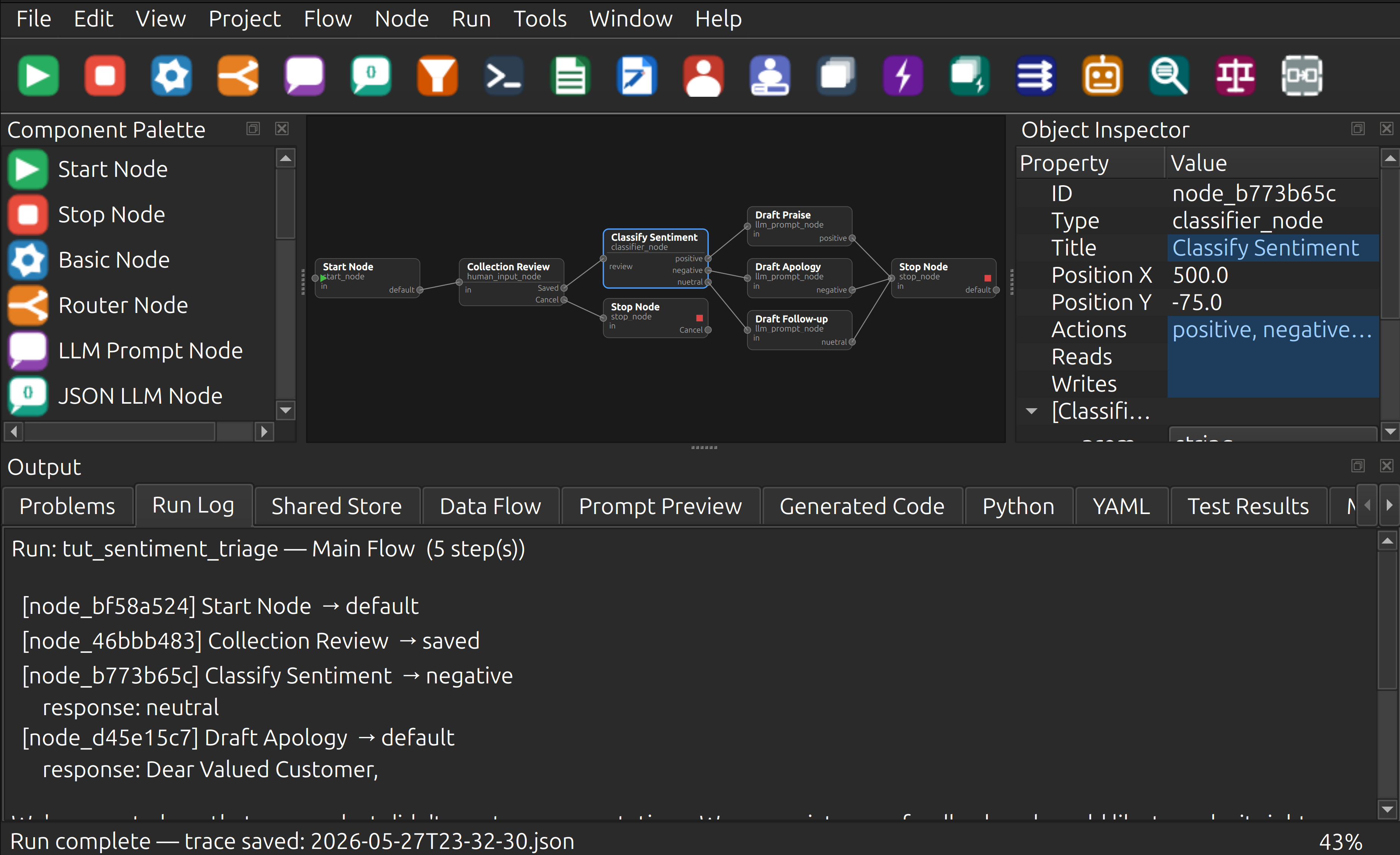
An independent PySide6 desktop application for visually designing, testing, and exporting PocketFlow-style LLM workflows and agentic applications. Design flows on a live canvas, run them against any supported LLM provider (local model hosts like Ollama, cloud APIs like OpenAI/Claude/Gemini, or mock providers for testing), inspect shared-store state step-by-step, and export a runnable Python package — all from one IDE-like GUI.
Install and launch
pip install pocketflow-creator
pocketflow-creator
Requires Python 3.10 or newer. No LLM account is required to explore the designer or use the built-in mock provider. See Quick Start for source installation and platform-specific setup.
Status — v0.3.2 (comprehensive standalone support)
Milestones M0–M17 complete. 181 CI-safe/headless tests passing. NEW: All 90+ node types have standalone Python script generation. Export graphs as self-contained scripts with embedded providers and zero external dependencies.
Relationship to PocketFlow
PocketFlow Creator is an independent visual workflow designer inspired by the excellent PocketFlow project.
PocketFlow is a small, elegant, MIT-licensed framework for building LLM workflows using nodes, flows, shared state, and action-based transitions. PocketFlow Creator was created to explore a complementary idea: making PocketFlow-style workflows visible, editable, testable, and exportable through a desktop GUI.
This project is not an official PocketFlow project and is not affiliated with, endorsed by, or maintained by the PocketFlow maintainers. It is an independent project built with appreciation for the ideas and simplicity of the upstream PocketFlow framework.
Thank you to the PocketFlow project and its maintainers for releasing their work under the MIT license and for helping make simple, understandable LLM workflow development more accessible.
Prefer a code-first workflow?
PocketFlow Creator is intended for users who want a GUI-assisted workflow design experience.
If you prefer a lightweight, code-first approach without a visual editor, you should start with the upstream PocketFlow project directly:
- PocketFlow: https://github.com/The-Pocket/PocketFlow
PocketFlow is the better choice if you want to work directly in Python, keep the framework minimal, avoid GUI tooling, or build workflows entirely by hand.
Features
Visual Graph Designer
- Drag nodes from the Component Palette onto the canvas
- Wire action ports to create directed edges between nodes
- 90+ built-in node types available in the visual palette with purpose-drawn icons across 28 categories:
- (All with complete standalone Python script generator support)
- Flow Control: Start, Stop, Basic, Router, Subflow
- LLM / AI: LLM Prompt, JSON LLM, Classifier, Agent, RAG, Judge
- AI / Reasoning: Chain of Thought, Majority Vote, Supervisor, Debate Advocate, Debate Judge
- Web / Search: Web Search, Web Scrape, API Call
- Data / Vector: Text Chunk, Embed, Vector Index, Vector Retrieve
- Database / SQL: DB Schema, NL to SQL, SQL Execute
- Voice / Audio: Speech to Text, Text to Speech
- Hardware I/O: USB Serial In/Out, Audio Input/Output, Video Input/Output, Webcam
- Document / Vision: PDF Extract, Image Vision, Data Validate
- Code / Execution: Code Gen, Code Exec, Test Gen
- Data Processing: Map, Reduce, Condition, Loop Counter, Transform, Merge
- Calendar: Calendar Read, Calendar Write
- MCP / Agent Protocol: MCP Tool, A2A Send, A2A Receive
- Observability / Utility: Log, Timer, Cache, Trace
- Data Structures / Memory: Registry, Stack Push/Pop, Queue Enqueue/Dequeue, Local Memory
- Security: Secret (env/dotenv/AWS/Vault)
- Human-in-the-Loop: Human Review, Human Input
- Batch / Async: Batch, Async, Async Batch, Async Parallel Batch, Shell Command
- I/O: File Reader, File Writer, Python Tool
- System / Shell: TTY Serial, Spreadsheet (CSV/TSV/Excel)
- Networking: Socket (TCP/UDP), WebSocket, Webhook Trigger
- AI / LLM Utilities: Context Compact (5 strategies), Conversation History
- Text / Data Processing: Regex, Template Render, JSON Parse, List Operations, String Operations
- Resilience: Retry (exponential backoff), Rate Limiter
- Messaging: Email Send, Email Read, Notification (Slack/Discord/Teams/Telegram)
- Multi-action output ports — one port per action, node height grows dynamically
- Input port label shows
input_keyproperty; action labels rendered inside the node body
Auto Arrange (Ctrl+Shift+L)
- Three layout algorithms: Layered BFS, Grid, Row×Column, Force-directed spring-embedder
- Three connector styles: Straight, Curved (quadratic Bezier), Orthogonal (right-angle)
- Settings dialog before each run; settings persisted per-project in
.pfcproj.yaml - Operation is fully undoable
Undo / Redo (Ctrl+Z / Ctrl+Y)
Snapshot-based — covers add node, delete node/edge, add edge, edit property, change edge action, move node, and Auto Arrange.
Object Inspector
Live property grid for selected nodes and edges. Edits sync back to the model immediately and trigger re-validation.
Validation
GraphValidator checks: unique IDs, start node present, edge endpoints valid, actions declared.
Error badges appear on canvas nodes. Problems tab lists all issues with error codes.
Editors
- Python editor with syntax highlighting and
# NODE_START/# NODE_ENDmarkers for bidirectional canvas ↔ code sync - Markdown editor with live preview
- YAML editor with schema-driven validation feedback
- Shared Store Designer — key/type/default table, serializes to project YAML
Run and Debug
- Run Active Flow — executes the active graph using any configured LLM provider (local hosts like Ollama, cloud APIs like OpenAI/Claude/Gemini, or mock providers for testing); populates Run Log and Shared Store tabs; saves a timestamped JSON trace
- Debug Active Flow — step-through debugger with breakpoints (F9), pause/resume/stop
- Run Tests — runs
pytestas a subprocess and populates Test Results tab - Prompt Preview tab shows the resolved prompt for any selected LLM node
Code Generation and Export
- Ctrl+G: Generate Code — creates standalone Python scripts in
generated_scripts/folder (or temp directory if no project). Ready to run immediately. - Standalone Python script generation — export graphs as self-contained
.pyfiles:- Embedded provider implementations (Ollama, OpenAI, Anthropic, Gemini, DeepSeek)
- Complete node dispatch logic with type-based execution
- Zero external dependencies beyond Python stdlib (optional libs detected at runtime)
- Environment variable support for API keys and secrets
- One
.pyfile runs the entire flow independently - Text I/O for interactive nodes — stdin/stdout/stderr for Human Input/Review nodes
- Works in CI/CD pipelines, shell scripts, and piped environments
- Graceful EOF handling for non-interactive execution
- File > Export PocketFlow Project — writes a full runnable Python package:
generated/,custom/(never overwritten on re-export),tests/,standalone/,main.py - File > Export Standalone Archive — creates a complete, ready-to-share package:
- All generated scripts in
scripts/directory requirements.txtwith pip dependencies and pinned versionssetup.sh/setup.bat— auto-create.venvand install dependenciesrun.sh/run.bat— execute scripts with venv pre-activatedREADME.md— usage guide, I/O redirection, environment variables, troubleshooting- Everything packed in a
.zipfile, no unpacking needed on most systems
- All generated scripts in
- Project > Export Graph Image — PNG or SVG render of the canvas scene
- Project > Export Project Report — Markdown summary of nodes, edges, validation status
- Project > Data Flow Report — per-node reads/writes and shared-store key lifecycle
Custom Node Types
- Node > New Custom Node Type — wizard with three tabs (Definition, Actions, Properties) writes a YAML definition + Python skeleton
- Node Type Library Manager — list, import, and version custom node packages
- Inspector shows inherited properties from the type definition
Help System
- Help > PocketFlow Creator Help (F1) — integrated
HelpBrowserwith 21 Markdown pages, back/forward/home navigation - Context-sensitive
?buttons in every dialog - Help pages: getting started, first flow, about PocketFlow, about Creator, tutorials (4 parts), 11 context pages (canvas, inspector, palette, explorer, options, …)
Internationalisation
Language selector in Tools > Options; English, Spanish, French, German, Chinese, Japanese
.qm files included.
Prerequisites
| Requirement | Version |
|---|---|
| Python | ≥ 3.10 |
| PySide6 | ≥ 6.6 |
| PyYAML | ≥ 6.0 |
| jsonschema | ≥ 4.20 |
| markdown | ≥ 3.5 |
| jinja2 | ≥ 3.1 |
Optional for running LLM flows: Ollama running locally on port 11434.
Quick Start
Linux / macOS
cd PocketFlowCreator
./scripts/setup-prj.sh     # create venv, install deps
./scripts/run_app.sh       # launch the GUI
Windows (PowerShell)
cd PocketFlowCreator
.\scripts\setup-prj.ps1
.\scripts\run_app.ps1
Or directly with pip
python -m venv .venv
source .venv/bin/activate   # Windows: .venv\Scripts\activate
pip install -e ".[dev]"
pocketflow-creator          # or: python -m pocketflow_creator
Provider Setup
PocketFlow Creator supports multiple LLM providers. Configure them via Tools → Provider Manager.
Quick Setup
To use Ollama locally (recommended for getting started):
- Install Ollama from ollama.ai
- Start Ollama:
ollama serve - Pull a model:
ollama pull qwen2.5-coder:14b - In PocketFlow Creator: Tools → Provider Manager → + Add
- Name: "Local Ollama"
- Type: "Ollama (local)"
- Base URL:
http://localhost:11434(auto-filled) - Model:
qwen2.5-coder:14b(auto-filled)
- Test: Click "Test Connection" → should show ✓ Connection successful
To use cloud providers (OpenAI, Claude, etc.):
- Generate an API key from your provider
- In PocketFlow Creator: Tools → Provider Manager → + Add
- Name: e.g., "OpenAI Production"
- Type: Select your provider
- Enter your API Key
- Test: Click "Test Connection"
For detailed setup instructions for all providers, custom ports, environment variables, and troubleshooting, see docs/13_provider_setup.md.
Running Tests
python -m pytest            # CI-safe/headless test suite (181 tests)
./scripts/test.sh           # same, via script
The CI-safe test suite runs headless (no display required) using QT_QPA_PLATFORM=offscreen. GitHub Actions runs this suite on Ubuntu, macOS, and Windows across Python 3.10–3.13.
GUI / Manual Tests
Some GUI behavior is validated manually or with tests that are not suitable for GitHub Actions because they require a live display server, user interaction, or platform-specific desktop behavior. The CI suite uses QT_QPA_PLATFORM=offscreen for the tests that can run reliably in headless mode.
To test locally on macOS or Windows with the app GUI:
python -m pytest -v         # run full test suite
source .venv/bin/activate   # activate venv (Windows: .venv\Scripts\activate)
pocketflow-creator          # launch app
Project Layout
PocketFlowCreator/
├─ src/pocketflow_creator/
│   ├─ app/
│   │   ├─ main.py              MainWindow + AutoArrangeDialog + all inline dialogs
│   │   ├─ canvas.py            NodeItem, EdgeItem, GraphScene, GraphView, PaletteWidget
│   │   ├─ commands.py          GraphSnapshotCommand (undo/redo)
│   │   ├─ editors.py           PythonHighlighter, YamlHighlighter
│   │   ├─ node_type_wizard.py  NodeTypeWizard (3-tab dialog)
│   │   ├─ help_browser.py      HelpBrowser, open_help()
│   │   └─ code_manager.py      canvas ↔ .py file sync
│   ├─ model/
│   │   ├─ graph_model.py       GraphModel, NodeModel, EdgeModel
│   │   ├─ node_type.py         NodeTypeDefinition
│   │   └─ project.py           ProjectModel (includes auto_arrange field)
│   ├─ generation/
│   │   ├─ python_generator.py  Jinja2 template-based code generator
│   │   ├─ exporter.py          Full package export with custom/ guard
│   │   ├─ report.py            Markdown project report
│   │   └─ dataflow_report.py   Shared-store data-flow analysis
│   ├─ runtime/
│   │   ├─ providers.py         LLMProvider, MockProvider, OllamaProvider
│   │   └─ runner.py            FlowRunner, RunTrace, StepController
│   ├─ validation/
│   │   └─ graph_validator.py   GraphValidator (PFCE error codes)
│   ├─ graph_io.py              GraphLoader, GraphSaver
│   ├─ project_io.py            ProjectLoader, ProjectSaver
│   ├─ templates/               Jinja2 .j2 templates for code generation
│   ├─ help/                    21 Markdown help pages + context/ + tutorials/
│   └─ translations/            .ts and .qm files (en, es, fr, de, zh, ja)
├─ tests/                       181 CI-safe/headless tests (all passing)
├─ examples/document_summarizer/ Example PocketFlow project
├─ docs/                        13 design/spec documents
├─ scripts/                     setup, run, test, lint, format, package scripts
├─ pyproject.toml
└─ CHANGELOG.md
Keyboard Shortcuts
| Shortcut | Action |
|---|---|
| Ctrl+N | New Project |
| Ctrl+O | Open Project |
| Ctrl+S | Save |
| Ctrl+Shift+S | Save All |
| Ctrl+Z | Undo |
| Ctrl+Y | Redo |
| Ctrl+G | Generate Code |
| Ctrl+Shift+V | Validate Project |
| Ctrl+Shift+L | Auto Arrange… |
| Ctrl+0 | Zoom to Fit |
| Ctrl++ | Zoom In |
| Ctrl+- | Zoom Out |
| Ctrl+Shift+Z | Zoom to Selected Node |
| Ctrl+Scroll | Canvas zoom |
| Middle-drag / Space-drag | Canvas pan |
| Delete | Delete selected node/edge |
| F9 | Toggle Breakpoint |
| F1 | Help |
Development
./scripts/lint.sh            # ruff + mypy
./scripts/format.sh          # ruff format
./scripts/package.sh         # PyInstaller standalone binary
Lint policy: 0 ruff errors, 0 mypy errors. Pyright "possibly unbound" warnings in
try/except import blocks are expected false positives — not real errors.
License
BSD-2-Clause — use, modify, and distribute the software with attribution. See LICENSE.
1 maintainer

Metadata
1 maintainer
Release files for pocketflow-creator 0.3.2
For a detailed explanation of source distributions (sdists) and built distributions (wheels), please see the package formats documentation.
Source distribution (sdist)
| File | Size | Uploaded | |
|---|---|---|---|
| pocketflow_creator-0.3.2.tar.gz | 3.3 MB | Details |
Built distribution (wheel)
| File | Interpreter | ABI | Platform | Reset |
|---|---|---|---|---|
| pocketflow_creator-0.3.2-py3-none-any.whl | Python 3 | none | any | Details |
Total release size: 6.6 MB
Release files / pocketflow_creator-0.3.2.tar.gz
| Download URL | pocketflow_creator-0.3.2.tar.gz |
|---|---|
| Size | 3.3 MB |
| Tags | Source |
|
SHA-256 checksum How to use checksums |
a3d54b8d2ae3a5d1cbaf190896cd4984e33e9e64026a0f4257da30194c3a308b
|
|
BLAKE2b-256 checksum How to use checksums |
78aecf73841bbac437c292d284f0dbe0e57cd152ad9c76a0f5c94afa4b488487
|
| Upload date | |
|
Uploaded using Trusted Publishing? What is trusted publishing? |
Yes |
| Uploaded via |
twine/7.0.0 CPython/3.13.14
|
Provenance
Provenance describes where a file came from. On PyPI, provenance is shared via attestations, which provide a verifiable record of the build or publishing details. View details, limitations and caveats.


PyPI Publish Attestation
PyPI verified that this artifact, at this checksum, originated from the publisher listed below.
Signed by GitHub Actions, verified by PyPI on Sep 24, 2026.
Transparency logRelease files / pocketflow_creator-0.3.2-py3-none-any.whl
| Download URL | pocketflow_creator-0.3.2-py3-none-any.whl |
|---|---|
| Size | 3.4 MB |
| Tags | Python 3 |
|
SHA-256 checksum How to use checksums |
b60140bc856416c31f6716edcadc0a39e40c30aeb3bb6228cf929846430a29e9
|
|
BLAKE2b-256 checksum How to use checksums |
fdc6e08b0cf489f15b4cbaa850edbfea724bc3b3de2f20d42541f7c694a057a1
|
| Upload date | |
|
Uploaded using Trusted Publishing? What is trusted publishing? |
Yes |
| Uploaded via |
twine/7.0.0 CPython/3.13.14
|
Provenance
Provenance describes where a file came from. On PyPI, provenance is shared via attestations, which provide a verifiable record of the build or publishing details. View details, limitations and caveats.
PyPI Publish Attestation
PyPI verified that this artifact, at this checksum, originated from the publisher listed below.
Signed by GitHub Actions, verified by PyPI on Sep 24, 2026.
Transparency log













