
 poetry-plugin-dotenv




Overview
poetry-plugin-dotenv loads environment variables from a dotenv file into the environment before any poetry command runs.
It also adds new poetry commands:
poetry activate- loads environment variables from a dotenv file and activates the virtual environment
Features
- Fully type-safe
- No external dependencies required
- Brings back beloved
activatecommand with extended functionality - Supports templates and variable interpolation using POSIX variable expansions
- Supports
--directory, which allows setting the working directory for thepoetrycommand - Supports multiple configuration sources
- Provides configuration auto-completion and validation in IDEs like Visual Studio Code or PyCharm (via JSON Schema Store)
- Supports both
poetry v1.5+andpoetry v2+
Installation
poetry self add poetry-plugin-dotenv@latest
Usage and Configuration
By default, the plugin will load the .env file from the current working directory or any higher-level directories.
ignore
Type: str
Default: false
Allowed values (as True): y / yes / t / on / 1 / true
Allowed values (as False): n / no / f / off / 0 / false
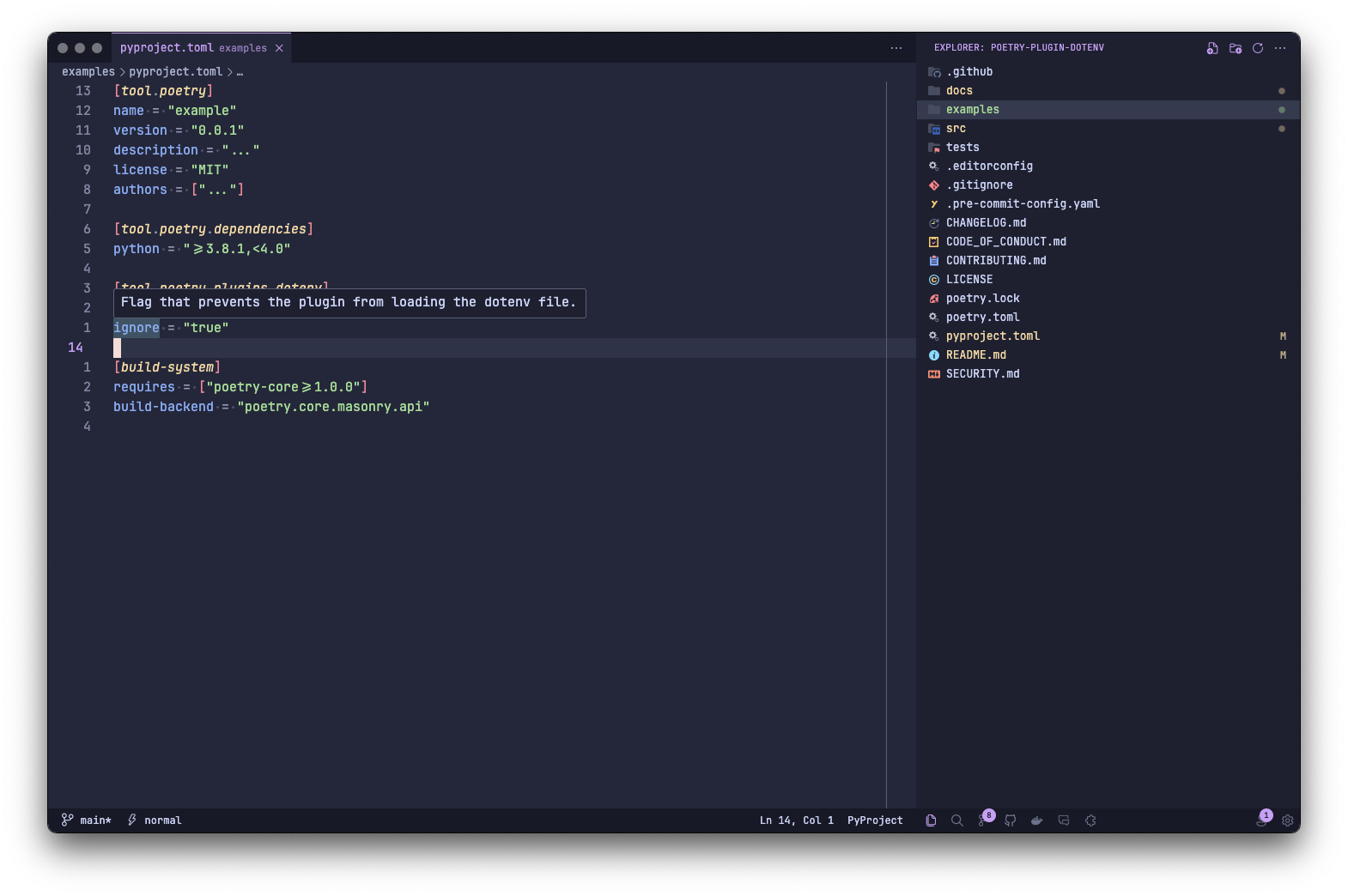
Prevents poetry from loading the dotenv file.
location
Type: str
Default: .env
If your dotenv file is located elsewhere or has a different name, you can set this parameter.
Configuration Via TOML File
The plugin can read project-specific default values for its options from a pyproject.toml file.
By default, poetry-plugin-dotenv looks for a pyproject.toml file that includes either a [tool.dotenv] or [tool.poetry.plugins.dotenv] section.
Example pyproject.toml:
[tool.dotenv]
ignore = "false"
location = ".env.dev"

[tool.poetry.plugins.dotenv]
ignore = "false"
location = ".env.dev"
The configuration schema is part of the JSON Schema Store, so IDEs like Visual Studio Code and PyCharm offer auto-completion and validation for it.
Configuration Via Environment Variables
poetry-plugin-dotenv supports the following configuration options via environment variables:
POETRY_PLUGIN_DOTENV_LOCATIONPOETRY_PLUGIN_DOTENV_IGNORE
Lookup Hierarchy
A pyproject.toml file can override default values. Environment variables override both.
Examples
Using the activate command:
# .env
DB__HOST=localhost
DB__DBNAME=local_lakehouse
DB__USER=volodymyr
DB__PASSWORD=super_secret_password
DB__ENGINE=postgresql://${DB__USER}:${DB__PASSWORD}@${DB__HOST}/${DB__DBNAME}
poetry activate -v
# Using virtualenv: ...
# Loading environment variables: .../.env

# Reloads shell within the environment with loaded environment variables
Using the run command:
# .env
DB__HOST=localhost
DB__DBNAME=local_lakehouse
DB__USER=volodymyr
DB__PASSWORD=super_secret_password
DB__ENGINE=postgresql://${DB__USER}:${DB__PASSWORD}@${DB__HOST}/${DB__DBNAME}
# .env.dev
DB__HOST=dev.host
DB__DBNAME=dev_lakehouse
DB__USER=svc_team
DB__PASSWORD=super_secret_password
DB__ENGINE=postgresql://${DB__USER}:${DB__PASSWORD}@${DB__HOST}/${DB__DBNAME}
# pyproject.toml
[tool.dotenv]
location = ".env.dev"
# main.py
from __future__ import annotations

import os


if __name__ == "__main__":
    try:
        print(f"Host: {os.environ['DB__HOST']!r}")
        print(f"Name: {os.environ['DB__DBNAME']!r}")
        print(f"Username: {os.environ['DB__USER']!r}")
        print(f"Password: {os.environ['DB__PASSWORD']!r}")
        print(f"Engine: {os.environ['DB__ENGINE']!r}")

    except KeyError:
        print("Environment variables not set!")
poetry run -vvv python main.py
# Loading environment variables: .env
# Host: 'localhost'
# Name: 'local_lakehouse'
# Username: 'volodymyr'
# Password: 'super_secret_password'
# Engine: 'postgresql://volodymyr:super_secret_password@localhost/local_lakehouse'

# Set location section in pyproject.toml
poetry run -vvv python main.py
# Loading environment variables: .env.dev
# Host: 'dev.host'
# Name: 'dev_lakehouse'
# Username: 'svc_team'
# Password: 'super_secret_password'
# Engine: 'postgresql://svc_team:super_secret_password@dev.host/dev_lakehouse'

# Set ignore = "true" in pyproject.toml
poetry run -vvv python main.py
# Not loading environment variables. Ignored by configuration
# Environment variables not set!

export POETRY_PLUGIN_DOTENV_LOCATION=.env.dev && poetry run -vvv python main.py
# Loading environment variables: .env.dev
# Host: 'dev.host'
# Name: 'dev_lakehouse'
# Username: 'svc_team'
# Password: 'super_secret_password'
# Engine: 'postgresql://svc_team:super_secret_password@dev.host/dev_lakehouse'

export POETRY_PLUGIN_DOTENV_IGNORE=true && poetry run -vvv python main.py
# Not loading environment variables. Ignored by configuration
# Environment variables not set!
1 maintainer

Metadata
1 maintainer
Release files for poetry-plugin-dotenv 4.0.0
For a detailed explanation of source distributions (sdists) and built distributions (wheels), please see the package formats documentation.
Source distribution (sdist)
| File | Size | Uploaded | Provenance | Actions |
|---|---|---|---|---|
| poetry_plugin_dotenv-4.0.0.tar.gz | 14.2 kB | Without provenance | Details for poetry_plugin_dotenv-4.0.0.tar.gz |
Built distribution (wheel)
| File | Interpreter | ABI | Platform | Actions Reset |
|---|---|---|---|---|
| poetry_plugin_dotenv-4.0.0-py3-none-any.whl | Python 3 | none | any | Details for poetry_plugin_dotenv-4.0.0-py3-none-any.whl |
Total release size: 30.6 kB
Release files / poetry_plugin_dotenv-4.0.0.tar.gz
| Download URL | poetry_plugin_dotenv-4.0.0.tar.gz |
|---|---|
| Size | 14.2 kB |
| Tags | Source |
|
SHA-256 checksum How to use checksums |
b45a1b34b4be1dd9ad961f3b84ea3a22cdea50b54cf0a772ca6d3fa3c113eeb9
|
|
BLAKE2b-256 checksum How to use checksums |
9b78bf8aeb99865822074cea4c77736f233da1d9decee9d6545d9150f2216e3c
|
| Upload date | |
|
Uploaded using Trusted Publishing? What is trusted publishing? |
Yes |
| Uploaded via |
uv/0.13.9 {"installer":{"name":"uv","version":"0.13.9","subcommand":["publish"]},"python":null,"implementation":{"name":null,"version":null},"distro":{"name":"Ubuntu","version":"24.04","id":"noble","libc":null},"system":{"name":null,"release":null},"cpu":null,"openssl_version":null,"setuptools_version":null,"rustc_version":null,"ci":true}
|
Release files / poetry_plugin_dotenv-4.0.0-py3-none-any.whl
| Download URL | poetry_plugin_dotenv-4.0.0-py3-none-any.whl |
|---|---|
| Size | 16.3 kB |
| Tags | Python 3 |
|
SHA-256 checksum How to use checksums |
317d8201c10e8061f5866dd4a279a8b85ea79f1ef3699b2ca1ee41a2d753aab5
|
|
BLAKE2b-256 checksum How to use checksums |
fc4d9a31eb10d827b97a51bc7bf70722483e4646f9a4b0c0968b900da4925360
|
| Upload date | |
|
Uploaded using Trusted Publishing? What is trusted publishing? |
Yes |
| Uploaded via |
uv/0.13.9 {"installer":{"name":"uv","version":"0.13.9","subcommand":["publish"]},"python":null,"implementation":{"name":null,"version":null},"distro":{"name":"Ubuntu","version":"24.04","id":"noble","libc":null},"system":{"name":null,"release":null},"cpu":null,"openssl_version":null,"setuptools_version":null,"rustc_version":null,"ci":true}
|
Security for poetry-plugin-dotenv 4.0.0
Provenance
Provenance describes where a file came from. On PyPI, provenance is shared via attestations, which provide a verifiable record of the build or publishing details. View details, limitations and caveats.
No provenance found
None of the files in this release were uploaded with provenance metadata.
A note on package security
PyPI is a repository for distributing packages, not a service for auditing them. While third-party security researchers and our staff do their best to detect and remove malicious packages, PyPI cannot guarantee the quality, security or suitability of any given package.
To learn more about protecting yourself from malicious actors, visit our package security documentation.














