
📊 Book chapter progress
Overall: 31% complete — 14 of 37 chapters have content
Foundations
Intro: ███████████████ 100%
Getting Started: █████████████░░ 88%
Inspecting Data: ███████████████ 100%
Validation Workflow: ███████████████ 100%
Analysis Loop: ██████████░░░░░ 65%
Building Validation Plans
Column Validations: ███████████████ 100%
Aggregate Validations: ███████████░░░░ 71%
Row Validations: ███████████░░░░ 72%
Table Validations: ███████████████ 100%
Missing Data: ███████████████ 100%
Segmented Validation: ███████████░░░░ 75%
Advanced Validation: ████████████░░░ 78%
Responding to Results
Thresholds & Actions: ███████████████ 100%
Reports & Extracts: █░░░░░░░░░░░░░░ 9%
Quality Scoring: ░░░░░░░░░░░░░░░ 0%
Notifications & Observability: ░░░░░░░░░░░░░░░ 0%
AI-Assisted Validation
Semantic Validation: ░░░░░░░░░░░░░░░ 1%
AI Authoring: ░░░░░░░░░░░░░░░ 1%
Data Sources, Interfaces & Automation
Data Sources: ░░░░░░░░░░░░░░░ 1%
YAML Workflows: ░░░░░░░░░░░░░░░ 1%
Command Line: ░░░░░░░░░░░░░░░ 1%
MCP Server: ░░░░░░░░░░░░░░░ 1%
Data Contracts & Pipelines
Data Contracts: ░░░░░░░░░░░░░░░ 1%
Pipelines: ░░░░░░░░░░░░░░░ 1%
Test Data Generation
Test Data Generation: ░░░░░░░░░░░░░░░ 1%
Clinical & Regulated Data
Clinical & CDISC: ░░░░░░░░░░░░░░░ 0%
CDISC Conformance: ░░░░░░░░░░░░░░░ 0%
Industry Playbooks
Financial: ░░░░░░░░░░░░░░░ 0%
Ecommerce: ░░░░░░░░░░░░░░░ 0%
Data Engineering: ░░░░░░░░░░░░░░░ 0%
Healthcare: ░░░░░░░░░░░░░░░ 0%
Real-World Evidence: ░░░░░░░░░░░░░░░ 0%
ML Monitoring: ░░░░░░░░░░░░░░░ 0%
IoT Sensors: ░░░░░░░░░░░░░░░ 0%
Insurance: ░░░░░░░░░░░░░░░ 0%
Public Sector: ░░░░░░░░░░░░░░░ 0%
Marketing: ░░░░░░░░░░░░░░░ 0%

Data validation toolkit for assessing and monitoring data quality.











Pointblank is a data validation library for Python. You describe what your data should look like in a validation plan, Pointblank checks the data against it, and the results come back as a report that's easy to read and to share. Data quality then becomes something the whole team can discuss, not just a list of errors in a log.
The same plan works on Polars and Pandas DataFrames, on database tables (DuckDB, PostgreSQL, Snowflake, BigQuery, and others), and on PySpark. After a validation, you can look at the failing rows, split the table into the rows that pass and the rows that fail, or act when too many rows fail.
Getting Started
Every validation follows the same pattern: (1) start with Validate, (2) add validation steps, and (3) finish with interrogate().
import pointblank as pb

validation = (
   pb.Validate(data=pb.load_dataset(dataset="small_table"))
   .col_vals_gt(columns="d", value=100)             # Validate values > 100
   .col_vals_le(columns="c", value=5)               # Validate values <= 5
   .col_exists(columns=["date", "date_time"])       # Check columns exist
   .interrogate()                                   # Execute and collect results
)

# Get the validation report from the REPL with:
validation.get_tabular_report().show()

# From a notebook simply use:
validation
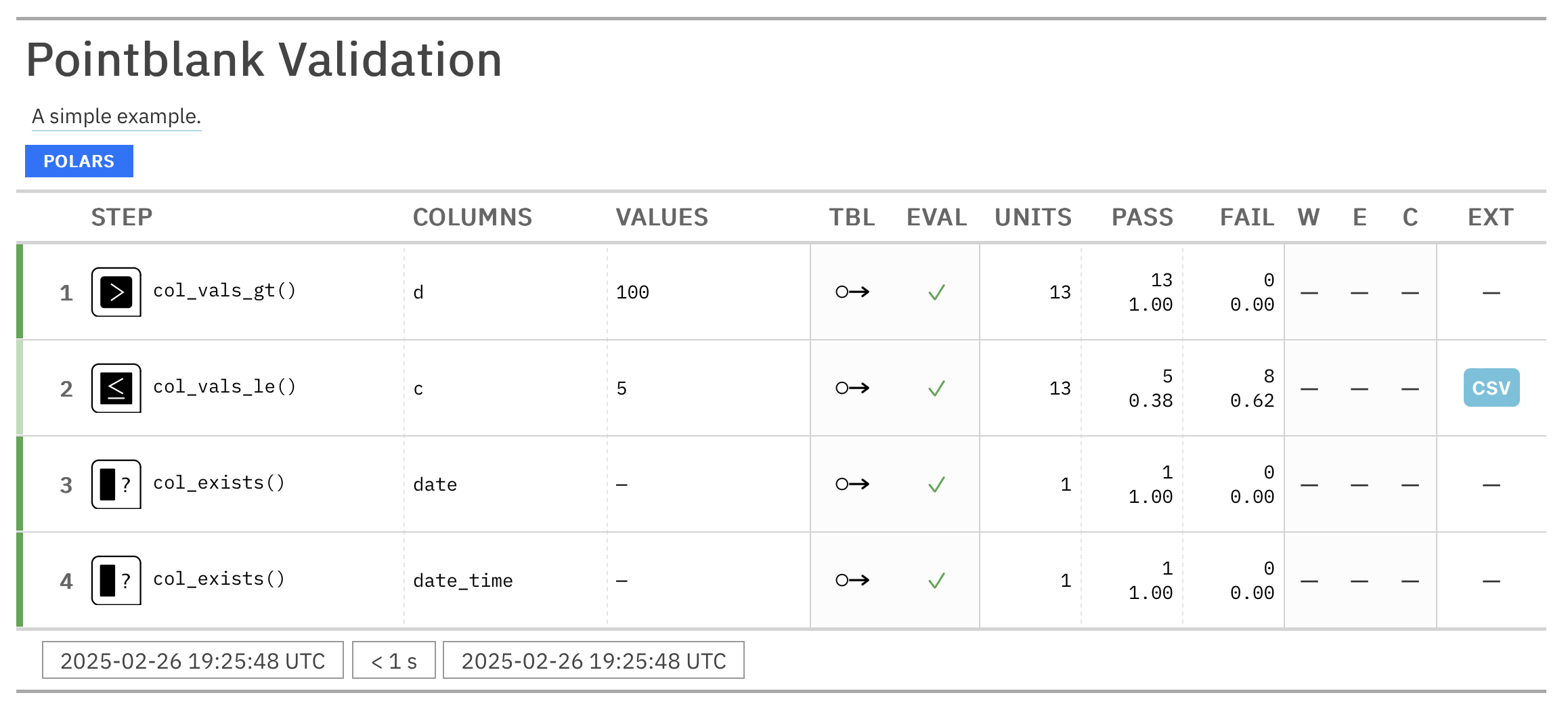
Once you have an interrogated validation object, you can:
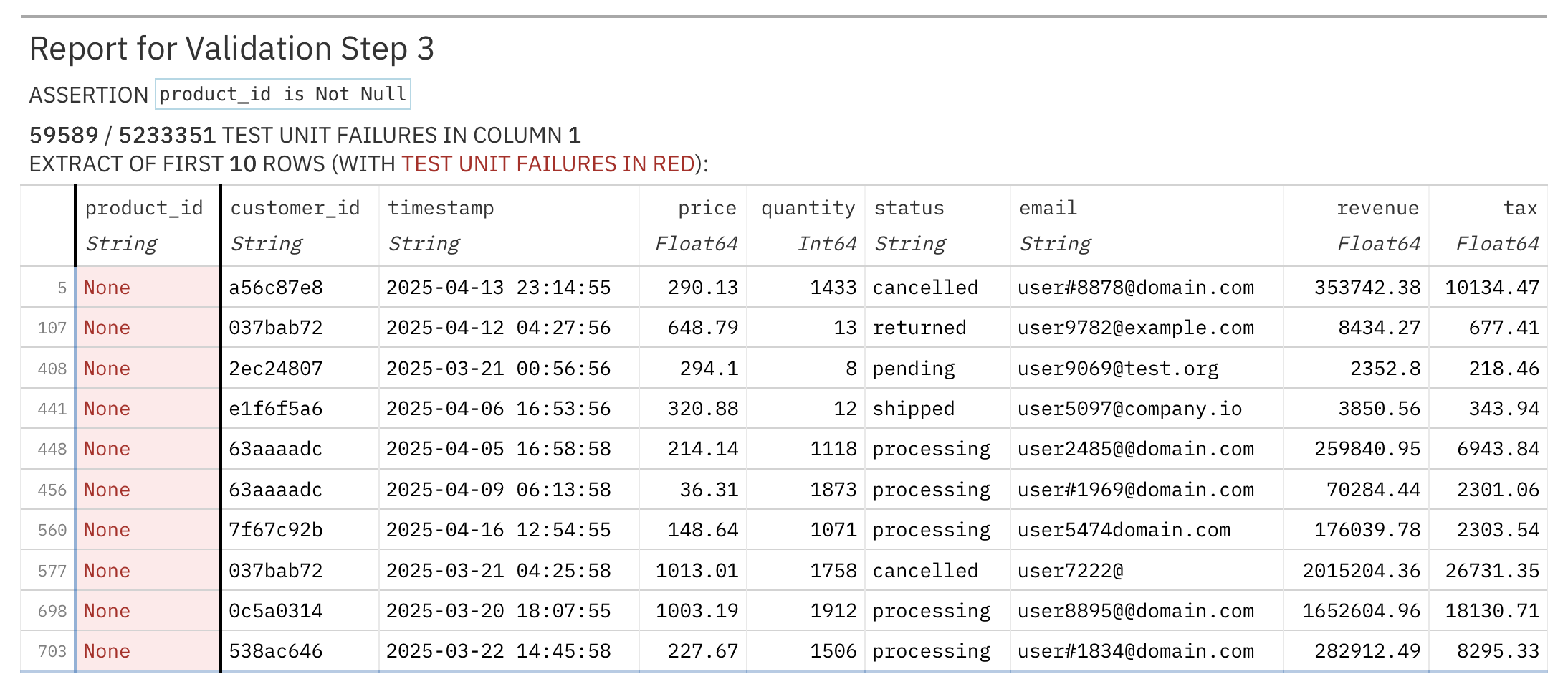
- get a report for a single step that shows the failing rows
- extract the failing rows for debugging
- split the table into the rows that pass and the rows that fail
Installation
You can install Pointblank using pip:
pip install pointblank
You can also install Pointblank from Conda-Forge by using:
conda install conda-forge::pointblank
If you don't have Polars or Pandas installed, you'll need to install one of them to use Pointblank.
pip install "pointblank[pl]" # Install Pointblank with Polars
pip install "pointblank[pd]" # Install Pointblank with Pandas
To validate tables in a database, install Pointblank with the Ibis backend for it (or with PySpark, for Spark DataFrames):
pip install "pointblank[duckdb]"     # DuckDB
pip install "pointblank[postgres]"   # PostgreSQL
pip install "pointblank[mysql]"      # MySQL
pip install "pointblank[sqlite]"     # SQLite
pip install "pointblank[mssql]"      # SQL Server
pip install "pointblank[snowflake]"  # Snowflake
pip install "pointblank[bigquery]"   # BigQuery
pip install "pointblank[databricks]" # Databricks
pip install "pointblank[pyspark]"    # PySpark
Other extras add optional features, such as generate (for drafting plans with an LLM), mcp (the MCP server), and otel (OpenTelemetry). See the installation guide for more.
Why Pointblank?
- Works with your existing stack: one API for Polars, Pandas, PySpark, DuckDB, PostgreSQL, MySQL, SQLite, SQL Server, Snowflake, BigQuery, Databricks, and files like CSV and Parquet
- Reports to share: validation reports that show what was checked and what failed, for colleagues who don't read code, in 40 languages
- Thresholds and actions: set 'warning', 'error', and 'critical' levels for each step, and run actions (like a Slack message) when they're exceeded
- Results you can use: counts, failing rows, the table split by the results, or a full report
- Runs anywhere: in notebooks, scripts, CI pipelines, scheduled jobs, or from the command line
A Validation for Production
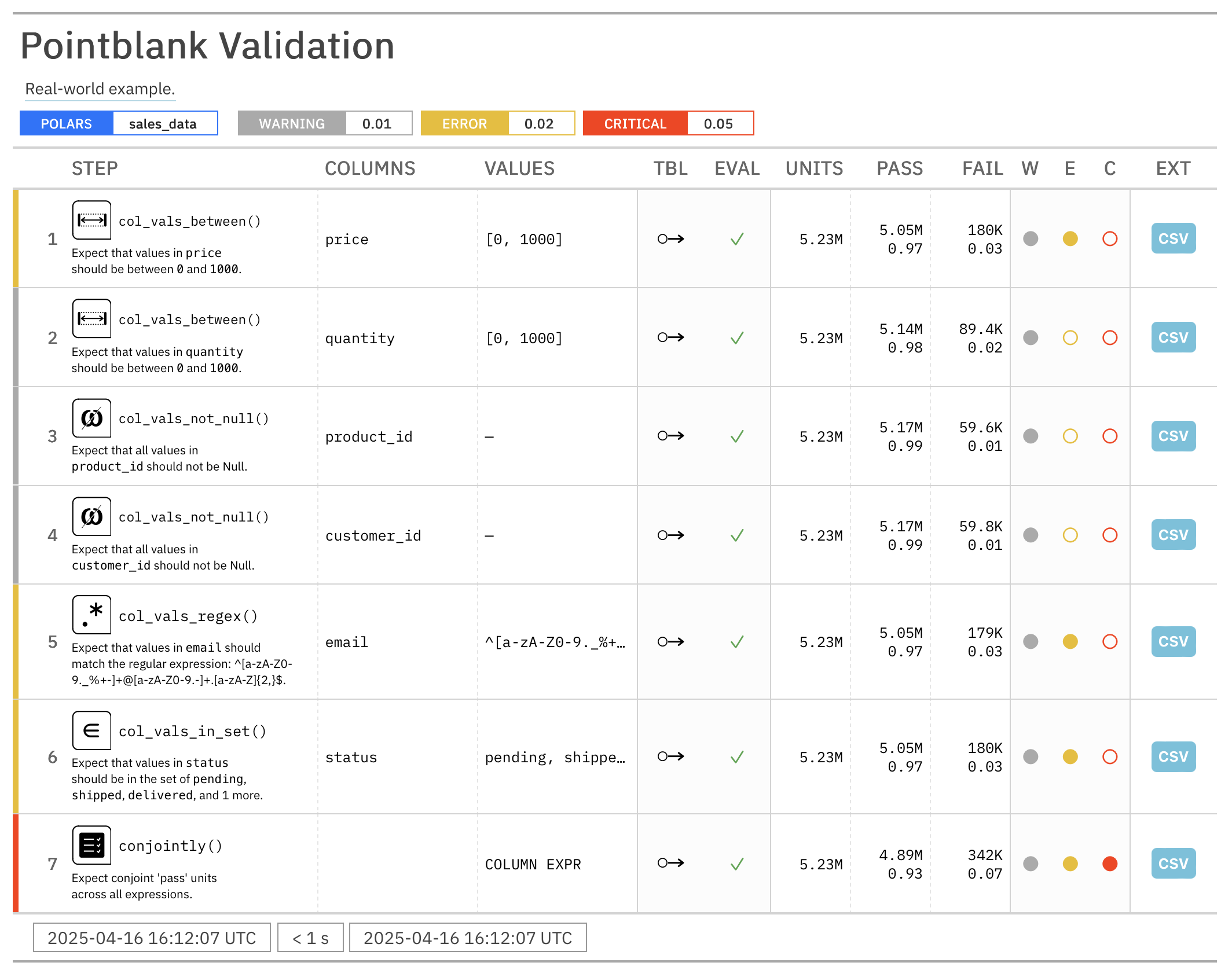
A validation in a production pipeline usually needs more: a name for the table, thresholds, actions when the thresholds are exceeded, and briefs that say what each step checks.
import pointblank as pb
import polars as pl

# Load your data
sales_data = pl.read_csv("sales_data.csv")

validation = (
   pb.Validate(
      data=sales_data,
      tbl_name="sales_data",           # Name of the table for reporting
      label="Real-world example.",     # Label for the validation, appears in reports
      thresholds=(0.01, 0.02, 0.05),   # Thresholds for warnings, errors, and critical issues
      actions=pb.Actions(              # An action for any step that exceeds the 'critical' level
         critical="Major data quality issue found in step {step} ({time})."
      ),
      final_actions=pb.FinalActions(   # An action once the whole validation is done
         pb.send_slack_notification(
            webhook_url="https://hooks.slack.com/services/your/webhook/url"
         )
      ),
      brief=True,                      # A generated brief for each step
   )
   .col_vals_between(            # Check numeric ranges
      columns=["price", "quantity"],
      left=0, right=1000
   )
   .col_vals_not_null(           # Ensure that columns ending with '_id' don't have null values
      columns=pb.ends_with("_id")
   )
   .col_vals_regex(              # Validate patterns with regex
      columns="email",
      pattern="^[a-zA-Z0-9._%+-]+@[a-zA-Z0-9.-]+\\.[a-zA-Z]{2,}$"
   )
   .col_vals_in_set(             # Check categorical values
      columns="status",
      set=["pending", "shipped", "delivered", "returned"]
   )
   .conjointly(                  # Combine multiple conditions
      lambda df: pb.expr_col("revenue") == pb.expr_col("price") * pb.expr_col("quantity"),
      lambda df: pb.expr_col("tax") >= pb.expr_col("revenue") * 0.05
   )
   .interrogate()
)
Major data quality issue found in step 7 (2025-04-16 15:03:04.685612+00:00).
# Get an HTML report you can share with your team
validation.get_tabular_report().show("browser")
# Get a report of failing records from a specific step
validation.get_step_report(i=3).show("browser")  # Get failing records from step 3
Drafting a Plan with an LLM
If you're not sure where to start with a table, DraftValidation can have an LLM draft a plan for you. It sends the model a summary of the table (its columns and their types, statistics like the number of missing values, and a few values from each column) rather than the whole table, and gets back a validation plan:
import pointblank as pb

# Load your data
data = pb.load_dataset("game_revenue")              # A sample dataset

# Use DraftValidation to generate a validation plan
pb.DraftValidation(data=data, model="anthropic:claude-opus-4-6")
The output is a plan that you can run as it is:
import pointblank as pb

# The validation plan
validation = (
    pb.Validate(
        data=data,
        label="Draft Validation",
        thresholds=pb.Thresholds(warning=0.10, error=0.25, critical=0.35)
    )
    .col_vals_in_set(columns="item_type", set=["iap", "ad"])
    .col_vals_gt(columns="item_revenue", value=0)
    .col_vals_between(columns="session_duration", left=3.2, right=41.0)
    .col_count_match(count=11)
    .row_count_match(count=2000)
    .rows_distinct()
    .interrogate()
)

validation
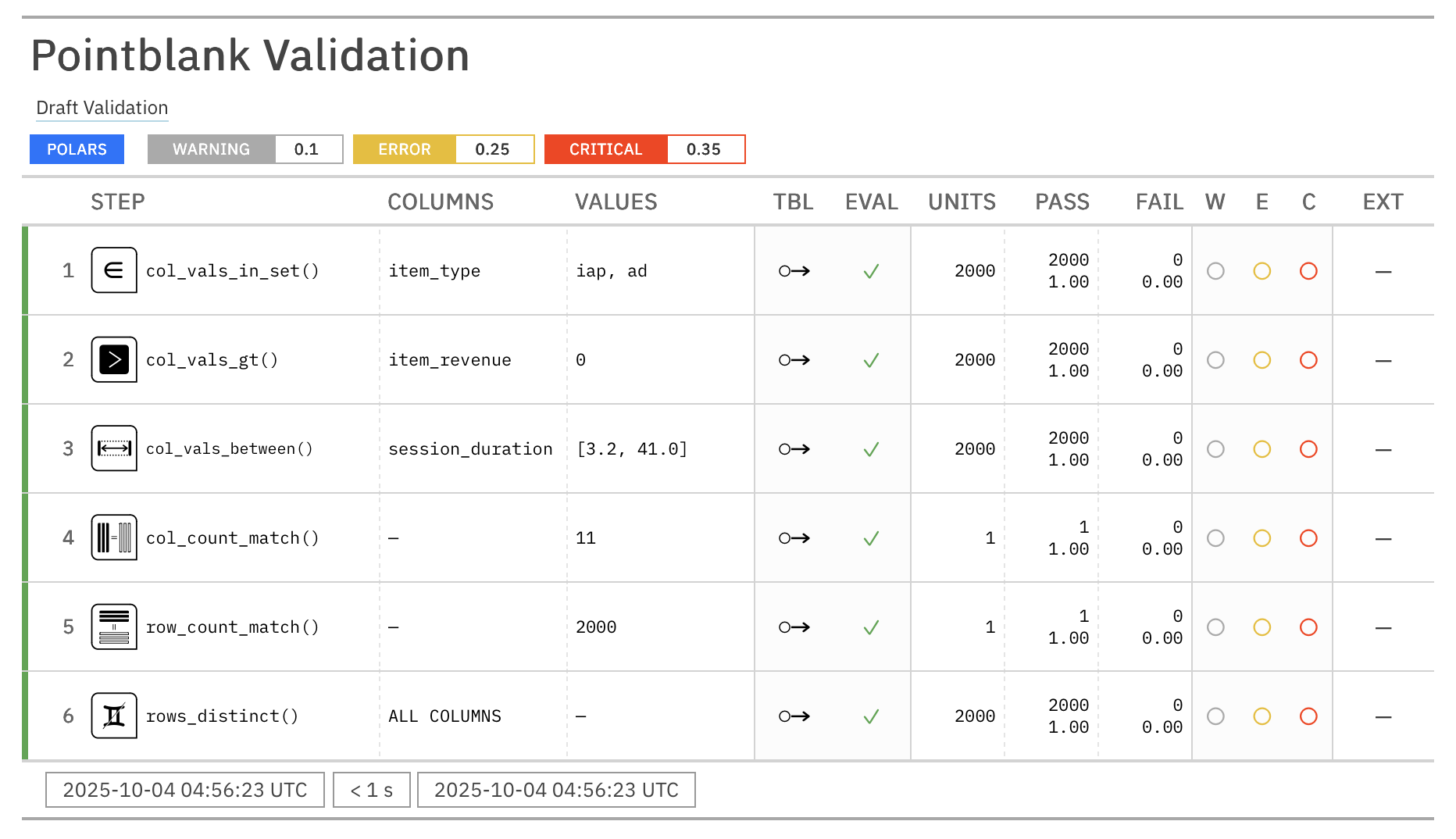
A draft is a starting point. Copy it, then add, remove, and adjust steps for what you know about the data. To change an existing plan with an instruction in plain English, use the AI validation editor.
YAML Configuration
For teams that need portable, version-controlled validation workflows, Pointblank supports YAML configuration files. This makes it easy to share validation logic across different environments and team members, ensuring everyone is on the same page.
validation.yaml
validate:
  data: small_table
  tbl_name: "small_table"
  label: "Getting started validation"

steps:
  - col_vals_gt:
      columns: "d"
      value: 100
  - col_vals_le:
      columns: "c"
      value: 5
  - col_exists:
      columns: ["date", "date_time"]
Execute the YAML validation
import pointblank as pb

# Run validation from YAML configuration
validation = pb.yaml_interrogate("validation.yaml")

# Get the results just like any other validation
validation.get_tabular_report().show()
This approach is suitable for:
- CI/CD pipelines: Store validation rules alongside your code
- Team collaboration: Share validation logic in a readable format
- Environment consistency: Use the same validation across dev, staging, and production
- Documentation: YAML files serve as living documentation of your data quality requirements
Command Line Interface (CLI)
Pointblank includes a powerful CLI utility called pb that lets you run data validation workflows directly from the command line. Perfect for CI/CD pipelines, scheduled data quality checks, or quick validation tasks.

Explore Your Data
# Get a quick preview of your data
pb preview small_table

# Preview data from GitHub URLs
pb preview "https://github.com/user/repo/blob/main/data.csv"

# Check for missing values in Parquet files
pb missing data.parquet

# Generate column summaries from database connections
pb scan "duckdb:///data/sales.ddb::customers"
Run Essential Validations
# Run validation from YAML configuration file
pb run validation.yaml

# Run validation from Python file
pb run validation.py

# Check for duplicate rows
pb validate small_table --check rows-distinct

# Validate data directly from GitHub
pb validate "https://github.com/user/repo/blob/main/sales.csv" --check col-vals-not-null --column customer_id

# Verify no null values in Parquet datasets
pb validate "data/*.parquet" --check col-vals-not-null --column a

# Extract failing data for debugging
pb validate small_table --check col-vals-gt --column a --value 5 --show-extract
Integrate with CI/CD
# Use exit codes for automation in one-liner validations (0 = pass, 1 = fail)
pb validate small_table --check rows-distinct --exit-code

# Run validation workflows with exit codes
pb run validation.yaml --exit-code
pb run validation.py --exit-code
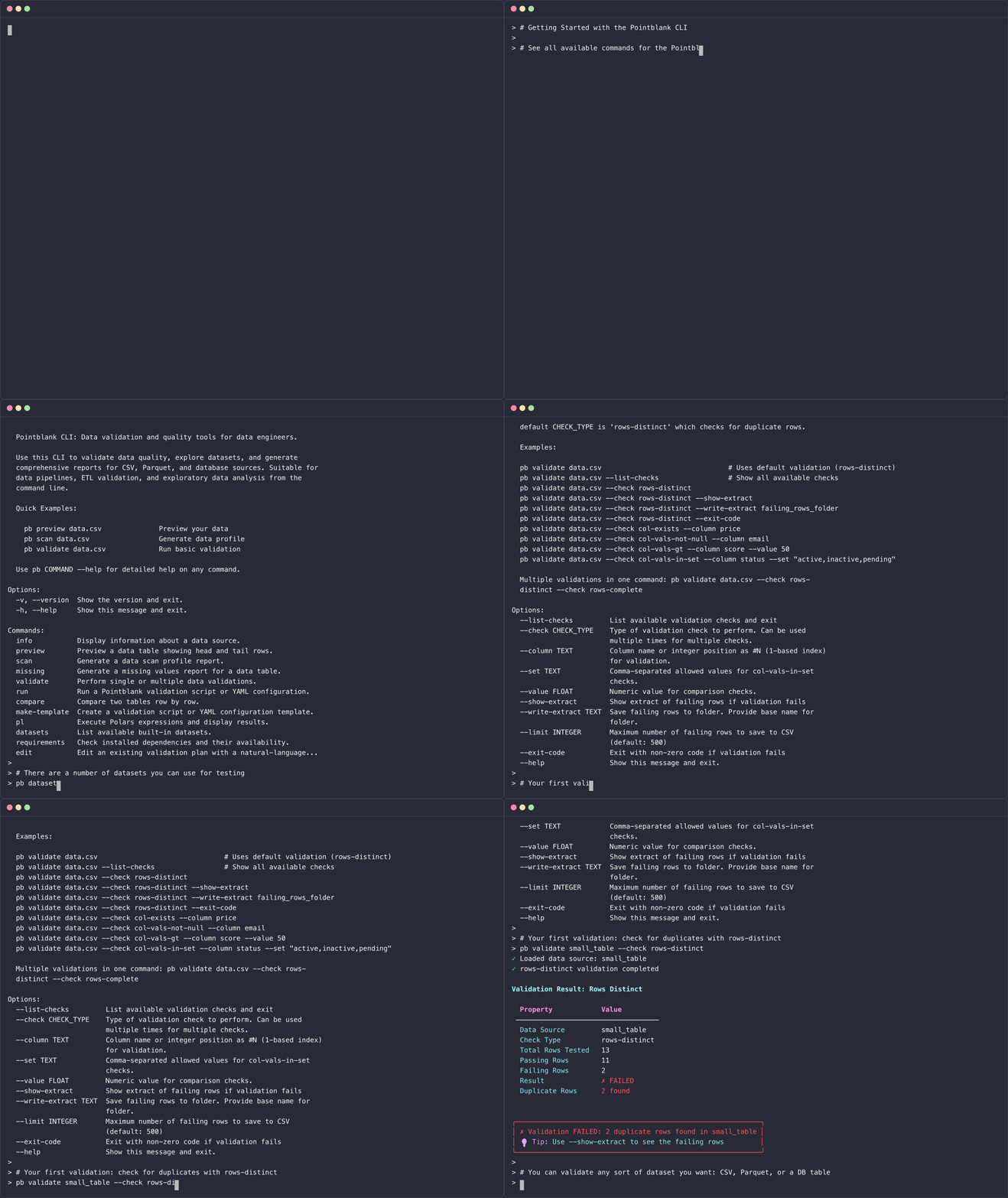
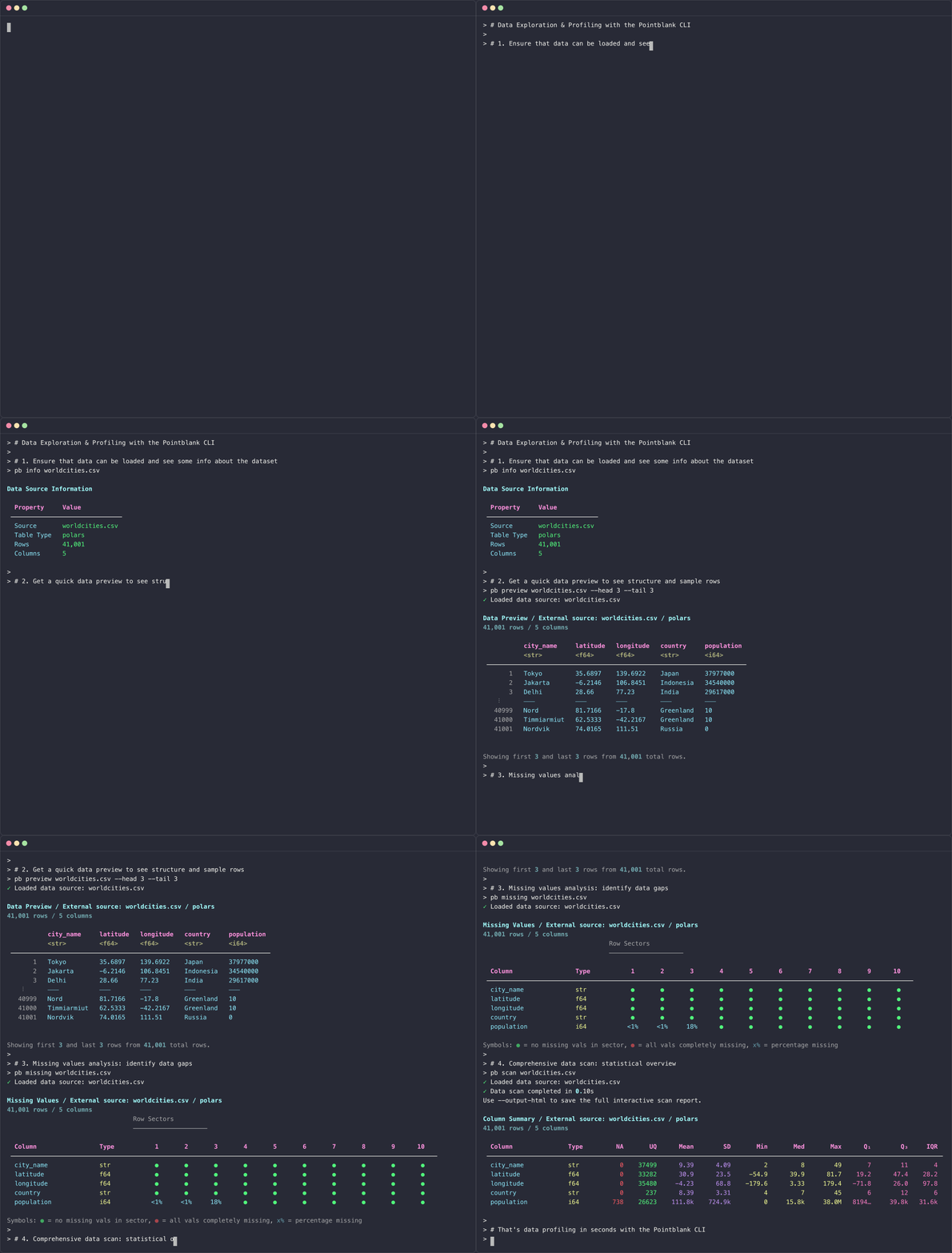
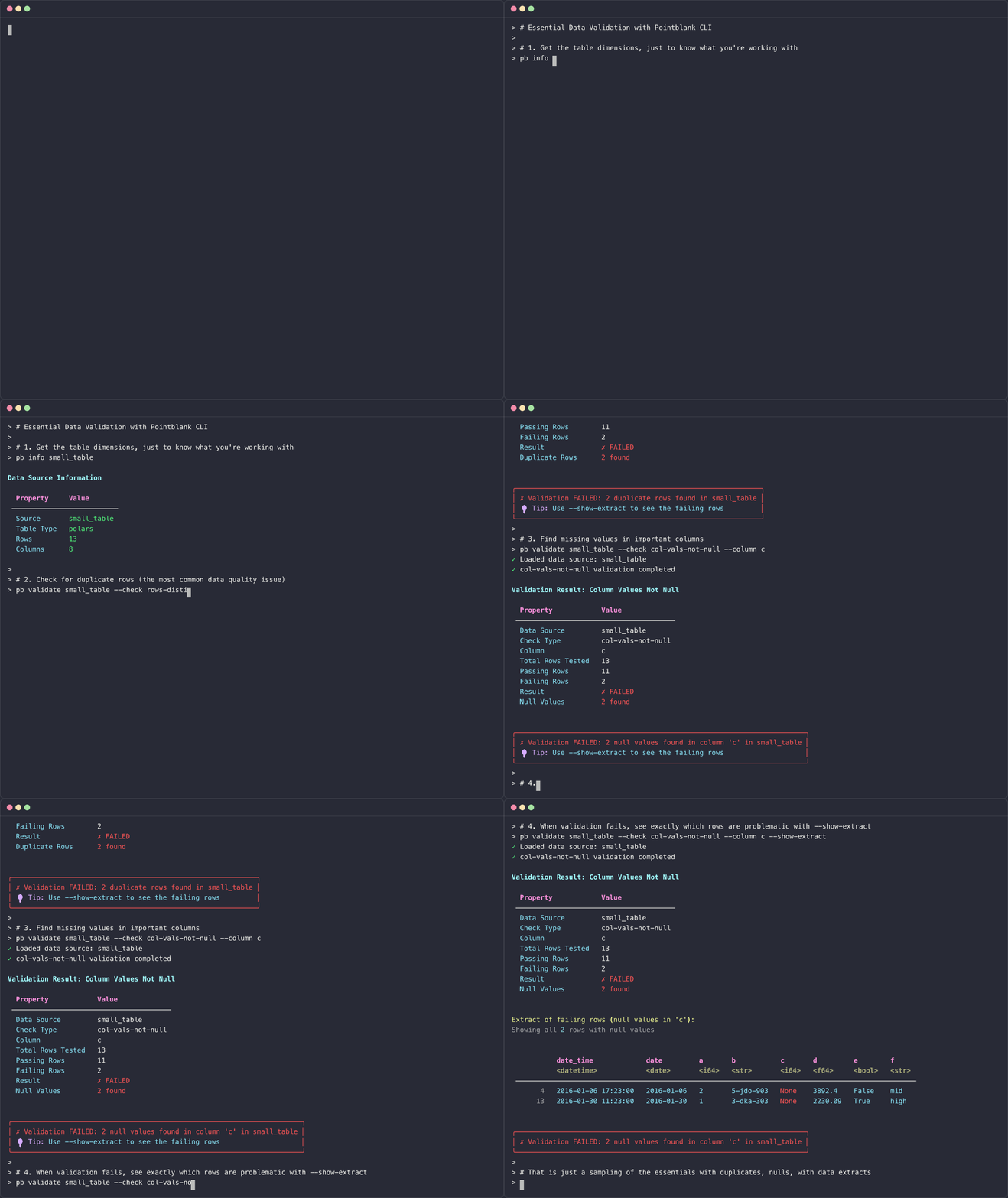
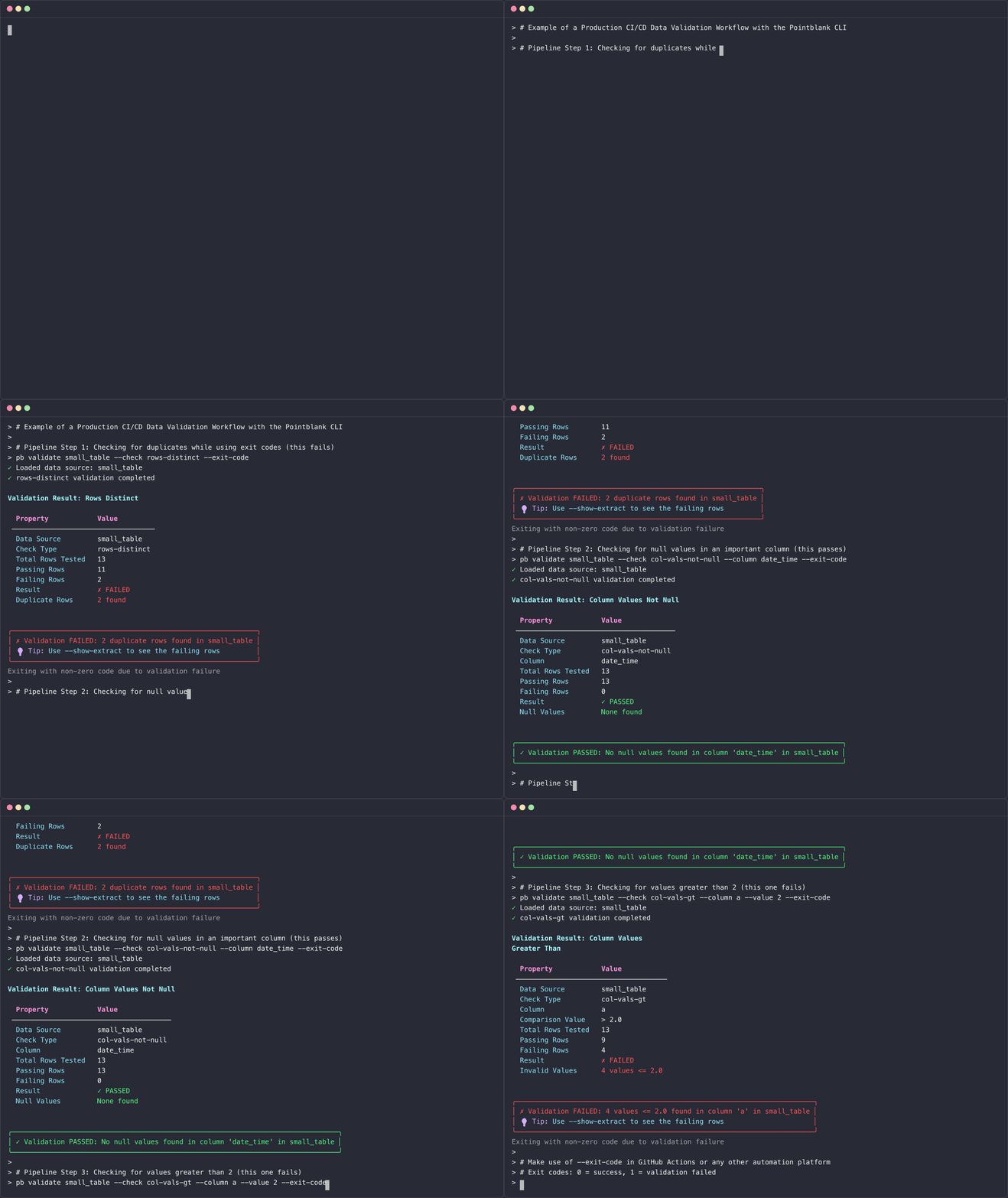
Click the following headings to see some terminal recordings of the CLI in action:
Getting Started with the Pointblank CLI
Doing Some Data Exploration
Validating Data with the CLI
Using Polars in the CLI

Integrating Pointblank with CI/CD
Generate Realistic Test Data
Need test data for your validation workflows? The generate_dataset() function creates realistic, locale-aware synthetic data from a schema. It's useful for developing pipelines without production data, running CI tests with reproducible data, or prototyping a workflow before the real data is available.
import pointblank as pb

# Define a schema with field constraints
schema = pb.Schema(
    user_id=pb.int_field(min_val=1, unique=True),
    name=pb.string_field(preset="name"),
    email=pb.string_field(preset="email"),
    age=pb.int_field(min_val=18, max_val=100),
    status=pb.string_field(allowed=["active", "pending", "inactive"]),
)

# Generate 10 rows of realistic test data
data = pb.generate_dataset(schema, n=10, seed=23)

pb.preview(data)
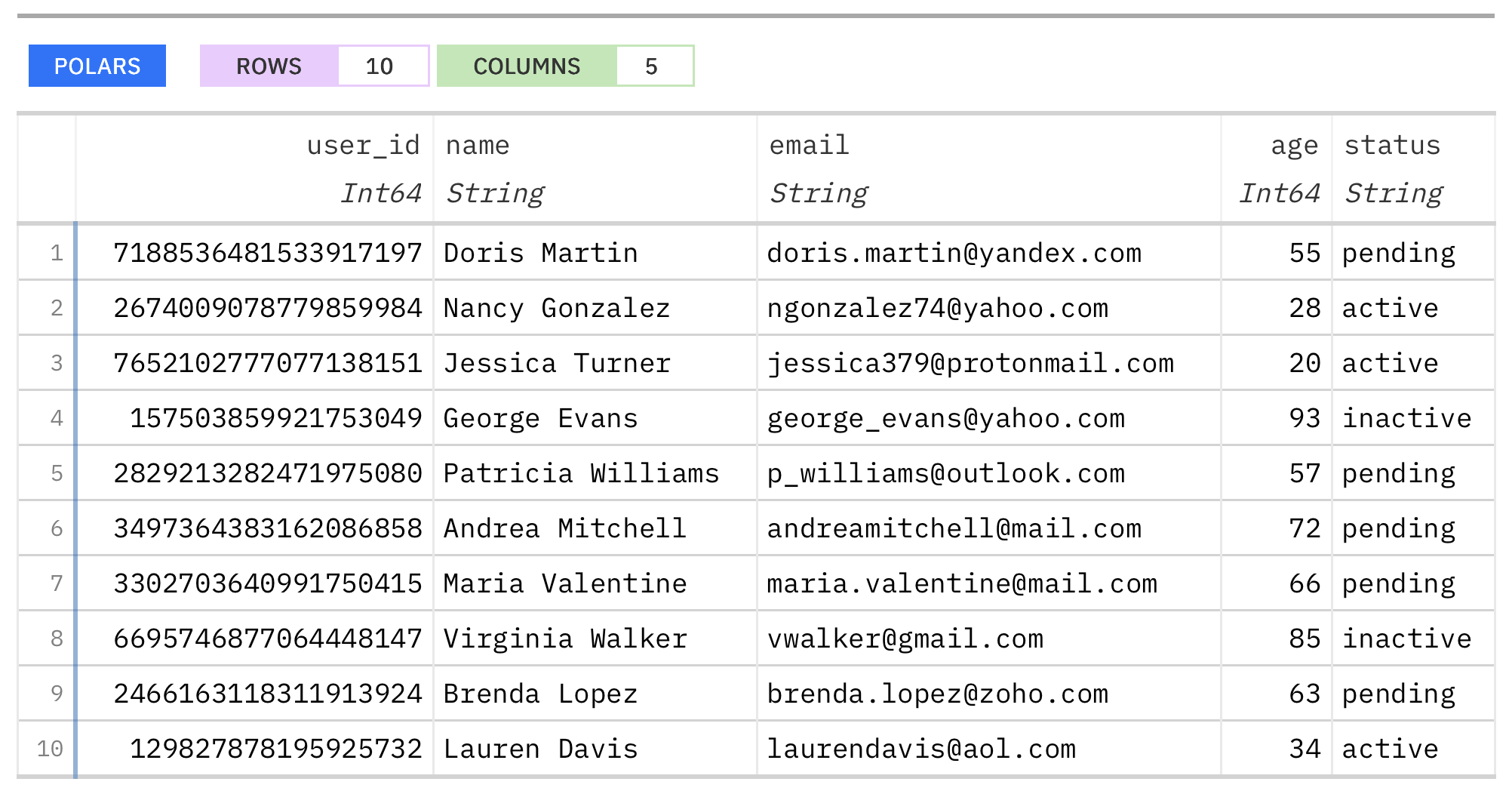
The generator has:
- Over 50 presets: realistic values like
"name","email","address","phone_number", and"user_agent", which agree with each other within a row (the email address is made from the name) - Data for 100 countries: locale-specific values (e.g.,
country="DE"for German addresses), from one country or a mix of them - Field constraints: ranges, patterns, uniqueness, missing values, and allowed values
- Several output formats: Polars DataFrames by default, or Pandas (
output="pandas") or dictionaries (output="dict")
This makes it easy to generate test data that matches your validation rules. A pytest fixture gives each test its own reproducible data. When synthetic data stands in for a real table, check_synthetic() compares the two: how closely each column's distribution matches, how varied the rows are, and whether any rows are copies of real ones.
Check Data for Model Training
A model learns from everything in its training data, including the boilerplate, the duplicates, and any rows of the test set that leaked in. Pointblank has validation methods and step bundles for these problems. They're ordinary validation steps, so they come with the same reports, thresholds, and actions as any other.
import pointblank as pb
import polars as pl

# A corpus of web documents for training a language model, one per row
corpus = pl.read_parquet("web_corpus.parquet")

validation = (
    pb.Validate(data=corpus, tbl_name="web_corpus")
    .col_vals_text_quality(columns="text")  # The quality filters of the Gopher models
    .rows_near_distinct(columns="text")     # Documents that are nearly the same
    .col_vals_no_pii(columns="text")        # Email addresses, phone and card numbers
    .interrogate()
)

# Keep the documents that pass, with one copy of each group of near duplicates
clean = validation.get_sundered_data(type="pass", duplicates="keep_first")
A model is judged fairly only if its splits are independent and alike. The check_splits() function looks for rows of a later split that are also in an earlier one, labels that are missing from a split, and columns whose distributions drift between splits:
check = pb.check_splits(
    train=train, valid=valid, test=test, columns="text", label="topic", near=True
)

print("\n".join(check.issues))
2 rows of 'test' (0.7%) are also in 'train' (1 the same and 1 nearly the same).
'test' has no rows with the label 'returns' of 'train'.
The shares of the labels of 'test' differ from those of 'train' (PSI 1.75).
The distribution of 'wait_days' in 'test' differs from that in 'train' (PSI 0.798).
Failing a check doesn't always mean that the rows hurt the model. An Ablation tests this by experiment. It trains the model without each step's failing rows, compares each version with one that has the same number of random rows removed, and reports whether removing the rows helps, hurts, or makes no clear difference:
def evaluate(train, *, seed):
    ...  # Train the model on `train` and return its score on held-out data

ablation = (
    pb.Ablation(validation, evaluate=evaluate, metric="accuracy")
    .drop_each()  # A version without the failing rows of each step
    .drop_all()   # A version without the rows that fail any step
    .run()
)
There's more for training data in the User Guide:
- Text checks: the language of each document, its length in a tokenizer's tokens, and the format of chat conversations for fine-tuning
- RAG checks: the chunks of a retrieval corpus and the questions of its evaluation set
- Scored validation: checks of each row's score from a model, such as an embedding similarity, a classifier, or a language model's perplexity
- Checking splits and data ablation: the full guides to the examples above
- Data cards: a card describing a dataset, with the validation's results as the evidence of its quality
More of What Pointblank Does
- Segmentation: run a step separately for each group of rows, like each region or each month
- Coded missing values: treat codes like
-99or"refused"as missing, by reason, withMissingSpec - Validation with an LLM: check rows against a rule written in plain English, with
prompt() - Reusable steps and plan serialization: share sets of steps between plans, and write a plan out as Python code or YAML
- Quality dimensions and health scores: scores for completeness, validity, uniqueness, and other dimensions, rolled up into one score for the table
- Data contracts and pipelines: the schema and rules of a table in one portable contract, enforced on the input and output of a transformation
- Table comparison: find the rows that are missing, extra, or changed between two versions of a table, with
pb.compare() - Profiles and drift: profile a table with
DataScan, save the profile, and compare later versions with it - Metadata import and CDISC validation: turn SPSS, Stata, SAS, Frictionless, and Define-XML metadata into validations, and check clinical data against the CDISC standards
- MCP server: validate data by asking an AI assistant, in VS Code or Positron
- OpenTelemetry: send validation results to Grafana, Datadog, and other monitoring tools
Documentation and Examples
Visit our documentation site for:
Join the Community
We'd love to hear from you! Connect with us:
- GitHub Issues for bug reports and feature requests
- Discord server for discussions and help
There are many ways to contribute to the development of Pointblank. Some contributions are simple (like fixing typos, improving the documentation, or filing issues for feature requests or problems) and others take more time and care (like answering questions and submitting PRs with code changes). Anything you can do to help is very much appreciated! The contributing guidelines explain how to get started.
Technical Details
Pointblank uses Narwhals to work with Polars and Pandas DataFrames, and integrates with Ibis for database and file format support. It also validates PySpark DataFrames. This gives one API for validating tabular data from all of these sources.
Pointblank for R
There's also a version of Pointblank for R, which has been around since 2017 and is widely used in the R community. You can find it at https://github.com/rstudio/pointblank.
Code of Conduct
Please note that the Pointblank project is released with a contributor code of conduct.
By participating in this project you agree to abide by its terms.
📄 License
Pointblank is licensed under the MIT license.
© Posit Software, PBC.
🏛️ Governance
This project is primarily maintained by Rich Iannone. Other authors may occasionally assist with some of these duties.
1 maintainer

Metadata
1 maintainer
Release files for pointblank 1.3.0
For a detailed explanation of source distributions (sdists) and built distributions (wheels), please see the package formats documentation.
Source distribution (sdist)
| File | Size | Uploaded | Provenance | Actions |
|---|---|---|---|---|
| pointblank-1.3.0.tar.gz | 57.5 MB | Without provenance | Details for pointblank-1.3.0.tar.gz |
Built distribution (wheel)
| File | Interpreter | ABI | Platform | Actions Reset |
|---|---|---|---|---|
| pointblank-1.3.0-py3-none-any.whl | Python 3 | none | any | Details for pointblank-1.3.0-py3-none-any.whl |
Total release size: 77.5 MB
Release files / pointblank-1.3.0.tar.gz
| Download URL | pointblank-1.3.0.tar.gz |
|---|---|
| Size | 57.5 MB |
| Tags | Source |
|
SHA-256 checksum How to use checksums |
8e685e29a34d2976baa1f79f4ae593329fd5b38fb1a2d93aba02593b110ffac4
|
|
BLAKE2b-256 checksum How to use checksums |
0755ca226bd19b2b745552c4d04497764791b4f8deec4f6404288dae6795058f
|
| Upload date | |
|
Uploaded using Trusted Publishing? What is trusted publishing? |
No |
| Uploaded via |
twine/7.0.0 CPython/3.13.16
|
Release files / pointblank-1.3.0-py3-none-any.whl
| Download URL | pointblank-1.3.0-py3-none-any.whl |
|---|---|
| Size | 20.0 MB |
| Tags | Python 3 |
|
SHA-256 checksum How to use checksums |
7d5dff5632b4d32f7d0664c089849e2d688456c1627705b18e2ee3a1639a7c13
|
|
BLAKE2b-256 checksum How to use checksums |
99dfc011d62e0bfb5354669353879980f7583f1bb2698d075dfe53ed5fa85c9b
|
| Upload date | |
|
Uploaded using Trusted Publishing? What is trusted publishing? |
No |
| Uploaded via |
twine/7.0.0 CPython/3.13.16
|
Security for pointblank 1.3.0
Provenance
Provenance describes where a file came from. On PyPI, provenance is shared via attestations, which provide a verifiable record of the build or publishing details. View details, limitations and caveats.
No provenance found
None of the files in this release were uploaded with provenance metadata.
A note on package security
PyPI is a repository for distributing packages, not a service for auditing them. While third-party security researchers and our staff do their best to detect and remove malicious packages, PyPI cannot guarantee the quality, security or suitability of any given package.
To learn more about protecting yourself from malicious actors, visit our package security documentation.














