
Image processing as Polars expressions: decode, transform and analyse images in a DataFrame column, in Rust, on every core, without a Python loop.






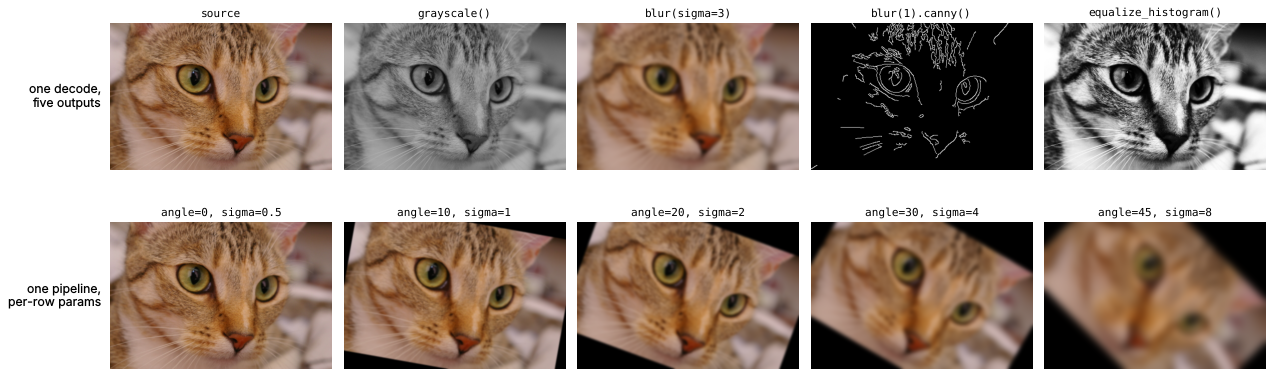
Every panel is computed by polars-cv from a CC0 photo
(scripts/make_readme_figure.py).
equalize_histogram() is a contrast stretch: it remaps intensities so they
spread evenly over 0–255.
Install
pip install polars-cv # or: uv add polars-cv
Wheels for Linux (x86_64, aarch64) and macOS (Apple silicon), CPython 3.11+, Polars 2.0+. Other platforms build from source with Rust 1.96+.
Quickstart
A Pipeline describes the work, .cv.pipe() applies it to a column, and
.sink() picks the output format.
from pathlib import Path

import polars as pl
from polars_cv import Pipeline

df = pl.DataFrame({"path": sorted(str(p) for p in Path("photos").glob("*.jpg"))})

pipe = Pipeline().source("file_path").resize(height=224, width=224).grayscale()
out = df.with_columns(gray=pl.col("path").cv.pipe(pipe).sink("numpy"))
Sources include image_bytes, local paths and s3:///gs:///az:///http(s)://
URLs. Sinks include numpy, array, list, png and jpeg. See
Sources
and Pipelines.
One decode, several outputs, per-row parameters
A folder of photos to centre-cropped 224×224 training tensors plus JPEG thumbnails. Each file is decoded once and feeds both outputs, and the crop box is computed per row from each image's header.
from pathlib import Path

import polars as pl
from polars_cv import Pipeline

df = pl.DataFrame({"path": sorted(str(p) for p in Path("photos").glob("*.jpg"))})
df = df.with_columns(pl.col("path").cv.image_info().struct.unnest())  # header only

side = pl.min_horizontal("width", "height")  # a per-row value
img = pl.col("path").cv.pipe(Pipeline().source("file_path", dtype="u8"))
x = img.pipe(
    Pipeline()
    .crop(top=(pl.col("height") - side) // 2, left=(pl.col("width") - side) // 2,
          height=side, width=side)
    .resize(height=224, width=224, filter="bilinear")
).alias("x")
thumb = img.pipe(Pipeline().resize_max(128)).alias("thumb")

out = df.with_columns(
    o=x.merge_pipe(thumb).sink({
        "x": ("array", {"shape": [224, 224, 3]}),
        "thumb": ("jpeg", {"quality": 85}),
    })
).unnest("o")
batch = out["x"].to_numpy()  # (n_images, 224, 224, 3) uint8
Any parameter that does not change the output's rank, dtype or domain accepts a Polars expression. See Multi-output pipelines.
Branch, rejoin, optimise: cutting out the foreground
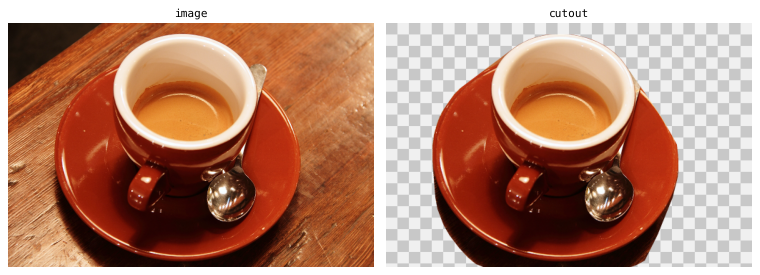
Pipelines compose into a graph. This one cuts a cup and saucer out of a photo with a transparent background: two cues find the china (bright pixels, and the saturated red that the brown table lacks), their union is traced to an outline, and the outline is rasterized back into an alpha channel for the photo.
from pathlib import Path

import polars as pl
from polars_cv import Pipeline

base = Pipeline().source("file_path").resize_max(512)
img = pl.col("path").cv

# Two cues, each written as if it stood alone. The threshold is a column.
bright = img.pipe(base.grayscale().threshold(190))
saturated = img.pipe(
    base.to_hsv().channel_select(1).threshold(pl.col("min_saturation"))
)

# Rejoin: either cue, cleaned up and traced; keep the largest outline's hull.
outline = bright.maximum(saturated).pipe(
    Pipeline().morphology_open(ksize=5).extract_contours().largest().convex_hull()
)

# The outline as an anti-aliased alpha channel joined to the photo's colours.
photo = img.pipe(base)
alpha = outline.rasterize(shape=photo, supersample=4)
cutout = photo.channel_merge(alpha).alias("cutout")

expr = cutout.merge_pipe(outline.area().alias("area"))
paths = sorted(str(p) for p in Path("photos").glob("*.jpg"))
out = (
    pl.LazyFrame({"path": paths, "min_saturation": 210})
    .with_columns(o=expr.sink({"cutout": "png", "area": "native"}))
    .unnest("o")
    .collect()
)
expr.sink(..., return_expr=False).show_graph() draws the graph that runs
(it needs polars-cv[viz] and Graphviz's dot):
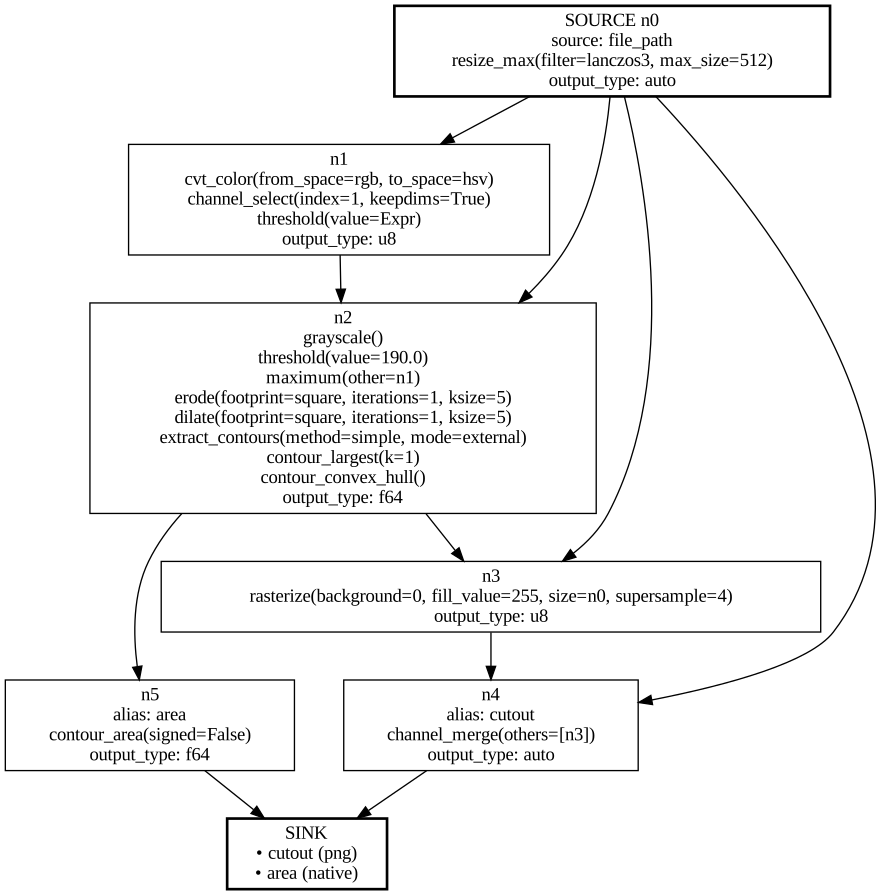
Written out, this is eight nodes with three decodes; it runs as six with one.
The optimiser computes each distinct value once: the three pipelines built from base share one read
and resize (the SOURCE node), and each linear run of steps that nothing else
reads becomes a single node, so the brightness threshold runs straight through
maximum to the hull in one. Pass opt_flags=False to sink to see the
graph as written; the outputs are byte for byte the same. The whole graph is
one Polars expression: it runs in the lazy and streaming engines, per row,
with min_saturation read from each row's column, and returns the PNG and the
outline's area together.
Why polars-cv
- Images are a column. Paths, bytes, labels, metadata and results sit in one
DataFrame, so filtering, joining and
group_byon image properties is plain Polars, not a second data structure kept in sync with a list of arrays. - Polars runs it. Pipelines are expressions: they run lazily, in the streaming engine for larger-than-memory data, with each call's rows spread over every core by Rust code. There is no Python per image.
- Parameters can be expressions. Crop boxes from annotations, sizes from metadata, thresholds from a lookup, evaluated per row.
Benchmarks
5,000 COCO val2017 images on 4 cores, against PIL, OpenCV (process pool),
torchvision (DataLoader), Daft and Hugging Face datasets. Each is written the
way its users would write it and checked against PIL's output before timing.
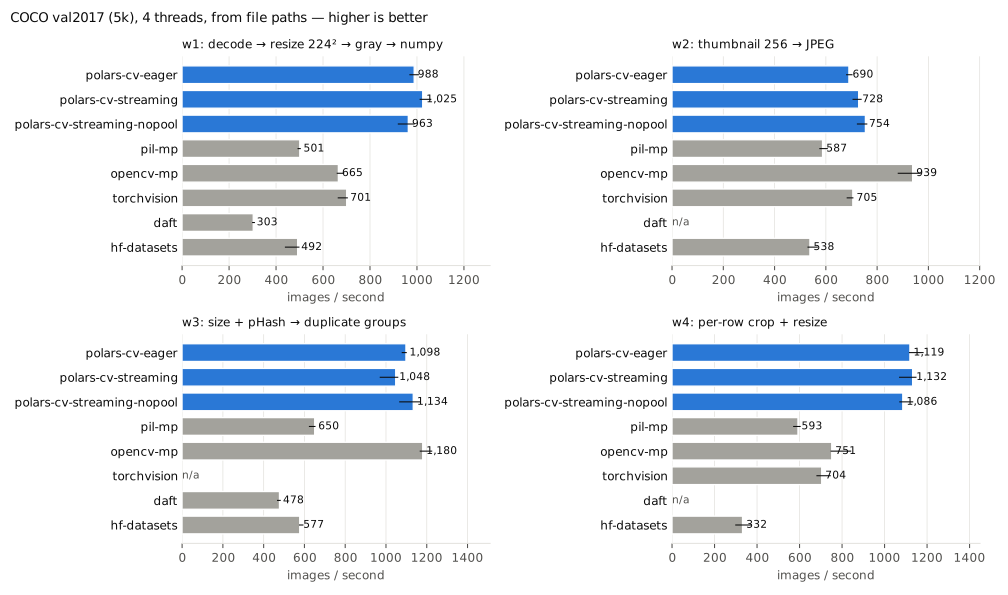
| Workload | polars-cv (streaming) | Fastest alternative | polars-cv speed-up | Peak memory, polars-cv vs that alternative |
|---|---|---|---|---|
| Decode → resize 224² → gray → NumPy | 1,025 img/s | torchvision 701 | 1.5× | 849 MiB vs 1,094 |
| Per-row crop box + per-row size | 1,132 img/s | OpenCV 751 | 1.5× | 686 MiB vs 2,238 |
| Size + pHash → duplicate groups | 1,048 img/s | OpenCV 1,180 | 0.89× | 143 MiB vs 120 |
| Thumbnail → JPEG | 728 img/s | OpenCV 939 | 0.78× | 250 MiB vs 194 |
polars-cv trails OpenCV on thumbnails because its JPEG encoder is slower than
libjpeg-turbo. Methodology, every table and the command to reproduce them are
in benchmarks/.
What's included
| Area | Examples |
|---|---|
| Resize & geometry | resize, resize_max, crop, pad, letterbox, rotate, flip, warp_affine |
| Colour & intensity | grayscale, to_hsv, to_lab, adjust_contrast, adjust_gamma, equalize_histogram |
| Filters & morphology | blur, sharpen, sobel, canny, convolve2d, erode/dilate (square or disk), distance_transform |
| Arithmetic | normalize, cast, clamp, element-wise math, and add/blend/apply_mask between pipelines |
| Analysis | histogram, perceptual_hash, reduce_mean/max/percentile/…, statistics() |
| Contours, points, boxes | extract_contours, area, iou, hausdorff_distance, pairwise_iou via .contour/.point/.bbox |
| Drawing | rasterize (anti-aliased), stroke, offset, smooth, union/intersection/difference, coordinate_grid, apply_lut palettes |
| Header metadata | .cv.image_info(), .cv.width(), .cv.height() without decoding |
| Detection metrics | COCO-style AP/mAP, PR curves, FROC/LROC, bootstrap intervals in polars_cv.metrics |
The full list is in the operations guide and the API reference; the drawing guide builds the logo above from these ops.
Larger-than-memory data
Eager calls already use every core. For data that does not fit in memory, use
a LazyFrame: .collect() streams by default, and .collect_batches() hands
you one batch at a time.
from pathlib import Path

import polars as pl
from polars_cv import Pipeline

pipe = Pipeline().source("file_path", dtype="u8").resize(height=64, width=64)
lf = pl.LazyFrame({"path": sorted(str(p) for p in Path("photos").glob("*.jpg"))})
for batch in (
    lf.select(x=pl.col("path").cv.pipe(pipe).sink("array", shape=[64, 64, 3]))
    .collect_batches(chunk_size=2)
):
    x = batch["x"].to_numpy()  # (rows, 64, 64, 3) uint8
Thread counts, morsel sizing and memory budgets are covered in Streaming & Scaling.
Project status
ℹ️ Note: This is a largely AI-developed project and still in its early stages. Use at your own discretion.
polars-cv is 0.x: a minor release may break the API. Breaking changes are
listed in the changelog,
each with a migration guide.
Pin a minor version (polars-cv~=0.39.0) if you depend on it. Outputs are
checked against NumPy, SciPy, OpenCV and imagehash in CI.
Contributing
Issues and pull requests are welcome. CONTRIBUTING.md
covers the build, and scripts/verify.sh runs every check CI runs.
Citation
If you use polars-cv in research, please cite the version you used:
@software{dar_polars_cv,
  author = {Dar, Hesham},
  title  = {polars-cv: Image processing as Polars expressions},
  url    = {https://github.com/heshamdar/polars-cv},
  year   = {2026}
}
Licensed under either of MIT or Apache-2.0, at your option.
1 maintainer

Metadata
1 maintainer
Release files for polars-cv 0.39.0
For a detailed explanation of source distributions (sdists) and built distributions (wheels), please see the package formats documentation.
Source distribution (sdist)
| File | Size | Uploaded | |
|---|---|---|---|
| polars_cv-0.39.0.tar.gz | 3.5 MB | Details |
Built distributions (wheels)
| File | Interpreter | ABI | Platform | Reset |
|---|---|---|---|---|
| polars_cv-0.39.0-cp311-abi3-manylinux_2_17_x86_64.manylinux2014_x86_64.whl | CPython 3.11 | abi3 | Linux glibc 2.17+ x86-64 | Details |
| polars_cv-0.39.0-cp311-abi3-manylinux_2_17_aarch64.manylinux2014_aarch64.whl | CPython 3.11 | abi3 | Linux glibc 2.17+ ARM64 | Details |
| polars_cv-0.39.0-cp311-abi3-macosx_11_0_arm64.whl | CPython 3.11 | abi3 | macOS 11.0+ ARM64 | Details |
Total release size: 49.3 MB
Release files / polars_cv-0.39.0.tar.gz
| Download URL | polars_cv-0.39.0.tar.gz |
|---|---|
| Size | 3.5 MB |
| Tags | Source |
|
SHA-256 checksum How to use checksums |
ce50a34eabc54ec865251da7f77a01b12adda5e4ecb124df2c2ddb6d9f181de0
|
|
BLAKE2b-256 checksum How to use checksums |
9f0bf0c289c9a6e9a50f3a2630afa5c5658727bd22858b960056684f37c43e97
|
| Upload date | |
|
Uploaded using Trusted Publishing? What is trusted publishing? |
Yes |
| Uploaded via |
twine/7.0.0 CPython/3.13.14
|
Provenance
Provenance describes where a file came from. On PyPI, provenance is shared via attestations, which provide a verifiable record of the build or publishing details. View details, limitations and caveats.


PyPI Publish Attestation
PyPI verified that this artifact, at this checksum, originated from the publisher listed below.
Signed by GitHub Actions, verified by PyPI on Oct 18, 2026.
Transparency logRelease files / polars_cv-0.39.0-cp311-abi3-manylinux_2_17_x86_64.manylinux2014_x86_64.whl
| Download URL | polars_cv-0.39.0-cp311-abi3-manylinux_2_17_x86_64.manylinux2014_x86_64.whl |
|---|---|
| Size | 18.5 MB |
| Tags | CPython 3.11 Linux glibc 2.17+ x86-64 abi3 |
|
SHA-256 checksum How to use checksums |
c5349419655fefe115696a35ba199d8c69eaee91916c93d87e44f2bcbe5dae76
|
|
BLAKE2b-256 checksum How to use checksums |
16bc53ffd240cad6b0e731e775e66c75d078eccd08b15e9ff93a1895127f8a60
|
| Upload date | |
|
Uploaded using Trusted Publishing? What is trusted publishing? |
Yes |
| Uploaded via |
twine/7.0.0 CPython/3.13.14
|
Provenance
Provenance describes where a file came from. On PyPI, provenance is shared via attestations, which provide a verifiable record of the build or publishing details. View details, limitations and caveats.
PyPI Publish Attestation
PyPI verified that this artifact, at this checksum, originated from the publisher listed below.
Signed by GitHub Actions, verified by PyPI on Oct 18, 2026.
Transparency logRelease files / polars_cv-0.39.0-cp311-abi3-manylinux_2_17_aarch64.manylinux2014_aarch64.whl
| Download URL | polars_cv-0.39.0-cp311-abi3-manylinux_2_17_aarch64.manylinux2014_aarch64.whl |
|---|---|
| Size | 13.4 MB |
| Tags | CPython 3.11 Linux glibc 2.17+ ARM64 abi3 |
|
SHA-256 checksum How to use checksums |
be9c75ff80b545a1a77820aad75be2cc7740b9d2849e38d129f72fa88543bf84
|
|
BLAKE2b-256 checksum How to use checksums |
e159859c0b534a85bb7acad27eb7919cb09ea31edf3649427c8b5d2d042037e7
|
| Upload date | |
|
Uploaded using Trusted Publishing? What is trusted publishing? |
Yes |
| Uploaded via |
twine/7.0.0 CPython/3.13.14
|
Provenance
Provenance describes where a file came from. On PyPI, provenance is shared via attestations, which provide a verifiable record of the build or publishing details. View details, limitations and caveats.
PyPI Publish Attestation
PyPI verified that this artifact, at this checksum, originated from the publisher listed below.
Signed by GitHub Actions, verified by PyPI on Oct 18, 2026.
Transparency logRelease files / polars_cv-0.39.0-cp311-abi3-macosx_11_0_arm64.whl
| Download URL | polars_cv-0.39.0-cp311-abi3-macosx_11_0_arm64.whl |
|---|---|
| Size | 13.9 MB |
| Tags | CPython 3.11 abi3 macOS 11.0+ ARM64 |
|
SHA-256 checksum How to use checksums |
eb1dec30d69c641bbcb0bbe06c32517ce77a4463d27059b800faf9fc227d8f28
|
|
BLAKE2b-256 checksum How to use checksums |
f01b398decfc735e080ecc98b47e71edf7382ac83368ee771828004fbb21e2cd
|
| Upload date | |
|
Uploaded using Trusted Publishing? What is trusted publishing? |
Yes |
| Uploaded via |
twine/7.0.0 CPython/3.13.14
|
Provenance
Provenance describes where a file came from. On PyPI, provenance is shared via attestations, which provide a verifiable record of the build or publishing details. View details, limitations and caveats.
PyPI Publish Attestation
PyPI verified that this artifact, at this checksum, originated from the publisher listed below.
Signed by GitHub Actions, verified by PyPI on Oct 18, 2026.
Transparency log













