
polars-telemetry




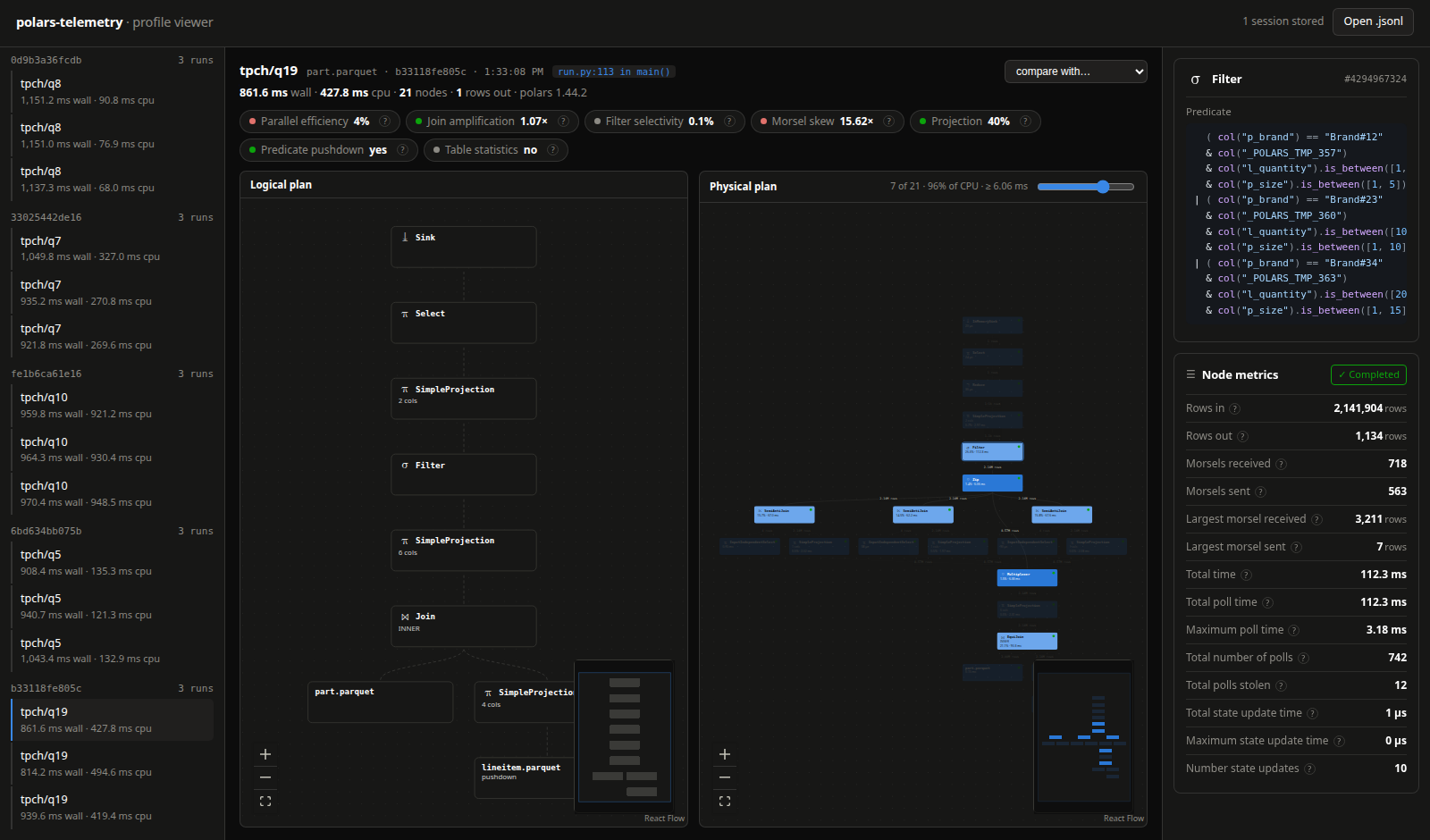
See what your Polars queries do: timings and row counts for every node of every query, both plans in a browser viewer, and findings on what slows a query down. Send the same data to OpenTelemetry or DogStatsD when you want it in your observability stack.
Python 3.10+, Polars 1.44.1 – 1.44.x and 2.x. Not affiliated with Polars: it uses an interface Polars exposes for Polars Cloud, which can change in any Polars release.
Install
pip install polars-telemetry
Quick start
1. Profile a block of code
import polars as pl
import polars_telemetry as pt

orders = pl.LazyFrame({"id": range(200_000), "region": ["EU", "US"] * 100_000})

with pt.profile() as session:
    orders.unique().group_by("region").len().collect()

session.write("profile.jsonl")
2. Open it in the viewer
Drop profile.jsonl on the
profile viewer: both
plans, every node's counters, and the findings. It runs in your browser and
uploads nothing. No profile at hand? The viewer loads the TPC-H queries with one
click.
3. Find what slows it down
$ polars-telemetry insights profile.jsonl
profile.jsonl · 01a111e2-ac8d-7fd0-a766-e17ecb2eec7c  (9 ms wall, 32 ms CPU, 9 nodes)
  warn   75% CPU   Deduplication removes no rows  [redundant_aggregation, GroupBy #4294967299]
                   rows_in 200K · rows_removed 0
                   fix: drop the `unique`/`group_by` if keys are unique by construction, or dedup at the source

1 query: 1 warning, 0 information
--fail-on warn exits with 1 on a warning, for CI. Every rule:
Insights.
Or watch every query as it runs
import polars as pl
import polars_telemetry as pt
from polars_telemetry.export.console import ConsoleExporter

pt.install(exporter=ConsoleExporter())

orders = pl.LazyFrame({"region": ["EU", "US", "EU"], "amount": [10, 20, 30]})
orders.group_by("region").agg(pl.col("amount").sum()).collect()
polars query 1a8cfdfd ok wall=1.92ms planning=0.47ms cpu=1.57ms parallelism=0.82x nodes=5 rows_out=2
  at report.py:8 in <module>()
  GroupBy               0.89ms  in=           3  out=           2
  InMemorySource        0.52ms  in=           0  out=           3
  SimpleProjection        74us  in=           3  out=           3
  InMemorySink            61us  in=           2  out=           0
  SimpleProjection        23us  in=           2  out=           2
Send it to your observability stack
| Exporter | Install | Sends |
|---|---|---|
| OpenTelemetry, the default | pip install 'polars-telemetry[otlp]', then set up the SDK |
a span per query, per-node metrics, findings as span events |
| DogStatsD | pip install 'polars-telemetry[datadog]' |
the same metrics, tagged, to the Datadog Agent or Telegraf |
| JSONL file | included | a profile per query, for the viewer and the CLI |
| Events file | included | a query's plan, samples while it runs, and its profile |
| Events over HTTP | included | the same, sent while the query runs to Nunatak, a dashboard you run yourself |
| Console | included | a short summary on standard error |
pt.install() without an exporter sends to OpenTelemetry, through the SDK you
configured; exporter= takes one exporter or a list. Every span attribute and
metric: Spans and metrics.
Label queries
with pt.label("revenue_by_region"):
    report.collect()
Labels name a query in the viewer, the CLI and on spans; nested labels join
with /. See Labels.
Configure
pt.install(pt.Config(node_metrics=False))
| Option | Default | Effect |
|---|---|---|
node_metrics |
True |
Read per-node counters once at query end |
include_plan |
False |
Attach the full plan to the span as JSON |
call_site |
True |
Record the file, line and function that ran the query |
describe_fallbacks |
True |
Have Polars describe what an in-memory fallback node runs |
insights |
True |
Find what slows each query down, as it runs |
progress_interval |
1.0 |
Seconds between samples of a running query, for exporters that follow queries live |
redaction |
None |
What to mask before exporters see a query; Redaction() masks literal values |
Details: Configuration.
Your data
Plans are exported as written, literal values included, such as
col("email") == "...". Config(redaction=Redaction()) masks them; metrics
never carry them. URL query strings, which can hold credentials, are masked for
every exporter. Details: Data and privacy.
Links
- Documentation
- Troubleshooting
- Polars Cloud: runs alongside it
- Contributing
- Changelog
License
1 maintainer

Metadata
1 maintainer
Release files for polars-telemetry 0.10.2
For a detailed explanation of source distributions (sdists) and built distributions (wheels), please see the package formats documentation.
Source distribution (sdist)
| File | Size | Uploaded | Provenance | Actions |
|---|---|---|---|---|
| polars_telemetry-0.10.2.tar.gz | 758.7 kB | With provenance | Details for polars_telemetry-0.10.2.tar.gz |
Built distribution (wheel)
| File | Interpreter | ABI | Platform | Actions Reset |
|---|---|---|---|---|
| polars_telemetry-0.10.2-py3-none-any.whl | Python 3 | none | any | Details for polars_telemetry-0.10.2-py3-none-any.whl |
Total release size: 860.7 kB
Release files / polars_telemetry-0.10.2.tar.gz
| Download URL | polars_telemetry-0.10.2.tar.gz |
|---|---|
| Size | 758.7 kB |
| Tags | Source |
|
SHA-256 checksum How to use checksums |
7a9dc9a8ef8ed9eaaa6dd772f569d9ef8fe367a064c52905531c56dbf090fc1e
|
|
BLAKE2b-256 checksum How to use checksums |
2de95613f4f2e9167bd70932481f24279151b0addda45c542eae1e4d7eb1b534
|
| Upload date | |
|
Uploaded using Trusted Publishing? What is trusted publishing? |
Yes |
| Uploaded via |
twine/7.0.0 CPython/3.13.14
|
Provenance
Provenance describes where a file came from. On PyPI, provenance is shared via attestations, which provide a verifiable record of the build or publishing details. View details, limitations and caveats.


PyPI Publish Attestation
PyPI verified that this artifact, at this checksum, originated from the publisher listed below.
Signed by GitHub Actions, verified by PyPI on Oct 26, 2026.
Transparency logRelease files / polars_telemetry-0.10.2-py3-none-any.whl
| Download URL | polars_telemetry-0.10.2-py3-none-any.whl |
|---|---|
| Size | 102.0 kB |
| Tags | Python 3 |
|
SHA-256 checksum How to use checksums |
6813c8605ab758942de4773332e38d6d1c1dc7e409ae1d60dafda8e913e4b0ce
|
|
BLAKE2b-256 checksum How to use checksums |
825894c999f2a33d23edaf3202ecd781503ba42b1e453a5d65a0073bad2921c3
|
| Upload date | |
|
Uploaded using Trusted Publishing? What is trusted publishing? |
Yes |
| Uploaded via |
twine/7.0.0 CPython/3.13.14
|
Provenance
Provenance describes where a file came from. On PyPI, provenance is shared via attestations, which provide a verifiable record of the build or publishing details. View details, limitations and caveats.
PyPI Publish Attestation
PyPI verified that this artifact, at this checksum, originated from the publisher listed below.
Signed by GitHub Actions, verified by PyPI on Oct 26, 2026.
Transparency logSecurity for polars-telemetry 0.10.2
Provenance
Provenance describes where a file came from. On PyPI, provenance is shared via attestations, which provide a verifiable record of the build or publishing details. View details, limitations and caveats.
Full provenance
Both files in this release have been uploaded with provenance metadata.
Attestation for polars_telemetry-0.10.2.tar.gz
PyPI Publish Attestation
PyPI verified that this artifact, at this checksum, originated from the publisher listed below.
Signed by GitHub Actions, verified by PyPI on Oct 26, 2026.
Transparency logA note on package security
PyPI is a repository for distributing packages, not a service for auditing them. While third-party security researchers and our staff do their best to detect and remove malicious packages, PyPI cannot guarantee the quality, security or suitability of any given package.
To learn more about protecting yourself from malicious actors, visit our package security documentation.














