
Polychromy





Description
Polychromy is a Python script to manipulate the colors of a text.
Features
- Function
colorateprints text of a specified colour in a specified colour background. - Function
showprints out color details such as Hex and RGB values of a given colour in a square of the given colour.
Latest Version 1.1.1
Table of Contents
Getting Started
Prerequisites
This script relies on the Python standard library, and the libraries requests and textlinebreaker (v1.0.0+ with the TextLineBreaker class).
Installation
- Install the package with pip
pip install polychromy
- or upgrade it with
pip install --upgrade polychromy
- Import the selected package in your program
from polychromy import colorate
or
from polychromy import show
Usage
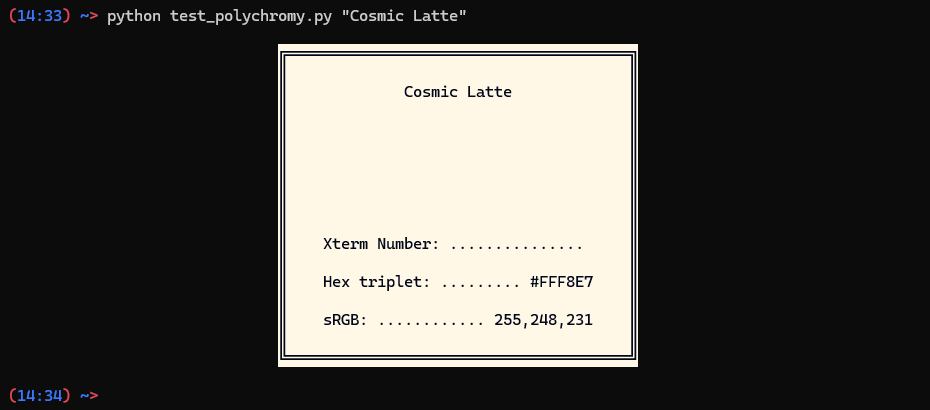
Calling the function show your program will print a square of the selected color with details about it.
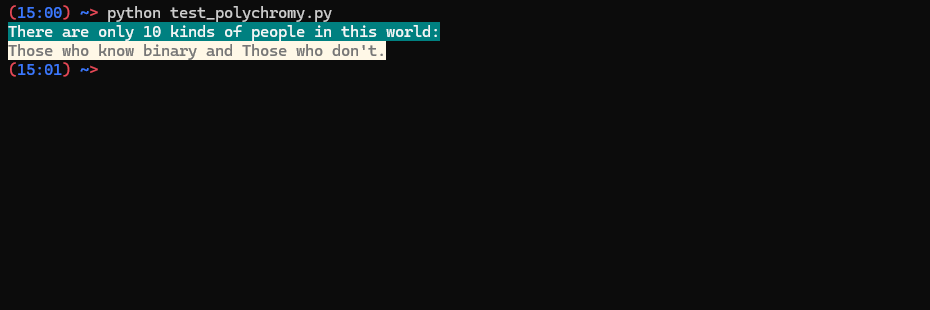
Calling the function colorate inside your program will return a printable string of the desired color.
Parameters
The function accept most color names, RGB values [0-255];[0-255];[0-255], Hex values #[00-FF][00-FF][00-FF], xterm color number in the format x[0-255], and ANSI codes.1
Examples
Show
Using the function show you can print out color details such as Hex and RGB values of a given colour in a square of the given colour.
import sys
from polychromy import show

# If you run this program without any argument it asks you for a color and prints it out to the screen.
if len(sys.argv) == 1:

    color_in = input("Enter a colour: ")
    show(color_in)

# Giving a color as argument it prints it out directly to the screen
# Accepted values are: Name colors, HEX and RGB values.

else:
    show()
Output 1
Colorate
Using the function colorate you can print text of a specified colour in a specified colour background.
from polychromy import colorate

# Texts to print
text1 = "There are only 10 kinds of people in this world:"
text2 = "Those who know binary and Those who don't."

# Foreground (text) coors
foreground_1 = "#F5F5F5"
foreground_2 = 90

# Background colors
background_1 = "0;128;128"
background_2 = "Cosmic Latte"

print(colorate(text1,foreground_1,background_1))
print(colorate(text2,foreground_2,background_2))
Output 2
Contributing
If you'd like to contribute to this project, please follow these steps:
- Fork the repository on GitHub.
- Clone the fork to your local machine.
- Create a new branch for your feature or bug fix.
- Make your changes and commit them.
- Push the changes to your fork on GitHub.
- Create a pull request to the original repository.
License
This project is licensed under the MIT License - see the LICENSE file for details.
-
The output color might differ from the desired one depending on terminal used. ↩
1 maintainer

Metadata
1 maintainer
Release files for polychromy 1.1.1
For a detailed explanation of source distributions (sdists) and built distributions (wheels), please see the package formats documentation.
Source distribution (sdist)
| File | Size | Uploaded | |
|---|---|---|---|
| polychromy-1.1.1.tar.gz | 39.7 kB | Details |
Built distribution (wheel)
| File | Interpreter | ABI | Platform | Reset |
|---|---|---|---|---|
| polychromy-1.1.1-py3-none-any.whl | Python 3 | none | any | Details |
Total release size: 54.1 kB
Release files / polychromy-1.1.1.tar.gz
| Download URL | polychromy-1.1.1.tar.gz |
|---|---|
| Size | 39.7 kB |
| Tags | Source |
|
SHA-256 checksum How to use checksums |
37ae58e3260b936928a3c3bca2ba53fa96fe01690f00a23d490d1d964922d257
|
|
BLAKE2b-256 checksum How to use checksums |
612cb487c3c254c6002cf08c3e5a808a1564304ed398af02592fd904bb6a8d52
|
| Upload date | |
|
Uploaded using Trusted Publishing? What is trusted publishing? |
No |
| Uploaded via |
twine/6.1.0 CPython/3.13.7
|
Release files / polychromy-1.1.1-py3-none-any.whl
| Download URL | polychromy-1.1.1-py3-none-any.whl |
|---|---|
| Size | 14.4 kB |
| Tags | Python 3 |
|
SHA-256 checksum How to use checksums |
d2cfc59ee0c77c952f191c79a585f752202301d89e1c07e5d483383b72582c73
|
|
BLAKE2b-256 checksum How to use checksums |
c1f69710db5af08975ecbc674cd82a1d94717962b46d02663aab4660c316e9e5
|
| Upload date | |
|
Uploaded using Trusted Publishing? What is trusted publishing? |
No |
| Uploaded via |
twine/6.1.0 CPython/3.13.7
|














