
A module to print strings in a given colour, with a given colour background

Project description
Polychromy





Description
Polychromy is a Python script to manipulate the colors of a text.
Features
- Function
colorateprints text of a specified colour in a specified colour background. - Function
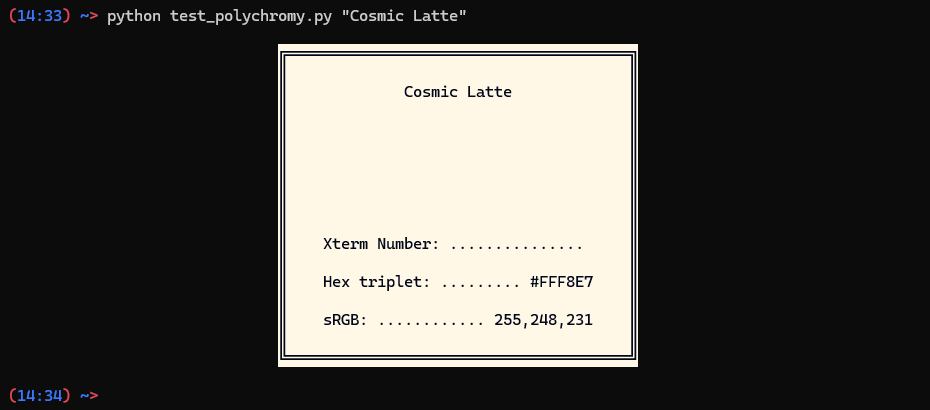
showprints out color details such as Hex and RGB values of a given colour in a square of the given colour.
Latest Version 1.1.1
Table of Contents
Getting Started
Prerequisites
This script relies on the Python standard library, and the libraries requests and textlinebreaker (v1.0.0+ with the TextLineBreaker class).
Installation
- Install the package with pip
pip install polychromy
- or upgrade it with
pip install --upgrade polychromy
- Import the selected package in your program
from polychromy import colorate
or
from polychromy import show
Usage
Calling the function show your program will print a square of the selected color with details about it.
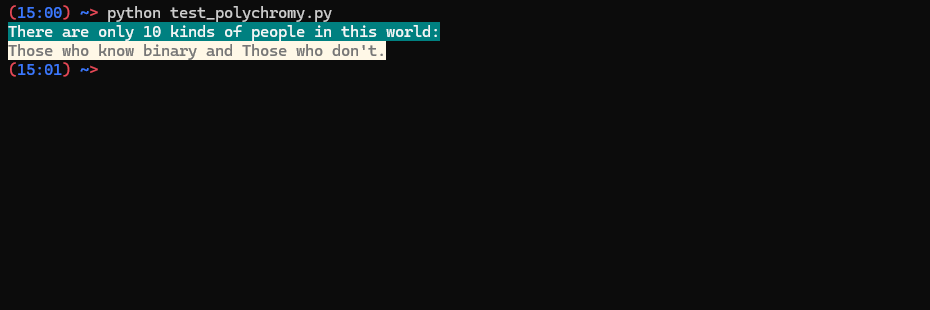
Calling the function colorate inside your program will return a printable string of the desired color.
Parameters
The function accept most color names, RGB values [0-255];[0-255];[0-255], Hex values #[00-FF][00-FF][00-FF], xterm color number in the format x[0-255], and ANSI codes.[^Note]
[^Note]: The output color might differ from the desired one depending on terminal used.
Examples
Show
Using the function show you can print out color details such as Hex and RGB values of a given colour in a square of the given colour.
import sys
from polychromy import show

# If you run this program without any argument it asks you for a color and prints it out to the screen.
if len(sys.argv) == 1:

    color_in = input("Enter a colour: ")
    show(color_in)

# Giving a color as argument it prints it out directly to the screen
# Accepted values are: Name colors, HEX and RGB values.

else:
    show()
Output 1
Colorate
Using the function colorate you can print text of a specified colour in a specified colour background.
from polychromy import colorate

# Texts to print
text1 = "There are only 10 kinds of people in this world:"
text2 = "Those who know binary and Those who don't."

# Foreground (text) coors
foreground_1 = "#F5F5F5"
foreground_2 = 90

# Background colors
background_1 = "0;128;128"
background_2 = "Cosmic Latte"

print(colorate(text1,foreground_1,background_1))
print(colorate(text2,foreground_2,background_2))
Output 2
Contributing
If you'd like to contribute to this project, please follow these steps:
- Fork the repository on GitHub.
- Clone the fork to your local machine.
- Create a new branch for your feature or bug fix.
- Make your changes and commit them.
- Push the changes to your fork on GitHub.
- Create a pull request to the original repository.
License
This project is licensed under the MIT License - see the LICENSE file for details.
Project details
Release history Release notifications | RSS feed


Download files
Download the file for your platform. If you're not sure which to choose, learn more about installing packages.
Source Distribution
Built Distribution
Filter files by name, interpreter, ABI, and platform.
If you're not sure about the file name format, learn more about wheel file names.
Copy a direct link to the current filters
File details
Details for the file polychromy-1.1.1.tar.gz.
File metadata
- Download URL: polychromy-1.1.1.tar.gz
- Upload date:
- Size: 39.7 kB
- Tags: Source
- Uploaded using Trusted Publishing? No
- Uploaded via: twine/6.1.0 CPython/3.13.7
File hashes
| Algorithm | Hash digest | |
|---|---|---|
| SHA256 |
37ae58e3260b936928a3c3bca2ba53fa96fe01690f00a23d490d1d964922d257
|
|
| MD5 |
78d2e383d996c93c8097ee52daa9ce28
|
|
| BLAKE2b-256 |
612cb487c3c254c6002cf08c3e5a808a1564304ed398af02592fd904bb6a8d52
|
File details
Details for the file polychromy-1.1.1-py3-none-any.whl.
File metadata
- Download URL: polychromy-1.1.1-py3-none-any.whl
- Upload date:
- Size: 14.4 kB
- Tags: Python 3
- Uploaded using Trusted Publishing? No
- Uploaded via: twine/6.1.0 CPython/3.13.7
File hashes
| Algorithm | Hash digest | |
|---|---|---|
| SHA256 |
d2cfc59ee0c77c952f191c79a585f752202301d89e1c07e5d483383b72582c73
|
|
| MD5 |
7394c4278a4874923e89203cbd22ebe7
|
|
| BLAKE2b-256 |
c1f69710db5af08975ecbc674cd82a1d94717962b46d02663aab4660c316e9e5
|






