

Polyphon AI
Local, Identity-Aware Transcription & Diarization Engine
Turning multi-speaker conversational audio into structured, named intelligence — 100% offline.




Architecture • Features • Polyphon Studio (Web UI) • Quick Start • CLI Usage • Local LLM • VoiceDB & Identity • Python API • API Reference • Hardware Acceleration
⚡ The Problem & The Vision
State-of-the-art open models like faster-whisper (ASR) and pyannote (diarization) are phenomenal, but standard pipelines (including tools like WhisperX) leave critical problems unsolved:
- Reconciliation Failures: Naive timestamp overlap breaks when speakers interrupt, talk over each other, or use short backchannels ("Yeah", "Right").
- Identity Amnesia: Every file starts from scratch as
SPEAKER_00,SPEAKER_01. There is no persistent voice memory across meetings. - Multilingual & Code-Switching Desync: Monolingual forced alignment models fail when speakers naturally mix languages (e.g., English-Mandarin, Singlish, dialects).
- Fragile Orchestration: Juggling PyTorch versions, Hugging Face tokens, FFmpeg quirks, and GPU runtimes makes deployment in homelabs or local microservices painful.
Polyphon bridges this gap. It does not reinvent foundational weights; it provides a unified, identity-aware reconciliation and structuring engine that runs locally on commodity hardware, high-VRAM GPUs, and unified-memory APUs.
🏗️ Architecture
                    ┌────────────────────────┐
 Audio / Video ────►│   Audio Preprocessor   │ (16kHz Mono, VAD Chunking)
                    └───────────┬────────────┘
                                │
                 ┌──────────────┴──────────────┐
                 │                             │
                 ▼                             ▼
          ┌──────────────┐              ┌──────────────┐
          │     ASR      │              │ Diarization  │
          │ faster-whisper│             │ pyannote /   │
          │ (Word Tokens)│              │ NeMo Sortform│
          └──────┬───────┘              └──────┬───────┘
                 │                             │
                 │ [t_start, t_end]            │ [Speaker Intervals]
                 └──────────────┬──────────────┘
                                ▼
                 ┌─────────────────────────────┐
                 │    Reconciliation Engine    │◄─── Audio-Embedding
                 │  - Exclusive anchor windows │     Fallback for
                 │  - Overlap disambiguation   │     Boundary Clashes
                 └──────────────┬──────────────┘
                                ▼
                 ┌─────────────────────────────┐
                 │     VoiceDB (Identity)      │◄─── Local Enrollment
                 │  - Cosine Sim + AS-Norm     │     Embeddings
                 │  - SPEAKER_00 ➔ "Alice"     │     (Zero Telemetry)
                 └──────────────┬──────────────┘
                                ▼
                 ┌─────────────────────────────┐
                 │    Semantic / LLM Layer     │◄─── Local LLM
                 │  - Meeting summary & topics │     (llama.cpp / vLLM)
                 │  - Action items & decisions │
                 └──────────────┬──────────────┘
                                ▼
                 ┌─────────────────────────────┐
                 │   Structured Intelligence   │ (JSON / Markdown / SRT)
                 └─────────────────────────────┘
✨ Key Features
- ⚡ Robust Timestamp Reconciliation: Multi-scale boundary alignment that assigns ambiguous or overlapping words using acoustic embedding proximity rather than simplistic box overlapping.
- 👤 VoiceDB (Persistent Identity): Enroll local speaker voiceprints.
SPEAKER_00andSPEAKER_01automatically becomeAliceandBobacross past and future recordings. - ✨ One-Click VoiceDB Enrollment from Transcript: Turn unknown clusters into named identities directly while listening to the meeting in Polyphon Studio, extracting multi-segment voice embeddings and auto-updating all past turns.
- 🎙️+💻 Dual Audio Capture (Mic & Meeting): Record both your microphone (you) and remote meeting participants (Google Meet, Zoom, Teams, Webex) in the browser via Web Audio API mixing without meeting bots or virtual audio cables.
- ⚖️ Side-by-Side Comparative Benchmarking: Compare real-time edge streaming transcription against offline multi-speaker diarization and executive intelligence with dual synchronized columns and KPI cards.
- 🌏 Multilingual & Code-Switching Native: Designed to handle real-world conversations where speakers switch languages mid-sentence (e.g. English + Mandarin, Singlish, Malay) without forced-alignment phonetic breakdown.
- 🧠 Local Structured Extraction: Seamlessly pipelines reconciled speaker transcripts into local LLMs (via
llama.cpp, Ollama, or vLLM) to output actionable summaries, decisions, and speaker talk-time metrics. - 🎙️ Polyphon Studio (Modular Web UI): High-performance 4-tab web workspace (Studio, Live Stream, Archive, VoiceDB) with synchronized media playback, word-level karaoke glow, deterministic auto-scrolling, live SSE progress, and clean zero-build modular static assets.
- ✨ Clean Verbatim Mode (Zero Timing Drift): Intelligently detects and filters vocal disfluencies ("um", "uh", "er", "ah", "hmm") with zero millisecond timing impact. All word-level timestamps, audio scrubbing, and karaoke illumination remain frame-accurate.
- 🔴 Real-Time Streaming & Neural Diarization: Low-latency live streaming speech recognition and NVIDIA NeMo Sortformer end-to-end neural diarization (EEND) with speculative/committed token reconciliation, CLI live streaming (
polyphon stream), and browser WebSocket (/api/stream/ws). - 🔒 100% Offline & Private: Zero telemetry, no cloud API dependencies, and no remote data leakage. Ideal for confidential meetings, medical/legal notes, and homelab setups.
🚀 Quick Start
Prerequisites
-
FFmpeg: Required for audio decoding, format conversion, and 16 kHz mono resampling.
# Debian / Ubuntu / Raspberry Pi OS
sudo apt update && sudo apt install -y ffmpeg

# macOS (Homebrew)
brew install ffmpeg

# Arch Linux
sudo pacman -S ffmpeg

# Windows (winget - Recommended)
# NOTE: must be the *shared* build - see the warning below
winget install Gyan.FFmpeg.Shared
⚠️ Windows: you need a
sharedFFmpeg build. Speaker diarization decodes audio throughtorchcodec, which loads FFmpeg's DLLs (avcodec-*.dll,avformat-*.dll,avutil-*.dll) at runtime rather than shelling out toffmpeg.exe. The default Windows packages -winget install Gyan.FFmpeg,choco install ffmpeg, andscoop install ffmpeg- are static builds that ship only the.exefiles and no DLLs. With one of those,ffmpeg -versionworks fine but--diarizefails withRuntimeError: Could not load libtorchcodec.Install a shared build (above), or download
ffmpeg-release-full-shared.7zfrom gyan.dev/ffmpeg/builds and add itsbindirectory to yourPATH.You can verify this once the environment is set up — see Step 1.
-
uv (Recommended): High-performance Python package and environment manager.
# Linux & macOS
curl -LsSf https://astral.sh/uv/install.sh | sh

# Windows (PowerShell)
powershell -ExecutionPolicy ByPass -c "irm https://astral.sh/uv/install.ps1 | iex"
# or via winget: winget install --id=astral-sh.uv
-
Hugging Face Access Token (Required for Diarization): Speaker diarization uses
pyannote.audiomodels which are gated on Hugging Face:- Accept user agreements on hf.co/pyannote/speaker-diarization-3.1
- Accept user agreements on hf.co/pyannote/segmentation-3.0
- Export your User Access Token in your terminal:
# Linux / macOS (bash / zsh)
export HF_TOKEN="hf_xxxxxxxxxxxxxxxxxxxxxxxxxxxxxxxxx"

# Windows (PowerShell)
$env:HF_TOKEN="hf_xxxxxxxxxxxxxxxxxxxxxxxxxxxxxxxxx"

# Windows (Command Prompt)
set HF_TOKEN=hf_xxxxxxxxxxxxxxxxxxxxxxxxxxxxxxxxx
(Or authenticate viauv run hf auth login)
Step-by-Step Installation Guide
Option A: Install from PyPI (Recommended for Users)
# Recommended: Install the complete package (ASR + Pyannote Diarization + Studio WebUI + Meeting Bot)
pip install "polyphon-ai[all]"

# Or install as an isolated global CLI via pipx or uv tool:
pipx install "polyphon-ai[all]"
uv tool install "polyphon-ai[all]"

# Check runtime dependencies (FFmpeg shared libraries, needed for --diarize)
polyphon doctor
Option B: Clone & Run from Source (Recommended for Contributors)
uv automatically downloads the designated Python toolchain (Python 3.12) and creates an isolated virtual environment (.venv):
# 1. Clone repository
git clone https://github.com/seehiong/polyphon-ai.git
cd polyphon-ai

# 2. Sync all dependencies into isolated virtual environment (.venv)
uv sync --all-extras

# 3. Verify installation
uv run polyphon --help

# 4. Check runtime dependencies (FFmpeg shared libraries, needed for --diarize)
uv run polyphon doctor
doctor encodes and decodes a short audio buffer, so it fails when FFmpeg's shared
libraries are missing and exits non-zero — usable as a CI gate. It reports the ffmpeg
executable separately from the shared libraries, since a working ffmpeg -version does
not imply the libraries are loadable.
Windows: FFmpeg installed correctly but still not found
DLL resolution follows PATH, and a shell only picks up PATH changes when it
starts — so a terminal opened before you installed FFmpeg keeps the old value. Open a
new terminal and re-run uv run polyphon doctor (or polyphon doctor).
If it still fails, copy the FFmpeg DLLs next to the library that loads them. Windows
searches a DLL's own directory before PATH, so this works regardless of PATH:
Copy-Item "C:\path\to\ffmpeg-shared\bin\av*.dll", "C:\path\to\ffmpeg-shared\bin\sw*.dll" `
  -Destination ".venv\Lib\site-packages\torchcodec\"
This is a workaround, not a fix: uv sync reinstalls torchcodec and removes the
copied DLLs, so prefer getting PATH right. Re-run the copy if diarization breaks
again after a sync.
Step 2: Set Hugging Face Token
export HF_TOKEN="your_huggingface_token"
Step 3 (Optional): Start Local LLM Server (for --summarize)
For meeting intelligence and action item extraction, run your local model server:
llama-server-rocm \
  --model ~/models/Qwen3.8-27B-Q4_K_M.gguf \
  --alias qwen3.8-27b \
  --n-gpu-layers 99 \
  --ctx-size 131072 \
  --parallel 1 \
  --flash-attn on \
  --jinja \
  --temp 0.7 --top-p 0.8 --top-k 20 --min-p 0 \
  --spec-type draft-mtp --spec-draft-n-max 2 \
  --kv-unified --fit off \
  --host 0.0.0.0 --port 8080
(See Local LLM Serving for hardware tuning details).
Any OpenAI-compatible server works — llama-server, vLLM, Ollama, or
LM Studio. With Ollama, ollama serve already exposes an
OpenAI-compatible API on port 11434; just point Polyphon at it (note the /v1 suffix):
POLYPHON_LLM_ENDPOINT=http://127.0.0.1:11434/v1
POLYPHON_LLM_MODEL=qwen2.5:7b
Pointing at a different machine (e.g. Remote Ollama, llama-server, vLLM)
You can run Polyphon on one machine (e.g. your laptop or lightweight client) while hosting Ollama or llama-server on a dedicated GPU machine on your local network (e.g. 192.168.1.50):
┌──────────────────────────────────────┐          HTTP / LAN          ┌──────────────────────────────────────┐
│       Machine A (Polyphon)           │─────────────────────────────►│         Machine B (Ollama)           │
│  - pip install "polyphon-ai[all]"    │  POST http://192.168.1.50:   │  - OLLAMA_HOST=0.0.0.0               │
│  - ~/.polyphon/.env                  │       11434/v1/chat/...      │  - qwen2.5-16k (num_ctx 16384)       │
└──────────────────────────────────────┘                              └──────────────────────────────────────┘
Polyphon resolves its configuration in the following order:
-
User Global Config (
~/.polyphon/.envor~/.config/polyphon/.env) — Best for PyPI Users: Save your settings once in your home directory so Polyphon connects to your remote LLM from any folder without needing a.envin every directory:mkdir -p ~/.polyphon cat << 'EOF' > ~/.polyphon/.env POLYPHON_LLM_ENDPOINT=http://192.168.1.50:11434/v1 POLYPHON_LLM_MODEL=qwen2.5:7b POLYPHON_LLM_TIMEOUT=1800 EOF
-
Project-Level
.env(Current Directory): Copy.env.exampleto.envin your project folder. Polyphon walks up from the current working directory to find it. Local.envfiles take precedence over~/.polyphon/.env. -
Shell Environment Variables (
export): Real environment variables take precedence over all.envfiles:export POLYPHON_LLM_ENDPOINT="http://192.168.1.50:11434/v1" export POLYPHON_LLM_MODEL="qwen2.5:7b"
-
Command-Line Flags (
--llm-endpoint,--llm-model): Override the LLM endpoint for a single command:polyphon transcribe meeting.mp4 --summarize --llm-endpoint http://192.168.1.50:11434/v1 --llm-model qwen2.5:7b
-
Explicit Environment File: Point at any custom env file:
POLYPHON_ENV_FILE=/path/to/custom.env polyphon transcribe ....
Step 4: Obtain Sample Media
Run the included helper script to fetch test meeting audio and auto-generate MP4 video files into the examples/ directory:
# Standard 2-Speaker Benchmark (~87s dialogue: Lex Fridman & Mark Zuckerberg)
uv run python scripts/download_sample.py

# 🔥 Challenging 4-Speaker Stress Test (AMI Meeting Corpus ES2004a: ~17.5m multi-party design meeting)
uv run python scripts/download_sample.py --challenging
(Saved cleanly into examples/; the --challenging option also creates examples/meeting_challenging_3min.mp4 for rapid stress testing).
Step 5: Run Polyphon
On first execution, model weights for Whisper large-v3 (~3 GB) and Pyannote are downloaded and cached automatically in ~/.cache/huggingface/hub:
# Transcribe + Diarize
uv run polyphon transcribe examples/meeting.mp4 --diarize

# Full Pipeline: Transcribe + Diarize + Identify + Summarize
uv run polyphon transcribe examples/meeting.mp4 \
  --diarize \
  --identify \
  --summarize \
  --format markdown \
  --output meeting_summary.md
Step 6: Verify Environment with Tests
uv run pytest -v
Alternative: Using standard venv + pip
# Clone the repository
git clone https://github.com/seehiong/polyphon-ai.git
cd polyphon

# Create and activate virtual environment (Python 3.10+)
python3 -m venv .venv
source .venv/bin/activate

# Install Polyphon in editable mode with all extras
pip install -e ".[all,dev]"
💻 CLI Usage
If installed from PyPI (pip install "polyphon-ai[all]"), execute polyphon <command> directly. When developing from a source clone with uv, prefix commands with uv run polyphon <command> or activate the environment with source .venv/bin/activate.
Guided Walkthrough
Run these in order for a complete end-to-end tour. Each step builds on the previous one's
output, and every command uses the same meeting_challenging recording throughout.
# 0. Fetch the sample media (creates examples/meeting_challenging.mp4)
uv run python scripts/download_sample.py --challenging

# 1. Transcribe to a JSON manifest -- the machine-readable file later steps edit
uv run polyphon transcribe examples/meeting_challenging.mp4 --diarize --format json

# 2. Put real names on the acoustic clusters, and enroll their voiceprints
uv run polyphon assign outputs/meeting_challenging.json \
  --map SPEAKER_00="Marcus Vance" \
  --map SPEAKER_01="David (UI Designer)" \
  --enroll \
  --summarize

# 3. Any future meeting now recognises those voices automatically
uv run polyphon transcribe examples/meeting_challenging_3min.mp4 \
  --diarize --identify --summarize --format html
--summarize in step 2 needs a local LLM server (see
Step 3); drop the flag if you
have not started one — everything else works without it.
The sections below are a reference — independent examples of individual flags, not a sequence. Mixing them out of order can reference files an earlier example never created.
1. Basic Transcription & Diarization
uv run polyphon transcribe examples/meeting.mp4 --diarize
2. Full Pipeline: Transcribe + Diarize + Speaker Identification + LLM Summary
uv run polyphon transcribe examples/meeting.mp4 \
  --diarize \
  --identify \
  --summarize \
  --format html \
  --output meeting_report.html
(Available --format options: markdown, json, srt, html)
3. Clean Verbatim Transcription (--clean-fillers)
Professional transcription often demands removing vocal disfluencies ("um", "uh", "er", "ah", "hmm") to produce publication-ready text. Polyphon provides Clean Verbatim with 0ms timing impact: filler tokens are tagged at the word level, preserving every millisecond timestamp for audio scrubbing and karaoke sync while producing clean text outputs:
# Transcribe and export clean verbatim text (removes filler words from reports):
uv run polyphon transcribe examples/meeting_challenging.mp4 \
  --diarize \
  --clean-fillers \
  --format html

# Batch process an entire directory with clean verbatim enabled:
uv run polyphon batch ./recordings/ --clean-fillers --diarize --summarize --format all
4. Interactive Standalone HTML Reports (--format html)
Export a self-contained, offline-ready HTML report featuring:
- Interactive Talk-Time Visualizer: Proportional multi-speaker progress bar with color-coded badges.
- Instant Keyword Search: Real-time search box filtering dialogue turns.
- Speaker Isolation Tabs: Click on any speaker to filter the conversation to their turns only.
- Clean Verbatim Toggle (
✨ Clean Verbatim): Interactive in-report button allowing viewers to switch instantly between verbatim and clean text in their browser. - Checkable Action Items: Interactive checklists with assignee badges.
uv run polyphon transcribe examples/meeting_challenging_3min.mp4 --diarize --summarize --format html
# Open meeting_challenging_3min.html directly in any browser!
5. Speaker Voiceprint Enrollment (polyphon enroll)
Enroll a speaker voiceprint into the local VoiceDB so Polyphon automatically replaces SPEAKER_XX with their actual name in all future meetings:
# Enroll from a clean standalone sample audio:
uv run polyphon enroll --name "Lex Fridman" --audio lex_sample.wav

# Or enroll directly from a speaker cluster in an existing meeting:
uv run polyphon enroll --name "Sarah (PM)" --audio examples/meeting_challenging.mp4 --speaker SPEAKER_00
6. In-Context Verbal Speaker Identification & Auto-Enrollment (--infer-names, --auto-enroll)
Even without pre-enrolling speakers, Polyphon can automatically discover who is speaking from verbal introductions in the dialogue (e.g., "Hello everybody, I'm Sarah, project manager...", "My name is David", "Lex here"):
--infer-names(Enabled by default): Scans opening turns and renamesSPEAKER_XXdirectly from self-introductions or conversational address.--auto-enroll: Automatically extracts the speaker's 256-dimensional acoustic embedding from that meeting and saves it into localVoiceDB. In all future meetings, Polyphon will recognize their voice biometrically—even if they never say their name again!
# Zero-touch transcription: Inactive VoiceDB -> Discovers Sarah -> Auto-enrolls her permanently!
uv run polyphon transcribe examples/meeting_challenging_3min.mp4 \
  --diarize \
  --infer-names \
  --auto-enroll \
  --summarize \
  --format html
7. Batch Speaker Assignment & VoiceDB Registration (polyphon assign)
Assign real speaker identities to acoustic clusters (SPEAKER_00, SPEAKER_01) in an existing meeting manifest in a single command, enroll their voiceprints permanently into VoiceDB, and regenerate executive summaries and reports.
# Step 1 — transcribe to a JSON manifest (writes outputs/meeting_challenging.json)
uv run polyphon transcribe examples/meeting_challenging.mp4 --diarize --format json

# Step 2 — assign real identities, extract voiceprints into VoiceDB, regenerate reports
uv run polyphon assign outputs/meeting_challenging.json \
  --map SPEAKER_00="Marcus Vance" \
  --map SPEAKER_01="David (UI Designer)" \
  --enroll \
  --summarize
Step 2 rewrites the manifest in place and regenerates the HTML/MD/SRT reports beside it, so there is no need to transcribe again after assigning.
(You can also use shorthand numbers like --map 0="Marcus Vance" --map 1="David" or comma-separated pairs -m "0=Marcus,1=David").
Direct Assignment During Transcription (--speaker-map)
You can also specify known speaker identities up-front when transcribing:
uv run polyphon transcribe examples/meeting_challenging.mp4 \
  --diarize \
  --speaker-map "SPEAKER_00=Marcus Vance,SPEAKER_01=David (UI Designer)" \
  --auto-enroll \
  --summarize
Merging Multiple Clusters into One Speaker (Solo Recordings)
If unsupervised diarization splits a single speaker into multiple clusters (e.g. SPEAKER_00 and SPEAKER_01) due to head movement, vocal inflection, or microphone distance, mapping both clusters to the same name automatically consolidates them:
uv run polyphon assign outputs/meeting.json \
  --map SPEAKER_00="Alice" \
  --map SPEAKER_01="Alice" \
  --enroll
All dialogue turns, talk-time statistics, and reports combine into 1 single speaker (100% talk time), and their voice embeddings are unified into a single VoiceDB entry.
Alternatively, you can constrain diarization up-front when processing solo recordings, podcasts, or voice notes:
uv run polyphon transcribe solo_session.wav --num-speakers 1
8. VoiceDB Speaker Management
# List all enrolled speaker profiles in local VoiceDB
uv run polyphon speakers list

# Remove an enrolled speaker profile
uv run polyphon speakers remove "Lex Fridman"
9. Batch Processing Directory Mode (polyphon batch)
Process an entire folder of recordings sequentially with multi-task queue tracking:
uv run polyphon batch ./recordings/ \
  --output-dir ./transcripts/ \
  --diarize \
  --identify \
  --summarize \
  --format all \
  --recursive
(Generates .md, .json, .srt, and .html for each meeting, plus a central batch_index.md executive dashboard and batch_index.json manifest).
10. Polyphon Studio Web Dashboard (polyphon serve)
Launch the interactive web workspace to process recordings, visualize meetings, live-stream audio, and manage VoiceDB profiles from any device on your network:
# Recommended for local LAN access (enables HTTPS & microphone permissions across devices):
uv run polyphon serve --self-signed --host 0.0.0.0 --port 7860

# Or plain HTTP (localhost only):
uv run polyphon serve --host 0.0.0.0 --port 7860
11. Real-Time Audio Streaming & Simulation (polyphon stream)
Capture live microphone audio with real-time speech recognition and neural diarization, or simulate real-time streaming from existing files:
# Live microphone capture with NeMo Sortformer neural diarization:
uv run polyphon stream --mic --diarizer sortformer --identify

# Real-time streaming simulation from an audio file:
uv run polyphon stream examples/meeting.mp4 --simulate --speed 1.0
12. Automated Meeting Bot (polyphon bot)
Deploy a headless virtual attendee powered by Playwright to join open WebRTC video meetings (such as Jitsi Meet) and stream audio directly to Polyphon's real-time engine:
# Join a Jitsi meeting room as an automated notetaker:
uv run polyphon bot https://meet.jit.si/my-project-room --name "Polyphon Notetaker"
🎙️ Polyphon Studio (Web UI)
Polyphon Studio provides an elegant, 100% local web workspace for your meetings. Run the server on your primary GPU/APU machine (such as an AMD Strix Halo or NVIDIA desktop) and interact with it from your laptop, tablet, or phone over your local network:
# Launch with self-signed HTTPS (Recommended for LAN access & microphone capture):
uv run polyphon serve --self-signed --host 0.0.0.0 --port 7860

# Access in your browser:
# • Local:   https://localhost:7860
# • Network: https://<your-lan-ip>:7860
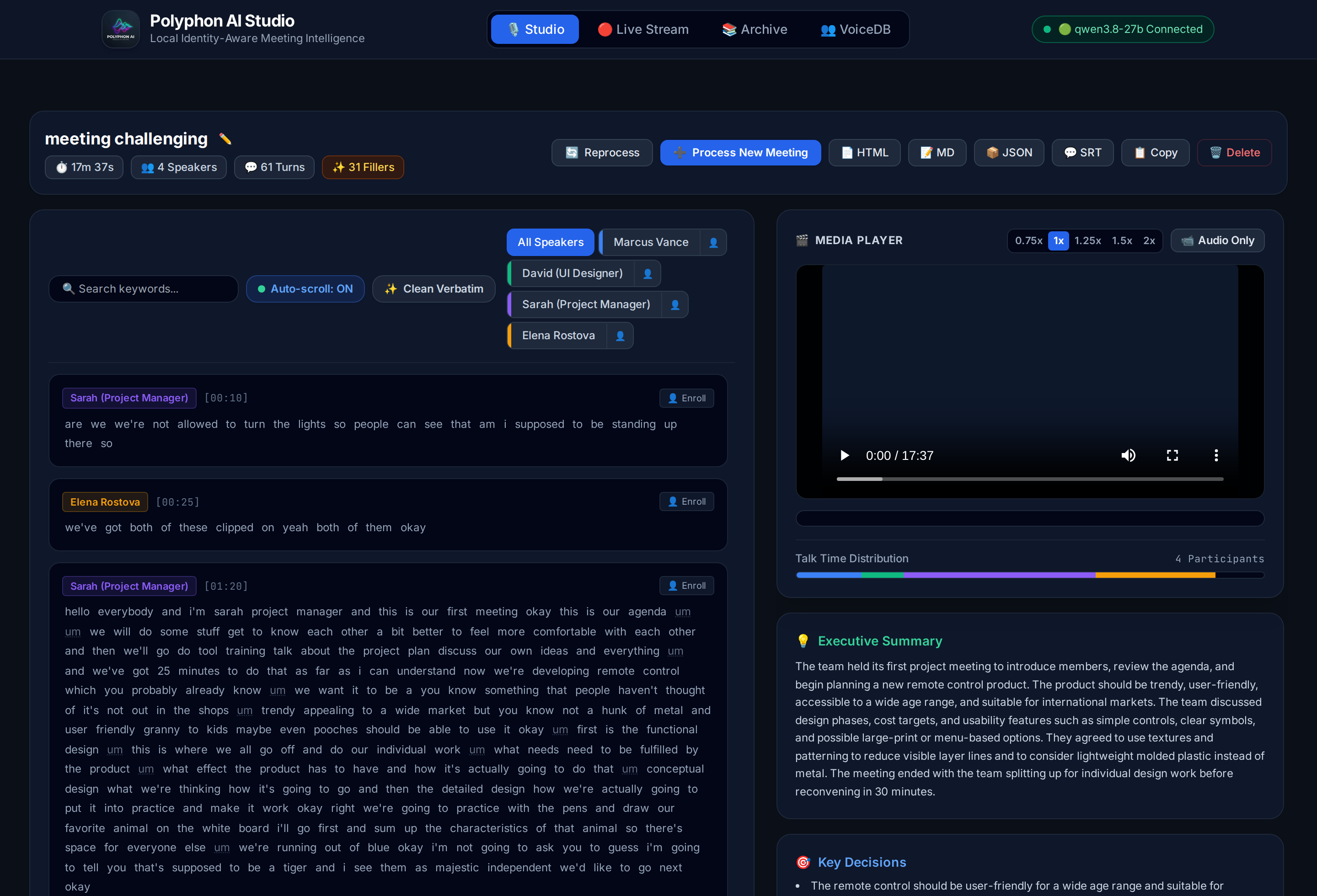
Core Tabs & Capabilities:
1. 🎙️ Studio Workspace ([🎙️ Studio])
- 2-Column Synchronized Workspace:
- Left Column (Dialogue Transcript): Scrollable dialogue feed with instant keyword search (
🔍 Search keywords...), speaker filter chips with inline👤enroll buttons, auto-scroll toggle, Clean Verbatim toggle (✨ Clean Verbatim), and word-level karaoke glow (.k-word.current) that illuminates words in real-time as spoken. - Right Column (Media & Intelligence): Unified HTML5 audio/video player (supporting MP4, WebM, WAV, MP3, M4A, FLAC, MKV), proportional multi-speaker talk time distribution bar, Executive Summary, Key Decisions, checkable Action Items with assignee badges, and Topics cloud.
- Left Column (Dialogue Transcript): Scrollable dialogue feed with instant keyword search (
- Clean Verbatim Toggle & Filler Disfluency Filtering (
✨ Clean Verbatim):- Instant one-click toggle in the transcript toolbar between Full Verbatim (vocal disfluencies shown with a subtle dotted underline) and Clean Verbatim (fillers hidden via CSS).
- Zero Timing Drift: Filler filtering preserves all underlying word tokens and exact millisecond start/end timestamps. Audio scrubbing, word-level seeking, and karaoke illumination remain 100% frame-accurate.
- Clickable Filler Metrics Badge (
✨ X Fillers): Prominently displays the total number of vocal disfluencies detected in the header; clicking the badge toggles Clean Verbatim mode. - Clipboard Awareness (
📋 Copy): One-click copy automatically exports clean text when Clean Verbatim is active, or full verbatim text when off. - Upload Modal Option: Toggle
[x] Clean Verbatim (Remove filler words like um, uh, er)directly during file upload.
- Playback Speed Control (
0.75x,1x,1.25x,1.5x,2x):- One-click playback speed pills in the Media Player header allow reviewing 30–60 minute recordings in half the time while word-level karaoke synchronization stays locked.
- Interactive Action Items & Quick Copy (
📋 Copy Tasks):- Check action items directly in the UI to mark tasks complete with visual strikethrough. Click Copy Tasks to copy the formatted Markdown checklist (
- [ ] task (@assignee)) straight to Slack, Jira, or Notion.
- Check action items directly in the UI to mark tasks complete with visual strikethrough. Click Copy Tasks to copy the formatted Markdown checklist (
- One-Click Transcript Copy (
📋 Copy):- Copy the full dialogue transcript with clean speaker names and timestamps (
[MM:SS] Speaker: Text) directly to clipboard.
- Copy the full dialogue transcript with clean speaker names and timestamps (
- Click-to-Seek & Bi-directional Navigation:
- Click any turn card or individual word in the transcript to jump audio/video playback directly to that exact second.
- Deterministic Auto-Scrolling:
- Automatically centers the active speaker's card smoothly once per speaker turn without interrupting ongoing speech or shifting the main page viewport.
- Live SSE Progress Tracking:
- Streaming progress bar with stage-by-stage diagnostics (Whisper transcription seconds, Pyannote diarization chunks, VoiceDB identity matching, local LLM intelligence extraction).
- On-Demand Multi-Format Exports:
- Every meeting can be exported or downloaded on the fly in 4 distinct formats:
- 📄 HTML: Standalone, self-contained interactive web report with dark mode, collapsible search, speaker analytics charts, and interactive Clean Verbatim toggle button.
- 📝 Markdown (MD): Clean meeting notes with timestamps and action item checklists (
- [ ] task (assignee)) for Notion, Obsidian, Jira, and GitHub. - 📦 JSON: Full raw manifest with millisecond timestamps and word alignments for pipelines and APIs.
- 💬 SubRip (SRT): Standard closed caption subtitle file with speaker tags for VLC, YouTube, or video editing.
- Every meeting can be exported or downloaded on the fly in 4 distinct formats:
2. 🔴 Live Stream & Dual Audio Capture ([🔴 Live Stream])
- Three Audio Ingestion Modes:
🎙️ Mic Only: Stream live directly from your physical microphone.🎙️+💻 Mic & Meeting(Dual Capture): Simultaneously captures your local microphone (you) AND remote meeting audio (Google Meet, Zoom web, Microsoft Teams, Webex, YouTube) directly in the browser via Web Audio API mixing. Zero third-party cloud bots (Fireflies/Otter), zero virtual audio cables, and zero privacy leakage. Includes step-by-step guidance modal and tab audio verification.📁 File Simulation: Decodes and resamples benchmark samples (meeting.mp4,meeting_challenging_3min.mp4) or any uploaded recording in-browser via Web AudioOfflineAudioContext, allowing real-time streaming over WebSocket (/api/stream/ws) even over plain HTTP without microphone hardware.
- Speaking Stats HUD (Real-Time Metrics):
- Displays live session telemetry above the transcript feed: total words spoken, speaking speed in Words Per Minute (WPM), and active speaker tag.
- Real-Time Diarization & Metrics:
- Spoken words and speaker turns stream into the transcript feed with real-time NVIDIA NeMo Sortformer neural diarization, live audio VU meter, talk-time distribution, and recording session timer.
- Automated Archiving:
- Automatically saves finalized audio (
.wav) and structured JSON manifests to the Archive upon clicking Stop & Finalize.
- Automatically saves finalized audio (
3. 📚 Meeting Archive & Comparison ([📚 Archive])
- Real-Time Archive Search & Filter:
- Instant client-side search bar (
🔍 Filter meetings by title, speaker...) to search through dozens of past meetings by participant name, meeting title, or summary keywords with zero latency.
- Instant client-side search bar (
- Archive Grid: Browse past meetings with duration, speakers, and turns metadata.
- Live vs Processed Badges:
🔴 Live Only: Session captured in real-time streaming; ready for one-click full AI processing.⚖️ Compared: Session has both live edge stream and offline deep AI pipeline data.
- Actions per Meeting:
▶️ Play in Studio: Open the meeting directly in the 2-column Studio player.🚀 Process: Run full offline AI pipeline (Whisper large-v3 + Pyannote 3.1 + VoiceDB + LLM) on live recordings.⚖️ Compare: Open the side-by-side comparative benchmarking modal.View Report(HTML),JSON,🗑️ Delete(safely removes audio, manifest, and reports).
4. 👥 VoiceDB Biometric Profiles ([👥 VoiceDB])
- Biometric Profile Grid: View enrolled speaker voiceprints, inspect audio sample sources, and manage identities visually.
- Audio Preview Player: Listen to sliced voice samples (
sample_<slug>.wav) for each enrolled speaker. - Profile Management: Delete outdated profiles or refresh the voice catalog.
Interactive Modals:
- 👤 One-Click VoiceDB Enrollment Modal (
#modal-enroll-speaker):- Click
[👤 Enroll]directly on any dialogue turn card or speaker filter chip while listening to a recording. - Displays the candidate speaker cluster tag (
SPEAKER_00), dialogue turn count, and full name input. - Extracts multi-segment voice embeddings across the cleanest turns using Pyannote, unit-normalizes the vector, and saves it into VoiceDB.
- Automatically slices a clean 1–5 second preview audio clip via
ffmpeg(outputs/samples/sample_<slug>.wav). - In-place DOM update instantly renames all dialogue cards and filter chips across the meeting, updates
outputs/{id}.json, and regenerates HTML/MD/SRT reports.
- Click
- ⚖️ Comparative Benchmarking Modal (
#modal-compare):- Evaluates real-time edge streaming transcription against offline multi-speaker diarization and executive intelligence.
- Four KPI summary cards: Dialogue Turns, Word Count, Speakers, and Intelligence status.
- Dual synchronized scrolling columns: Live Stream Transcript (real-time Whisper) vs AI Processed Pipeline (large-v3 + Pyannote 3.1 + LLM).
- 🎙️ Microphone & LAN Security Guide (
#modal-mic-help):- Comprehensive instructions for Chrome/Edge flags, HTTPS configuration, and step-by-step guidance for selecting meeting tabs and ensuring "Also share tab audio" is enabled.
Modular Static Frontend Architecture:
The Polyphon Studio web frontend is cleanly structured with zero build tooling (no Node.js/NPM/bundler needed), served directly by FastAPI:
src/polyphon/server/static/
├── index.html         (Pure semantic layout & modals — 761 lines)
├── css/
│   └── app.css        (Custom typography, karaoke glow, scrollbars)
└── js/
    ├── state.js       (Shared global state & constants)
    ├── utils.js       (escapeHtml, hashString, toast alerts)
    ├── navigation.js  (Tab switching & system health checks)
    ├── stream.js      (Live stream, dual audio capture, Web Audio mixer, VU meter)
    ├── studio.js      (Upload dropzone, SSE progress, karaoke player, filtering)
    ├── archive.js     (Archive cards, batch processing, delete, open in Studio)
    ├── compare.js     (Side-by-side benchmark modal: live vs processed)
    ├── voicedb.js     (VoiceDB profile cards & sample audio preview)
    ├── enroll.js      (One-click voicedb enrollment modal & in-place DOM updates)
    └── main.js        (DOMContentLoaded bootstrap & recurring timers)
🧠 Local LLM Serving (ROCm / Strix Halo)
For the Semantic & LLM Layer (--summarize), Polyphon interfaces with an OpenAI-compatible local server. On AMD Strix Halo APUs (128 GB unified memory), you can run a hardware-accelerated local server using llama-server-rocm with speculative decoding (MTP) and unified memory optimization:
llama-server-rocm \
  --model ~/models/Qwen3.8-27B-Q4_K_M.gguf \
  --alias qwen3.8-27b \
  --n-gpu-layers 99 \
  --ctx-size 131072 \
  --parallel 1 \
  --flash-attn on \
  --jinja \
  --temp 0.7 --top-p 0.8 --top-k 20 --min-p 0 \
  --spec-type draft-mtp --spec-draft-n-max 2 \
  --kv-unified --fit off \
  --host 0.0.0.0 --port 8080
Key Optimizations for Polyphon:
--spec-type draft-mtp --spec-draft-n-max 2: Uses Qwen's Multi-Token Prediction heads for up to 1.8× faster token generation.--kv-unified --fit off: Specifically targets AMD APU unified memory architecture and preventsllama.cppfrom defensively truncating context or memory allocation.--flash-attn on: Ensures high throughput during the prompt prefill stage when processing long transcripts.- OpenAI-Compatible Endpoint: Exposes standard endpoints at
http://localhost:8080/v1for Polyphon's extraction pipeline.
🧪 Development & Testing
Run all quality checks and tests seamlessly using uv:
# Run unit and integration tests (clean warning-free output via pyproject.toml filterwarnings)
uv run pytest -v

# Run tests with short traceback on failures
uv run pytest -q --tb=short

# Code linting and style checking
uv run ruff check .
uv run black --check .

# Auto-fix linting and format code
uv run ruff check --fix .
uv run black .

# Build distribution wheel and source tarball
uv build
🐍 Python API
Offline Batch & File Pipeline
from polyphon import PolyphonEngine

# Initialize engine (supports CPU, CUDA, and ROCm)
engine = PolyphonEngine(asr_model="large-v3", diarizer="pyannote", device="auto")

# Process audio or video file
result = engine.process("executive_sync.mp4", diarize=True, identify_speakers=True, summarize=True)

# Access structured output
print(f"Duration: {result.duration:.1f}s")
for segment in result.segments:
    print(f"[{segment.start:.2f}s - {segment.end:.2f}s] {segment.speaker_name}: {segment.text}")

# Extract structured insights (if summarize=True)
if result.insights:
    print("\n--- Action Items ---")
    for item in result.insights.action_items:
        print(f"- [{item.assignee}] {item.task}")
Real-Time Streaming Pipeline
from polyphon import StreamingPolyphonEngine, SortformerDiarizer

# Initialize streaming engine with low-latency NeMo Sortformer neural diarizer
stream_engine = StreamingPolyphonEngine(diarizer=SortformerDiarizer(), chunk_duration=1.5)
stream_engine.start_stream()

# Feed incremental audio chunks (16kHz float32 or int16 PCM bytes)
stream_engine.feed_audio(audio_chunk)

# Process step and receive real-time event
event = stream_engine.process_step()
if event and event.text:
    print(f"[{event.stream_time:.1f}s] {event.active_speaker}: {event.text}")

# Finalize meeting recording and generate full result
result = stream_engine.stop_stream(session_name="live_standup")
Output Schema (JSON)
{
  "duration": 1420.5,
  "language": "en",
  "speakers": [
    { "id": "spk_001", "name": "Alice", "confidence": 0.94 },
    { "id": "spk_002", "name": "Bob", "confidence": 0.89 }
  ],
  "segments": [
    {
      "start": 12.42,
      "end": 17.80,
      "speaker_id": "spk_001",
      "speaker_name": "Alice",
      "text": "Let's review the quarterly infrastructure spend.",
      "words": [
        { "word": "Let's", "start": 12.42, "end": 12.65, "score": 0.98 },
        { "word": "review", "start": 12.68, "end": 13.05, "score": 0.96 }
      ]
    }
  ],
  "insights": {
    "summary": "The team reviewed infrastructure costs and approved migration plans.",
    "topics": ["infrastructure", "budget", "hardware"],
    "decisions": ["Proceed with local ROCm deployment"],
    "action_items": [
      { "task": "Benchmark ROCm execution on Strix Halo", "assignee": "Bob", "due_date": null }
    ],
    "speaker_stats": {
      "Alice": { "talk_time_seconds": 820.2, "percentage": 57.7, "segment_count": 14 },
      "Bob": { "talk_time_seconds": 600.3, "percentage": 42.3, "segment_count": 9 }
    }
  }
}
👤 VoiceDB & Speaker Identity
Unlike conventional tools that output arbitrary labels (SPEAKER_00), Polyphon maintains a persistent local biometric vector catalog:
- Acoustic Profiling: Stores normalized voice embedding centroids per enrolled identity.
- Continuous Learning (70/30 Running Centroid Adaptation): When updating or re-enrolling an existing identity, VoiceDB blends 70% of the existing centroid with 30% of the newly observed turn embeddings: $$\mathbf{v}{\text{combined}} = \text{norm}(0.7 \times \mathbf{v}{\text{existing}} + 0.3 \times \mathbf{v}_{\text{new}})$$ This online exponential adaptation prevents catastrophic forgetting while allowing the voice model to adapt to new microphones, vocal strain, laughter, and room acoustics over time.
- Multi-Cluster Resolution: When unsupervised diarization detects 2 or more clusters for a single speaker (common in solo recordings or phone calls), assigning or enrolling both to the same name merges all turns, combines talk-time statistics to 100%, and refines the speaker's VoiceDB profile.
- Adaptive Score Normalization (AS-Norm): Calibrates cross-session microphone and acoustic drift to prevent false-positive matches.
- Interactive One-Click Labeling: Directly in Polyphon Studio, users can click the 👤 badge next to any speaker to enroll them into VoiceDB or merge them with an existing profile in real time.
🌐 REST & WebSocket API Reference
When running polyphon serve, Polyphon exposes an asynchronous REST API and WebSocket gateway for browser frontends, local automations, and agentic workflows:
| Method | Endpoint | Description |
|---|---|---|
GET |
/ |
Serves the interactive Polyphon Studio web application |
GET |
/api/system |
Returns server health, model versions, local LLM status, and VoiceDB stats |
POST |
/api/upload |
Uploads an audio or video file for processing (multipart/form-data) |
POST |
/api/process |
Enqueues a full pipeline job (diarize, identify, infer_names, auto_enroll, summarize) |
GET |
/api/jobs/current |
Returns the current active background processing job state |
GET |
/api/jobs/{id} |
Retrieves status, percentage, stage, and errors for a specific job |
GET |
/api/jobs/{id}/events |
Real-time Server-Sent Events (SSE) stream for live progress tracking |
GET |
/api/meetings |
Lists all archived meetings with duration, speaker count, and comparison status |
GET |
/api/meetings/{id} |
Retrieves full meeting manifest, transcript segments, and live comparison data |
DELETE |
/api/meetings/{id} |
Permanently deletes an archived meeting and all associated report files |
POST |
/api/meetings/assign_speakers |
Batch assigns real speaker identities, updates transcript/stats, and optionally enrolls in VoiceDB |
GET |
/api/speakers |
Lists all enrolled speaker biometric profiles in VoiceDB |
DELETE |
/api/speakers/{id} |
Removes a speaker voiceprint profile from VoiceDB |
POST |
/api/speakers/enroll_from_meeting |
One-click VoiceDB enrollment from a meeting's dialogue turns (meeting_id, speaker_id, name) |
WS |
/api/stream/ws |
Real-time bidirectional WebSocket streaming audio input (PCM bytes) & Sortformer live events |
GET |
/reports/{filename} |
Serves or dynamically generates standalone HTML, Markdown, JSON, and SRT reports |
GET |
/media/{filename} |
Streams media files with HTTP range request (206 Partial Content) support |
⚙️ Hardware Targets
Polyphon is optimized for multi-platform local compute:
| Platform | Recommended Acceleration | Notes |
|---|---|---|
| AMD Ryzen AI Max / Strix Halo | CPU (AVX-512) + ROCm / DirectML | 128 GB Unified Memory allows Whisper Large + Diarizer + 32B/70B LLM simultaneously without VRAM swapping |
| NVIDIA RTX 30/40/A-series | CUDA (FP16 / BF16) | Peak throughput with flash-attention and batched inference |
| Apple Silicon (M-series) | MPS / Metal (mlx / llama.cpp) |
Efficient unified-memory execution |
| Modern x86_64 CPU | CTranslate2 + OpenVINO | Excellent baseline throughput using AVX-512 |
👤 Author
- seehiong (@seehiong)
📄 License
Polyphon is released under the Apache 2.0 License. Copyright © 2026 seehiong.
1 maintainer

Metadata
1 maintainer
Release files for polyphon-ai 0.2.0
For a detailed explanation of source distributions (sdists) and built distributions (wheels), please see the package formats documentation.
Source distribution (sdist)
| File | Size | Uploaded | |
|---|---|---|---|
| polyphon_ai-0.2.0.tar.gz | 1.7 MB | Details |
Built distribution (wheel)
| File | Interpreter | ABI | Platform | Reset |
|---|---|---|---|---|
| polyphon_ai-0.2.0-py3-none-any.whl | Python 3 | none | any | Details |
Total release size: 2.2 MB
Release files / polyphon_ai-0.2.0.tar.gz
| Download URL | polyphon_ai-0.2.0.tar.gz |
|---|---|
| Size | 1.7 MB |
| Tags | Source |
|
SHA-256 checksum How to use checksums |
6b7cbcdf42b16234fd1e037121452d46d116ea2a1f57126f65c6ac2beceb4d3e
|
|
BLAKE2b-256 checksum How to use checksums |
d9e99a6a316d230dfd5b437c70121bc551efcdd031274748caad06c773c1f3b2
|
| Upload date | |
|
Uploaded using Trusted Publishing? What is trusted publishing? |
No |
| Uploaded via |
uv/0.5.26
|
Release files / polyphon_ai-0.2.0-py3-none-any.whl
| Download URL | polyphon_ai-0.2.0-py3-none-any.whl |
|---|---|
| Size | 508.2 kB |
| Tags | Python 3 |
|
SHA-256 checksum How to use checksums |
21edffca5bb980b4791132a950cc8d9ad1812d6d8b95d5de1ca263ba593c3afc
|
|
BLAKE2b-256 checksum How to use checksums |
70ce254b0548b64043829b1bad80b1bd8086d52f155e86a0e91c363cbe16cff7
|
| Upload date | |
|
Uploaded using Trusted Publishing? What is trusted publishing? |
No |
| Uploaded via |
uv/0.5.26
|














