

A self-hosted AI agent that works toward your goals, on your own machine.


Quick Start · Docs · Examples · Comparison
POLYROB is an AI agent you run yourself. Give it a task or a standing goal in plain language: it plans the steps, uses tools (web, files, code, a shell, mail, MCP servers), recovers from its own errors, and reports back — in your terminal, a web console, a REST API, or a chat app such as Telegram or email.
It is for people who want an agent that keeps working between messages and whose data stays on their own box. The agent loop and the LLM layer are native code (no third-party agent framework), memory and state are local SQLite files, and anything that spends money waits behind caps and your approval.
Self-hosted, not a SaaS. There is no hosted version. Your keys, your data, your machine; only the LLM calls (and the tools you turn on) leave it.
Quick Start
On Linux, macOS or WSL2 (no Python 3.11+? The installer fetches a private copy):
curl -fsSL https://polyrob.dev/install.sh | bash
The script clones the source into ~/.polyrob/src, builds a virtualenv, puts polyrob on your
PATH and starts the setup wizard. To read it first (recommended):
curl -fsSL https://polyrob.dev/install.sh -o install.sh && less install.sh && bash install.sh
Or from PyPI:
pipx install polyrob          # or: pip install polyrob   ("polyrob[all]" for every extra)
polyrob setup                 # provider key, model, persona, owner, autonomy, chat surface
polyrob doctor                # preflight: keys, the model it will pick, memory, health
polyrob                       # talk to the agent
Where things live:
| What | Where |
|---|---|
| Configuration and keys | ~/.polyrob/.env |
| Data (memory, goals, sessions, skills) | ~/.polyrob/data, for every process — set POLYROB_DATA_DIR to move it |
| Source and virtualenv (install script only) | ~/.polyrob/src, ~/.polyrob/venv |
Keep it running after you close the terminal:
polyrob service install       # a systemd user unit or a launchd agent
polyrob service restart       # or /restart from chat; it finishes the current work first
Update a git install with polyrob update --apply (snapshot, migrate, verify, automatic rollback);
for pip or pipx, polyrob update prints the command to run. Coming from 1.7.0? Read the
1.7.1 note first. Remove it with polyrob uninstall.
Full walkthrough: getting started ·
upgrading.
What it does
Works toward goals. A durable goal board and scheduled jobs ("every monday 09:00", 30m,
cron syntax) keep work going between your messages and across restarts. Every unattended run stops
at one step cap and one spend cap and says why it stopped. When it needs you, it raises an action
card; once you decide, it carries on. → Jobs, goals, decisions and pauses
Learns from use. It keeps cross-session memory, writes and retires its own skills, and wakes
itself to follow up on unfinished work. The CLI turns on the interactive tools by itself; the
learning and self-directed loops need one more switch, polyrob autonomy on. Every skill or
identity edit the agent writes waits in quarantine for your review.
→ Skills · the autonomy dial
Uses real tools. Core ships web reading (web_fetch, no browser needed) and Playwright
automation, files, coding tools, git and GitHub, a persistent shell with background jobs, opt-in
code execution, the agent's own mailbox, an MCP client, and sub-agents with a narrowed toolset.
First-party packs add more and ship inside the same install: discovery (AnySite structured
data, Perplexity search), x (the agent's X account), markets (Polymarket, Hyperliquid) and
remote sandbox backends. → Packs · Architecture
You choose how much it may do. /mode says what runs without asking; /mode ask-first,
standard or on-my-own sets one level.
Meets you where you are. The terminal (polyrob), a web console, a REST API with SSE, an
OpenAI-compatible /v1 endpoint, the A2A agent protocol, an MCP server (off by default), and chat
surfaces: Telegram, email, WhatsApp, Discord, Slack, Signal, Feishu / Lark and DingTalk. Run every
enabled chat surface in one process with polyrob gateway.
→ CLI · Chat commands · API
Any model. OpenAI, Anthropic, Google Gemini, DeepSeek, OpenRouter and NVIDIA NIM built in, plus
a catalog of other providers, OAuth subscription plans and any OpenAI- or Anthropic-compatible
endpoint you declare in ~/.polyrob/providers.yaml. It fails over between providers, caches the
stable prompt prefix, and switches model live with /model <name> from the next step.
→ Providers and models
The console
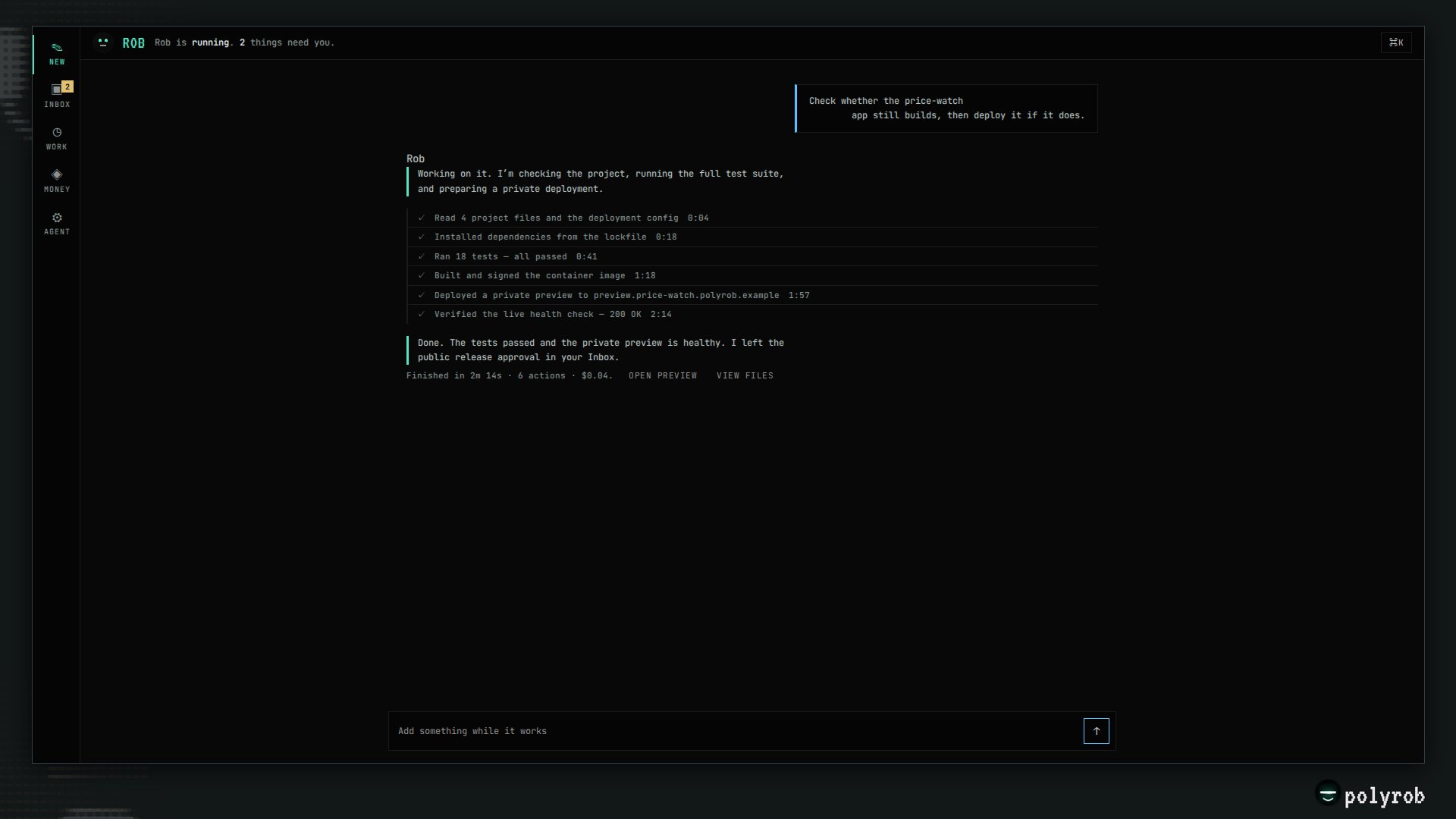
Chat, Inbox (only what needs you), Work (running, next, scheduled, apps), Money and Agent (identity,
memory, capabilities, health) in one owner surface over the same goal board, approval queue and
ledger as the CLI. Start it with polyrob dashboard and open http://localhost:5050.
→ Console guide
Safety, as mechanisms
- Untrusted input is data. Web pages, mail and tool results reach the model inside an untrusted-content frame, never as instructions.
- Strangers cannot steer it. On a chat surface only the owner steers. A third party the agent contacted can only return data, and while that data is in the session the high-impact tools (money, outbound messages, code execution, delegation) are off until the owner's next turn. Group rooms get a read-only toolset unless you grant a bundle; money and owner data stay out. → Owner controls · Groups
- Least-privilege sub-agents. A delegated worker gets a narrowed toolset — no money, wallet, shell, code execution, raw HTTP or self-modification tools — and cannot delegate again.
- Self-edits leave a trail. New skills go live with a rollback; identity edits and anything from an untrusted session go to quarantine first.
- Code execution needs a sandbox on a server. It is off by default; the local subprocess
backend is a convenience for your own machine, and a server refuses any backend that is not a
sandbox (set
CODE_EXEC_BACKEND=docker). Child processes never inherit your API keys. - A shell command guard. Every shell line is classified: a floor nothing lifts, a dangerous class that waits for you, and unattended runs refuse it.
- Bounded runs. Step and spend caps on every autonomous run, sub-agents included.
The full model, including what each gate does not do: security model. Defaults for every flag: docs/CONFIGURATION.md.
Money and crypto (optional)
The agent can hold a wallet, pay for resources over x402, send invoices and detect their settlement on-chain, read token and wallet data, and trade within a mandate you set. Read-only token data is on by default; nothing that spends or signs is. Every outward payment is capped and goes through an approval rail you control.
⚠️ The crypto code is unaudited. The wallet, signing and payment code (the
cryptoextra) has had no independent security audit, ships with no warranty, and can lose funds. Prefer testnets. See SECURITY.md.
→ Payments · Wallet · On-chain
Self-hosting
Three postures, chosen from how you bind the console: local (loopback), own_ops (a public host
with owner login) and multitenant (wallet sign-in and billing). docker compose up builds the
server, the browser and vector memory, and keeps data in a volume.
→ Self-hosting · Deployment postures
For developers
git clone https://github.com/theselfruleorg/polyrob
cd polyrob
bash install.sh                      # installs this tree: venv, editable install, wizard
# or by hand:
python -m venv venv && source venv/bin/activate
pip install -e ".[dev,all]"
pytest tests/unit -q
ruff check .
The layers: agents/ (the agent loop), modules/ (LLM, memory, database), tools/, surfaces/
(chat apps), api/, cli/, webview/ (console), cron/ (scheduled runs), core/ (config,
policy, identity), packs/ (first-party packs) and polyrob/ (the pack SDK).
→ Architecture · AGENTS.md (contributor guide) ·
CONTRIBUTING.md
Documentation
Start
| Page | What it covers |
|---|---|
| Getting started | Install, first run, extras, where data lives |
| CLI | Every polyrob shell command |
| Chat commands | Slash commands on the terminal, chat apps and the console |
| Configuration | Providers, memory, the autonomy dial, tools, surfaces, preferences |
| FAQ | Short answers, and troubleshooting by the exact text you see |
Use
| Page | What it covers |
|---|---|
| Jobs, goals, decisions and pauses | Standing work, the goal board, the inbox |
| Owner controls | Stop, pause, resume; approvals; first contact |
| Conversation | One conversation across phone, console and terminal |
| Skills | Install, author and manage skills |
| Packs | First-party and third-party packs |
| Groups | Group chats: allowlist, roles, per-chat policy |
| X (Twitter) | The agent's X account |
| Feishu / DingTalk | The Feishu / Lark and DingTalk surfaces |
| Console | The web console |
Run
| Page | What it covers |
|---|---|
| Operate the service | Start, stop, restart and update the background service |
| Upgrading | Updates, snapshots, rollback, version notes |
| Self-hosting | Servers, Docker, units |
| Deployment postures | local, own_ops, multitenant |
| Profiles | Several isolated agents on one machine |
| Instances | Identity: SOUL, character, avatar |
| Migration | Moving from another agent framework |
Money
| Page | What it covers |
|---|---|
| Payments | Invoicing, settlement, credits, the ledger, the arming ladder |
| Wallet | The agent wallet, signer, caps, paying over x402 |
| On-chain | Token data, guarded transfers and swaps, the trading mandate |
Reference
| Page | What it covers |
|---|---|
| API | REST, A2A, OpenAI-compatible /v1, MCP server |
| Architecture | How the parts fit together |
| Security model | Each gate, and the OS or container boundary behind it |
| Rails verification | What counts as proof that a send landed |
| docs/CONFIGURATION.md | Every environment flag and its default |
| Comparison · Examples | Other frameworks; real usage |
| CHANGELOG · SECURITY | Changes; reporting a vulnerability |
Contributing and license
Contributions are welcome — see CONTRIBUTING.md. Report vulnerabilities as SECURITY.md describes. MIT licensed (LICENSE); name and brand use in TRADEMARK.md; third-party attributions in THIRD-PARTY-NOTICES.md.
POLYROB — by The Selfrule Organization
1 maintainer

Metadata
1 maintainer
Release files for polyrob 1.7.9
For a detailed explanation of source distributions (sdists) and built distributions (wheels), please see the package formats documentation.
Source distribution (sdist)
| File | Size | Uploaded | Provenance | Actions |
|---|---|---|---|---|
| polyrob-1.7.9.tar.gz | 9.1 MB | Without provenance | Details for polyrob-1.7.9.tar.gz |
Built distribution (wheel)
| File | Interpreter | ABI | Platform | Actions Reset |
|---|---|---|---|---|
| polyrob-1.7.9-py3-none-any.whl | Python 3 | none | any | Details for polyrob-1.7.9-py3-none-any.whl |
Total release size: 18.5 MB
Release files / polyrob-1.7.9.tar.gz
| Download URL | polyrob-1.7.9.tar.gz |
|---|---|
| Size | 9.1 MB |
| Tags | Source |
|
SHA-256 checksum How to use checksums |
e4f41d58c88272eb3188bf1d366660f0e6c5ab2c03877bde3d52c0fbc3e8a67b
|
|
BLAKE2b-256 checksum How to use checksums |
5c56717cdd6e2a0742d231fbe5f58c46bd07238fb11b8437433596b9a63ba602
|
| Upload date | |
|
Uploaded using Trusted Publishing? What is trusted publishing? |
No |
| Uploaded via |
twine/7.0.0 CPython/3.12.16
|
Release files / polyrob-1.7.9-py3-none-any.whl
| Download URL | polyrob-1.7.9-py3-none-any.whl |
|---|---|
| Size | 9.4 MB |
| Tags | Python 3 |
|
SHA-256 checksum How to use checksums |
cf1643483d2e3ffb43e7037d32e059358daf9e1b0321cc0d9e5ffdebaac25887
|
|
BLAKE2b-256 checksum How to use checksums |
19df35543ed2b25de59e20e438b9a8bdb38db98b7393a61914feb1c3bb7fc552
|
| Upload date | |
|
Uploaded using Trusted Publishing? What is trusted publishing? |
No |
| Uploaded via |
twine/7.0.0 CPython/3.12.16
|
Security for polyrob 1.7.9
Provenance
Provenance describes where a file came from. On PyPI, provenance is shared via attestations, which provide a verifiable record of the build or publishing details. View details, limitations and caveats.
No provenance found
None of the files in this release were uploaded with provenance metadata.
A note on package security
PyPI is a repository for distributing packages, not a service for auditing them. While third-party security researchers and our staff do their best to detect and remove malicious packages, PyPI cannot guarantee the quality, security or suitability of any given package.
To learn more about protecting yourself from malicious actors, visit our package security documentation.














