
CLI Pomodoro Timer

Project description
pomodorotimer (CLI Pomodoro Timer)
Console Pomodoro timer with playing the melody of the signal or with the generation of an end time signal. Displays a push notification on Linux and Mac OS X.
Support: 

Pomodoro Technique:
Pomodoro Technique - see
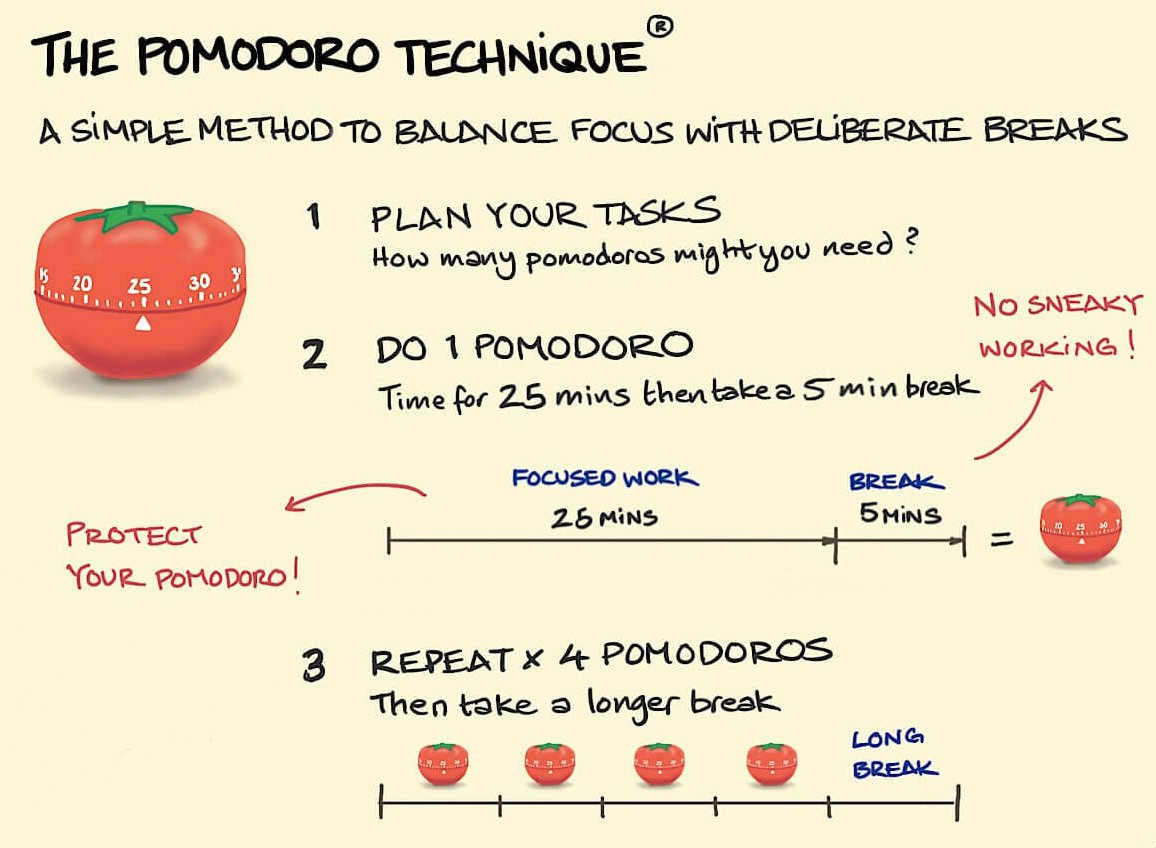
We will use the traditional Pomodoro scheme:
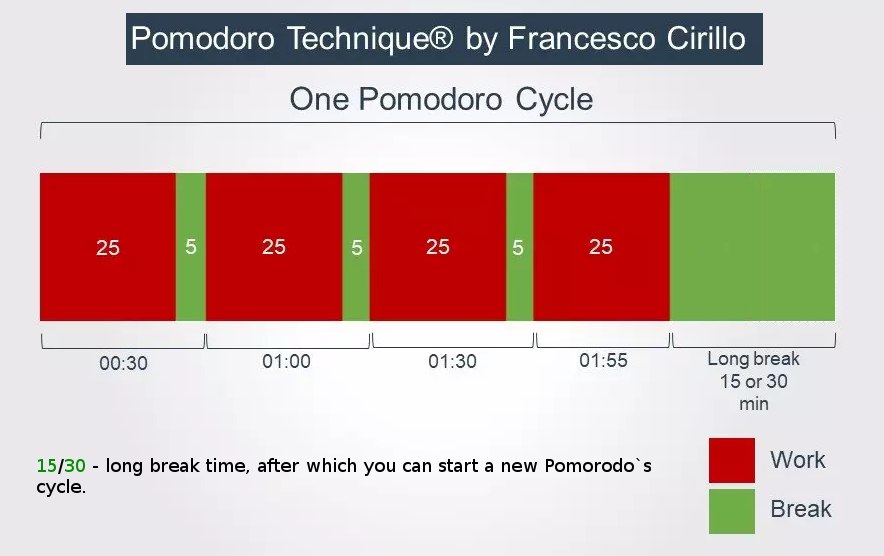
It is important:
According to the principle of the Pomodoro technique - if you are distracted while doing work, then you must interrupt the current time and start a new Pomodoro. And this means that you need to write time in to the database only after the specified time has passed and not earlier.
If you follow this principle, the Pomodoro Technique will be for you exactly the tool for which it was invented, namely, not to calculate the time of your work and breaks in work, but to make you concentrate on continuous and concentrated execution of works during one Pomodoro, i.e. within 25 minutes.
We call the program from any directory in the console and set the countdown time:

When the time ends, a sound signal will be played, push notification will be displayed and it is proposed to enter a new countdown time. And also, it will display the time that is OUT, in the form of a colored time bar, where:
- red color - working time (25 minutes)
- green color - time for a short or long break (5, 15 or 30 minutes)




The type of push notification depends on your OS and the type of graphical shell used, for example:

How to install:
From PyPI:
pip install pomodorotimer
From sources:
Alternatively you can install pomodorotimer from sources directory:
git clone https://github.com/patsuckow/pomodorotimer
cd pomodorotimer
pip install -r requirements.txt
pip install .
cd ..
rm -rf pomodorotimer
How run pomodorotimer:
pomodoro
Work with statistics Pomodoro`s:
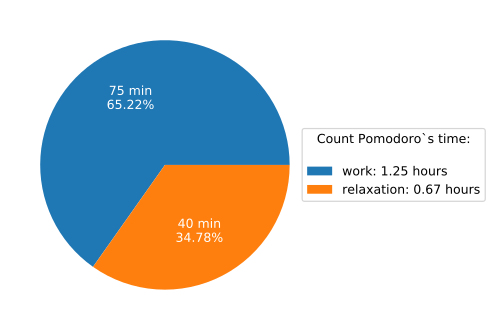
Get statistics today:
pomodoro --statistic=today
We get something like this in the browser window:
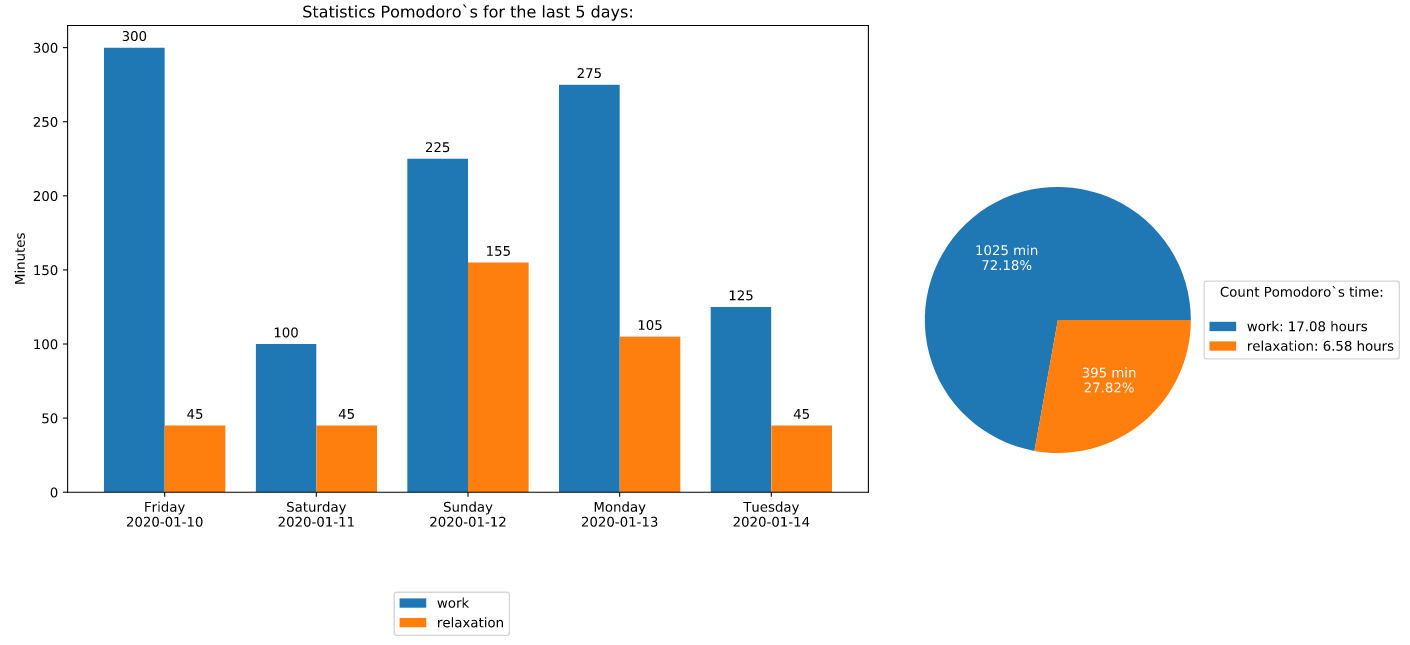
All-Time Statistics:
pomodoro --statistic=all
We get something like this in the browser window:
Delete (clear) statistics for today:
pomodoro --statistic=delete-today
Delete (clear) all statistics:
pomodoro --statistic=delete-all
Requirements:
See in requirements.txt
pomodorotimer works with python 3.10.13 or higher.
How uninstall pomodorotimer 😭:
pip uninstall pomodorotimer
Licence:

Authors:
Alexey Patsukov 🇷🇺 - GitHub profile
Submit issues
If you spotted something weird in application behavior or want to propose a feature you are welcome.
Write code
If you are eager to participate in application development and to work on an existing issue (whether it should be a bugfix or a feature implementation), fork, write code, and make a pull request right from the forked project page.
Spread the word
If you have some tips and tricks or any other words that you think might be of interest for the others — publish it wherever you find convenient.
Read also:
Release history Release notifications | RSS feed


Download files
Download the file for your platform. If you're not sure which to choose, learn more about installing packages.
Source Distribution
Built Distribution
Filter files by name, interpreter, ABI, and platform.
If you're not sure about the file name format, learn more about wheel file names.
Copy a direct link to the current filters
File details
Details for the file pomodorotimer-0.2.3.tar.gz.
File metadata
- Download URL: pomodorotimer-0.2.3.tar.gz
- Upload date:
- Size: 209.1 kB
- Tags: Source
- Uploaded using Trusted Publishing? No
- Uploaded via: twine/4.0.2 CPython/3.11.7
File hashes
| Algorithm | Hash digest | |
|---|---|---|
| SHA256 |
2380e390fc61fcce33db4b0122c13153b414fde6ef0b4bceec2dda739057f3bc
|
|
| MD5 |
2119f861d1ebf32e1550694921023fbc
|
|
| BLAKE2b-256 |
5b7d5e34d647642f61507bc372bdfd0300b16f04ce1311e8b2da41df6cb6fef2
|
File details
Details for the file pomodorotimer-0.2.3-py3-none-any.whl.
File metadata
- Download URL: pomodorotimer-0.2.3-py3-none-any.whl
- Upload date:
- Size: 208.3 kB
- Tags: Python 3
- Uploaded using Trusted Publishing? No
- Uploaded via: twine/4.0.2 CPython/3.11.7
File hashes
| Algorithm | Hash digest | |
|---|---|---|
| SHA256 |
038160bc2233344abdd12abe2300ac4a6eb5badd5b717ba77690e1cb1da481df
|
|
| MD5 |
29bb4f7191afe4ff1a081a3e6be0c909
|
|
| BLAKE2b-256 |
5ff8de3a082b883b541bd8dabc149e1dc08729e8be6eaeeb922fe0d392f12ddd
|






