
Praetorian CLI and SDK






🔗 Guard Platform 📖 Documentation 🔖 PyPI
Table of Contents
Description
Praetorian CLI and SDK are open-source tools for interacting with our products and services. Currently, they support
access to Guard, our
offensive security platform.
The SDK exposes the full set of APIs that the Guard UI uses.
The CLI is a fully-featured companion to the Guard UI.
Getting Started
Prerequisites
- Python v3.10 or above
- pip v23.0 or above
Installation
Install the Python package:
pip install praetorian-cli
Install from source
git clone https://github.com/praetorian-inc/praetorian-cli.git
cd praetorian-cli
pip install -e .
Configure authentication
guard configure
Or set environment variables:
export PRAETORIAN_CLI_API_KEY_ID=your-api-key-id
export PRAETORIAN_CLI_API_KEY_SECRET=your-api-key-secret
Signing up
Register for an account for Guard using the instructions in our documentation.
Authentication
Once you can properly access Guard through the UI, you can obtain API credentials by clicking the Praetorian icon in the top right corner -> User Profile -> API Keys. Be sure to carefully copy the API credentials you created as you will need to provide them to the CLI for interacting with Guard.
Note: SSO Organizations should provision access through API Keys as well.
Using API Keys
This is the authentication method for CLI. You can authenticate using either a keychain file or environment variables.
Using the keychain file
This method stores your API key in a keychain file.
- Run
guard configureand follow the prompts to set up authentication. Use the default values forprofile name,URL of backend API, andclient ID. - It creates
~/.praetorian/keychain.ini, which should read like this:
[United States]
name = guard
client_id = 795dnnr45so7m17cppta0b295o
api = https://d0qcl2e18h.execute-api.us-east-2.amazonaws.com/chariot
api_key_id = your-api-key-id-here
api_key_secret = your-api-key-here
Using environment variables
This method uses in-memory environment variables to pass your API key to the CLI. There is no need for a keychain file on disk. This enables you to choose a credential storage method suitable for your use cases. To use this method, set the following environment variables:
export PRAETORIAN_CLI_API_KEY_ID=your-api-key-id-here
export PRAETORIAN_CLI_API_KEY_SECRET=your-api-key-here
The backend API URL and the Cognito emulator endpoint (aws_endpoint_url)
must be HTTPS; the CLI refuses to send credentials over plaintext HTTP. For local development against a loopback endpoint (localhost,
127.0.0.1, ::1), set PRAETORIAN_CLI_ALLOW_HTTP_LOOPBACK=1.
For more advanced configuration options or managing access in SSO organizations see the documentation on configuration.
Using the CLI
The CLI is a command and option utility for accessing the full suite of Guard's API. You can see the documentation for commands
using the help option:
guard --help
As an example, run the following command to retrieve the list of all assets in your account:
guard --account guard+example@praetorian.com list assets
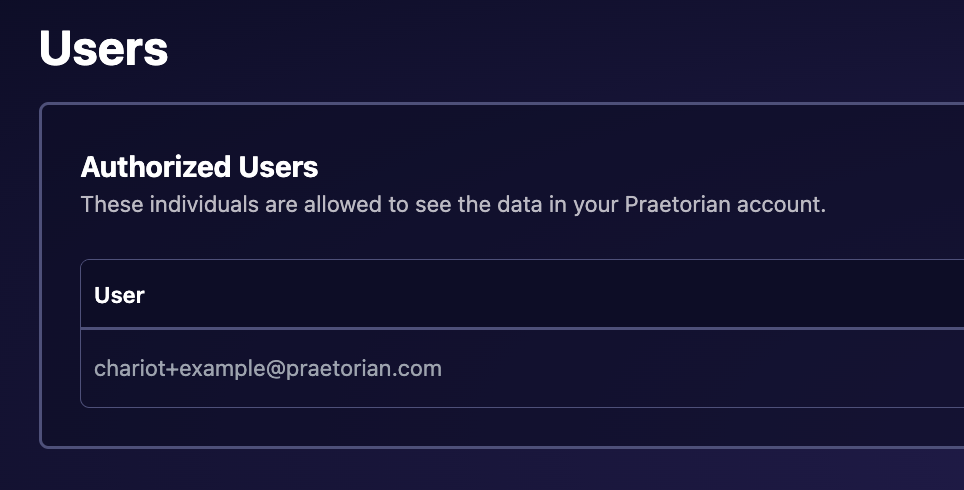
You can obtain the account argument by viewing the email of the first user on the Users page in your Guard account, as shown below:
To get detailed information about a specific asset, run:
guard --account guard+example@praetorian.com get asset <ASSET_KEY>
Aegis v2 endpoints
List Aegis endpoints or open the interactive endpoint console:
guard aegis list --details
guard aegis
Aegis v2 support includes durable online/offline inventory, enrollment approval, endpoint-compatible capability execution, Linux user and Cloudflare tunnel management and status diagnostics, endpoint-bound Hunts, host egress policy, verified artifact downloads, and explicit session/task/operation cancellation.
guard aegis enrollment inspect <USER_CODE>
guard aegis enrollment approve <USER_CODE>
guard agent endpoint status <CONVERSATION_ID>
See Aegis endpoints for enrollment, interactive commands, endpoint execution, tunnels, users, and policy management.
AI Hunts
Launch Hunts across External, Internal, Cloud, Web Application, and LLM Application surfaces:
guard hunt launch
guard hunt launch --scope-mode specific --scope example.com --yes
guard hunt launch --internal --endpoint <ENDPOINT_ID> \
  --scope 10.20.30.0/24 --confirm-endpoint --yes
Use guard hunt open <HUNT_ID> for the unified Overview, Vulnerabilities,
Workflow, Log, Memory, Chat, and Approvals interface. Static commands provide
findings/evidence, finalized logs, memory CRUD, live chat and steering,
interactions, workflow status, projected cost, and pause/resume/stop/delete
lifecycle controls.
See AI Hunts for launch options, scoped credentials, keyboard controls, human-in-the-loop (HITL) approvals, and scriptable commands.
Aegis endpoint network policy
Aegis v2 endpoint policies restrict egress from every active and future workload on an endpoint, including agentic Hunt workloads. View the desired and applied revisions, protected gateway/DNS connectivity, built-in rules, and custom rules with:
guard aegis network-policy show <ENDPOINT_ID>
Add address-wide or TCP-port-specific denies using canonical IP addresses or CIDRs:
guard aegis network-policy deny add <ENDPOINT_ID> 10.20.30.0/24
guard aegis network-policy deny add <ENDPOINT_ID> 198.51.100.7 --tcp-ports 22,443
guard aegis network-policy deny remove <ENDPOINT_ID> 1
The remove command accepts either the rule number shown by show, or an exact destination plus matching --tcp-ports.
Guard supplies four built-in rules: deny-unspecified, deny-loopback,
deny-docker-api, and deny-control-plane. They can be removed or restored
explicitly:
guard aegis network-policy default remove <ENDPOINT_ID> deny-loopback
guard aegis network-policy default restore <ENDPOINT_ID> deny-loopback
Changes require confirmation unless --yes is supplied. Guard rejects
policies that conflict with protected gateway or DNS connectivity, and
revisions prevent one operator from silently overwriting another operator's
changes.
The interactive guard aegis interface exposes the same operations for the
selected endpoint through policy, policy default ..., and policy deny ....
See Host egress network policy for
all built-in rules, safety behavior, and SDK access.
Engineer VMs
Praetorian engineers can manage ad-hoc cloud workspaces with the vm command group:
guard vm launch --tier general
guard vm list
guard vm ssh <VM_ID>
guard vm code-server <VM_ID>
guard vm pause <VM_ID>
guard vm archive <VM_ID>
guard vm revive <VM_ID>
SSH uses an ephemeral keypair and short-lived VM-bound certificate through Guard's authenticated gateway. See Engineer VMs for lifecycle, access, and security details.
File upload partitions
Praetorian operators can place an upload in the Praetorian-only partition independently of its destination path:
guard add file ./narratives.md \
  --name "reports/narratives.md" \
  --praetorian
--praetorian and --public are mutually exclusive. Guard enforces operator authorization server-side; customer users cannot write to the Praetorian partition.
Update checks
After a command finishes, the CLI may check PyPI for a newer release of
praetorian-cli and print a three-line upgrade advisory to stderr. The check is
deliberately quiet and infrequent:
- At most once every 24 hours. Every attempt is recorded at
${XDG_CACHE_HOME:-~/.cache}/praetorian-cli/update-check.jsonbefore the request is made, so a refresh that fails — offline, DNS, timeout, a malformed response — is rate-limited exactly like one that succeeds, and keeps advertising the last version it did learn. Between refreshes the check reads that file and makes no network request at all — as long as the record is a plain file that belongs to you and is no larger than 64 KiB. Anything else at that path is ignored as though it were absent, so the next invocation refreshes and replaces it rather than trusting what it found. Commands that start at the same instant are excluded by a marker file created beside that record, so eight concurrent invocations perform one refresh rather than eight — including when the request fails instantly, since the attempt is recorded before it is made. A process killed mid-refresh leaves the marker behind, which defers the next refresh that is actually due rather than permitting an extra one — by up to a minute, or up to two if the clock steps backwards in between, since a marker counts as held while its age is within a minute in either direction. A relativeXDG_CACHE_HOMEis ignored in favour of~/.cache, as the base-directory spec requires — honouring it would put a separate cache in every working directory and so defeat the limit outright. If the cache directory cannot be written at all (a read-only home, one owned by another user, or one reached through a symlink), the check does not run: a probe whose rate we cannot limit is one we do not send. - Only when a human is watching. It is skipped unless both stdout and
stderr are a terminal, and skipped when
CIorGITHUB_ACTIONSis set orTERM=dumb. Piping either stream —guard list assets | jq— turns it off. A script you launch by hand from your own terminal inherits your terminal, so treat the opt-out below, not this gate, as the way to guarantee silence. - Never in place of your command's work. A command that raises skips the
check, and a group that is only delegating to a subcommand leaves the check to
the subcommand that does the work. A command that reports an error but still
exits
0is the one case where an advisory can follow a visible error. - Not on the path you run day to day. The daily refresh passes a 2-second
timeout to
requests, which bounds how long the server may go without sending data — not total wall-clock, so DNS, TLS, redirects and a slow trickle are outside it. Ordinary failures are swallowed and cannot change your exit code;Ctrl-Cand process-control exceptions raised during the check still propagate, by design, so that interrupting the CLI always works.
Disabling it
export PRAETORIAN_CLI_DISABLE_UPDATE_CHECK=1
1, true, yes or on (any case). Nothing is read or written — no request,
no cache file.
Privacy
A refresh is an unauthenticated GET to https://pypi.org/pypi/praetorian-cli/json.
It sends no account, profile, command, or argument — only what any HTTPS request
inherently reveals to the server: your IP address and the fact that some
praetorian-cli install asked for the package index at that moment. Because
every attempt is recorded before it is made and concurrent attempts are
excluded, that happens at most once per day per user account on the machine —
several users each get their own cache — so your per-command usage cadence is
not exposed. If contacting
pypi.org at all is unacceptable in your environment, set the variable above.
Operators
Interactive Console
The Guard CLI includes a Metasploit-style interactive console for operator-focused engagement workflows.
guard console
guard console --account client@example.com
The console provides:
- Engagement management — switch between accounts, view stats (seeds/assets/risks), create customers, manage vaults
- Metasploit-style tool selection —
use <tool>,show targets,set target,execute - All 141 backend capabilities — any capability can be selected via
use <name>oruse <#> - Marcus Aurelius AI — inline queries, supervised multi-agent operations, HITL approvals, and secure credential prompts
- Aegis v2 operations — endpoint inventory, capability execution, tunnels, users, egress policy, and lifecycle controls
- AI Hunts — all-surface launch, unified monitoring, steering, memory, findings, workflows, and approvals
- Fulltext search —
findfor Neo4j graph search across all entity types - Evidence hydration —
evidence <risk>fetches all scattered evidence in one view - Report generation —
report generate/report validate - Local tool execution — run installed Praetorian binaries locally, upload results to Guard
- Live job tracking —
status,jobs, real-time tool output from Marcus
Example session
guard > accounts                           # list engagements
guard > use 5                              # switch to engagement #5
guard > assets                             # list assets (scoped to engagement)
guard > risks                              # list risks
guard > show 1                             # drill into risk #1

guard > use brutus                         # select credential tester
guard (brutus) > show targets              # show valid port targets
guard (brutus) > set target 3              # pick target #3
guard (brutus) > run                       # execute (local if installed, remote otherwise)
guard (brutus) > status                    # check job results
guard (brutus) > exit                      # back to main prompt

guard > ask "summarize critical risks"     # one-shot Marcus query
guard > marcus                             # enter multi-turn conversation
marcus > @aurelius scan cloud infra        # delegate to specialist agent
marcus > back

guard > marcus read "vault/sow.pdf"        # have Marcus analyze a file
guard > marcus do "add example.com as seed" # direct instruction
guard > download proofs                     # download all proof files locally
guard > home                                # return to your own account
Install local security tools (optional)
Requires the GitHub CLI (gh) to be installed and authenticated:
guard run install brutus       # install a specific tool
guard run install all          # install all Praetorian tools
guard run installed            # check what's installed
Binaries are downloaded from praetorian-inc GitHub releases to ~/.praetorian/bin/.
Marcus Aurelius AI
Marcus is Guard's AI operator, accessible from both the CLI and the interactive console.
# One-shot queries
guard ask "how many critical risks are there?"
guard ask "show me all assets with port 22 open" --mode query

# Supervised multi-agent operations
guard agent conversation --mode agent

# File analysis and ingestion
guard marcus read "vault/engagement/sow.pdf"
guard marcus ingest "vault/nessus-export.csv" --findings
guard marcus do "generate an executive summary"
Agent mode shows named tool and delegated-agent progress. Use /agents,
/focus, and /guide to navigate and steer the tree; /stop <id-prefix> stops
one branch, while stop or Ctrl+X stops Marcus and all correlated work.
Endpoint approvals and masked one-time credential/MFA prompts are handled in
the terminal without persisting secret values in conversation history.
See Guard Interactive Console for the complete command set.
In the console, Marcus shows live tool execution:
guard > ask "analyze the top risks"
Thinking...
  → query — 14 risks done
  → query — 5 assets done
Found 14 risks across 5 assets...
Security Tools
All 141 Guard capabilities are available through the CLI. Named tools include:
| Agent | Description |
|---|---|
asset-analyzer |
Deep-dive reconnaissance & risk mapping |
brutus |
Credential attacks (SSH, RDP, FTP, SMB) |
julius |
LLM/AI service fingerprinting |
augustus |
LLM jailbreak & prompt injection attacks |
aurelius |
Cloud infrastructure discovery (AWS/Azure/GCP) |
trajan |
CI/CD pipeline security scanning |
priscus |
Remediation retesting |
seneca |
CVE research & exploit intelligence |
titus |
Secret scanning & credential leak detection |
Local execution
Tools can run locally if the binary is installed, with results uploaded to Guard:
guard run install brutus           # download from praetorian-inc GitHub
guard run install all              # install everything
guard run tool brutus 10.0.1.5     # runs locally (default if installed)
guard run tool brutus 10.0.1.5 --remote  # force remote execution
guard run installed                # show what's installed locally
Additional CLI Commands
Beyond the standard CRUD commands, the CLI includes:
# Fulltext search (Neo4j graph queries)
guard find "example.com"
guard find "CVE-2024" --type risk

# Evidence hydration
guard get risk "#risk#example.com#CVE-2024-1234" --evidence basic
guard get risk "#risk#example.com#CVE-2024-1234" --evidence full

# Reports
guard report generate --title "Q1 Pentest" --client "Acme Corp" --risks "status:OH"
guard report validate --risks "status:OH"

# One-shot Marcus AI query
guard ask "what assets have port 22 open?"

# Marcus subcommands
guard marcus read "vault/sow.pdf"
guard marcus ingest "vault/scope.md" --scope --findings
guard marcus do "add example.com as a seed and start discovery"

# Security tools (local or remote)
guard run tool brutus 10.0.1.5
guard run tool nuclei example.com --remote
guard run install brutus
guard run installed

# Engagement management
guard engagement list
guard engagement create-customer --email ops@acme.com --name "ACME Corp"
guard engagement create-vault --client acme --sow SOW-1234 --sku WAPT --github-user jdoe
Developers
Both CLI and SDK is open-source in this repository. The SDK is installed along with the praetorian-cli
package. You can extend Guard by creating scripts using the SDK.
SDK
Integrate the SDK into your own Python application with the following steps:
- Include the dependency
praetorian-cliin your project. - Import the Guard class
from praetorian_cli.sdk.guard import Guard. - Import the Keychain class
from praetorian_cli.sdk.keychain import Keychain. - Call any function of the Guard class, which expose the full backend API. See example below:
from praetorian_cli.sdk.guard import Guard
from praetorian_cli.sdk.keychain import Keychain

guard = Guard(Keychain(account='guard+example@praetorian.com'))
guard.add('asset', dict(name='example.com', dns='example.com'))
The best place to explore the SDK is the code of the CLI, especially the handlers of the CLI
You can inspect the handler code to see how each CLI command is implemented
with the SDK. The 2.6.0 release adds structured APIs under sdk.aegis,
sdk.hunts, sdk.conversations, sdk.endpoint_executions, and
sdk.credentials.
For higher-level examples and safety requirements, see Aegis endpoints, AI Hunts, and Engineer VMs.
Developing external scripts
The CLI has a scripting engine that allow external scripts to be executed within the CLI's framework, taking
advantage of the SDK, click, and authentication.
To add those external scripts to the CLI, set the PRAETORIAN_SCRIPTS_PATH
environment to point to directories where you store additional extension scripts.
Those external scripts are available under the script commands. To see a list of them:
guard --account guard+example@praetorian.com script --help
For developing scripts, you can refer to this readme file.
Running the test suite
guard test runs the integration suites that ship with the package. Some of
those suites create, modify and delete real entities in whatever account the
selected profile points at, so the command is gated.
Suites are selected with -s/--suite:
| Suite | What it runs | Touches a live account? |
|---|---|---|
safe (default) |
Local, offline unit tests | No |
coherence |
End-to-end entity lifecycle tests | Yes — creates and deletes assets, risks, settings, configurations |
cli |
CLI-level integration tests | Yes — mutating |
tui |
Terminal UI tests | No |
A bare guard test runs the safe suite only. It executes with a temporary
HOME and with credential environment variables stripped, so it cannot reach
your real credentials.
The mutating suites additionally require:
- An explicit profile and account. Both must be given and non-empty —
guard --profile <profile> --account <account> test --suite coherence. There is no fallback: an unset or blank value is an error, so the suite can never quietly run against a default profile. - Interactive confirmation. The command prints the suite, profile, account, and whether the suite is live and mutating, then asks you to confirm. Declining — or a non-interactive invocation, which cannot confirm — exits non-zero without running any test.
# Safe by default — no account is touched.
guard test

# Mutating suite: target must be explicit, and you must confirm.
guard --profile "United States" --account guard+scratch@praetorian.com \
    test --suite coherence
Never point a mutating suite at a production account. Use a dedicated scratch account whose contents you are willing to lose.
Contributing
We welcome contributions from the community, from scripts, to the core CLI and SDK. To contribute, fork this repository and following the GitHub instructions to create pull requests.
By contributing, you agree to our Code of Conduct.
Support
If you have any questions or need support, please open an issue here or reach out via support@praetorian.com.
License
This project is licensed under the MIT License - see the LICENSE file for details.
Backwards Compatibility
Guard is a rebrand of Chariot.
CLI
The guard command is the new primary CLI entry point. The legacy praetorian chariot command continues to work:
# New (preferred):
guard list assets
guard --account example@praetorian.com list assets
guard configure

# Legacy (still supported):
praetorian chariot list assets
praetorian configure
SDK
Both Guard and Chariot classes are available and interchangeable:
# New (preferred):
from praetorian_cli.sdk.guard import Guard
guard = Guard(Keychain())

# Legacy (still supported):
from praetorian_cli.sdk.chariot import Chariot
chariot = Chariot(Keychain())
Configuration
The keychain file and environment variables remain unchanged. Existing configurations will continue to work without modification.
4 maintainers


Release files for praetorian-cli 2.6.0
For a detailed explanation of source distributions (sdists) and built distributions (wheels), please see the package formats documentation.
Source distribution (sdist)
| File | Size | Uploaded | |
|---|---|---|---|
| praetorian_cli-2.6.0.tar.gz | 494.6 kB | Details |
Built distribution (wheel)
| File | Interpreter | ABI | Platform | Reset |
|---|---|---|---|---|
| praetorian_cli-2.6.0-py3-none-any.whl | Python 3 | none | any | Details |
Total release size: 1.1 MB
Release files / praetorian_cli-2.6.0.tar.gz
| Download URL | praetorian_cli-2.6.0.tar.gz |
|---|---|
| Size | 494.6 kB |
| Tags | Source |
|
SHA-256 checksum How to use checksums |
497c71b252cc4424e87edee53d007dcdf5326f0af40b0a315a419f50b46f5d50
|
|
BLAKE2b-256 checksum How to use checksums |
faeb4e4aae743d3ec2341f2d1531b499ddcf6e2648d004bceba09f38d698c6d0
|
| Upload date | |
|
Uploaded using Trusted Publishing? What is trusted publishing? |
No |
| Uploaded via |
twine/7.0.0 CPython/3.14.7
|
Release files / praetorian_cli-2.6.0-py3-none-any.whl
| Download URL | praetorian_cli-2.6.0-py3-none-any.whl |
|---|---|
| Size | 580.1 kB |
| Tags | Python 3 |
|
SHA-256 checksum How to use checksums |
4ce8d55682cf8f0169cc36ff54a2961ad36f0f55798278b5cdd78e424734dffa
|
|
BLAKE2b-256 checksum How to use checksums |
359c159a002b37b595e7beef198a2fb1ea7c553cfa17823c93e9ea0adc34b685
|
| Upload date | |
|
Uploaded using Trusted Publishing? What is trusted publishing? |
No |
| Uploaded via |
twine/7.0.0 CPython/3.14.7
|














