
Production-grade RLMs (Recursive Language Models) with tool use, built on DSPy
Project description
[!NOTE] Read the launch post for our optimized SpreadsheetBench skill.
predict-rlm
Many LLM workflows are too complex for one prompt and too adaptive for a fixed chain.
predict-rlm gives models a runtime for those workflows: inspect files, keep state, branch, call focused sub-models, use tools, manage large context through code, and return typed output.
You define the inputs, outputs, tools, and operating procedure. The model writes and executes Python in a sandboxed REPL, adapting as it discovers evidence.
Use it when you know the outcome you want, but not the exact path.
Based on the Recursive Language Models
paper by Alex L. Zhang,
Tim Kraska, and
Omar Khattab from MIT CSAIL.






crafted with ♥ in MTL · NYC · FLP
by Trampoline AI
When to use it
predict-rlm is a good fit when the model needs to explore, reason, and adapt before it can produce the final output:
- codebase analysis and investigations
- document review, redaction, extraction, and comparison
- log analysis and incident-style evidence gathering
- spreadsheet and financial-model workflows
- audits, compliance review, and messy data transformation
- multi-file synthesis with typed outputs and readable traces
It is probably not the right tool for simple chat completions, one-shot classification, deterministic ETL, or tiny prompts where a direct LLM call is already enough.
Installation
uv add predict-rlm
Optional extras are available for adjacent tooling:
# GEPA optimization support
uv add "predict-rlm[gepa]"

# Codex-backed DSPy LM and the `codex-lm` CLI
uv add "predict-rlm[codex-lm]"

# Docker Sandboxes backend support
uv add "predict-rlm[sbx]"
With the Codex LM extra installed, import CodexLM or use the script. The
vendored backend supports the GPT-5.6 family: gpt-5.6-sol, gpt-5.6-terra,
and gpt-5.6-luna.
from dspy_codex_lm import CodexLM
codex-lm auth list
codex-lm usage
Why RLMs?
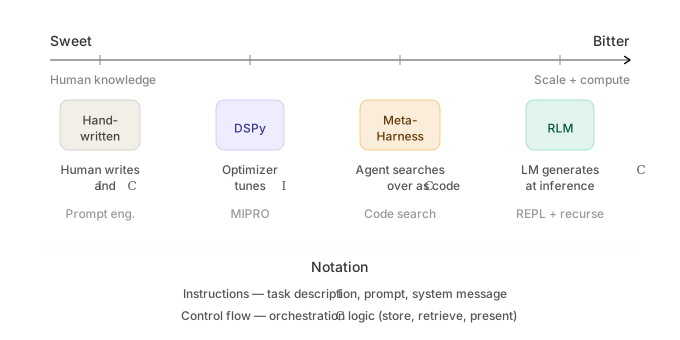
- Avoid context rot — The outer LM works through files, variables, and tool calls instead of trying to keep every detail in one prompt. Large inputs stay as file paths and metadata until the runtime needs to inspect them.
- Adaptive execution inside a defined procedure — A signature gives the workflow a contract, while the REPL lets the model branch, retry, verify, and accumulate state across iterations.
- Focused sub-model calls —
predict()lets the runtime spin up typed DSPy signatures for narrow perception and extraction tasks, including multimodal calls withdspy.Image. - Readable trajectories — Every run records generated code, output, tool
calls,
predict()subcalls, timings, token usage, errors, and finalSUBMITpayloads, so you can inspect what happened instead of guessing. - Optimization-ready traces — The same traces that help humans debug a run can feed tools like GEPA to improve RLM strategies from scored examples.
Features
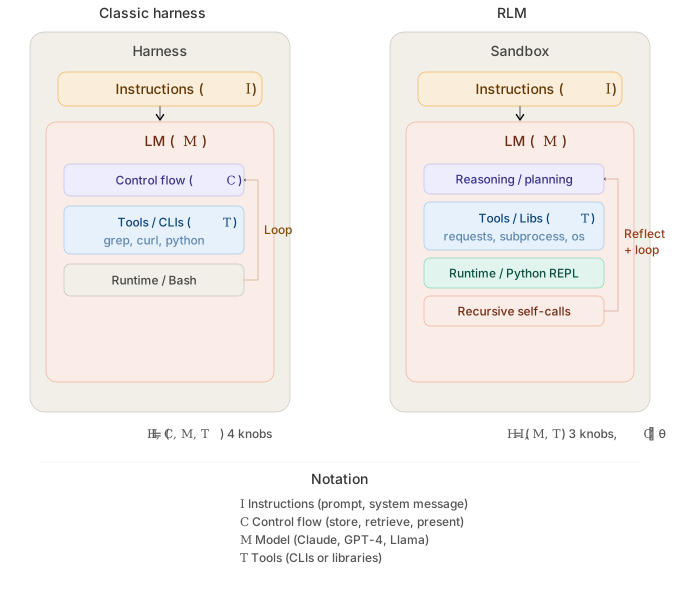
- Multimodal — process images and rendered document pages through sub-LM calls using native provider multimodal APIs.
- Async tool calling — native RLM async support in the WASM sandbox, enabling concurrent sub-LM invocations and tool calls.
- Skills & tools — bundle domain instructions, PyPI packages, sandbox modules, and host-side tools for reusable task capabilities.
- Simple file I/O — pass local files and mutable workspaces as typed inputs,
and return generated artifacts through
Fileoutputs. - Structured sub-LM calls — native Pydantic and DSPy signature support for type-safe sub-LM invocations with structured outputs.
Demos
| Description | Input / Output | Preview |
|---|---|---|
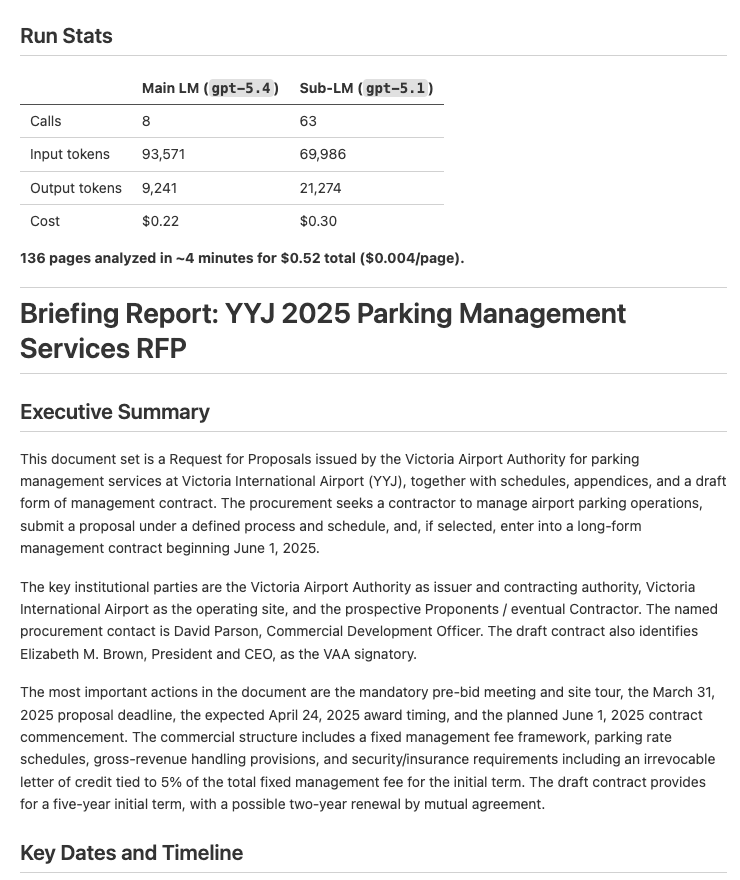
| Document Analysis — Analyze documents and extract key dates, entities, and financial information into a structured report | Input: PDFs Output: Structured briefing report (example output) |
 |
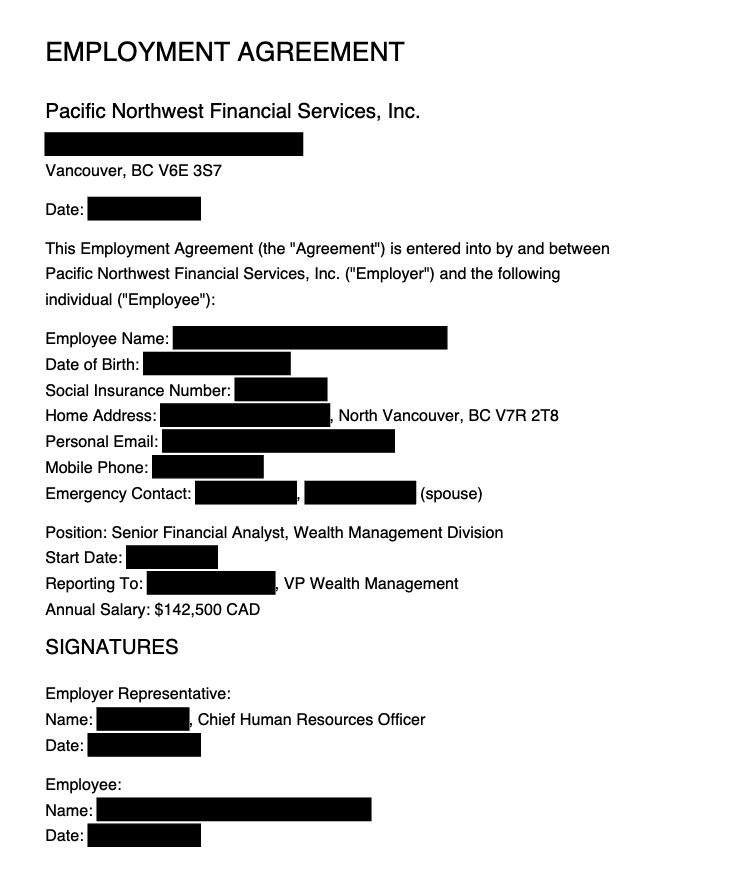
| Document Redaction — Redact PII from PDFs based on a policy, then verify the redactions visually | Input: PDFs Output: Redacted PDFs (example output) |
 |
| Invoice Processing — Extract vendor info, line items, and totals from PDF invoices into a consolidated Excel spreadsheet | Input: PDF invoices Output: Excel spreadsheet (example output) |
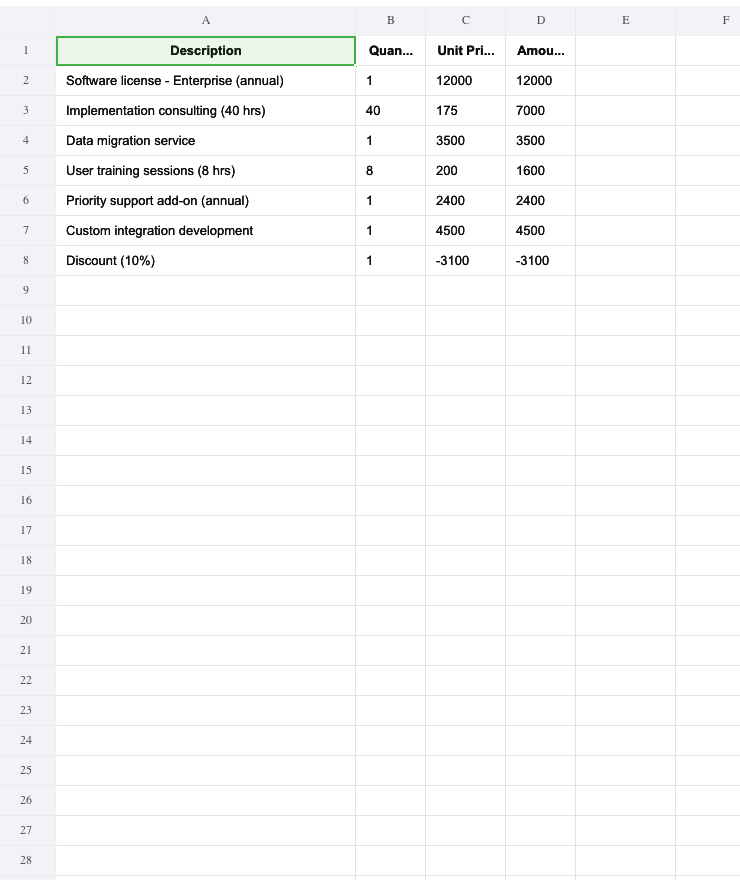 |
| Contract Comparison — Compare two contract versions and produce a structured diff report with per-section analysis | Input: 2 PDF contracts Output: Structured diff report (example output) |
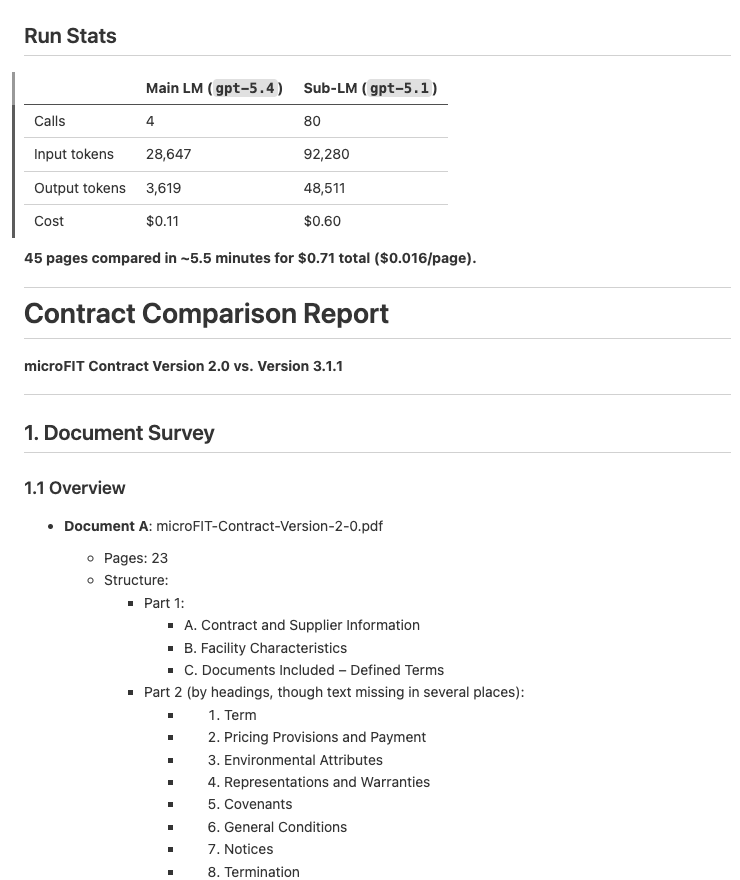 |
Quick start
With your coding agent
Install the predict-rlm skill in Claude Code, Codex, Cursor, or any compatible coding agent:
npx skills add Trampoline-AI/predict-rlm
Then ask your agent to build an RLM:
❯ /rlm build an RLM that extracts line items from PDF invoices into a spreadsheet
Quick Example
import dspy
from predict_rlm import CtxStr, File, PredictRLM

class AnalyzeImages(dspy.Signature):
    """Analyze images and answer the query. Load each image as a base64 data
    URI and use predict() with dspy.Image to extract visual information."""
    images: list[File] = dspy.InputField()
    query: CtxStr = dspy.InputField()
    answer: str = dspy.OutputField()

rlm = PredictRLM(
    AnalyzeImages,
    lm="openai/gpt-5.4",
    sub_lm="openai/gpt-5.1",
)

result = rlm(
    images=[File(path="page.png")],
    query="Extract all visible text, then count each letter A-Z (case-insensitive).",
)

print(result.answer)
Use CtxStr for criteria, rubrics, and requests the outer RLM should read before
writing code. Callers still pass a normal string; the value is available both in
the prompt and as a Python variable in the REPL. See Custom path
inputs when adding file-, workspace-, or glob-like
signature inputs.
Observability
Every PredictRLM call returns a structured prediction.trace with iterations,
code, output, tool calls, predict() subcalls, timings, token usage, and errors.
Human-readable colored trace blocks are printed to stderr by default; pass
verbose=False for quiet execution. Use debug=True for timestamped RLM and
sandbox lifecycle diagnostics; error-like debug records are colored red.
Optional: Docker Sandboxes backend
JSPI/Deno/Pyodide remains the default sandbox. After installing
predict-rlm[sbx], use Docker Sandboxes (sbx) when you want an explicit
opt-in Linux Python runner:
brew install docker/tap/sbx
sbx login
from predict_rlm import PredictRLM, SbxConfig, SbxPool

rlm = PredictRLM(
    "question -> answer",
    sandbox_backend="sbx",
    sbx_config=SbxConfig(name="my-predict-rlm-sbx"),
)
By default, SbxConfig passes the explicit non-Docker shell template
docker.io/docker/sandbox-templates:shell to sbx create. Pass a custom
template="..." to override it, or template=None to omit --template and use
Docker's CLI default behavior.
For throughput-sensitive evals or optimization loops, create a pool of prewarmed runners and pass it explicitly:
with SbxPool(size=4, config=SbxConfig()) as pool:
    rlm = PredictRLM(
        "question -> answer",
        sandbox_backend="sbx",
        sbx_pool=pool,
    )
The backend mounts only a per-run staging directory under .predict_rlm_sbx/ by
default, preserving model-facing paths such as /sandbox/input/... and
/sandbox/output/... without exposing the rest of the repo workspace. Use
SbxConfig(extra_workspaces=[...]) only when the sandbox needs explicit
additional host mounts. Real sbx integration tests are skipped by default; run
them with PREDICT_RLM_RUN_SBX_TESTS=1 uv run pytest -m sbx after the CLI is
installed and logged in.
The native execution stack uses a persistent supervisor plus a persistent Python kernel so successful iterations preserve full REPL state. Per-iteration timeouts are recoverable when the backend can interrupt execution cleanly; native hard-kill fallback restores only a pre-timeout pickleable snapshot and tells the RLM which globals / imports were lost.
See predict-rlm Architecture for the component model, timeout behavior, and shared backend contracts.
Using the spreadsheet skill
The optimized spreadsheet skill is built in. Import it and pass it through
skills=[spreadsheet] so the RLM gets the spreadsheet-specific instructions,
openpyxl, pandas, formulas, and the formula_eval verification module
inside its sandbox.
import dspy

from predict_rlm import CtxStr, File, PredictRLM
from predict_rlm.skills import spreadsheet


class UpdateWorkbook(dspy.Signature):
    """Update the workbook following the request.

    Use openpyxl for workbook edits, Excel formulas for derived values, and
    verify formulas before returning the final .xlsx file.
    """

    workbook: File = dspy.InputField(desc="Input .xlsx workbook")
    request: CtxStr = dspy.InputField(desc="Requested spreadsheet changes")
    updated_workbook: File = dspy.OutputField(desc="Updated .xlsx workbook")


rlm = PredictRLM(
    UpdateWorkbook,
    lm="openai/gpt-5.4",
    sub_lm="openai/gpt-5.1",
    skills=[spreadsheet],
)

result = rlm(
    workbook=File(path="model.xlsx"),
    request="Add a Summary sheet with revenue by quarter and formulas for totals.",
)

print(result.updated_workbook.path)
For workflows that combine source documents and spreadsheets, compose skills:
from predict_rlm.skills import pdf, spreadsheet

rlm = PredictRLM(ProcessInvoices, skills=[pdf, spreadsheet])
Lifecycle callbacks
Hook into the RLM iteration loop to broadcast progress to a UI, write
structured logs, or feed an observability pipeline. PredictRLM extends
DSPy's existing callback contract (dspy.utils.callback.BaseCallback)
with two RLM-specific handlers:
| Handler | Fires | Receives |
|---|---|---|
on_rlm_iteration_start |
Before the action LM is called for iteration N | call_id, instance, iteration, max_iterations |
on_rlm_iteration_end |
After iteration N finishes (code executed, IterationStep built — or an error was raised) |
call_id, instance, iteration, step: IterationStep | None, is_final: bool, exception: Exception | None |
call_id matches the parent module's on_module_start/end ID, so events
correlate cleanly with DSPy's own callback events when you invoke the RLM
through DSPy's public module call path (rlm(...) or await rlm.acall(...)).
Existing BaseCallback subclasses keep working unchanged — handlers we
call are opt-in via getattr.
Async-aware. If you use await rlm.acall(...) your handlers may be
coroutines and they will be awaited. Sync rlm(...) calls sync handlers;
if it encounters an async handler the coroutine is closed and a warning
is logged.
Failure-isolated. Handler exceptions are logged and swallowed — a broken callback can never break the run.
Broadcasting a "loading" status to a websocket
import json
from dspy.utils.callback import BaseCallback
from predict_rlm import IterationStep, PredictRLM

class ProgressBroadcaster(BaseCallback):
    def __init__(self, websocket):
        self.ws = websocket

    async def on_rlm_iteration_start(self, *, iteration, max_iterations, **_):
        await self.ws.send_json({
            "type": "iteration_start",
            "iteration": iteration,
            "max_iterations": max_iterations,
        })

    async def on_rlm_iteration_end(
        self, *, iteration, step: IterationStep | None, is_final, exception, **_
    ):
        await self.ws.send_json({
            "type": "iteration_end",
            "iteration": iteration,
            "is_final": is_final,
            "step": step.model_dump(mode="json") if step else None,
            "error": str(exception) if exception else None,
        })

rlm = PredictRLM("query -> answer")
rlm.callbacks = [ProgressBroadcaster(ws)]
result = await rlm.acall(query="...")
Register globally instead with dspy.configure(callbacks=[...]) and the
same handlers fire for every PredictRLM instance.
Next steps
- Custom path inputs — add file-, workspace-, or glob-like signature inputs
- Custom adapters and the runtime kernel — implement an advanced typed lifecycle or execution capability
- Runtime observability — connect monitoring, logging, GEPA evidence, or another event consumer
- Architecture — understand and review runtime components, process boundaries, state ownership, and recovery
- How it works — understand the sandbox, REPL loop, signatures, and file I/O
- API reference — constructor params for
PredictRLM,File,CtxStr, andSkill - Skills — define, compose, and mount custom skills
- RLM-GEPA — optimize RLM skills from traces and
configure
AgentSpec - Examples — end-to-end demos with setup instructions
Project details
Release history Release notifications | RSS feed


Download files
Download the file for your platform. If you're not sure which to choose, learn more about installing packages.
Source Distribution
Built Distribution
Filter files by name, interpreter, ABI, and platform.
If you're not sure about the file name format, learn more about wheel file names.
Copy a direct link to the current filters
File details
Details for the file predict_rlm-0.8.0a0.tar.gz.
File metadata
- Download URL: predict_rlm-0.8.0a0.tar.gz
- Upload date:
- Size: 300.5 kB
- Tags: Source
- Uploaded using Trusted Publishing? Yes
- Uploaded via: twine/6.1.0 CPython/3.13.12
File hashes
| Algorithm | Hash digest | |
|---|---|---|
| SHA256 |
3dee35d4a88ae0e9c8bd7ed0cbc50dfdcc3273148b02ce949048a8e93e13a9c5
|
|
| MD5 |
c6be3eb0779cfd7a5584fa5e52dce497
|
|
| BLAKE2b-256 |
b4a6e31ccbf66b592a7548b0a415e78c678ee788de5700307fde6833695c48a9
|
Provenance
The following attestation bundles were made for predict_rlm-0.8.0a0.tar.gz:
Publisher:
release.yml on Trampoline-AI/predict-rlm
-
Statement:
-
Statement type:
https://in-toto.io/Statement/v1 -
Predicate type:
https://docs.pypi.org/attestations/publish/v1 -
Subject name:
predict_rlm-0.8.0a0.tar.gz -
Subject digest:
3dee35d4a88ae0e9c8bd7ed0cbc50dfdcc3273148b02ce949048a8e93e13a9c5 - Sigstore transparency entry: 2191673316
- Sigstore integration time:
-
Permalink:
Trampoline-AI/predict-rlm@e3c24f40ee4ae385b11b1b1f135020bf3431918a -
Branch / Tag:
refs/tags/v0.8.0-alpha0 - Owner: https://github.com/Trampoline-AI
-
Access:
public
-
Token Issuer:
https://token.actions.githubusercontent.com -
Runner Environment:
github-hosted -
Publication workflow:
release.yml@e3c24f40ee4ae385b11b1b1f135020bf3431918a -
Trigger Event:
push
-
Statement type:
File details
Details for the file predict_rlm-0.8.0a0-py3-none-any.whl.
File metadata
- Download URL: predict_rlm-0.8.0a0-py3-none-any.whl
- Upload date:
- Size: 335.1 kB
- Tags: Python 3
- Uploaded using Trusted Publishing? Yes
- Uploaded via: twine/6.1.0 CPython/3.13.12
File hashes
| Algorithm | Hash digest | |
|---|---|---|
| SHA256 |
ec28c72a088d9b72e46e639ac668163c05344f8c65cdee8fd3ef1ad88bebc1f9
|
|
| MD5 |
8b3f92b166830f5af8d9ec5a64aa5702
|
|
| BLAKE2b-256 |
64cdea12cf2911a36538d53551f7aa6063de64139dd01fc02e4c545a5843554b
|
Provenance
The following attestation bundles were made for predict_rlm-0.8.0a0-py3-none-any.whl:
Publisher:
release.yml on Trampoline-AI/predict-rlm
-
Statement:
-
Statement type:
https://in-toto.io/Statement/v1 -
Predicate type:
https://docs.pypi.org/attestations/publish/v1 -
Subject name:
predict_rlm-0.8.0a0-py3-none-any.whl -
Subject digest:
ec28c72a088d9b72e46e639ac668163c05344f8c65cdee8fd3ef1ad88bebc1f9 - Sigstore transparency entry: 2191673327
- Sigstore integration time:
-
Permalink:
Trampoline-AI/predict-rlm@e3c24f40ee4ae385b11b1b1f135020bf3431918a -
Branch / Tag:
refs/tags/v0.8.0-alpha0 - Owner: https://github.com/Trampoline-AI
-
Access:
public
-
Token Issuer:
https://token.actions.githubusercontent.com -
Runner Environment:
github-hosted -
Publication workflow:
release.yml@e3c24f40ee4ae385b11b1b1f135020bf3431918a -
Trigger Event:
push
-
Statement type:






