

PrepImage
A Unified Framework for Computer Vision Dataset Preparation
Curate, preprocess, annotate, and augment image datasets — all in one desktop app.



PrepImage is an all-in-one image dataset preparation platform for artificial intelligence and computer vision that integrates Image Curation, Image Preprocessing, Image Annotation, and Image Augmentation into a single, modern PySide6 (Qt) desktop application. It enables users to discard duplicate, blurry, and noisy images; perform image cropping, resizing, and consistent naming; create box and polygon annotations for object detection and image segmentation; and generate augmentations for both images and their annotation files using geometric and non-geometric transformations. By combining these capabilities in one unified platform, PrepImage simplifies the creation of high-quality datasets for image classification, object detection, and segmentation tasks.
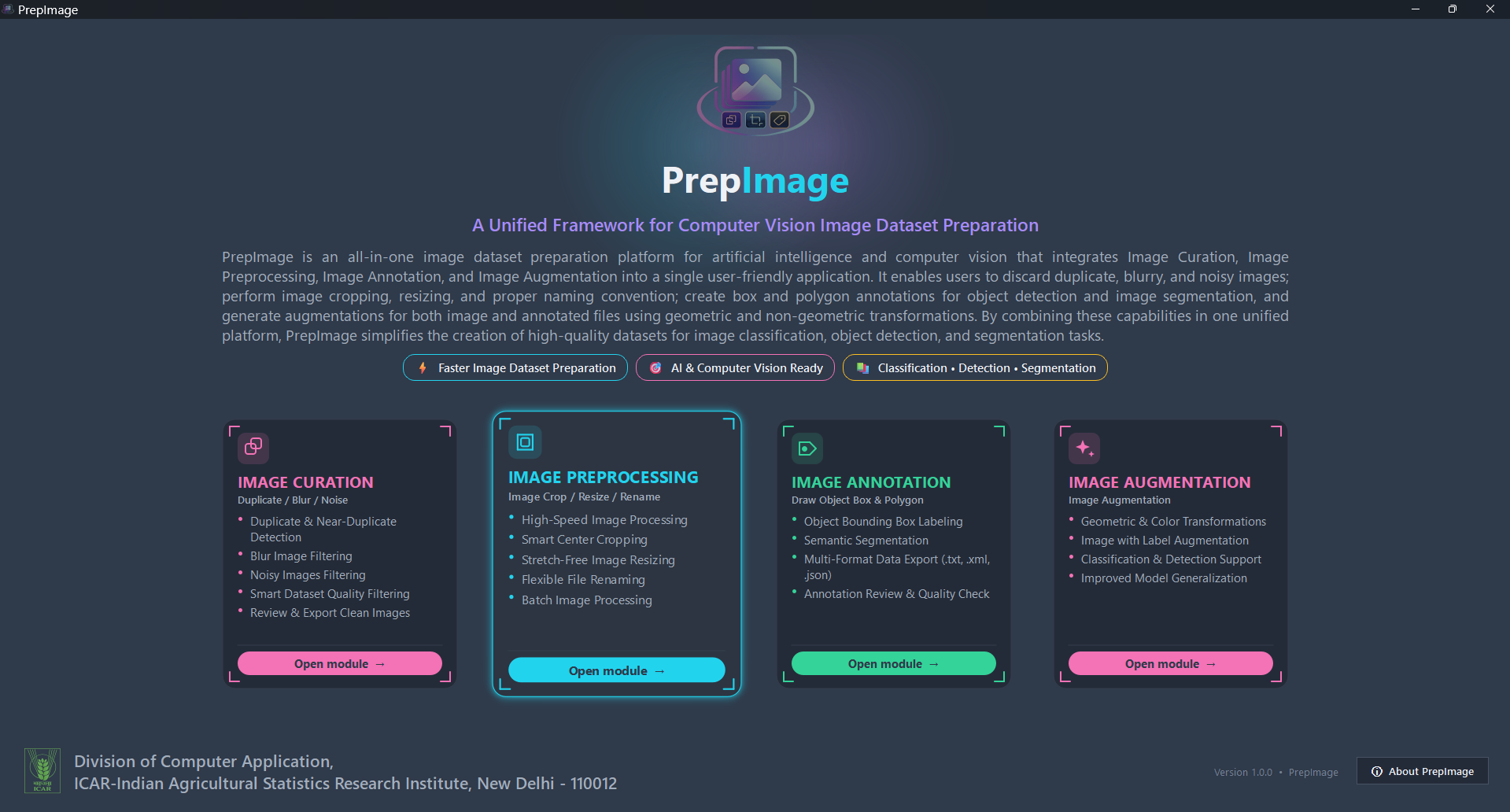
Table of Contents
Why PrepImage
- One app, four workflows — curation, preprocessing, annotation, and augmentation share one consistent, modern dark-themed interface instead of four different scripts and conventions.
- Built for real datasets — background worker threads keep the UI responsive on folders with thousands of images; every long-running step shows live progress, and can be stopped mid-run without losing what's already been processed.
- Training-format aware — exports YOLO
.txt, Pascal VOC.xml, and COCO-style.jsonannotations, and augments images with their labels so bounding boxes and polygons stay correct after a flip, rotation, or crop. - Nothing leaves your machine — PrepImage is a local desktop tool; your images and labels never get uploaded anywhere.
Modules
1. Image Curation
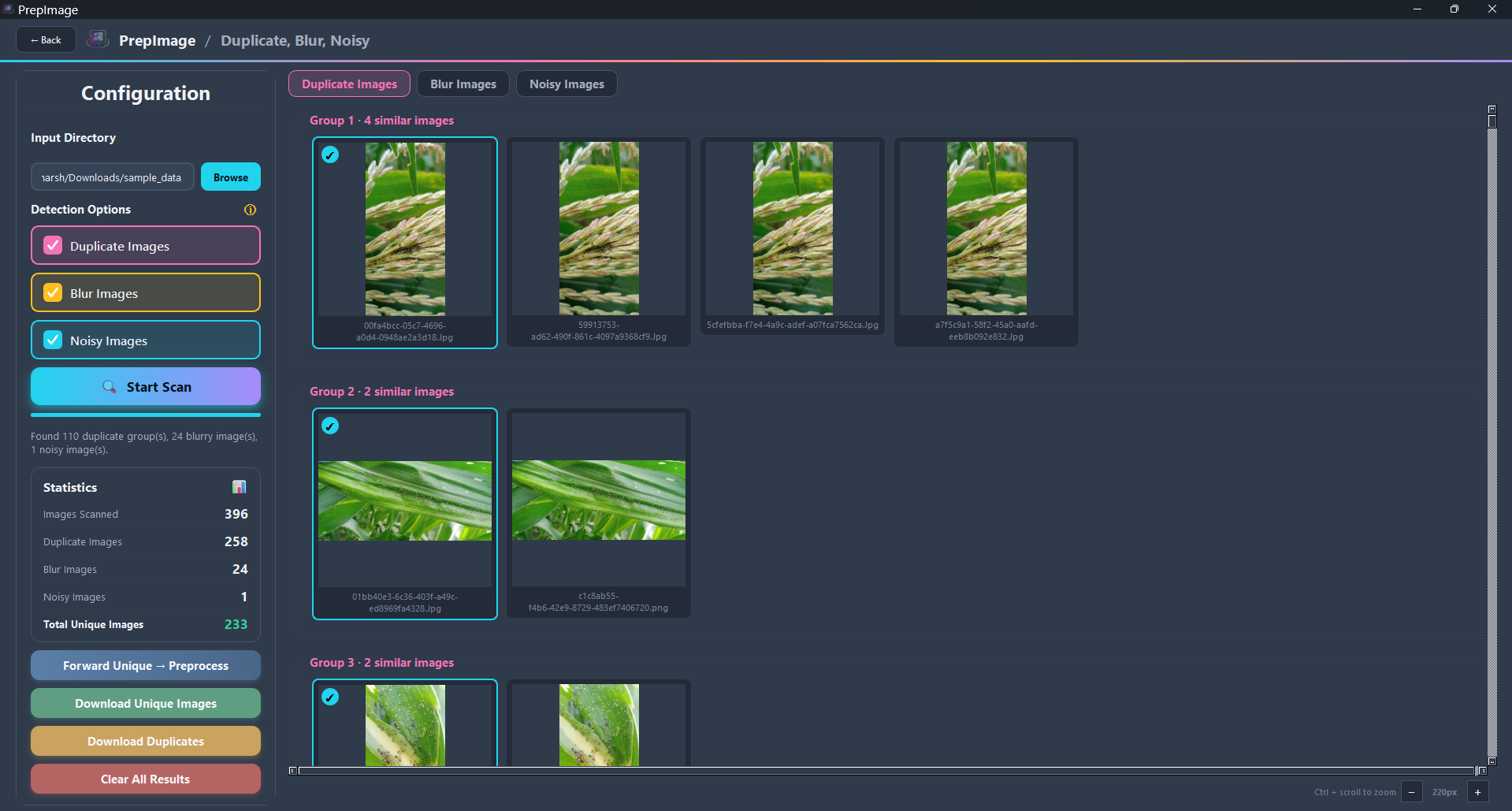
Batch-processes large collections of images to automatically identify and organize common image-quality issues that quietly hurt model training if they slip into a dataset:
- Duplicate & near-duplicate images — found via perceptual
average-hashing (
imagehash), then grouped so you can keep one representative from each group instead of every copy. - Blurry images — images that may negatively affect model training, detected via a Laplacian-variance sharpness score.
- Noisy images — grainy or poor-visual-quality images, detected via a median-filter residual noise estimate.
Enable any combination of the three Detection Options and run one scan; each category gets its own results tab with its own thumbnail grid, plus a live Statistics panel (images scanned, duplicate/blur/noisy counts, and total unique images). From there you can Forward Unique → Preprocess (send the clean set straight into the next module), Download Unique Images, or Download Duplicates for manual review.
Directories
| Field | Purpose |
|---|---|
| Input Directory | The folder of images to scan. Required. |
| (no separate output field) | Results stay in memory until you explicitly export them — each export action (Forward, Download Unique, Download Duplicates) prompts for its own destination folder when clicked. |
2. Image Preprocessing
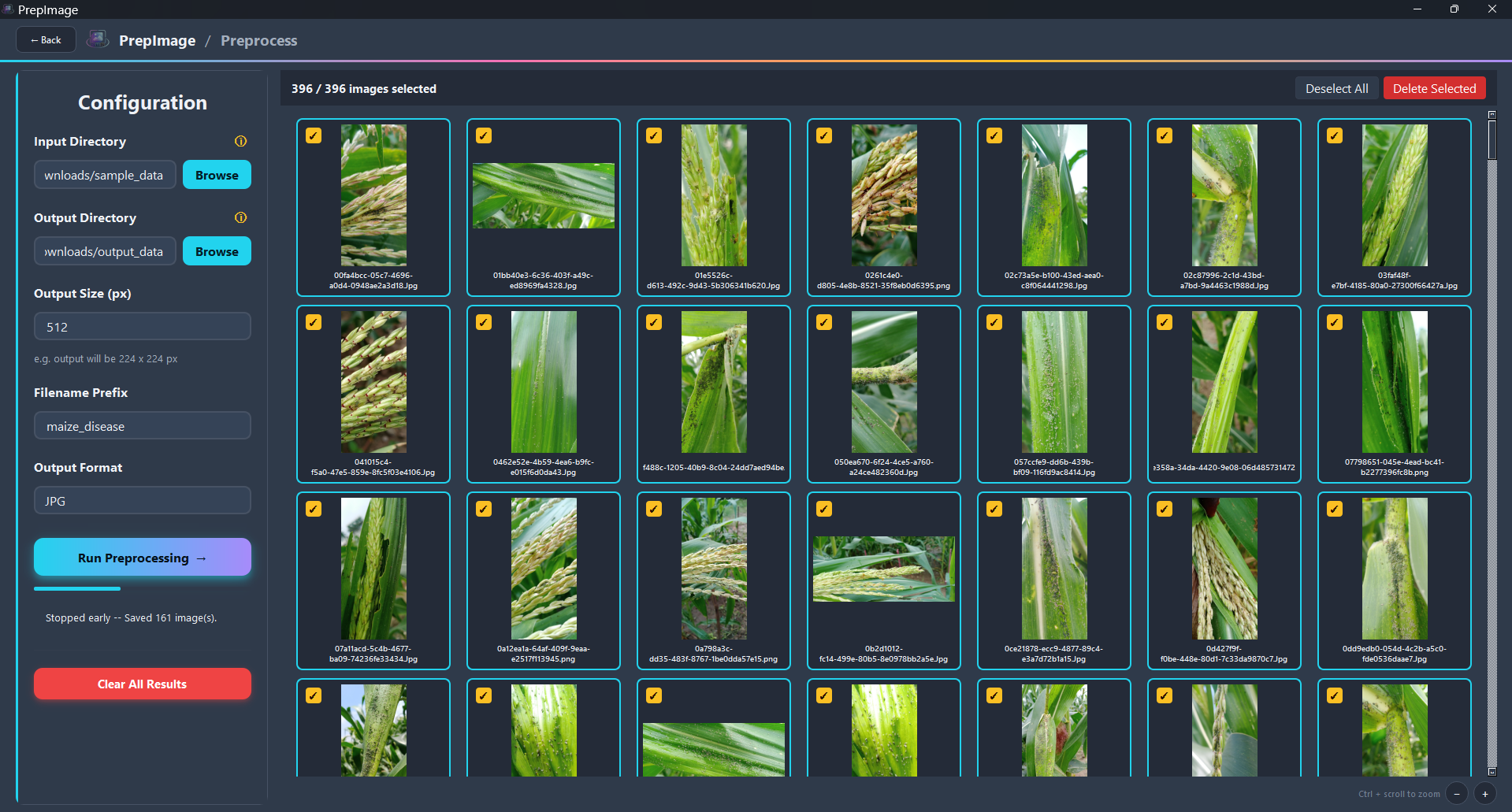
Prepares a complete collection of images for consistent, reliable use in downstream processing and model training — the shape most training pipelines expect:
- Crops every image to a square, trimming evenly from the longer side instead of stretching or distorting it, then resizes the square result to a fixed target size in pixels — cropping before resizing keeps proportions intact.
- Renames output files sequentially with a custom prefix.
- Output Format — keep every image in its own original format, or convert the whole batch to one uniform format (JPG or PNG) regardless of what each source file started as.
- Zoomable thumbnail gallery to review and select which images to process before running.
Directories
| Field | Purpose |
|---|---|
| Input Directory | Folder of source images to process. Required. |
| Output Directory | Folder where cropped/resized/renamed images are written. Required. |
3. Image Annotation
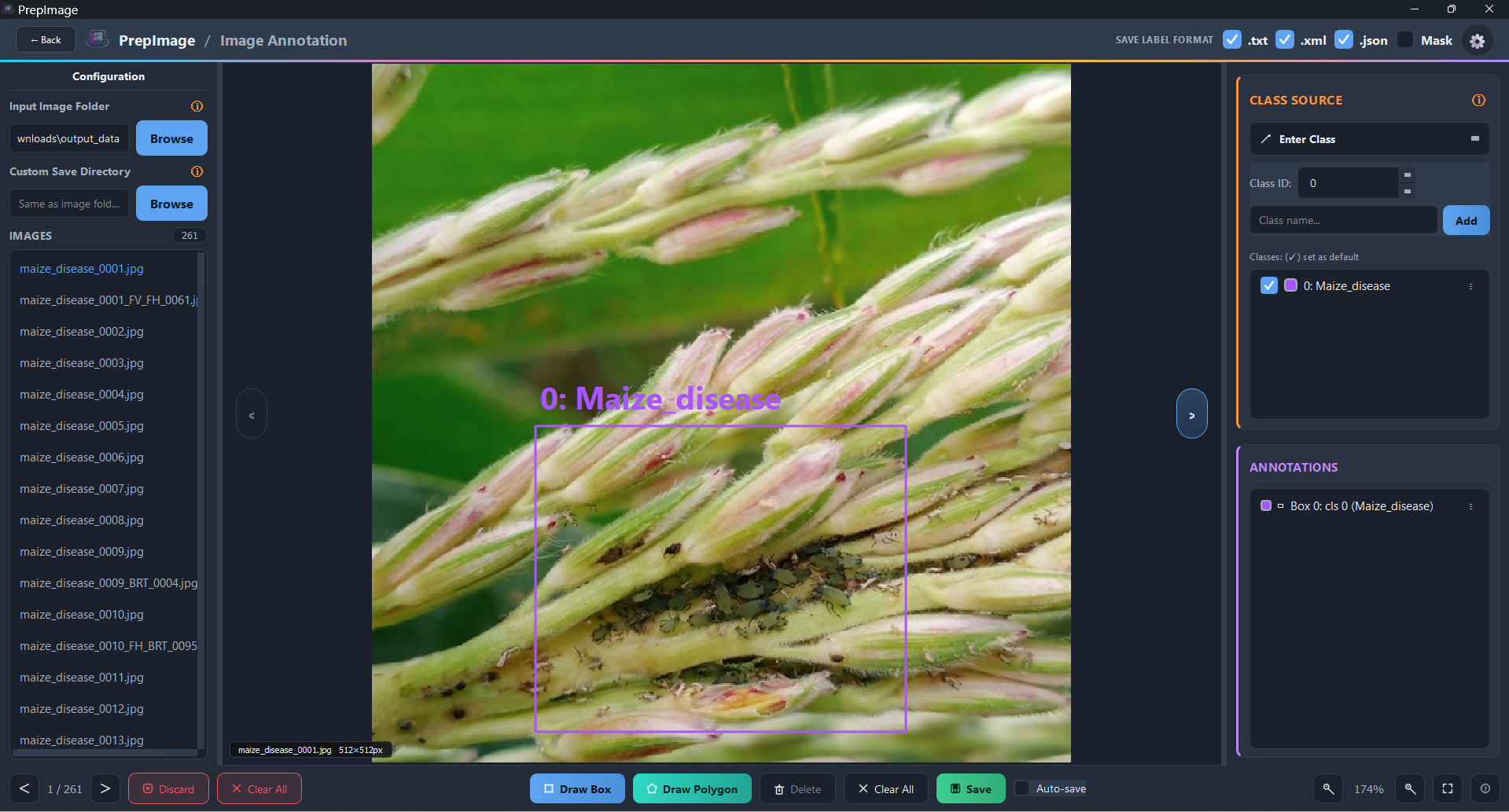
A complete image annotation module for creating high-quality datasets for object detection and image segmentation tasks:
- Bounding boxes for object detection and polygons for pixel-level segmentation, with an optional rasterized mask PNG export.
- Per-image class labels, editable at any time (a "⋮" menu on every class and every annotation row covers editing, recoloring, renaming, changing class, and deleting).
- Undo/redo — whole-shape while browsing, per-vertex while a polygon is still being drawn.
- Export to YOLO
.txt, Pascal VOC.xml, and/or COCO-style.json— pick any combination — with class names round-tripped through a per-folderclasses.txtso relabeling later doesn't lose your class names. - Zoom/pan canvas, keyboard shortcuts, and an in-app shortcuts reference.
Directories
| Field | Purpose |
|---|---|
| Input Image Folder | Folder of images to annotate. Required. |
| Custom Save Directory | Where annotation files (and masks, if enabled) are saved. Optional — defaults to the input image folder if left blank. |
4. Image Augmentation
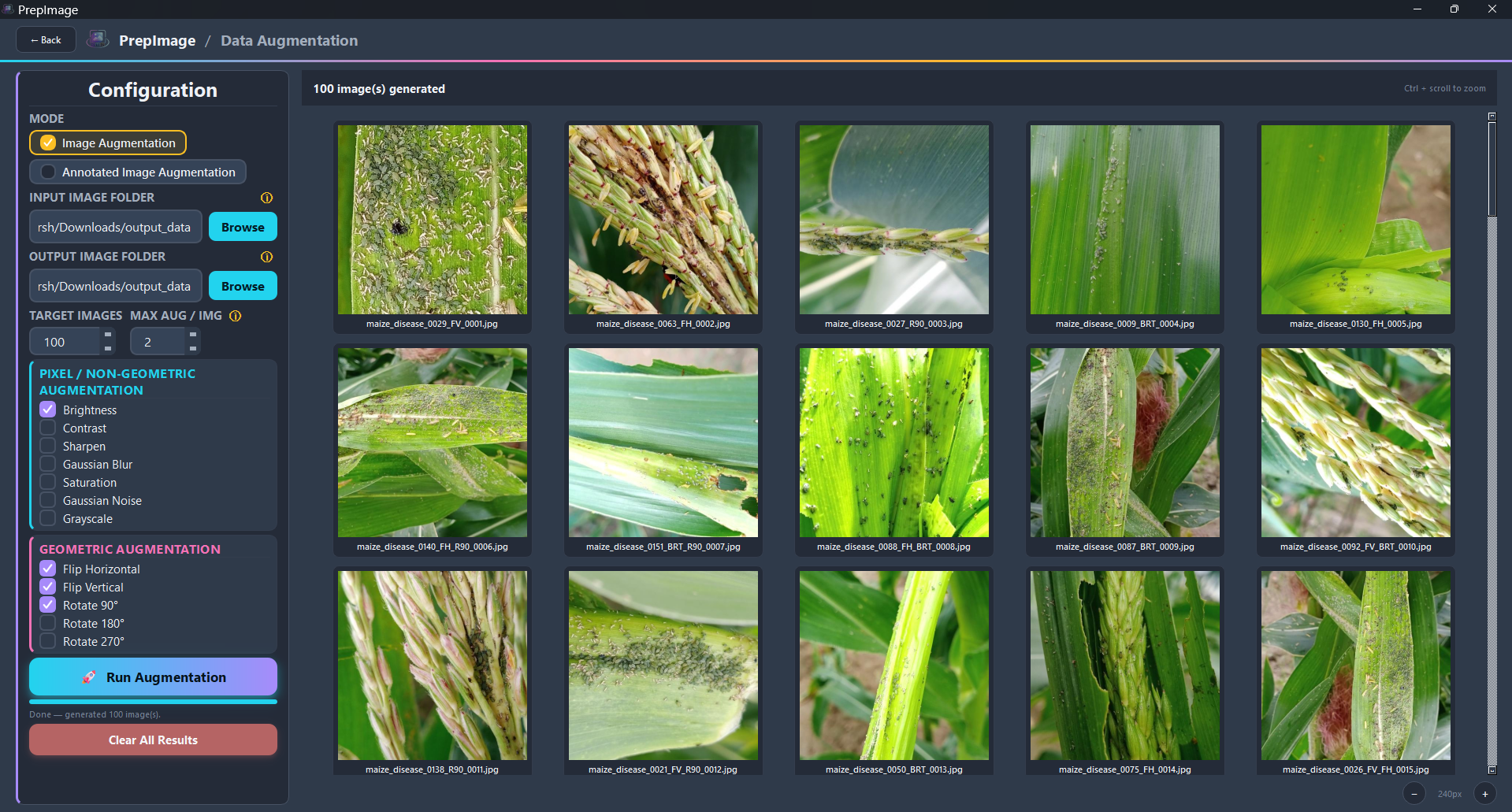
Enhances image datasets by generating diverse, realistic variations of each image using both geometric and non-geometric augmentation techniques, in two modes:
- Image Augmentation — augments a folder of images with no annotations to carry along.
- Annotated Image Augmentation — augments images and their existing
YOLO
.txtannotations together. Pixel/non-geometric augmentations (brightness, contrast, sharpen, Gaussian blur, saturation, Gaussian noise, grayscale) leave box coordinates untouched; geometric ones (horizontal/vertical flip, 90°/180°/270° rotation) transform the coordinates to match, so every saved label still lines up with its image.
Target Images controls how many augmented images to generate in total;
Max Aug / Img caps how many augmented variants can come from any single
source image. Augmented files follow the naming convention
originalname_SHORTCODE1_SHORTCODE2_0001.ext, so it's obvious at a glance
which combination of augmentations produced a given output.
Directories
| Field | Purpose |
|---|---|
| Input Image Folder | Folder of source images (in Annotated mode, this folder should also contain the matching .txt label for each image). Required. |
| Output Image Folder | Folder where augmented images (and, in Annotated mode, their updated .txt labels) are written. Required. |
Installation
From PyPI
pip install prepimage
From source (editable / dev mode)
git clone https://github.com/harsh-iasri/PrepImage.git
cd prepimage/prepimage_pkg
pip install -e .
Usage
prepimage
or, without installing the console script:
python -m prepimage
Requirements
- Python >= 3.9
- PySide6 — Qt GUI framework
- Pillow — image I/O and processing
- ImageHash — perceptual hashing for duplicate detection
- NumPy — array operations for preprocessing, blur/noise detection, and augmentation
All of the above are installed automatically as dependencies.
Project Layout
prepimage_pkg/
├── pyproject.toml
├── README.md
├── LICENSE
└── src/
    └── prepimage/
        ├── __init__.py
        ├── __main__.py            # entry point (`prepimage` / `python -m prepimage`)
        ├── app.py                 # QMainWindow + navigation (QStackedWidget)
        ├── theme.py               # colors, fonts, global stylesheet
        ├── widgets.py             # ToolCard (painted card, hover zoom)
        ├── assets.py              # shared logo loading helper
        ├── duplicates.py          # duplicate/blur/noise detection core logic
        ├── preprocess.py          # crop/resize/rename core logic
        ├── augment.py             # augmentation engine + box/polygon transforms
        └── screens/
            ├── __init__.py
            ├── home.py             # landing page (hero + 4 tool cards + About dialog)
            ├── duplicates.py       # Image Curation screen (duplicate/blur/noise)
            ├── preprocess.py       # Image Preprocessing screen
            ├── annotate.py         # Image Annotation screen (boxes + polygons)
            ├── augment.py          # Image Augmentation screen
            ├── working.py          # shared "under construction" placeholder
            └── images/             # screenshots + logo bundled with the package
License
Released under the MIT License.
Contributors
| Name | Affiliation |
|---|---|
| Harsh Sachan | ICAR-Indian Agricultural Statistics Research Institute (IASRI), New Delhi |
| Shalini Kumari | ICAR-Indian Agricultural Statistics Research Institute (IASRI), New Delhi |
| Dr. Md Ashraful Haque | ICAR-Indian Agricultural Statistics Research Institute (IASRI), New Delhi |
| Dr. Sudeep Marwaha | ICAR-Central Institute of Agricultural Engineering (CIAE), Bhopal |
| Dr. Chandan Kumar Deb | ICAR-Indian Agricultural Statistics Research Institute (IASRI), New Delhi |
| Dr. Alka Arora | ICAR-Indian Agricultural Statistics Research Institute (IASRI), New Delhi |
| Dr. Anshu Bharadwaj | ICAR-Indian Agricultural Statistics Research Institute (IASRI), New Delhi |
Contributions are welcome — feel free to open an issue or pull request on GitHub.
Citation
If PrepImage is useful in your research or project, please cite it as:
Sachan, H., Kumari, S., Haque, M. A., Marwaha, S., Deb, C. K., Arora, A., & Bharadwaj, A. (2026). PrepImage: A Unified Framework for Computer Vision Dataset Preparation (Version 1.1.0) [Computer software]. ICAR-Indian Agricultural Statistics Research Institute (IASRI), New Delhi. https://github.com/harsh-iasri/PrepImage
@software{prepimage2026,
  author  = {Sachan, Harsh and Kumari, Shalini and Haque, Md Ashraful and
             Marwaha, Sudeep and Deb, Chandan Kumar and Arora, Alka and
             Bharadwaj, Anshu},
  title   = {{PrepImage}: A Unified Framework for Computer Vision Dataset Preparation},
  year    = {2026},
  version = {1.1.0},
  url     = {https://github.com/harsh-iasri/PrepImage},
  note    = {ICAR-Indian Agricultural Statistics Research Institute (IASRI), New Delhi}
}
1 maintainer

Release files for PrepImage 1.1.0
For a detailed explanation of source distributions (sdists) and built distributions (wheels), please see the package formats documentation.
Source distribution (sdist)
| File | Size | Uploaded | |
|---|---|---|---|
| prepimage-1.1.0.tar.gz | 5.4 MB | Details |
Built distribution (wheel)
| File | Interpreter | ABI | Platform | Reset |
|---|---|---|---|---|
| prepimage-1.1.0-py3-none-any.whl | Python 3 | none | any | Details |
Total release size: 10.8 MB
Release files / prepimage-1.1.0.tar.gz
| Download URL | prepimage-1.1.0.tar.gz |
|---|---|
| Size | 5.4 MB |
| Tags | Source |
|
SHA-256 checksum How to use checksums |
653d093ebd34f11c1a6a271c55efbe075f1c16eb08a0d9323e122aca53a49926
|
|
BLAKE2b-256 checksum How to use checksums |
3e67ff23dd8e903ffd5f1266c279aca111e210da05c91c9bf4e1e1e1c7323b96
|
| Upload date | |
|
Uploaded using Trusted Publishing? What is trusted publishing? |
No |
| Uploaded via |
twine/7.0.0 CPython/3.10.0
|
Release files / prepimage-1.1.0-py3-none-any.whl
| Download URL | prepimage-1.1.0-py3-none-any.whl |
|---|---|
| Size | 5.4 MB |
| Tags | Python 3 |
|
SHA-256 checksum How to use checksums |
66ba5fa98d6e89ec0cb1f4105532d74e0dbd67595a0db98a344ae2d49ea14d64
|
|
BLAKE2b-256 checksum How to use checksums |
9f35191c955c2cc63414e98e6084dd0d85d93f4a90bf84e34d1d892a6da1ad68
|
| Upload date | |
|
Uploaded using Trusted Publishing? What is trusted publishing? |
No |
| Uploaded via |
twine/7.0.0 CPython/3.10.0
|














