
PrePro Auto





AI-assisted tabular data preprocessing with human-in-the-loop control.
Profile, clean, transform, and export any tabular dataset — from a Jupyter notebook or a local web UI — with every step undoable, auditable, and reproducible. The same engine drives both interfaces, so results are identical wherever you call it from.
pip install prepro-auto
Author: Shivanshu Pandey · Package: pypi.org/project/prepro-auto
About this repo.
pip install prepro-autois the supported way to get PrePro Auto — that's where the working code ships from and stays up to date. This repository hosts the documentation, the full user guide, screenshots, and a runnable example notebook.
See it in action
Watch a dataset go from messy to model-ready — review each fix, approve it, and watch the issue count drop to 0.

▶ Click the GIF to watch the full walkthrough in HD on GitHub.
📦 GitHub Repository: https://github.com/Chilliflex/prepro_auto
🎥 Demo Video: https://github.com/Chilliflex/prepro_auto/blob/main/examples/Bengaluru_House_Prices_Workflow.mp4
Performance shown in the GIF: When every AI recommendation is applied automatically (AI-only mode), the demonstrated workflow achieves 97.2% accuracy. Enabling Human-in-the-Loop (HITL) review—where users approve or override recommendations before execution—raises the final accuracy to 99.9% on our benchmark evaluations.
Contents
- Quickstart — get going in 30 seconds
- Ways to give PrePro Auto your data — 5 from notebook, 3 from web UI
- 1. Input functions (notebook) — how to load data into a session
- 2. Preprocessing functions — clean, transform, visualize
- 3. Output functions — DataFrames, files, audit PDFs, pipelines
- 4. Train functions (optional ML layer) — fit, compare, predict, export models
- AI providers — optional, 5 providers supported
- REST API reference
- Documentation
Quickstart
One call, no browser (fastest — for the impatient):
import prepro_auto

result = prepro_auto.quickclean("your_data.csv", target="label")
df = result.df          # cleaned, model-ready DataFrame
print(result)           # what was applied vs. left for review
quickclean runs the whole engine headlessly and applies every confident decision, leaving the uncertain ones for you (raise the bar or go full auto-pilot with apply_all=True). Then feed result.df straight into model.fit(X, y).
Notebook + visual workbench (recommended for careful cleaning):
import prepro_auto

# Point at a file, auto-detects encoding (handles Latin-1, cp1252, BOM)
session = prepro_auto.launch_file(r"C:\path\to\your_data.csv")
# Click the printed http://127.0.0.1:8721/workbench?job=... link
df = session.current()        # pull the UI-edited DataFrame back into the notebook

df["amount_per_item"] = df["amount"] / df["quantity"]
session.update(df)            # push it back — the open tab refreshes itself
The notebook and the browser tab share one live dataset, in both directions:
current() returns whatever you last executed in the UI, and update() appears
in the open tab within a couple of seconds — no reload, no re-launch. Call
session.status() any time to see which version is live and whether the UI is
holding decisions you approved but haven't executed yet.
Snapshot vs. live.
df = session.current()hands you an ordinary DataFrame — a snapshot taken at that moment. Nothing that happens in the browser afterwards can reach into that local variable, sodf.head()keeps showing what it showed when you assigned it. Callsession.current()again for fresh data, or usesession.df(the session's own live property — not your localdf), which re-reads on every access:df = session.current() # snapshot — stays as-is session.df.head() # live — always the current version session.df.shape
Web UI (recommended for analysts): open Command Prompt (not Jupyter) and run:
prepro_auto
Then open http://127.0.0.1:8000/workbench and drag-drop a file.
Note:
prepro_autotyped inside a Jupyter cell just prints the module object — it doesn't start a server. The CLI command runs from a terminal only. Inside a notebook, useprepro_auto.launch_file(path)orprepro_auto.launch(df)instead.
Screenshots
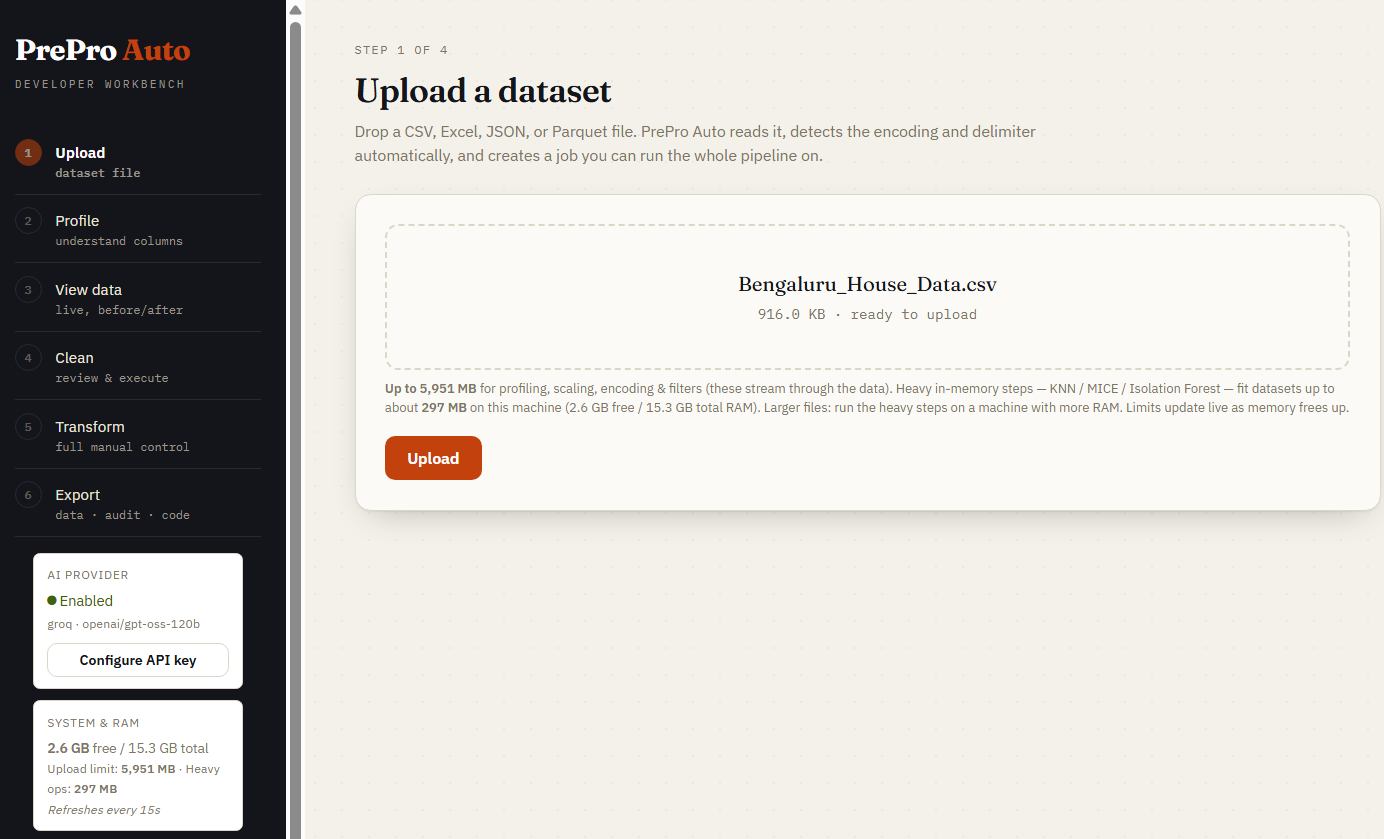
Step 1 — Upload
Drop any CSV, Parquet, Excel, or JSON file. Encoding and delimiter are auto-detected. The sidebar shows live RAM-aware upload limits for your machine.
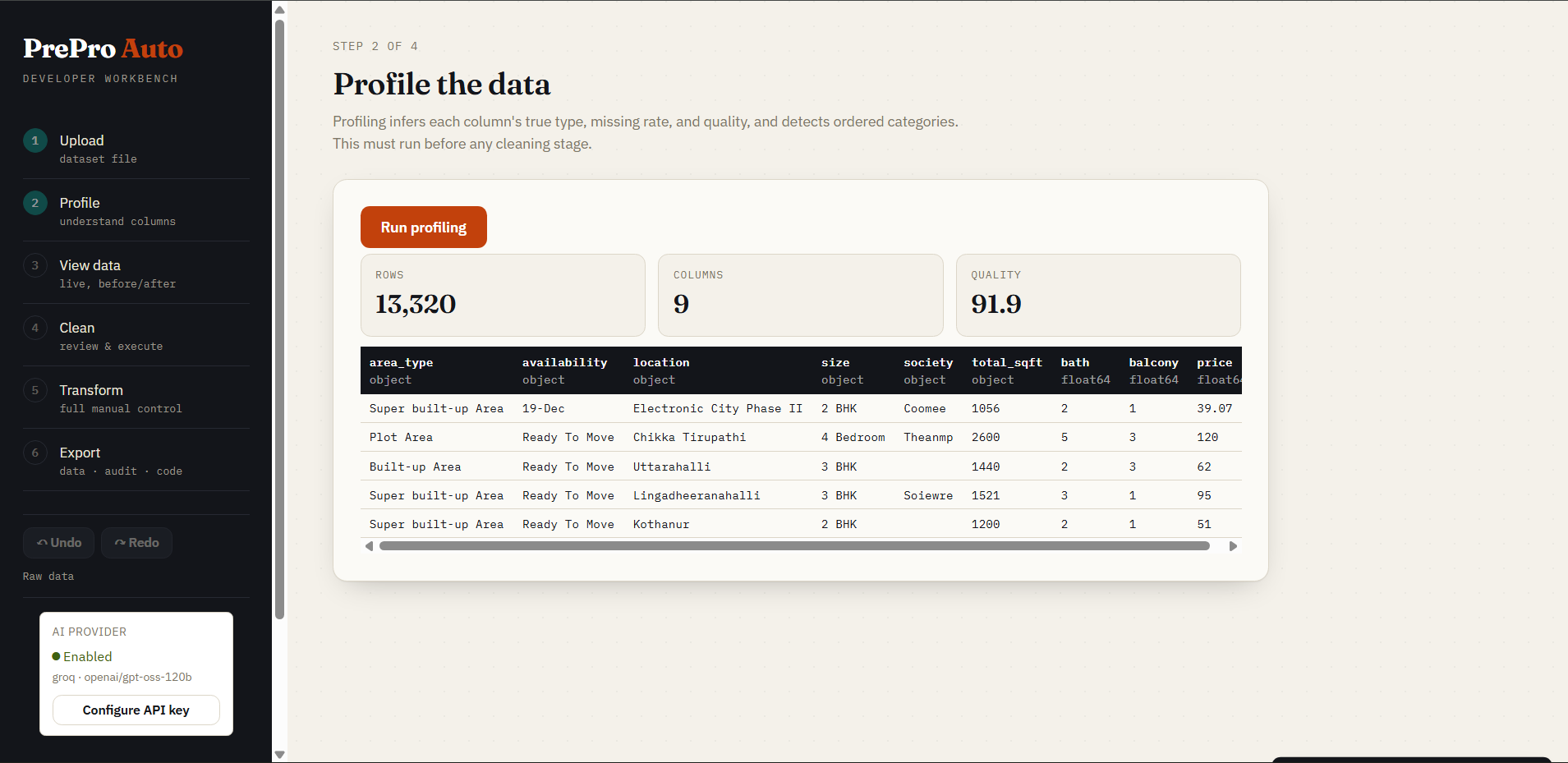
Step 2 — Profile
Per-column semantic type inference, missing rates, cardinality, and a 0–100 dataset quality score — all in one pass, before any data is changed. Profiling runs automatically when you open this step (no button to click).
What the quality score is (and isn't). It starts at 100 and subtracts weighted penalties across six dimensions — completeness (missing cells, empty and mostly-empty columns), validity (columns mixing numbers and text, untypeable columns), consistency (categories that differ only by case or whitespace), uniqueness (duplicate rows, constant columns), distribution (IQR-fence outlier prevalence), and sufficiency (very small samples). The Profile step shows the full breakdown: every factor, what it measured, and what it cost.
Treat it as a progress indicator for one dataset's cleaning session — "did what I just did help?" — which is exactly how the before/after delta uses it. It is not a validated metric: the weights are considered judgements, not constants calibrated against downstream model performance, and each factor is capped, so past a point more damage stops lowering the score. Two different datasets both scoring 85 are not therefore equally good, and the number should not be reported as a measurement in a paper without independent validation. Use the per-dimension breakdown, which says what is actually wrong, rather than the scalar alone.
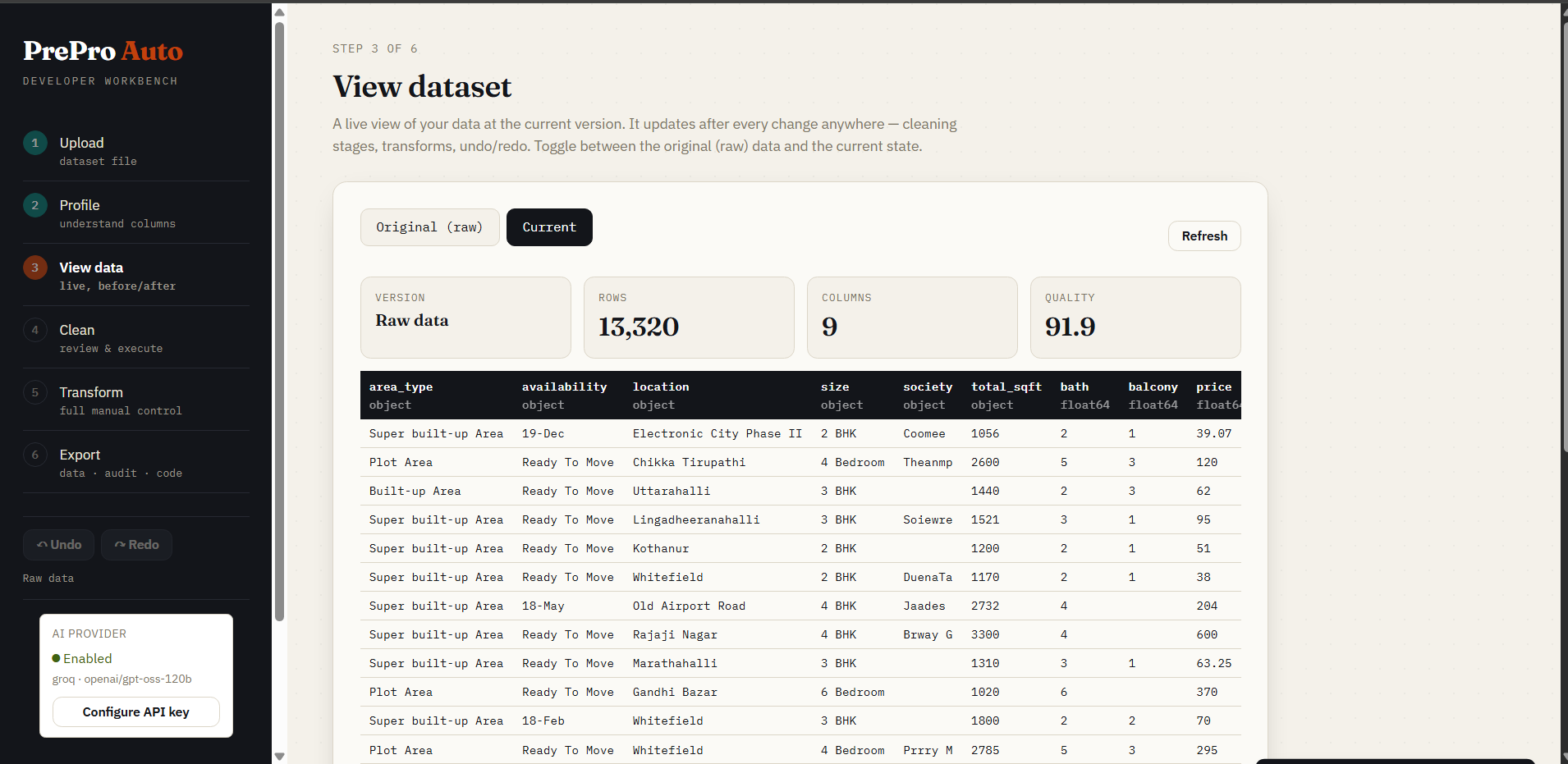
Step 3 — View data
Live table toggling between Original (raw) and Current (cleaned). Version label, row/column count, and quality score update after every operation.
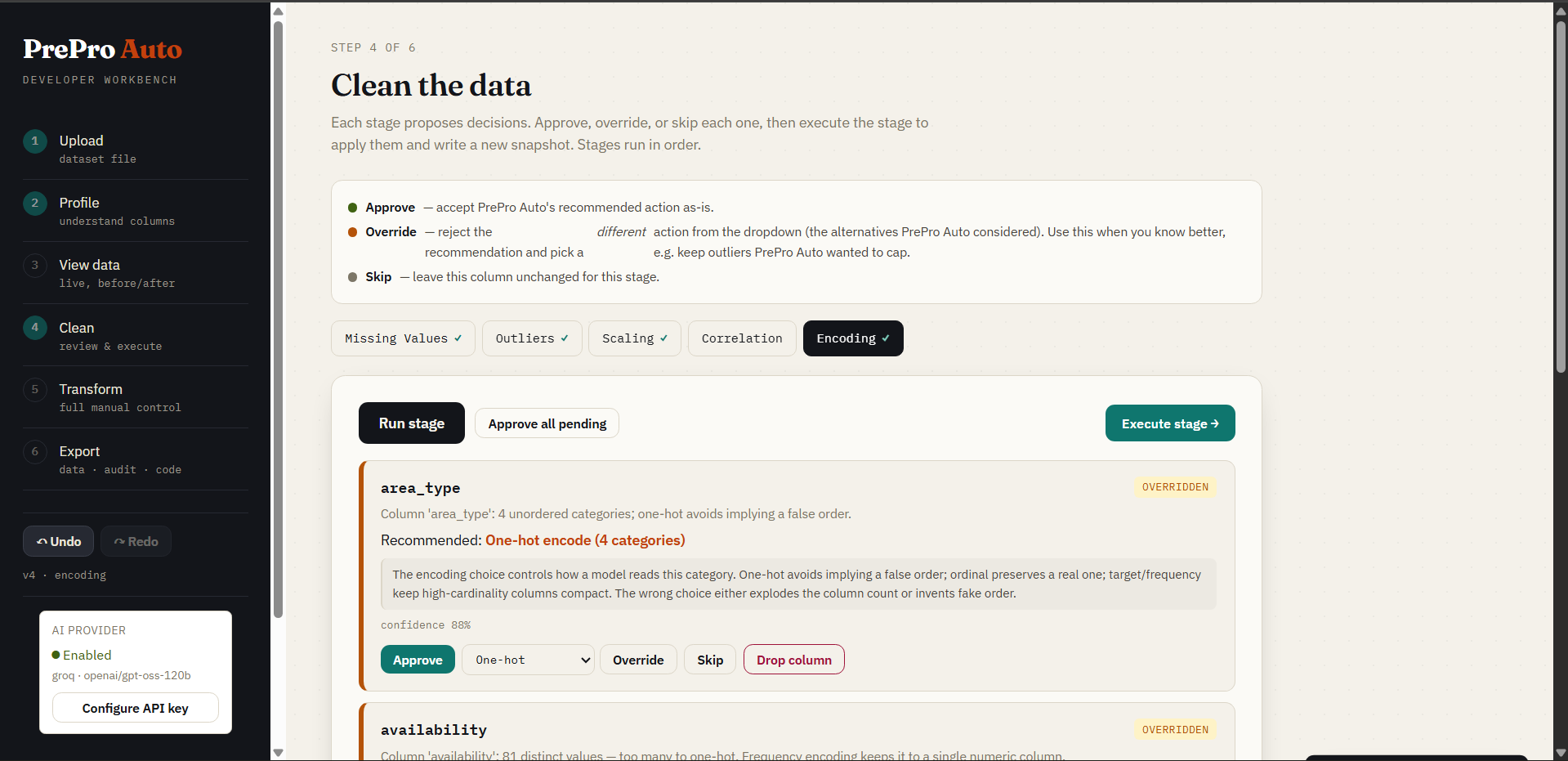
Step 4 — Clean (human-in-the-loop)
Selecting a stage tab (Missing Values, Outliers, Scaling, Correlation, Encoding) runs it automatically — no "Run stage" button; opening this step auto-runs Missing Values first. Each stage generates per-column decision cards. Every card shows contextual alternatives with their own confidence score and a one-line reason, and the recommended option always leads. Approve, Override (your choice sticks), Skip, or Drop. A live issue-count badge on each stage tab updates after you execute — watch it drop to 0 ✓ — and executing a stage auto-advances to and runs the next one so its cards are ready immediately. Prefer one click? ⚡ Quick clean runs all five stages and applies every recommendation at once (fully undoable) — the visual equivalent of prepro_auto.quickclean(..., apply_all=True).
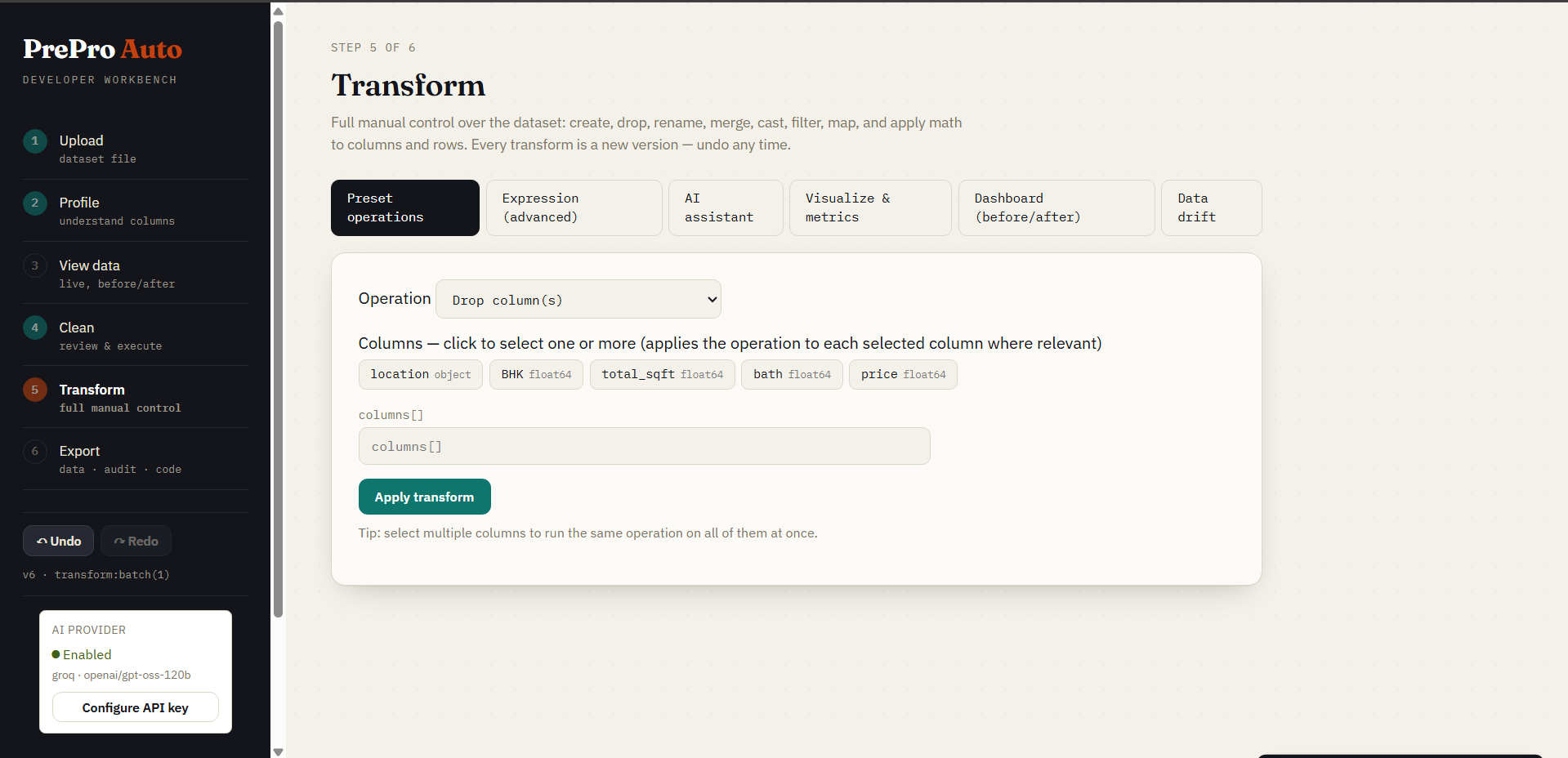
Step 5a — Preset Operations
18 built-in transforms (rename, cast, filter, merge, math, string ops, regex, group-aggregate, sort, dedup, and more). Every operation is a single undoable version.
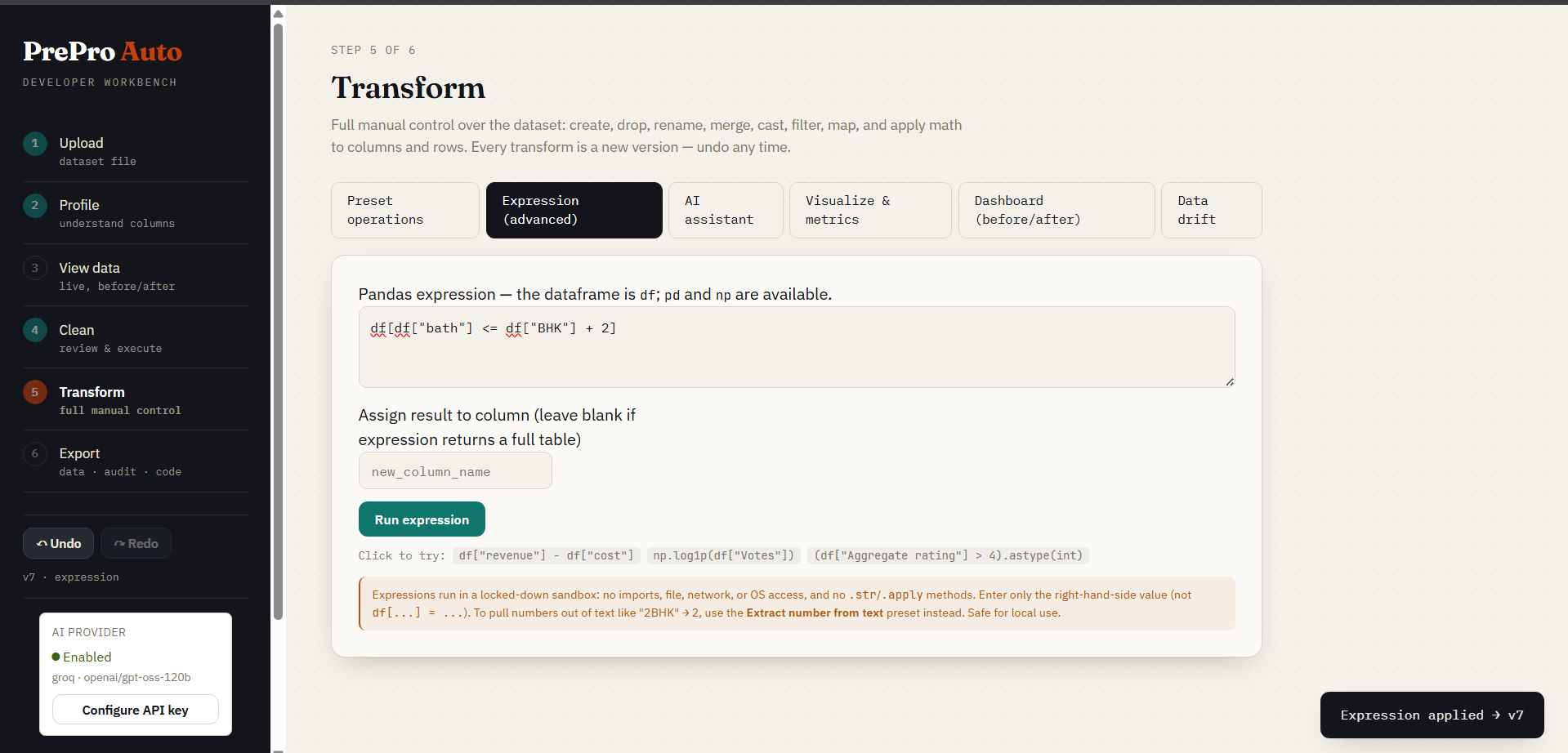
Step 5b — Expression Editor
Write the right-hand side of any pandas expression and name the column it lands in — e.g. expression df["revenue"] - df["cost"], target profit.
Preview (dry run) first. It evaluates against your current data and shows the shape delta, added/removed columns, dtype changes, and a before/after sample — committing nothing. Then apply, as one undoable version.
What works: arithmetic and comparisons, .str methods, .astype, .fillna, .clip(lower=0), .round(2), .where, .map({...}), pd.to_numeric(df["x"], errors="coerce"), pd.to_datetime, pd.cut, np.log1p/np.where, and df.groupby("g")["v"].transform("mean"). Keyword arguments are fine, and so is any column name — validation reads the parsed syntax tree, not the raw text, so a column called important_flag or opening_price is not mistaken for import/open.
Blocked: imports, dunder access, lambdas and comprehensions, .apply/.applymap/.pipe (they execute arbitrary callables), .eval/.query, and every read_*/to_* file operation. See SECURITY.md for the mechanism and threat model — this is a single-user, local-machine trust boundary, not a hostile-multi-tenant sandbox.
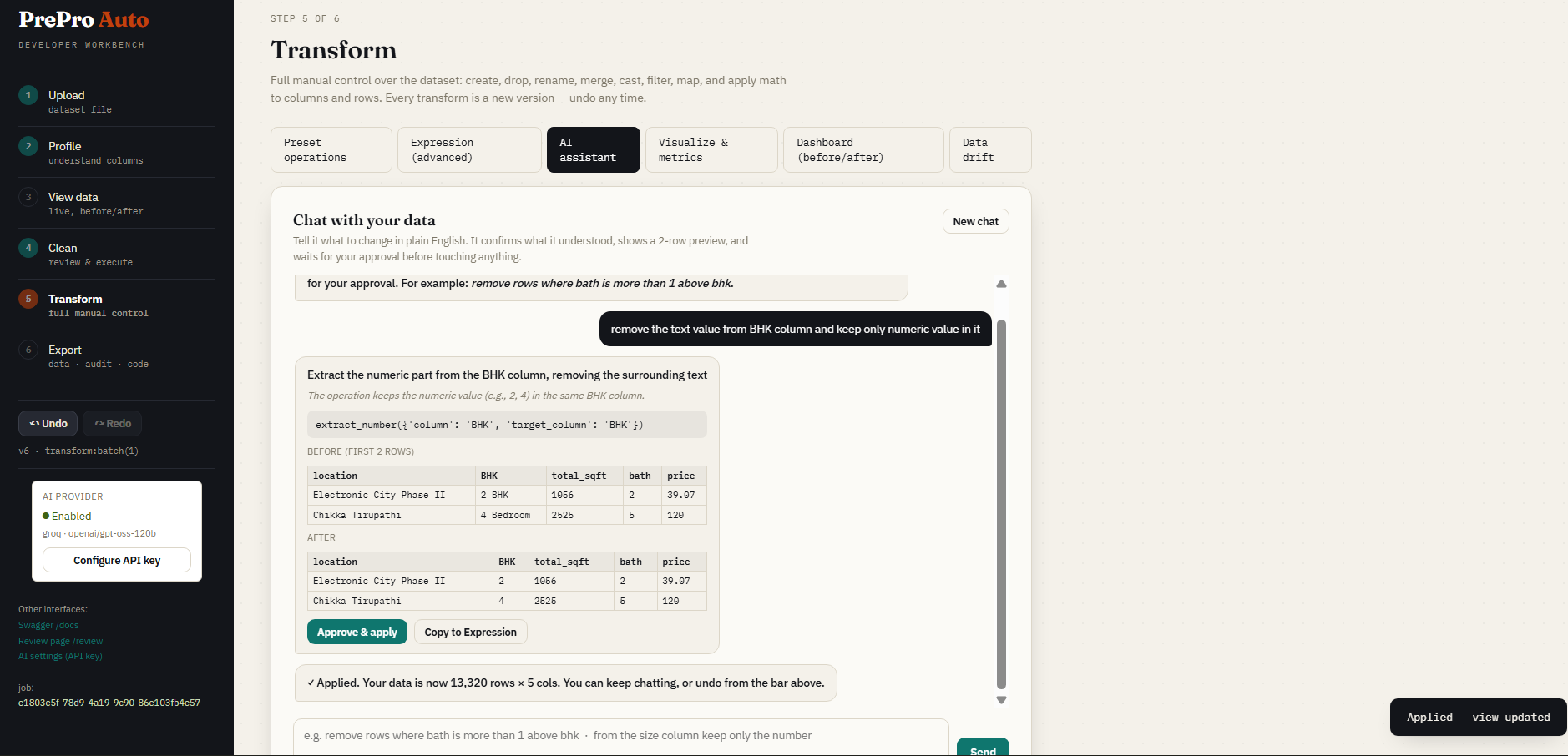
Step 5c — AI Assistant
Describe a transform in plain English. The AI proposes the pandas code, shows a preview, and waits for your confirmation before touching the data.
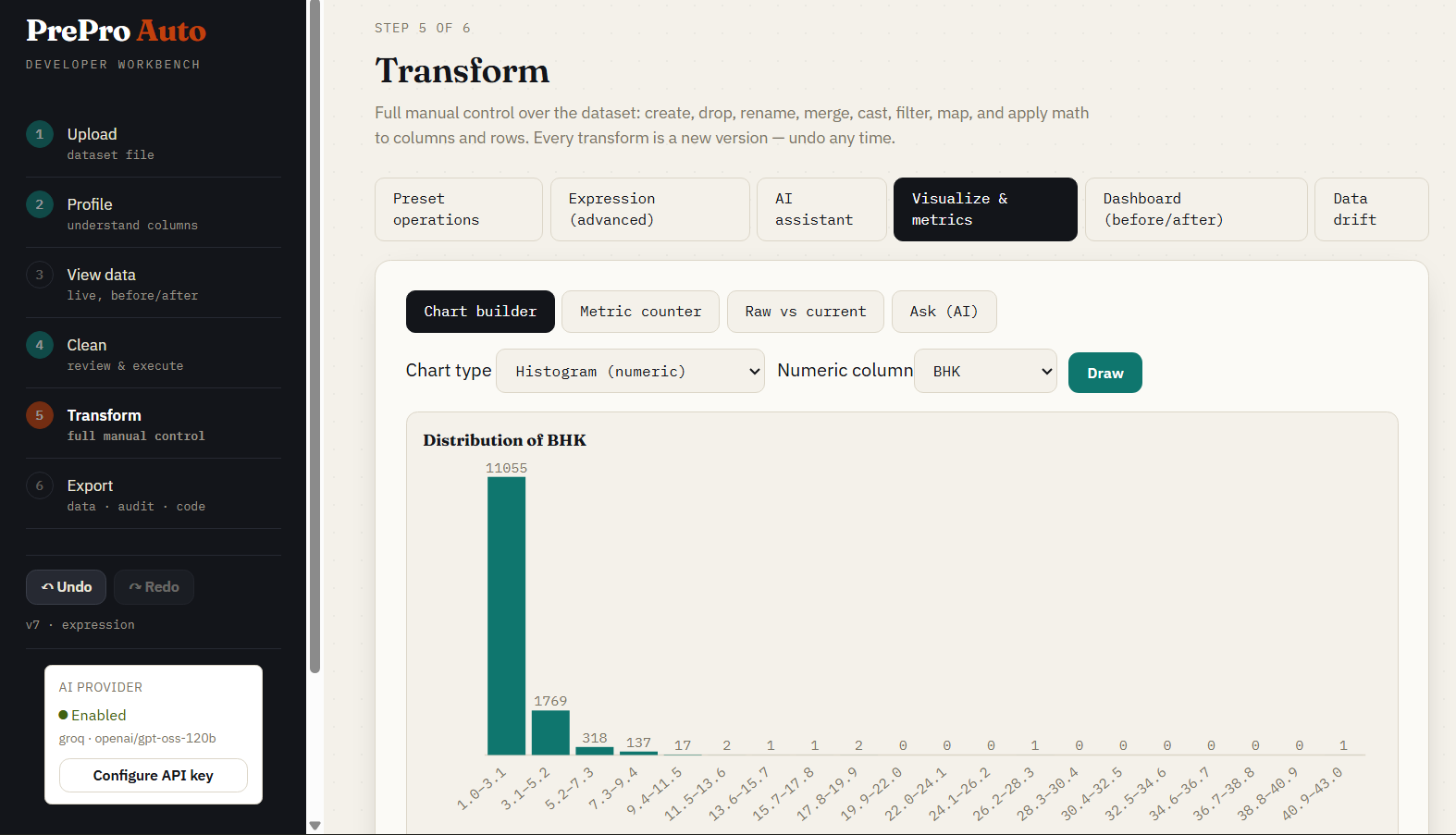
Step 5d — Visualization
Histograms, bar charts, scatter plots, and condition-based metrics — all rendered live against the current dataset version.
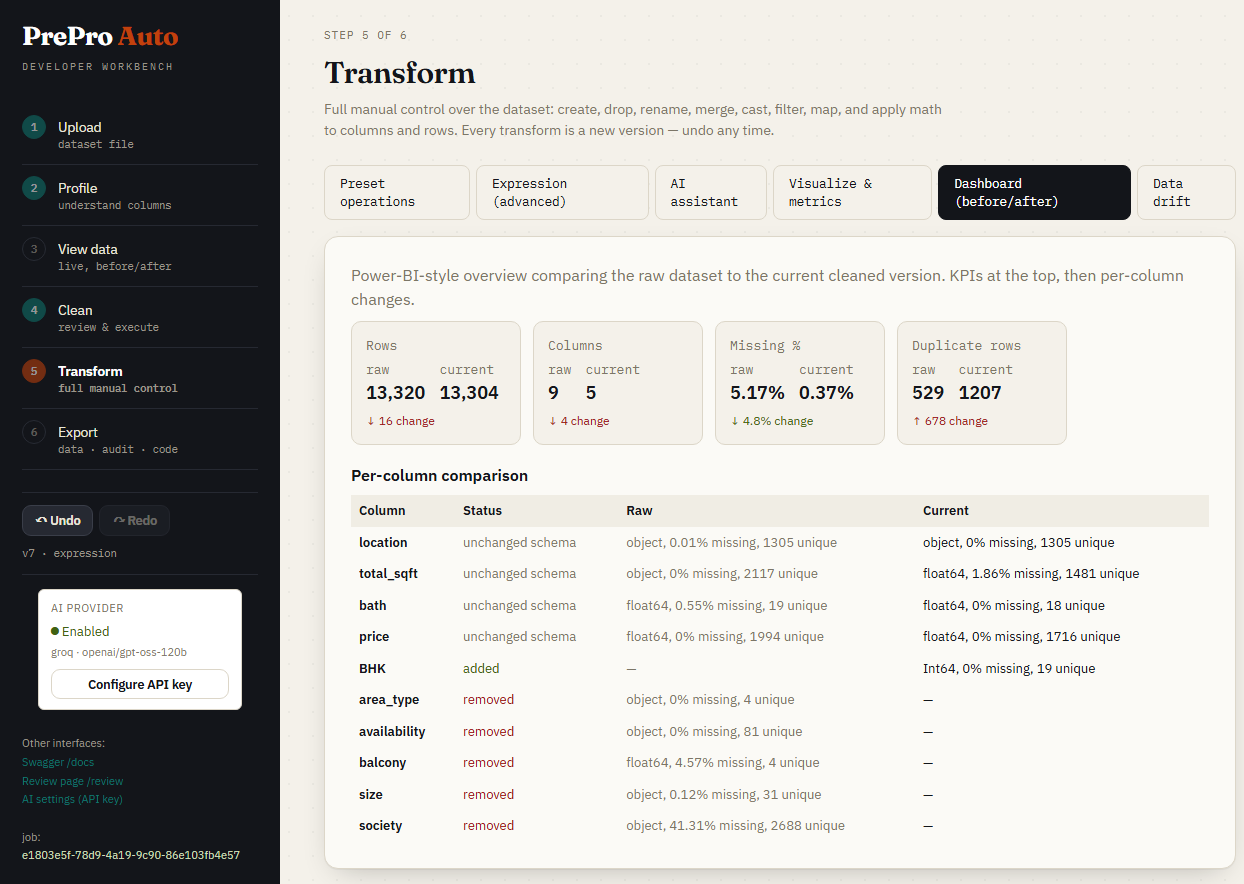
Step 5e — Before & After Dashboard
KPI tiles comparing raw upload to current cleaned version: quality score delta, per-column type changes, and data samples side-by-side.
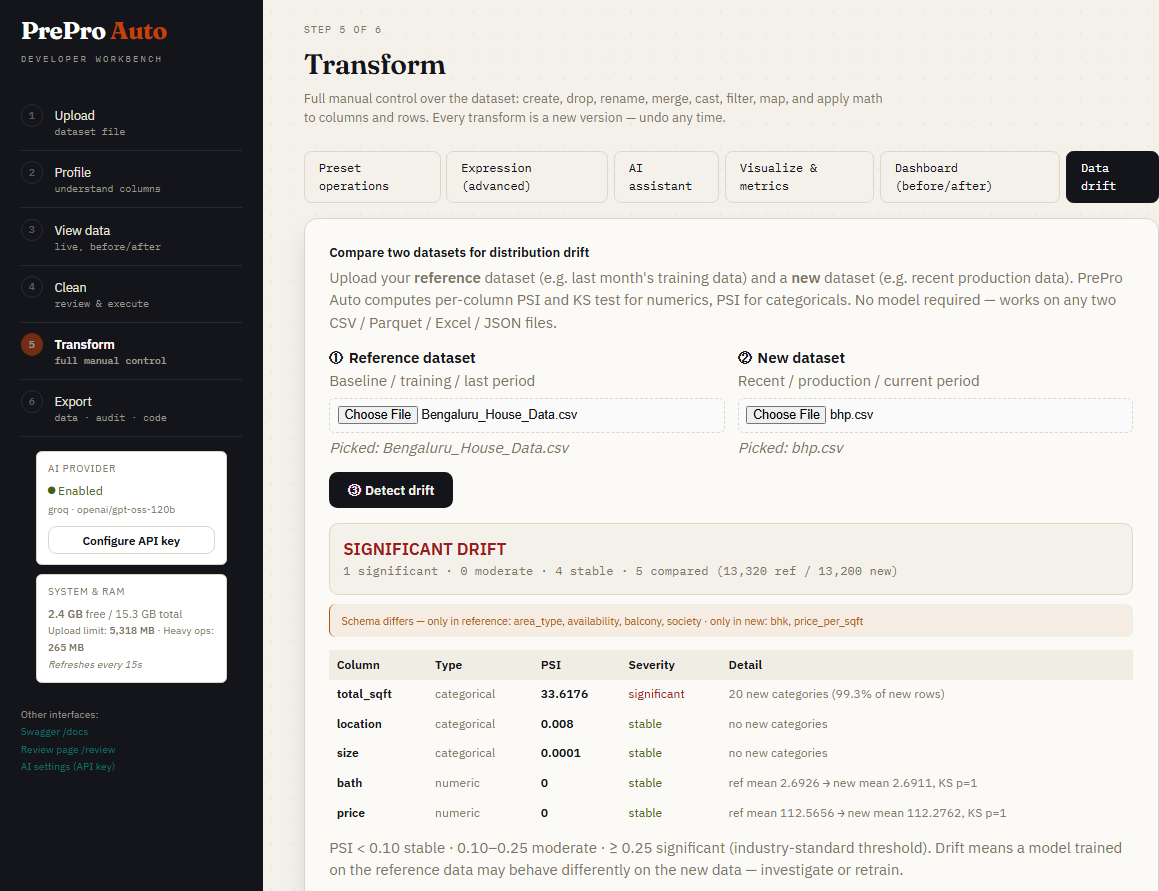
Step 5f — Data Drift Detection
Upload a second dataset (e.g. last month's production data) and compare distributions. PSI + KS test per column with stable / moderate / significant severity bands.
Step 7b — Zero-shot forecast with TimesFM (time-series jobs, a card of its own in Step 7)
Zero-shot forecasting with TimesFM 2.5 on the cleaned series, in its own card before the custom-model card: nothing is fit, no training split, nothing to tune. The most recent windows are held back and scored against persistence and seasonal-naive first; the q10–q90 band's coverage is measured, not assumed. The forecast never enters the dataset — it leaves as a PREDICTED-marked CSV, a self-contained HTML chart, or the forecast store, where it sits beside trained runs in one actual vs predicted chart. pip install "prepro-auto[timesfm]" (TimesFM 2.5 is Apache-2.0; 3.0's weights are non-commercial and are not used).
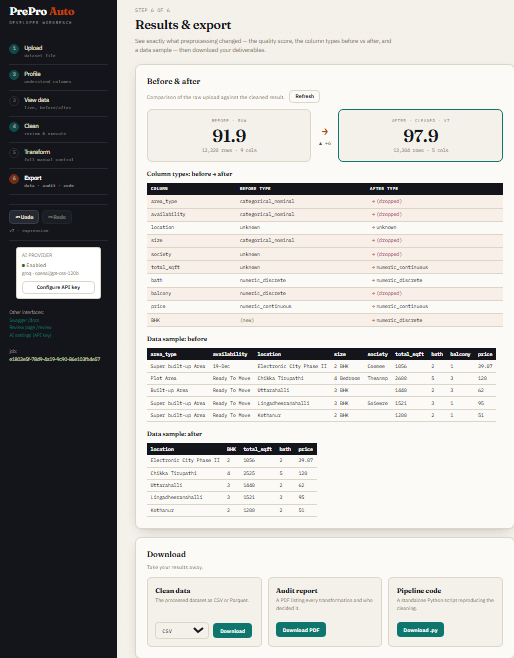
Step 6 — Results & Export
Quality score before vs after, column-type changes, and three downloads: cleaned data (CSV or Parquet), audit PDF, and a standalone pipeline script.
Reproducibility guarantee (no train/serve skew, no leakage). The exported
pipeline.pyis transform-only. Every parameter a step needs — means, medians, scaler statistics, category maps, target means — is fitted once inside PrePro Auto and baked into the script as a literal value. It never re-fits on the data it is later given. So running it on a held-out/test set applies the training statistics (no test-set leakage), one-hot encoding always emits the same columns in the same order regardless of which categories appear in new data, and target encoding reuses the stored per-category means so the target can never leak back into the features. This is verified bytests/test_reproducibility.py.
Step 7 — Train a model (optional)
New in b5 — the app/ml training layer. Reached from the Results & Export step, or directly at /train?job=<job_id>.
Data source & upload. Choose From this cleaning session — trains on your current cleaned dataset (the active version, reflecting every stage, transform, and undo/redo), so the model's features and the Test window match exactly what you prepared — or Upload a cleaned dataset (.csv/.parquet/.xlsx/.json) for a file already cleaned elsewhere. Both are trusted-input: the finishing steps re-fit per CV fold, preprocessing you already applied is baked in, and the data is scanned for obvious leaks (target leakage warnings surface on the leaderboard). The banner reflects the source.
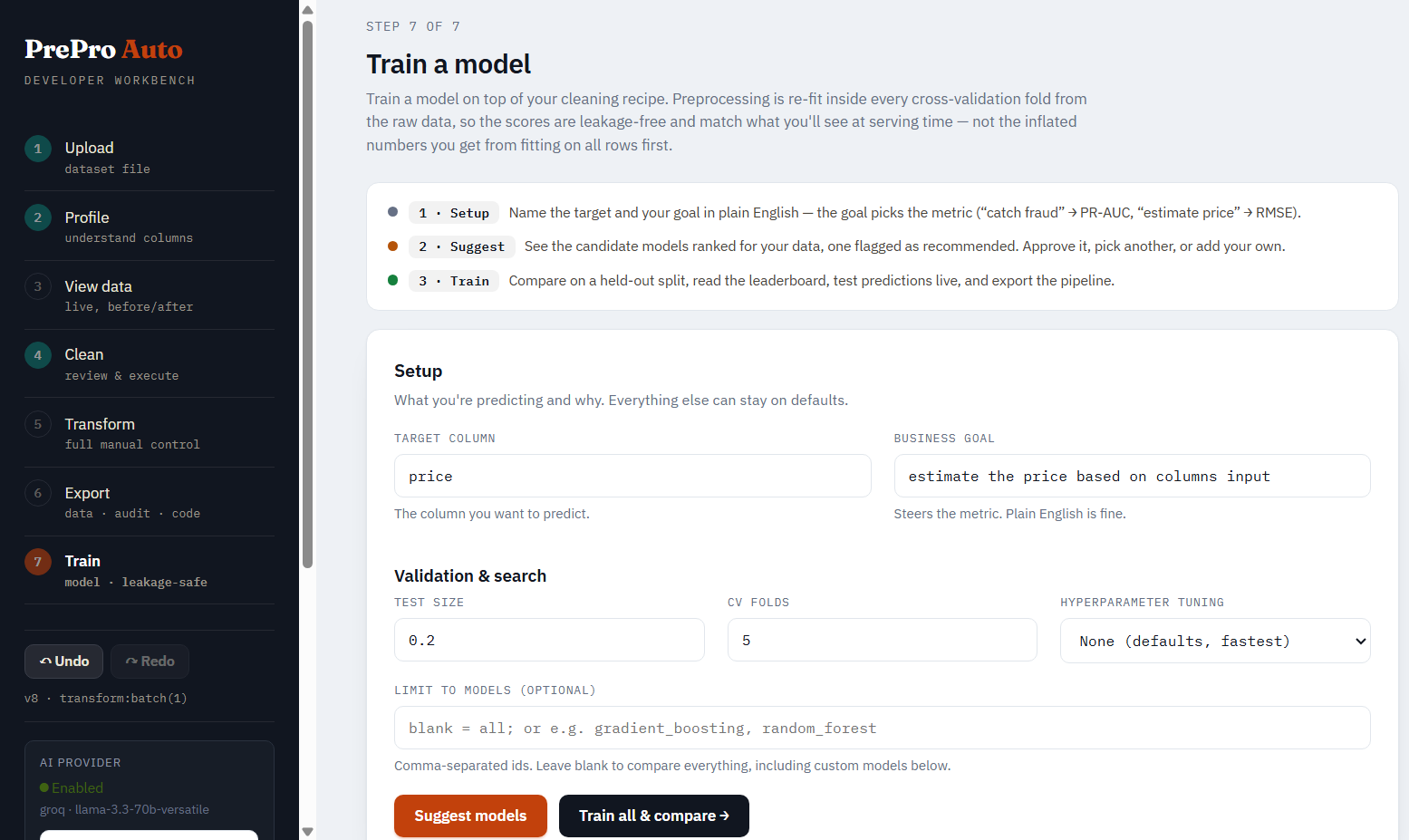
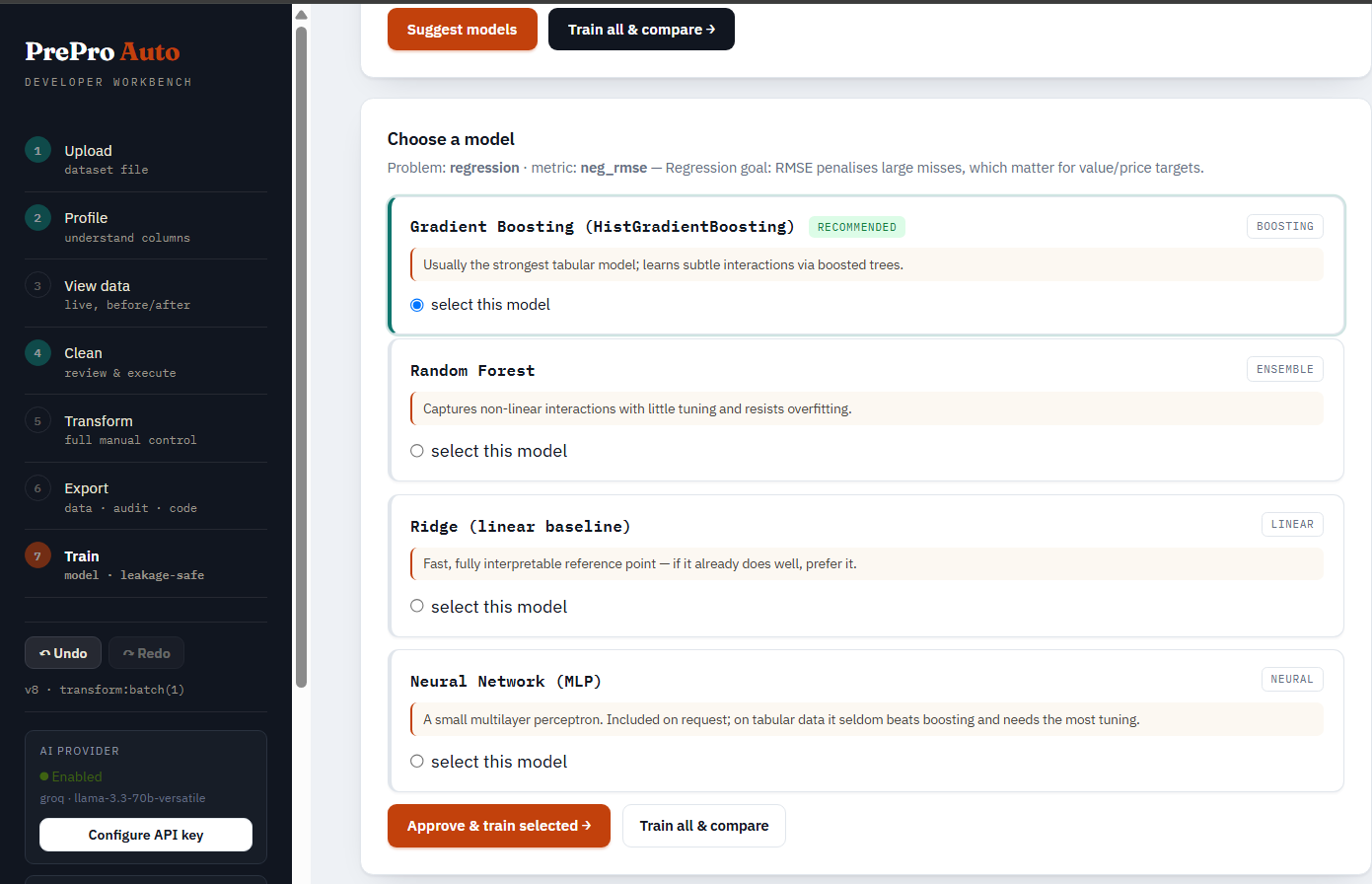
Setup & suggest. Pick the target from a dropdown of your current/updated columns (type-ahead search), add a plain-English business goal (PrePro Auto maps it to the right ranking metric), and click Suggest setup — it detects the task, recommends a metric with the reason, and pre-checks the recommended models. Then choose any models from a searchable, categorized picker: Linear, Tree & ensemble, Gradient boosting (XGBoost/LightGBM/CatBoost), Neighbors, SVM, Naive Bayes, Neural network — every model carries a one-line reason, a recommended badge on the defaults, and a needs [ml] / not installed badge where an extra is required. Leave everything unchecked to train the recommended defaults. The hyperparameter-tuning dropdown (None / Randomized / Grid / Halving / Optuna) sits alongside an explicit install note — search strategies are scikit-learn (already installed); only Optuna and the boosters need extra installs.
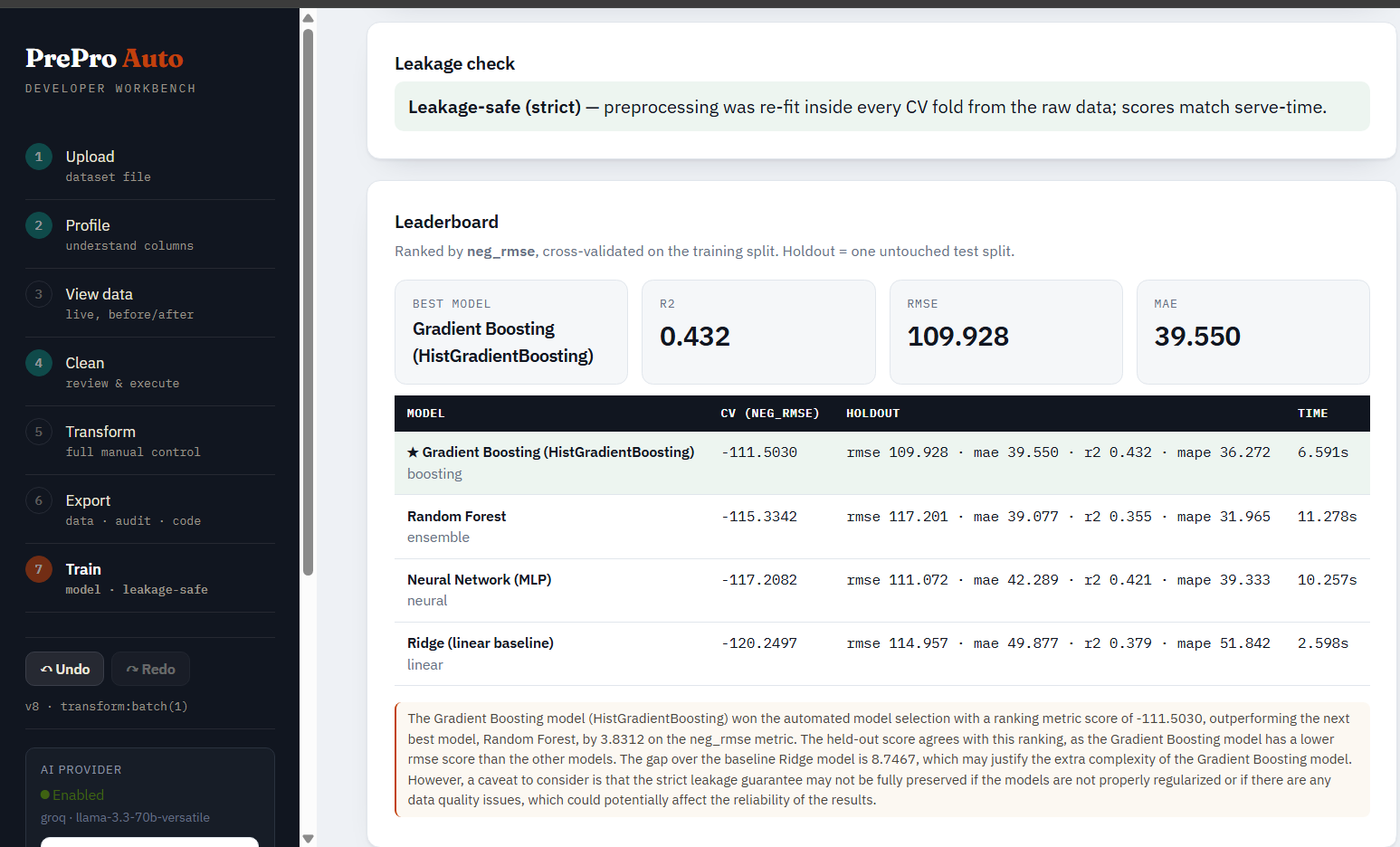
Leaderboard. Every candidate is cross-validated on the training split, then scored once on held-out test data. Each row shows the CV metric, accuracy (classification) or R² (regression), the holdout score, fit time, and why the model was a candidate. The winner is tagged BEST and gets a plain-English callout explaining why it was chosen (ranking metric + held-out accuracy + reason) — the same "decision card" style as the Clean step. A narrative and any leakage warnings sit below.
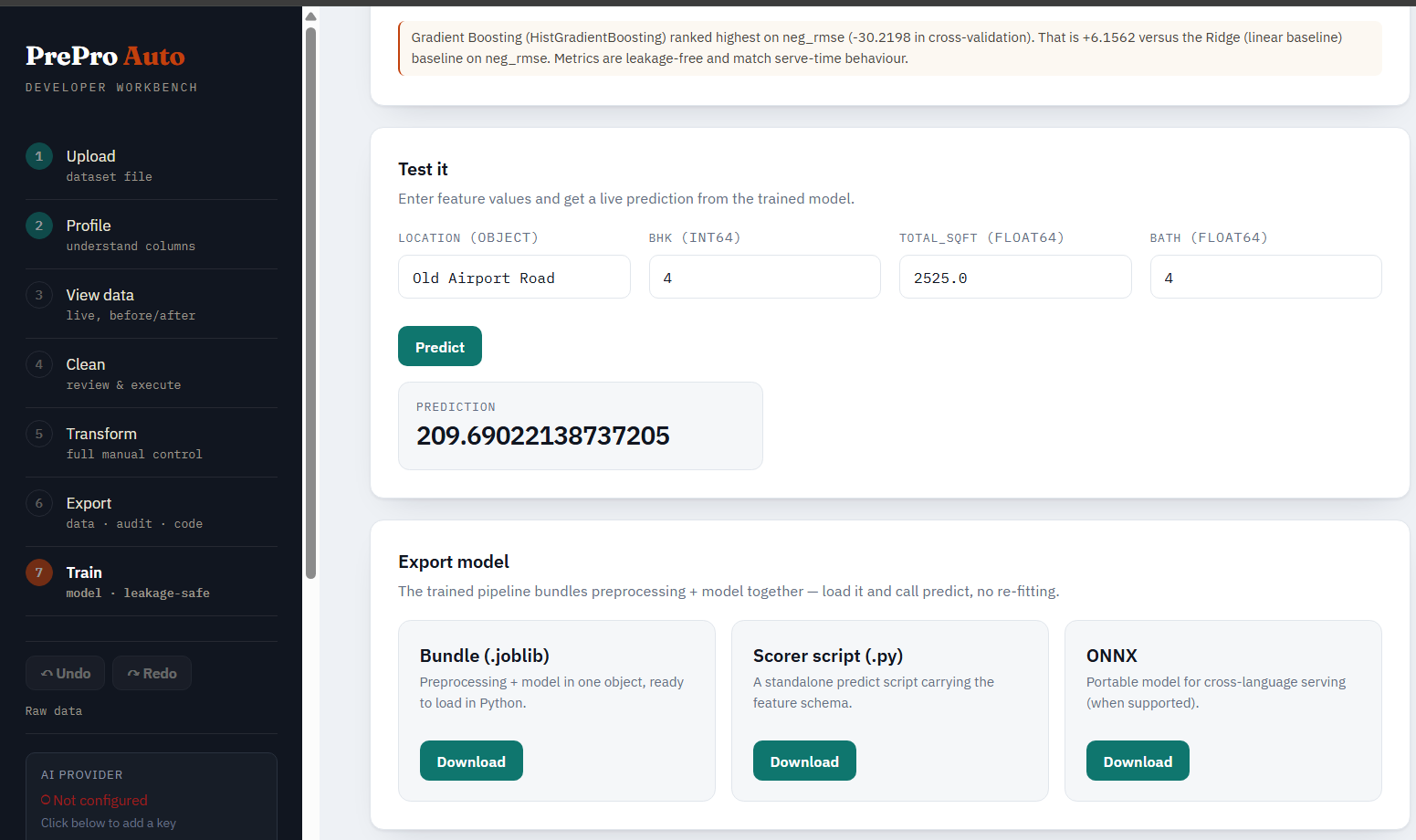
Test it. A form generated from the model's feature schema — type raw values and predict through the full pipeline (preprocessing + model), exactly as production would.
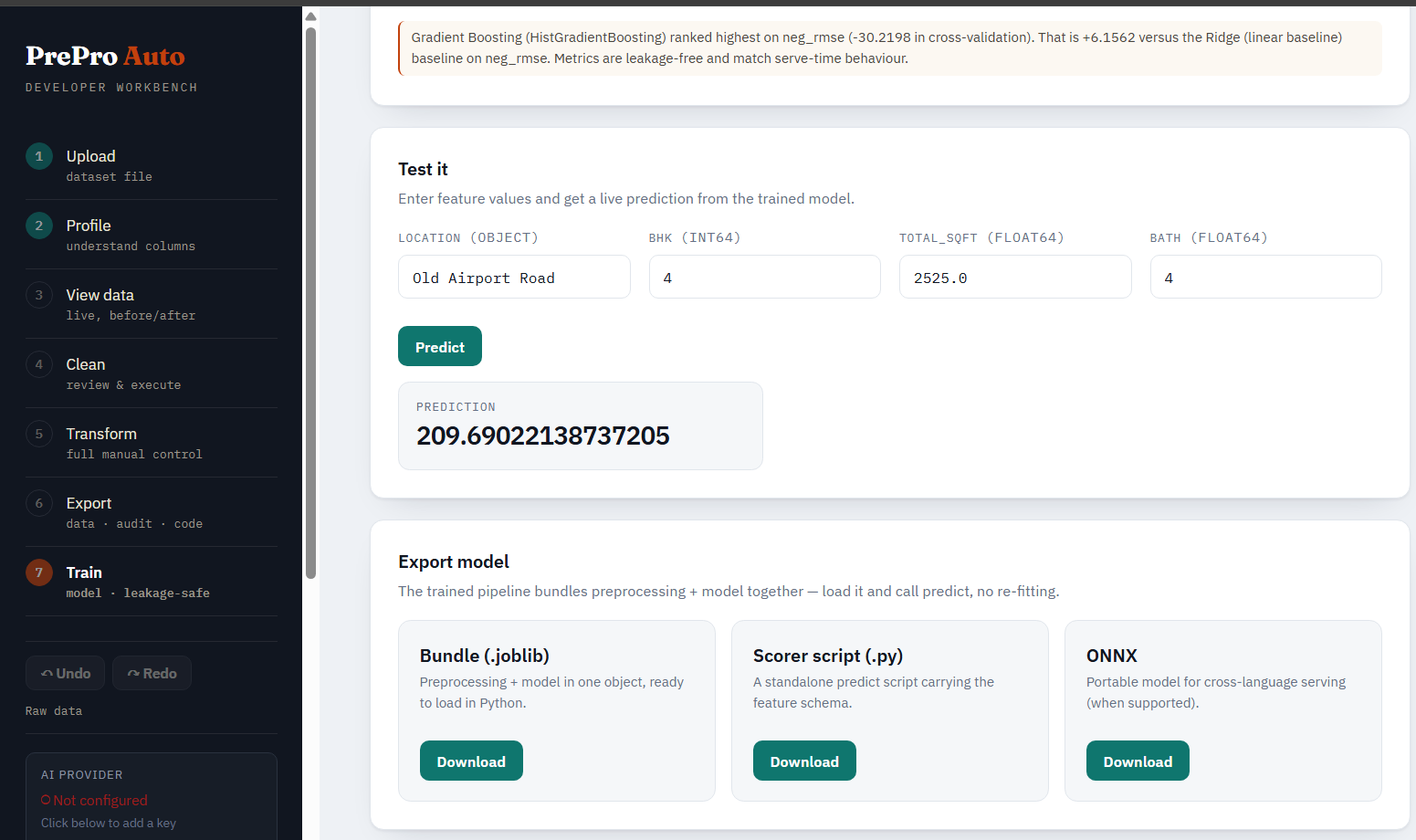
Export. Download a .joblib bundle, a standalone scorer script, or ONNX — all three ship preprocessing and the model together. The run itself is persisted (storage + a database row keyed on run_id), so it survives a server restart.
Ways to give PrePro Auto your data
There are 4 input methods in the notebook and 3 in the web UI. Pick whichever fits your workflow.
From a Jupyter notebook (5 ways)
| # | Method | When to use it |
|---|---|---|
| 1 | prepro_auto.quickclean(data) |
No browser at all. One call cleans the whole dataset headlessly and returns result.df. Fastest path to a model-ready frame. |
| 2 | prepro_auto.launch_file(path) |
You have a file on disk — CSV, Excel, JSON, Parquet, etc. Auto-detects encoding and delimiter. No pd.read_csv() needed. |
| 3 | prepro_auto.launch(df) |
You already have a pandas DataFrame in memory (from a database query, API response, generated data, or a tricky read you handled yourself). |
| 4 | session.update(df) |
You already have a session and want to push a new DataFrame to it (e.g. after notebook-side edits). Commits a new undoable version. |
| 5 | Web upload, then notebook reads | Start the server with the CLI, upload via browser, then in the notebook do prepro_auto.Session(job_id, port).current() to pull the data back into Python. Rare but valid. |
From the web UI (3 ways)
| # | Method | When to use it |
|---|---|---|
| 1 | Drag-and-drop upload on Step 1 of the workbench | Standard. Drop a CSV/Parquet/Excel/JSON file into the upload box. The engine auto-detects encoding and delimiter. |
| 2 | File picker on Step 1 | Same as drag-and-drop, just clicked. Useful when dragging is awkward (split screens, touchpads). |
| 3 | URL parameter ?job=<id> |
When the notebook launched the session, the printed URL already includes ?job=... — no upload needed, the workbench adopts the existing job. |
Supported file formats
| Format | Extensions | Notes |
|---|---|---|
| CSV | .csv, .tsv, .txt |
Auto-detects encoding (utf-8 / utf-8-sig / latin-1 / cp1252) and delimiter (comma, tab, semicolon, pipe) |
| Excel | .xlsx, .xls, .xlsm |
First sheet by default; multi-sheet handling via the upload form |
| Parquet | .parquet, .pq |
Fastest format for large datasets, preserves dtypes |
| JSON | .json, .jsonl, .ndjson |
JSON-records and JSON-lines both supported |
| Feather | .feather |
Apache Arrow's native columnar format |
Not supported: PDF, DOCX, HTML, images. PrePro Auto is a tabular-data tool — these formats need a dedicated extraction step first (Camelot or pdfplumber for PDFs, BeautifulSoup for HTML).
Have a PDF with a table?
Extract it to a DataFrame first, then hand it to PrePro Auto:
import pdfplumber, pandas as pd, prepro_auto

with pdfplumber.open("report.pdf") as pdf:
    rows = pdf.pages[0].extract_table()        # pick the right page
df = pd.DataFrame(rows[1:], columns=rows[0])    # first row is the header
session = prepro_auto.launch(df)                # now clean it like any DataFrame
For PDFs with merged cells or complex layouts, try camelot-py (better for bordered tables) or tabula-py (requires Java). PrePro Auto deliberately leaves PDF extraction to specialised tools because generic PDF-to-table conversion succeeds only ~30–70% of the time depending on the document — bundling it would mean silent extraction errors hidden under PrePro Auto's name.
1. Input functions (notebook)
Everything you call before preprocessing starts. The functions that get data into a session.
| Function | Parameters | Returns | What it does |
|---|---|---|---|
prepro_auto.quickclean(data, target=None, threshold=0.90, apply_all=False, stages=None, dataset_type="tabular") |
data: DataFrame or file path |
CleanResult (.df, .report, .job_id) |
Headless, no browser. Runs the whole engine and applies every decision at/above threshold, skipping the uncertain ones (or apply_all=True for full auto-pilot). Returns the cleaned DataFrame plus a report of what was applied vs. left for review. dataset_type="time_series" runs the time-index stage first. |
prepro_auto.launch_file(file_path, domain="general", dataset_type="tabular", port=None, open_browser=False) |
file_path: str or Path |
Session |
Reads a file from disk with auto-encoding-detection, starts the local workbench, returns a session. Handles all supported formats. Prints the workbench URL. |
prepro_auto.launch(df, domain="general", dataset_type="tabular", port=None, open_browser=False) |
df: pandas DataFrame |
Session |
Registers an in-memory DataFrame as a job (no upload, no file I/O), starts the workbench, returns a session. Use when you already have a DataFrame. Pass dataset_type="time_series" for time-ordered data — adds the time-index stage. |
prepro_auto.Session(job_id, port) |
job_id: str, port: int |
Session |
Reconnect to an existing session by ID. Use when the notebook restarted but the server is still running, or to attach to a job created from the web UI. |
prepro_auto.set_api_key(provider, api_key, model=None) |
provider: one of "groq" / "openai" / "anthropic" / "gemini" / "mistral" |
dict with ok, verified, provider, model, reason |
Configures the AI provider at runtime (in-memory only — not written to disk). Makes a tiny test call to verify the key works. Call before launch() if you want AI features active for the session. |
Example — most common pattern:
import prepro_auto

# Optional: enable AI features for this session
prepro_auto.set_api_key("openai", "sk-...")

# Load a file (auto-encoding-detection)
session = prepro_auto.launch_file(r"C:\Users\me\data\sales.csv")
2. Preprocessing functions
The work itself — clean, transform, version. These are called on the session object that input functions returned, or via REST endpoints under /api/v1/.
Profile and clean
| Function / Endpoint | What it does |
|---|---|
POST /datasets/{job_id}/profile |
Per-column type inference, missing rates, 0–100 quality score. Run once after upload. Time-series jobs are scored with 7 time-aware dimensions (temporal completeness 25 · timestamp integrity 20 · cell completeness 15 · outliers+stuck 15 · frequency regularity 10 · type mismatch 10 · span sufficiency 5) — every deduction is weight × severity with the rule printed beside the measured numbers, outage rows count as missing time steps rather than missing cells, and engineered feature columns are excluded from the arithmetic with the exclusion disclosed. |
POST /datasets/{job_id}/stages/time_index |
Time-series jobs only (upload with dataset_type=time_series; 422 otherwise). Detects the time column (parse-rate / order / uniqueness evidence), then cards for: parse (UTC-normalised when zoned, epoch units auto-detected), chronological sort, duplicate timestamps (keep last/first/average — held for review when values conflict), and frequency + gap inventory with optional reindex to the detected grid (gaps become countable NaN rows). Optional ?time_column= overrides the detected choice. |
POST /datasets/{job_id}/stages/missing_values |
Detect missingness mechanism (MCAR / MAR / MNAR), recommend fill strategy per column. Creates decision cards. Time-series jobs get the gap-structured path instead: run lengths decide the method (time-weighted interpolation / forward-fill for runs ≤ 4 steps, long outages left NaN), every filled cell is flagged in a __was_imputed shadow column, and KNN/MICE appear greyed-out with the reason they'd leak across time. |
POST /datasets/{job_id}/stages/outliers |
IQR + modified Z-score + Isolation Forest. Classifies findings as data errors vs rare events. Time-series jobs instead use a Hampel filter (rolling median ± 3×windowed MAD — values judged against their own neighbourhood, so daily peaks aren't flagged) plus stuck-sensor run detection; values are replaced or masked with shadow-column flags, never dropped (dropping a row deletes a timestamp), and long runs of the dominant value (night zeros) are review-only. |
POST /datasets/{job_id}/stages/scaling |
Normality-driven scaler choice: Standard / Robust / Box-Cox / Yeo-Johnson / MinMax / log1p. |
POST /datasets/{job_id}/stages/correlation |
Find correlated pairs, detect constant / ID-like / target-leaking columns. For time-series jobs each pair card also shows the DIFFERENCED correlation (step-to-step changes) — two trending series correlate spuriously, and the drop-confidence follows the differenced number. |
POST /datasets/{job_id}/stages/encoding |
Categorical encoding routed by cardinality: label / ordinal / one-hot / frequency / target. |
POST /datasets/{job_id}/stages/ts_physics |
Time-series jobs only. Renewables physics features from site facts sent in the body once and stored for reuse ({"domain": "wind"/"solar", latitude, longitude, hub_height, rated_kw, utc_offset_hours, wind_speeds: [{column, height_m}], columns: {...overrides}}). Wind: hub-height speed via the per-timestep two-height shear fit (α clamped [0, 0.5]) with an explicit fallback hierarchy and a per-row method column, air density p/(R·T) with unit auto-detection disclosed, v³, specific power ½ρv³, power-curve region flags. Solar: NOAA sun position (naive timestamps require utc_offset_hours), Haurwitz clear-sky GHI + clear-sky index kt (only with the sun ≥ 5° up), NOCT cell temperature. The QC card flags physically implausible power (night production, above rated, production at calm) in a __was_implausible shadow column — values never altered — which the TS quality score counts. Everything is closed-form numpy, so the exported pipeline.py reproduces it standalone. |
GET /ml/runs/{run_id}/contract · POST /ml/runs/{run_id}/prune |
Model card + evidence-gated pruning. The contract is introspected from the shipped artifact: every required raw column with dtype, the preprocessing branch it actually flows through inside the pipeline, permutation importance normalised 0–1, real predict behaviour (missing column → NaN for the imputer; extras ignored), and forecast semantics + clip bounds. Prune drops features below a normalised-importance threshold and re-runs the champion's CV on the kept set — a CV-only before/after comparison (no test read); apply: true trains the pruned configuration as a new sealed run. Forecast runs additionally store an actual-vs-predicted-over-time series (with the persistence baseline) captured during the single test read, drawn in the workbench's Phase-5 panel. |
| Forecast training (time-series) | Any training endpoint/spec accepts forecast_horizon (predict the target N steps ahead — label shifted, unlabelable tail dropped, H-row purge between train/test and a gap=H in every walk-forward fold, all disclosed in the Phase-1 preview), forecast_baseline_col (a physics estimate scored beside the always-on persistence baseline, same folds + same single test read, champion skill = 1 − error_model/error_baseline), and clip_min/clip_max (bounds applied INSIDE the shipped pipeline). prepro_auto.train_horizons(df, target, horizons=[...]) returns the skill-vs-lead-time curve, one sealed run per horizon. Time-series jobs auto-fill the time column from the Time Index stage. |
POST/GET /datasets/{job_id}/templates · .../templates/presets · POST .../templates/{name}/render |
Deliverable templates (time-series). Explicit per-column recipes — source, rename, aggregation method, scale factor with your stated reason ("kW over 15 min → MWh") — rendered raw/15-min/hourly/daily with an optional India 96-block column (only when the output step is truly 15 min). The manifest travels in the CSV as # header lines (pandas: comment='#'); forecast-sourced columns ("forecast:latest") are permanently marked PREDICTED with run/model/horizon and the latest-issue join rule, and future target times are appended as rows with the count disclosed. Presets are generated from your job's own columns. Notebook: session.save_template / .templates / .template_presets / .render_template. |
POST /datasets/{job_id}/forecasts/issue · .../reconcile · GET .../accuracy · POST/GET/DELETE .../schedule |
Forecast store + scheduler (time-series). Issue predicts from the latest data row for each trained forecast run — issue_time is the data's own timestamp (deterministic; re-issuing on unchanged data is an idempotent skip), target_time = issue + horizon × the detected step, and the persistence prediction is captured from the same row at the same instant. Reconcile fills actuals only from realized rows (nothing interpolated); accuracy reports live MAE/RMSE and skill = 1 − rmse_model/rmse_persistence per (run, horizon) — overlapping scheduled runs give the skill-vs-lead-time curve for free. The interval scheduler (default 2 h) lives with the server process and says so in its status; for production point OS cron at the issue endpoint. Notebook: session.issue_forecasts / .reconcile_forecasts / .forecast_accuracy / .schedule_forecasts. |
POST /datasets/{job_id}/farm · GET .../farm |
Time-series jobs only. Store/read the per-asset farm layout ({assets: [{id, latitude, longitude, rated_kw, hub_height_m/tilt_deg/azimuth_deg}]}), validated (unique ids, plausible coordinates, ≤ 500 km span) with a computed summary — span km and how many weather-model grid cells the assets cover at a stated spacing (default 9 km): more than one cell is the measured argument for per-asset weather. |
POST /datasets/{job_id}/weather/fetch |
Time-series jobs only. Fetch Open-Meteo weather for every farm asset and merge it into the dataset as a versioned, audited transformation (undo works). source: "archive" (default) uses the historical-forecast archive — past forecasts, never reanalysis, so training inputs match what the live system receives; "live" fetches the current forecast. Per-asset columns (≤ 8 assets) plus a capacity-weighted farm aggregate; requested-vs-returned coordinates, the 15-min-interpolation caveat of hourly-native models, and the merge match rate are all recorded; naive timestamps require utc_offset_hours for the join. The pipeline.py export marks the step as a loud network-dependent gap instead of silently dropping the columns. CFSv2 (16–30 day, coarse, pip install prepro-auto[cfsv2]) ships as an operational helper with bilinear multi-asset grid extraction. |
POST /datasets/{job_id}/foundation/timesfm/check · POST …/runs · GET …/runs/{run_id} · GET …/runs/{run_id}/export?fmt=csv|html · POST …/runs/{run_id}/issue · DELETE …/runs/{run_id} |
Time-series jobs only. Zero-shot forecasting with TimesFM 2.5 (pip install "prepro-auto[timesfm]"). check runs every readiness test with its number and never loads the model; runs starts one batched forecast (8 held-back windows + the final horizon) on a worker thread and returns 202; the result carries MAE/RMSE by lead, persistence and seasonal-naive on the same windows, skill (1 − error_model/error_baseline), measured q10–q90 coverage, the checkpoint revision and the fixed config. Exports are marked PREDICTED; issue writes one forecast-store record per lead. GET /foundation/timesfm/status says whether the model is usable here. |
GET /datasets/{job_id}/forecasts/series · GET …/series/export.html |
Actual vs every issued forecast in the store (trained runs and TimesFM) on one axis, persistence underneath, with each run's MAE on the same rows; join=latest or join=lead:<h>. The .html variant is one self-contained file (Plotly and data embedded) that opens offline. |
POST /datasets/{job_id}/stages/ts_features |
Time-series jobs only (422 otherwise; runs last). Proposes lag features guided by measured lag coefficients against a ±z/√n significance band with z raised for the number of candidates tested (Bonferroni; PACF for short lags with prepro-auto[timeseries], plain autocorrelation otherwise and always for the daily/weekly lags — the card names the method and the band), rolling mean/std over ~1 h and ~1 day windows shifted by one step (the window at time t ends at t−1 — leakage-safe by construction), and calendar features the span can actually support (cyclical sin/cos for time-of-day and day-of-year). Additive only: rows untouched, existing columns never overwritten; a pure-noise column earns no lag card. |
POST /datasets/{job_id}/stages/{stage_name}/execute |
Apply your approved decisions, commit a new version. stage_name is one of the stages above. |
Decision cards (the human-in-the-loop)
| Endpoint | What it does |
|---|---|
GET /datasets/{job_id}/decisions?stage=<stage> |
List decision cards for a stage |
POST /decisions/{decision_id}/approve |
Use the recommended action |
POST /decisions/{decision_id}/override |
Use an alternative action (body: {"action": "...", "reason": "..."}) |
POST /decisions/{decision_id}/skip |
Don't change this column |
POST /decisions/{decision_id}/drop-column |
Drop the column entirely |
Manual transforms (when you need more control)
| Endpoint | What it does |
|---|---|
GET /datasets/{job_id}/transform/operations |
List all 18 preset operations and their parameters |
POST /datasets/{job_id}/transform/preset |
Apply one preset op (rename, drop, cast, fillna, filter, merge, math, map, string ops, regex, group-aggregate, sort, dedup, extract-number) |
POST /datasets/{job_id}/transform/expression |
Apply a sandboxed pandas expression (e.g. df["revenue"] - df["cost"] into target profit). In the UI this runs only from a preview's "Looks right — apply it" — never directly. |
POST /datasets/{job_id}/transform/expression/preview |
Dry-run the same expression: shape delta, added/removed columns, dtype changes and a before/after sample — commits nothing |
POST /datasets/{job_id}/transform/expression/evaluate |
Read-only answer mode (same sandbox): a scalar comes back as its value (((df["a"]==0) & (df["b"]==0)).sum() → the count), a boolean mask as its true-count + share (with one-click drop/keep follow-up filters in the UI), a Series as stats + first values, a frame as shape + sample. Touches nothing, logs nothing — the inspect step before preview → approve. |
GET /datasets/{job_id}/transformations |
The audit trail: every applied step with the snapshot version it produced |
POST /ml/split/{job_id} |
Phase 1 of training: the exact split the run will use — row counts, target balance per side, CV fold plan, leakage scan — computed without fitting anything |
POST /ml/candidates/{job_id} |
Phase 2: every catalog model scored against the training partition — base + named factor adjustments, each citing the measured numbers — ranked, with a family-diverse preselection |
POST /ml/tuning/{job_id} |
Phase 3: each selected model's search space (standard ranges reshaped by the measured training partition, every reshape explained), the resolved method (auto = grid iff it fits the budget), and the cost in fits — computed by the same functions the trainer runs |
POST /ml/runs/{run_id}/select |
Phase 4: evaluate the chosen champion — the single read of the run's test partition, in the configuration that ships. Selection happens on the CV-only board (selection: "manual" on train); a second read is refused. The response carries the Phase-5 evaluation detail (predicted-vs-actual, residuals, confusion matrix, ROC/PR), captured during that read and rendered offline with a vendored Plotly |
POST /ml/ai/plan/{job_id} |
C1, the AI trainer: an LLM reads computed facts about the current dataset and proposes the plan a person would fill in by hand, with reasons; the server validates every field against the real data (corrections disclosed), the engine derives the metric, and approval runs the ordinary phased flow — the AI computes no number the seal protects |
GET /ml/runs/{run_id}/export?fmt=train_script |
C2: a Python script that re-runs this training outside the app — same pinned columns, split, seed, preprocessing and champion — and checks every reproduced metric against the recorded ones (exit 0 = the report reproduces). Trusted runs are standalone pandas+sklearn; strict runs embed the exact recipe and rebuild it via prepro_auto |
GET /datasets/{job_id}/state |
Cheap polling endpoint: active version + a revision token that changes when the data changes (drives notebook↔browser sync) |
POST /datasets/{job_id}/transform/batch |
Apply one operation across many columns as a single undoable step |
AI-assisted transforms (optional, needs an API key)
| Endpoint | What it does |
|---|---|
POST /datasets/{job_id}/transform/ai-propose |
Describe a change in plain English; AI proposes a concrete transform with preview |
POST /datasets/{job_id}/transform/ai-advise |
Ask the AI for advice on a column without changing anything |
POST /datasets/{job_id}/transform/assistant |
One-shot assistant call (full message) |
POST /datasets/{job_id}/transform/chat |
Multi-turn conversation preserving history |
Versioning and history
| Endpoint | What it does |
|---|---|
GET /datasets/{job_id}/view |
Current (active-version) data with shape, dtypes, sample rows |
GET /datasets/{job_id}/history |
Full version history with labels |
POST /datasets/{job_id}/undo |
Move active pointer back one version |
POST /datasets/{job_id}/redo |
Move active pointer forward one version |
GET /datasets/{job_id}/snapshots |
List all committed snapshots |
Visualization and monitoring
| Endpoint | What it does |
|---|---|
POST /datasets/{job_id}/viz/chart |
Build a histogram, bar, or scatter chart |
POST /datasets/{job_id}/viz/metric |
Compute a condition-based metric (e.g. "rows where price > 1000") |
POST /datasets/{job_id}/viz/compare |
Compare one column's distribution raw vs current |
GET /datasets/{job_id}/viz/dashboard |
Power-BI-style before/after dashboard (KPI tiles + per-column comparison) |
POST /drift/compare |
Compare two uploaded datasets for distribution drift (PSI + KS) |
3. Output functions
The artifacts you take away from a session. Notebook methods return Python objects; REST endpoints return downloadable files.
From the notebook (Python objects)
| Method | Returns | Where to use it |
|---|---|---|
prepro_auto.quickclean(data) |
CleanResult — .df (cleaned DataFrame), .report (per-stage summary), .job_id |
Headless one-call clean. result.df drops straight into model.fit(X, y); print(result) shows what was applied vs. left for review. |
session.current() |
pandas DataFrame | The current (active-version) DataFrame as it stands in the UI right now. Drop straight into model.fit(X, y). Warns if the UI holds approved decisions whose stage has not been executed — those are not in the data yet. |
session.update(df) |
the same Session |
Pushes a notebook-edited DataFrame as a new undoable version; an open workbench tab refreshes itself within ~2s. Decision cards computed against the replaced data are cleared so the UI re-analyses (reanalyze=False keeps them). |
session.df |
pandas DataFrame | The live dataset, re-read on every access — session.df.head() is never stale. session.current() by contrast returns a snapshot you can hold onto. |
session.state() / session.status() |
dict / dict + printout | Live version, shape, undo/redo availability, decisions still open, and anything approved in the UI but not yet executed. |
session.version |
int | The active version number (0 = the raw data you launched with). |
session.url |
str | The workbench URL for this session — useful for re-opening after closing the tab. |
session.job_id |
str | The internal job ID — use it for raw REST API calls. |
session.port |
int | The local port the server is running on. |
From the REST API or web UI (downloadable files)
| Endpoint | File | Where to use it |
|---|---|---|
GET /datasets/{job_id}/export/data?format=csv |
Cleaned CSV | Share with teammates, load into BI tools (Tableau, Power BI, Looker), commit to a versioned data repo. |
GET /datasets/{job_id}/export/data?format=parquet |
Cleaned Parquet | Faster and smaller than CSV for large datasets; preserves dtypes exactly. |
GET /datasets/{job_id}/export/audit |
Audit PDF | Compliance trail listing every transformation with parameters, before/after stats, who approved. Attach to a model-card or hand to a data-governance reviewer. |
GET /datasets/{job_id}/export/pipeline |
Runnable .py script |
Transform-only reproduction of the exact cleaning (no re-fitting; uses the statistics fitted at clean time), with no PrePro Auto dependency. Auto-detects CSV/Parquet/Excel/JSON input. Drop into Airflow / Prefect / GitHub Actions. Run with python pipeline.py raw.csv ready.csv. |
POST /drift/compare (returns JSON) |
Drift report | Per-column PSI / KS verdicts with severity bands. Plug into a monitoring dashboard, alert on overall_verdict == "significant_drift". |
Two typical workflows end-to-end
# Workflow 1 — notebook to model, no file I/O:
session = prepro_auto.launch_file(r"C:\data\sales.csv")
# ...clean visually in the browser, then:
X = session.current().drop(columns=["target"])
y = session.current()["target"]
model.fit(X, y)

# Workflow 2 — clean once, productionize the pipeline:
# 1) Download pipeline.py from the workbench's Export step
# 2) Commit it to your model repo
# 3) In production:
#    subprocess.run(["python", "pipeline.py", "incoming.csv", "ready.csv"])
4. Train functions (optional ML layer)
New in b5 — app/ml. Once a dataset is clean, fit and compare candidate models on your current cleaned data, predict, and export. The finishing steps re-fit per CV fold and the data is scanned for obvious leaks (trusted-input).
| Function | Parameters | Returns | What it does |
|---|---|---|---|
prepro_auto.list_models(task="classification") |
task: "classification" or "regression" |
pandas DataFrame | Lists every model id you can pass to models=[...], with its category, whether it's a recommended default, and whether any extra install is needed. The notebook equivalent of the workbench's model picker. |
session.train(target, business_goal=None, models=None, test_size=0.2, cv=5, tuning="none", tuning_iter=25, time_column=None, group_column=None, calibrate=False, importance=False, tune_threshold=False) |
Available on Session and CleanResult (chained automatically) |
TrainResult |
Trains on your current cleaned dataset (the active version — every stage, transform, and undo/redo), so the features match what you prepared. Trusted-input: finishing steps re-fit per fold, scanned for leaks. |
prepro_auto.train(data, target, **kwargs) |
data: DataFrame or file path that's already clean; same keyword args as above |
TrainResult |
Trusted-input mode. Adds no target encoding of its own and scans for obvious leaks, surfacing warnings. |
TrainResult: .report (problem type, primary metric, leaderboard, leakage guarantee), .best (winning model's metrics), .leaderboard (pandas DataFrame, one row per model — includes accuracy/R², CV and holdout scores), .leakage (guarantee level + warnings), .predict(records) (runs the full fitted pipeline), .export(path, fmt="joblib"|"pipeline"|"onnx").
Choosing models — models= takes a list of ids resolved against the full catalog (run prepro_auto.list_models() to see them all). Leave it None to train the recommended defaults.
| Category | Classification ids | Regression ids |
|---|---|---|
| Recommended defaults | logistic, random_forest, gradient_boosting, neural_net |
linear, random_forest, gradient_boosting, neural_net |
| Linear | ridge_classifier, sgd_classifier |
linear_regression, lasso, elasticnet |
| Tree & ensemble | decision_tree, extra_trees, hist_gradient_boosting, adaboost, bagging |
same |
| Neighbors / SVM | knn, svc, linear_svc |
knn, svr, linear_svr |
| Naive Bayes | gaussian_nb, bernoulli_nb |
— |
Gradient boosting (needs [ml]) |
xgboost, lightgbm, catboost |
same |
Tuning — tuning= is one of "none" (defaults), "random", "grid", "halving" (all scikit-learn, already installed) or "optuna" (needs pip install optuna); tuning_iter is the search budget.
Real-world rigor options (same engine the UI's Step 7 uses): time_column (chronological holdout, no future-row leakage), group_column (grouped holdout, no entity straddles train/test), calibrate (wrap the winner in CalibratedClassifierCV), tune_threshold (F1-optimal binary decision threshold), importance (permutation feature importance on the holdout split).
import prepro_auto

prepro_auto.list_models()                   # discover model ids by category

session = prepro_auto.launch_file("sales.csv")
# ...clean visually in the workbench...
res = session.train(
    target="churn",
    business_goal="catch likely churn",
    models=["logistic", "random_forest", "xgboost"],   # or omit for the defaults
    tuning="random", tuning_iter=20,
    calibrate=True, tune_threshold=True,               # trustworthy probabilities + F1-optimal cutoff
)

print(res)                                  # leaderboard + metric + leakage guarantee
res.leaderboard                             # pandas DataFrame (incl. accuracy / R²)
res.predict({"tenure_months": 14, "plan": "pro"})
res.export("model.joblib")                  # bundled preprocessing + model
The phased workflow, from the notebook — the same five sealed phases the workbench walks, as session methods (each calls the same service layer, so the seals hold: the comparison is cross-validation only, and the test partition is read exactly once, by the champion you pick):
session.plan_split("churn")                       # Phase 1: the EXACT split, nothing fit
session.candidates("churn")                       # Phase 2: catalog scored for THIS data (.df)
session.plan_tuning("churn", models=["gradient_boosting", "logistic"])   # Phase 3: fits priced

cmp = session.compare("churn", models=["gradient_boosting", "logistic"],
                      tuning="auto")              # Phase 4: CV-only leaderboard
cmp.leaderboard                                   # no test numbers exist yet
res = cmp.select()                                # Phase 5: the single test read
# cmp.select("logistic")                          # ...or override the CV winner (recorded)
# cmp.select() a second time raises: the test set has been spent

plan = session.ai_plan("catch likely churn — rare churners matter")   # AI plans,
print(plan)                                       # reasons + validator corrections
res = plan.compare().select()                     # ...the engine runs

res = session.train(target="churn", mode="strict")   # one-shot, recipe replayed from raw
Run persistence: every training run is saved to durable storage (a joblib-serialised bundle) and indexed by an MLRun database row keyed on run_id. Predict, export, and drift all reload a run by ID on demand — a run survives a server restart or redeploy, not just an in-memory session.
| Endpoint | What it does |
|---|---|
GET /api/v1/ml/catalog |
The full model catalog grouped by category (classification + regression), tuning strategies, and install hints — powers the searchable picker |
GET /api/v1/ml/columns/{job_id} |
Current columns (name + dtype) of a cleaning job — populates the target dropdown |
POST /api/v1/ml/columns/upload |
Columns of an uploaded cleaned file — target dropdown on the upload path |
POST /api/v1/ml/suggest/{job_id} |
DEPRECATED — pre-phase suggestion; use POST /ml/candidates/{job_id}, which scores against the Phase-1 training partition |
POST /api/v1/ml/train/session/{job_id} |
Train in the chosen mode (strict replays the recipe from raw per fold); selection: "manual" returns the Phase-4 CV-only board for /runs/{run_id}/select |
POST /api/v1/ml/train/upload |
Training on an uploaded already-clean dataset (trusted-input mode) |
GET /api/v1/ml/runs/{run_id} |
Full report: leaderboard, metrics, leakage guarantee, selection + evaluation detail |
POST /api/v1/ml/runs/{run_id}/predict |
Test playground — runs the full pipeline on raw records |
GET /api/v1/ml/runs/{run_id}/export?fmt=joblib|pipeline|onnx|train_script |
Download the trained bundle, a standalone scorer script, an ONNX export, or the self-verifying training script (C2) |
POST /api/v1/ml/runs/{run_id}/drift |
Drift on the model's input features (reuses the product's PSI/KS drift engine) |
Optional boosters for stronger tabular models (the layer falls back to scikit-learn's HistGradientBoosting if none are installed):
pip install prepro-auto[ml] # LightGBM, XGBoost, CatBoost, ONNX export
What it does
- Profile — per-column type inference, missing rates, 0–100 quality score
- Clean (guided) — five HITL stages: missing values, outliers, scaling, correlation/leakage, encoding
- Transform (manual) — 18 preset ops (incl. group-aggregate features), sandboxed expressions with dry-run preview, multi-column batches
- Visualize — histogram, bar, scatter, box plot (grouped, with outlier counts), correlation heatmap, missing-value overview, grouped aggregates, time series, and a shared-axis raw-vs-current overlay
- AI assistant — optional; describe a change in plain English; preview before applying
- Dashboard & drift — before/after KPI tiles with per-column change status; PSI/KS drift between any two datasets
- Data drift — PSI + KS test between two datasets
- Undo/redo — every change is a version
- Export — cleaned data (CSV/Parquet), audit PDF, runnable Python pipeline
- Train (optional, Step 7) — fit and compare candidate models on your current cleaned dataset, calibrate probabilities, tune the decision threshold, get permutation importance, predict, and export a bundled joblib/ONNX/scorer-script — runs persist across restarts
Methods
Field-standard methods throughout: MICE / KNN / median imputation, IQR + MAD + Isolation Forest for outliers, normality-driven scaling (Standard / Robust / Box-Cox / Yeo-Johnson), label / ordinal / one-hot / frequency / target encoding. No accuracy compromises — the same algorithms a data scientist would write by hand.
AI providers (optional)
AI features are optional. Everything works offline without a key. PrePro Auto supports five providers:
| Provider | ID | Install | Get a key |
|---|---|---|---|
| Groq (free tier, fast) | groq |
pip install prepro-auto[groq] |
https://console.groq.com |
| OpenAI / GPT | openai |
pip install prepro-auto[openai] |
https://platform.openai.com |
| Anthropic Claude | anthropic |
pip install prepro-auto[anthropic] |
https://console.anthropic.com |
| Google Gemini | gemini |
pip install prepro-auto[gemini] |
https://aistudio.google.com/app/apikey |
| Mistral | mistral |
pip install prepro-auto[mistral] |
https://console.mistral.ai |
Or install all five at once: pip install prepro-auto[ai].
Data privacy — what leaves your machine
The preprocessing engine is 100% local: profiling, cleaning, scaling, encoding, drift, export, versioning, and storage all run in-process, with no network calls and no telemetry.
The optional AI features are the only part that uses the network. When you enable a provider, PrePro Auto sends only:
- column names and dtypes, and
- a few sample values per column (default 3–4, never the full dataset), plus
- a 2-row before/after preview when you use the AI assistant to apply a transform.
It never uploads your dataset, and AI is off until you add a key. Two controls reduce egress further (both on by default where noted):
| Setting | Default | Effect |
|---|---|---|
LLM_MASK_PII |
True |
Redacts values that look like PII (emails, phones, long IDs, card-like numbers) and fully masks samples from PII-named columns (email, ssn, name, address, …) before anything is sent. |
LLM_SEND_VALUES |
True |
Set False to send no raw values at all — only column names, dtypes, and aggregate descriptors. Maximum privacy; slightly lower suggestion quality. |
Will the provider "learn" my data? Your sample values are sent to the provider you choose, governed by that provider's data-processing terms (the major APIs generally do not train on API traffic, and several offer zero-retention modes — check your provider). PrePro Auto adds the masking above so obvious PII never leaves the machine in the first place. For zero network egress, leave AI disabled, or point it at a local model (e.g. an OpenAI-compatible endpoint such as Ollama).
Three ways to give PrePro Auto your API key
1. Notebook (in-memory, session-only — safest):
prepro_auto.set_api_key("openai", "sk-...")
2. Web UI: click AI Provider → Configure API key in the side rail, paste key, click Test & apply.
3. .env file (survives restarts):
LLM_PROVIDER=openai
OPENAI_API_KEY=sk-...
Security note: the .env file is plain text. Fine for a personal machine; never enable disk-persistence on a shared or hosted deployment.
REST API reference
The web app and SDK both call the same endpoints under /api/v1. Once the server is running, the interactive Swagger UI is at http://localhost:8000/docs.
For the full table organized by category, see Section 2 — Preprocessing functions and Section 3 — Output functions above. System endpoints:
| Endpoint | Purpose |
|---|---|
GET /api/v1/health |
Liveness check |
GET /api/v1/system/limits |
Live RAM-aware upload limits |
GET /api/v1/system/llm |
List providers + active one |
POST /api/v1/system/llm/configure |
Set provider + key at runtime |
Documentation
- Complete Guide (PDF) — project overview, architecture, all ML/stats models used, accuracy benchmarks, full user guide for notebook and web UI
- Interactive Swagger at
http://localhost:8000/docs(once running)
License
MIT
1 maintainer

Metadata
1 maintainer
Release files for prepro-auto 2.0.0
For a detailed explanation of source distributions (sdists) and built distributions (wheels), please see the package formats documentation.
Source distribution (sdist)
| File | Size | Uploaded | |
|---|---|---|---|
| prepro_auto-2.0.0.tar.gz | 861.5 kB | Details |
Built distribution (wheel)
| File | Interpreter | ABI | Platform | Reset |
|---|---|---|---|---|
| prepro_auto-2.0.0-py3-none-any.whl | Python 3 | none | any | Details |
Total release size: 1.7 MB
Release files / prepro_auto-2.0.0.tar.gz
| Download URL | prepro_auto-2.0.0.tar.gz |
|---|---|
| Size | 861.5 kB |
| Tags | Source |
|
SHA-256 checksum How to use checksums |
8a7c7c9ebe8f4d37aacbb86b6247d6c02be0539ba50367dd285bb65c6a4929d0
|
|
BLAKE2b-256 checksum How to use checksums |
b963553d9e5f55c7eab03447ecfb96799e81bd43380916d69a8585de48da8490
|
| Upload date | |
|
Uploaded using Trusted Publishing? What is trusted publishing? |
No |
| Uploaded via |
twine/7.0.0 CPython/3.11.0
|
Release files / prepro_auto-2.0.0-py3-none-any.whl
| Download URL | prepro_auto-2.0.0-py3-none-any.whl |
|---|---|
| Size | 874.6 kB |
| Tags | Python 3 |
|
SHA-256 checksum How to use checksums |
768f319a60c588bfb520f3970f848bca8dd8de0aec7a51d51dfca698061ff41a
|
|
BLAKE2b-256 checksum How to use checksums |
c867548ba7ed70c5ee58615a268bd22fcd9a892ecec4678d85a947cd24ee967a
|
| Upload date | |
|
Uploaded using Trusted Publishing? What is trusted publishing? |
No |
| Uploaded via |
twine/7.0.0 CPython/3.11.0
|














