
Prezo
A TUI-based presentation tool for the terminal, built with Textual.
Display presentations written in Markdown using conventions similar to those of MARP or Deckset.
Features
- Markdown presentations - MARP/Deckset format with
---slide separators - Column layouts - Pandoc-style fenced divs for multi-column slides (
::: columns) - Incremental lists - Reveal list items one at a time (
-Iflag, like Pandoc) - Live reload - Auto-refresh when file changes (1s polling)
- Keyboard navigation - Vim-style keys, arrow keys, and more
- Slide overview - Grid view for quick navigation (
o) - Search - Find slides by content (
/) - Table of contents - Navigate by headings (
t) - Go to slide - Jump to specific slide number (
:) - Presenter notes - Toggle notes panel (
p) - Themes - 6 color schemes (
Tto cycle): dark, light, dracula, solarized-dark, nord, gruvbox - Timer/Clock - Elapsed time and countdown (
c) - Edit slides - Open in $EDITOR (
e), saves back to source file - Export - PDF, HTML, PNG, SVG formats with customizable themes and sizes
- Image support - Inline and background images with MARP layout directives (left/right/fit)
- Native image viewing - Press
ifor full-quality image display (iTerm2/Kitty protocols) - Blackout/Whiteout - Blank screen modes (
b/w) - Command palette - Quick access to all commands (
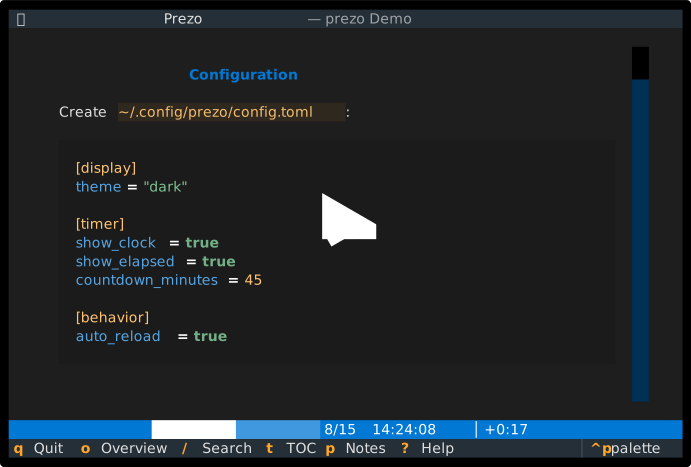
Ctrl+P) - Config file - Customizable settings via
~/.config/prezo/config.toml - Recent files - Tracks recently opened presentations
- Position memory - Remembers last slide position per file
Demo
Installation
pip install prezo
Or with uv:
uv tool install prezo
Usage
# View a presentation
prezo presentation.md

# Disable auto-reload
prezo --no-watch presentation.md

# Use custom config
prezo -c myconfig.toml presentation.md

# Set image rendering mode
prezo --image-mode ascii presentation.md   # Options: auto, kitty, sixel, iterm, ascii, none

# Incremental list reveal (reveal items one at a time)
prezo -I presentation.md

# Export to PDF
prezo -e pdf presentation.md

# Export with options
prezo -e pdf presentation.md --theme light --size 100x30 --no-chrome
Keyboard Shortcuts
| Key | Action |
|---|---|
→ / j / Space |
Next slide |
← / k |
Previous slide |
Home / g |
First slide |
End / G |
Last slide |
: |
Go to slide number |
/ |
Search slides |
o |
Slide overview |
t |
Table of contents |
p |
Toggle notes panel |
c |
Cycle clock display |
s |
Start/stop timer |
T |
Cycle theme |
b |
Blackout screen |
w |
Whiteout screen |
i |
View image (native quality) |
e |
Edit in $EDITOR |
r |
Reload file |
Ctrl+P |
Command palette |
? |
Help |
q |
Quit |
Presentation Format
Prezo supports standard Markdown with MARP/Deckset conventions:
---
title: My Presentation
theme: default
---

# First Slide

Content here...

---

# Second Slide

- Bullet points
- Code blocks
- Tables

???
Presenter notes go here (after ???)

---

# Third Slide

::: columns
::: column
**Left Column**
- Point A
- Point B
:::

::: column
**Right Column**
- Point C
- Point D
:::
:::

---

# Fourth Slide

<!-- notes: Alternative notes syntax -->

::: center
**Centered content**
:::
See the Writing Presentations in Markdown tutorial for a complete guide on creating presentations, including column layouts, images, presenter notes, and configuration directives.
Themes
Available themes: dark, light, dracula, solarized-dark, nord, gruvbox
Press T to cycle through themes during presentation.
Export Options
Prezo supports multiple export formats: PDF, HTML, PNG, and SVG.
# PDF export
prezo -e pdf presentation.md                    # Default: 80x24, dark theme
prezo -e pdf presentation.md --theme light      # Light theme (for printing)
prezo -e pdf presentation.md --size 100x30      # Custom dimensions
prezo -e pdf presentation.md --no-chrome        # No window decorations
prezo -e pdf presentation.md -o slides.pdf      # Custom output path

# HTML export (single self-contained file)
prezo -e html presentation.md

# Image export (PNG/SVG)
prezo -e png presentation.md                    # All slides as PNG
prezo -e png presentation.md --slide 3          # Single slide (1-indexed)
prezo -e svg presentation.md --scale 2.0        # SVG with scale factor
PDF/PNG/SVG export requires optional dependencies:
pip install prezo[export]
# or
pip install cairosvg pypdf
Development
# Clone and install
git clone https://github.com/user/prezo.git
cd prezo
uv sync

# Run
uv run prezo presentation.md

# Run tests
uv run pytest

# Lint
uv run ruff check .
uv run ruff format .
License
MIT
1 maintainer

Metadata
1 maintainer
Release files for prezo 2026.6.1
For a detailed explanation of source distributions (sdists) and built distributions (wheels), please see the package formats documentation.
Source distribution (sdist)
| File | Size | Uploaded | |
|---|---|---|---|
| prezo-2026.6.1.tar.gz | 73.0 kB | Details |
Built distribution (wheel)
| File | Interpreter | ABI | Platform | Reset |
|---|---|---|---|---|
| prezo-2026.6.1-py3-none-any.whl | Python 3 | none | any | Details |
Total release size: 166.2 kB
Release files / prezo-2026.6.1.tar.gz
| Download URL | prezo-2026.6.1.tar.gz |
|---|---|
| Size | 73.0 kB |
| Tags | Source |
|
SHA-256 checksum How to use checksums |
07d0f2d45e58908c9a2113e204d659a8dec6d19d8da0f5c3877f6af0464af2d4
|
|
BLAKE2b-256 checksum How to use checksums |
412959847d1c88cec934110cf0354ee744c7f30d8903e7368d90975c4be1c73d
|
| Upload date | |
|
Uploaded using Trusted Publishing? What is trusted publishing? |
No |
| Uploaded via |
uv/0.11.12 {"installer":{"name":"uv","version":"0.11.12","subcommand":["publish"]},"python":null,"implementation":{"name":null,"version":null},"distro":{"name":"macOS","version":null,"id":null,"libc":null},"system":{"name":null,"release":null},"cpu":null,"openssl_version":null,"setuptools_version":null,"rustc_version":null,"ci":null}
|
Release files / prezo-2026.6.1-py3-none-any.whl
| Download URL | prezo-2026.6.1-py3-none-any.whl |
|---|---|
| Size | 93.2 kB |
| Tags | Python 3 |
|
SHA-256 checksum How to use checksums |
17f74eebe5ced42f41a7723971fdabc91b9072d2655ef79309aea43a13156974
|
|
BLAKE2b-256 checksum How to use checksums |
8dc2af7b17ca6bc752c80272af37fbc208b2c3657b0ac5ff576504c0a34843cc
|
| Upload date | |
|
Uploaded using Trusted Publishing? What is trusted publishing? |
No |
| Uploaded via |
uv/0.11.12 {"installer":{"name":"uv","version":"0.11.12","subcommand":["publish"]},"python":null,"implementation":{"name":null,"version":null},"distro":{"name":"macOS","version":null,"id":null,"libc":null},"system":{"name":null,"release":null},"cpu":null,"openssl_version":null,"setuptools_version":null,"rustc_version":null,"ci":null}
|














