
A TUI-based presentation tool for the terminal, built with Textual.

Project description
Prezo
A TUI-based presentation tool for the terminal, built with Textual.
Display presentations written in Markdown using conventions similar to those of MARP or Deckset.
Features
- Markdown presentations - MARP/Deckset format with
---slide separators - Column layouts - Pandoc-style fenced divs for multi-column slides (
::: columns) - Incremental lists - Reveal list items one at a time (
-Iflag, like Pandoc) - Live reload - Auto-refresh when file changes (1s polling)
- Keyboard navigation - Vim-style keys, arrow keys, and more
- Slide overview - Grid view for quick navigation (
o) - Search - Find slides by content (
/) - Table of contents - Navigate by headings (
t) - Go to slide - Jump to specific slide number (
:) - Presenter notes - Toggle notes panel (
p) - Themes - 6 color schemes (
Tto cycle): dark, light, dracula, solarized-dark, nord, gruvbox - Timer/Clock - Elapsed time and countdown (
c) - Edit slides - Open in $EDITOR (
e), saves back to source file - Export - PDF, HTML, PNG, SVG formats with customizable themes and sizes
- Image support - Inline and background images with MARP layout directives (left/right/fit)
- Native image viewing - Press
ifor full-quality image display (iTerm2/Kitty protocols) - Blackout/Whiteout - Blank screen modes (
b/w) - Command palette - Quick access to all commands (
Ctrl+P) - Config file - Customizable settings via
~/.config/prezo/config.toml - Recent files - Tracks recently opened presentations
- Position memory - Remembers last slide position per file
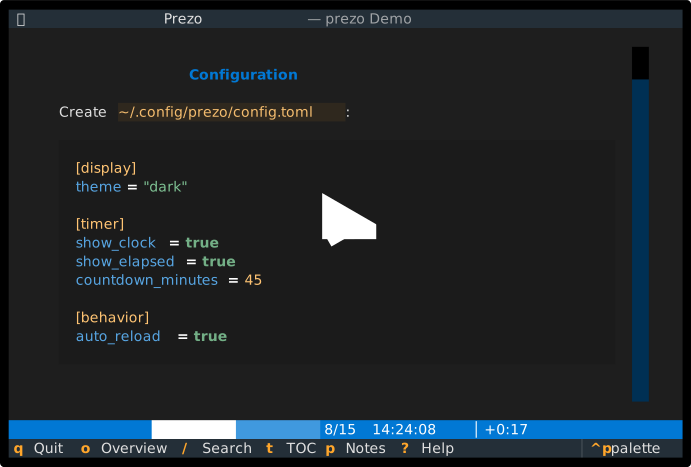
Demo
Installation
pip install prezo
Or with uv:
uv tool install prezo
Usage
# View a presentation
prezo presentation.md

# Disable auto-reload
prezo --no-watch presentation.md

# Use custom config
prezo -c myconfig.toml presentation.md

# Set image rendering mode
prezo --image-mode ascii presentation.md   # Options: auto, kitty, sixel, iterm, ascii, none

# Incremental list reveal (reveal items one at a time)
prezo -I presentation.md

# Export to PDF
prezo -e pdf presentation.md

# Export with options
prezo -e pdf presentation.md --theme light --size 100x30 --no-chrome
Keyboard Shortcuts
| Key | Action |
|---|---|
→ / j / Space |
Next slide |
← / k |
Previous slide |
Home / g |
First slide |
End / G |
Last slide |
: |
Go to slide number |
/ |
Search slides |
o |
Slide overview |
t |
Table of contents |
p |
Toggle notes panel |
c |
Cycle clock display |
s |
Start/stop timer |
T |
Cycle theme |
b |
Blackout screen |
w |
Whiteout screen |
i |
View image (native quality) |
e |
Edit in $EDITOR |
r |
Reload file |
Ctrl+P |
Command palette |
? |
Help |
q |
Quit |
Presentation Format
Prezo supports standard Markdown with MARP/Deckset conventions:
---
title: My Presentation
theme: default
---

# First Slide

Content here...

---

# Second Slide

- Bullet points
- Code blocks
- Tables

???
Presenter notes go here (after ???)

---

# Third Slide

::: columns
::: column
**Left Column**
- Point A
- Point B
:::

::: column
**Right Column**
- Point C
- Point D
:::
:::

---

# Fourth Slide

<!-- notes: Alternative notes syntax -->

::: center
**Centered content**
:::
See the Writing Presentations in Markdown tutorial for a complete guide on creating presentations, including column layouts, images, presenter notes, and configuration directives.
Themes
Available themes: dark, light, dracula, solarized-dark, nord, gruvbox
Press T to cycle through themes during presentation.
Export Options
Prezo supports multiple export formats: PDF, HTML, PNG, and SVG.
# PDF export
prezo -e pdf presentation.md                    # Default: 80x24, dark theme
prezo -e pdf presentation.md --theme light      # Light theme (for printing)
prezo -e pdf presentation.md --size 100x30      # Custom dimensions
prezo -e pdf presentation.md --no-chrome        # No window decorations
prezo -e pdf presentation.md -o slides.pdf      # Custom output path

# HTML export (single self-contained file)
prezo -e html presentation.md

# Image export (PNG/SVG)
prezo -e png presentation.md                    # All slides as PNG
prezo -e png presentation.md --slide 3          # Single slide (1-indexed)
prezo -e svg presentation.md --scale 2.0        # SVG with scale factor
PDF/PNG/SVG export requires optional dependencies:
pip install prezo[export]
# or
pip install cairosvg pypdf
Development
# Clone and install
git clone https://github.com/user/prezo.git
cd prezo
uv sync

# Run
uv run prezo presentation.md

# Run tests
uv run pytest

# Lint
uv run ruff check .
uv run ruff format .
License
MIT
Release history Release notifications | RSS feed


Download files
Download the file for your platform. If you're not sure which to choose, learn more about installing packages.
Source Distribution
Built Distribution
Filter files by name, interpreter, ABI, and platform.
If you're not sure about the file name format, learn more about wheel file names.
Copy a direct link to the current filters
File details
Details for the file prezo-2026.2.4.tar.gz.
File metadata
- Download URL: prezo-2026.2.4.tar.gz
- Upload date:
- Size: 66.5 kB
- Tags: Source
- Uploaded using Trusted Publishing? No
- Uploaded via: uv/0.9.26 {"installer":{"name":"uv","version":"0.9.26","subcommand":["publish"]},"python":null,"implementation":{"name":null,"version":null},"distro":{"name":"macOS","version":null,"id":null,"libc":null},"system":{"name":null,"release":null},"cpu":null,"openssl_version":null,"setuptools_version":null,"rustc_version":null,"ci":null}
File hashes
| Algorithm | Hash digest | |
|---|---|---|
| SHA256 |
60189b82f48df4e1232992121b1c499f93d52b11b5d6735922cc5f0d481755bc
|
|
| MD5 |
4d62cdabdda5d1d33a0ba2bbe76ce88c
|
|
| BLAKE2b-256 |
1708ca56645cc15f212949950a2d6fa42def39874e69aa7d1bcfc0fe021b4867
|
File details
Details for the file prezo-2026.2.4-py3-none-any.whl.
File metadata
- Download URL: prezo-2026.2.4-py3-none-any.whl
- Upload date:
- Size: 86.0 kB
- Tags: Python 3
- Uploaded using Trusted Publishing? No
- Uploaded via: uv/0.9.26 {"installer":{"name":"uv","version":"0.9.26","subcommand":["publish"]},"python":null,"implementation":{"name":null,"version":null},"distro":{"name":"macOS","version":null,"id":null,"libc":null},"system":{"name":null,"release":null},"cpu":null,"openssl_version":null,"setuptools_version":null,"rustc_version":null,"ci":null}
File hashes
| Algorithm | Hash digest | |
|---|---|---|
| SHA256 |
412ee02c2f600733887add677be0b96f49f99cfb2c677544893db3c83f81c98a
|
|
| MD5 |
6c3e2150694ef369070330c8f3465b3d
|
|
| BLAKE2b-256 |
b572041f4a0e07edc2056018fbccec341f32b8b42bcfdd99eae98b926111b26c
|






