
Vault v0.2.0

Secure Agentic Trading of RWA and Tokens on Robinhood Chain
A desktop custody and authorization layer for AI agents, by Primer.
Vault lets you delegate on-chain actions to AI agents without sharing private keys. It supports two authorization lanes:
- x402 Payments — Agents request signatures for paywalled services; Vault enforces spending policies and signs EIP-712 authorizations. Contains the full MultiClaw engine for AP2 protocol support.
- DeFi Trading — Agents submit swap requests; Vault re-quotes independently, enforces trading limits, and executes on-chain (Uniswap v3 and v4 on Robinhood Chain).
Both lanes share the same agent identity, policy system, and approval workflow. The agent never sees private keys.
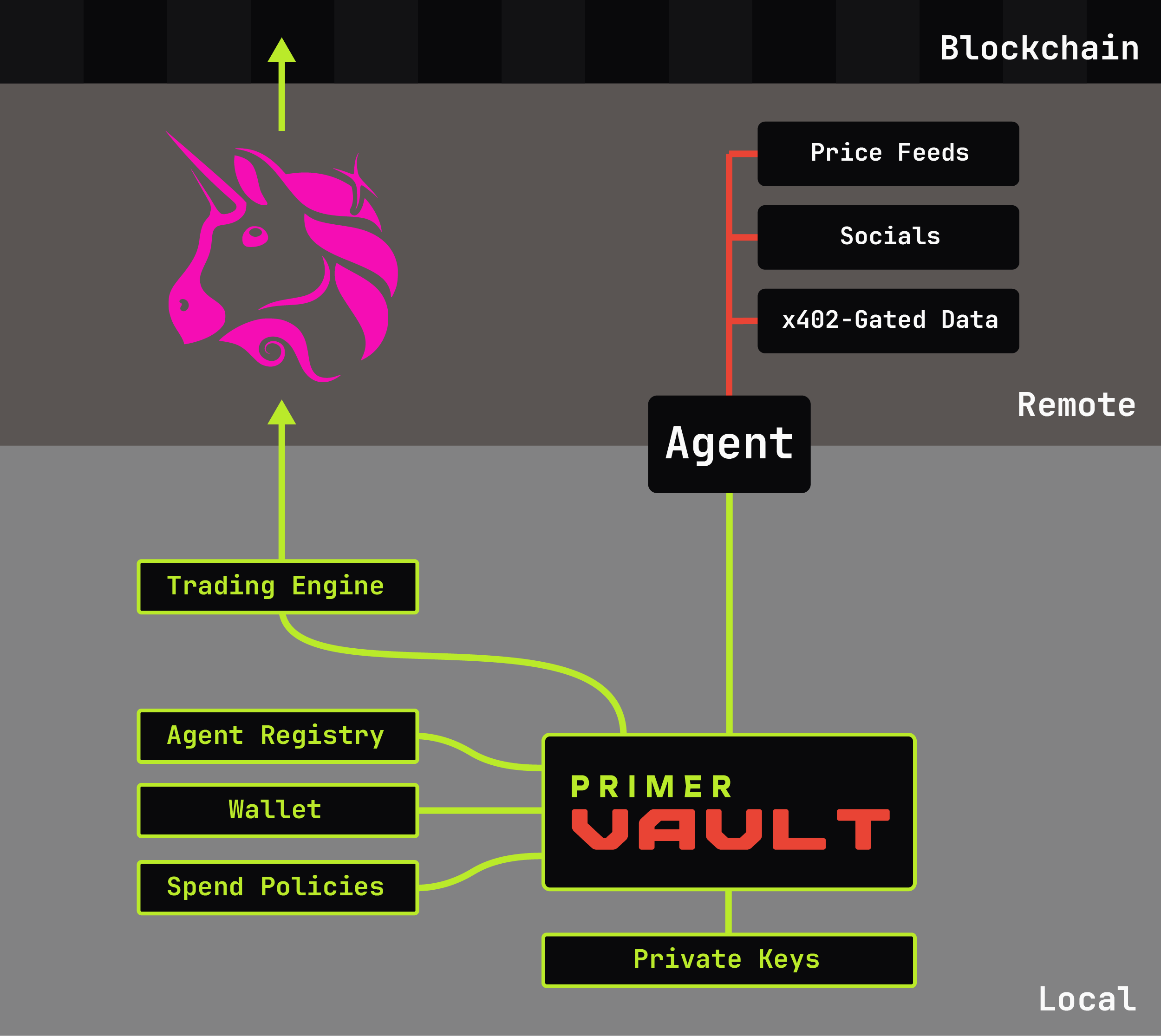
The Problem
AI agents need to transact on-chain, but giving an agent your private key is dangerous. No amount of prompting is guaranteed to constrain a free-willed agent. Vault sits between your agents and your wallet, enforcing policies and requiring human approval when needed.
Quick Start
# Download the desktop app (no install needed) — this is the GUI only
# https://github.com/primer-systems/Vault/releases
#   For a terminal inside the app, use File → Console.

# Or install the command line — adds the `primer-vault` command (CLI + daemon)
pip install primer-vault

# Run
primer-vault                    # GUI mode (default)
primer-vault --cli              # Interactive terminal — pip install only
primer-vault --headless         # Daemon mode (no GUI) — pip install only
The downloaded Vault.exe / Vault binary is the GUI application only — it
has no terminal attached, so --cli cannot run from it and --headless would
run with no console output. Use File → Console inside the window for a
terminal, or pip install primer-vault for the command line and the headless
daemon.
First run — "unknown publisher" warnings
The downloadable builds are not yet code-signed, so your operating system will warn you the first time you open Vault.
| Platform | What you'll see | What to click |
|---|---|---|
| Windows | "Windows protected your PC" (SmartScreen) | More info → Run anyway |
| macOS | "Vault cannot be opened because the developer cannot be verified" | System Settings → Privacy & Security → Open Anyway. Or right-click the app → Open → Open |
| Linux | No warning, but the file may not be executable | chmod +x Vault |
Vault is open source, and releases are built by GitHub Actions from the tagged commit — not uploaded by hand. The build log shows exactly what went into each binary, and every release binary carries a signed provenance attestation you can check yourself:
gh attestation verify Vault.exe --repo primer-systems/Vault
Prefer to skip the warning entirely? pip install primer-vault, or build from source.
Neither is subject to OS code-signing checks.
Features
Agent Management
Agents are isolated identities with unique credentials. Each agent has:
- Short ID — Human-readable identifier (e.g.,
ABC123) - Auth Token — HMAC-SHA256 secret or Bearer token
- Policy — Assigned spending/trading rules
- Wallet Address — Signs from a specific address
Agent and wallet commands run in the Vault console (primer-vault --cli),
where the wallet stays unlocked between commands:
primer-vault --cli
> wallet create main                  # first run: creates and opens it (prompts for a password)
> agent register MyAgent --auth bearer
> agent commission MyAgent standard A001
> agent mandate MyAgent --upload      # intent mandate (AP2 verifiable credential)
If you already have a wallet, use wallet open main in place of the first line.
standard is the policy created under Policy Management below — create it before
commissioning. A001 is the address ID shown by address list; a full 0x address works too (in any capitalisation).
The example uses a bearer token, whose request format is the simple one
shown under DeFi Trading below. For production, register with --auth hmac
instead; HMAC requests are signed SIG:<unix-time>:<hex> and the exact
format is served at http://localhost:4663/agent.
Policy System
Policies define what agents can do. Two independent lanes:
x402 Payments:
- Daily spending limit (USDG)
- Per-request cap
- Auto-approve threshold
- Domain allowlist/blocklist — see What a policy can and cannot enforce below
- Network restrictions
Trading:
- Per-trade max (USD)
- Daily volume limit
- Auto-approve threshold
- Max slippage tolerance
- Max price impact (catches a bad pool)
- Min ETH balance (halts trading below this)
primer-vault policy create standard \
  --day 100 --txn 50 --auto 5 \
  --trading --trade-max 100 --trade-daily 500

# Trading-only policy (no x402 payments)
primer-vault policy create trader --no-x402 --trading --trade-max 100
What a policy can and cannot enforce
Worth being precise about, because the two halves are not equally strong.
Enforced, whatever the agent does. The amount is read once and the value Vault signs is the value it checked, so the figure in a request cannot differ from the figure that leaves your wallet. On top of that: the per-request cap, the daily total, the asset (USDG), the chain, and whether a human had to say yes. An agent cannot spend more than the policy allows, however it words the request.
Not enforced — the domain allowlist. An agent tells Vault where it got a payment request from. Vault has no way to check that, and a compromised agent can put anything there — or invent an entire payment request that never came from a merchant at all. Domain rules keep a well-behaved agent in its lane, which is what a misconfigured or drifting one needs. They are not a defence against one that has been taken over.
The practical consequence: below your auto-approve threshold, the only thing constraining an agent is the amount. Above it, you see the recipient and the resource in the approval dialog, and you are the check on where the money goes. Set the threshold with that in mind.
Sized against an off-chain price. Limits are written in USD, so a trade with an ETH leg has to be valued before it can be checked. That value comes from an off-chain ETH/USD reference, and if the reference is wrong your limits are wrong with it. Vault treats a price it cannot fetch, or one more than 15 minutes old, as unknown and asks you rather than guessing — but a plausible wrong number is taken at face value, as it is in every wallet that shows you a fiat figure. USDG is not affected: it is valued at $1 and needs no reference.
Wallet Security
HD wallet support with strong encryption:
- BIP-39 — 12 or 24-word seed phrases
- BIP-44 — Standard derivation paths
- Argon2id — Memory-hard key derivation (256MB, 3 iterations)
- AES-256-GCM — Authenticated encryption
Private keys never leave the wallet in plaintext. Signing happens internally.
Your password sets the real strength. The encryption above only makes each guess expensive — roughly 280ms and 256MB of memory per attempt, so a few guesses per second per CPU core rather than millions. How many guesses an attacker needs is decided entirely by the password you choose. Vault requires at least 8 characters and imposes no other rules, so this is worth being clear about:
| Password | Time for a well-funded attacker |
|---|---|
abcd1980 and similar |
days |
| Two random words | hours |
| Four random words | longer than you will need |
| 16 random characters from a password manager | effectively never |
A short or predictable password is not protected by strong encryption; it is only slightly slower to break. For balances that matter, use a passphrase of four or more random words — or better, put the keys on a Ledger, which Vault supports and which removes offline guessing from the picture entirely.
primer-vault wallet create main
One command: it prompts for a password, then creates the wallet, a 12-word seed, and its first address. Additional seeds and addresses are managed in the console (or the window):
primer-vault --cli
> wallet open main
> seed create --words 24
> address create
Hardware Wallets (Ledger)
Addresses can be backed by a Ledger device instead of an encrypted seed. The private keys stay on the device — Vault stores only the address and its derivation path, and every signature is produced on the Ledger itself.
Add one from the wallet tab: + Add Address → Connect Ledger. Pick a derivation path, then choose addresses in the same browser used for software seeds — same layout, same inline renaming, same start-index and Load More. Addresses are read from the device in the background, so the dialog stays responsive while it works.
| Path type | Template | Matches |
|---|---|---|
| Ledger Live | m/44'/60'/x'/0/0 |
Ledger Live default |
| BIP44 Standard | m/44'/60'/0'/0/x |
MetaMask, Rabby, most wallets |
| Legacy (MEW) | m/44'/60'/0'/x |
Older MyEtherWallet |
| Custom | user-supplied | power users |
Ledger addresses work for both x402 payments and trades. Software and hardware addresses can live side by side in the same wallet.
Approval and signing are separate steps. Auto-approve still decides policy ("is this trade within limits?"), but the signature itself always requires a physical button press on the device. A $5 trade under a $10 auto-approve threshold skips the approval dialog and goes straight to the Ledger prompt.
Because a swap needs an ERC-20 approval first, a single trade can ask for two confirmations. The dialog says which step you are on.
Requirements:
- The Ledger Ethereum app must be open and the device unlocked
- Blind signing must be enabled (Ethereum app → Settings → Blind signing). Vault signs EIP-712 payment authorizations and DEX calldata, neither of which the device can decode on its own.
- GUI mode only. Headless and CLI have no way to prompt for a device
confirmation, so they return
LEDGER_SIGN_NOT_AVAILABLEfor Ledger addresses.
Use Verify on Ledger in the wallet tab to confirm the connected device still derives a stored address before relying on it.
Approval Workflow
Requests below threshold → auto-approved. Above threshold → human approval dialog.
- GUI shows modal dialog with full details
- CLI uses
pending/approve/rejectcommands - Headless mode approves over the Admin API, which a headless daemon has to be
started with
--admin-opento expose (see Admin API Security below)
x402 Payment Signing (MultiClaw Engine)
Vault contains the full MultiClaw engine for x402 payment authorization. Agents hit paywalls, request signatures from Vault, and retry with payment headers.
How It Works
Agent hits paywall → 402 + Payment-Required header
                            ↓
              Agent calls POST /sign with header
                            ↓
         Vault checks policy (daily limit, domain, etc.)
                            ↓
        Auto-approve OR human approval dialog in app
                            ↓
              Vault signs EIP-712 authorization
                            ↓
         Agent retries request with payment header
                            ↓
            Merchant settles via x402 Facilitator
                            ↓
         Agent reports settlement via POST /callback
                            ↓
              Vault verifies on-chain, stores receipt
Any agent framework can integrate via HTTP to localhost:4663. Bearer tokens for simplicity, HMAC-SHA256 for production security. The desktop window and --headless open this port automatically; in --cli mode, run server start in the console to open it (and server status / server stop to manage it).
Protocol Support
- v1 — X-PAYMENT header (base64-encoded JSON)
- v2 — PAYMENT-REQUIRED header with
x402Versionfield - A2A x402 — Direct JSON payloads (agent-to-agent)
Intent Mandates
Agents can have signed Intent Mandates — AP2 verifiable credentials documenting:
- Agent identity (agent ID + auth key fingerprint; the internal code and name are omitted for privacy)
- Spending limits and networks
- Issuing wallet signature
Mandates are published to the AP2 Registry. Merchants query by agent ID to verify authorization before accepting payment.
Transaction Receipts
Every payment is logged with AP2-formatted receipts:
{
  "type": "AP2Receipt",
  "version": "ap2.primer/v0.1",
  "transactionId": "b7c1a0e2-3f4d-4a1b-8c2e-9d0f1a2b3c4d",
  "status": "payment-completed",
  "timestamp": "2026-01-15T14:32:00Z",
  "intent": {
    "type": "IntentMandate",
    "mandateId": "mandate-9f2c...",
    "policyName": "standard",
    "agent": { "id": "ABC123", "name": "MyAgent" }
  },
  "authorization": {
    "method": "manual",
    "authorizedAt": "2026-01-15T14:32:01Z",
    "wallet": { "address": "0x742d35Cc6634C0532925a3b844Bc9e7595f...", "id": "A001" }
  },
  "payment": {
    "amount": { "micro": 1500000, "formatted": "1.500000 USDG" },
    "recipient": "0x8ba1f109551bD432803012645Ac136ddd64...",
    "network": "eip155:4663",
    "resource": "https://api.example.com/report",
    "requestUrl": "https://api.example.com/report"
  },
  "settlement": {
    "txHash": "0x3a1b2c3d4e5f...",
    "settledAt": "2026-01-15T14:32:05Z",
    "verification": { "status": "verified", "block": 12847293, "detail": null }
  }
}
authorization.method is "auto" or "manual"; settlement is null until
the payment settles on-chain, and a rejected or failed payment additionally
carries a rejection or failure object (the settlement stays null). Fetch
a receipt with history receipt <id> or GET /receipt/<id>.
DeFi Trading
Agents can submit swap requests to Vault. Vault re-quotes the pool independently, validates against trading policy, and executes or escalates.
Supported Operations
- Uniswap v3 swaps — Single-pool exactInputSingle
- Uniswap v4 swaps — Singleton PoolManager; requires
tick_spacingandhooksin the request - Native ETH — Use
"ETH"or address(0) as token_in/token_out - Wrap/Unwrap — ETH ↔ WETH conversion (1:1, no pool)
Trade Request
trade = {
    "token_in": "0x5fc5360D0400a0Fd4f2af552ADD042D716F1d168",  # USDG
    "token_out": "ETH",                                        # Native ETH
    "amount_in": "10",                                         # Human units
    "fee_tier": 500,                                           # Pool fee bps
    "max_slippage_bps": 100,                                   # 1%
}
# POST the trade wrapped with your agent credentials:
#   {"agent_id": AGENT_ID, "signature": TOKEN, "trade": trade}
# to ${PRIMER_VAULT_URL}/trade
Trading Policy
Trading is controlled separately from x402 payments:
| Field | Description |
|---|---|
enabled |
Global on/off for trading |
per_trade_max_usd |
Max notional per swap |
daily_volume_limit_usd |
Daily volume cap |
auto_approve_below_usd |
Manual approval threshold |
max_slippage_percent |
Reject if the agent asks for more tolerance than this |
max_price_impact_percent |
Escalate if the fill is this much worse than the pool's rate |
min_reserve_eth |
Reject trades while ETH balance is below this |
Price impact — why Vault checks the pool the agent chose
An agent names the pool it wants to trade through, including its fee tier. That is the one decision Vault cannot verify by re-quoting, because re-quoting the same pool only confirms the agent's arithmetic. A pool with almost no liquidity in it will happily quote a fill worth a fraction of what goes in, stay inside its slippage tolerance, and report the trade size the agent asked for.
So Vault measures the rate as well as the size. Before every trade it quotes a dust amount through the same pool — small enough not to move the price — to learn what the pool's rate actually is. It then compares the real fill against that rate and adds the tier's fee:
dust quote   ->  the rate with no meaningful impact
real quote   ->  the rate you would actually get
difference   +  the pool's fee  =  price impact
A pool with room for the trade costs its fee and nothing more: 0.05% in a 0.05% pool. A pool too thin for the trade reads far higher — the case this exists to catch measured 99.4%.
Above max_price_impact_percent Vault stops and asks you, rather than refusing:
an expensive trade may still be one you want, but it should not happen while
nobody is looking. Only you can set this. An agent cannot propose or raise it,
because it is the ceiling on a choice the agent itself is making.
Note this is not the same as slippage, which compares Vault's quote against the final on-chain fill and is enforced by the chain through a minimum-output amount. Slippage protects against the price moving while you wait; price impact is about whether the price was any good to begin with.
Native ETH Support
Agents can trade with native ETH directly:
# ETH as input (router auto-wraps)
{"token_in": "ETH", "token_out": USDG, "amount_in": "0.01", "fee_tier": 500, "max_slippage_bps": 100}

# ETH as output (swap + unwrap atomically)
{"token_in": USDG, "token_out": "ETH", "amount_in": "10", "fee_tier": 500, "max_slippage_bps": 100}

# Explicit wrap/unwrap (1:1, no pool)
{"token_in": "ETH", "token_out": WETH, "amount_in": "0.1", "fee_tier": 0, "max_slippage_bps": 0}
Network
| Network | Chain ID | USDG | WETH |
|---|---|---|---|
| Robinhood Chain | 4663 | 0x5fc5360D0400a0Fd4f2af552ADD042D716F1d168 |
0x0Bd7D308f8E1639FAb988df18A8011f41EAcAD73 |
Deployment Modes
GUI Mode (Default)
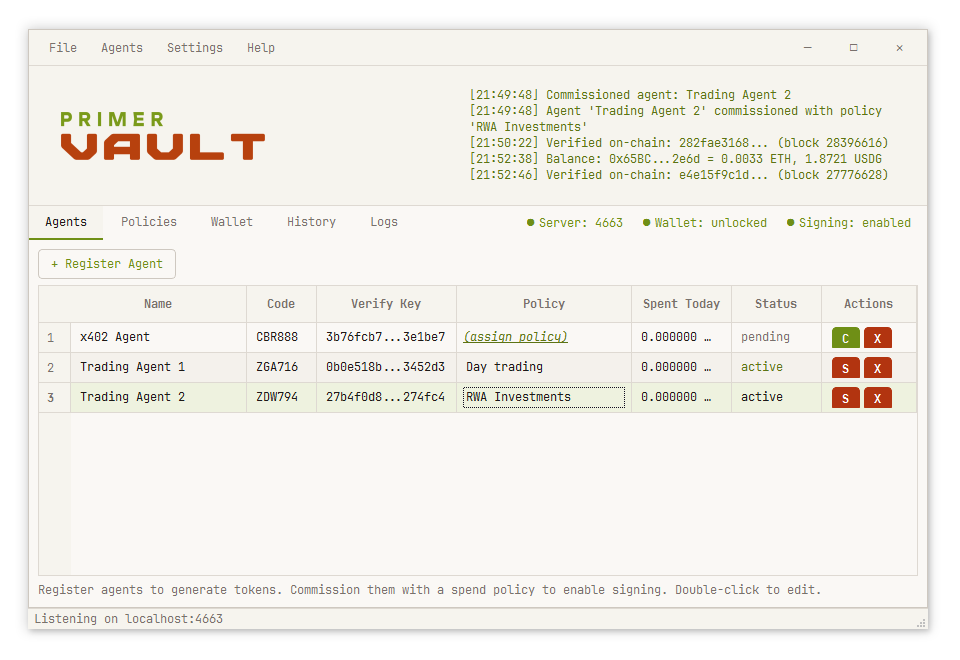
Desktop application with tabs for agents, policies, wallet, and history.
primer-vault
Features:
- Interactive approval dialogs
- Real-time activity log
- Built-in terminal console (File → Console)
- System tray integration
CLI Mode
Interactive terminal or single commands for scripting.
# Interactive REPL
primer-vault --cli

# Single commands
primer-vault agent list
primer-vault wallet status
primer-vault policy create test --day 100

# Scriptable with flags
primer-vault wallet create main --password "a-strong-passphrase" --yes
Headless Mode
Daemon with no GUI — agent API only.
# Pass the password via the environment, not a --password flag. On Linux and
# macOS, command-line arguments are readable by any other user on the machine.
export PRIMER_VAULT_PASSWORD="a-strong-passphrase"

primer-vault --headless \
  --agent-port 4663 \
  --admin-port 4664 \
  --wallet main
--allow-lan opens the agent API to your whole local network instead of just this
machine. Requests are still authenticated, but the connection is not encrypted, so
agent tokens cross the network in cleartext. Use it only on a network you trust, or
put a TLS-terminating proxy in front of it.
Admin API Security
By default, the Admin API (port 4664) operates in GUI-only mode. This means:
- Only the embedded GUI can access admin endpoints (create agents, modify policies, etc.)
- CLI and headless modes will receive HTTP 403 with a clear error message
- This protects against local malware that could otherwise create agents and obtain tokens
You usually don't need to change this. The Admin API only matters when the GUI
(or the headless daemon) is already running and a separate CLI process wants to share
that same instance. If the GUI is not running, primer-vault <command> loads the
core directly and never uses HTTP at all — every CLI command works with the default
setting untouched.
Change it only if you want CLI commands to reach a running GUI or daemon. For
an instance that is already running, open the Admin API in the window
(Settings → Preferences → Security → Admin API), or restart a headless
daemon with --admin-open — a headless daemon has no window to be driven from,
so without one of these the CLI cannot talk to it. (primer-vault config set admin-api open sets the mode for the next start; it cannot flip an instance
that is already running.)
| Mode | Who can access Admin API |
|---|---|
| GUI Only (default) | Only the embedded GUI |
| Open | Any local process on port 4664 |
What "Open" costs you. The Admin API has no authentication of its own —
GUI-only mode is the whole of the protection. Opened, any process running as you
can read /wallet/addresses, create a policy with limits of its choosing, create
an agent and receive its token in the response, commission that agent to your
funded address, and start the server. While the wallet is unlocked that is a
complete drain path with no dialog and no confirmation. Open it deliberately, on
a machine you trust, and close it again.
In both modes, requests carrying a browser Origin header are rejected, so a web page
you have open cannot issue commands to Vault in the background.
Single Instance
One Vault instance owns a data folder at a time. On the default setting a
running instance is driven only from its own window; the CLI can detect that an
instance is running but cannot command it, and every command explains how to
change that. To drive a running instance from the CLI, open the Admin API (port
4664): Settings → Preferences → Security in the window, or — for a headless
server — restart it with --admin-open. Once open, CLI commands drive the same
instance and changes made in the terminal appear live in the window.
Architecture
┌─────────────────────────────────────────────────────────┐
│ CORE LAYER (framework-independent)                      │
│  • Vault coordinator (single source of truth)           │
│  • Services (SigningService, TradingService)            │
│  • Models (Agent, Policy, Transaction)                  │
│  • Wallet crypto (HD wallets, AES-256-GCM encryption)   │
└─────────────────────────────────────────────────────────┘
                          ▲
                          │ (direct calls or HTTP)
          ┌───────────────┼───────────────┐
          │               │               │
┌─────────▼─────┐  ┌──────▼──────┐  ┌────▼────────┐
│  GUI Mode     │  │  CLI Mode   │  │  Headless   │
│  (PyQt6)      │  │  (terminal) │  │  (daemon)   │
└───────────────┘  └─────────────┘  └─────────────┘
Data Directory
Where Vault keeps your wallet depends on how you got it. Downloaded builds are
portable; pip install follows platform convention.
Downloaded build — portable. Nothing is installed, so nothing is left on the
machine. Vault stores everything in a data folder next to the executable:
E:\                        <- a USB stick, or any folder you like
├── Vault.exe
└── data\
    ├── wallets\
    │   ├── *.wallet           # Encrypted wallet files
    │   └── *.wallet.previous  # The version each save replaced
    ├── agents.json        # Agent registry
    ├── policies.json      # Spend/trading policies
    ├── transactions.json  # Payment & trade history
    ├── settings.json      # Configuration
    ├── gui_settings.json  # Window preferences (auto-lock, server auto-start)
    ├── wallet_path.txt    # Last unlocked wallet
    ├── vault.lock         # Held while Vault is running
    └── logs\
*.wallet.previous is the wallet as it was one save ago, kept so a file damaged
by a bad sector or an interrupted write has something to fall back on. It is
encrypted exactly like the wallet itself and opens with the same password — so
treat it as a second copy of your keys, not as a scratch file. Changing your
password deletes it rather than leaving a copy that still opens with the old
one; the next ordinary save writes a fresh copy under the new password.
Deleting a wallet deletes it too.
The path is worked out each time Vault starts, from wherever the executable is
sitting — so a stick that mounts as E: on one machine and F: on another
works either way. Move the executable and your wallet moves with it.
Three things to know. Your keys live beside the app, so if you run Vault straight out of your Downloads folder, that is where your wallet is — put it somewhere you will not clear out. Keep a backup of your seed phrase regardless: a lost or damaged USB stick is a lost wallet. And on a shared PC, put the folder inside your own user profile (Documents, Desktop) rather than at a drive root or on a FAT32/exFAT stick: only your profile restricts other local accounts from reading the folder. The wallet is encrypted either way, so a strong password still protects it — but a per-user location keeps the encrypted file out of other users' hands to begin with. A Ledger removes the question entirely. See docs/security.md.
pip install primer-vault — platform-standard. You ran an installer, so
Vault uses the location your OS expects:
| Platform | Location |
|---|---|
| Windows | %LOCALAPPDATA%\Primer\Vault |
| macOS | ~/Library/Application Support/Primer/Vault |
| Linux | ~/.local/share/Primer/Vault |
Same contents in both cases.
If Vault cannot write to its data folder — an executable in Program Files, a
write-protected stick, a locked-down work machine — it will not start silently.
It tells you which folder it tried and what to do about it.
Network Calls
Vault has no telemetry, no analytics and no crash reporting. It never sends your keys, your seed phrase or your password anywhere — signing happens on your machine.
It does need the network for the things a wallet cannot do offline. Everything it contacts is listed here.
| Host | When | What it learns |
|---|---|---|
rpc.mainnet.chain.robinhood.com |
Quotes, balances, allowances, and broadcasting transactions | Your addresses, and the transactions you send |
robinhoodchain.blockscout.com |
Refreshing balances and discovering tokens | Your wallet address |
api.coingecko.com |
Valuing ETH-denominated trades against your policy limits | Nothing identifying — one price lookup, cached for a minute |
ap2.primer.systems |
Only when you upload an Intent Mandate | The mandate: agent ID, wallet address, spending limits |
Token icons are fetched from whatever URL Blockscout supplies for a token, so
that host varies — commonly assets.coingecko.com. Only image data is read.
The RPC endpoint is yours to change. Point it at your own node under Settings → Network… and the first row above goes with it. Blockscout refreshes your balances; CoinGecko values ETH-denominated trades against your policy limits. Both fail gracefully, and a failed price lookup escalates a trade to manual approval rather than valuing it with a stale number.
Vault also listens on two loopback ports: 4663 for agents and 4664 for the
CLI to reach a running instance. The Admin API (4664) is always bound to
loopback and never accepts a connection from another machine. The agent API
(4663) does too, unless you pass --allow-lan, which exposes only that port to
your local network. Both refuse any request a web page initiated.
Technical Details
- Wallet Security: AES-256-GCM encryption, Argon2id key derivation (256MB, 3 iterations); 8-character minimum password
- Payment Signing: EIP-712 structured data, EIP-3009
transferWithAuthorization - Trading: Uniswap v3 SwapRouter02 and v4 UniversalRouter, multicall for atomic operations
- Network: Robinhood Chain (4663)
- Protocol Support: HTTP x402 v1/v2, A2A x402 (direct JSON)
- Auth Modes: Bearer tokens (simple) or HMAC-SHA256 (production)
CLI Reference
Agent Commands
agent list                                    # List all agents
agent show <name|ID>                          # Display agent details
agent register <name> [--auth hmac|bearer]    # Create new agent
agent commission <agent> <policy> <address>   # Assign policy and wallet
agent mandate <agent> [--upload]              # Generate intent mandate
agent suspend <name|ID>                       # Disable agent
agent activate <name|ID>                      # Re-enable agent
agent delete <name|ID>                        # Remove agent
Server Commands
server start [port]              # Open the agent HTTP port (auto in GUI/headless)
server stop                      # Close it
server status                    # Show whether it is listening
Policy Commands
policy list                                   # List all policies
policy show <name>                            # Display policy
policy create <name> [options]                # Create policy
policy edit <name> [options]                  # Modify policy
policy delete <name>                          # Remove policy

# Payment options:
#   --day N          Daily limit in USDG (default: 100)
#   --txn N          Per-transaction max (default: 10)
#   --auto N         Auto-approve threshold
#   --x402 / --no-x402  Enable/disable x402 payments
#                    (policy edit takes values: --x402 on|off, --trading on|off)
#   --networks N,N   Allowed chain IDs (comma-separated)
#   --allow-domains D,D  Merchant domains to allow (empty = allow any)
#   --block-domains D,D  Merchant domains to block (empty = block none)

# Trading options:
#   --trading        Enable trading
#   --trade-max N    Per-trade max in USD (default: 100)
#   --trade-daily N  Daily volume limit (default: 500)
#   --trade-auto N   Auto-approve threshold
#   --min-eth N      Halt trading below this ETH balance (default: 0.0001)
#   --max-slip N     Max slippage percent (default: 3.0)
#   --max-impact N   Max price impact percent (default: 5.0)
Wallet Commands
wallet status                    # Show lock status
wallet create <name>             # Create new wallet
wallet open <name>               # Unlock wallet
wallet lock                      # Lock wallet
wallet delete                    # Remove wallet

seed list                        # List seeds
seed create [--words 12|24]      # Generate seed
seed import [phrase]             # Import seed

address list                     # List addresses
address create [seed] [index]    # Derive address
address import <key>             # Import private key
address balance [address]        # Check balance
Approval Commands
pending                          # List pending requests
approve <request_id>             # Approve request
reject <request_id> [reason]     # Reject request

trade pending                    # List pending trades
trade approve <id>               # Execute trade
trade reject <id> [reason]       # Reject trade
History Commands
history [limit]                  # List transactions
history show <id>                # Show details
history receipt <id>             # Get AP2 receipt
history verify <id>              # Verify on-chain
history export [file]            # Export CSV
Links
Development
git clone https://github.com/primer-systems/Vault.git
cd Vault
pip install -e .
pip install pytest

# Run tests
pytest tests/ -v

# Run from source
primer-vault                    # GUI
primer-vault --cli              # CLI
primer-vault --headless         # Daemon
Changelog
See CHANGELOG.md for the full release history.
1 maintainer

Release files for primer-vault 0.2.0
For a detailed explanation of source distributions (sdists) and built distributions (wheels), please see the package formats documentation.
Source distribution (sdist)
| File | Size | Uploaded | |
|---|---|---|---|
| primer_vault-0.2.0.tar.gz | 946.6 kB | Details |
Built distribution (wheel)
| File | Interpreter | ABI | Platform | Reset |
|---|---|---|---|---|
| primer_vault-0.2.0-py3-none-any.whl | Python 3 | none | any | Details |
Total release size: 1.4 MB
Release files / primer_vault-0.2.0.tar.gz
| Download URL | primer_vault-0.2.0.tar.gz |
|---|---|
| Size | 946.6 kB |
| Tags | Source |
|
SHA-256 checksum How to use checksums |
d99d66c1388879e0d7421e93d5208c95f22b55669779cf47090261e2880175e1
|
|
BLAKE2b-256 checksum How to use checksums |
a23a31e8bb1d11688ab41f620b87285095925fac8430bede5e876cc423672a94
|
| Upload date | |
|
Uploaded using Trusted Publishing? What is trusted publishing? |
No |
| Uploaded via |
twine/7.0.0 CPython/3.13.7
|
Release files / primer_vault-0.2.0-py3-none-any.whl
| Download URL | primer_vault-0.2.0-py3-none-any.whl |
|---|---|
| Size | 488.7 kB |
| Tags | Python 3 |
|
SHA-256 checksum How to use checksums |
71860e1df5bbea3545730c0fcea57d26b77e8ff606e0f7a0aa465b233b85f13f
|
|
BLAKE2b-256 checksum How to use checksums |
2ad7ac3bdca64ae0887b7f21176345330367561e783df48da02868de1a19619d
|
| Upload date | |
|
Uploaded using Trusted Publishing? What is trusted publishing? |
No |
| Uploaded via |
twine/7.0.0 CPython/3.13.7
|














