
Local image privacy masking — detect and redact sensitive info (IDs, phones, keys, etc.) before images leave your machine.

Project description
privacy-mask
Detect and redact sensitive information in images — 100% local, 100% offline.


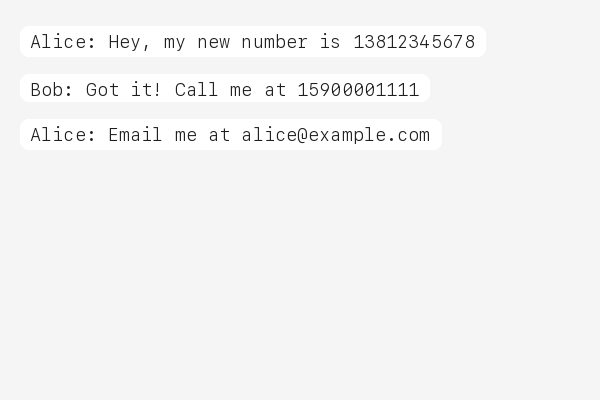
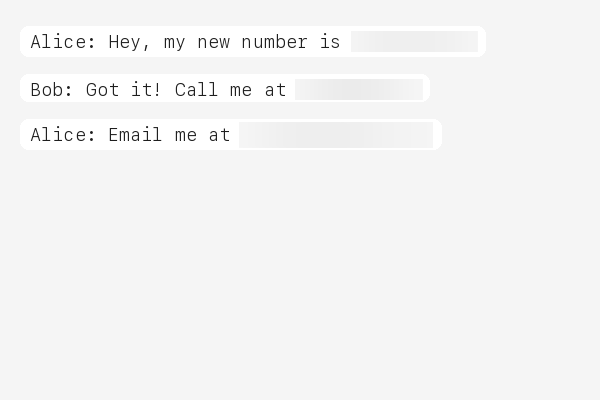
Your images never leave your machine. privacy-mask intercepts screenshots before they are sent to AI services, automatically detecting and masking phone numbers, ID cards, API keys, and 40+ other sensitive patterns.
Before / After
| Original | Masked |
|---|---|
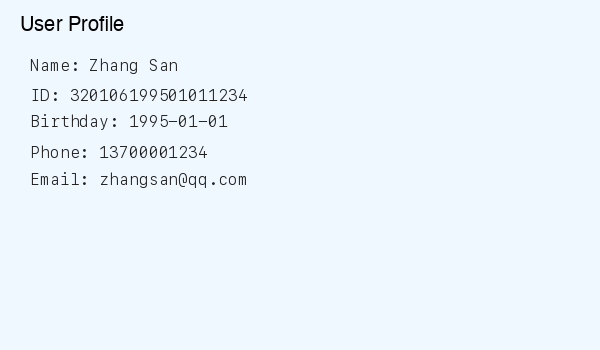 |
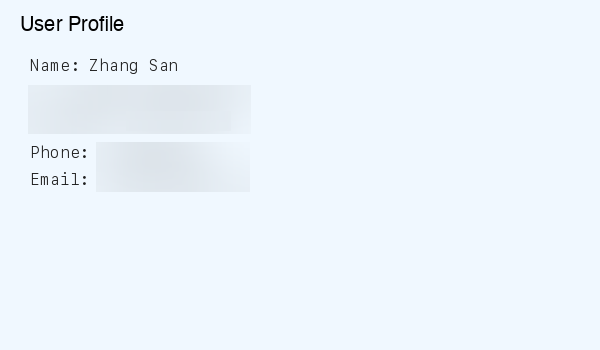 |
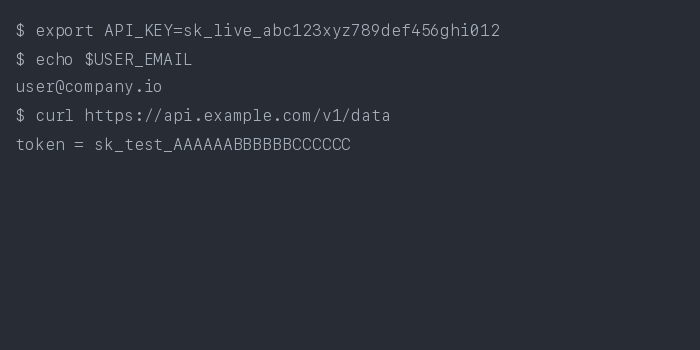 |
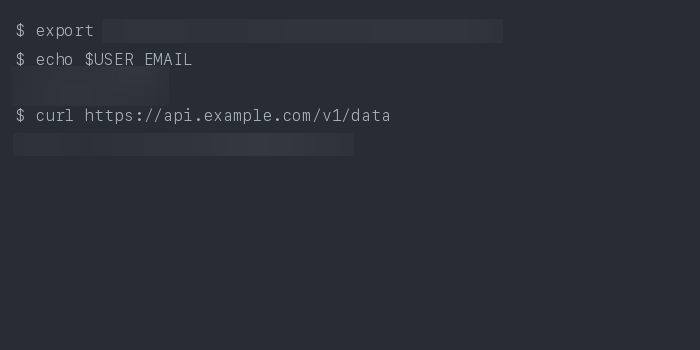 |
 |
 |
Why?
When you share screenshots with AI assistants, you might accidentally expose:
- Personal IDs — national ID numbers, passports, social security numbers
- Phone numbers & emails — yours or your users'
- API keys & tokens — AWS, GitHub, Stripe, database credentials
- Financial data — bank card numbers, IBAN codes
Cloud-based redaction services require uploading your images — defeating the purpose. privacy-mask processes everything locally before any data leaves your machine, making it the only approach that truly protects your privacy.
This matters for compliance too: GDPR, HIPAA, and other regulations require that sensitive data be protected at the point of origin.
Quick Start
# Install
pip install privacy-mask

# Mask a screenshot
privacy-mask mask screenshot.png

# One-time setup: auto-mask all images before AI upload
privacy-mask install
That's it. After privacy-mask install, every image you share with your AI coding assistant is automatically masked before upload.
Agent Integration
privacy-mask follows the agentskills.io SKILL.md standard and works with 20+ AI coding tools that run locally:
| Platform | How it works |
|---|---|
| Claude Code | Hook auto-masks images before upload |
| Cursor | SKILL.md auto-detected in project |
| VS Code Copilot | SKILL.md auto-detected in project |
| Gemini CLI | SKILL.md auto-detected in project |
| OpenHands | CLI available via shell |
| Goose | SKILL.md auto-detected |
| Roo Code | SKILL.md auto-detected |
| aider | CLI available via shell |
| Cline | SKILL.md auto-detected |
| Windsurf | SKILL.md auto-detected |
| OpenClaw | SKILL.md auto-detected |
Note: privacy-mask only works with local agents. Web-based AI (ChatGPT Web, Gemini Web) uploads images to cloud servers before processing — local masking cannot help there. This tool is designed for agents that run on your machine.
What It Detects
47 regex rules covering 15+ countries:
| Category | Rules |
|---|---|
| IDs | Chinese ID card & passport, HK/TW ID, US SSN, UK NINO, Canadian SIN, Indian Aadhaar & PAN, Korean RRN, Singapore NRIC, Malaysian IC |
| Phone | Chinese mobile & landline, US phone, international (+prefix) |
| Financial | Bank card (UnionPay/Visa/MC), Amex, IBAN, SWIFT/BIC |
| Developer Keys | AWS access key, GitHub token, Slack token, Google API key, Stripe key, JWT, database connection strings, generic API keys, SSH/PEM private keys |
| Crypto | Bitcoin address (legacy + bech32), Ethereum address |
| Other | Email, birthday, IPv4/IPv6, MAC address, UUID, Chinese license plate, passport MRZ, URL auth tokens, WeChat/QQ IDs |
How It Works
┌──────────┐     ┌───────────┐     ┌──────────┐     ┌──────────────┐
│  Image   │────▶│    OCR    │────▶│  Detect  │────▶│     Mask     │
│  Input   │     │ Tesseract │     │ 47 Regex │     │ Blur / Fill  │
│          │     │ + Rapid   │     │  Rules   │     │              │
└──────────┘     └───────────┘     └──────────┘     └──────────────┘
                  Extract text      Match patterns    Redact regions
                  + bounding boxes  with positions    in original image
-
OCR — Dual-engine: Tesseract + RapidOCR extract text with bounding boxes. Multi-strategy preprocessing (grayscale, binarization, contrast enhancement) with confidence-based merge for maximum accuracy.
-
Detect — 47 compiled regex rules scan OCR results. Overlapping detections on nearby bounding boxes are merged automatically.
-
Mask — Matched regions are blurred (default) or filled with solid color. Output is saved as a new file or overwrites the original.
CLI Usage
# Basic: mask → screenshot_masked.png
privacy-mask mask screenshot.png

# Overwrite original
privacy-mask mask screenshot.png --in-place

# Detection only, no masking
privacy-mask mask screenshot.png --dry-run

# Black fill instead of blur
privacy-mask mask screenshot.png --method fill

# Custom config
privacy-mask mask screenshot.png --config my_rules.json

# Output path
privacy-mask mask screenshot.png -o /tmp/safe.png
Output is JSON:
{
  "status": "success",
  "input": "screenshot.png",
  "output": "screenshot_masked.png",
  "detections": [
    {"label": "PHONE_CN", "text": "***", "bbox": [10, 20, 100, 30]},
    {"label": "EMAIL", "text": "***", "bbox": [10, 50, 200, 30]}
  ],
  "summary": "Masked 2 regions: 1 PHONE_CN, 1 EMAIL"
}
Configuration
Rules are defined in config.json. You can pass a custom config:
privacy-mask mask image.png --config my_config.json
Each rule has a name, pattern (regex), and optional flags. Example:
{
  "rules": [
    {
      "name": "MY_CUSTOM_ID",
      "pattern": "CUSTOM-\\d{8}",
      "flags": ["IGNORECASE"]
    }
  ]
}
See the bundled config.json for all 47 rules.
Requirements
- Python 3.10+
- Tesseract OCR
- macOS:
brew install tesseract - Ubuntu:
sudo apt install tesseract-ocr - Windows: Download installer
- macOS:
Contributing
Contributions are welcome! Here's how you can help:
- Add detection rules — submit new regex patterns for your country's ID format
- Improve OCR accuracy — better preprocessing strategies
- Report false positives — help us tune regex patterns
- Add tests — currently 174 tests, always room for more
# Run tests
pip install -e .
python -m pytest tests/ -v
License
MIT
🇨🇳 中文说明
privacy-mask — 本地图片隐私打码工具
在截图发送给 AI 助手之前,自动检测并遮盖敏感信息。100% 本地处理,数据不出本机。
特性
- 47 条正则规则,覆盖 15+ 国家的证件、电话、银行卡、开发者密钥等
- 双 OCR 引擎(Tesseract + RapidOCR),多策略预处理,置信度融合
- 一键安装:
pip install privacy-mask && privacy-mask install - 兼容 20+ AI 编程工具:Claude Code、Cursor、VS Code Copilot、Gemini CLI 等
- 支持模糊和填充两种打码方式
- 自定义规则配置
快速开始
pip install privacy-mask
privacy-mask mask screenshot.png          # 打码
privacy-mask mask screenshot.png --dry-run # 仅检测
privacy-mask install                       # 安装全局钩子,自动打码
为什么选择本地打码?
云端脱敏工具需要上传你的图片——这本身就违背了隐私保护的初衷。privacy-mask 在图片离开你的电脑之前就完成打码,是真正保护隐私的唯一方案。


Download files
Download the file for your platform. If you're not sure which to choose, learn more about installing packages.
Source Distribution
Built Distribution
Filter files by name, interpreter, ABI, and platform.
If you're not sure about the file name format, learn more about wheel file names.
Copy a direct link to the current filters
File details
Details for the file privacy_mask-0.1.1.tar.gz.
File metadata
- Download URL: privacy_mask-0.1.1.tar.gz
- Upload date:
- Size: 36.7 kB
- Tags: Source
- Uploaded using Trusted Publishing? No
- Uploaded via: twine/6.2.0 CPython/3.12.3
File hashes
| Algorithm | Hash digest | |
|---|---|---|
| SHA256 |
78175c81fdbcfb22c3a6a35f96131a9b3303ae624f120e535f9a8d3d45c4df63
|
|
| MD5 |
b0968a0a1b15ecca60b5e2f61203243c
|
|
| BLAKE2b-256 |
434d8d1164220e9053254fc96f4a3302542ad4dfbccfd03a2eaee3d2b0be2a8f
|
File details
Details for the file privacy_mask-0.1.1-py3-none-any.whl.
File metadata
- Download URL: privacy_mask-0.1.1-py3-none-any.whl
- Upload date:
- Size: 26.8 kB
- Tags: Python 3
- Uploaded using Trusted Publishing? No
- Uploaded via: twine/6.2.0 CPython/3.12.3
File hashes
| Algorithm | Hash digest | |
|---|---|---|
| SHA256 |
e39a4dcff37e50f109488170e792c1d20a456c6e7e42abf18ad17c78c0ef626e
|
|
| MD5 |
29360b5ad9a5cbf6123f0719286ea92c
|
|
| BLAKE2b-256 |
f84a602a7cf1c451d8ced0b611cfb6b06b155829a7b32274afe78da3c62a5d25
|






