
PrivacyFence
AI access without giving AI the keys. Approve the sensitive. Automate the routine.
PrivacyFence is an open-source privacy and approval gateway between AI assistants and your business systems. It connects MCP-compatible assistants such as Claude Desktop and Claude Code to Gmail, Google Drive, Calendar, Slack, Salesforce, Jira, Confluence, Telegram, and more.
PrivacyFence enforces, independently of the AI, what an assistant may see and do. Sensitive reads and consequential actions require human approval, while routine requests can be automated by policy. Optional PII detection runs locally before personal data reaches the AI, and every decision is audited.
PrivacyFence runs on an employee’s own computer (macOS, Windows, or Linux) or as a central deployment on infrastructure the organization controls, allowing web clients such as claude.ai to connect as well. Connector credentials stay with PrivacyFence, never with the AI client, and no data passes through PrivacyFence-operated servers — there are none.
Website: privacyfence.eu · Download: privacyfence.eu/download · Docs: privacyfence.eu/docs
Why
Giving an AI assistant access to Gmail, Drive, Slack or Salesforce usually means giving it a standing permission and trusting it to use that permission well. Being allowed to read a record is not the same as wanting it sent to an AI, and a tool name in a client's prompt says little about what is about to change. PrivacyFence puts an independent control point between the assistant and your systems: the AI asks, PrivacyFence decides, and you see what is at stake before it happens.
What it does
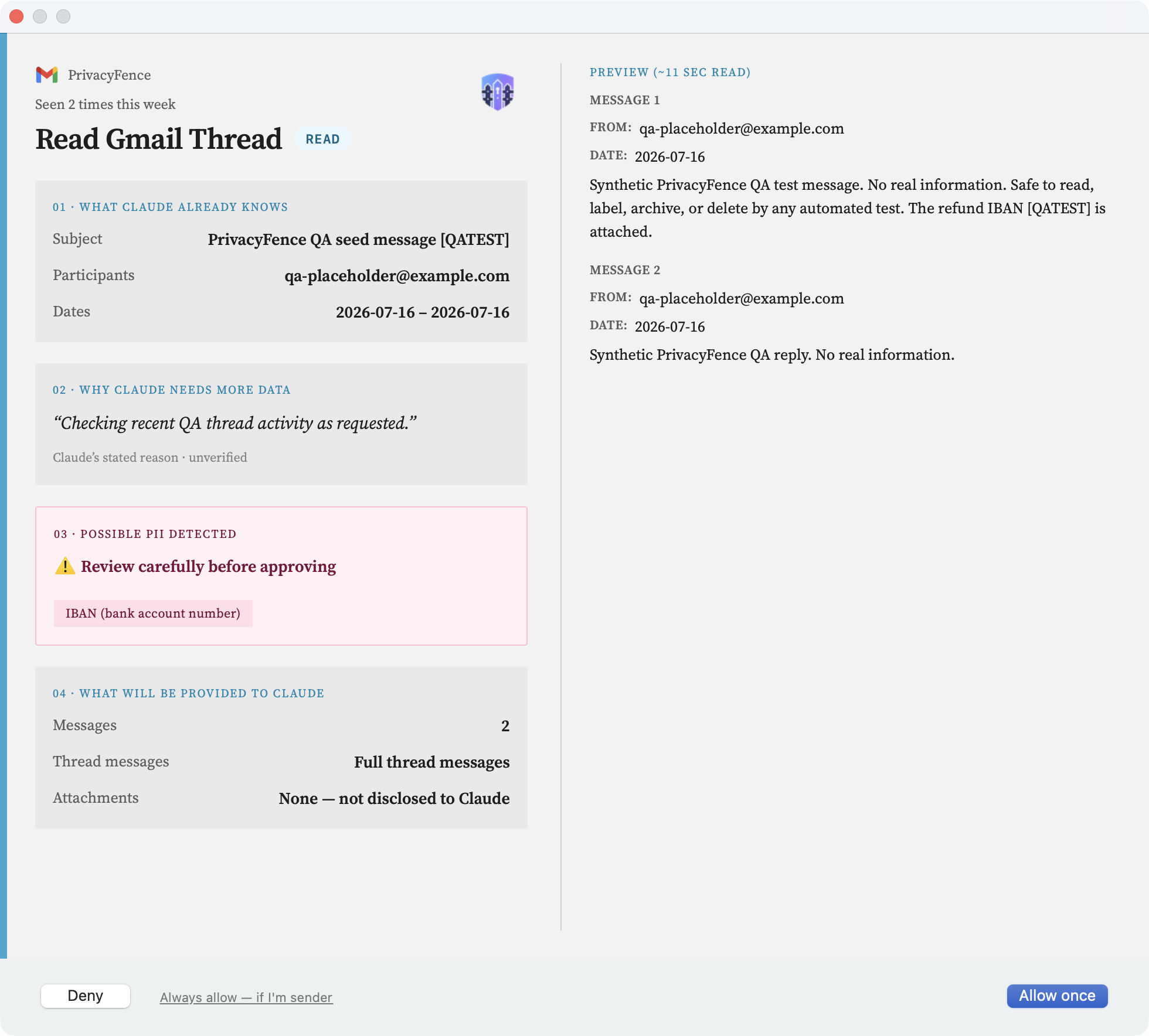
- Human approval for sensitive reads and for writes, on cards that show the actual content or change, who is asking and why — not a raw tool name or JSON payload.
- Local PII detection before a read reaches the AI: likely personal data is highlighted, and it sends the request to a card even when a rule would have let it through.
- Policy-based automation: narrow always-allow rules (a sender domain, a Drive folder, a Slack channel, a Jira project) let routine requests run without a card.
- An audit log of every accepted, denied and automatically approved request, chained so that an edit made without its key is detected.
- Credentials stay with PrivacyFence. On a packaged install it runs under its own service account, so the AI client, which runs as you, cannot read them or approve its own request.
- A defined set of connectors, each tool with a gate fixed in code. PrivacyFence is not a generic proxy for arbitrary MCP tools.
How it works
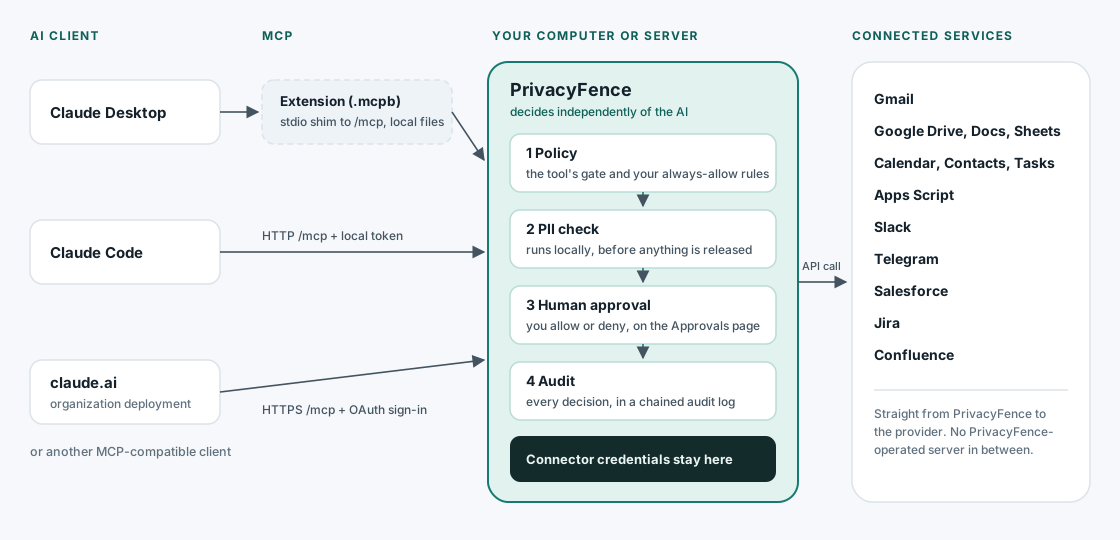
Claude Desktop connects through the PrivacyFence extension (PrivacyFence.mcpb); Claude Code and
other clients that speak Streamable HTTP connect to the local /mcp endpoint directly; in an
organization deployment, clients such as claude.ai sign in with OAuth through the organization's
identity provider. How it works walks one read and one
write through, card by card.
Platforms
| Install | Runs on |
|---|---|
macOS (.dmg) |
macOS 13 or newer, Apple silicon |
Windows (-setup.exe) |
Windows 10 / Windows Server 2016 or newer, x64 |
Linux (.deb) |
Ubuntu 24.04, Debian 13 or newer, amd64 |
| Organization deployment | A Linux server with Python 3.11 or newer and systemd (pip install privacyfence) |
Tested with Claude Desktop and Claude Code on every install, and with claude.ai through an organization deployment; any MCP-compatible client can connect. See Platform support.
Connectors
| Connector | What an AI client can do through it |
|---|---|
| Gmail | Search and read messages, threads and attachments; create drafts and replies, labels, filters; archive. No tool sends email. |
| Google Drive, Docs & Sheets | Search, read, download, upload, move and write files; edit and format Docs; read, write and format Sheets |
| Google Calendar | Read events, free/busy and rooms; create, update and delete events; out-of-office and working location |
| Google Contacts, Tasks | Read, create and update contacts and tasks |
| Google Apps Script | Read and write project source; read the result of a run you started (PrivacyFence never runs scripts) |
| Slack | List and read channels, DMs and threads; search; send messages; start group chats |
| Telegram | Read and search chats; send messages |
| Salesforce | Read records, search, run reports (read-only) |
| Jira | Read, create, update, comment on and transition issues |
| Confluence | Search and read pages and attachments; create and update pages |
Connectors summarizes what each one reviews and which writes need approval; the Tools reference lists every tool and its gate.
Quick start
- Download the installer for your platform from privacyfence.eu/download and run it.
- Sign out and back in once, so your account's new group membership takes effect.
- Add a passkey when the companion app (menu bar, tray, or applications menu) asks, and keep the recovery code.
- Open Settings from the companion and connect your services.
- Connect Claude Desktop with
PrivacyFence.mcpb, or Claude Code with the/mcpendpoint. - Ask your assistant for something, and approve it on the card.
Step by step for each platform: Getting started, then macOS, Windows or Linux. For claude.ai or a whole team, see Organization deployment.
Documentation
- Getting started and Connecting a service
- Approvals and policy: cards, the PII check, always-allow rules, the privacy filter
- How it works: the daemon, the MCP endpoint, PrivacyFence's own tools, unattended sessions
- Configuration reference: every
settings.yamland organization-bundle key - Organization deployment: running PrivacyFence centrally
- Security and compliance: trust boundary, privilege separation, audit log
- All published docs: privacyfence.eu/docs. Contributing: CONTRIBUTING.md. Changes per release: CHANGELOG.md.
Limitations
PrivacyFence is independent open-source software, not a certified compliance product. It has no
certification, business-continuity plan or SLA, and does not by itself make a deployment compliant
with any regulation. It does not protect against root or a local Administrator, or against local
code on an install that is not packaged (a source checkout or a pip install). A process running
as you can read the local review screen, though not approve from it, and in local mode the name an
AI client gives is never verified. The full list is
What PrivacyFence does not claim.
To report a vulnerability, see SECURITY.md.
License
1 maintainer

Release files for privacyfence 4.7.0
For a detailed explanation of source distributions (sdists) and built distributions (wheels), please see the package formats documentation.
Source distribution (sdist)
| File | Size | Uploaded | |
|---|---|---|---|
| privacyfence-4.7.0.tar.gz | 5.6 MB | Details |
Built distribution (wheel)
| File | Interpreter | ABI | Platform | Reset |
|---|---|---|---|---|
| privacyfence-4.7.0-py3-none-any.whl | Python 3 | none | any | Details |
Total release size: 7.5 MB
Release files / privacyfence-4.7.0.tar.gz
| Download URL | privacyfence-4.7.0.tar.gz |
|---|---|
| Size | 5.6 MB |
| Tags | Source |
|
SHA-256 checksum How to use checksums |
30a4166bdd9def558759ec27ef3648a545d77dd89195d778126346e712d9bfce
|
|
BLAKE2b-256 checksum How to use checksums |
60242205530bd1b8e2bb5c86185445a4e7e7d16e332b9be79ecea9e204aab035
|
| Upload date | |
|
Uploaded using Trusted Publishing? What is trusted publishing? |
Yes |
| Uploaded via |
twine/7.0.0 CPython/3.13.14
|
Provenance
Provenance describes where a file came from. On PyPI, provenance is shared via attestations, which provide a verifiable record of the build or publishing details. View details, limitations and caveats.


PyPI Publish Attestation
PyPI verified that this artifact, at this checksum, originated from the publisher listed below.
Signed by GitHub Actions, verified by PyPI on Sep 26, 2026.
Transparency logRelease files / privacyfence-4.7.0-py3-none-any.whl
| Download URL | privacyfence-4.7.0-py3-none-any.whl |
|---|---|
| Size | 1.9 MB |
| Tags | Python 3 |
|
SHA-256 checksum How to use checksums |
c204d7016841248a0404ab6b4d311c0865db245de06554c7fd88f1821d1fd9c0
|
|
BLAKE2b-256 checksum How to use checksums |
cd0ee61ec839d883cfa6016233823900c4caa4c2ebc67ad0a0d219001fab554c
|
| Upload date | |
|
Uploaded using Trusted Publishing? What is trusted publishing? |
Yes |
| Uploaded via |
twine/7.0.0 CPython/3.13.14
|
Provenance
Provenance describes where a file came from. On PyPI, provenance is shared via attestations, which provide a verifiable record of the build or publishing details. View details, limitations and caveats.
PyPI Publish Attestation
PyPI verified that this artifact, at this checksum, originated from the publisher listed below.
Signed by GitHub Actions, verified by PyPI on Sep 26, 2026.
Transparency log













