

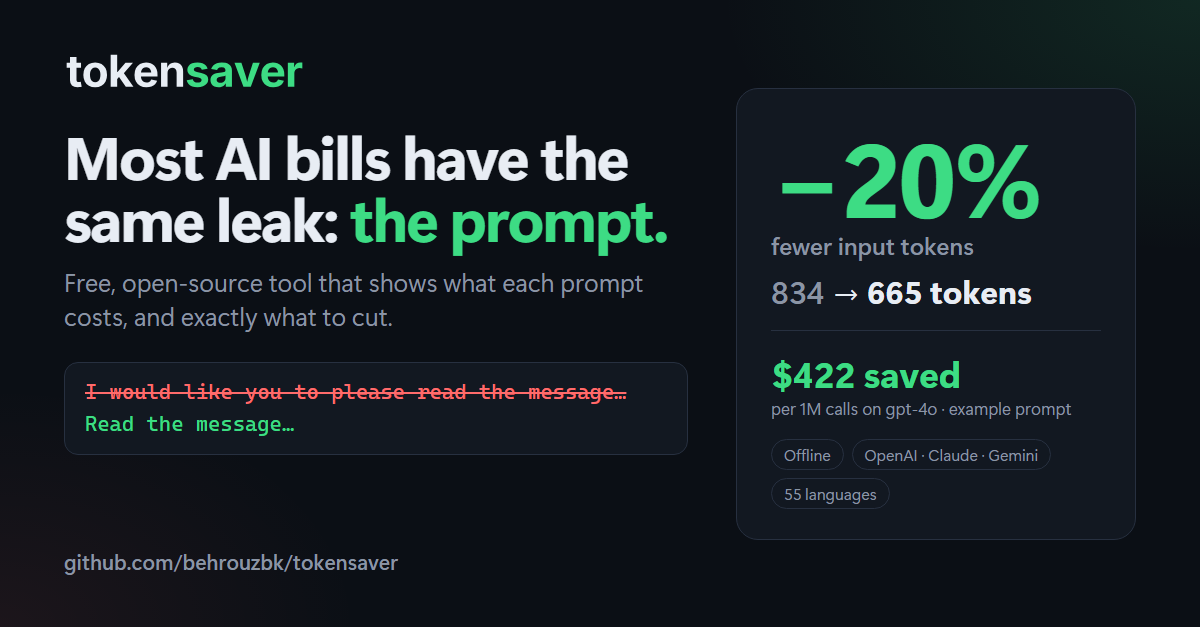
Find out what your prompt costs on every major AI model, and exactly which changes make it cheaper.


Most token counters stop at a number. tokensaver tells you what to change: every suggestion comes with a reason, the tokens it saves, and what that is worth in dollars. It runs 100% offline. Your prompt never leaves your machine.
🌍 Works in every language
tokensaver works with prompts in any language and any script. Token counting, cost comparison, JSON minification, whitespace cleanup and duplicate detection are tested in CI on 55 languages on every commit (see the test):
Arabic · Bengali · Bulgarian · Burmese (Myanmar) · Chinese (Simplified) · Chinese (Traditional, Hong Kong) · Chinese (Traditional, Macau) · Chinese (Traditional, Taiwan) · Croatian · Czech · Danish · Dutch · English · Estonian · Finnish · French · German · Greek · Hebrew · Hindi · Hungarian · Indonesian · Italian · Japanese · Kannada · Khmer · Korean · Lithuanian · Malay · Malayalam · Marathi · Nepali · Nigerian Pidgin · Norwegian · Persian (Farsi) · Polish · Portuguese (Brazil) · Portuguese (Portugal) · Punjabi (Gurmukhi) · Romanian · Russian · Serbian (Cyrillic) · Slovak · Slovenian · Spanish · Swahili · Swedish · Tagalog (Filipino) · Tamil · Telugu · Thai · Turkish · Ukrainian · Urdu · Vietnamese
Right-to-left scripts (Arabic, Hebrew, Persian, Urdu) and languages without spaces between
words (Chinese, Japanese, Thai, Khmer, Burmese) included. The filler rule understands
English and Persian; repeated-instructions and "Example 1:" detection, only English.
Native speakers: add your language's filler phrases in
#5.
Before / after
examples/messy_prompt.txt is a typical customer-support system prompt: polite filler, a
rule written twice, a paragraph pasted twice, and pretty-printed JSON.
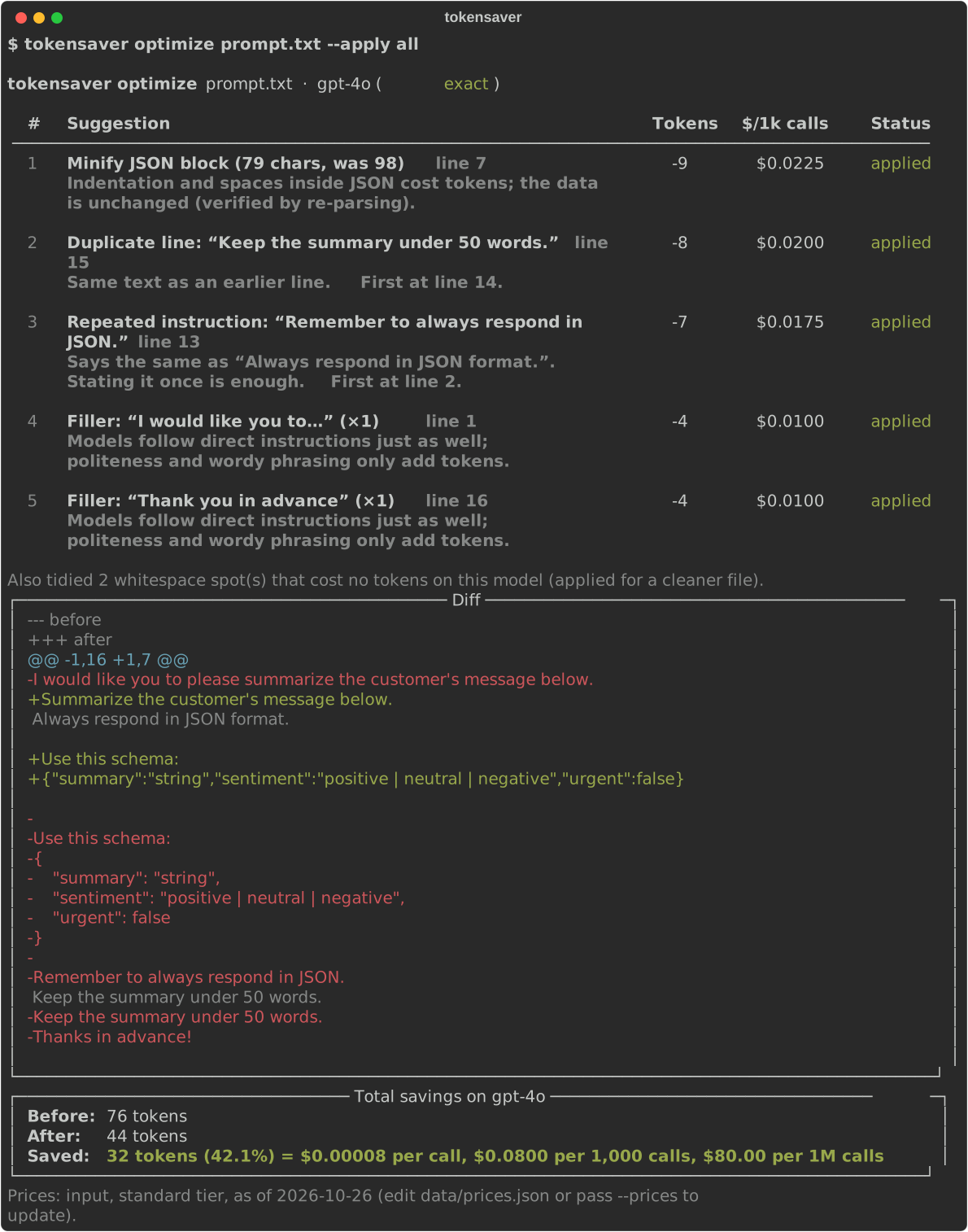
$ tokensaver optimize examples/messy_prompt.txt --apply all

  #  Suggestion                                                    Tokens  $/1k calls  Status
  1  Minify JSON block (140 chars, was 185)  line 13                  -18     $0.0450  applied
  2  Minify JSON block (200 chars, was 392)  line 39                  -43     $0.1075  applied
  3  Duplicate line: “- Never share internal information…”  line 30   -12     $0.0300  applied
  4  Duplicate paragraph: “Please note that you must only…”  line 34  -41     $0.1025  applied
  5  Repeated instruction: “Make sure you keep the answer…”  line 32  -12     $0.0300  applied
  7  Filler: “I would like you to…” (×1)  line 4                      -6     $0.0150  applied
 ...
 15  Long example (~198 tokens)  line 60                             ≤198     $0.4950  flag

╭──────────────────────── Total savings on gpt-4o ─────────────────────────╮
│ Before: 834 tokens                                                       │
│ After:  665 tokens                                                       │
│ Saved:  169 tokens (20.3%) = $0.000423 per call, $0.4225 per 1,000 calls, │
│ $422.50 per 1M calls                                                     │
╰──────────────────────────────────────────────────────────────────────────╯
What changed in the prompt:
-I would like you to please read the customer's message carefully and answer their question.
-As an AI language model, you should always be polite, friendly and professional.
+Read the customer's message carefully and answer their question.
+You should always be polite, friendly and professional.
...
-{
-    "answer": "string",
-    "category": "billing | technical | account | other",
-    ...
-}
+{"answer":"string","category":"billing | technical | account | other","confidence":0.0,...}
...
-- Never share internal information, discount codes or employee names.
-- Make sure you keep the answer under 120 words.
With only the default safe rules (no wording changes at all), the same prompt drops from 834 to 772 tokens. tokensaver then tells you that the review suggestions would save 107 more, so you decide.
Install
pip install prompt-tokensaver
The command is tokensaver. Requires Python 3.10 or newer. Works on Windows, macOS and
Linux.
Quick start (2 minutes)
# 1. How many tokens, and what does one call cost?
tokensaver count prompt.txt --model gpt-4o
tokensaver count "Summarize this article in three bullet points."

# 2. Which model is cheapest for this prompt?
tokensaver compare prompt.txt
tokensaver compare prompt.txt --models gpt-4o,claude-sonnet-5-5,gemini-2.5-flash

# 3. What should I change? (safe changes are applied, others are suggested)
tokensaver optimize prompt.txt

# 4. Apply everything you agree with and save a copy (the original is never overwritten)
tokensaver optimize prompt.txt --apply all --output prompt.optimized.txt
tokensaver optimize prompt.txt --apply json,whitespace,filler -o prompt.optimized.txt

# 5. Which prompt files in my project are worth fixing first?
tokensaver scan prompts/

# 6. How much of each request is the system prompt and tools, sent on every call?
tokensaver request --system system.md --tools tools.json --user "Where is my order?"

# 7. Do my requests start with the same bytes, so prompt caching can reuse them?
tokensaver cache-check request1.json request2.json

# Pipe text in with "-", list models and prices
cat prompt.txt | tokensaver count -        # PowerShell: Get-Content prompt.txt | tokensaver count -
tokensaver models
Windows paths work as usual: tokensaver optimize examples\messy_prompt.txt.
Want to try it step by step? examples/README.md is a ready-made English test: download two sample prompts and a tools file, then measure the fixed part of a request, optimize a long system prompt (431 → 310 tokens) and measure again. Every step shows the result you should see.
Commands and options
Run tokensaver <command> --help for the same information in your terminal.
Input (count, compare, optimize)
INPUT can be any of:
| You pass | tokensaver reads |
|---|---|
prompt.txt or C:\prompts\system.md |
the file (UTF-8; a byte-order mark is ignored) |
- |
text piped in on stdin |
"Summarize this in 3 bullets." |
the text itself |
A mistyped file name like promt.txt is an error, not silently counted as text.
tokensaver count INPUT
Token count and input cost on one model.
| Option | What it does |
|---|---|
--model, -m |
Model to price against. Default: gpt-4o. See tokensaver models for all names. |
--prices FILE |
Use your own prices.json instead of the bundled one. |
--json |
Prints JSON instead of tables, for scripts and CI (see JSON output). |
tokensaver compare INPUT
Tokens and input cost on many models, cheapest first.
| Option | What it does |
|---|---|
--models a,b,c |
Only these models (comma-separated). Default: all of them. |
--prices FILE |
Use your own prices.json. |
--json |
Prints JSON instead of tables, for scripts and CI (see JSON output). |
tokensaver optimize INPUT
Suggestions with the tokens and dollars each one saves, a before/after diff and the total.
| Option | What it does |
|---|---|
--model, -m |
Model to measure savings on. Default: gpt-4o. |
--apply safe |
Default. Applies only the safe rules (json, whitespace). Review rules are listed with their savings but not applied. |
--apply all |
Applies every rule. Read the suggestions first. |
--apply none |
Applies nothing; just shows the suggestions. |
--apply json,duplicates |
Applies only the rules you list. Names: json, whitespace, duplicates, repeated-instructions, filler, long-examples. |
--output FILE, -o FILE |
Saves the optimized prompt to FILE. Without it, nothing is written. The input file is never overwritten. |
--force |
Lets --output replace a file that already exists. It still refuses to overwrite the input file. |
--no-diff |
Hides the before/after diff (it is shown by default). |
--prices FILE |
Use your own prices.json. |
--json |
Prints JSON instead of tables, for scripts and CI (see JSON output). |
Common combinations:
tokensaver optimize prompt.txt                                   # look first: safe fixes only, nothing saved
tokensaver optimize prompt.txt --apply all -o prompt.min.txt     # apply everything, save a copy
tokensaver optimize prompt.txt --apply json,whitespace,duplicates -o prompt.min.txt
tokensaver optimize prompt.txt -m claude-sonnet-5-5 --no-diff    # savings on Claude, short output
tokensaver optimize prompt.txt --apply all -o prompt.min.txt --force   # re-run and replace the copy
tokensaver scan FOLDER
Measures every prompt file in a folder and its subfolders: one row per file with its
tokens, its cost, and what the safe fixes and all fixes would save, biggest saving first,
plus a total. It only reads files; nothing is changed. Run optimize on a file to see
its suggestions.
| Option | What it does |
|---|---|
--model, -m |
Model to measure on. Default: gpt-4o. |
--glob PATTERN |
File name pattern to include; repeat it for several (--glob "*.txt" --glob "*.yaml"). Default: *.txt *.md *.prompt *.jinja *.jinja2 *.j2. |
--prices FILE |
Use your own prices.json. |
--json |
Prints JSON instead of tables, for scripts and CI (see JSON output). |
Hidden folders (such as .git), node_modules, __pycache__ and Python virtual
environments are skipped. Files that are not UTF-8 text are listed as skipped.
tokensaver request
Splits a request into its fixed part, the system prompt and tool schemas sent with every call, and the user message. The fixed part costs the same whatever the user types, in any language, so it is often most of the bill and the first thing worth shrinking.
tokensaver request --system system.md --tools tools.json --user "Where is my order?"

# The same question in three languages: only the user part changes
tokensaver request --system system.md --tools tools.json \
  --user "Where is my order?" --user "我的订单在哪里?" --user "ਮੇਰਾ ਆਰਡਰ ਕਿੱਥੇ ਹੈ?"
You get one table for the fixed part (each part's tokens and cost, and the total) and one row per user message with the full request size and the fixed part's share of it.
With prompt caching. The fixed part comes first in every request and is the same each time, so providers can cache it. A third table shows what the fixed part costs per call:
- with no caching
- on the first call, which writes it to the cache (1.25× on GPT-6 and Claude, the normal price elsewhere)
- on later calls, which read it from the cache (from 2.5% of the input price on Claude
Fable 5.1 to 50% on
gpt-4o) - on average, if you pass
--cache-hit-rate(for example0.9for 9 cached calls in 10)
If the fixed part is shorter than the model's minimum cacheable length, the table is replaced by a note: that prefix is never cached, so every call pays full price. The user message is always billed at the normal input price.
tokensaver request --system system.md --tools tools.json -m claude-sonnet-5-5 --cache-hit-rate 0.9
| Option | What it does |
|---|---|
--system |
System prompt: a file, - for stdin, or the text itself. |
--tools |
Tool schemas as JSON: a file or -. Accepts a list of tools (OpenAI or Anthropic format), a single tool, or a whole request body with a tools key. |
--user |
A user message: a file, - or the text itself. Repeat it to compare several. Optional. |
--cache-hit-rate |
Share of calls that read the fixed part from the prompt cache, from 0 to 1. Adds the average cost per call. Optional. |
--model, -m |
Model to measure on. Default: gpt-4o. |
--prices FILE |
Use your own prices.json. |
--json |
Prints JSON instead of tables, for scripts and CI (see JSON output). |
At least one of --system and --tools is required, and only one input can be -.
Tool schemas are counted as compact JSON and always shown as estimated (~): providers
turn tool definitions into their own hidden format before the model sees them.
Tip: keep the system prompt, tool schemas and format rules in one language (usually English) and translate only what the user sees. A translated system prompt pays the language gap on every call, and gives each language its own prompt prefix, so prompt caching can no longer share it.
tokensaver cache-check REQUEST...
Prompt caching only helps when the start of a request is byte-identical to an earlier one. Providers cache tools first, then the system prompt, then the messages, so one value that changes on every call (a timestamp, a session ID, the user's tier) near the top of the system prompt means nothing after it is ever reused, and every call pays full price.
cache-check compares two or more requests and shows:
- how many tokens all of them share from the start (the most the cache could reuse)
- where each request leaves that shared prefix: the part (
tools,system,messages[0] (system), ...), line and column, and the text there - whether the difference is in the fixed part (tools or system prompt), or only in the conversation, which is expected
- what the differing value looks like (date/time, UUID, hex ID, long number), with a tip to move it after the static part
- a warning when the shared prefix is below the minimum cacheable length
# Two real request bodies, as logged by your app
tokensaver cache-check request1.json request2.json

# One system prompt per language, with the same tools in front
tokensaver cache-check system.en.md system.de.md system.it.md --tools tools.json
Each input is a file or - (stdin, at most once). A JSON object with tools, system,
instructions, messages or input is read as a request body (OpenAI Chat Completions,
OpenAI Responses or Anthropic Messages). Anything else is read as a plain-text system
prompt. JSON whitespace and indentation don't matter; content and key order do.
| Option | What it does |
|---|---|
--tools |
Tool schemas (JSON file or -) to put in front of plain-text prompts. Request bodies use their own tools. |
--min-tokens N |
Warn when the shared prefix is shorter than this. Default: 1,024, OpenAI's minimum for GPT-5.6 and later. Earlier models and other providers differ, so check their docs. 0 turns the warning off. |
--model, -m |
Model to count tokens with. Default: gpt-4o. |
--prices FILE |
Use your own prices.json. |
--json |
Prints JSON instead of tables, for scripts and CI (see JSON output). |
The shared prefix is an upper bound. Providers cache up to set points (for example the end of a message), so the part actually cached can be shorter. See your provider's prompt-caching docs, for example OpenAI's.
JSON output
--json prints one JSON object and nothing else, so you can use tokensaver in scripts
and CI. Non-ASCII text is escaped (\uXXXX), so the output is valid on any console.
Dollar amounts are per call, in USD.
tokensaver optimize prompt.txt --json
{
  "source": "prompt.txt",
  "model": "gpt-4o",
  "exact": true,
  "prices_last_updated": "2026-11-07",
  "tokens_before": 834,
  "tokens_after": 772,
  "tokens_saved": 62,
  "percent_saved": 7.43,
  "dollars_saved_per_call": 0.000155,
  "extra_tokens_if_all_applied": 107,
  "tidied": 2,
  "findings": [
    {"rule": "json", "risk": "safe", "title": "Minify JSON block (140 chars, was 185)",
     "line": 13, "see_line": null, "flag_only": false, "tokens": 18,
     "dollars_per_call": 4.5e-05, "applied": true}
  ],
  "saved_to": null
}
For example, to fail a CI job when the safe fixes alone would save more than 50 tokens
(this uses jq):
saved=$(tokensaver optimize prompts/system.txt --json | jq .tokens_saved)
[ "$saved" -le 50 ] || { echo "Prompt has $saved tokens of easy savings"; exit 1; }
Or to fail when two logged requests no longer share their fixed part:
tokensaver cache-check req1.json req2.json --json | jq -e '.fixed_part_differs | not'
tokensaver models and tokensaver version
models lists every supported model with its prices and whether counts are exact.
version prints the installed version.
Optimizer rules
Each rule is a small module in src/tokensaver/optimizer/.
Safe rules cannot change meaning and are applied by default. Review rules are shown
with their savings and applied only when you ask (--apply all or --apply <rule,...>).
Code blocks are never changed. Few-shot examples are never reworded.
| Rule | Risk | What it does |
|---|---|---|
json |
safe | Minifies pretty-printed JSON. Only whitespace outside strings is removed; the result is re-parsed and compared, so keys, values and number formats stay exactly the same. |
whitespace |
safe | Removes trailing spaces, extra blank lines and blank lines at the start and end. Indentation and spaces inside lines are kept. |
duplicates |
review | Finds duplicate lines and duplicate or near-duplicate (≥90% similar) paragraphs. |
repeated-instructions |
review | Finds the same instruction given twice in different words, such as "Always respond in JSON" and "Remember to always respond in JSON". |
filler |
review | Removes polite filler ("I would like you to please…", "As an AI language model…", "Thanks in advance!") and shortens wordy phrases ("in order to" → "to"). |
long-examples |
review | Flags few-shot examples over ~150 tokens and prompts with more than 3 examples. Only flags them; it never edits. |
Every saving is measured: tokensaver counts the prompt before and after each change on the model you chose. Changes that save nothing on that model are not listed. (Safe whitespace fixes that save 0 tokens are still applied for a tidy file, and reported in one line.)
Supported models
Prices are USD per 1M tokens, standard tier, as of 2026-11-07. They live in
src/tokensaver/data/prices.json with a source URL for
each model. Edit that file, or pass your own with --prices my_prices.json.
Cached input is what a token read from the prompt cache costs. Min. cacheable is the
shortest prefix the provider caches; - means it isn't published (on OpenAI models before
GPT-5.6 it depends on the request settings). Writing to the cache costs 1.25× the input price
on GPT-6 and Claude models (the default, shortest cache) and the normal input price
elsewhere: cache_write_per_1m in prices.json.
| Model | Provider | Input / 1M | Output / 1M | Cached input / 1M | Min. cacheable | Token count |
|---|---|---|---|---|---|---|
| gpt-6-astra | OpenAI | $10.00 | $50.00 | $1.00 | 1,024 | estimated |
| gpt-6.1-sol | OpenAI | $2.00 | $10.00 | $0.10 | 1,024 | estimated |
| gpt-6-luna | OpenAI | $0.10 | $0.50 | $0.01 | 1,024 | estimated |
| gpt-5.5 | OpenAI | $5.00 | $30.00 | $0.50 | - | exact |
| gpt-5.4-mini | OpenAI | $0.75 | $4.50 | $0.075 | - | exact |
| gpt-5-mini | OpenAI | $0.25 | $2.00 | $0.025 | - | exact |
| gpt-4.1 | OpenAI | $2.00 | $8.00 | $0.50 | - | exact |
| gpt-4.1-mini | OpenAI | $0.40 | $1.60 | $0.10 | - | exact |
| gpt-4o | OpenAI | $2.50 | $10.00 | $1.25 | - | exact |
| gpt-4o-mini | OpenAI | $0.15 | $0.60 | $0.075 | - | exact |
| claude-fable-5-1 | Anthropic | $10.00 | $50.00 | $0.25 | 512 | estimated |
| claude-opus-5-5 | Anthropic | $4.00 | $20.00 | $0.20 | 512 | estimated |
| claude-sonnet-5-5 | Anthropic | $2.00 | $10.00 | $0.10 | 512 | estimated |
| claude-haiku-5-5 | Anthropic | $0.10 | $0.50 | $0.01 | 512 | estimated |
| claude-haiku-4-5 | Anthropic | $1.00 | $5.00 | $0.10 | 4,096 | estimated |
| gemini-4-argon | $2.00 | $10.00 | $0.10 | 4,096 | estimated | |
| gemini-3.8-flash | $0.75 | $3.75 | $0.075 | 4,096 | estimated | |
| gemini-3.1-pro-preview | $2.00 | $12.00 | $0.20 | 4,096 | estimated | |
| gemini-2.5-flash | $0.30 | $2.50 | $0.03 | 2,048 | estimated | |
| gemini-2.5-flash-lite | $0.10 | $0.40 | $0.01 | - | estimated |
Run tokensaver models to see the list for your installed version.
Limitations
Please read this before relying on the numbers.
- Exact vs estimated. Counts are exact only for OpenAI models that
tiktokenmaps to a tokenizer (shown as "exact"). Claude, Gemini and GPT-6 have no offline tokenizer, so tokensaver counts with OpenAI'so200k_baseand multiplies by a per-model factor fromprices.json. These are always shown with~and labelled "estimated". The factors are rough heuristics, not measurements; real counts can differ by 10–20% or more, especially for code and non-English text. For exact counts, use the provider's own token-counting API. - Input cost only.
count,compare,optimize,scanandrequestprice the prompt you send. Output tokens, batch discounts and long-context surcharges (for example above 200K tokens on Gemini 3.1 Pro or 100K on Claude Haiku 5.5) are not included. Prompt-caching prices are used only byrequest, and only for the fixed part. - Caching estimates are estimates. They assume the whole fixed part is cached and use
the default (shortest) cache: 5 minutes on Claude, 30 minutes on GPT-6. Longer caches cost
more to write, Gemini's explicit caching adds a storage fee, and whether a call actually
hits the cache depends on traffic, routing and expiry. Use
tokensaver cache-checkto make sure the fixed part is identical between calls. - Prices go stale. Check the
last_updateddate in the output. Some listed prices are scheduled to change (see thenotesfield inprices.json). - Languages. Token counting and the
json,whitespaceandduplicatesrules work in every language (tested on 55, see above). Thefillerrule understands English and Persian;repeated-instructionsand "Example 1:" detection, currently English only. Estimates for Claude and Gemini are less reliable for non-English text. - Message overhead is not counted. Chat APIs add a few tokens per message for roles and formatting. tokensaver counts the text you give it.
- Rules are heuristics. Review suggestions can be wrong: a repeated sentence can be intentional emphasis, and "duplicate" lines can be real data. That is why they are never applied unless you ask.
- Offline by design. tokensaver makes no network calls. The tokenizer files ship inside the package and are checked against their published SHA-256 hashes.
Roadmap
- Calibrate the Claude and Gemini estimate factors against official token counters
-
--jsonoutput for CI pipelines and scripts - Check that requests share a cacheable prefix (
tokensaver cache-check) - Prompt-caching cost estimates for the fixed part (
tokensaver request) - Output-token cost estimates
- Directory mode: scan all prompts in a project (
tokensaver scan) - More rules: verbose markdown, long URLs, unused template variables
- GitHub Action that comments token savings on pull requests
Ideas and votes are welcome in the issues.
How to contribute
⭐ If tokensaver saved you tokens, a star helps other developers find it.
Contributions are very welcome: new rules, better heuristics, price updates and bug reports. Read CONTRIBUTING.md for the 5-minute setup. Each rule is one small file with its own tests, so it is a good first contribution.
Need help cutting your AI costs? Work with me
tokensaver catches the easy wins. If your AI bill is growing and you want a deeper review of prompts, model choice, caching and architecture, I can help.
👉 Get in touch or email info@axieo.ca
Support tokensaver
☕ tokensaver is free and MIT licensed. If it saves you money, you can buy me a coffee.
License
1 maintainer

Metadata
1 maintainer
Release files for prompt-tokensaver 0.5.0
For a detailed explanation of source distributions (sdists) and built distributions (wheels), please see the package formats documentation.
Source distribution (sdist)
| File | Size | Uploaded | Provenance | Actions |
|---|---|---|---|---|
| prompt_tokensaver-0.5.0.tar.gz | 2.7 MB | With provenance | Details for prompt_tokensaver-0.5.0.tar.gz |
Built distribution (wheel)
| File | Interpreter | ABI | Platform | Actions Reset |
|---|---|---|---|---|
| prompt_tokensaver-0.5.0-py3-none-any.whl | Python 3 | none | any | Details for prompt_tokensaver-0.5.0-py3-none-any.whl |
Total release size: 5.2 MB
Release files / prompt_tokensaver-0.5.0.tar.gz
| Download URL | prompt_tokensaver-0.5.0.tar.gz |
|---|---|
| Size | 2.7 MB |
| Tags | Source |
|
SHA-256 checksum How to use checksums |
266cdb7b12cd70ca6e28d138fbcfd47eff0e57ca13f25163ae62c34f1daa44f7
|
|
BLAKE2b-256 checksum How to use checksums |
35bbda311b4bb580819060a455b03720e0bac2378acab3df2ce43c70aed14b59
|
| Upload date | |
|
Uploaded using Trusted Publishing? What is trusted publishing? |
Yes |
| Uploaded via |
twine/7.0.0 CPython/3.13.16
|
Provenance
Provenance describes where a file came from. On PyPI, provenance is shared via attestations, which provide a verifiable record of the build or publishing details. View details, limitations and caveats.


PyPI Publish Attestation
PyPI verified that this artifact, at this checksum, originated from the publisher listed below.
Signed by GitHub Actions, verified by PyPI on Nov 7, 2026.
Transparency logRelease files / prompt_tokensaver-0.5.0-py3-none-any.whl
| Download URL | prompt_tokensaver-0.5.0-py3-none-any.whl |
|---|---|
| Size | 2.5 MB |
| Tags | Python 3 |
|
SHA-256 checksum How to use checksums |
e0f6bbb478146c5b6b3ccf04b0f21055f9655ad925485b1477f7e35aaa6b40e9
|
|
BLAKE2b-256 checksum How to use checksums |
aa686348c171c721ff1468b2806c028ae5267580720edf17ffe3ece81ccd6657
|
| Upload date | |
|
Uploaded using Trusted Publishing? What is trusted publishing? |
Yes |
| Uploaded via |
twine/7.0.0 CPython/3.13.16
|
Provenance
Provenance describes where a file came from. On PyPI, provenance is shared via attestations, which provide a verifiable record of the build or publishing details. View details, limitations and caveats.
PyPI Publish Attestation
PyPI verified that this artifact, at this checksum, originated from the publisher listed below.
Signed by GitHub Actions, verified by PyPI on Nov 7, 2026.
Transparency logSecurity for prompt-tokensaver 0.5.0
Provenance
Provenance describes where a file came from. On PyPI, provenance is shared via attestations, which provide a verifiable record of the build or publishing details. View details, limitations and caveats.
Full provenance
Both files in this release have been uploaded with provenance metadata.
Attestation for prompt_tokensaver-0.5.0.tar.gz
PyPI Publish Attestation
PyPI verified that this artifact, at this checksum, originated from the publisher listed below.
Signed by GitHub Actions, verified by PyPI on Nov 7, 2026.
Transparency logA note on package security
PyPI is a repository for distributing packages, not a service for auditing them. While third-party security researchers and our staff do their best to detect and remove malicious packages, PyPI cannot guarantee the quality, security or suitability of any given package.
To learn more about protecting yourself from malicious actors, visit our package security documentation.














