
Proxbox API service made using FastAPI

Project description
Installing proxbox-api (Plugin backend made using FastAPI)
Integrations Architecture
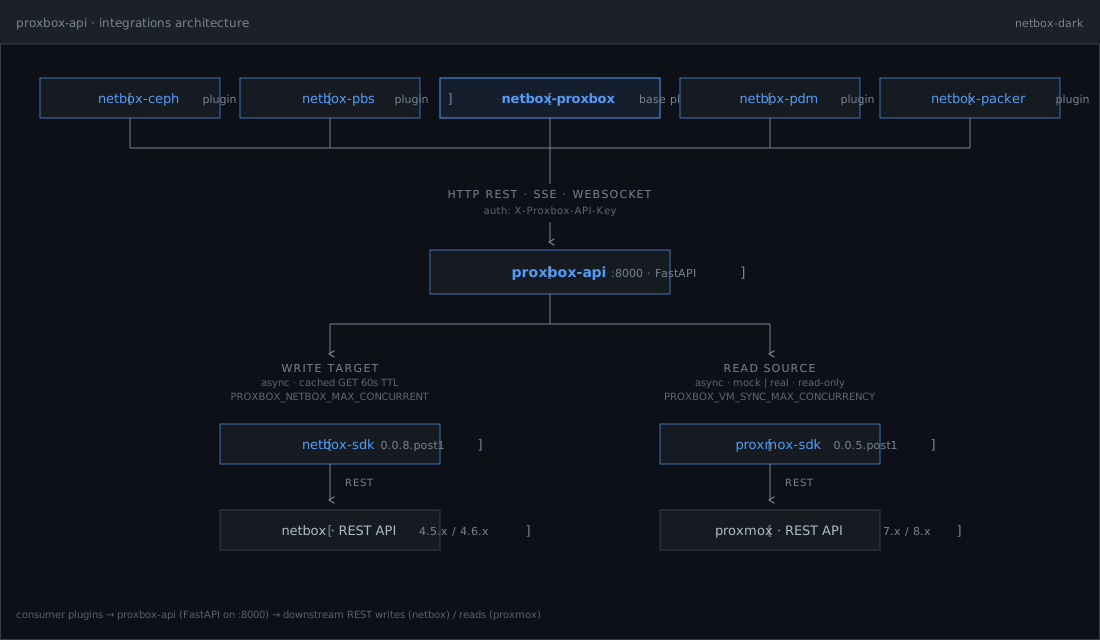
proxbox-api sits between consumer NetBox plugins (top tier) and the
downstream REST surfaces it talks to (bottom tier):
- Top — consumer plugins:
netbox-ceph,netbox-pbs,netbox-proxbox(base plugin),netbox-pdm,netbox-packer. They reachproxbox-apiover HTTP REST / SSE / WebSocket, authenticated with theX-Proxbox-API-Keyheader. - Middle —
proxbox-api: FastAPI app on:8000. Owns the SSE and WebSocket sync streams, runtime tunables, and the API-key auth surface. - Bottom — downstream SDKs:
- Write target —
netbox-sdk→netbox · REST API(4.5.x / 4.6.x). Async with a cached GET layer (60s TTL); concurrency capped byPROXBOX_NETBOX_MAX_CONCURRENT. - Read source —
proxmox-sdk→proxmox · REST API(8.1 / 8.2 / 8.3 / latest, perSUPPORTED_PROXMOX_VERSIONSinproxbox_api/constants.py). PVE 9.x route groups (HA rules, firewall writes, SDN fabrics, datacenter CPU models, access token regeneration, CRS config) are implemented and degrade gracefully on older clusters. Async, read-only for discovery,mock | realmodes; concurrency capped byPROXBOX_VM_SYNC_MAX_CONCURRENCY. - Firecracker host-agent —
/cloud/firecracker/provisionand/cloud/firecracker/provision/streamcall the selected host-agent VM to health-check KVM, read capacity, prepare kernel/rootfs assets, create the micro-VM, and optionally start it. NetBox inventory still lives innetbox-proxbox; this service owns the host-agent HTTP contract.
- Write target —
The interactive version of this diagram lives at emersonfelipesp.com/proxbox-api.
Tooling: uv + Ruff + ty
This repo uses uv to install Python and dependencies, Ruff for linting and formatting, and ty for type checking.
# Runtime only
uv sync

# Tests + Ruff (matches CI)
uv sync --extra test --group dev

# Documentation (MkDocs)
uv sync --extra docs --group dev
uv run ruff check .
uv run ruff format .
uv run ty check proxbox_api/types proxbox_api/utils/retry.py
uv run pytest tests
uv run mkdocs serve   # after syncing with --extra docs
Documentation (MkDocs Material)
Project documentation is available under docs/ and built with MkDocs Material.
The VM reconciliation engine is documented in
docs/sync/reconciliation-architecture.md.
Python is the default engine; the optional Rust engine is for compare-mode validation and explicit
opt-in testing.
Firecracker host-agent provisioning is documented in
docs/operations/firecracker.md, including
the Cloud endpoints, SSE events, request shape, and response shape.
Local docs build
uv sync --extra docs --group dev
uv run mkdocs serve
Languages
- English (default)
- Brazilian Portuguese (
pt-BR) as optional translation
Using docker (recommended)
All images are Alpine-based (smaller footprint), built from this repository with uv and uv.lock in a multi-stage Dockerfile. Three Python-only variants are published to Docker Hub by default, plus opt-in experimental PyO3/Rust variants:
| Variant | Tags | Description |
|---|---|---|
| Raw (default) | latest, <version> |
Pure uvicorn, HTTP only. Smallest image. |
| Nginx | latest-nginx, <version>-nginx |
nginx terminates HTTPS via mkcert; proxies to uvicorn. |
| Granian | latest-granian, <version>-granian |
Granian (Rust ASGI server) with native TLS via mkcert. No nginx. |
| Raw PyO3/Rust (experimental) | experimental, pyo3-rust, <version>-pyo3-rust |
Raw image with the optional PyO3 reconciliation engine installed and enabled. |
| Nginx PyO3/Rust (experimental) | experimental-nginx, pyo3-rust-nginx, <version>-pyo3-rust-nginx |
nginx image with the optional PyO3 reconciliation engine installed and enabled. |
| Granian PyO3/Rust (experimental) | experimental-granian, pyo3-rust-granian, <version>-pyo3-rust-granian |
granian image with the optional PyO3 reconciliation engine installed and enabled. |
Upgrade note: before v0.0.7,
latestwas the nginx+HTTP image. It is now the raw uvicorn image. Pulllatest-nginxfor the previous behavior.
Raw image (default)
Plain uvicorn on HTTP — the simplest option for local dev or when you put your own proxy in front.
docker pull emersonfelipesp/proxbox-api:latest
docker run -d -p 8000:8000 --name proxbox-api emersonfelipesp/proxbox-api:latest
Build from source:
docker build -t proxbox-api:raw .
docker run -d -p 8000:8000 proxbox-api:raw
Nginx image (nginx + mkcert HTTPS + uvicorn)
nginx terminates HTTPS on PORT (default 8000) using certificates from mkcert and proxies to uvicorn on 127.0.0.1:8001. supervisord manages both processes. The nginx config disables proxy buffering so chunked / SSE responses flow through unmodified.
Plain HTTP requests to the TLS port return a structured JSON 400 body
({"error":"plain_http_on_https_port", ...}) instead of nginx's stock 400 page,
so clients can detect the misconfiguration. When wiring this image into the
NetBox netbox-proxbox plugin (>= 0.0.16), set Use HTTPS ✓ and (if using
the bundled mkcert cert) Verify SSL ✗ on the FastAPI endpoint —
netbox-proxbox#352.
docker pull emersonfelipesp/proxbox-api:latest-nginx
docker run -d -p 8443:8000 --name proxbox-api-nginx \
  emersonfelipesp/proxbox-api:latest-nginx
Build from source:
docker build --target nginx -t proxbox-api:nginx .
docker run -d -p 8443:8000 proxbox-api:nginx
Granian image (granian + mkcert HTTPS)
Granian is a Rust-based ASGI server with native HTTP/2, WebSocket, and TLS support. This variant eliminates nginx and supervisord — a single granian process handles everything.
docker pull emersonfelipesp/proxbox-api:latest-granian
docker run -d -p 8443:8000 --name proxbox-api-granian \
  emersonfelipesp/proxbox-api:latest-granian
Build from source:
docker build --target granian -t proxbox-api:granian .
docker run -d -p 8443:8000 proxbox-api:granian
Experimental PyO3/Rust images
The default images above continue to use the Python reconciliation engine. To opt in to the native PyO3/Rust implementation, run one of the experimental tags. The raw alias is the easiest path:
docker pull emersonfelipesp/proxbox-api:pyo3-rust
docker run -d -p 8000:8000 --name proxbox-api-rust \
  emersonfelipesp/proxbox-api:pyo3-rust
Equivalent HTTPS variants are available as pyo3-rust-nginx and
pyo3-rust-granian. These images set
PROXBOX_RECONCILIATION_ENGINE=rust and include the local
proxbox-reconcile-rs native extension. Use the standard Python-only tags to
roll back immediately.
Docker runtime environment variables
Common to all images, including the experimental PyO3/Rust variants:
| Variable | Default | Description |
|---|---|---|
PORT |
8000 |
Port the server listens on |
PROXBOX_BIND_HOST |
0.0.0.0 |
Bind address for the API server. Set to :: for IPv4 + IPv6 dual-stack. Honored by the raw and granian images; the nginx image listens on both stacks unconditionally. |
PROXBOX_LOG_LEVEL |
INFO |
Console log verbosity. Valid values: DEBUG, INFO, WARNING, ERROR, CRITICAL. Set to DEBUG for verbose tracing (also enables full netbox_sdk.client request tracing). The in-memory log buffer and rotating file handler are unaffected. |
mkcert-specific (only for nginx and granian):
| Variable | Default | Description |
|---|---|---|
MKCERT_CERT_DIR |
/certs |
Directory where certs are stored |
MKCERT_EXTRA_NAMES |
— | Extra SANs (commas or spaces), e.g. proxbox.lan,10.0.0.5 |
CAROOT |
— | Mount a volume here to persist the local CA across container restarts |
docker run -d -p 8443:8000 --name proxbox-api-tls \
  -e MKCERT_EXTRA_NAMES='myhost.local,192.168.1.10' \
  emersonfelipesp/proxbox-api:latest-nginx
Database Persistence
The SQLite database is stored at /data/database.db by default. The /data directory is declared as a Docker volume mount point, allowing you to persist the database across container restarts and image upgrades.
Mount a volume for persistence:
docker run -d -p 8000:8000 \
  -v proxbox-data:/data \
  --name proxbox-api \
  emersonfelipesp/proxbox-api:latest
Or mount a host directory:
docker run -d -p 8000:8000 \
  -v /host/path/to/data:/data \
  --name proxbox-api \
  emersonfelipesp/proxbox-api:latest
Override the database path (optional):
If you prefer a custom database location, set PROXBOX_DATABASE_PATH:
docker run -d -p 8000:8000 \
  -e PROXBOX_DATABASE_PATH=/custom/path/database.db \
  -v /custom/path:/custom/path \
  --name proxbox-api \
  emersonfelipesp/proxbox-api:latest
With Docker Compose:
services:
  proxbox-api:
    image: emersonfelipesp/proxbox-api:latest
    ports:
      - "8000:8000"
    volumes:
      - proxbox-data:/data
    environment:
      - PROXBOX_BIND_HOST=0.0.0.0

volumes:
  proxbox-data:
Binding to IPv6 / dual-stack
docker run -d -p 8000:8000 -e PROXBOX_BIND_HOST=:: \
  emersonfelipesp/proxbox-api:latest
In Docker Compose environment: list-form, the value is taken verbatim — quotes are NOT stripped — so - PROXBOX_BIND_HOST="::" arrives in the container as the literal string "::". The container sanitizes surrounding quotes defensively, but the recommended forms are:
environment:
  - PROXBOX_BIND_HOST=::          # list-form: NO quotes
environment:
  PROXBOX_BIND_HOST: "::"         # map-form: YAML strips the quotes
To run a shell instead of starting the server, pass a command (the entrypoint delegates to it):
docker run --rm emersonfelipesp/proxbox-api:latest-nginx sh
Installing from PyPI
The package is published to PyPI as proxbox-api.
pip install proxbox-api
Or with uv:
uv add proxbox-api
Start the server after installing:
python -m uvicorn proxbox_api.main:app --host 0.0.0.0 --port 8000
Using git repository
Clone the repository
git clone https://github.com/emersonfelipesp/proxbox-api.git
Change to project root folder
cd proxbox-api
Install dependencies
From the repository root (where pyproject.toml lives):
uv sync
Start the FastAPI app (recommended)
From the repository root:
uv run fastapi run proxbox_api.main:app --host 0.0.0.0 --port 8000
-
--host 0.0.0.0will make the app available on all host network interfaces, which my not be recommended. Just pass your desired IP like--host <YOUR-IP>and it will also work. -
--port 8000is the default port, but you can change it if needed. Just to remember to update it on NetBox also, at FastAPI Endpoint model.
Cache Configuration (optional)
Control NetBox API request caching to optimize sync performance:
# 5-minute TTL (default is 60 seconds)
export PROXBOX_NETBOX_GET_CACHE_TTL=300

# Disable caching entirely
export PROXBOX_NETBOX_GET_CACHE_TTL=0

# Increase max entries (default 4096)
export PROXBOX_NETBOX_GET_CACHE_MAX_ENTRIES=8192

# Set max cache size in bytes (default 52428800 = 50MB)
export PROXBOX_NETBOX_GET_CACHE_MAX_BYTES=104857600  # 100MB

# Enable debug logging
export PROXBOX_DEBUG_CACHE=1

uv run fastapi run proxbox_api.main:app --host 0.0.0.0 --port 8000
Cache metrics are available at GET /cache and GET /cache/metrics/prometheus.
Backup Sync Throttling (optional)
Control backup synchronization batch size and delay to prevent overwhelming NetBox's PostgreSQL connection pool:
# Batch size for backup sync (default 5, was 10 before fix)
export PROXBOX_BACKUP_BATCH_SIZE=5

# Delay between batches in milliseconds (default 200ms)
export PROXBOX_BACKUP_BATCH_DELAY_MS=200

uv run fastapi run proxbox_api.main:app --host 0.0.0.0 --port 8000
Why adjust these?
- Smaller batch size (3-5): Use when NetBox has limited PostgreSQL connections or many concurrent users
- Larger batch size (10-20): Safe if NetBox has a large PostgreSQL pool (50+ connections) and dedicated hardware
- Longer delay (500-1000ms): Helps when "database unavailable" errors appear during full sync
- Shorter delay (0-100ms): Faster sync when NetBox is lightly loaded
Symptoms of incorrect tuning:
- HTTP 500 "database unavailable" during backup/VM sync → decrease batch size, increase delay
- HTTP 502 "Response ended prematurely" → decrease batch size, increase delay
- Slow sync performance on powerful hardware → increase batch size, decrease delay
NetBox PostgreSQL Connection Pool
proxbox-api holds at most PROXBOX_NETBOX_MAX_CONCURRENT in-flight NetBox
requests per worker at a time. Peak PostgreSQL connections across the whole
deployment equal roughly:
peak_connections ≈ PROXBOX_NETBOX_MAX_CONCURRENT × uvicorn_workers
Key concurrency tunables:
| Env var | Default | Effect |
|---|---|---|
PROXBOX_NETBOX_MAX_CONCURRENT |
1 | Caps concurrent NetBox HTTP requests per worker. This is the primary lever for PostgreSQL connection usage. |
PROXBOX_NETBOX_WRITE_CONCURRENCY |
8 | Caps simultaneous VM create/update operations per sync pass (semaphore-bounded). |
PROXBOX_NETBOX_GET_CACHE_TTL |
60 s | GET cache TTL. Raising this reduces total NetBox requests — a cache hit costs zero connections. |
When netbox_overwhelmed errors appear:
# Primary fix: reduce write concurrency (VM sync)
export PROXBOX_NETBOX_WRITE_CONCURRENCY=4

# Extend GET cache to reduce read traffic
export PROXBOX_NETBOX_GET_CACHE_TTL=300

# Already the default — keep max concurrent at 1
export PROXBOX_NETBOX_MAX_CONCURRENT=1
For deployments with many concurrent clients, placing PgBouncer in
transaction mode in front of PostgreSQL significantly raises the effective
connection headroom. With PgBouncer active, set CONN_MAX_AGE=0 in NetBox's
configuration.py and you can safely raise PROXBOX_NETBOX_MAX_CONCURRENT to
2–4.
See docs/getting-started/configuration.md for the full tunables table, peak connection formula, sizing guidance by cluster size, and PgBouncer sample configuration.
Alternative: pip editable install
pip install -e .
fastapi run proxbox_api.main:app --host 0.0.0.0 --port 8000
Or with uvicorn:
uvicorn proxbox_api.main:app --host 0.0.0.0 --port 8000
HTTPS without Docker
Local development: mkcert
Install the local CA in your system trust store, generate a cert, then point uvicorn at the PEM files:
mkcert -install
mkcert proxbox.backend.local localhost 127.0.0.1 ::1
From the repository root (adjust paths to the files mkcert printed):
uv run uvicorn proxbox_api.main:app --host 127.0.0.1 --port 8000 --reload \
  --ssl-keyfile=./proxbox.backend.local+3-key.pem \
  --ssl-certfile=./proxbox.backend.local+3.pem
NetBox plugin layout (paths differ): example with --app-dir and module path as in your install:
/opt/netbox/venv/bin/uvicorn netbox-proxbox.proxbox_api.proxbox_api.main:app \
  --host 127.0.0.1 --port 8000 --app-dir /opt/netbox/netbox \
  --ssl-keyfile=/path/to/localhost+2-key.pem \
  --ssl-certfile=/path/to/localhost+2.pem
Optional nginx in front of that uvicorn: copy or adapt a site config that proxy_passes to http://127.0.0.1:8000 and terminates TLS on 443 (same idea as TLS with a real certificate below).
TLS with a real certificate (no Docker)
Use Let’s Encrypt, a corporate CA, or any PEM full chain + private key. Prefer terminating TLS in nginx or Caddy and keeping the app on plain HTTP on localhost; uvicorn TLS is fine for small setups if you accept Python as the TLS endpoint.
1. Certificate files
- Let’s Encrypt (Certbot): typically
/etc/letsencrypt/live/<your-domain>/fullchain.pemandprivkey.pem. Renew withcertbot renew; reload nginx (or your proxy) after renewal. - Corporate / manual: use the PEM the CA gave you: certificate file must include the full chain (leaf + intermediates) in one file, plus the unencrypted private key (or use
--ssl-keyfile-passwordwith uvicorn if the key is encrypted).
2. Recommended: reverse proxy on the same host
Run the API on HTTP bound to loopback only, proxy from 443:
uv run uvicorn proxbox_api.main:app --host 127.0.0.1 --port 8000
Example nginx server block (replace domain and paths):
server {
    listen 443 ssl http2;
    server_name api.example.com;

    ssl_certificate     /etc/letsencrypt/live/api.example.com/fullchain.pem;
    ssl_certificate_key /etc/letsencrypt/live/api.example.com/privkey.pem;

    location / {
        proxy_pass http://127.0.0.1:8000;
        proxy_http_version 1.1;
        proxy_set_header Host $host;
        proxy_set_header X-Real-IP $remote_addr;
        proxy_set_header X-Forwarded-For $proxy_add_x_forwarded_for;
        proxy_set_header X-Forwarded-Proto $scheme;
        proxy_set_header Upgrade $http_upgrade;
        proxy_set_header Connection $connection_upgrade;
        proxy_read_timeout 86400;
        proxy_send_timeout 86400;
        proxy_buffering off;
    }
}
For Connection $connection_upgrade, add at http level:
map $http_upgrade $connection_upgrade {
    default upgrade;
    ''      close;
}
Reload nginx after editing. Point NetBox’s FastAPI endpoint at https://api.example.com (and port 443 or your chosen HTTPS port).
3. Alternative: uvicorn serves TLS directly
uv run uvicorn proxbox_api.main:app --host 0.0.0.0 --port 8443 \
  --ssl-certfile=/etc/letsencrypt/live/api.example.com/fullchain.pem \
  --ssl-keyfile=/etc/letsencrypt/live/api.example.com/privkey.pem
Ensure the user running uvicorn can read the key (often root owns /etc/letsencrypt; use group ACLs, a deploy user + copied certs, or hitch/proxy instead). Use fullchain.pem for --ssl-certfile so clients receive the full chain.
Release history Release notifications | RSS feed


Download files
Download the file for your platform. If you're not sure which to choose, learn more about installing packages.
Source Distribution
Built Distribution
Filter files by name, interpreter, ABI, and platform.
If you're not sure about the file name format, learn more about wheel file names.
Copy a direct link to the current filters
File details
Details for the file proxbox_api-0.0.18.post3.tar.gz.
File metadata
- Download URL: proxbox_api-0.0.18.post3.tar.gz
- Upload date:
- Size: 9.2 MB
- Tags: Source
- Uploaded using Trusted Publishing? No
- Uploaded via: twine/6.2.0 CPython/3.13.13
File hashes
| Algorithm | Hash digest | |
|---|---|---|
| SHA256 |
521cfdb25f2a7ff1357ebdea0d1a582e3f0ac9ef3d2d2f1e17ebb37b8b27d5ac
|
|
| MD5 |
88c488101f411c4f1b5d2087e8863893
|
|
| BLAKE2b-256 |
4f376f0b79301bc49af5113debb989557356c6757156a724d87aea4e9aa0c870
|
File details
Details for the file proxbox_api-0.0.18.post3-py3-none-any.whl.
File metadata
- Download URL: proxbox_api-0.0.18.post3-py3-none-any.whl
- Upload date:
- Size: 9.6 MB
- Tags: Python 3
- Uploaded using Trusted Publishing? No
- Uploaded via: twine/6.2.0 CPython/3.13.13
File hashes
| Algorithm | Hash digest | |
|---|---|---|
| SHA256 |
0a9482294e5c708875e17911809676bb5ff0bd7438ef794cf59bc9155786a77a
|
|
| MD5 |
5b6559d06a151c7e6d71c756c192c06e
|
|
| BLAKE2b-256 |
f36b42ad2175954fa73450f1447857e94fc190dd478fe5d5080a3c324ffc146f
|






