
// the instrument
Mapping an app by hand takes hours, and it starts over on every engagement: which hosts, pages and endpoints exist, which page calls what, what the JavaScript names but you never reached, what each role can see. proxy2model does that bookkeeping from the traffic you already capture, so the time goes to testing. It does not scan or attack, and it never calls anything a vulnerability. It tells you what is there, which request proves it, and what the capture could not show.




// field test — the bundled capture
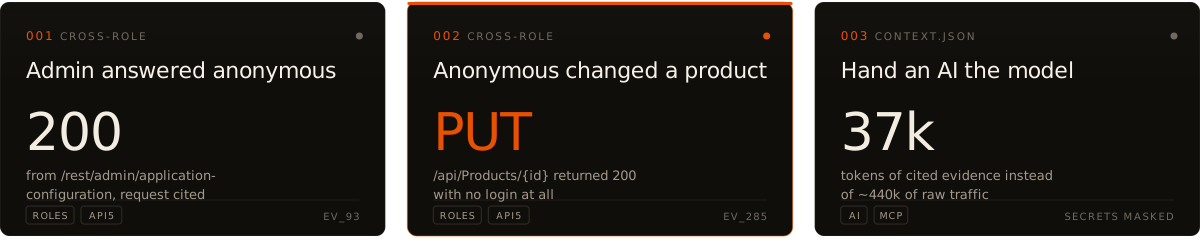
Four OWASP Juice Shop sessions (417 requests as anonymous, user, accounting and admin), modelled in about two seconds on a laptop:
- 001 · The API, mapped — 104 endpoints, and the observed API as OpenAPI 3.0: 68 paths, 88 operations, ready for Postman, ZAP or a fuzzer.
- 002 · Named, never called — 16 endpoints the app's JavaScript names but the browsing never reached:
/rest/admin,/rest/chat,/rest/track-order,/api/SecurityAnswers... - 003 · Anonymous got 200 from admin-looking endpoints, cited to the request:
$ proxy2model cross-role juiceshop --low anon --high user
'anon' reached privileged-looking endpoints (2)
  GET /rest/admin/application-configuration    ev_93  anon=[200] user=[200]
    unknown: whether the low-role response was authorised or a leak · next: compare 'anon' and 'user' response bodies
Every line cites the request behind it (ev_93), and every lead says what is still unknown and the
next safe check. Reproduce it:
for r in anon user accountant admin; do proxy2model samples/juiceshop-$r.xml -w juiceshop --role $r; done
// intake
| Traffic from | Command |
|---|---|
| Burp (Save items XML), Logger++ CSV, Caido (JSON or CSV), or a HAR (browser, ZAP, mitmproxy) | proxy2model FILE -w app |
| A browser it opens and records while you use the app | proxy2model browse |
| A crawl of a running app | proxy2model crawl URL -w app --yes |
Every value is masked as it is read. One model comes out: a report, a SQLite graph you can query, OpenAPI, and a compact package for an AI. Runs locally.
pip install proxy2model
proxy2model history.xml -w shop     # build from an export
proxy2model browse                  # or open a browser and use the app (asks for URL, scope, mode)

proxy2model query shop help         # ask the model; answers cite requests, no AI involved
proxy2model mcp --out "$PWD/proxy2model-out"   # or let an AI agent ask (see Using it with an AI)
./demo.sh builds the bundled sample. proxy2model on its own lists the everyday commands;
proxy2model <command> --help explains each.
// what comes out
proxy2model-out/shop/
├── report.html     interactive report: overview, what to check, endpoints, map, every request, query console
├── model.json      the model, and the request behind every claim
├── openapi.json    the observed API, OpenAPI 3.0
├── context.json    what to hand an AI instead of raw traffic
├── graph.db        SQLite graph, queried with `proxy2model q`
├── exports/        graph.json · graph.graphml · build.svg
└── inputs/         masked records of every capture, merged on rebuild
// boundaries
| It does | It never |
|---|---|
| Read traffic you captured | Upload, forward or replay it |
| Mask every value before the first write | Store a token, cookie, key or PII value |
| Say what it could not observe | Claim coverage it did not have |
| Offer hypotheses and the evidence to test them | Call anything a vulnerability |
A plain build is offline. crawl, browse --active and osint send requests of their own: use
them only on systems you are authorized to test. CI plants fake secrets in the samples and fails if
one reaches any output.
// field manual
- 01 · Capturing traffic — Burp, Caido, HAR,
browse, roles. - 02 · Crawling a running app —
crawland scripted journeys. - 03 · How it works — what is in the model and how it is built.
- 04 · Querying the model —
query, BQL, graph reach, diffs between builds. - 05 · Using it with an AI —
context.jsonand the MCP server. - Skill — the same method as a playbook for an AI, nothing to install.
fa1c0n@recon ~ $ captured traffic in · a model of the app out · every line cited
1 maintainer

Metadata
1 maintainer
Release files for proxy2model 2.0.1
For a detailed explanation of source distributions (sdists) and built distributions (wheels), please see the package formats documentation.
Source distribution (sdist)
| File | Size | Uploaded | Provenance | Actions |
|---|---|---|---|---|
| proxy2model-2.0.1.tar.gz | 1.9 MB | With provenance | Details for proxy2model-2.0.1.tar.gz |
Built distribution (wheel)
| File | Interpreter | ABI | Platform | Actions Reset |
|---|---|---|---|---|
| proxy2model-2.0.1-py3-none-any.whl | Python 3 | none | any | Details for proxy2model-2.0.1-py3-none-any.whl |
Total release size: 2.4 MB
Release files / proxy2model-2.0.1.tar.gz
| Download URL | proxy2model-2.0.1.tar.gz |
|---|---|
| Size | 1.9 MB |
| Tags | Source |
|
SHA-256 checksum How to use checksums |
3102dbb5b07b8384e02d99bf1d2a77521157b38f5a5352f492e2baf34e2b1507
|
|
BLAKE2b-256 checksum How to use checksums |
52a792c79c4973b91ed72ffaecf5dd17727e3e5af1f43cd84fe99e7f73177a95
|
| Upload date | |
|
Uploaded using Trusted Publishing? What is trusted publishing? |
Yes |
| Uploaded via |
twine/7.0.0 CPython/3.13.16
|
Provenance
Provenance describes where a file came from. On PyPI, provenance is shared via attestations, which provide a verifiable record of the build or publishing details. View details, limitations and caveats.


PyPI Publish Attestation
PyPI verified that this artifact, at this checksum, originated from the publisher listed below.
Signed by GitHub Actions, verified by PyPI on Nov 5, 2026.
Transparency logRelease files / proxy2model-2.0.1-py3-none-any.whl
| Download URL | proxy2model-2.0.1-py3-none-any.whl |
|---|---|
| Size | 492.8 kB |
| Tags | Python 3 |
|
SHA-256 checksum How to use checksums |
c1521f49341521f3bcbb73cf64f67a9b759135d30bb18d6c505ce78db9db5a25
|
|
BLAKE2b-256 checksum How to use checksums |
eb457a726446c44fc5645158b43a19965274460931d7a8006c281ce13eb9e512
|
| Upload date | |
|
Uploaded using Trusted Publishing? What is trusted publishing? |
Yes |
| Uploaded via |
twine/7.0.0 CPython/3.13.16
|
Provenance
Provenance describes where a file came from. On PyPI, provenance is shared via attestations, which provide a verifiable record of the build or publishing details. View details, limitations and caveats.
PyPI Publish Attestation
PyPI verified that this artifact, at this checksum, originated from the publisher listed below.
Signed by GitHub Actions, verified by PyPI on Nov 5, 2026.
Transparency logSecurity for proxy2model 2.0.1
Provenance
Provenance describes where a file came from. On PyPI, provenance is shared via attestations, which provide a verifiable record of the build or publishing details. View details, limitations and caveats.
Full provenance
All 2 files in this release have been uploaded with provenance metadata.
Attestation for proxy2model-2.0.1.tar.gz
PyPI Publish Attestation
PyPI verified that this artifact, at this checksum, originated from the publisher listed below.
Signed by GitHub Actions, verified by PyPI on Nov 5, 2026.
Transparency logA note on package security
PyPI is a repository for distributing packages, not a service for auditing them. While third-party security researchers and our staff do their best to detect and remove malicious packages, PyPI cannot guarantee the quality, security or suitability of any given package.
To learn more about protecting yourself from malicious actors, visit our package security documentation.














