
psgdnd
AI Alert...

Our collective favorite topic. Just a quick disclosure about the new code and this readme. The 6.0.5 code contains some changes made by Claude Fable 5. This readme was also updated by Claude.
If I didn't think it did as good or better job than I would (it's a lot better than I am), then I wouldn't be using it. These changes, adding a Rules design while keeping the code backwards compatible, and easy to understand documentation are impressive enough to release.
Drag and Drop for PySimpleGUI
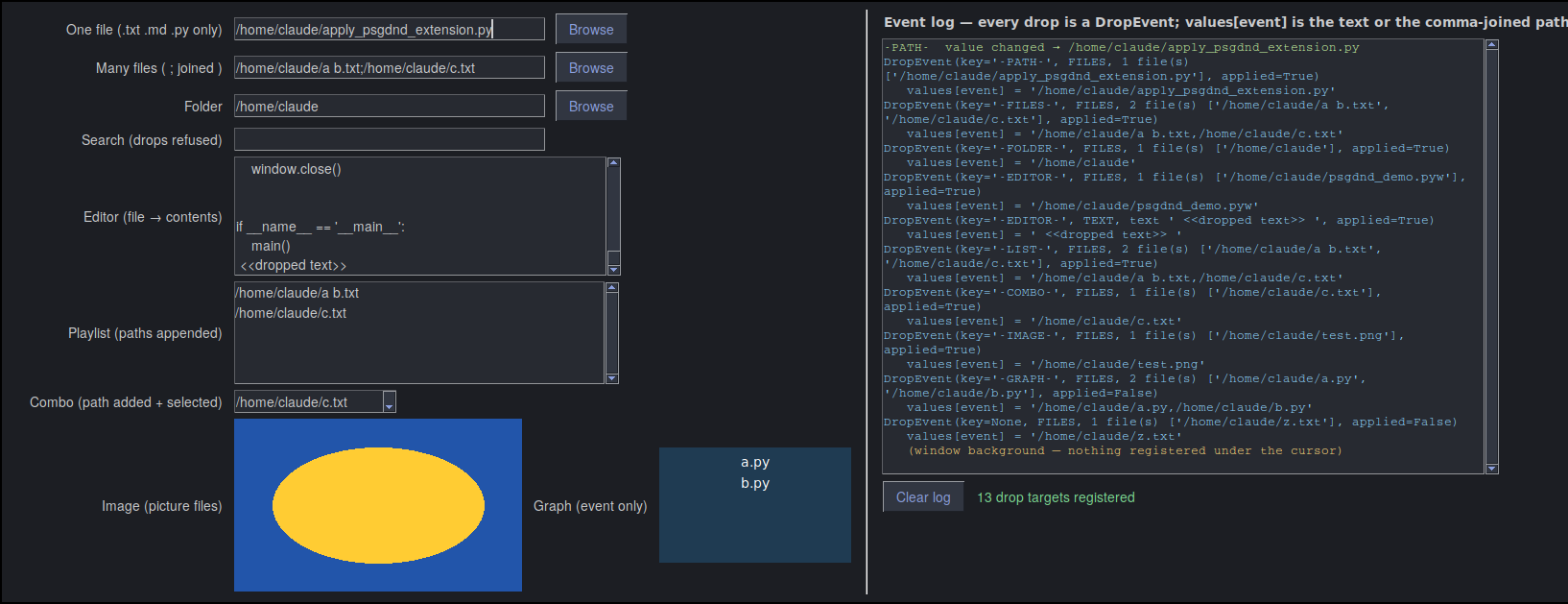
Drop files, folders and text from File Explorer, Finder, a browser or any other application straight onto the elements of a PySimpleGUI window. One call turns every input-type element into a drop target that does the obvious thing — a path lands in an Input, lines in a Multiline, items in a Listbox, a picture in an Image — and your event loop is told about it.
psgdnd is a separate package built on tkinterdnd2. It works with an unmodified PySimpleGUI 6 on Windows, macOS and Linux (X11).
Try it in 60 seconds
python -m pip install --upgrade psgdnd        # from PyPI (installs tkinterdnd2 too)
python -m psgdnd                              # opens the demo window — drag anything onto it
Latest code straight from this repo:
python -m pip install --upgrade https://github.com/PySimpleGUI/psgdnd/zipball/main
Add it to your program: 2 lines
import PySimpleGUI as sg
import psgdnd                                           # 1

layout = [[sg.Text('File to process'), sg.Input(key='-FILE-', enable_events=True, expand_x=True), sg.FileBrowse()],
          [sg.Multiline(size=(60, 8), key='-NOTES-')],
          [sg.Button('OK'), sg.Button('Cancel')]]
window = sg.Window('Drop something on me', layout, finalize=True)

psgdnd.enable(window)                                   # 2  every input-type element is now a drop target

while True:
    event, values = window.read()
    if event in (sg.WIN_CLOSED, 'Cancel'):
        break
    if psgdnd.is_drop_event(event):                     # optional — react to a drop
        print(event.key, event.files, event.text)
window.close()
Drop a file on the Input and its path appears there; because the Input has enable_events=True, its own event fires just as
if the user had typed. Drop text on the Multiline and it is inserted at the cursor. Drop something on the Browse button and it
goes to the Input the button belongs to. While you hover, the element tints blue if the drop will be accepted, or the cursor
turns to a no-entry sign if it won't.
What happens when something is dropped
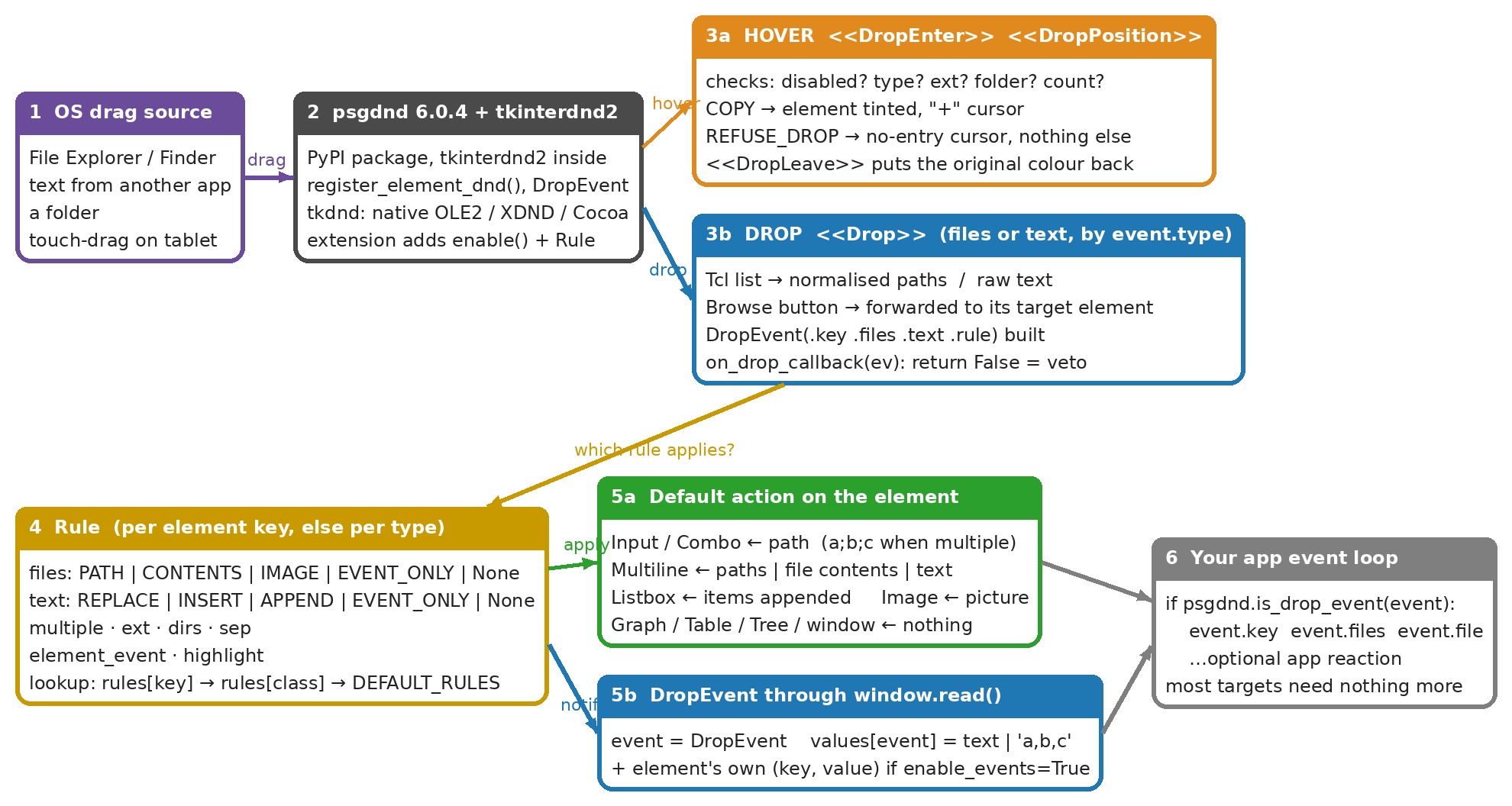
- tkinterdnd2 receives the native drag and psgdnd wires it into your window.
- Hover — the element's
Ruleis checked (enabled? files or text? extension? folder? how many?). Accept → tint + "+" cursor. Refuse → no-entry cursor. - Drop — the payload becomes a list of paths or a string of text.
- The Rule decides the default action and psgdnd performs it on the element.
- A
DropEventarrives throughwindow.read()as the event;values[event]holds the raw payload.
Most elements need nothing in the event loop — step 4 already did what the user expects.
What each element does by default
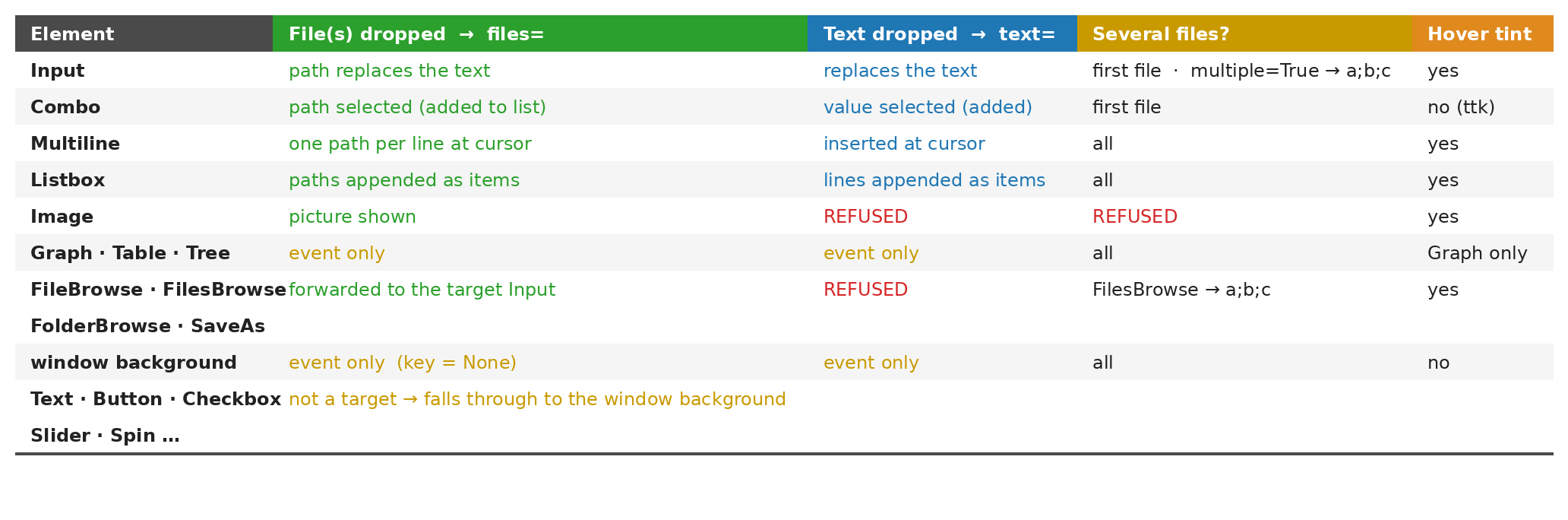
Elements with enable_events=True also get their own (key, value) event after the drop, so existing code keeps working.
Changing the behaviour: Rules
List only the exceptions; everything else keeps its default.
DND_RULES = {'-MIDI-':   psgdnd.Rule(ext=('.mid', '.midi')),                     # one file, only these extensions
             '-QUEUE-':  psgdnd.Rule(multiple=True),                              # several files, joined with ';'
             '-EDITOR-': psgdnd.Rule(files=psgdnd.CONTENTS, text=psgdnd.INSERT),  # a dropped text file is loaded into the Multiline
             '-NOTES-':  psgdnd.Rule(files=None),                                 # text only, file drops refused
             sg.Listbox: psgdnd.Rule(files=psgdnd.EVENT_ONLY)}                    # every Listbox: report the drop, don't touch it
DND_SKIP = ['-SEARCH-']                                                           # never drop targets

psgdnd.enable(window, rules=DND_RULES, skip=DND_SKIP)
Rule(...) |
Values | Meaning |
|---|---|---|
files= |
PATH CONTENTS IMAGE EVENT_ONLY None |
what to do with dropped files (None = refuse) |
text= |
REPLACE INSERT APPEND EVENT_ONLY None |
what to do with dropped text (None = refuse) |
multiple= |
bool |
accept several files (Input/Combo join them with sep) |
ext= |
tuple | accepted extensions, e.g. ('.png', '.jpg') |
dirs= |
bool (True) |
accept folders |
sep= |
str (';') |
joiner for multiple paths in an Input/Combo |
element_event= |
bool / None |
also fire the element's own event (None = only if enable_events=True) |
highlight= |
bool (True) |
tint the element while hovering |
Lookup order: rules[key] → rules[ElementClass] → the built-in default for the element type.
enable() also takes window_rule= (drops on the window background; None = refuse) and on_drop_callback= (called before the
default action; return False to cancel it). target() / untarget() add or remove one element after enable().
The DropEvent
event.key |
key of the element dropped on — None for the window background |
event.element |
the element |
event.files / event.file |
list of paths (empty for text) / the first path |
event.text |
dropped text (None for files) |
event.drop_type |
DROP_TYPE_FILES, DROP_TYPE_TEXT, DROP_TYPE_UNKNOWN |
event.applied |
True if psgdnd's default action changed the element |
values[event] |
raw payload: the text, or the paths joined with , |
if psgdnd.is_drop_event(event):
    if event.key == '-GRAPH-':
        show_preview(event.file)
    elif event.key is None:                              # dropped on the window itself
        open_document(event.file)
The classic API (still there)
Elements can also be registered one at a time. No default action, no hover feedback — the DropEvent arrives and your code does the rest.
psgdnd.register_element_dnd(window['-INPUT-'], window, psgdnd.DROP_TYPE_FILES) # DROP_TYPE_TEXT / DROP_TYPE_FILES / DROP_TYPE_ALL
Don't register the same element both ways.
Demo programs
| Program | What it shows |
|---|---|
python -m psgdnd |
every default behaviour plus a few Rule overrides, with an event log |
Demo Programs/psgdnd_demo.py |
the same window as an ordinary standalone program — start here when adding psgdnd to your own code |
Platform notes
- Drops into your window only; dragging out of a window is not part of psgdnd.
- Windows — the payload is known while hovering, so extension filtering shows the no-entry cursor before you let go.
- Linux — X11 only; drag and drop does not work under Wayland. Use 6.0.4 or later (earlier releases had Linux issues).
- macOS — not yet verified. Reports welcome.
- ttk-based elements (Combo, Table, Tree) can't be tinted; the cursor still shows accept/refuse.
License & Copyright
Copyright 2026 PySimpleGUI. All rights reserved.
Licensed under LGPL3.
Contributing
We are happy to receive issues describing bug reports and feature requests! If your bug report relates to a security vulnerability, please do not file a public issue, and please instead reach out to us at issues@PySimpleGUI.com.
We do not accept (and do not wish to receive) contributions of user-created or third-party code, including patches, pull requests, or code snippets incorporated into submitted issues. Please do not send us any such code! Bug reports and feature requests should not include any source code.
If you nonetheless submit any user-created or third-party code to us, (1) you assign to us all rights and title in or relating to the code; and (2) to the extent any such assignment is not fully effective, you hereby grant to us a royalty-free, perpetual, irrevocable, worldwide, unlimited, sublicensable, transferrable license under all intellectual property rights embodied therein or relating thereto, to exploit the code in any manner we choose, including to incorporate the code into PySimpleGUI and to redistribute it under any terms at our discretion.
2 maintainers


Metadata
2 maintainers
Release files for psgdnd 6.1
For a detailed explanation of source distributions (sdists) and built distributions (wheels), please see the package formats documentation.
Source distribution (sdist)
| File | Size | Uploaded | Provenance | Actions |
|---|---|---|---|---|
| psgdnd-6.1.tar.gz | 22.8 kB | Without provenance | Details for psgdnd-6.1.tar.gz |
Built distribution (wheel)
| File | Interpreter | ABI | Platform | Actions Reset |
|---|---|---|---|---|
| psgdnd-6.1-py3-none-any.whl | Python 3 | none | any | Details for psgdnd-6.1-py3-none-any.whl |
Total release size: 42.7 kB
Release files / psgdnd-6.1.tar.gz
| Download URL | psgdnd-6.1.tar.gz |
|---|---|
| Size | 22.8 kB |
| Tags | Source |
|
SHA-256 checksum How to use checksums |
574bb1739523bce6d0d0d10c4f21271ef6f7006d71f8efea38f2db6007ea8a11
|
|
BLAKE2b-256 checksum How to use checksums |
dbcfcccc535d4abe8bbc7aca9de5dfed2c785eda1e4f6f1fe24b39b2f780fc95
|
| Upload date | |
|
Uploaded using Trusted Publishing? What is trusted publishing? |
No |
| Uploaded via |
twine/7.0.0 CPython/3.12.10
|
Release files / psgdnd-6.1-py3-none-any.whl
| Download URL | psgdnd-6.1-py3-none-any.whl |
|---|---|
| Size | 19.9 kB |
| Tags | Python 3 |
|
SHA-256 checksum How to use checksums |
c3bdaa8756abcb6fd5c2fb5b69fe591ee27766c112a52b1c23fcbc0b55a0c846
|
|
BLAKE2b-256 checksum How to use checksums |
2c2162080dc138ca8779b0ac23e538b69de8c024ad73bea1b16c32a65f13c377
|
| Upload date | |
|
Uploaded using Trusted Publishing? What is trusted publishing? |
No |
| Uploaded via |
twine/7.0.0 CPython/3.12.10
|
Security for psgdnd 6.1
Provenance
Provenance describes where a file came from. On PyPI, provenance is shared via attestations, which provide a verifiable record of the build or publishing details. View details, limitations and caveats.
No provenance found
None of the files in this release were uploaded with provenance metadata.
A note on package security
PyPI is a repository for distributing packages, not a service for auditing them. While third-party security researchers and our staff do their best to detect and remove malicious packages, PyPI cannot guarantee the quality, security or suitability of any given package.
To learn more about protecting yourself from malicious actors, visit our package security documentation.














