

psghotkey
A Windows Hotkey Tool
A PySimpleGUI Application
Features
- A complete hotkey manager - a key combination inserts text or launches a program
- On Windows each hotkey is registered with Windows itself, so the keys never reach the program underneath
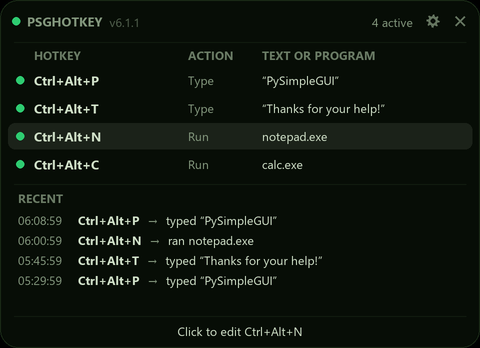
- Lives in the system tray - its card lists your hotkeys, with a green dot on each one that is working
- When a hotkey fires, its row is highlighted for a moment and it is added to the Recent list
- 32 themes and Brightness
- Demonstrates integrating the system tray into your application
Adding your hotkeys
- Click the tray icon for psghotkey's card, then its gear (or right-click > Hotkeys...) to open the Hotkeys window.
- Add a hotkey: click Rec and press the keys you want.
- Choose what it does: insert text, or launch a program.
Your hotkeys are saved in your own psghotkey.json settings file, so upgrading never loses them. Right-click the card for its 32 themes and Brightness.
Installation
Using PIP with PyPI
The latest official release of PySimpleGUI products can be found on PyPI. To pip install psghotkey from PyPI, use this command
If you use the command python on your computer to invoke Python (Windows):
python -m pip install --upgrade psghotkey
If you use the command python3 on your computer to invoke Python (Linux, Mac):
python3 -m pip install --upgrade psghotkey
Using PIP with GitHub
You can also pip install the PySimpleGUI Applications that are in the PySimpleGUI GitHub account. The GitHub versions have bug fixes and new programs/features that have not yet been released to PyPI. To directly pip install from that repo:
If you use the command python on your computer to invoke Python (Windows):
python -m pip install --upgrade https://github.com/PySimpleGUI/psghotkey/zipball/main
If you use the command python3 on your computer to invoke Python (Linux, Mac):
python3 -m pip install --upgrade https://github.com/PySimpleGUI/psghotkey/zipball/main
Usage
Once installed, launch psghotkey by typing the following in your command line:
psghotkey
Packages Used
This project uses these pip installable packages:
- PySimpleGUI
- psgtray
- keyboard
- Pillow
The system tray code is from psgtray. The psgtray package is an important add-on to the tkinter port of PySimpleGUI as it enables you to run your applications in the system tray.
Windows Only (most likely)
psgtray runs the best on Windows and is used in this project. It's not been tried on Linux (recently) nor the Mac.
License & Copyright
Copyright 2023-2026 PySimpleGUI.
Licensed under LGPL3.
Contributing
I'm happy to receive issues describing bug reports and feature requests! The project does not accept pull requests.
2 maintainers


Metadata
2 maintainers
Release files for psghotkey 6.1.1
For a detailed explanation of source distributions (sdists) and built distributions (wheels), please see the package formats documentation.
Source distribution (sdist)
| File | Size | Uploaded | Provenance | Actions |
|---|---|---|---|---|
| psghotkey-6.1.1.tar.gz | 106.1 kB | Without provenance | Details for psghotkey-6.1.1.tar.gz |
Built distribution (wheel)
| File | Interpreter | ABI | Platform | Actions Reset |
|---|---|---|---|---|
| psghotkey-6.1.1-py3-none-any.whl | Python 3 | none | any | Details for psghotkey-6.1.1-py3-none-any.whl |
Total release size: 214.5 kB
Release files / psghotkey-6.1.1.tar.gz
| Download URL | psghotkey-6.1.1.tar.gz |
|---|---|
| Size | 106.1 kB |
| Tags | Source |
|
SHA-256 checksum How to use checksums |
01d1e02849f1a19c4643c2b3622df0bd2d5ad1985b8018be42682662a097a900
|
|
BLAKE2b-256 checksum How to use checksums |
87c6fa1c94dc4966003c3a96ebb9d5bbc370305227229933ff4833339bdc3892
|
| Upload date | |
|
Uploaded using Trusted Publishing? What is trusted publishing? |
No |
| Uploaded via |
twine/7.0.0 CPython/3.12.10
|
Release files / psghotkey-6.1.1-py3-none-any.whl
| Download URL | psghotkey-6.1.1-py3-none-any.whl |
|---|---|
| Size | 108.3 kB |
| Tags | Python 3 |
|
SHA-256 checksum How to use checksums |
aa8acf827758e64bf7edaec968cfa0287b76747a61341ee2200ff319fd6ad9a1
|
|
BLAKE2b-256 checksum How to use checksums |
0a2c47793eddbd423d8c47221ee220f38dc60908cae660e1c02ea2a08e1bf58c
|
| Upload date | |
|
Uploaded using Trusted Publishing? What is trusted publishing? |
No |
| Uploaded via |
twine/7.0.0 CPython/3.12.10
|
Security for psghotkey 6.1.1
Provenance
Provenance describes where a file came from. On PyPI, provenance is shared via attestations, which provide a verifiable record of the build or publishing details. View details, limitations and caveats.
No provenance found
None of the files in this release were uploaded with provenance metadata.
A note on package security
PyPI is a repository for distributing packages, not a service for auditing them. While third-party security researchers and our staff do their best to detect and remove malicious packages, PyPI cannot guarantee the quality, security or suitability of any given package.
To learn more about protecting yourself from malicious actors, visit our package security documentation.














