

psgshortcut
A PySimpleGUI Application
PySimpleGUI Shortcut Tool
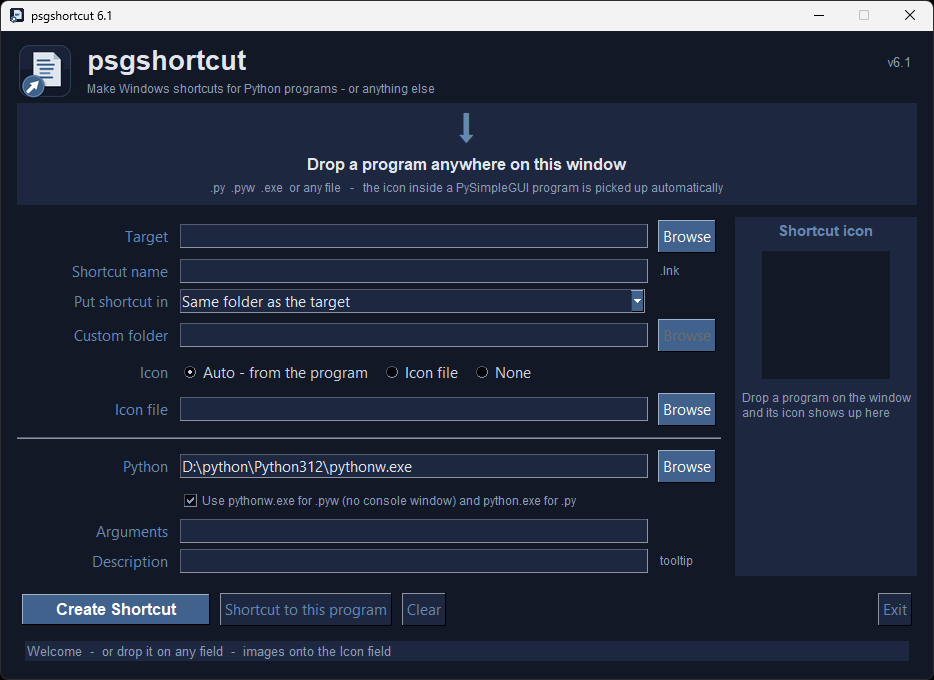
Creates Windows shortcuts for Python programs (and anything else) - drop the file on the window, click Create Shortcut.
Features
- Drag and drop - drop a
.py,.pyw,.exeor any file anywhere on the window - Automatic icon - the icon embedded in a PySimpleGUI program (
ICON = b'iVBORw0KGgo...') is found, converted to a.icoand used for the shortcut. Programs without an icon get the PySimpleGUI default icon - Icon preview - see the icon the shortcut will get before you make it; use your own
.ico/.png/.gif/.jpginstead if you prefer - Choose where it goes - same folder as the program, the Desktop, the Start Menu (so you can pin it to the taskbar) or any folder
- Pins properly - the shortcut carries the program's Windows taskbar App ID, so the running window groups under its own pinned icon (works with PySimpleGUI 6.3.17+ and older versions)
- Right launcher automatically -
.pywfiles are launched withpythonw.exe(no console window),.pyfiles withpython.exe - Shortcut name, arguments and description (tooltip) are all optional
- Shortcut to this program - one click fills in a shortcut to psgshortcut itself, so you can pin psgshortcut to your taskbar or Desktop
- Makes shortcuts to EXE and other files too - Windows uses the file's own icon unless you choose another
- Dark HarborMist theme, Escape closes the window, Settings on the right-click menu
Installation
Using PIP with PyPI
The latest official release of PySimpleGUI products can be found on PyPI. To pip install the demo applications from PyPI, use this command
If you use the command python on your computer to invoke Python (Windows):
python -m pip install --upgrade psgshortcut
If you use the command python3 on your computer to invoke Python (Linux, Mac):
python3 -m pip install --upgrade psgshortcut
Using PIP with GitHub
You can also pip install the PySimpleGUI Applications that are in the PySimpleGUI GitHub account. The GitHub versions have bug fixes and new programs/features that have not yet been released to PyPI. To directly pip install from that repo:
If you use the command python on your computer to invoke Python (Windows):
python -m pip install --upgrade https://github.com/PySimpleGUI/psgshortcut/zipball/main
If you use the command python3 on your computer to invoke Python (Linux, Mac):
python3 -m pip install --upgrade https://github.com/PySimpleGUI/psgshortcut/zipball/main
Requirements
Installed automatically by pip: PySimpleGUI, pywin32 (writes the .lnk files), psgdnd (drag and drop) and pillow (makes the .ico files).
psgshortcut still runs if psgdnd or pillow are missing - you just lose drag and drop, or icon conversion.
Usage
Once installed, launch psgshortcut by typing the following in your command line:
psgshortcut
You can also pass a file: psgshortcut my_program.pyw pre-fills the target.
- Drop your program on the window (or click Browse)
- Check the icon in the preview, pick where the shortcut should go
- Click Create Shortcut (or press Enter)
The shortcut is a normal Windows .lnk file - move it anywhere, double-click it, or pin it to the taskbar.
Make a Shortcut To This Program
Click Shortcut to this program. The form is filled in with psgshortcut itself (icon included), pick a destination and click Create Shortcut. Put it on your Desktop or in the Start Menu and pin it from there - no command window needed.
Make Shortcuts To Anything
You can not only make shortcuts to Python programs, but you can make shortcuts to EXE and other files. Drop the file on the window, click Create Shortcut and you'll find the shortcut in the folder you chose.
Pinning To The Taskbar
Windows will only pin shortcuts whose target is an EXE, which is why Python shortcuts are made with pythonw.exe (or python.exe) as the target and your program as the argument - the Python field shows which one will be used. Put the shortcut in the Start Menu or on the Desktop, then right-click it → Pin to taskbar.
For the running program to group under its pinned icon (instead of opening a second, generic Python icon) the shortcut must carry the same taskbar App ID the program sets. psgshortcut writes the .lnk with IShellLink + IPropertyStore and sets System.AppUserModel.ID to:
PySimpleGUI.App.<md5 of the script path>for programs run with PySimpleGUI 6.3.17 or newer (the ID PySimpleGUI derives from the script path - psgshortcut asks the interpreter in the Python field which version it has)mycompany.myproduct.subproduct.versionfor programs run with an older PySimpleGUI- whatever the program passes to
sg.set_options(win_app_id=...), if it does - no ID for programs that don't use PySimpleGUI
Where the Icons Go
The .ico files made from your programs' embedded icons are saved next to the program (my_program.pyw → my_program.ico). Right-click → Settings can send them to one central folder (%LOCALAPPDATA%\psgshortcut\icons) instead if you prefer to keep program folders clean.
License & Copyright
Copyright 2023-2026 PySimpleGUI.
Licensed under LGPL3.
Contributing
I'm happy to receive issues describing bug reports and feature requests! The project does not accept pull requests.
3 maintainers


Metadata
3 maintainers
Release files for psgshortcut 6.1
For a detailed explanation of source distributions (sdists) and built distributions (wheels), please see the package formats documentation.
Source distribution (sdist)
| File | Size | Uploaded | Provenance | Actions |
|---|---|---|---|---|
| psgshortcut-6.1.tar.gz | 114.0 kB | Without provenance | Details for psgshortcut-6.1.tar.gz |
Built distribution (wheel)
| File | Interpreter | ABI | Platform | Actions Reset |
|---|---|---|---|---|
| psgshortcut-6.1-py3-none-any.whl | Python 3 | none | any | Details for psgshortcut-6.1-py3-none-any.whl |
Total release size: 227.7 kB
Release files / psgshortcut-6.1.tar.gz
| Download URL | psgshortcut-6.1.tar.gz |
|---|---|
| Size | 114.0 kB |
| Tags | Source |
|
SHA-256 checksum How to use checksums |
4eeff0ce504993d2b58a5043b440d40126aea5bc10c5d39e37bd5cf4c6e732c0
|
|
BLAKE2b-256 checksum How to use checksums |
2ef9f88c366517e5af6371fbfb8996f3080cd0ddbe72bc3ebb71944eb4b426d3
|
| Upload date | |
|
Uploaded using Trusted Publishing? What is trusted publishing? |
No |
| Uploaded via |
twine/7.0.0 CPython/3.12.10
|
Release files / psgshortcut-6.1-py3-none-any.whl
| Download URL | psgshortcut-6.1-py3-none-any.whl |
|---|---|
| Size | 113.7 kB |
| Tags | Python 3 |
|
SHA-256 checksum How to use checksums |
8d9355ec26eba69c7537fe567b8c1764e6ab613d2ebffc359ca6a9f5d8bb28ea
|
|
BLAKE2b-256 checksum How to use checksums |
e2134045b37291355d444c4d78169d5d1e2351ac4e6118c6512b11da3d1932d1
|
| Upload date | |
|
Uploaded using Trusted Publishing? What is trusted publishing? |
No |
| Uploaded via |
twine/7.0.0 CPython/3.12.10
|
Security for psgshortcut 6.1
Provenance
Provenance describes where a file came from. On PyPI, provenance is shared via attestations, which provide a verifiable record of the build or publishing details. View details, limitations and caveats.
No provenance found
None of the files in this release were uploaded with provenance metadata.
A note on package security
PyPI is a repository for distributing packages, not a service for auditing them. While third-party security researchers and our staff do their best to detect and remove malicious packages, PyPI cannot guarantee the quality, security or suitability of any given package.
To learn more about protecting yourself from malicious actors, visit our package security documentation.














