
 psp (Python Scaffolding Projects)
psp is a blazing fast command line utility to scaffold your Python project, written in Rust.
- ⚡️ 1-100x faster compared to other scaffolding tools
- 🛠️
pyproject.tomlsupport - 🤝 Python 3.15 compatibility
- 🗃 Scaffolding file and folder structures for your Python project
- 🗂️ Unit-test and pytest support
- 🧪 Create a virtual environment
- 🔧 Automagically dependencies installation
- 🪛 Add build and deploy dependencies to distribute the package
- 📏 tox configuration supports and remotes CI like CircleCI, TravisCI, GitHub Actions and Gitlab CI/CD
- ⌨️ MkDocs and Sphinx documentation support
- 🧰 Initialize git repository and
gitignorefile - 🌎 GitHub and Gitlab remote repository support
- 📑 Create
README,LICENSE,CONTRIBUTING,CODE_OF_CONDUCTandCHANGESfiles - 🐳 Create
DockerfileandContainerfilefor your project - 💡 Can use quick, simple and full argument for rapid configuration
- 💾 Create
$HOME/.psp.envand$PWD/.envfiles with your customizations - 🎛️ Can use some
PSP_variables to control your defaults - 📦 Support
pip,condaanduvpackage manager - 🧮 Support
hatch,maturinandpoetrybuilder - 🍿 Stop, pause and resume project creation when you want; see Resume
- 🖇️ Handlebars custom templates engine (with local cache) to customize project; see Template
- 🧩 Customize layout of Python projects through profiles, see Profiles
🚀 Get Started in 30 Seconds
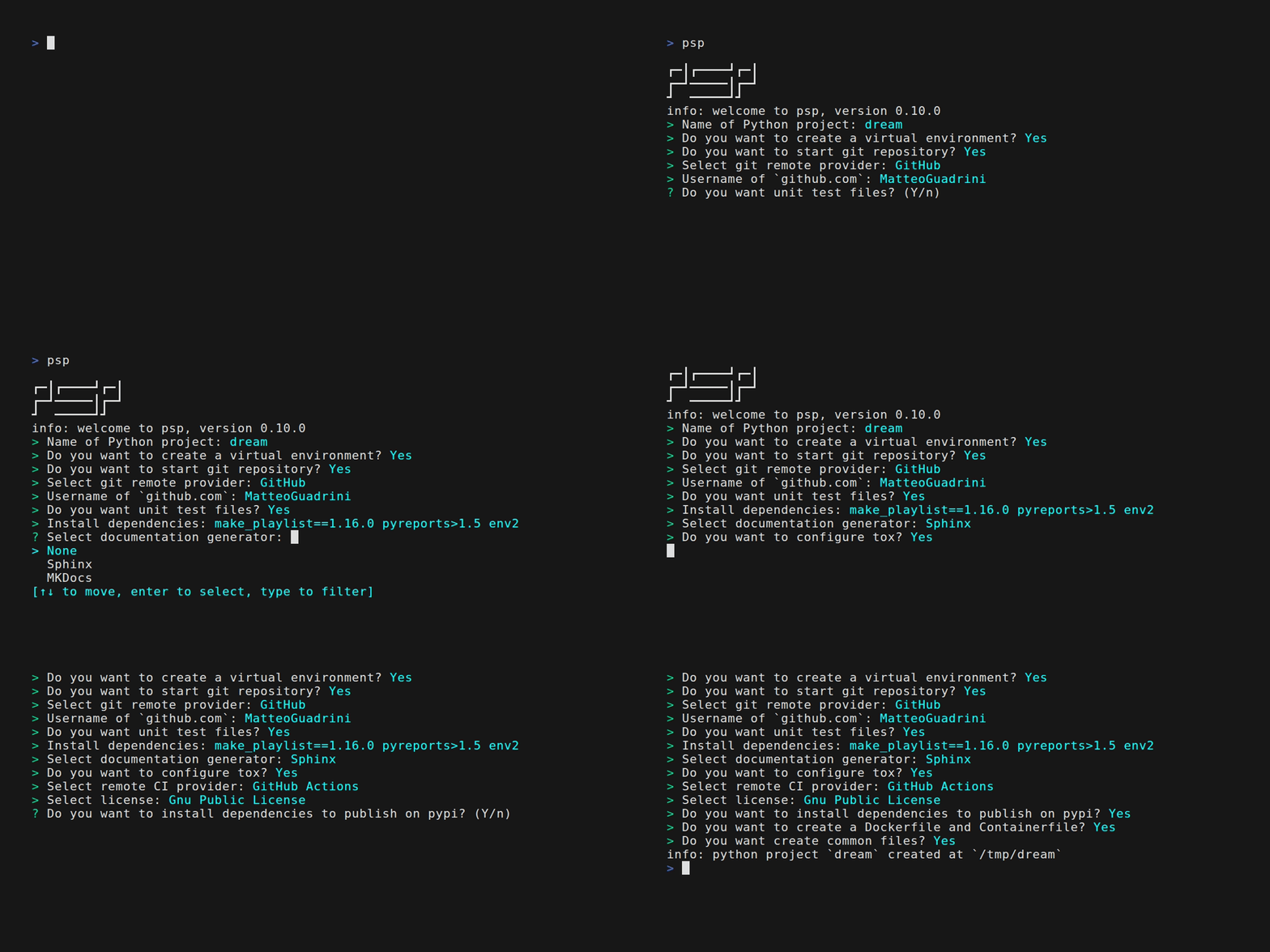
The result is:
$> tree dream/ --filelimit=19 -a
dream                   # Project folder
├── LICENSE.md          # License file
├── pyproject.toml      # Python package configuration file
├── README.md           # Readme file
├── CHANGES.md          # List of changes
├── .circleci           # CI folder
│   └── config.yml      # CI configuration file
├── CODE_OF_CONDUCT.md  # Code of Conduct
├── CONTRIBUTING.md     # Contributing guide lines
├── Containerfile       # Standard container file for build image
├── Dockerfile          # Docker container file for build image
├── Makefile            # Makefile for command make; make help
├── requirements.txt    # Dependencies list used by third programs
├── docs                # Documentation folder: Sphinx/MKDocs
│   ├── build
│   ├── make.bat
│   ├── Makefile
│   └── source
│       ├── conf.py
│       ├── index.rst
│       ├── _static
│       └── _templates
├── .git                # Git folder
│   ├── branches
│   ├── config
│   ├── description
│   ├── HEAD
│   ├── hooks  [14 entries exceeds filelimit, not opening dir]
│   ├── info
│   │   └── exclude
│   ├── objects
│   │   ├── info
│   │   └── pack
│   └── refs
│       ├── heads
│       └── tags
├── .github             # Github issue and merge templates
│   ├── ISSUE_TEMPLATE
│   │   ├── bug.yml
│   │   ├── config.yml
│   │   └── feature.yml
│   └── PULL_REQUEST_TEMPLATE
│       └── pull_request_template.md
├── .gitignore          # Git ignore file
├── .psp.log            # Update log (if enabled)
├── .dockerignore       # Docker ignore file
├── .containerignore    # Container ignore file
├── dream               # Python package
│   └── __init__.py
├── tests               # Tests package for modules
│   ├── __init__.py
│   └── test_dream.py   # Test module "test_<name_python_package>"
├── tox.ini             # Tox configuration files
├── samples
│   └── dream_sample.py # Sample code of package "<name_python_package>_sample"
└── .venv               # Virtual environment
    ├── bin  [33 entries exceeds filelimit, not opening dir]
    ├── include
    │   └── python3.14
    ├── lib
    │   └── python3.14
    │       └── site-packages  [68 entries exceeds filelimit, not opening dir]
    ├── lib64 -> lib
    └── pyvenv.cfg

29 directories, 44 files
And git status is:
$> git status
On branch main

No commits yet
...
$> git remote get-url origin
git@github.com:MatteoGuadrini/dream.git
Help
For help message, type:
$> psp help

┏━┃┏━━━━┛┏━┃
┏━┛━━━━━┃┏━┛
┛  ━━━━━┛┛
psp (Python Scaffolding Projects), version 0.10.0
usage: psp [shortcut]
ie: psp [help|quick|simple|full]

shortcut:
    help:   print this help message
    quick:  enables a rapid setup (few options included)
    simple: enables a basic setup (only Python package)
    full:   enables a full setup (all options)

links:
    repository:     https://github.com/MatteoGuadrini/psp
    documentation:  https://psp.readthedocs.io/

templates:
    cache:      true
    repository: https://raw.githubusercontent.com/MatteoGuadrini/psp_templates/refs/heads/main

variables:
    ["PSP_GIT","PSP_GIT_REMOTE","PSP_GIT_USER","PSP_CACHE"]

environments:
    Python version: 3.15
    Python profile: package
Why choose psp?
psp is simple, fast, effective, declarative, and supports Python and the entire ecosystem of tools written for it.
Rather than replacing it, psp seeks to integrate and provide a useful scaffold for the end user.
Differences with other tools
- cookiecutter: Templates are prescriptive by design. Cookiecutter
enforces a particular project structure and conventions, which may not align with your or your organization's
preferences. If a template's opinions don't match your needs, you're forced to either choose a different template or
heavily modify an existing one. This can become tedious when you need something slightly different from what's
available.
pspis dynamic; scaffold what you need. - PyScaffold: PyScaffold doesn't manage virtual environments directly.
You have to manually create and activate a virtualenv or use external tools like
pipenv,poetry,conda, orpyenv. While PyScaffold documents integrations with these tools, it doesn't provide a unified interface for environment management likepspdo.
psp asks only what you need. By configuring a few environment variables, you can automate any project; in seconds, not
hours.
🔌 Prerequisites
psp has four mandatory prerequisetes installed on own machine:
gitpython3pipcurl(Linux/MacOS only)
macOS prerequisites installation
/bin/bash -c "$(curl -fsSL https://raw.githubusercontent.com/Homebrew/install/HEAD/install.sh)"
brew install python git
Windows prerequisites installation
winget install -e --id Git.Git
winget install -e --id Python.Python.3.15
Ubuntu based prerequisites installation
sudo apt install -y python3 python3-pip git curl
Red Hat based prerequisites installation
sudo dnf install -y python3 python3-pip git curl
Arch based prerequisites installation
sudo pacman -Qi python3 python3-pip git curl
💿 Installation
For quick installation using installation script, follow this:
Linux/MacOS
curl --proto '=https' --tlsv1.2 -fsSL https://raw.githubusercontent.com/MatteoGuadrini/psp/main/install.sh | bash
Windows
iwr https://raw.githubusercontent.com/MatteoGuadrini/psp/main/install.ps1 | iex
🐍 Python
To install with pip:
# Install psp-scaffold package (deprecated)
pip install psp-scaffold
# Use user-space
pip install --user psp-scaffold
Use external tools like pipx and/or uv
(they create virtual environments for you); upgrading is done via a specific subcommand
pipx install psp-scaffold && pipx upgrade-all || uv pip install psp-scaffold --upgrade
Deactivate the externally managed file, temporarily or permanently
pip install psp-scaffold --break-system-packages || python3 -m pip config set global.break-system-packages true
Binary file
To install compiled file into your machine, download it:
Linux
For all users (required root access):
sudo -i
curl -L https://github.com/MatteoGuadrini/psp/releases/download/v0.10.0/psp-x86_64-unknown-linux-gnu -o /usr/local/bin/psp
chmod +x /usr/local/bin/psp
For current user:
curl -L https://github.com/MatteoGuadrini/psp/releases/download/v0.10.0/psp-x86_64-unknown-linux-gnu -o $HOME/.local/bin/psp
chmod +x $HOME/.local/bin/psp
MacOS
sudo su -
curl -L https://github.com/MatteoGuadrini/psp/releases/download/v0.10.0/psp-aarch64-apple-darwin -o /usr/local/bin/psp
chmod +x /usr/local/bin/psp
Windows
For all users (required Administrator):
iwr -OutFile "C:\Windows\system32\psp.exe" "https://github.com/MatteoGuadrini/psp/releases/download/v0.10.0/psp-amd64-windows-gnu"
For current user:
mkdir "$( $Env:USERPROFILE )\bin"
[System.Environment]::SetEnvironmentVariable("PATH", $Env:PATH + ";$( $Env:USERPROFILE )\bin", "USER")
iwr -OutFile "$( $Env:USERPROFILE )\bin\psp.exe" "https://github.com/MatteoGuadrini/psp/releases/download/v0.10.0/psp-amd64-windows-gnu"
Packages
If you want to install OS package, follow instructions for your Operating System:
For Debian/Ubuntu:
curl -L https://github.com/MatteoGuadrini/psp/releases/download/v0.10.0/psp-x86_64-unknown-linux-gnu.deb -o psp.deb
sudo dpkg -i psp.deb
For Fedora/Mageia/OpenSuse:
sudo rpm -i https://github.com/MatteoGuadrini/psp/releases/download/v0.10.0/psp-x86_64-unknown-linux-gnu.rpm
Compile as your own
Instead, if you compile this project as own, follow this steps:
git clone https://github.com/MatteoGuadrini/psp.git
cd psp && cargo build --release && sudo cp -v target/release/psp /usr/local/bin/psp && chmod +x /usr/local/bin/psp
or build with script:
git clone https://github.com/MatteoGuadrini/psp.git
cd psp
# Build
./build_psp.sh
# Copy binary
sudo cp -v target/release/psp /usr/local/bin/psp && chmod +x /usr/local/bin/psp
# Install rpm
sudo rpm -i /tmp/psp_rpm/psp.rpm
# Install deb
sudo dpkg -i /tmp/psp_deb/psp.deb
Docker/Podman
If you want to use psp in a containerized environment, follow this:
# Clone...
git clone https://github.com/MatteoGuadrini/psp.git
# Build...
cd psp && docker build . -t psp:latest
# Run...
docker run -it --rm -v ~/python_projects:/psp localhost/psp:latest
You can use .env files and environment variables:
# .env file
docker run -it --rm -v ~/python_projects:/psp -v ~/python_projects/.env:/psp/.env localhost/psp:latest
# PSP_ environment variables
docker run -it --rm -v ~/python_projects:/psp -e "PSP_GIT=true" -e "PSP_PYVER=1.0.0" localhost/psp:latest
Next features
-
windowsoperating system support - container support for psp program
-
condaanduvsupport -
hatch,maturinandpoetrybuild support - pause/resume project creation
- Gitlab CI/CD and GitHub Actions
- templating files support
- templating custom files support
- universal installation script
- profiles support (type of modules, custom init projects, custom files)
- support update if project exists
- support AGENTS.md file
- command line flags support
- YAML configuration file
Open source
psp is an open source project. Any contribution, It's welcome.
A great thanks.
For donations, press this
For me

For Telethon
The Telethon Foundation is a non-profit organization recognized by the Ministry of University and Scientific and Technological Research. They were born in 1990 to respond to the appeal of patients suffering from rare diseases. Come today, we are organized to dare to listen to them and answers, every day of the year.
Acknowledgments
Thanks to Jim Blandy, Jason Orendorff and Nora Tindall for writing the Programming Rust book that make up my Rust foundation.
Thanks to Tim McNamara for writing the Rust in Action book.
Thanks to Zed IDE and for license of RustRover offered by JetBrains.
Special thanks go to my wife, who understood the hours of absence for this development. Thanks to my children, for the daily inspiration they give me and to make me realize, that life must be simple.
Thanks, Rust Community!
1 maintainer

Metadata
1 maintainer
Release files for psp-scaffold 0.10.0
For a detailed explanation of source distributions (sdists) and built distributions (wheels), please see the package formats documentation.
Source distribution (sdist)
| File | Size | Uploaded | Provenance | Actions |
|---|---|---|---|---|
| psp_scaffold-0.10.0.tar.gz | 62.5 kB | Without provenance | Details for psp_scaffold-0.10.0.tar.gz |
Built distribution (wheel)
| File | Interpreter | ABI | Platform | Actions Reset |
|---|---|---|---|---|
| psp_scaffold-0.10.0-py3-none-manylinux_2_39_x86_64.whl | Python 3 | none | Linux glibc 2.39+ x86-64 | Details for psp_scaffold-0.10.0-py3-none-manylinux_2_39_x86_64.whl |
Total release size: 6.5 MB
Release files / psp_scaffold-0.10.0.tar.gz
| Download URL | psp_scaffold-0.10.0.tar.gz |
|---|---|
| Size | 62.5 kB |
| Tags | Source |
|
SHA-256 checksum How to use checksums |
8fd0eebac920b02eeb40ef2359d37b47bb98ac36d31a58fc844890e4d78ba476
|
|
BLAKE2b-256 checksum How to use checksums |
2f763aafd324d32a78e3017b9d8ccb9e624a11c612d49fc0ef1bda87a6ac76b7
|
| Upload date | |
|
Uploaded using Trusted Publishing? What is trusted publishing? |
No |
| Uploaded via |
twine/7.0.0 CPython/3.14.8
|
Release files / psp_scaffold-0.10.0-py3-none-manylinux_2_39_x86_64.whl
| Download URL | psp_scaffold-0.10.0-py3-none-manylinux_2_39_x86_64.whl |
|---|---|
| Size | 6.4 MB |
| Tags | Linux glibc 2.39+ x86-64 Python 3 |
|
SHA-256 checksum How to use checksums |
3e1096144737ac30de61d8e920d889e60a795d93cb783d74763b3e335da46cf5
|
|
BLAKE2b-256 checksum How to use checksums |
1ba2a3e3602669507c0077d99b065464f0ba174ff1f588cf24ad74328c2dfa24
|
| Upload date | |
|
Uploaded using Trusted Publishing? What is trusted publishing? |
No |
| Uploaded via |
twine/7.0.0 CPython/3.14.8
|
Security for psp-scaffold 0.10.0
Provenance
Provenance describes where a file came from. On PyPI, provenance is shared via attestations, which provide a verifiable record of the build or publishing details. View details, limitations and caveats.
No provenance found
None of the files in this release were uploaded with provenance metadata.
A note on package security
PyPI is a repository for distributing packages, not a service for auditing them. While third-party security researchers and our staff do their best to detect and remove malicious packages, PyPI cannot guarantee the quality, security or suitability of any given package.
To learn more about protecting yourself from malicious actors, visit our package security documentation.














