
psp (Python Scaffolding Projects)

Project description
 psp (Python Scaffolding Projects)
psp is a blazing fast command line utility to scaffold your Python project, written in Rust.
- ⚡️ 1-100x faster compared to other scaffolding tools
- 🛠️
pyproject.tomlsupport - 🤝 Python 3.14 compatibility
- 🗃 Scaffolding file and folder structures for your Python project
- 🗂️ Unit-test and pytest support
- 🧪 Create a virtual environment
- 🔧 Automagically dependencies installation
- 🪛 Add build and deploy dependencies to distribute the package
- 📏 tox configuration supports and remotes CI like CircleCI and TravisCI
- ⌨️ MkDocs and Sphinx documentation support
- 🧰 Initialize git repository and
gitignorefile - 🌎 GitHub and Gitlab remote repository support
- 📑 Create
README,LICENSE,CONTRIBUTING,CODE_OF_CONDUCTandCHANGESfiles - 🐳 Create
DockerfileandContainerfilefor your project - 💡 Can use quick, simple and full argument for rapid configuration
- 💾 Create
$HOME/.psp.envand$PWD/.envfiles with your customizations - 🎛️ Can use some
PSP_variables to control your defaults - 📦 Support
pip,condaanduvpackage manager
🚀 Get Started in 30 Seconds
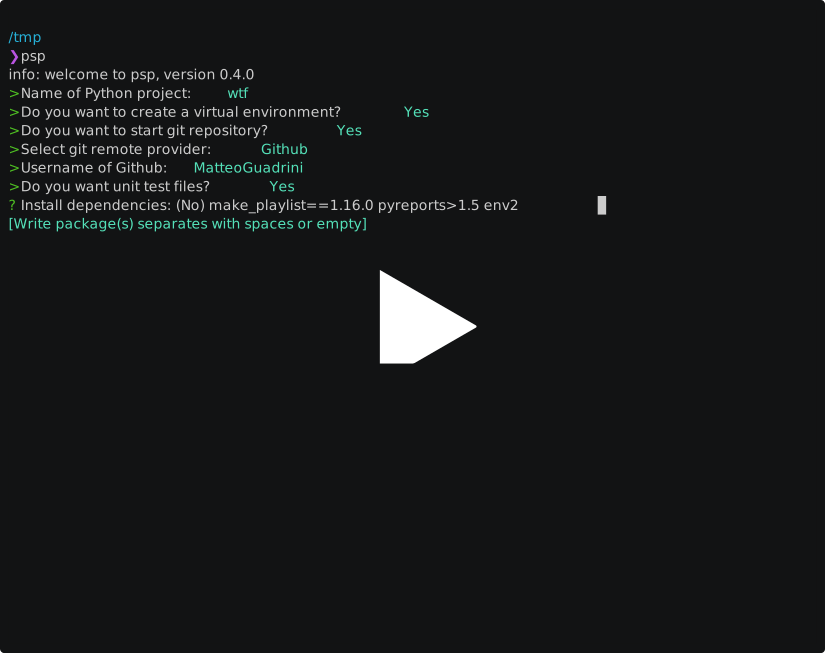
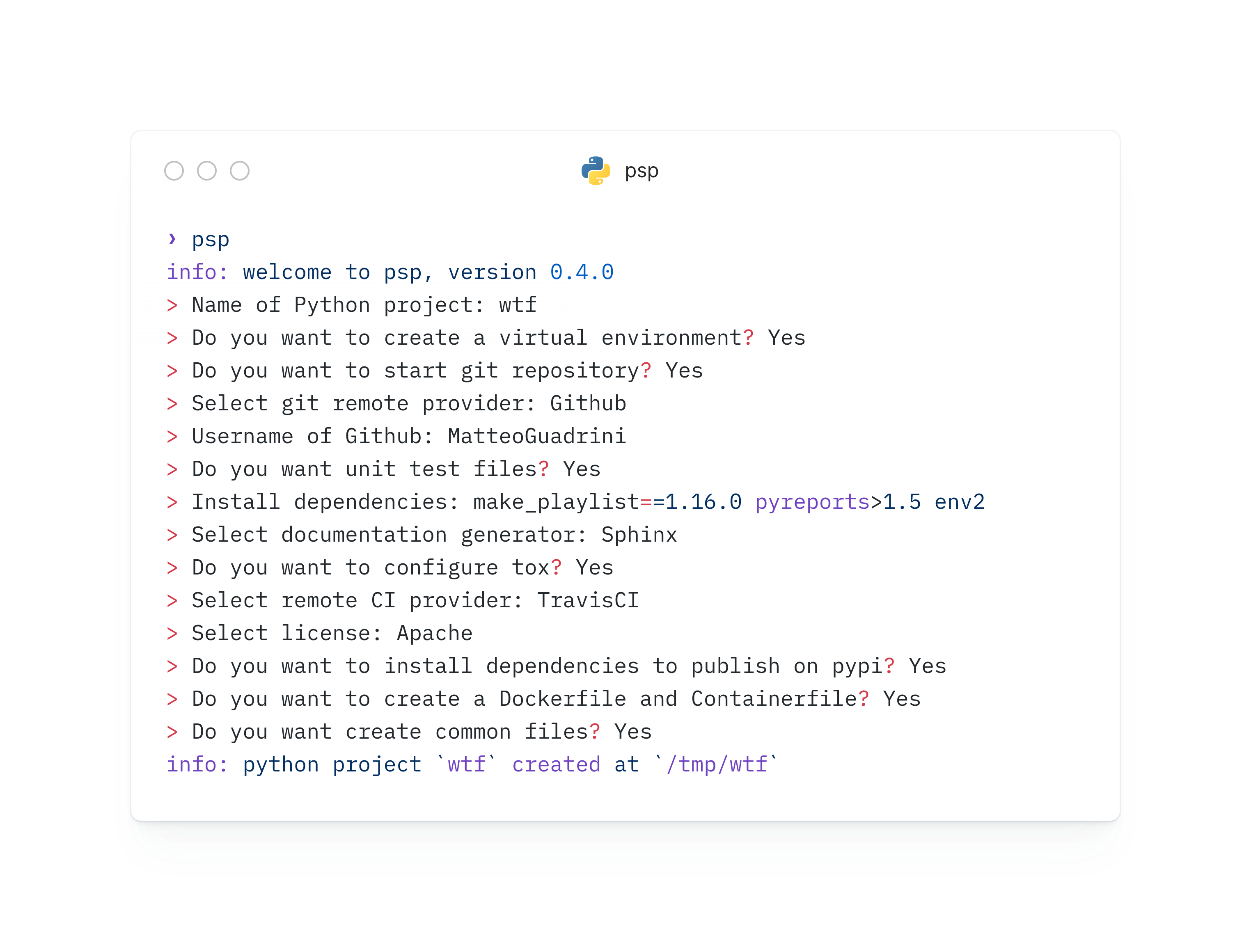
The result is:
$> tree wtf/ --filelimit=19 -a
wtf                     # Project folder
├── LICENSE.md          # License file
├── pyproject.toml      # Python package configuration file
├── README.md           # Readme file
├── CHANGES.md          # List of changes
├── .circleci           # CI folder
│   └── config.yml      # CI configuration file
├── CODE_OF_CONDUCT.md  # Code of Conduct
├── CONTRIBUTING.md     # Contributing guide lines
├── Containerfile       # Standard container file for build image
├── Dockerfile          # Docker container file for build image
├── Makefile            # Makefile for command make; make help
├── requirements.txt    # Dependencies list used by third programs
├── docs                # Documentation folder: Sphinx/MKDocs
│   ├── build
│   ├── make.bat
│   ├── Makefile
│   └── source
│       ├── conf.py
│       ├── index.rst
│       ├── _static
│       └── _templates
├── .git                # Git folder
│   ├── branches
│   ├── config
│   ├── description
│   ├── HEAD
│   ├── hooks  [14 entries exceeds filelimit, not opening dir]
│   ├── info
│   │   └── exclude
│   ├── objects
│   │   ├── info
│   │   └── pack
│   └── refs
│       ├── heads
│       └── tags
├── .github             # Github issue and merge templates
│   ├── ISSUE_TEMPLATE
│   │   ├── bug.yml
│   │   ├── config.yml
│   │   └── feature.yml
│   └── PULL_REQUEST_TEMPLATE
│       └── pull_request_template.md
├── .gitignore          # Git ignore file
├── .dockerignore       # Docker ignore file
├── .containerignore    # Container ignore file
├── wtf                 # Python package
│   └── __init__.py
├── tests               # Tests package for modules
│   ├── __init__.py
│   └── test_wtf.py     # Test module "test_<name_python_package>"
├── tox.ini             # Tox configuration files
├── samples
│   └── wtf_sample.py   # Sample code of package "<name_python_package>_sample"
└── .venv                # Virtual environment
    ├── bin  [33 entries exceeds filelimit, not opening dir]
    ├── include
    │   └── python3.14
    ├── lib
    │   └── python3.14
    │       └── site-packages  [68 entries exceeds filelimit, not opening dir]
    ├── lib64 -> lib
    └── pyvenv.cfg

29 directories, 44 files
And git status is:
$> git status
On branch main

No commits yet
...
$> git remote get-url origin
git@github.com:MatteoGuadrini/test.git
Help
For help message, type:
$> psp help
psp (Python Scaffolding Projects), version 0.4.0
usage: psp [shortcut]
ie: psp [help|quick|simple|full]

shortcut:
    help:   print this help message
    quick:  enables a rapid setup (few options included)
    simple: enables a basic setup (only Python package)
    full:   enables a full setup (all options)

links:
    repository:     https://github.com/MatteoGuadrini/psp
    documentation:  https://psp.readthedocs.io/

variables:
    ["PSP_GIT","PSP_GIT_REMOTE","PSP_GIT_USER"]

environments:
    Python version: 3.14
[!NOTE] More details for shortcuts, variables and other things, available in official documentation: psp docs
🔌 Prerequisites
psp has four mandatory prerequisetes installed on own machine:
gitpython3pipcurl(Linux/MacOS only)
MacOS prerequisites installation
/bin/bash -c "$(curl -fsSL https://raw.githubusercontent.com/Homebrew/install/HEAD/install.sh)"
brew install python git
Windows prerequisites installation
winget install -e --id Git.Git
winget install -e --id Python.Python.3.14
Ubuntu based prerequisites installation
sudo apt install -y python3 python3-pip git curl
Red Hat based prerequisites installation
sudo dnf install -y python3 python3-pip git curl
Arch based prerequisites installation
sudo pacman -Qi python3 python3-pip git curl
💿 Installation
🐍 Python
To install with pip:
pip install psp-scaffold
Binary file
To install compiled file into your machine, download it:
Linux
For all users (required root access):
sudo -i
curl -L https://github.com/MatteoGuadrini/psp/releases/download/v0.4.0/psp_linux -o /usr/bin/psp
chmod +x /usr/bin/psp
For current user:
curl -L https://github.com/MatteoGuadrini/psp/releases/download/v0.4.0/psp_linux -o $HOME/.local/bin/psp
chmod +x $HOME/.local/bin/psp
MacOS
sudo su -
curl -L https://github.com/MatteoGuadrini/psp/releases/download/v0.4.0/psp_macos -o /usr/bin/psp
chmod +x /usr/bin/psp
Windows
For all users (required Administrator):
iwr -OutFile "C:\Windows\system32\psp.exe" "https://github.com/MatteoGuadrini/psp/releases/download/v0.4.0/psp_windows"
For current user:
mkdir "$($Env:USERPROFILE)\bin"
[System.Environment]::SetEnvironmentVariable("PATH", $Env:PATH + ";$($Env:USERPROFILE)\bin","USER")
iwr -OutFile "$($Env:USERPROFILE)\bin\psp.exe" "https://github.com/MatteoGuadrini/psp/releases/download/v0.4.0/psp_windows"
Packages
If you want to install OS package, follow instructions for your Operating System:
For Debian/Ubuntu:
curl -L https://github.com/MatteoGuadrini/psp/releases/download/v0.4.0/psp.deb -o psp.deb
sudo dpkg -i psp.deb
For Fedora/Mageia/OpenSuse:
sudo rpm -i https://github.com/MatteoGuadrini/psp/releases/download/v0.4.0/psp.rpm
Compile as your own
Instead, if you compile this project as own, follow this steps:
git clone https://github.com/MatteoGuadrini/psp.git
cd psp && cargo build --release && sudo cp -v target/release/psp /usr/bin/psp && chmod +x /usr/bin/psp
or build with script:
git clone https://github.com/MatteoGuadrini/psp.git
cd psp
# Build
./build_psp.sh
# Copy binary
sudo cp -v target/release/psp /usr/bin/psp && chmod +x /usr/bin/psp
# Install rpm
sudo rpm -i /tmp/psp_rpm/psp.rpm
# Instal deb
sudo dpkg -i /tmp/psp_deb/psp.deb
Docker/Podman
If you want to use psp in a containerized environment, follow this:
# Clone...
git clone https://github.com/MatteoGuadrini/psp.git
# Build...
cd psp && docker build . -t psp:latest
# Run...
docker run -it --rm -v ~/python_projects:/psp:z localhost/psp:latest
You can use .env files and environment variables:
# .env file
docker run -it --rm -v ~/python_projects:/psp:z -v ~/python_projects/.env:/psp/.env localhost/psp:latest
# PSP_ environment variables
docker run -it --rm -v ~/python_projects:/psp:z -e "PSP_GIT=true" -e "PSP_PYVER=1.0.0" localhost/psp:latest
🧰 Next features
-
windowsoperating system support - Container support for psp program
-
condaanduvsupport -
hatchsupport -
docker-composeandkubernetessupport - command line flags support
- updating/merging project
- templating folder support
- YAML configuration file
Open source
psp is an open source project. Any contribution, It's welcome.
A great thanks.
For donations, press this
For me

For Telethon
The Telethon Foundation is a non-profit organization recognized by the Ministry of University and Scientific and Technological Research. They were born in 1990 to respond to the appeal of patients suffering from rare diseases. Come today, we are organized to dare to listen to them and answers, every day of the year.
Licence
This package is Treeware. If you use it in production, then we ask that you buy the world a tree to thank us for our work. By contributing to the Treeware forest you’ll be creating employment for local families and restoring wildlife habitats.

Acknowledgments
Thanks to Jim Blandy, Jason Orendorff and Nora Tindall for writing the Programming Rust book that make up my Rust foundation.
Thanks to Tim McNamara for writing the Rust in Action book.
Thanks to Zed IDE and for license of RustRover offered by Jetbrains.
Special thanks go to my wife, who understood the hours of absence for this development. Thanks to my children, for the daily inspiration they give me and to make me realize, that life must be simple.
Thanks, Rust Community!


Download files
Download the file for your platform. If you're not sure which to choose, learn more about installing packages.
Source Distributions
Built Distribution
Filter files by name, interpreter, ABI, and platform.
If you're not sure about the file name format, learn more about wheel file names.
Copy a direct link to the current filters
File details
Details for the file psp_scaffold-0.4.0-py3-none-manylinux_2_39_x86_64.whl.
File metadata
- Download URL: psp_scaffold-0.4.0-py3-none-manylinux_2_39_x86_64.whl
- Upload date:
- Size: 7.9 MB
- Tags: Python 3, manylinux: glibc 2.39+ x86-64
- Uploaded using Trusted Publishing? No
- Uploaded via: twine/6.2.0 CPython/3.13.7
File hashes
| Algorithm | Hash digest | |
|---|---|---|
| SHA256 |
fef57d66d8eb9281ed7a790ebea3b67cddca7bc09326735ff10c1ac23d884ecb
|
|
| MD5 |
988f5f9b446304a30dbd3fdf20994c70
|
|
| BLAKE2b-256 |
f645d5dc56de6e29e70fa48591869d67f38e1d1ef991475f3bd25d6277c55792
|






