
A lightweight, stream-native AI agent powered by Timeplus

Project description
PulseBot
Stream-native AI Agent powered by Timeplus
PulseBot is a lightweight, extensible AI agent framework that uses Timeplus streaming database as its backbone for real-time message routing, observability, and memory storage.
✨ Features
- Stream-Native Architecture - All communication flows through Timeplus streams
- Multi-Provider LLM Support - Anthropic Claude, OpenAI, OpenRouter, Ollama, and NVIDIA
- Vector Memory - Semantic search using embeddings stored in Timeplus
- SQL-Native Scheduling - Timeplus Tasks replace traditional cron jobs
- Interactive Workspaces - Build and publish dynamic artifacts and runnable web apps
- Extensible Skills - Plugin-based tool system (web search, file ops, shell, workspace)
- Multi-Channel - Telegram, webchat, with easy extension to Slack/WhatsApp
- Real-Time Observability - All LLM calls and tool executions logged to streams
- Production Ready - Docker deployment, async architecture, structured logging
🏗️ Architecture
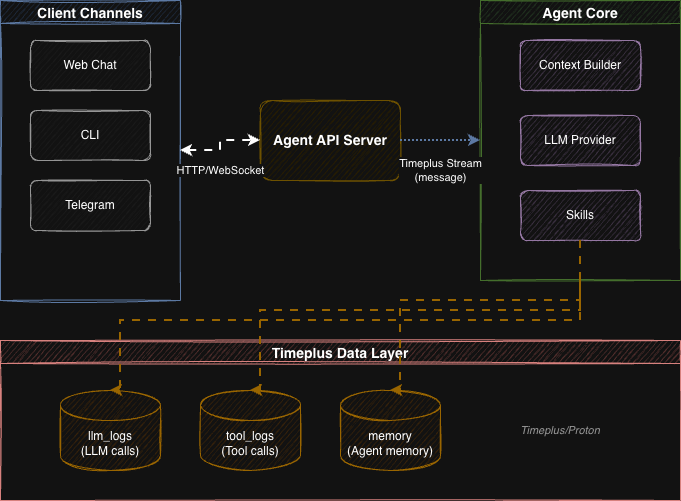
🚀 Quick Start
Prerequisites
- Python 3.11+
- Timeplus or Proton
Installation
# Clone repository
git clone https://github.com/timeplus-io/PulseBot.git
cd PulseBot

# Install package
pip install -e .

# Generate default config
pulsebot init
Configuration
Edit config.yaml with your API keys:
agent:
  name: "PulseBot"
  model: "claude-sonnet-4-20250514"  # or use ollama model

providers:
  anthropic:
    api_key: ${ANTHROPIC_API_KEY}

  # For local testing with Ollama
  ollama:
    enabled: true
    host: "http://localhost:11434"
    default_model: "llama3"

workspace:
  base_dir: "./workspaces"
  workspace_port: 8001
  internal_api_key: "${WORKSPACE_INTERNAL_KEY}"
Using Ollama (Local Testing)
# Install Ollama (macOS)
brew install ollama

# Pull a model
ollama pull llama3

# Start Ollama server
ollama serve

# Update config.yaml to use Ollama
# Set agent.provider: "ollama" and agent.model: "llama3"
Setup & Run
# Start the agent (streams are initialized automatically on first run)
pulsebot run

# Or start the API server
pulsebot serve
🐳 Docker Deployment
# Set environment variables
export ANTHROPIC_API_KEY=your_key
export TELEGRAM_BOT_TOKEN=your_token

# Start all services
docker-compose up -d
This starts:
- Timeplus - Streaming database (ports 8123, 3218, 8463)
- PulseBot Agent - Message processing
- PulseBot API - REST/WebSocket interface (port 8000)
📖 CLI Commands
| Command | Description |
|---|---|
pulsebot run |
Start the agent loop |
pulsebot serve |
Start FastAPI server |
pulsebot chat |
Interactive CLI chat |
pulsebot init |
Generate config.yaml |
pulsebot task list |
List scheduled tasks |
🔧 Built-in Skills
| Skill | Tools | Description |
|---|---|---|
web_search |
web_search |
Brave Search / SearXNG integration |
file_ops |
read_file, write_file, list_directory |
Sandboxed file operations |
shell |
run_command |
Shell execution with security guards |
workspace |
workspace_create_app, workspace_write_file, ... |
Create and publish dynamic artifacts and web apps |
AgentSkills.io Support
PulseBot supports the agentskills.io standard for external skill packages. Skills are discovered from configured directories by scanning for SKILL.md files.
Configure skill directories in config.yaml:
skills:
  skill_dirs:
    - "./skills"
    - "/shared/skills"
  disabled_skills: []
Create a skill package as a directory with a SKILL.md file:
skills/
  my-skill/
    SKILL.md          # Required: YAML frontmatter + instructions
    scripts/          # Optional: executable code
    references/       # Optional: supplementary docs
The SKILL.md uses YAML frontmatter for metadata and Markdown body for instructions:
---
name: my-skill
description: Does something useful when the user asks about X.
---

# My Skill

Full instructions loaded on demand by the agent.
Only skill name and description are loaded into the system prompt at startup (~24 tokens per skill). Full instructions are loaded on demand when the agent calls the load_skill tool.
Adding Custom Code Skills
from pulsebot.skills import BaseSkill, ToolDefinition, ToolResult

class MySkill(BaseSkill):
    name = "my_skill"

    def get_tools(self) -> list[ToolDefinition]:
        return [ToolDefinition(
            name="my_tool",
            description="Does something useful",
            parameters={"type": "object", "properties": {}}
        )]

    async def execute(self, tool_name: str, args: dict) -> ToolResult:
        return ToolResult.ok("Success!")
📡 API Endpoints
Web Chat UI
Access the built-in web chat interface at http://localhost:8000/ after starting the API server.
REST & WebSocket Endpoints
| Method | Endpoint | Description |
|---|---|---|
| GET | / |
Web chat UI |
| GET | /health |
Health check |
| POST | /chat |
Send message (async) |
| WS | /ws/{session_id} |
Real-time chat |
| GET | /sessions/{id}/history |
Get conversation history |
🗄️ Timeplus Streams
| Stream | Purpose |
|---|---|
messages |
All agent communication (user input, agent response, tool calls) |
llm_logs |
LLM call observability (tokens, latency, cost) |
tool_logs |
Tool execution logging (name, arguments, duration, status) |
memory |
Vector-indexed memories with semantic search |
events |
System events & alerts |
🔐 Environment Variables
# Required (one LLM provider)
ANTHROPIC_API_KEY=...     # For Claude models
# or
OPENAI_API_KEY=...        # For OpenAI models

# Timeplus
TIMEPLUS_HOST=localhost
TIMEPLUS_PASSWORD=...

# Optional
OPENAI_API_KEY=...        # Also used for memory embeddings
TELEGRAM_BOT_TOKEN=...    # For Telegram channel
📚 Documentation
- Technical Design - Full architecture documentation
- Configuration Guide - All settings and environment variables
- Agent Workspace - Dynamic artifacts and full-stack apps
- Telegram Setup - Connect PulseBot to Telegram
- Memory System - Vector memory and embeddings
- Skills System - Plugin architecture
Release history Release notifications | RSS feed


Download files
Download the file for your platform. If you're not sure which to choose, learn more about installing packages.
Source Distribution
Built Distribution
Filter files by name, interpreter, ABI, and platform.
If you're not sure about the file name format, learn more about wheel file names.
Copy a direct link to the current filters
File details
Details for the file pulsebot-0.3.0.tar.gz.
File metadata
- Download URL: pulsebot-0.3.0.tar.gz
- Upload date:
- Size: 309.4 kB
- Tags: Source
- Uploaded using Trusted Publishing? No
- Uploaded via: twine/6.2.0 CPython/3.13.3
File hashes
| Algorithm | Hash digest | |
|---|---|---|
| SHA256 |
7bad8f90641a31b563ea8f7f16d8d5b193e5793a7dfea8a83417f87fa55f3adb
|
|
| MD5 |
2aebb83a97f55eebed3da71139dc7a15
|
|
| BLAKE2b-256 |
9fff336ced514a6c0dc9ccda65bb7676d660a71119cda27d1e0d01f22d56de5e
|
File details
Details for the file pulsebot-0.3.0-py3-none-any.whl.
File metadata
- Download URL: pulsebot-0.3.0-py3-none-any.whl
- Upload date:
- Size: 123.6 kB
- Tags: Python 3
- Uploaded using Trusted Publishing? No
- Uploaded via: twine/6.2.0 CPython/3.13.3
File hashes
| Algorithm | Hash digest | |
|---|---|---|
| SHA256 |
c1729c6d81c6b520cfbfd16365095e7a8112e70f5454917fae03616fe4183f5b
|
|
| MD5 |
4e3a491173947cef84e101accd2bcee4
|
|
| BLAKE2b-256 |
d239572d86e130111e9a08f1952d0b136d1a2a79b906ea74dbc37806ae21626d
|






