
A lightweight, stream-native AI agent powered by Timeplus

Project description
PulseBot




Stream-native AI Agent powered by Timeplus
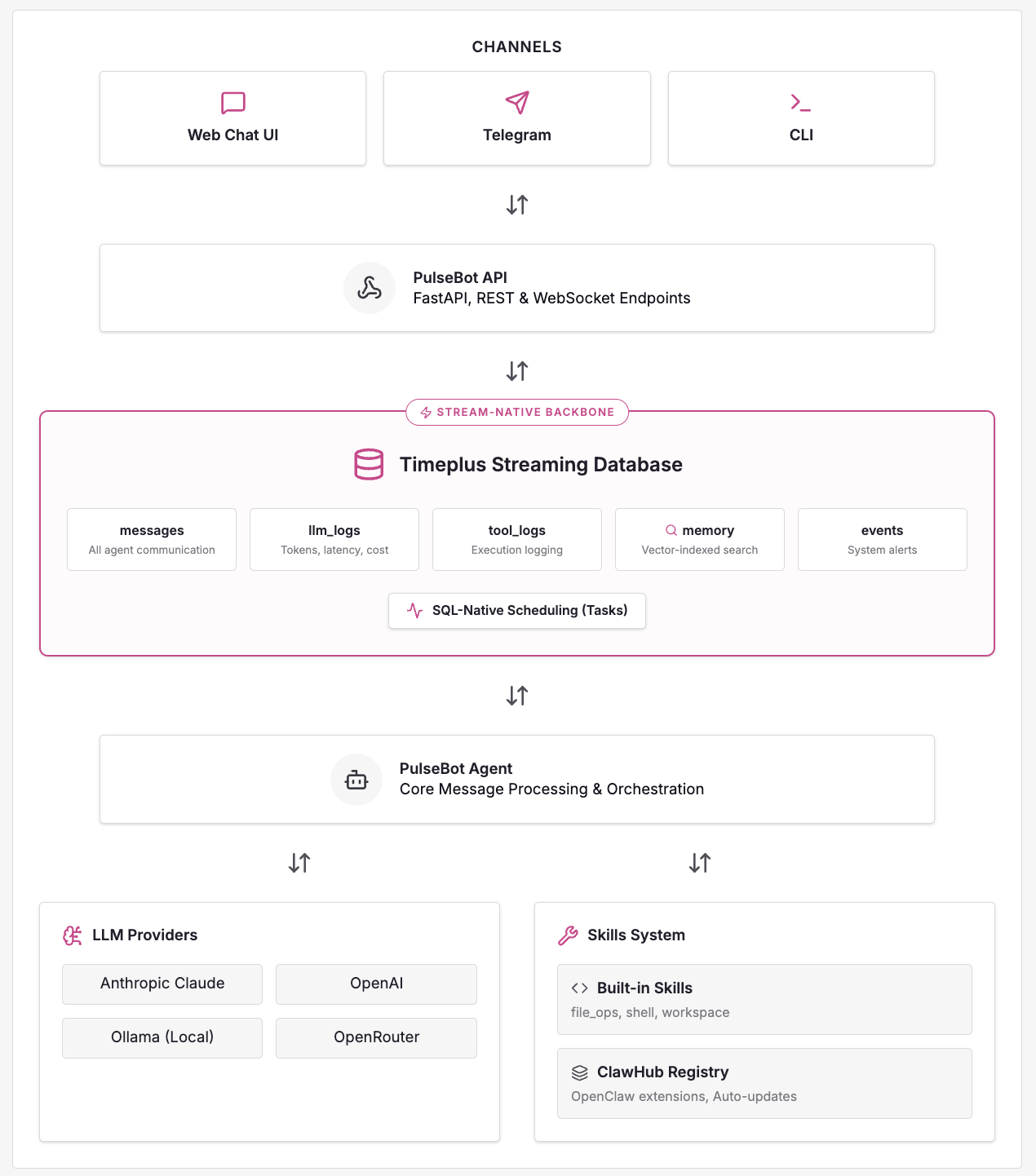
PulseBot is a lightweight, extensible AI agent framework that uses Timeplus streaming database as its backbone for real-time message routing, observability, and memory storage.
✨ Features
- Stream-Native Architecture - All communication flows through Timeplus streams
- Multi-Provider LLM Support - Anthropic Claude, OpenAI, OpenRouter, Ollama, and NVIDIA
- Multi-Agent Collaboration - Spawn coordinated agent teams for complex tasks via kanban-based message queues
- Vector Memory - Semantic search using embeddings stored in Timeplus
- SQL-Native Scheduling - Timeplus Tasks replace traditional cron jobs
- Interactive Workspaces - Build and publish dynamic artifacts and runnable web apps
- Extensible Skills - Plugin-based tool system with OpenClaw compatibility and ClawHub registry
- Tool Call Hooks - Intercept, approve, deny, or modify tool calls before/after execution
- Multi-Channel - Telegram, webchat, with easy extension to Slack/WhatsApp
- Real-Time Observability - All LLM calls and tool executions logged to streams
- Production Ready - Docker deployment, async architecture, structured logging
🏗️ Architecture
🚀 Quick Start
Prerequisites
- Python 3.11+
- Timeplus or Proton
Installation
# Clone repository
git clone https://github.com/timeplus-io/PulseBot.git
cd PulseBot

# Install package
pip install -e .

# Generate default config
pulsebot init
Configuration
Edit config.yaml with your API keys:
agent:
  name: "PulseBot"
  model: "claude-sonnet-4-20250514"  # or use ollama model

providers:
  anthropic:
    api_key: ${ANTHROPIC_API_KEY}

  # For local testing with Ollama
  ollama:
    enabled: true
    host: "http://localhost:11434"
    default_model: "llama3"

workspace:
  base_dir: "./workspaces"
  workspace_port: 8001
  internal_api_key: "${WORKSPACE_INTERNAL_KEY}"
Using Ollama (Local Testing)
# Install Ollama (macOS)
brew install ollama

# Pull a model
ollama pull llama3

# Start Ollama server
ollama serve

# Update config.yaml to use Ollama
# Set agent.provider: "ollama" and agent.model: "llama3"
Setup & Run
# Start the agent (streams are initialized automatically on first run)
pulsebot run

# Or start the API server
pulsebot serve
🐳 Docker Deployment
# Set environment variables
export ANTHROPIC_API_KEY=your_key
export TELEGRAM_BOT_TOKEN=your_token

# Start all services
docker-compose up -d
This starts:
- Timeplus - Streaming database (ports 8123, 3218, 8463)
- PulseBot Agent - Message processing
- PulseBot API - REST/WebSocket interface (port 8000)
📖 CLI Commands
| Command | Description |
|---|---|
pulsebot run |
Start the agent loop |
pulsebot serve |
Start FastAPI server |
pulsebot chat |
Interactive CLI chat |
pulsebot init |
Generate config.yaml |
pulsebot task list |
List scheduled tasks |
pulsebot task create --name <n> --prompt <p> --interval <i> |
Create an interval-based task |
pulsebot task create --name <n> --prompt <p> --cron <expr> |
Create a cron-scheduled task |
pulsebot task pause <name> |
Pause a scheduled task |
pulsebot task resume <name> |
Resume a paused task |
pulsebot task delete <name> |
Delete a scheduled task |
pulsebot skill search <query> |
Search ClawHub registry for skills |
pulsebot skill install <slug> |
Install skill from ClawHub |
pulsebot skill list |
List installed ClawHub skills |
pulsebot skill remove <slug> |
Remove installed skill |
🔧 Built-in Skills
| Skill | Tools | Description |
|---|---|---|
file_ops |
read_file, write_file, list_directory |
Sandboxed file operations |
shell |
run_command |
Shell execution with security guards |
workspace |
workspace_create_app, workspace_write_file, ... |
Create and publish dynamic artifacts and web apps |
scheduler |
create_interval_task, create_cron_task, list_tasks, pause_task, resume_task, delete_task |
Create and manage recurring tasks backed by Timeplus native Tasks |
project_manager |
create_project, list_projects, get_project_status, cancel_project |
Spawn and coordinate multi-agent projects |
AgentSkills.io & OpenClaw Support
PulseBot supports the agentskills.io standard and OpenClaw extensions for external skill packages.
OpenClaw adds runtime requirement checking and ClawHub registry integration:
- Declare required binaries, environment variables, and OS support in SKILL.md
- Install skills directly from ClawHub with
pulsebot skill install <slug> - Automatic integrity verification with SHA256 checksums
- Auto-update support for installed skills
Configure skill directories in config.yaml:
skills:
  skill_dirs:
    - "./skills"
    - "/shared/skills"
  disabled_skills: []

clawhub:
  install_dir: "./skills"    # Default install location
  auto_update: false          # Auto-update on startup
Install from ClawHub:
# Search for skills
pulsebot skill search python

# Install a skill
pulsebot skill install timeplus/sql-guide

# List installed skills
pulsebot skill list
Timeplus Related Skills Install
pulsebot skill install timeplus-sql-guide
pulsebot skill install timeplus-app-builder
pulsebot skill install cisco-asa-syslog
refer to
- https://clawhub.ai/gangtao/cisco-asa-syslog
- https://clawhub.ai/gangtao/timeplus-app-builder
- https://clawhub.ai/gangtao/timeplus-sql-guide
📡 API Endpoints
Web Chat UI
Access the built-in web chat interface at http://localhost:8000/ after starting the API server.
REST & WebSocket Endpoints
| Method | Endpoint | Description |
|---|---|---|
| GET | / |
Web chat UI |
| GET | /health |
Health check |
| POST | /chat |
Send message (async) |
| POST | /api/v1/task-trigger |
Timeplus UDF callback for scheduled tasks |
| WS | /ws/{session_id} |
Real-time chat (also streams task_notification events) |
| GET | /sessions/{id}/history |
Get conversation history |
🗄️ Timeplus Streams
| Stream | Purpose |
|---|---|
messages |
All agent communication (user input, agent response, tool calls) |
llm_logs |
LLM call observability (tokens, latency, cost) |
tool_logs |
Tool execution logging (name, arguments, duration, status) |
memory |
Vector-indexed memories with semantic search |
events |
System events, alerts & task_notification broadcasts |
task_triggers |
Audit log of every scheduled task invocation |
kanban |
Inter-agent message queue for multi-agent projects |
kanban_projects |
Project lifecycle metadata |
kanban_agents |
Per-agent state and checkpoints |
Scheduled tasks are Timeplus-native TASK objects created by the
schedulerskill. Each task runs a Python UDF that POSTs to/api/v1/task-trigger, which the agent processes and fans out to all connected channels via theeventsstream. See Task Design for details.
🔐 Environment Variables
# Required (one LLM provider)
ANTHROPIC_API_KEY=... # For Claude models
# or
OPENAI_API_KEY=... # For OpenAI models

# Timeplus
TIMEPLUS_HOST=localhost
TIMEPLUS_PASSWORD=...

# ClawHub (for installing skills from registry)
CLAWHUB_AUTH_TOKEN=... # Authentication token for ClawHub skill installation

# Optional
OPENAI_API_KEY=... # Also used for memory embeddings
TELEGRAM_BOT_TOKEN=... # For Telegram channel
📚 Documentation
- Technical Design - Full architecture documentation
- Configuration Guide - All settings and environment variables
- Multi-Agent Projects - Coordinated agent teams and kanban workflows
- Task Design - Scheduled task architecture and usage
- Agent Workspace - Dynamic artifacts and full-stack apps
- Telegram Setup - Connect PulseBot to Telegram
- Memory System - Vector memory and embeddings
- Skills System - Plugin architecture
- Tool Call Hooks - Intercept and control tool executions
Release history Release notifications | RSS feed


Download files
Download the file for your platform. If you're not sure which to choose, learn more about installing packages.
Source Distribution
Built Distribution
Filter files by name, interpreter, ABI, and platform.
If you're not sure about the file name format, learn more about wheel file names.
Copy a direct link to the current filters
File details
Details for the file pulsebot-0.6.0.tar.gz.
File metadata
- Download URL: pulsebot-0.6.0.tar.gz
- Upload date:
- Size: 17.3 MB
- Tags: Source
- Uploaded using Trusted Publishing? No
- Uploaded via: twine/6.2.0 CPython/3.11.15
File hashes
| Algorithm | Hash digest | |
|---|---|---|
| SHA256 |
91e3ec6908706700bfcbc32aceaa47f15802f1d7d49d77d3871a4d672797d9e6
|
|
| MD5 |
c8a9fe550dfaab814bfa9796350cc113
|
|
| BLAKE2b-256 |
8b2e17f299d5b8bc7ee6ff4dc9a4ecde5eb90a4c012c98f5093cf24687d05ab7
|
File details
Details for the file pulsebot-0.6.0-py3-none-any.whl.
File metadata
- Download URL: pulsebot-0.6.0-py3-none-any.whl
- Upload date:
- Size: 153.5 kB
- Tags: Python 3
- Uploaded using Trusted Publishing? No
- Uploaded via: twine/6.2.0 CPython/3.11.15
File hashes
| Algorithm | Hash digest | |
|---|---|---|
| SHA256 |
346d43d959a97cf3794ce6c221bcfa29513440b88c0a0075631804cef1955473
|
|
| MD5 |
38d885ea5a293a3da9079631b51a8067
|
|
| BLAKE2b-256 |
7d1ed8f2f57b791d1f11772adf3513b8b2c295cb233237345ff975483cd91f00
|






