
puzzlegen - Procedural Match-3 Puzzle Generator
Project Links:
GitHub Repository | PyPI Project | OSF Project | Preprint
Overview
puzzlegen is a Python package for generating, visualizing, and solving procedural Match-3 puzzles.
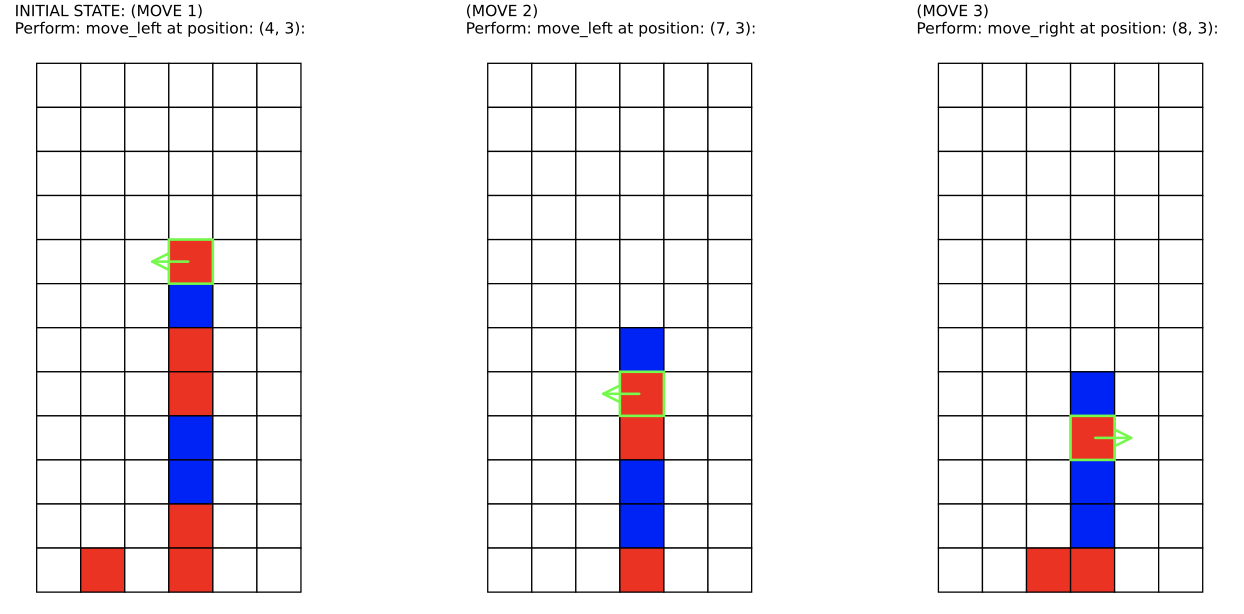
It allows you to create single puzzles or batches, visualize them, and automatically find solutions using a Breadth-First Search (BFS) solver.
Features
- Random puzzle generation with customizable grid size, colors, and block counts
- Automatic solver (BFS) to check puzzle solvability within a given number of moves
- Batch generation: create and filter many puzzles at once
- Visualization: display puzzles and solutions as images or PDFs
- Export: save puzzles and solutions as PDF or CSV
Installation
Option 1
pip install puzzlegen
Option 2
Or, if you want to install from the github repository that may contain more up-to-date versions:
pip install git+https://github.com/carodak/puzzlegen.git
Option 3
Or, if you want to clone and install locally:
git clone https://github.com/carodak/puzzlegen.git
cd puzzlegen
pip install .
Basic Usage
Example 1: Randomly generate and solve a single puzzle
from puzzlegen.frontend import SinglePuzzle

# 1. Create a single puzzle with defined parameters
puzzle = SinglePuzzle(nb_blocks=10, colors=['red', 'blue', 'gray'], nb_moves=5, grid_size=(12, 12))

# 2. Randomly populate the puzzle board with blocks
puzzle.generate()

# 3. Visualize the puzzle
puzzle.show()

# 4. Try to solve the puzzle (within the allowed number of moves)
solution = puzzle.solve()

# 5. Visualize the solution (if found)
puzzle.show_solution()
Example 2: Generate a batch of solvable puzzles
from puzzlegen.frontend import PuzzleBatch

# 1. Set up a batch generator with parameter ranges
batch = PuzzleBatch(
    blocks_range=(6, 10),
    colors_range=(2, 4),
    colors_blocks=['blue', 'red', 'gray'],
    nb_moves=5,
    grid_size=(12, 6),
    stack_probability=0.75
)

# 2. Attempt to generate solvable puzzles for all combinations within the given ranges
batch.generate()

# 3. Show stats and save the results
batch.show_stats()
batch.save_pdf("batch_puzzles.pdf")
batch.save_csv("batch_puzzles.csv")
Or use without installation
You can also use the package directly in the Jupyter notebook located at examples/basic_usage.ipynb, available online here: https://colab.research.google.com/github/carodak/puzzlegen/blob/main/examples/basic_usage.ipynb — no installation needed.
For additional detailed usage examples, please see:
examples folder
This script demonstrates how to generate, solve, and save puzzles using the puzzlegen package.
Puzzle Rules
- Puzzle Setup: The game board is a grid with colored blocks. Blocks are initially placed in the last row or stacked on top of each other. No more than 2 blocks of the same color are aligned horizontally or vertically. Each color must have at least 3 blocks.
- GamePlay: The goal is to remove all blocks from the grid in as few moves as possible.
- Available Moves:
- Simple Move: Move a block left or right if the target cell is empty.
- Exchange: Swap a block with its left or right neighbor if the target cell is occupied.
- Elimination Rule: If 3 or more blocks of the same color are aligned horizontally or vertically, they disappear.
- Gravity Rule: Blocks fall down if unsupported until they reach another block or the bottom of the grid.
- Winning Condition: All blocks are removed from the grid within the allowed number of moves.
Executive Function Task Reference: https://osf.io/3pz74/wiki/home/
Project Structure
src/puzzlegen/core/– Core logic (puzzle generation, solver, batch processing, etc.)src/puzzlegen/frontend.py– User-friendly interface for puzzle creation and batch operationsexamples/– Example notebooks and scripts to help you get startedtests/– Unit tests for code reliabilityoutputs/– Folder where generated puzzles and results are saved
Compatibility
- Tested with Python 3.14.0
- Tested with matplotlib 3.10.8
- Tested with tqdm 4.67.1
API Documentation
The API Documentation is available at https://carodak.github.io/puzzlegen/puzzlegen.html or in docs folder.
Authors
- Caroline DAKOURE – Development
- Katie LAVIGNE – Code review, feedback, and improvements
Contributing
Pull requests and suggestions are welcome!
Please add tests for any new features.
Resources
- Solving simplified Candy Crush (Medium)
- EightPuzzle (GitHub)
- BFS explanation (YouTube)
- Visualgo BFS/DFS
- What is BFS? (dev.to)
License
GPL-3.0
Contact:
caroline.dakoure@umontreal.ca
2 maintainers


Metadata
2 maintainers
Release files for puzzlegen 0.1.11
For a detailed explanation of source distributions (sdists) and built distributions (wheels), please see the package formats documentation.
Source distribution (sdist)
| File | Size | Uploaded | Provenance | Actions |
|---|---|---|---|---|
| puzzlegen-0.1.11.tar.gz | 37.3 kB | Without provenance | Details for puzzlegen-0.1.11.tar.gz |
Built distribution (wheel)
| File | Interpreter | ABI | Platform | Actions Reset |
|---|---|---|---|---|
| puzzlegen-0.1.11-py3-none-any.whl | Python 3 | none | any | Details for puzzlegen-0.1.11-py3-none-any.whl |
Total release size: 72.1 kB
Release files / puzzlegen-0.1.11.tar.gz
| Download URL | puzzlegen-0.1.11.tar.gz |
|---|---|
| Size | 37.3 kB |
| Tags | Source |
|
SHA-256 checksum How to use checksums |
1f2f6e991432c7ca2a495e735c336a1ae455a90854fd2119bd4d61c00d141d57
|
|
BLAKE2b-256 checksum How to use checksums |
693ec97ec2736dc1f4cd4a76db2ebe3a41f5a3df61d706096482ddb6d6288c5a
|
| Upload date | |
|
Uploaded using Trusted Publishing? What is trusted publishing? |
No |
| Uploaded via |
twine/6.2.0 CPython/3.14.0
|
Release files / puzzlegen-0.1.11-py3-none-any.whl
| Download URL | puzzlegen-0.1.11-py3-none-any.whl |
|---|---|
| Size | 34.8 kB |
| Tags | Python 3 |
|
SHA-256 checksum How to use checksums |
9a16518722f1eb9ea39c7ceffb855cecb683a5f863e48e29e1ec4d83544bd0f2
|
|
BLAKE2b-256 checksum How to use checksums |
38ec650eede67af9e837b852ec48cb8f682847577e3897879e24edcb90aac56a
|
| Upload date | |
|
Uploaded using Trusted Publishing? What is trusted publishing? |
No |
| Uploaded via |
twine/6.2.0 CPython/3.14.0
|
Security for puzzlegen 0.1.11
Provenance
Provenance describes where a file came from. On PyPI, provenance is shared via attestations, which provide a verifiable record of the build or publishing details. View details, limitations and caveats.
No provenance found
None of the files in this release were uploaded with provenance metadata.
A note on package security
PyPI is a repository for distributing packages, not a service for auditing them. While third-party security researchers and our staff do their best to detect and remove malicious packages, PyPI cannot guarantee the quality, security or suitability of any given package.
To learn more about protecting yourself from malicious actors, visit our package security documentation.














