
Procedural Match-3 Puzzle Generator and Solver


Project description
puzzlegen - Procedural Match-3 Puzzle Generator
Developed by Caroline DAKOURE
Github Repository: https://github.com/carodak/puzzlegen/ PyPi Project: https://pypi.org/project/puzzlegen/
Overview
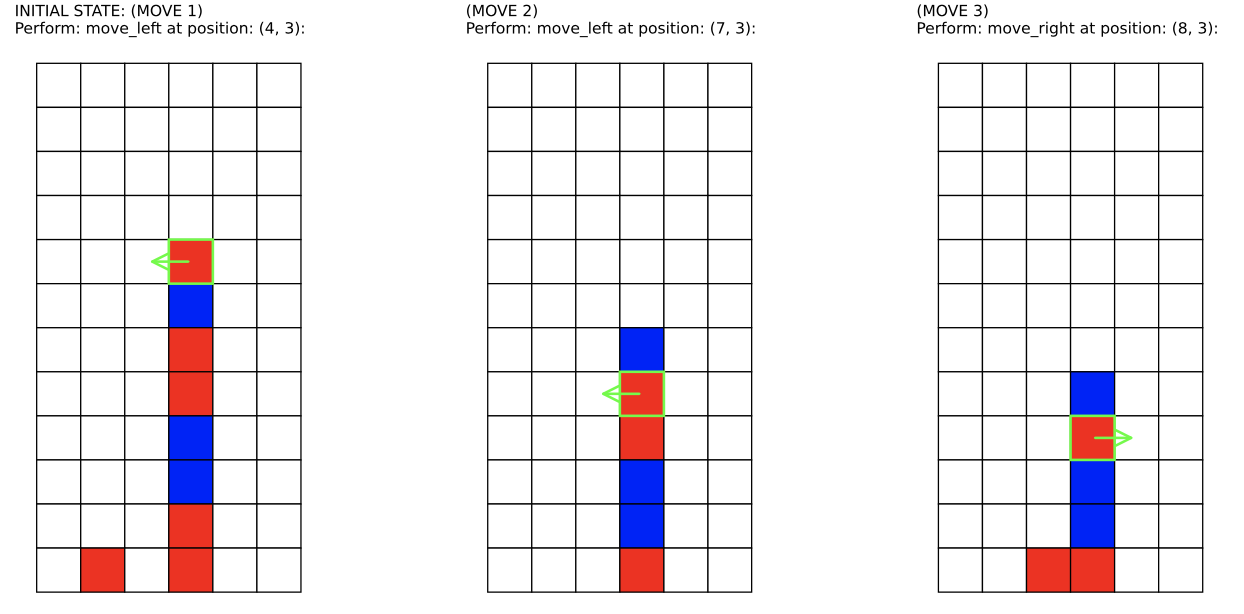
puzzlegen is a Python package for generating, visualizing, and solving procedural Match-3 puzzles.
It allows you to create single puzzles or batches, visualize them, and automatically find solutions using a Breadth-First Search (BFS) solver.
Features
- Random puzzle generation with customizable grid size, colors, and block counts
- Automatic solver (BFS) to check puzzle solvability within a given number of moves
- Batch generation: create and filter many puzzles at once
- Visualization: display puzzles and solutions as images or PDFs
- Export: save puzzles and solutions as PDF or CSV
Installation
pip install puzzlegen
Or, if you want to install from the github repository that may contain more up-to-date versions:
pip install git+https://github.com/carodak/puzzlegen.git
Or, if you want to clone and install locally:
git clone https://github.com/carodak/puzzlegen.git
cd puzzlegen
pip install .
Basic Usage
Example 1: Randomly generate and solve a single puzzle
from puzzlegen.frontend import SinglePuzzle

# 1. Create a puzzle game
puzzle = SinglePuzzle(nb_blocks=10, colors=['red', 'blue', 'gray'], nb_moves=5, grid_size=(12, 12))

# 2. Generate a random puzzle
puzzle.generate()

# 3. Display the puzzle
puzzle.show()

# 4. Attempt to solve the puzzle (i.e., find a solution within nb_moves)
solution = puzzle.solve()

# 5. Save the solution and batch as files
puzzle.show_solution()
Example 2: Generate a batch of solvable puzzles
from puzzlegen.frontend import PuzzleBatch

# 1. Create a batch of puzzles
batch = PuzzleBatch(
    blocks_range=(6, 10),
    colors_range=(2, 4),
    colors_blocks=['blue', 'red', 'gray'],
    nb_moves=5,
    grid_size=(12, 6),
    stack_probability=0.75
)

# 2. Generate the batch
batch.generate()

# 3. Show statistics and save the results
batch.show_stats()
batch.save_pdf("batch_puzzles.pdf")
batch.save_csv("batch_puzzles.csv")
Other option
You may also use the package directly from the Jupyter notebooks in examples/basic_usage.ipynb — no installation required.
For additional detailed usage examples, please see:
examples folder
This script demonstrates how to generate, solve, and save puzzles using the puzzlegen package.
Puzzle Rules
- Puzzle Setup: The game board is a grid with colored blocks. Blocks are initially placed in the last row or stacked on top of each other. No more than 2 blocks of the same color are aligned horizontally or vertically. Each color must have at least 3 blocks.
- GamePlay: The goal is to remove all blocks from the grid in as few moves as possible.
- Available Moves:
- Simple Move: Move a block left or right if the target cell is empty.
- Exchange: Swap a block with its left or right neighbor if the target cell is occupied.
- Elimination Rule: If 3 or more blocks of the same color are aligned horizontally or vertically, they disappear.
- Gravity Rule: Blocks fall down if unsupported until they reach another block or the bottom of the grid.
- Winning Condition: All blocks are removed from the grid within the allowed number of moves.
Executive Function Task Reference: https://osf.io/3pz74/wiki/home/
Project Structure
src/puzzlegen/core/– Core logic (puzzle generation, solver, batch processing, etc.)src/puzzlegen/frontend.py– User-friendly interface for puzzle creation and batch operationsexamples/– Example notebooks and scripts to help you get startedtests/– Unit tests for code reliabilityoutputs/– Folder where generated puzzles and results are saved
API Documentation
The API Documentation is available at https://carodak.github.io/puzzlegen/puzzlegen.html or in docs folder.
Contributing
Pull requests and suggestions are welcome!
Please add tests for any new features.
Resources
- Solving simplified Candy Crush (Medium)
- EightPuzzle (GitHub)
- BFS explanation (YouTube)
- Visualgo BFS/DFS
- What is BFS? (dev.to)
License
GPL-3.0
Contact:
caroline.dakoure@umontreal.ca
Release history Release notifications | RSS feed


Download files
Download the file for your platform. If you're not sure which to choose, learn more about installing packages.
Source Distribution
Built Distribution
Filter files by name, interpreter, ABI, and platform.
If you're not sure about the file name format, learn more about wheel file names.
Copy a direct link to the current filters
File details
Details for the file puzzlegen-0.1.3.tar.gz.
File metadata
- Download URL: puzzlegen-0.1.3.tar.gz
- Upload date:
- Size: 35.6 kB
- Tags: Source
- Uploaded using Trusted Publishing? No
- Uploaded via: twine/6.1.0 CPython/3.13.5
File hashes
| Algorithm | Hash digest | |
|---|---|---|
| SHA256 |
818d2033dc28dd204e9bd9f8fed50e6f96002a3724eb201aca3864f57d1d7e99
|
|
| MD5 |
4ee46afefab17e053d386eb452142bcd
|
|
| BLAKE2b-256 |
e062df9f76f5c1eb76e359020f59bf5a4e3aba89fd98d026947ff839d36cb4f9
|
File details
Details for the file puzzlegen-0.1.3-py3-none-any.whl.
File metadata
- Download URL: puzzlegen-0.1.3-py3-none-any.whl
- Upload date:
- Size: 33.1 kB
- Tags: Python 3
- Uploaded using Trusted Publishing? No
- Uploaded via: twine/6.1.0 CPython/3.13.5
File hashes
| Algorithm | Hash digest | |
|---|---|---|
| SHA256 |
716f1973e3218f40c4616235410159cdd29f45d4a8dac9ea6bf4e546d985dda3
|
|
| MD5 |
b63ffab8db5c4cfaa3cfd8cf2479929b
|
|
| BLAKE2b-256 |
3a6b9a3c988bc6840c4b66dc87dd704cb9858e7546fde8dc120b8d525129957f
|






