
pwncat-vl


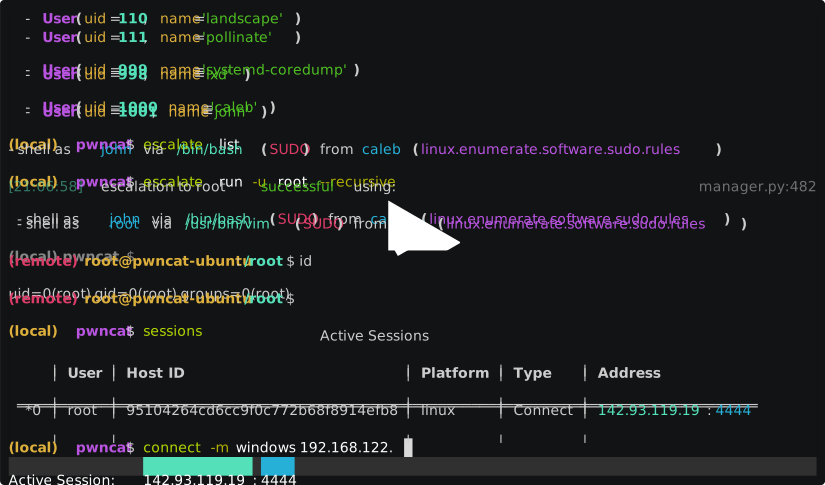
pwncat-vl is a community-maintained fork of pwncat-cs, revived to support modern Python versions (3.9 to 3.14) and ensure the tool remains usable for current red team workflows.
Originally created by @calebstewart, pwncat is a post-exploitation platform for Linux targets.
It started out as a wrapper around basic bind and reverse shells and has grown from there. It streamlines common red team operations while staging code from your attacker machine, not the target.
The original project has been unmaintained since 2021, and despite community interest and open pull requests, no updates were made. Rather than let the project fade away, this fork was created to fix critical issues, restore compatibility, and keep contributions alive.
Key changes in this fork:
- Python 3.9 to 3.14 support
- Busybox/Alpine PTY - auto-spawns a real PTY on minimal targets (Alpine containers, embedded busybox) where
scriptandpythonaren't available, via an embedded ~30KB staticforkptyhelper (x86_64, aarch64, i686, armv7l) - New privesc modules: PwnKit (CVE-2021-4034) and sudo
-RNSS-preload (CVE-2025-32463) - Recursive directory download with a single global progress bar
remembercommand to store and retrieve arbitrary key-value pairs during a session (passwords, tokens, paths)- Markdown report export
- SSH: window-size blocking fix (no more spurious
TimeoutErroron large uploads), agent support,@allowed in passwords - XDG-compliant config: loads
pwncatrcfrom$XDG_CONFIG_HOME/pwncat/with fallback to$XDG_DATA_HOME - Stable foundations: modernized dependencies, proper exception chaining, 155+ tests in CI, ~30 correctness fixes since the upstream stopped in 2021
- Active maintenance, contributions welcome
Features
pwncat intercepts the raw communication with a remote shell and allows the user to perform automated actions on the remote host including enumeration, implant installation and even privilege escalation.
After receiving a connection, pwncat will configure the remote shell:
- Disable shell history
- Normalize shell prompt
- Locate useful binaries (using
which) - Attempt to spawn a pseudo-terminal (pty) for full interactive sessions
pwncat supports multiple methods for spawning PTYs and cross-references them with available executables on the target system.
After spawning a PTY, it sets the terminal in raw mode to mimic the behavior of an ssh session.
It also synchronizes the remote PTY settings (rows, columns, TERM) with your local terminal to ensure proper behavior of interactive applications like vim or nano.
Busybox/Alpine support
Unlike the upstream project, pwncat-vl can spawn a full PTY on minimal environments like Alpine Linux containers or embedded busybox systems where script, python, and other standard PTY-spawning tools are unavailable. When all standard methods fail, pwncat automatically detects the remote architecture and uploads a tiny static binary (~30KB) that allocates a real PTY via forkpty(). The binary is written to /dev/shm (RAM) when possible, self-deletes after exec, and uses a randomized filename.
Platform Support
pwncat was initially Linux-only, but the original maintainers began introducing alpha support for Windows targets.
This fork continues to support these efforts but does not introduce new Windows features (yet).
Presentation
John Hammond and Caleb Stewart presented pwncat at GRIMMCon.
You can find the video here: YouTube link.
This shows an early version - for current details, refer to this repository.
Requirements
- Python 3.9 to 3.14
- Linux (primary support)
- pip / virtualenv recommended
Documentation
Official documentation for the original project was hosted on Read the Docs. This fork does not (yet) include RTD integration, but usage remains very similar. Updated instructions are in progress.
Disclaimer
This fork is not affiliated with the original author. It exists solely to keep a useful tool alive, with full respect and credit given to the original work. Contributions are welcome, and maintenance is ongoing as time permits.
Installation
pwncat only depends on a working Python development environment running on Linux.
In order to install some of the packages required with pip, you will likely need
your distribution's "Python Development" package. On Debian based systems,
this is python-dev. For Arch, the development files are shipped with the
main Python repository. For Enterprise Linux, the package is named
python-devel.
You can install pwncat-vl easily using pipx (recommended if you want isolation without managing virtualenvs manually):
pipx install git+https://github.com/Chocapikk/pwncat-vl
If you prefer manual installation from source:
git clone https://github.com/Chocapikk/pwncat-vl.git
cd pwncat-vl
python3 -m venv venv
source venv/bin/activate
pip install .
For a development environment, pwncat uses Python Poetry. You can clone the
repository locally and use Poetry to set up a development environment:
# Setup pwncat-vl inside a poetry-managed virtual environment
git clone https://github.com/Chocapikk/pwncat-vl.git
cd pwncat-vl
poetry install

# Enter the virtual environment
poetry shell
Naming
Due to naming conflicts with Cytopia's pwncat, the original project was renamed pwncat-cs.
This fork uses the name pwncat-vl with the entrypoint pwncat-vl.
Windows Support
pwncat supports connections from Windows targets starting at v0.4.0a1. The Windows
platform utilizes a .Net-based C2 library which is loaded automatically. Windows
targets should connect with either a cmd.exe or powershell.exe shell, and
pwncat will take care of the rest.
The libraries implementing the C2 are implemented at pwncat-windows-c2.
The DLLs for the C2 will be automatically downloaded from the targeted release
for you. If you do not have internet connectivity on your target machine,
you can tell pwncat to pre-stage the DLLs using the --download-plugins
argument. If you are running a release version of pwncat, you can also download
a tarball of all built-in plugins from the releases page.
The plugins are stored by default in ~/.local/share/pwncat, however this is
configurable with the plugin_path configuration. If you download the packaged
set of plugins from the releases page, you should extract it to the path pointed
to by plugin_path.
Aside from the main C2 DLLs, other plugins may also be available. Currently, the only provided default plugins are the C2 and an implementation of BadPotato. pwncat can reflectively load .Net binaries to be used as plugins for the C2. For more information on Windows C2 plugins, please see the documentation.
Modules
The architecture of the pwncat framework uses a generic "module" structure. All functionality is
implemented as modules. This includes enumeration, persistence and
privilege escalation. Interacting with modules is similar to most other
post-exploitation platforms. You can utilize the familiar run, search
and info commands and enter module contexts with the use command.
Refer to the documentation for more information.
Connecting to a Victim
The command line parameters for pwncat attempt to be flexible and accept a variety of common connection syntax. Specifically, it will try to accept common netcat and ssh like syntax. The following are all valid:
# Connect to a bind shell
pwncat-vl connect://10.10.10.10:4444
pwncat-vl 10.10.10.10:4444
pwncat-vl 10.10.10.10 4444
# Listen for reverse shell
pwncat-vl bind://0.0.0.0:4444
pwncat-vl 0.0.0.0:4444
pwncat-vl :4444
pwncat-vl -lp 4444
# Connect via ssh
pwncat-vl ssh://user:password@10.10.10.10
pwncat-vl user@10.10.10.10
pwncat-vl user:password@10.10.10.10
pwncat-vl -i id_rsa user@10.10.10.10
# SSH w/ non-standard port
pwncat-vl -p 2222 user@10.10.10.10
pwncat-vl user@10.10.10.10:2222
# Reconnect utilizing installed persistence
#   If reconnection fails and no protocol is specified,
#   SSH is used as a fallback.
pwncat-vl reconnect://user@10.10.10.10
pwncat-vl reconnect://user@c228fc49e515628a0c13bdc4759a12bf
pwncat-vl user@10.10.10.10
pwncat-vl c228fc49e515628a0c13bdc4759a12bf
pwncat-vl 10.10.10.10
By default (--platform/-m auto), pwncat probes the live shell and selects
the target platform automatically. It sends a small uname / ver /
$PSVersionTable sequence and classifies the reply on stdout as Linux or
Windows, falling back to Linux when the shell stays silent. Pass linux or
windows explicitly to skip the probe and force the choice:
# auto-detect (default) -- handles Linux shells and Windows cmd.exe/PowerShell
pwncat-vl 10.10.10.10 4444

# force the platform and skip detection
pwncat-vl -m linux 10.10.10.10 4444
pwncat-vl -m windows -lp 4444
For more information on the syntax and argument handling, see the
help information with pwncat-vl --help or visit the documentation.
Docker Image
The recommended installation method is a Python virtual environment. This
provides the easiest day-to-day usage of pwncat. However, there has been
interest in using pwncat from a docker image, so a Dockerfile is provided
which builds a working pwncat installation. To build the image use:
docker build -t pwncat .
This will build the pwncat docker image with the tag "pwncat". The working
directory within the container is /work. The entrypoint for the container
is the pwncat-vl binary. It can be used like so:
# Connect to a bind shell at 10.0.0.1:4444
docker run -v "/some/directory":/work -t pwncat 10.0.0.1 4444
In this example, only the files in /some/directory are exposed to the container.
Obviously, for upload/download, the container will only be able to see the files
exposed through any mounted directories.
Features and Functionality
pwncat provides two main features. At its core, its goal is to automatically
setup a remote PseudoTerminal (pty) which allows interaction with the remote
host much like a full SSH session. When operating in a pty, you can use common
features of your remote shell such as history, line editing, and graphical
terminal applications.
The other half of pwncat is a framework which utilizes your remote shell to
perform automated enumeration, persistence and privilege escalation tasks. The
local pwncat prompt provides a number of useful features for standard
penetration tests including:
- File upload and download
- Automated privilege escalation enumeration
- Automated privilege escalation execution
- Automated persistence installation/removal
- Automated tracking of modified/created files
pwncatalso offers the ability to revert these remote "tampers" automatically
The underlying framework for interacting with the remote host aims to abstract away the underlying shell and connection method as much as possible, allowing commands and plugins to interact seamlessly with the remote host.
You can learn more about interacting with pwncat and about the underlying framework
in the documentation. If you have an idea for a new privilege escalation method
or persistence method, please take a look at the API documentation specifically.
Pull requests are welcome!
1 maintainer

Metadata
1 maintainer
Release files for pwncat-vl 0.7.0
For a detailed explanation of source distributions (sdists) and built distributions (wheels), please see the package formats documentation.
Source distribution (sdist)
| File | Size | Uploaded | |
|---|---|---|---|
| pwncat_vl-0.7.0.tar.gz | 2.2 MB | Details |
Built distribution (wheel)
| File | Interpreter | ABI | Platform | Reset |
|---|---|---|---|---|
| pwncat_vl-0.7.0-py3-none-any.whl | Python 3 | none | any | Details |
Total release size: 4.7 MB
Release files / pwncat_vl-0.7.0.tar.gz
| Download URL | pwncat_vl-0.7.0.tar.gz |
|---|---|
| Size | 2.2 MB |
| Tags | Source |
|
SHA-256 checksum How to use checksums |
d3b9fdbf14d512a69b60aa51d43861e0531d6dcb5f9a94ff89baaba6ae51e519
|
|
BLAKE2b-256 checksum How to use checksums |
6cff0331e8bd90c0793583a0270381aec8277b68e877eb53be4fbabb67a33135
|
| Upload date | |
|
Uploaded using Trusted Publishing? What is trusted publishing? |
Yes |
| Uploaded via |
twine/6.1.0 CPython/3.13.12
|
Provenance
Provenance describes where a file came from. On PyPI, provenance is shared via attestations, which provide a verifiable record of the build or publishing details. View details, limitations and caveats.


PyPI Publish Attestation
PyPI verified that this artifact, at this checksum, originated from the publisher listed below.
Signed by GitHub Actions, verified by PyPI on Jun 13, 2026.
Transparency logRelease files / pwncat_vl-0.7.0-py3-none-any.whl
| Download URL | pwncat_vl-0.7.0-py3-none-any.whl |
|---|---|
| Size | 2.5 MB |
| Tags | Python 3 |
|
SHA-256 checksum How to use checksums |
c2fe71b685ee8e9118a687bbcb6330ee68204f5ff0f54bbb04c321c16fd47614
|
|
BLAKE2b-256 checksum How to use checksums |
5b5d10de7619d3671e521f64baff11d1279e70f1fb04cb24e59a165b0e2fd780
|
| Upload date | |
|
Uploaded using Trusted Publishing? What is trusted publishing? |
Yes |
| Uploaded via |
twine/6.1.0 CPython/3.13.12
|
Provenance
Provenance describes where a file came from. On PyPI, provenance is shared via attestations, which provide a verifiable record of the build or publishing details. View details, limitations and caveats.
PyPI Publish Attestation
PyPI verified that this artifact, at this checksum, originated from the publisher listed below.
Signed by GitHub Actions, verified by PyPI on Jun 13, 2026.
Transparency log













