
Community-maintained fork of pwncat with Python 3.13+ support
Verified details
These details have been verified by PyPIProject links
GitHub Statistics
Maintainers

Project description
pwncat-vl
pwncat-vl is a community-maintained fork of pwncat-cs,
revived to support modern Python versions (3.13+) and ensure the tool remains usable for current red team workflows.
Originally created by @calebstewart, pwncat is a post-exploitation platform for Linux targets.
It started out as a wrapper around basic bind and reverse shells and has grown from there. It streamlines common red team operations while staging code from your attacker machine, not the target.
The original project has been unmaintained since 2021, and despite community interest and open pull requests, no updates were made.
Rather than let the project fade away, this fork was created to fix critical issues, restore compatibility, and keep contributions alive.
Key changes in this fork:
- Python 3.13 compatibility
- Updated dependencies for modern environments
- Minimal but active maintenance (contributions welcome!)
Features
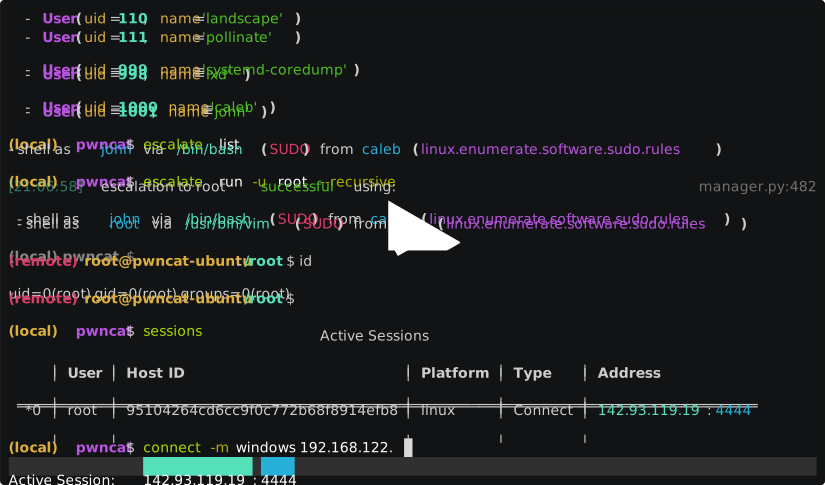
pwncat intercepts the raw communication with a remote shell and allows the user to perform automated actions on the remote host including enumeration, implant installation and even privilege escalation.
After receiving a connection, pwncat will configure the remote shell:
- Disable shell history
- Normalize shell prompt
- Locate useful binaries (using
which) - Attempt to spawn a pseudo-terminal (pty) for full interactive sessions
pwncat supports multiple methods for spawning PTYs and cross-references them with available executables on the target system.
After spawning a PTY, it sets the terminal in raw mode to mimic the behavior of an ssh session.
It also synchronizes the remote PTY settings (rows, columns, TERM) with your local terminal to ensure proper behavior of interactive applications like vim or nano.
Platform Support
pwncat was initially Linux-only, but the original maintainers began introducing alpha support for Windows targets.
This fork continues to support these efforts but does not introduce new Windows features (yet).
Presentation
John Hammond and Caleb Stewart presented pwncat at GRIMMCon.
You can find the video here: YouTube link.
This shows an early version \u2014 for current details, refer to this repository.
Requirements
- Python 3.9 to 3.13+
- Linux (primary support)
- pip / virtualenv recommended
Documentation
Official documentation for the original project was hosted on Read the Docs.
This fork does not (yet) include RTD integration, but usage remains very similar. Updated instructions are in progress.
Disclaimer
This fork is not affiliated with the original author. It exists solely to keep a useful tool alive,
with full respect and credit given to the original work. Contributions are welcome, and maintenance is ongoing as time permits.
Installation
pwncat only depends on a working Python development environment running on Linux.
In order to install some of the packages required with pip, you will likely need
your distribution's "Python Development" package. On Debian based systems,
this is python-dev. For Arch, the development files are shipped with the
main Python repository. For Enterprise Linux, the package is named
python-devel.
You can install pwncat-vl easily using pipx (recommended if you want isolation without managing virtualenvs manually):
pipx install git+https://github.com/Chocapikk/pwncat-vl
If you prefer manual installation from source:
git clone https://github.com/Chocapikk/pwncat-vl.git
cd pwncat-vl
python3 -m venv venv
source venv/bin/activate
pip install .
For a development environment, pwncat uses Python Poetry. You can clone the
repository locally and use Poetry to set up a development environment:
# Setup pwncat-vl inside a poetry-managed virtual environment
git clone https://github.com/Chocapikk/pwncat-vl.git
cd pwncat-vl
poetry install

# Enter the virtual environment
poetry shell
Naming Changes
Due to naming conflicts with Cytopia's pwncat, the original project was renamed pwncat-cs.
This fork continues under the name pwncat-vl, and uses the same pwncat-cs entrypoint for now,
but a future update might adjust that for clarity and independence.
Windows Support
pwncat now supports connections from Windows targets starting at v0.4.0a1. The Windows
platform utilizes a .Net-based C2 library which is loaded automatically. Windows
targets should connect with either a cmd.exe or powershell.exe shell, and
pwncat will take care of the rest.
The libraries implementing the C2 are implemented at pwncat-windows-c2.
The DLLs for the C2 will be automatically downloaded from the targeted release
for you. If you do not have internet connectivity on your target machine,
you can tell pwncat to pre-stage the DLLs using the --download-plugins
argument. If you are running a release version of pwncat, you can also download
a tarball of all built-in plugins from the releases page.
The plugins are stored by default in ~/.local/share/pwncat, however this is
configurable with the plugin_path configuration. If you download the packaged
set of plugins from the releases page, you should extract it to the path pointed
to by plugin_path.
Aside from the main C2 DLLs, other plugins may also be available. Currently, the only provided default plugins are the C2 and an implementation of BadPotato. pwncat can reflectively load .Net binaries to be used a plugins for the C2. For more information on Windows C2 plugins, please see the documentation.
Modules
Recently, the architecture of the pwncat framework was redesigned to
incorporate a generic "module" structure. All functionality is now
implemented as modules. This includes enumeration, persistence and
privilege escalation. Interacting with modules is similar to most other
post-exploitation platforms. You can utilize the familiar run, search
and info commands and enter module contexts with the use command.
Refer to the documentation for more information.
Connecting to a Victim
The command line parameters for pwncat attempt to be flexible and accept a variety of common connection syntax. Specifically, it will try to accept common netcat and ssh like syntax. The following are all valid:
# Connect to a bind shell
pwncat-vl connect://10.10.10.10:4444
pwncat-vl 10.10.10.10:4444
pwncat-vl 10.10.10.10 4444
# Listen for reverse shell
pwncat-vl bind://0.0.0.0:4444
pwncat-vl 0.0.0.0:4444
pwncat-vl :4444
pwncat-vl -lp 4444
# Connect via ssh
pwncat-vl ssh://user:password@10.10.10.10
pwncat-vl user@10.10.10.10
pwncat-vl user:password@10.10.10.10
pwncat-vl -i id_rsa user@10.10.10.10
# SSH w/ non-standard port
pwncat-vl -p 2222 user@10.10.10.10
pwncat-vl user@10.10.10.10:2222
# Reconnect utilizing installed persistence
#   If reconnection fails and no protocol is specified,
#   SSH is used as a fallback.
pwncat-vl reconnect://user@10.10.10.10
pwncat-vl reconnect://user@c228fc49e515628a0c13bdc4759a12bf
pwncat-vl user@10.10.10.10
pwncat-vl c228fc49e515628a0c13bdc4759a12bf
pwncat-vl 10.10.10.10
By default, pwncat assumes the target platform is Linux. In order to
connect to a Windows reverse or bind shell, you must pass the --platform/-m
argument:
pwncat-vl -m windows 10.10.10.10 4444
pwncat-vl -m windows -lp 4444
For more information on the syntax and argument handling, see the
help information with pwncat-vl --help or visit the documentation.
Docker Image
The recommended installation method is a Python virtual environment. This
provides the easiest day-to-day usage of pwncat. However, there has been
interest in using pwncat from a docker image, so I have provided a
Dockerfile which provides a working pwncat installation. To build the image
use:
docker build -t pwncat .
This will build the pwncat docker image with the tag "pwncat". The working
directory within the container is /work. The entrypoint for the container
is the pwncat binary. It can be used like so:
# Connect to a bind shell at 10.0.0.1:4444
docker run -v "/some/directory":/work -t pwncat 10.0.0.1 4444
In this example, only the files in /some/directory are exposed to the container.
Obviously, for upload/download, the container will only be able to see the files
exposed through any mounted directories.
Features and Functionality
pwncat provides two main features. At it's core, it's goal is to automatically
setup a remote PseudoTerminal (pty) which allows interaction with the remote
host much like a full SSH session. When operating in a pty, you can use common
features of your remote shell such as history, line editing, and graphical
terminal applications.
The other half of pwncat is a framework which utilizes your remote shell to
perform automated enumeration, persistence and privilege escalation tasks. The
local pwncat prompt provides a number of useful features for standard
penetration tests including:
- File upload and download
- Automated privilege escalation enumeration
- Automated privilege escalation execution
- Automated persistence installation/removal
- Automated tracking of modified/created files
pwncatalso offers the ability to revert these remote "tampers" automatically
The underlying framework for interacting with the remote host aims to abstract away the underlying shell and connection method as much as possible, allowing commands and plugins to interact seamlessly with the remote host.
You can learn more about interacting with pwncat and about the underlying framework
in the documentation. If you have an idea for a new privilege escalation method
or persistence method, please take a look at the API documentation specifically.
Pull requests are welcome!
Planned Features
pwncat would like to be come a red team swiss army knife. Hopefully soon, more features will be added.
- More privilege escalation methods (sudo -u#-1 CVE, LXD containers, etc.)
- Persistence methods (bind shell, cronjobs, SSH access, PAM abuse, etc.)
- Aggression methods (spam randomness to terminals, flush firewall, etc.)
- Meme methods (terminal-parrot, cowsay, wall, etc.)
- Network methods (port forward, internet access through host, etc.)
Known Issues
Because pwncat is trying to abstractly interact with any shell with minimal remote system
dependencies, there are some edge cases we have found. Where we find them, we do
everything we can to account for them and hide them from the user. However, some have
slipped through the cracks and been observed in the wild. When this happens, pwncat
will do whatever it can to preserve your terminal, but you may be greeted with some
peculiar output or command failures.
BSD Support
While BSD is a Unix-based kernel, in practice it's userland tools are noticeably
different from their Linux counterparts. Due to this, many of the automated
features of pwncat will not work or outright fail when running against a BSD
based target. I have tried to catch all errors or edge cases, however there are
likely some hiccups which haven't been fully tested against BSD. In any case,
the stabilized shell should function within a BSD environment, but I don't
provide any guarantees.
If I find some time later down the road, I may try to stabilize pwncat on BSD,
but for now my focus is on Linux-based distributions. If you'd like to
contribute to making pwncat behave better on BSD, you are more then welcome to
reach out or just fork the repo. As always, pull requests are welcome!
Project details
Verified details
These details have been verified by PyPIProject links
GitHub Statistics
Maintainers


Download files
Download the file for your platform. If you're not sure which to choose, learn more about installing packages.
Source Distribution
Built Distribution
Filter files by name, interpreter, ABI, and platform.
If you're not sure about the file name format, learn more about wheel file names.
Copy a direct link to the current filters
File details
Details for the file pwncat_vl-0.5.7.tar.gz.
File metadata
- Download URL: pwncat_vl-0.5.7.tar.gz
- Upload date:
- Size: 2.1 MB
- Tags: Source
- Uploaded using Trusted Publishing? Yes
- Uploaded via: twine/5.1.0 CPython/3.12.9
File hashes
| Algorithm | Hash digest | |
|---|---|---|
| SHA256 |
3993cfba1f1a6185e2ac89c4341c80c082c0a02b90a2c329c594b795c6e2b594
|
|
| MD5 |
aaac15fb423a39c3643b81ea58dcc8bd
|
|
| BLAKE2b-256 |
8a33f2b9123c4a6275edbf9f599aff1918c10d650a0aa7aaf4c5ed11a09eff3d
|
File details
Details for the file pwncat_vl-0.5.7-py3-none-any.whl.
File metadata
- Download URL: pwncat_vl-0.5.7-py3-none-any.whl
- Upload date:
- Size: 2.4 MB
- Tags: Python 3
- Uploaded using Trusted Publishing? Yes
- Uploaded via: twine/5.1.0 CPython/3.12.9
File hashes
| Algorithm | Hash digest | |
|---|---|---|
| SHA256 |
d1f01d713966918d09c0bcb0fe8c23a7e55e0532e9a4b12923f1ecf94249318e
|
|
| MD5 |
dc5f6993067da86bf4bdd2a937bda0b0
|
|
| BLAKE2b-256 |
281753797edde8d306abfc9820ccbc7dea9677a12ae43aaaffb0495750adcbbe
|






