
py-agui
Python Agentic UI -- Build real-time agentic chat interfaces with FastHTML.
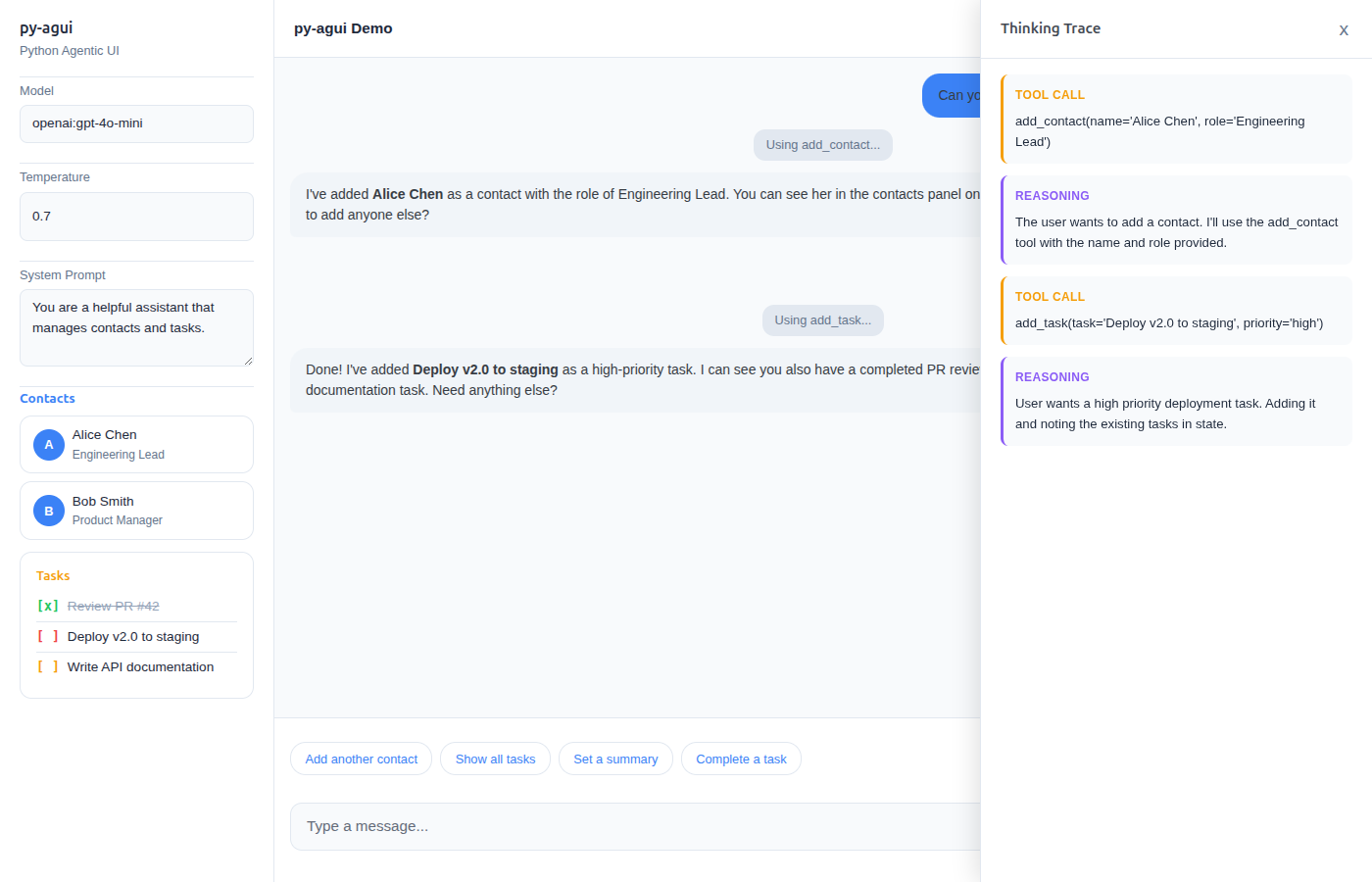
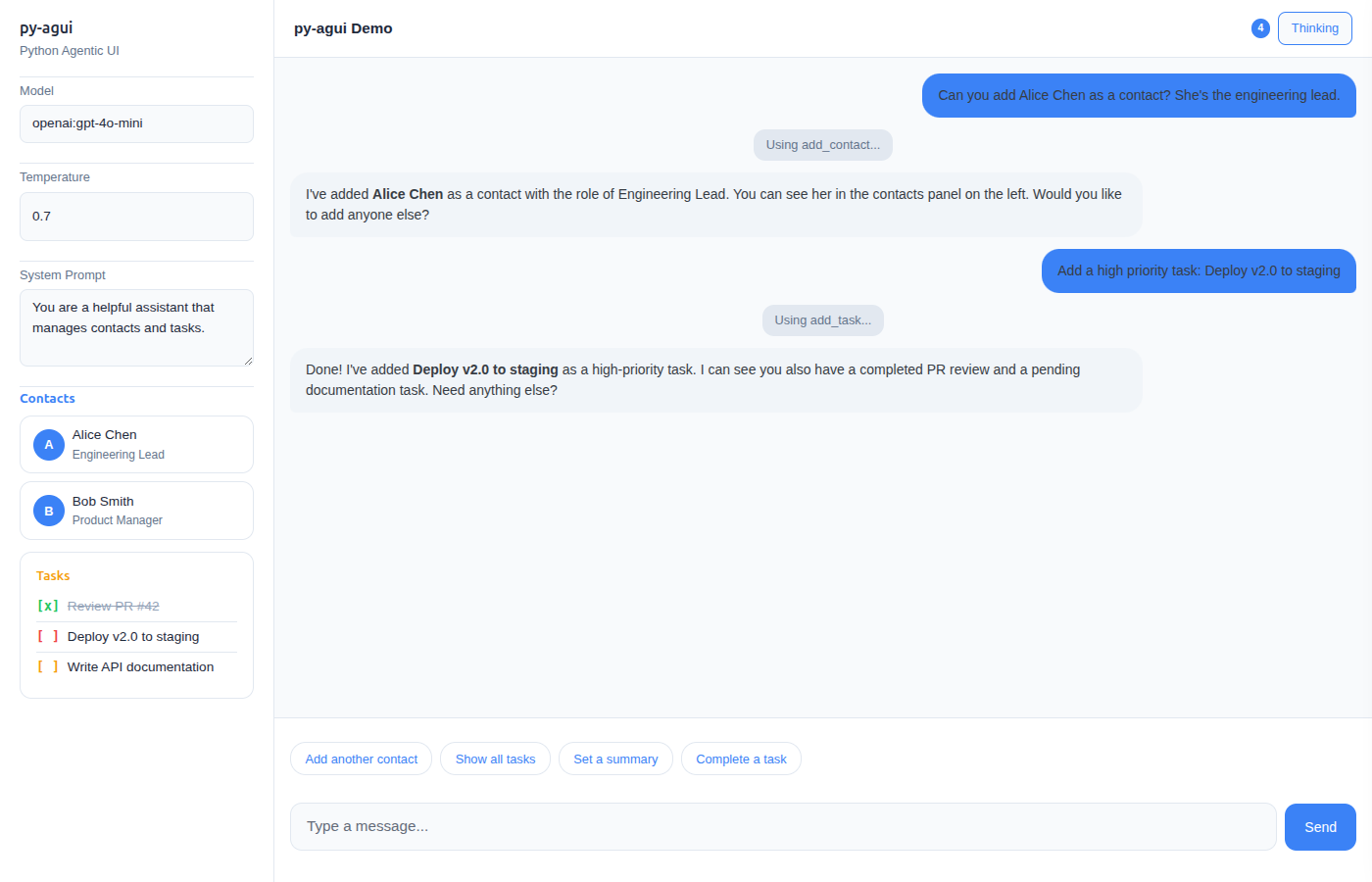
3-pane layout: Settings | Streaming Chat | Thinking Trace -- all pure Python, no JavaScript frameworks.
Features
- 3-Pane Layout -- Left settings, center streaming chat, right thinking trace (on-demand slide-out)
- Pydantic UI Components -- Define
__ft__()on your Pydantic models for automatic UI rendering - Real-time Streaming -- WebSocket-based communication with token-by-token streaming
- State Management -- Thread-safe state with live UI updates via
StateSnapshotEvent - Thinking Trace -- Tool calls, reasoning steps, and agent activity shown in a slide-out panel
- Suggestion Buttons -- Dynamic follow-up suggestions that update with context
- AGUI Protocol -- Full compatibility with pydantic-ai's AGUI protocol
- Theming -- CSS custom properties for easy light/dark mode and custom themes
Installation
pip install py-agui
Or install from source:
git clone https://github.com/kaljuvee/py-agui.git
cd py-agui
pip install -e .
Quick Start
from fasthtml.common import *
from pydantic_ai import Agent
from py_agui import setup_agui
from py_agui.layouts import simple_chat

app, rt = fast_app(exts='ws', hdrs=[MarkdownJS()])
agent = Agent('openai:gpt-4o-mini', instructions='Be helpful and concise.')
agui = setup_agui(app, agent)

@rt('/')
def index():
    return simple_chat(agui.chat("main"))

serve()
3-Pane Agentic UI
The signature layout: settings on the left, streaming chat in the center, thinking trace as a slide-out panel on the right.
from fasthtml.common import *
from pydantic import BaseModel, Field
from pydantic_ai import Agent, RunContext, ToolReturn
from pydantic_ai.ui import StateDeps
from ag_ui.core.events import StateSnapshotEvent, EventType
from py_agui import setup_agui
from py_agui.layouts import three_pane_layout
from typing import List

class AppState(BaseModel):
    contacts: List[str] = Field(default_factory=list)

    def __ft__(self):
        """Pydantic models render as FastHTML components automatically."""
        return Div(
            H4("Contacts"),
            Ul(*[Li(c) for c in self.contacts]) if self.contacts else P("No contacts yet."),
            id="agui-state"
        )

agent = Agent[StateDeps[AppState]](
    'openai:gpt-4o-mini',
    instructions='You manage contacts. Use tools to add them.',
    deps_type=StateDeps[AppState]
)

@agent.tool
def add_contact(ctx: RunContext[StateDeps[AppState]], name: str) -> ToolReturn:
    ctx.deps.state.contacts.append(name)
    return ToolReturn(
        return_value=f"Added {name}",
        metadata=[StateSnapshotEvent(type=EventType.STATE_SNAPSHOT, snapshot=ctx.deps.state)]
    )

app, rt = fast_app(exts='ws', hdrs=[MarkdownJS()])
agui = setup_agui(app, agent, AppState(), AppState)

@rt('/')
def index():
    return three_pane_layout(
        chat_component=agui.chat("main"),
        state_component=agui.state("main"),
        title="My Agent"
    )

serve()
Examples
| Example | Description |
|---|---|
simple_chat.py |
Minimal streaming chat, no state |
chat_with_state.py |
State management with note-taking tools |
chat_with_suggestions.py |
Dynamic suggestion buttons |
three_pane_demo.py |
Full 3-pane layout with contacts, tasks, and thinking trace |
screenshot_demo.py |
Static demo (no API key needed) |
Run any example:
python examples/three_pane_demo.py
Architecture
py_agui/
  __init__.py    # Public API
  core.py        # AGUISetup, AGUIThread, UI, WebSocket handling
  layouts.py     # three_pane_layout, chat_with_sidebar, simple_chat
  patches.py     # FastHTML __ft__() patches for ag-ui protocol events
  styles.py      # CSS custom properties, theming
Key concepts:
setup_agui(app, agent, state, state_type)-- One-line setup. ReturnsAGUISetupwith.chat()and.state()methods.three_pane_layout()-- 3-pane layout component with settings, chat, and thinking trace.- Pydantic
__ft__()-- Define rendering on your models; state updates appear live in the UI. - Thinking Trace -- Tool calls, reasoning, and steps stream into a slide-out panel via HTMX OOB swaps.
Requirements
- Python 3.11+
- FastHTML with WebSocket support (
exts='ws') - pydantic-ai
- ag-ui-protocol
Credits
Created by Julian Kaljuvee.
Built with FastHTML, pydantic-ai, and the AG-UI protocol.
Inspired by ft-ag-ui by Christoffer Bjorkskog.
License
MIT
1 maintainer

Metadata
1 maintainer
Release files for py-agui 0.1.3
For a detailed explanation of source distributions (sdists) and built distributions (wheels), please see the package formats documentation.
Source distribution (sdist)
| File | Size | Uploaded | |
|---|---|---|---|
| py_agui-0.1.3.tar.gz | 940.0 kB | Details |
Built distribution (wheel)
| File | Interpreter | ABI | Platform | Reset |
|---|---|---|---|---|
| py_agui-0.1.3-py3-none-any.whl | Python 3 | none | any | Details |
Total release size: 957.9 kB
Release files / py_agui-0.1.3.tar.gz
| Download URL | py_agui-0.1.3.tar.gz |
|---|---|
| Size | 940.0 kB |
| Tags | Source |
|
SHA-256 checksum How to use checksums |
45a61c969629db5e479b01bbe67cb09a9edf9ae7c66a9459640b59cdd62da497
|
|
BLAKE2b-256 checksum How to use checksums |
269ada7bbee18ef3ec5db766286a5a7393d83437cc6a26a52f7bc99654c3342d
|
| Upload date | |
|
Uploaded using Trusted Publishing? What is trusted publishing? |
No |
| Uploaded via |
twine/6.2.0 CPython/3.13.5
|
Release files / py_agui-0.1.3-py3-none-any.whl
| Download URL | py_agui-0.1.3-py3-none-any.whl |
|---|---|
| Size | 17.9 kB |
| Tags | Python 3 |
|
SHA-256 checksum How to use checksums |
8b9a222c693e012260c31ab38828c2608fed390f7a3737c3b47cd2a856af258f
|
|
BLAKE2b-256 checksum How to use checksums |
fcddd89eca670ae65d2d63d40117837b0412e048b2273a39d1c93db52651fd46
|
| Upload date | |
|
Uploaded using Trusted Publishing? What is trusted publishing? |
No |
| Uploaded via |
twine/6.2.0 CPython/3.13.5
|














