
Python Agentic UI - Real-time agentic chat interfaces with FastHTML, featuring 3-pane layout with settings, streaming chat, and thinking trace

Project description
py-agui
Python Agentic UI -- Build real-time agentic chat interfaces with FastHTML.
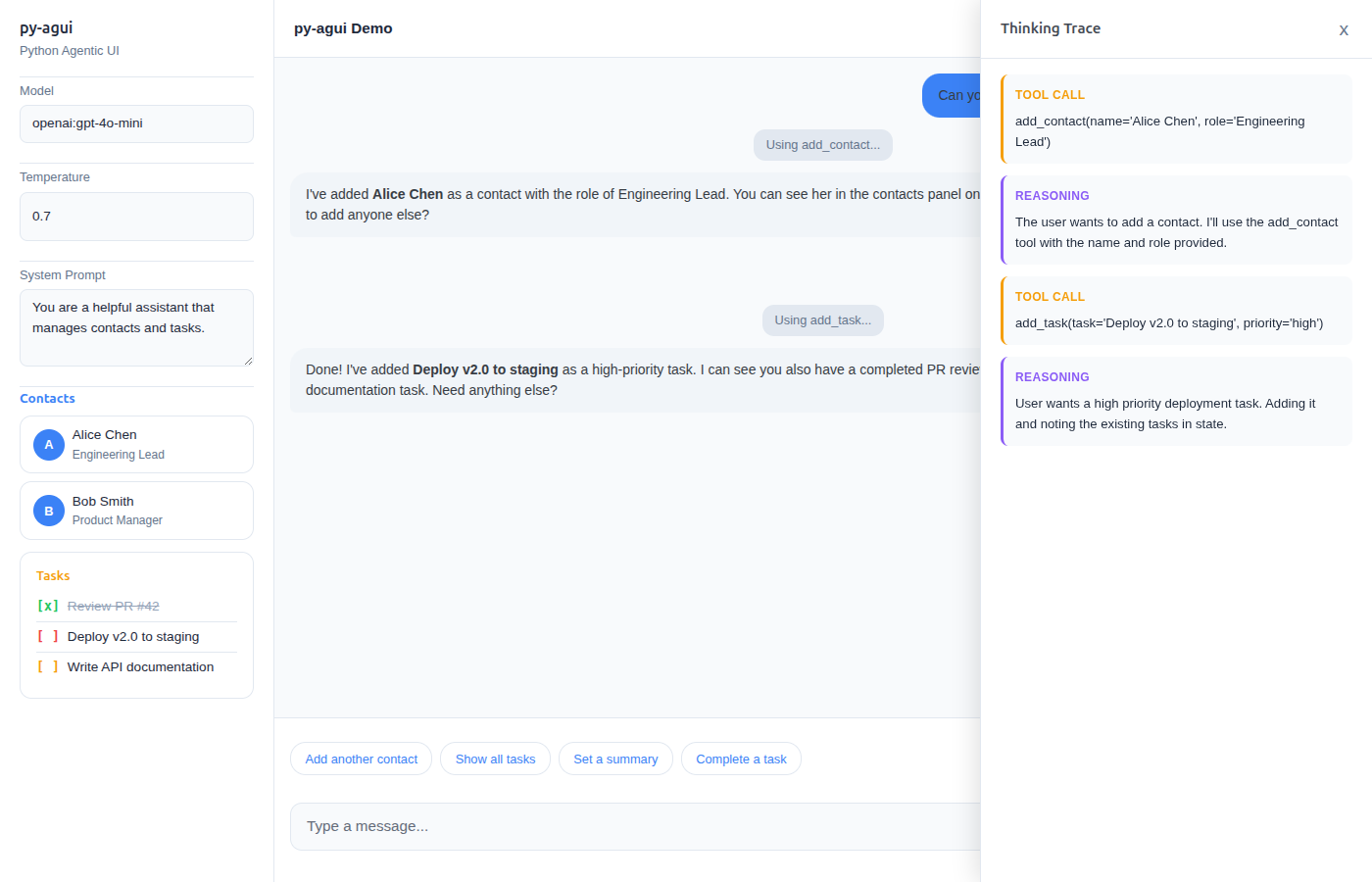
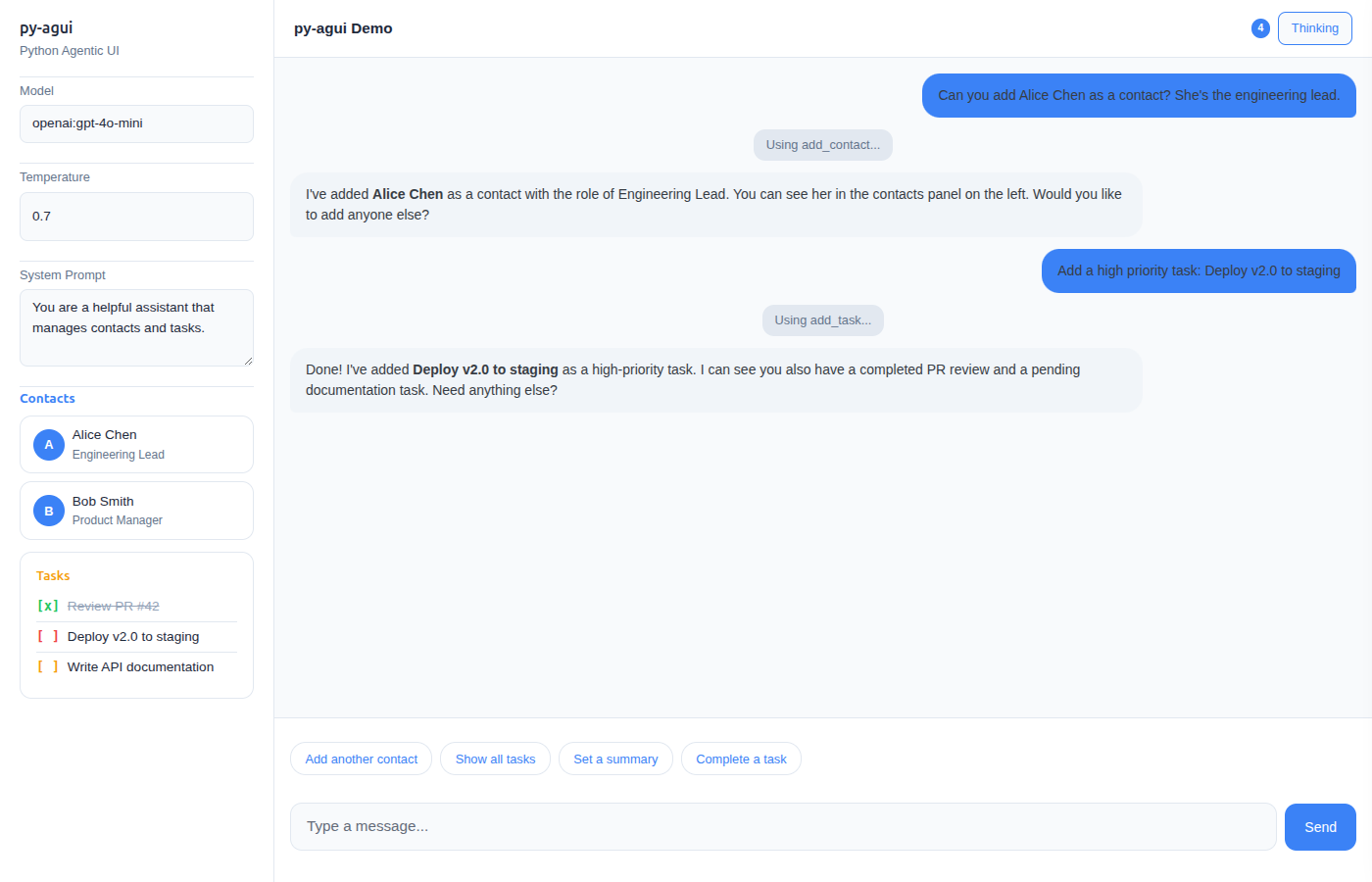
3-pane layout: Settings | Streaming Chat | Thinking Trace -- all pure Python, no JavaScript frameworks.
Features
- 3-Pane Layout -- Left settings, center streaming chat, right thinking trace (on-demand slide-out)
- Pydantic UI Components -- Define
__ft__()on your Pydantic models for automatic UI rendering - Real-time Streaming -- WebSocket-based communication with token-by-token streaming
- State Management -- Thread-safe state with live UI updates via
StateSnapshotEvent - Thinking Trace -- Tool calls, reasoning steps, and agent activity shown in a slide-out panel
- Suggestion Buttons -- Dynamic follow-up suggestions that update with context
- AGUI Protocol -- Full compatibility with pydantic-ai's AGUI protocol
- Theming -- CSS custom properties for easy light/dark mode and custom themes
Installation
pip install py-agui
Or install from source:
git clone https://github.com/kaljuvee/py-agui.git
cd py-agui
pip install -e .
Quick Start
from fasthtml.common import *
from pydantic_ai import Agent
from py_agui import setup_agui
from py_agui.layouts import simple_chat

app, rt = fast_app(exts='ws', hdrs=[MarkdownJS()])
agent = Agent('openai:gpt-4o-mini', instructions='Be helpful and concise.')
agui = setup_agui(app, agent)

@rt('/')
def index():
    return simple_chat(agui.chat("main"))

serve()
3-Pane Agentic UI
The signature layout: settings on the left, streaming chat in the center, thinking trace as a slide-out panel on the right.
from fasthtml.common import *
from pydantic import BaseModel, Field
from pydantic_ai import Agent, RunContext, ToolReturn
from pydantic_ai.ui import StateDeps
from ag_ui.core.events import StateSnapshotEvent, EventType
from py_agui import setup_agui
from py_agui.layouts import three_pane_layout
from typing import List

class AppState(BaseModel):
    contacts: List[str] = Field(default_factory=list)

    def __ft__(self):
        """Pydantic models render as FastHTML components automatically."""
        return Div(
            H4("Contacts"),
            Ul(*[Li(c) for c in self.contacts]) if self.contacts else P("No contacts yet."),
            id="agui-state"
        )

agent = Agent[StateDeps[AppState]](
    'openai:gpt-4o-mini',
    instructions='You manage contacts. Use tools to add them.',
    deps_type=StateDeps[AppState]
)

@agent.tool
def add_contact(ctx: RunContext[StateDeps[AppState]], name: str) -> ToolReturn:
    ctx.deps.state.contacts.append(name)
    return ToolReturn(
        return_value=f"Added {name}",
        metadata=[StateSnapshotEvent(type=EventType.STATE_SNAPSHOT, snapshot=ctx.deps.state)]
    )

app, rt = fast_app(exts='ws', hdrs=[MarkdownJS()])
agui = setup_agui(app, agent, AppState(), AppState)

@rt('/')
def index():
    return three_pane_layout(
        chat_component=agui.chat("main"),
        state_component=agui.state("main"),
        title="My Agent"
    )

serve()
Examples
| Example | Description |
|---|---|
simple_chat.py |
Minimal streaming chat, no state |
chat_with_state.py |
State management with note-taking tools |
chat_with_suggestions.py |
Dynamic suggestion buttons |
three_pane_demo.py |
Full 3-pane layout with contacts, tasks, and thinking trace |
screenshot_demo.py |
Static demo (no API key needed) |
Run any example:
python examples/three_pane_demo.py
Architecture
py_agui/
  __init__.py    # Public API
  core.py        # AGUISetup, AGUIThread, UI, WebSocket handling
  layouts.py     # three_pane_layout, chat_with_sidebar, simple_chat
  patches.py     # FastHTML __ft__() patches for ag-ui protocol events
  styles.py      # CSS custom properties, theming
Key concepts:
setup_agui(app, agent, state, state_type)-- One-line setup. ReturnsAGUISetupwith.chat()and.state()methods.three_pane_layout()-- 3-pane layout component with settings, chat, and thinking trace.- Pydantic
__ft__()-- Define rendering on your models; state updates appear live in the UI. - Thinking Trace -- Tool calls, reasoning, and steps stream into a slide-out panel via HTMX OOB swaps.
Requirements
- Python 3.11+
- FastHTML with WebSocket support (
exts='ws') - pydantic-ai
- ag-ui-protocol
Credits
Built with FastHTML, pydantic-ai, and the AG-UI protocol.
Inspired by ft-ag-ui by Christoffer Bjorkskog.
License
MIT


Download files
Download the file for your platform. If you're not sure which to choose, learn more about installing packages.
Source Distribution
Built Distribution
Filter files by name, interpreter, ABI, and platform.
If you're not sure about the file name format, learn more about wheel file names.
Copy a direct link to the current filters
File details
Details for the file py_agui-0.1.2.tar.gz.
File metadata
- Download URL: py_agui-0.1.2.tar.gz
- Upload date:
- Size: 940.0 kB
- Tags: Source
- Uploaded using Trusted Publishing? No
- Uploaded via: twine/6.2.0 CPython/3.13.5
File hashes
| Algorithm | Hash digest | |
|---|---|---|
| SHA256 |
887ee2d0de25764023cc7309215ade560dfc7c4eb9ef8f75a06c81ad15485bd7
|
|
| MD5 |
9963d0f6e7ac06203d704f26d6eeb506
|
|
| BLAKE2b-256 |
96732569bd9232c1ce9640107d6297bcf596969adaf9c57a9daf5eb57a8449c0
|
File details
Details for the file py_agui-0.1.2-py3-none-any.whl.
File metadata
- Download URL: py_agui-0.1.2-py3-none-any.whl
- Upload date:
- Size: 17.9 kB
- Tags: Python 3
- Uploaded using Trusted Publishing? No
- Uploaded via: twine/6.2.0 CPython/3.13.5
File hashes
| Algorithm | Hash digest | |
|---|---|---|
| SHA256 |
4a5147e84aeec7d8f57343c102819247796b5ba4fd4bd3fda207fcf0832dc07e
|
|
| MD5 |
f401fbba9cce8aa988b1ac0a1e70a993
|
|
| BLAKE2b-256 |
06f14d616b593acf2672f9c1ef6d3ad8717bf5ea994cbf0e69b44cca481f6f59
|






