
TCP framework in flavor of Netty

Project description
py-netty :rocket:



An event-driven TCP networking framework.
Ideas and concepts under the hood are built upon those of Netty, especially the IO and executor model.
APIs are designed to feel familiar to Netty users.
Features
- callback based application invocation
- non blocking IO
- recv/write is performed only in IO thread
- adaptive read buffer
- low/higher water mark to indicate writability (default low water mark is 32K and high water mark is 64K)
- all platform supported (linux: epoll, mac: kqueue, windows: select)
Installation
pip install py-netty
Getting Started
Start an echo server:
from py_netty import ServerBootstrap
ServerBootstrap().bind(address='0.0.0.0', port=8080).close_future().sync()
Start an echo server (TLS):
from py_netty import ServerBootstrap
ServerBootstrap(certfile='/path/to/cert/file', keyfile='/path/to/key/file').bind(address='0.0.0.0', port=9443).close_future().sync()
As TCP client:
from py_netty import Bootstrap, ChannelHandlerAdapter


class HttpHandler(ChannelHandlerAdapter):
    def channel_read(self, ctx, buffer):
        print(buffer.decode('utf-8'))


remote_address, remote_port = 'www.google.com', 80
b = Bootstrap(handler_initializer=HttpHandler)
channel = b.connect(remote_address, remote_port).sync().channel()
request = f'GET / HTTP/1.1\r\nHost: {remote_address}\r\n\r\n'
channel.write(request.encode('utf-8'))
input() # pause
channel.close()
As TCP client (TLS):
from py_netty import Bootstrap, ChannelHandlerAdapter


class HttpHandler(ChannelHandlerAdapter):
    def channel_read(self, ctx, buffer):
        print(buffer.decode('utf-8'))


remote_address, remote_port = 'www.google.com', 443
b = Bootstrap(handler_initializer=HttpHandler, tls=True, verify=True)
channel = b.connect(remote_address, remote_port).sync().channel()
request = f'GET / HTTP/1.1\r\nHost: {remote_address}\r\n\r\n'
channel.write(request.encode('utf-8'))
input() # pause
channel.close()
TCP port forwarding:
from py_netty import ServerBootstrap, Bootstrap, ChannelHandlerAdapter, EventLoopGroup


class ProxyChannelHandler(ChannelHandlerAdapter):

    def __init__(self, remote_host, remote_port, client_eventloop_group):
        self._remote_host = remote_host
        self._remote_port = remote_port
        self._client_eventloop_group = client_eventloop_group
        self._client = None

    def _client_channel(self, ctx0):

        class __ChannelHandler(ChannelHandlerAdapter):
            def channel_read(self, ctx, bytebuf):
                ctx0.write(bytebuf)

            def channel_inactive(self, ctx):
                ctx0.close()

        if self._client is None:
            self._client = Bootstrap(
                eventloop_group=self._client_eventloop_group,
                handler_initializer=__ChannelHandler
            ).connect(self._remote_host, self._remote_port).sync().channel()
        return self._client

    def exception_caught(self, ctx, exception):
        ctx.close()

    def channel_read(self, ctx, bytebuf):
        self._client_channel(ctx).write(bytebuf)

    def channel_inactive(self, ctx):
        if self._client:
            self._client.close()


proxied_server, proxied_port = 'www.google.com', 443
client_eventloop_group = EventLoopGroup(1, 'ClientEventloopGroup')
sb = ServerBootstrap(
    parent_group=EventLoopGroup(1, 'Acceptor'),
    child_group=EventLoopGroup(1, 'Worker'),
    child_handler_initializer=lambda: ProxyChannelHandler(proxied_server, proxied_port, client_eventloop_group)
)
sb.bind(port=8443).close_future().sync()
Event-driven callbacks
Create handler with callbacks for interested events:
from py_netty import ChannelHandlerAdapter


class MyChannelHandler(ChannelHandlerAdapter):
    def channel_active(self, ctx: 'ChannelHandlerContext') -> None:
        # invoked when channel is active (TCP connection ready)
        pass

    def channel_read(self, ctx: 'ChannelHandlerContext', msg: Union[bytes, socket.socket]) -> None:
        # invoked when there is data ready to process
        pass

    def channel_inactive(self, ctx: 'ChannelHandlerContext') -> None:
        # invoked when channel is inactive (TCP connection is broken)
        pass

    def channel_registered(self, ctx: 'ChannelHandlerContext') -> None:
        # invoked when the channel is registered with a eventloop
        pass

    def channel_unregistered(self, ctx: 'ChannelHandlerContext') -> None:
        # invoked when the channel is unregistered from a eventloop
        pass

    def channel_handshake_complete(self, ctx: 'ChannelHandlerContext') -> None:
        # invoked when ssl handshake is complete, this only applies to client side
        pass

    def channel_writability_changed(self, ctx: 'ChannelHandlerContext') -> None:
        # invoked when pending data > high water mark or < low water mark
        pass

    def exception_caught(self, ctx: 'ChannelHandlerContext', exception: Exception) -> None:
        # invoked when there is any exception raised during process
        pass
Benchmark
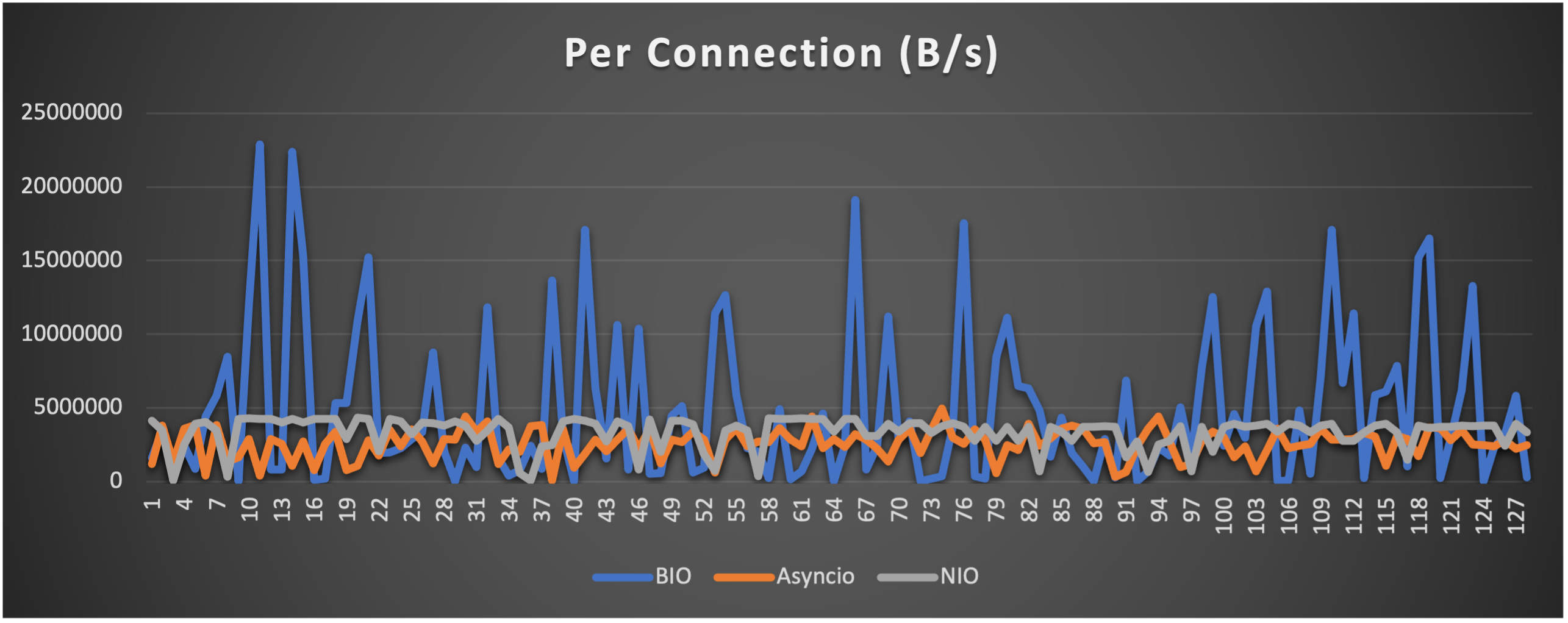
Test is performed using echo client/server mechanism on a 1-Core 2.0GHz Intel(R) Xeon(R) Platinum 8452Y with 4GB memory, Ubuntu 22.04.
(Please see bm_echo_server.py for details.)
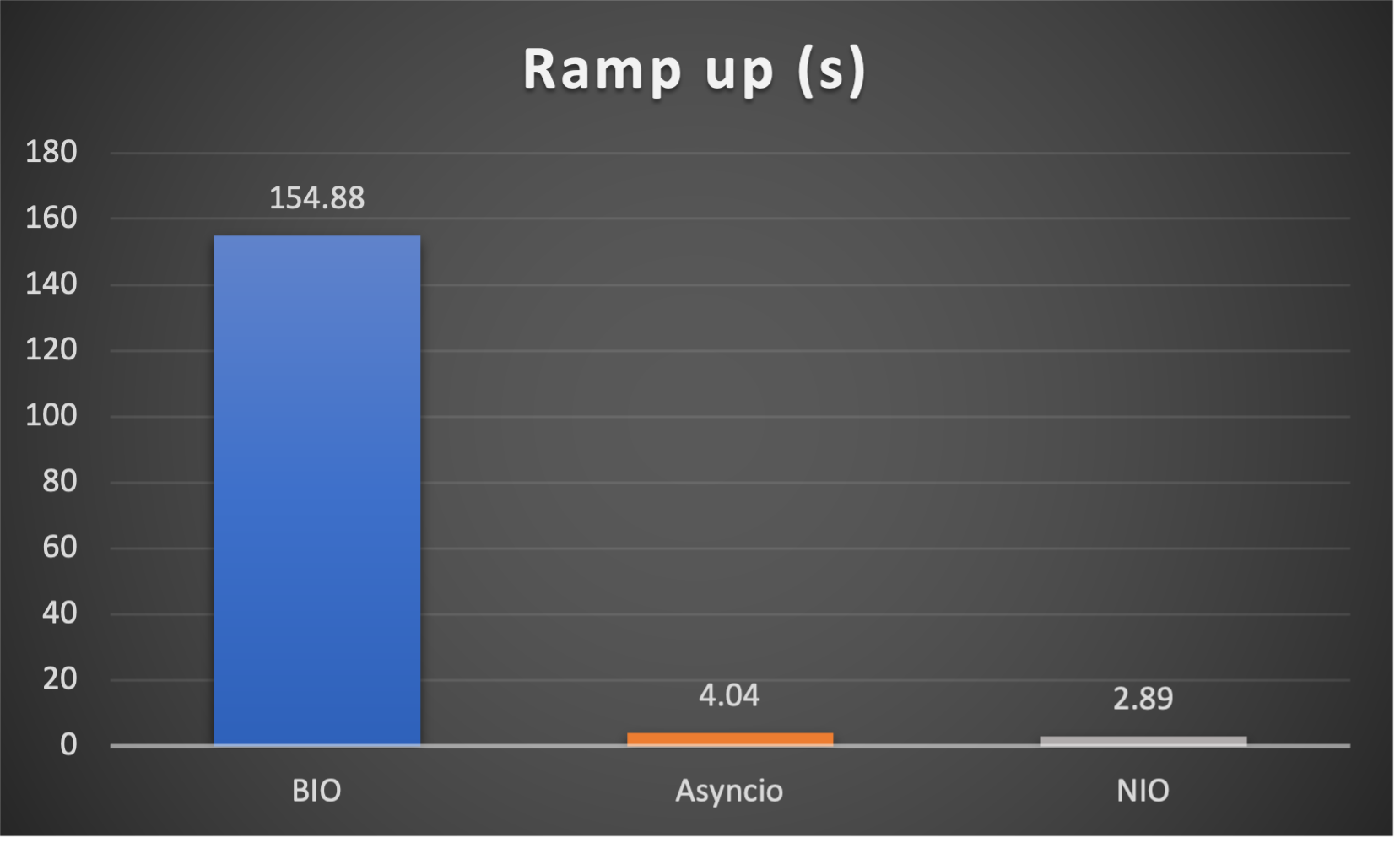
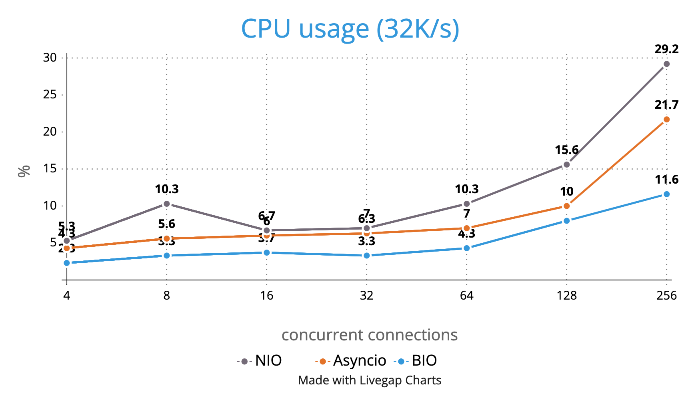
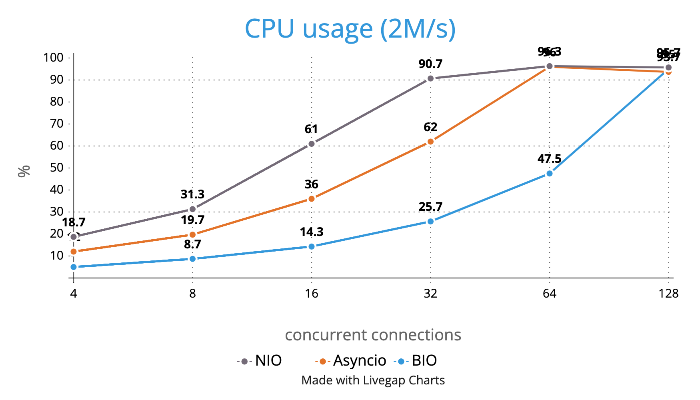
3 methods are tested:
- BIO (Traditional thread based blocking IO)
- Asyncio (Python built-in async IO)
- NIO (py-netty with 1 eventloop)
3 metrics are collected:
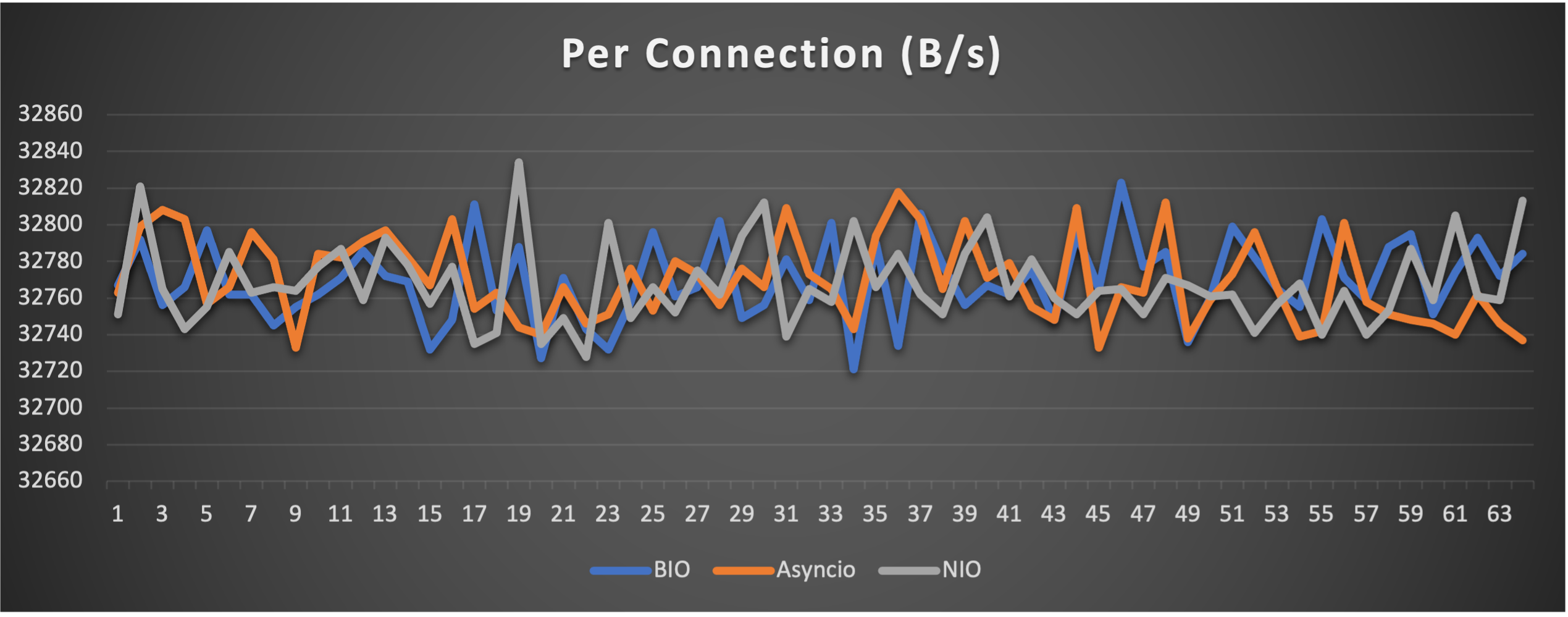
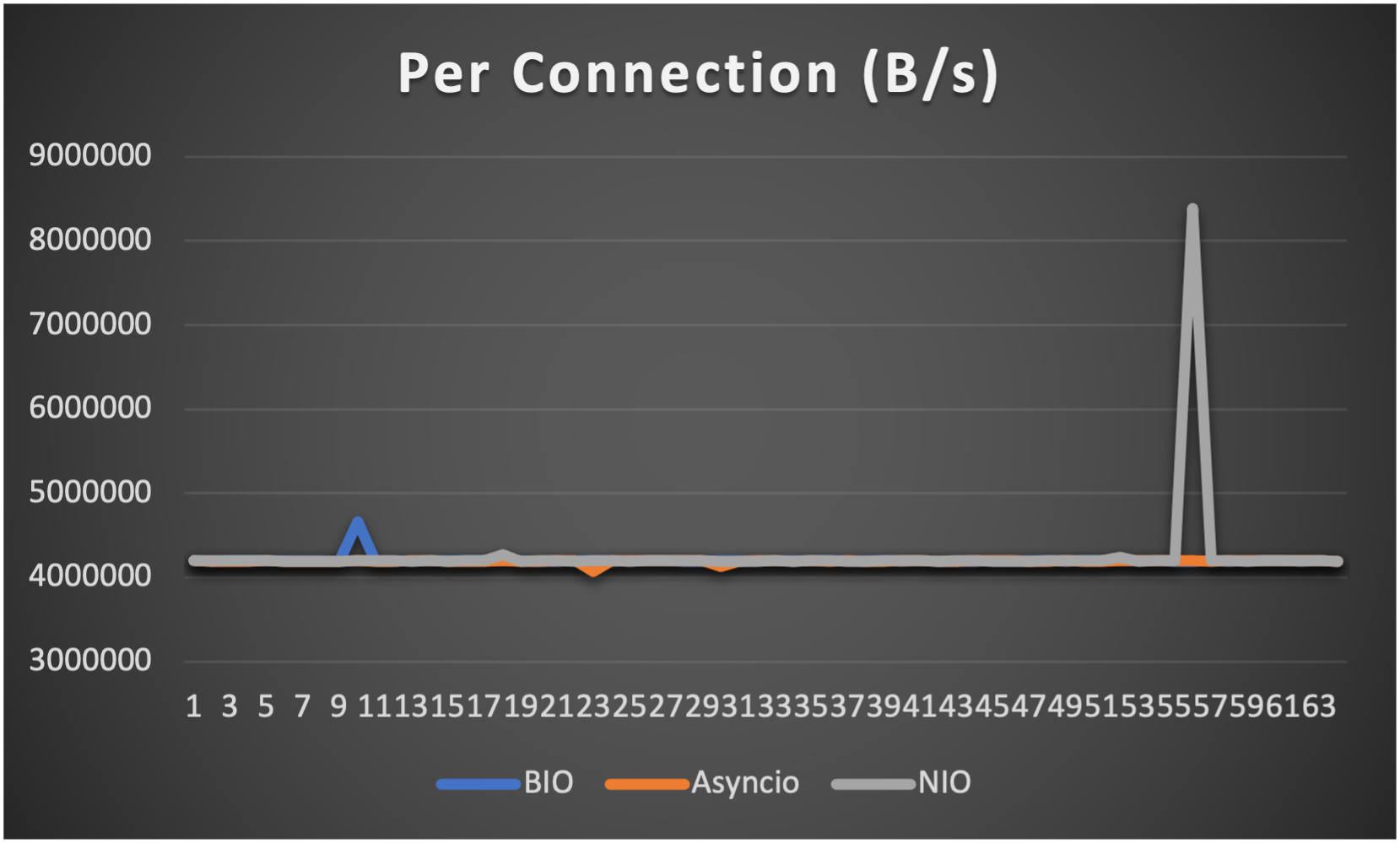
- Throughput (of each connection) to indicate overall stability
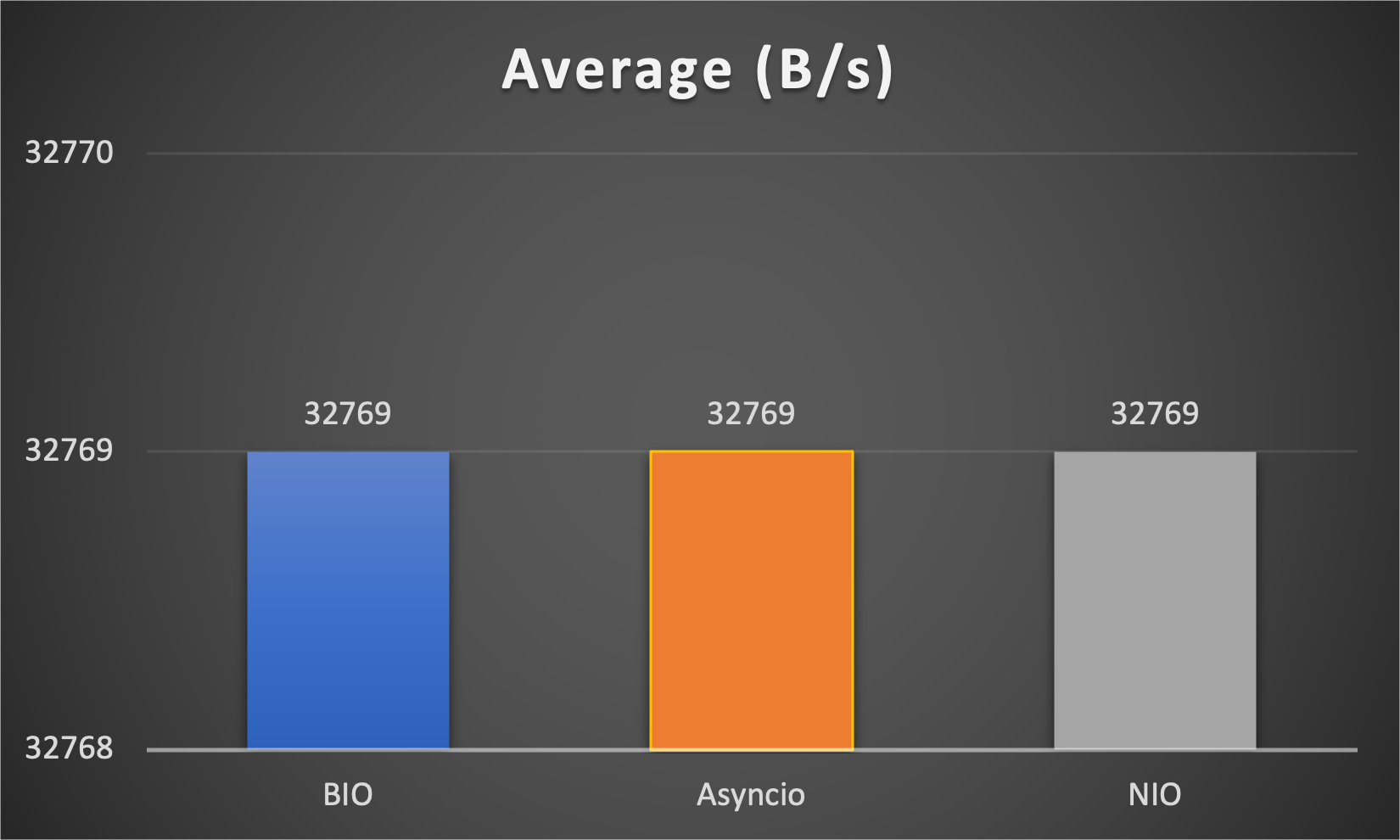
- Average throughput (of all connections) to indicate overall performance
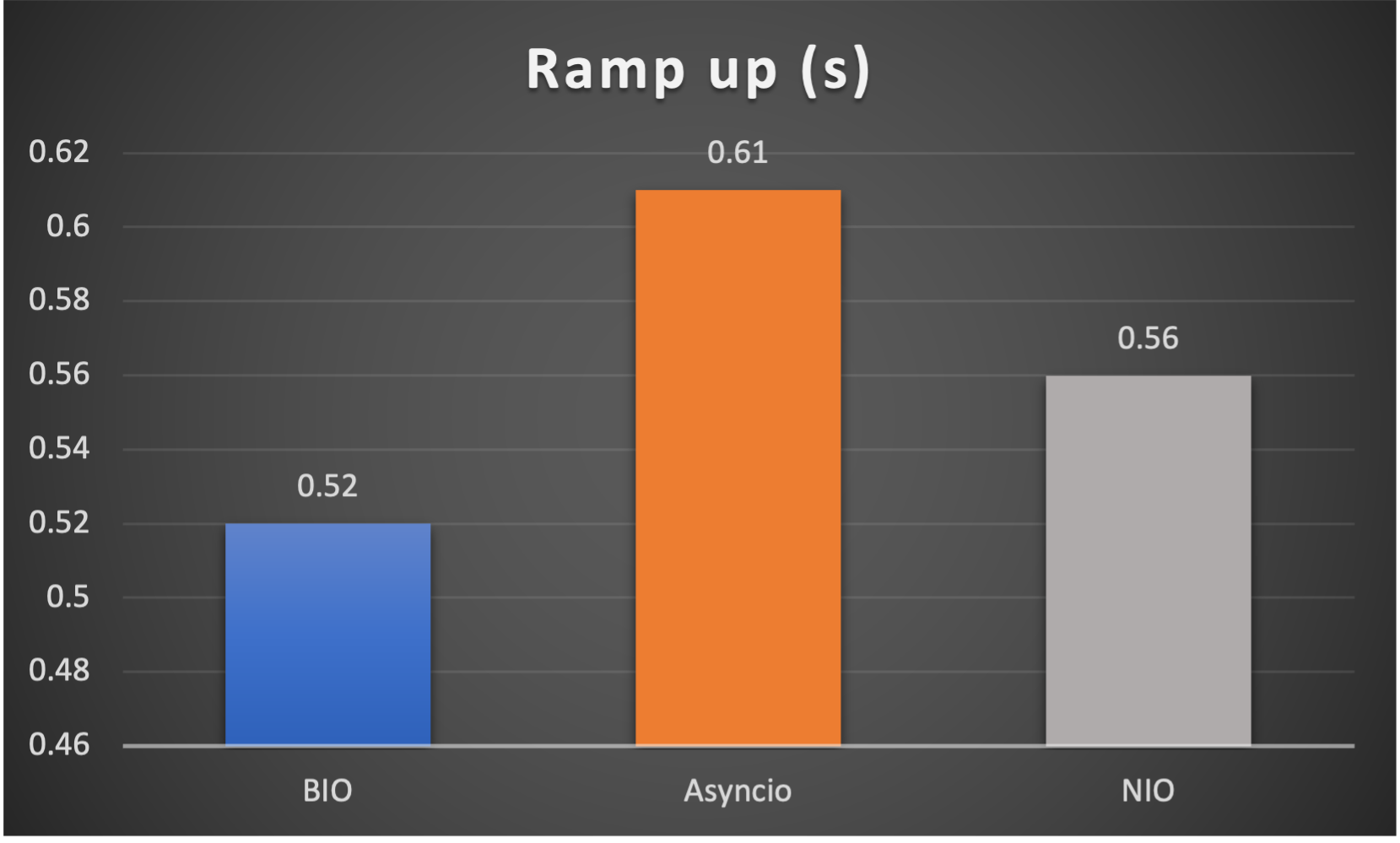
- Ramp up time (seconds consumed after all connections established) to indicate responsiveness
Case 1: Concurrent 64 connections with 32K/s
Case 2: Concurrent 64 connections with 4M/s
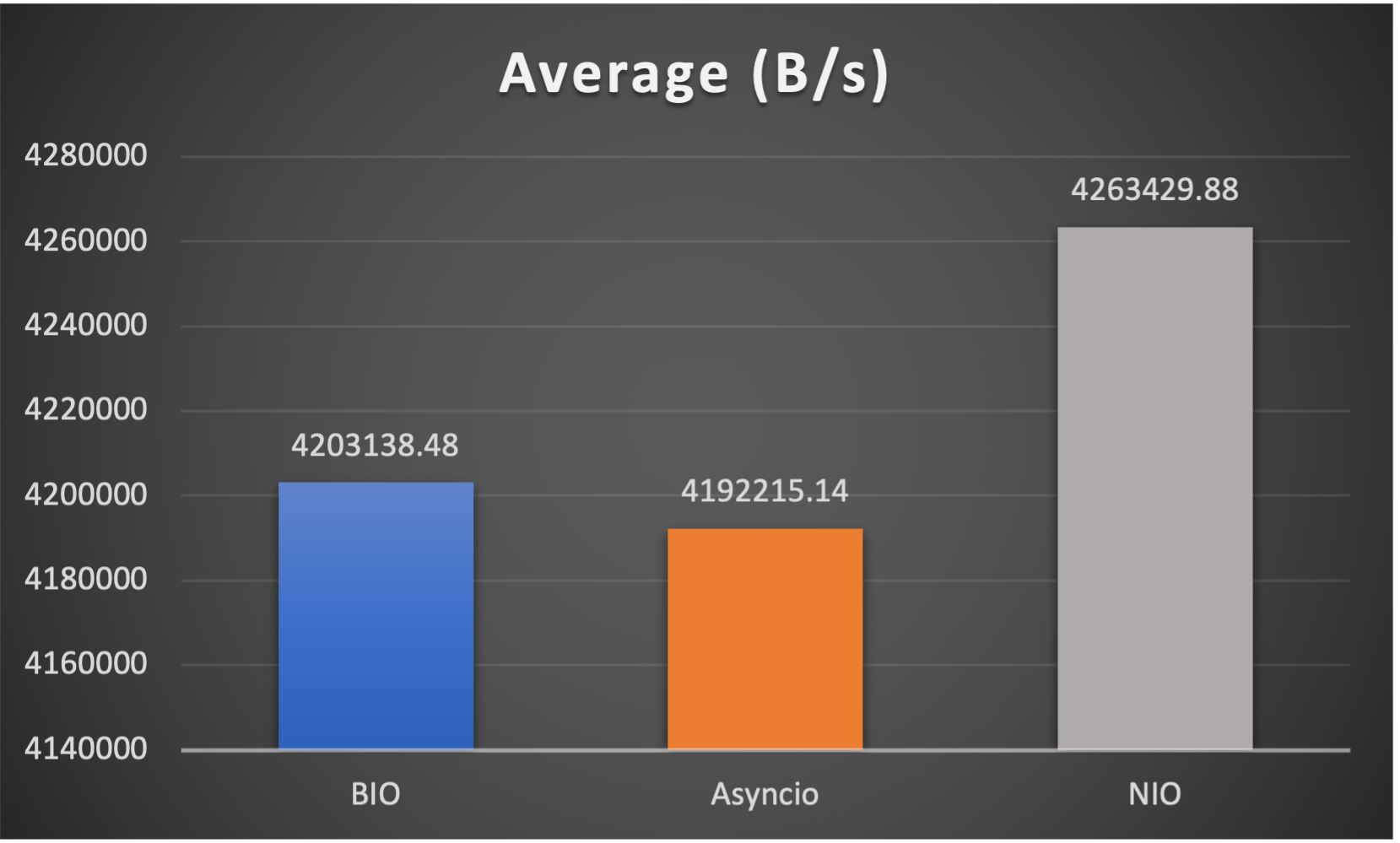
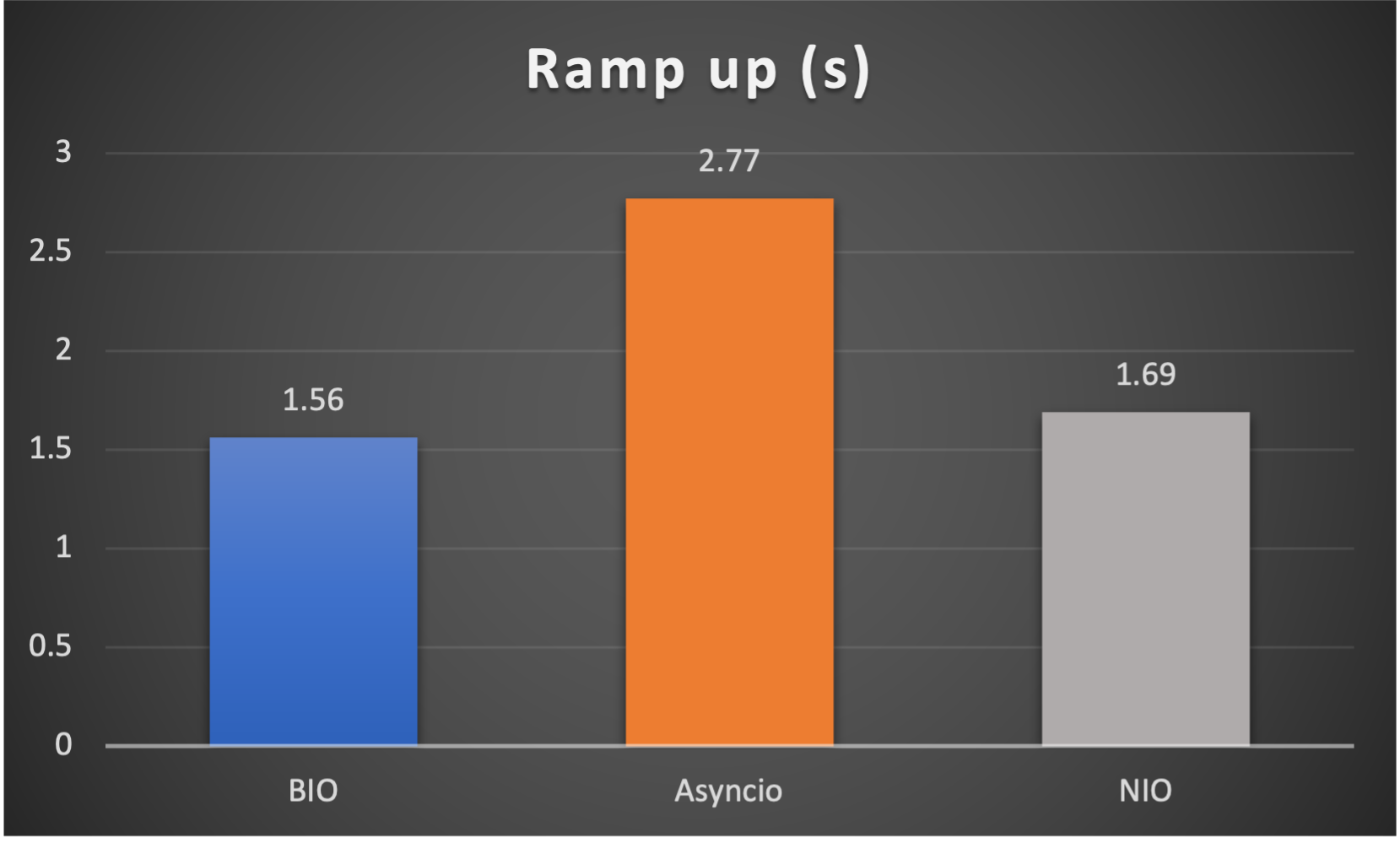
Case 3: Concurrent 128 connections with 4M/s
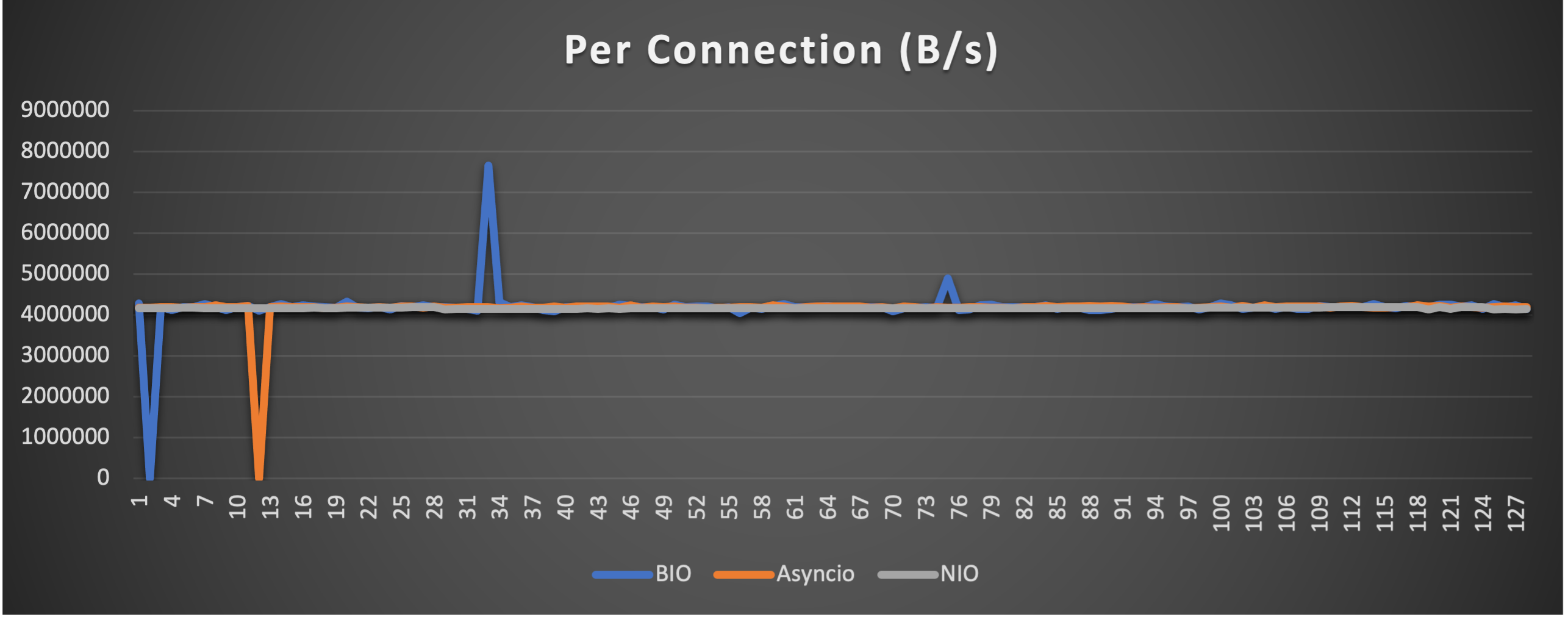
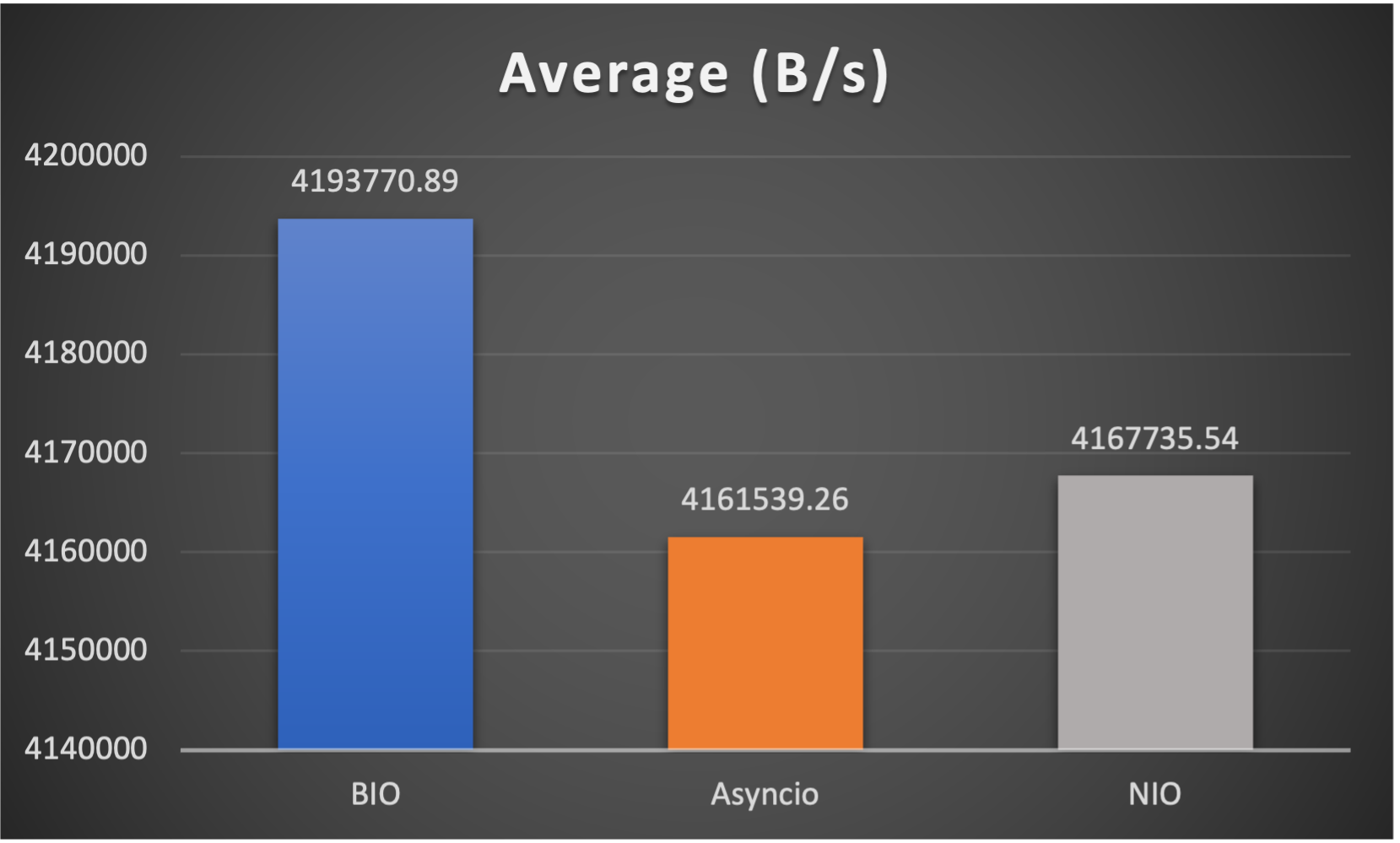
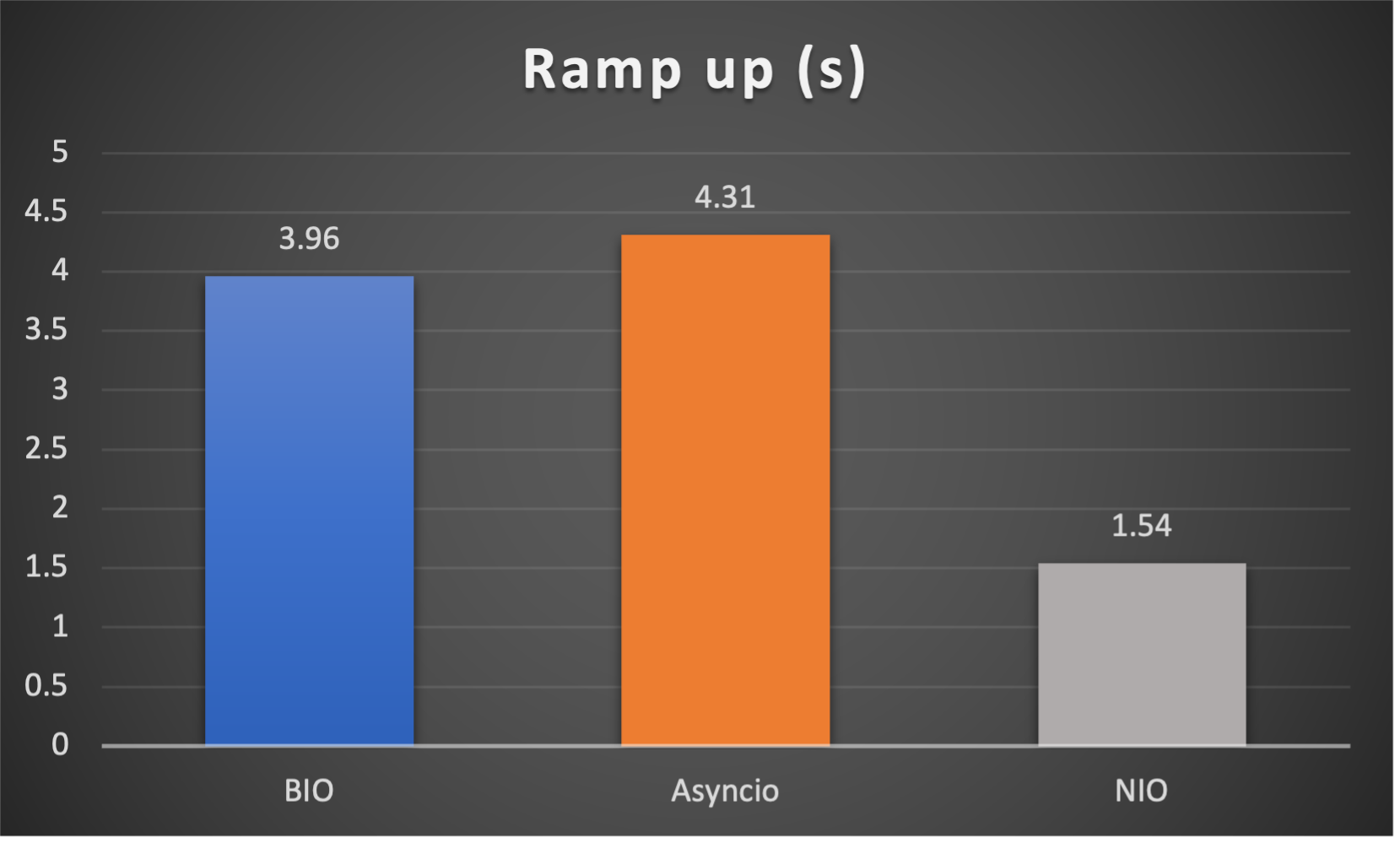
Case 4: Concurrent 128 connections with 8M/s
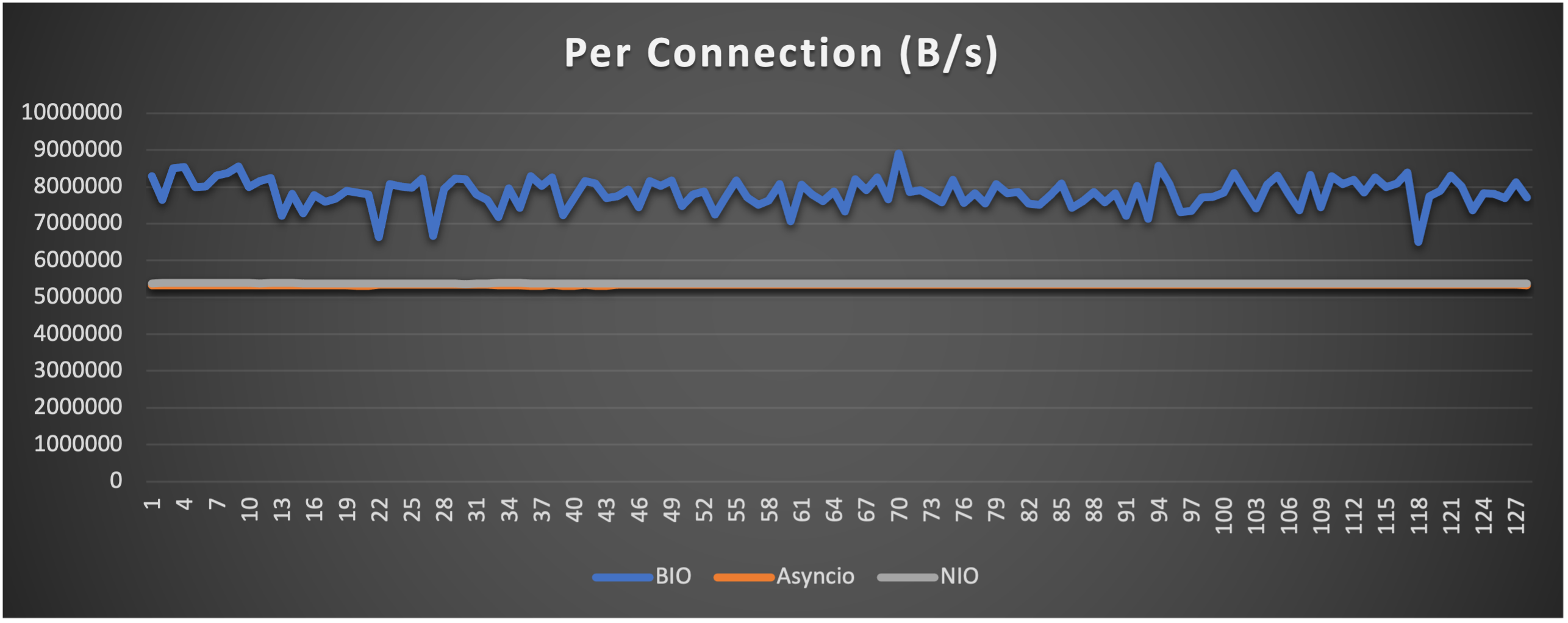
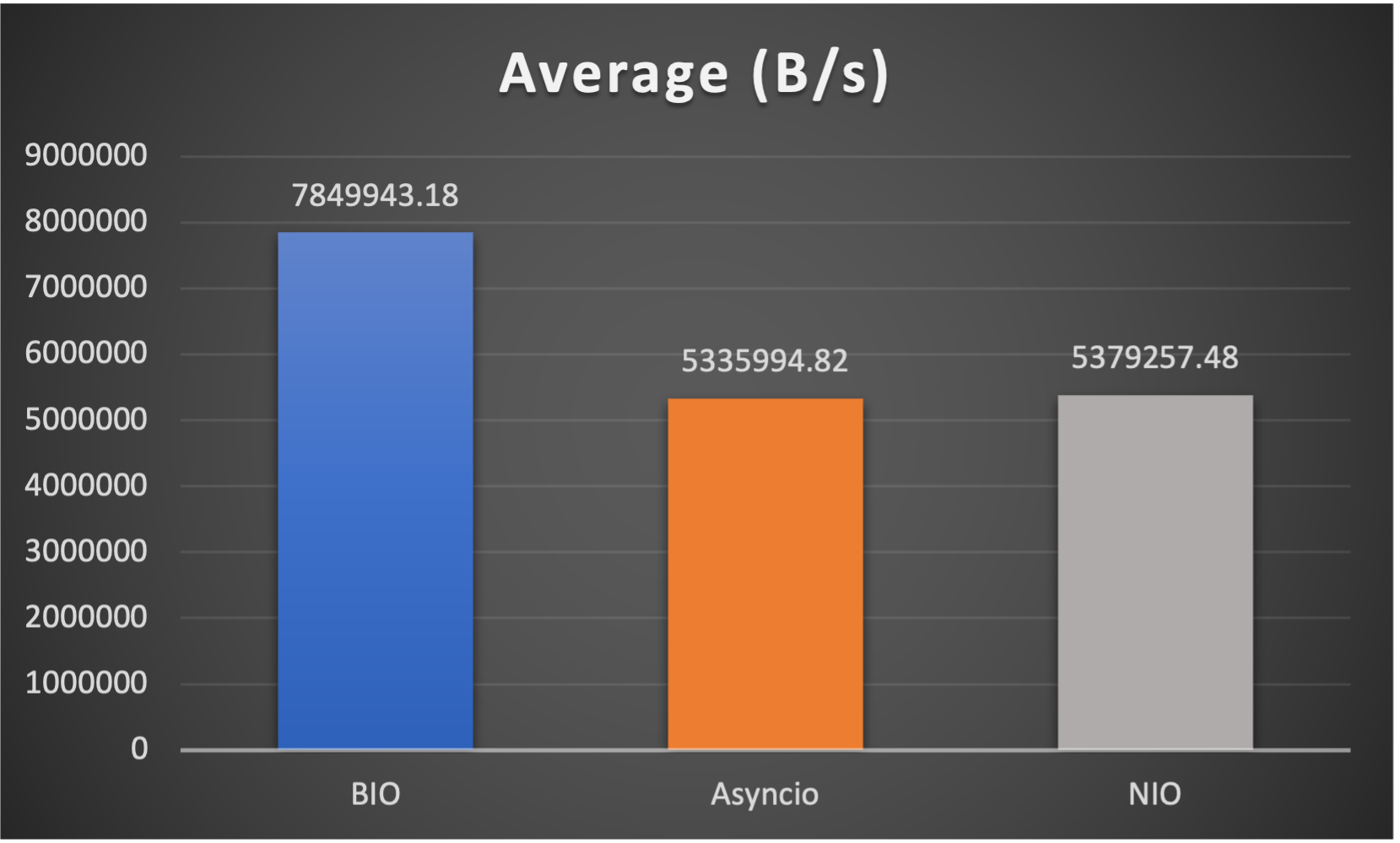
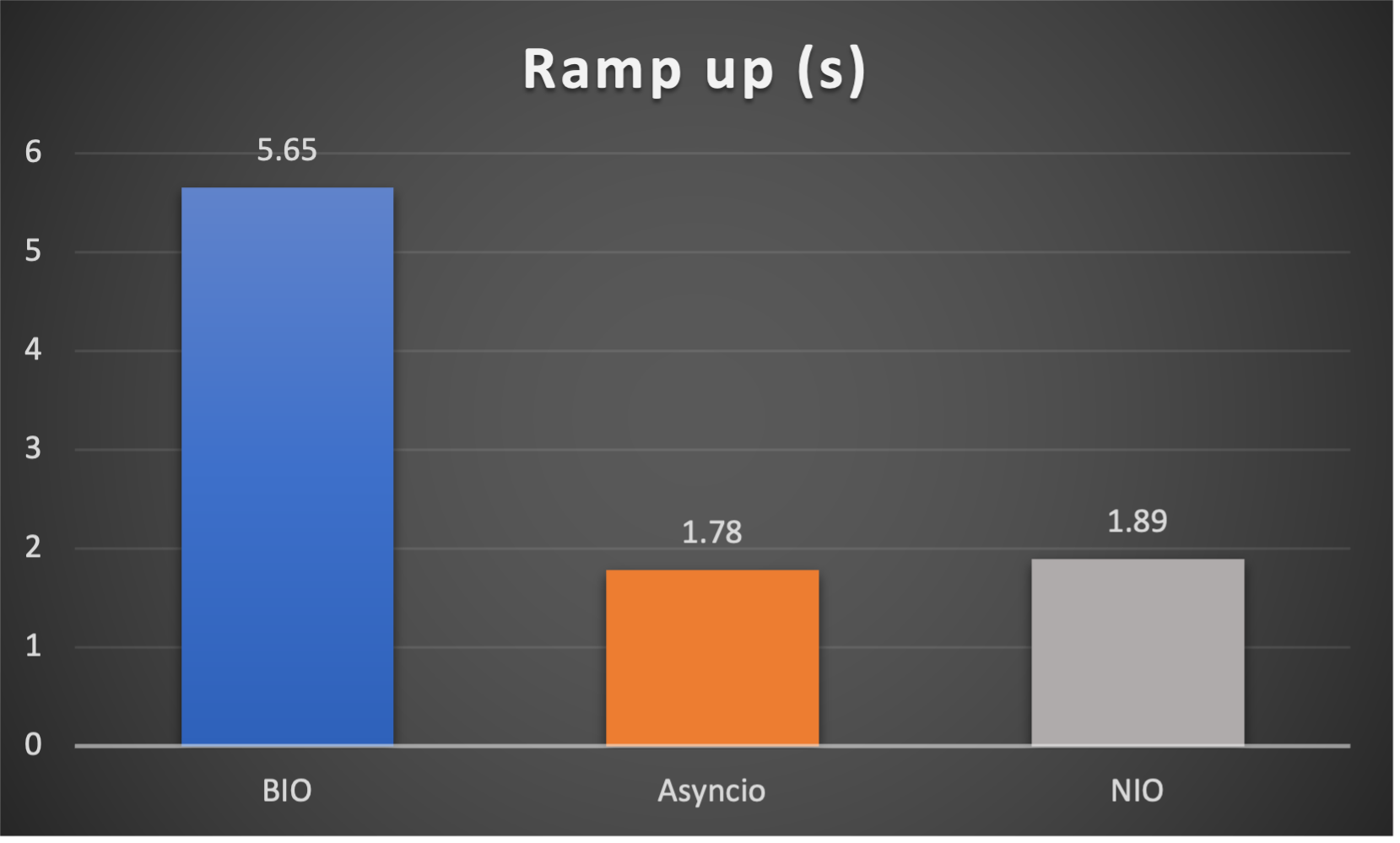
Case 5: Concurrent 256 connections with 8M/s

CPU Usage
Caveats
- No pipeline, supports only one handler FOR NOW
- No batteries-included codecs FOR NOW
- No pool or refcnt for bytes buffer, bytes objects are created and consumed at your disposal
Release history Release notifications | RSS feed


Download files
Download the file for your platform. If you're not sure which to choose, learn more about installing packages.
Source Distribution
Built Distribution
Filter files by name, interpreter, ABI, and platform.
If you're not sure about the file name format, learn more about wheel file names.
Copy a direct link to the current filters
File details
Details for the file py_netty-1.0.12.tar.gz.
File metadata
- Download URL: py_netty-1.0.12.tar.gz
- Upload date:
- Size: 31.2 kB
- Tags: Source
- Uploaded using Trusted Publishing? No
- Uploaded via: twine/6.2.0 CPython/3.12.10
File hashes
| Algorithm | Hash digest | |
|---|---|---|
| SHA256 |
45528dd0c883ef0e53b50036fccb2be6feed6ea6458537fdfe999e377a7a4816
|
|
| MD5 |
842cdc1614e876792425b22114fcea27
|
|
| BLAKE2b-256 |
bdfa54f2af1c80a83255285f44030874e9ebf903ec01218006e1e49de51cde44
|
File details
Details for the file py_netty-1.0.12-py3-none-any.whl.
File metadata
- Download URL: py_netty-1.0.12-py3-none-any.whl
- Upload date:
- Size: 18.4 kB
- Tags: Python 3
- Uploaded using Trusted Publishing? No
- Uploaded via: twine/6.2.0 CPython/3.12.10
File hashes
| Algorithm | Hash digest | |
|---|---|---|
| SHA256 |
9622a511100eb052392b8d30581f184c731cbf702ee624cd7198d25ac107325d
|
|
| MD5 |
f0b8e92f60229aee3ec10bad8e9f0c57
|
|
| BLAKE2b-256 |
010dc08e9bffbfba97541bfc4931640db513af1ed352b716ec0e8278726cb2e4
|






