
py-tbparse




Read Tableau workbooks (.twb and .twbx) from Python. You get datasources, fields, calculated fields, joins, relationships and dashboards as pandas DataFrames. It is plain Python on top of lxml and pandas, so Tableau and R are not needed.
It began as a port of PrigasG's R package twbparser. The command-line tool, the browser GUI, renaming, templates, workbook diffing and folder scanning are new here.
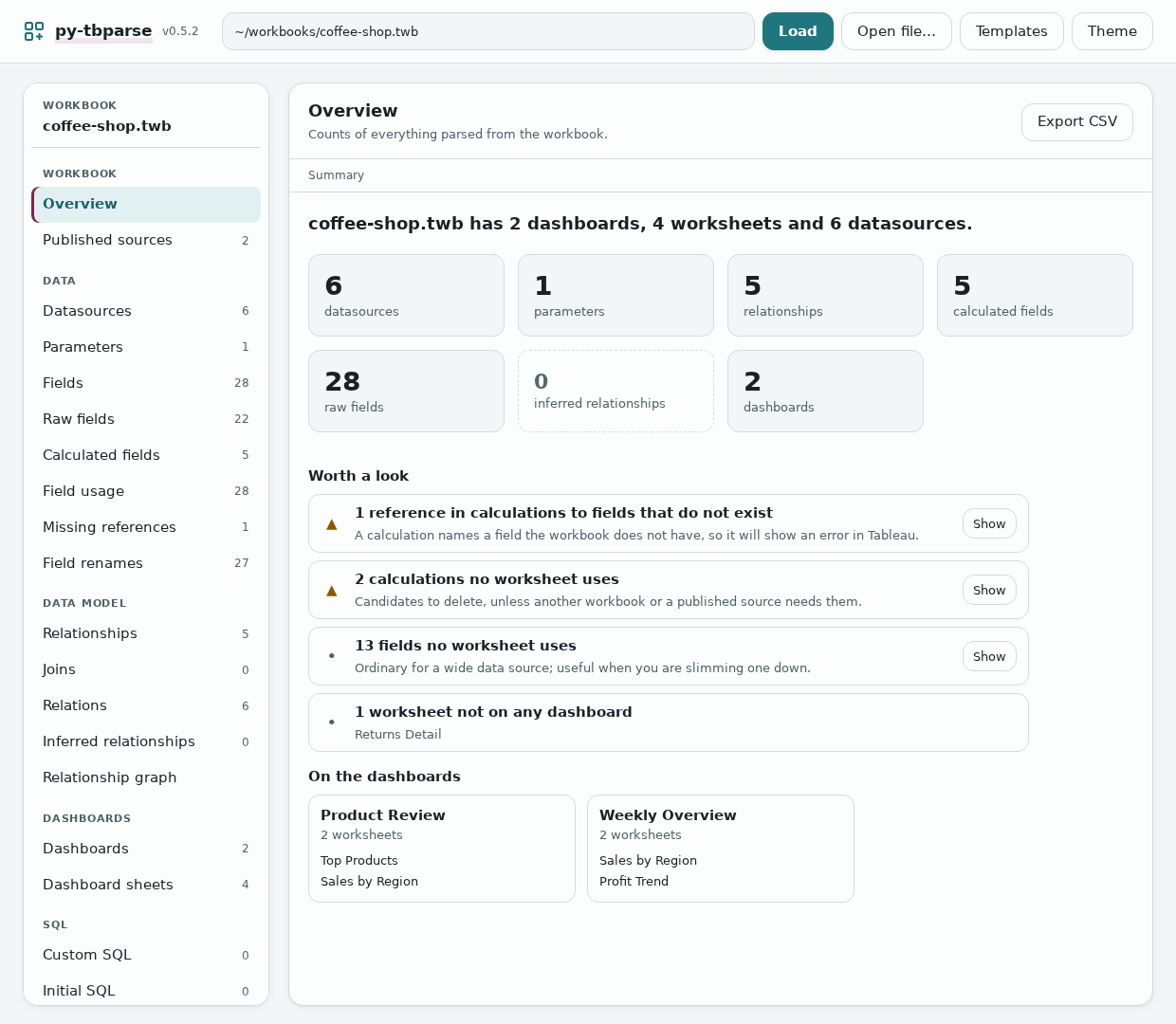
What it does
- Lists what is in a workbook: datasources, parameters, fields, calculations, joins, relationships, dashboards, custom SQL, published sources.
- Checks relationships and finds calculations that refer to fields the workbook does not have.
- Shows which worksheets, dashboards and calculations use each field.
- Suggests clean names for fields, sheets, dashboards and other objects, and writes a renamed copy.
- Turns a finished workbook into a template you can fill with other data.
- Compares two workbooks, scans a folder of them, and draws the data model as a graph.
- Works from Python, from the command line, or in a local browser page.
Install
pip install py-tbparse
Python 3.9 or newer. The package, the import and both commands all use the same name: pip install py-tbparse, import py_tbparse, py-tbparse, py-tbparse-gui. Releases up to 0.2.0 used twbparser_py and twbparser; those names are gone.
Quick start
From Python:
from py_tbparse import TwbParser

p = TwbParser("workbook.twb")    # or a .twbx
p.get_overview()                 # counts of everything
p.get_calculated_fields()        # each calculation and its formula
p.get_relationships()            # how the tables connect
Every getter returns a DataFrame. The others are get_datasources, get_parameters, get_fields, get_raw_fields, get_joins, get_relations, get_inferred_relationships, get_dashboards, get_dashboard_sheets, get_custom_sql, get_initial_sql, get_published_refs and get_field_usage. get_relationship_graph_dot() returns the data model as Graphviz text and validate() looks for problems in the relationships. In Jupyter, a bare p shows the overview.
From the command line:
py-tbparse workbook.twb                    # overview
py-tbparse workbook.twb calculated-fields
py-tbparse workbook.twb fields --format csv -o fields.csv
py-tbparse workbook.twb validate           # exit code 2 if it finds a problem
In the browser:
py-tbparse-gui workbook.twb
Across workbooks:
from py_tbparse import TwbParser, diff_workbooks, scan_folder

diff_workbooks(TwbParser("v1.twb"), TwbParser("v2.twb"), table="datasources")
scan_folder("./workbooks", table="datasources")   # one table, every workbook in the folder
Guides
- Command line: every table, the
diff,batch,renameandtemplatecommands, and their options. - Browser GUI: opening files, the table, the overview, the graph, themes.
- Renaming: clean names after a datasource switch, editing the suggestions, what will stay broken.
- Templates: make a template from a workbook and apply it to new data.
.twbxfiles: they are read straight from the zip; how to extract the contents.- Development: running the tests, the workbook corpus, the browser tests.
Limits
- Nothing the tool writes has been opened in Tableau yet. That covers renamed workbooks and workbooks made from templates. The XML follows what Tableau writes, but open one on a copy and check it before relying on it. The original file is never modified or overwritten.
- Only part of the R package is ported. Missing: formatting, tooltips, colors, axes and sorts, dashboard layout and actions, calculation complexity, the replication brief and the Shiny inspector. The GUI covers some of what the inspector did.
- Where the R version has a bug, this one does not copy it: joins and relationships on more than one key, nested joins, the include-parameters option, and calculations with brackets inside brackets.
- The GUI is meant to run on your own machine for one person. It refuses requests that come from other websites, but there is no login, so do not put it on a shared network.
Why a Tableau parser
A .twb is XML and a .twbx is a zip containing one, so reading them from Python is not hard. Power BI's .pbix is a binary format built on a proprietary storage engine, and getting into it from code took reverse-engineering projects like PBIXRay and pbi-tools. On the server side it goes the other way: Tableau's own Python tooling (tableauserverclient and tabcmd) is more mature and more open than what Microsoft has for the Power BI REST API.
Contributing
Issues and pull requests are welcome at github.com/DDSNA/py-tbparse. The test setup is in the development guide. AGENTS.md describes the code layout and the rules for porting a function from the R package.
Credit
Based on twbparser by George Arthur, MIT licensed.
License
MIT, see LICENSE.
1 maintainer

Metadata
1 maintainer
Release files for py-tbparse 0.4.4
For a detailed explanation of source distributions (sdists) and built distributions (wheels), please see the package formats documentation.
Source distribution (sdist)
| File | Size | Uploaded | |
|---|---|---|---|
| py_tbparse-0.4.4.tar.gz | 1.8 MB | Details |
Built distribution (wheel)
| File | Interpreter | ABI | Platform | Reset |
|---|---|---|---|---|
| py_tbparse-0.4.4-py3-none-any.whl | Python 3 | none | any | Details |
Total release size: 1.9 MB
Release files / py_tbparse-0.4.4.tar.gz
| Download URL | py_tbparse-0.4.4.tar.gz |
|---|---|
| Size | 1.8 MB |
| Tags | Source |
|
SHA-256 checksum How to use checksums |
ebd2a0e5e84807b8e4ef7e5a2645ab9b366921e397fff925b01d08e9d5cfd289
|
|
BLAKE2b-256 checksum How to use checksums |
3fac7b0fed042e81ef352e05e4d3517d9f223b0536645b20683595df58a57f37
|
| Upload date | |
|
Uploaded using Trusted Publishing? What is trusted publishing? |
Yes |
| Uploaded via |
twine/7.0.0 CPython/3.13.14
|
Provenance
Provenance describes where a file came from. On PyPI, provenance is shared via attestations, which provide a verifiable record of the build or publishing details. View details, limitations and caveats.


PyPI Publish Attestation
PyPI verified that this artifact, at this checksum, originated from the publisher listed below.
Signed by GitHub Actions, verified by PyPI on Oct 2, 2026.
Transparency logRelease files / py_tbparse-0.4.4-py3-none-any.whl
| Download URL | py_tbparse-0.4.4-py3-none-any.whl |
|---|---|
| Size | 115.5 kB |
| Tags | Python 3 |
|
SHA-256 checksum How to use checksums |
41ec9929ec97f8e86c1760991465d7a55b3298229362d0bc583fb3010aa935cd
|
|
BLAKE2b-256 checksum How to use checksums |
73d82d5e8cb2e24be8d913725cc5238f7871686fef41dc627e43531251fd0d19
|
| Upload date | |
|
Uploaded using Trusted Publishing? What is trusted publishing? |
Yes |
| Uploaded via |
twine/7.0.0 CPython/3.13.14
|
Provenance
Provenance describes where a file came from. On PyPI, provenance is shared via attestations, which provide a verifiable record of the build or publishing details. View details, limitations and caveats.
PyPI Publish Attestation
PyPI verified that this artifact, at this checksum, originated from the publisher listed below.
Signed by GitHub Actions, verified by PyPI on Oct 2, 2026.
Transparency log













