
PyCftool
Heavily inspired by matlabs interactive curvefitter (Cftool), this program attempts to copy its fantastic features for use in python.
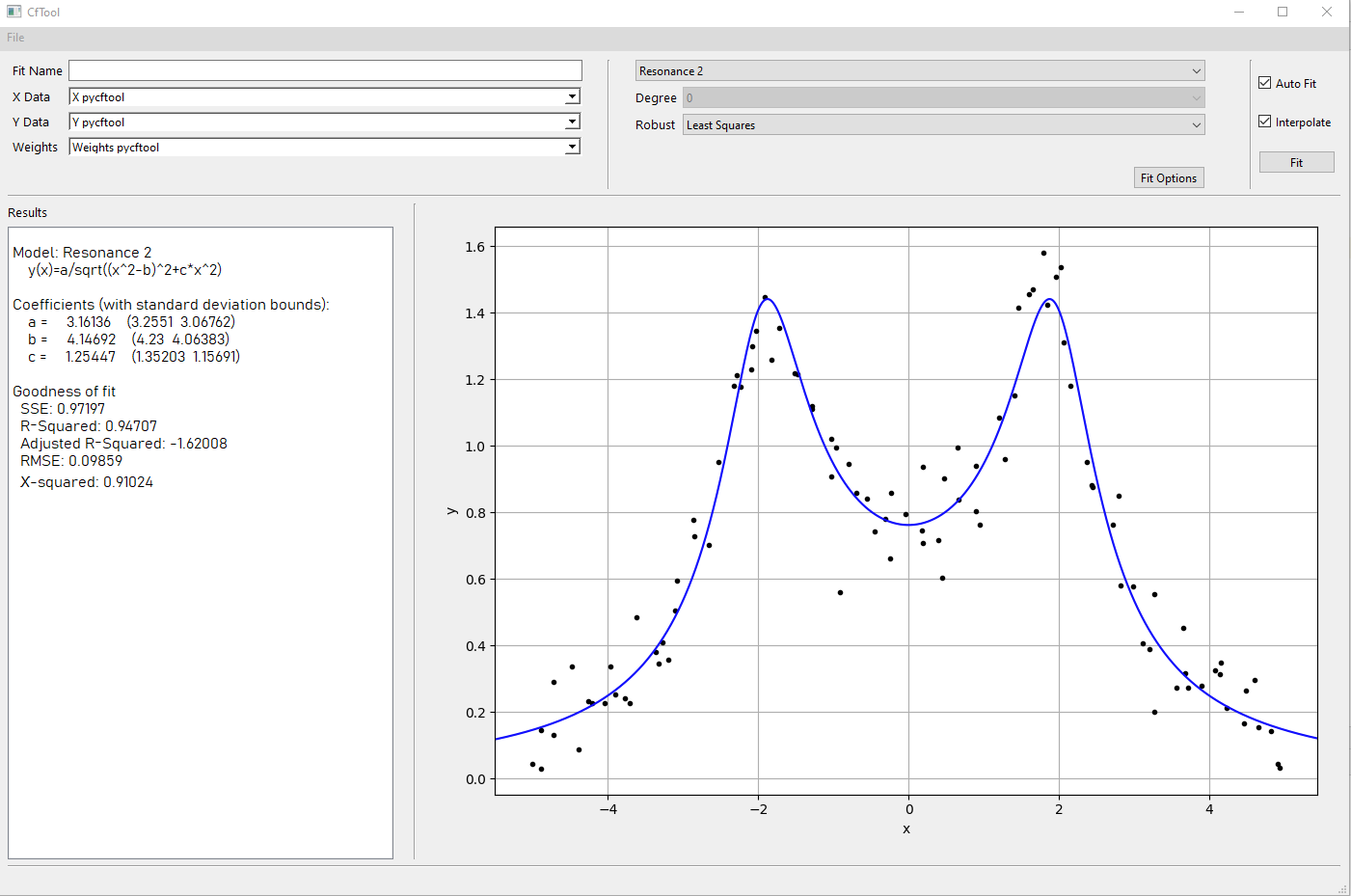
Features
Easy access to data via dropdown menu
Using the argument local_vars you can pass multiple arrays to the GUI. From two dropdown menus (X Data and Y Data) you can choose to select, which x and y data the program should fit to.
Automatic fitting
Everytime the program detects a change in any option, it will automatically fit a new line using these new options. This can be disabled by unchecking Auto Fit in the top right corner. By doing so, a fit will only be computed once the Fit button, located under Auto Fit, is pressed.
Multiple equation support
From a dropdown menu it's possible to use a wide variety of predefined functions. So far these include
| Name | Equation |
|---|---|
| Polynomial of N degree | $$y= \sum_{k=0}^N a_kx^{(N-k)}$$ |
| Exponential | $$y= be^{ax}$$ |
| Resonance 1 | $$y=\frac{ax}{\sqrt{(x^2-b)^2+cx^2}}$$ |
| Resonance 2 | $$y=\frac{a}{\sqrt{(x^2-b)^2+cx^2}}$$ |
| Custom Equation | Text input |
Custom Equation support
Choosing Custom Equation from the dropdown menu, it's possible to fit to any equation you desire!
Interpolation
The fit will by default contain as many datapoints as the input data. When using a small amount of datapoints or fitting "pointy" functions, checking the Interpolation box will give the fit line a smoother appearence. Note that this ONLY influences how the fit appear on the graph and not any of the actual fit parameters.
Display Window
The left hand side contains a window that displays the current fit model, best fit parameters and GOF analysis.
The best fit parameters come with a one $\sigma$ (68%) confidence interval. The program calculates the SSE, R-Squard, Adjusted R-Squared, RMSE, and
if weights have been given, the $\chi$-squared of the model.
Export to .py file
Under "File" you can choose to "Export", which will create a .py file. This file will contain code, that generates the fit parameters that are used in plotting the graph.
Robust
The dropdown menu Robust gives access to different fitting algorithms. Default is the Levenberg–Marquardt algorithm (least squares). For bounded problems, the algorithm is automatically set to TRF. For more information on the different fitting algorithms check the scipy.optimize.curve_fit documentation.
Fit Options
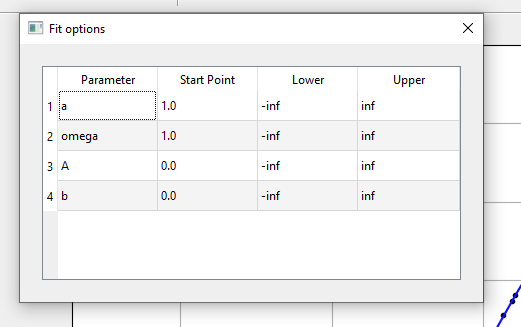
Fit options opens a window in which it's possible to adjust the initial variable guess as well as their boundaries.
To be implemented
- Residual options
- Save
- Multiple plots
- 3D curve fit
Prerequisite
Is currently supported for Python >=3.7.
Requires the following packages to be installed: PySide6, Matplotlib, Scipy and Numpy.
Installation
You can install pyCftool with: pip install pyCftool.
Usage
Import the function from pyCftool import cftool.
pyCftool
cftool(x=None ,y=None ,weights=None ,local_vars={})
Opens an interactive fitting program.
Parameters: x : one-dimensional numpy array of length N, optional
The x component of the data that will immediately be displayed and fitted for once the GUI opens.
y : one-dimensional numpy array of length N, optional
The y component of the data that will immediately be displayed and fitted for once the GUI opens.
weights : float or one-dimensional numpy arrayof length N, optional
The weights of each datapoint. Defined as being $w=1/\sigma$, where $\sigma$ is the uncertainty of the datapoints.
local_vars : dictionary, optional
A dictionary can be passed, but only values that are of type np.ndarray will be accessable by the GUI. A dropdown menu in the GUI allows the user to freely choose between the arrays contained in the dictionary. Passing the built-in function locals() will give the GUI access to all previously defined numpy arrays.
Examples
Polynomial fit
import numpy as np
from pyCftool import cftool

x = np.linspace(-5,5,100)+np.random.normal(0,scale=0.01,size=100)
noise = np.random.normal(0,scale=5,size=100)
y = 6.6*x**2-3*x+0.3+noise # Polynomial
lv = locals().copy()
cftool(x,y,local_vars=lv)
Will produce a window like this:
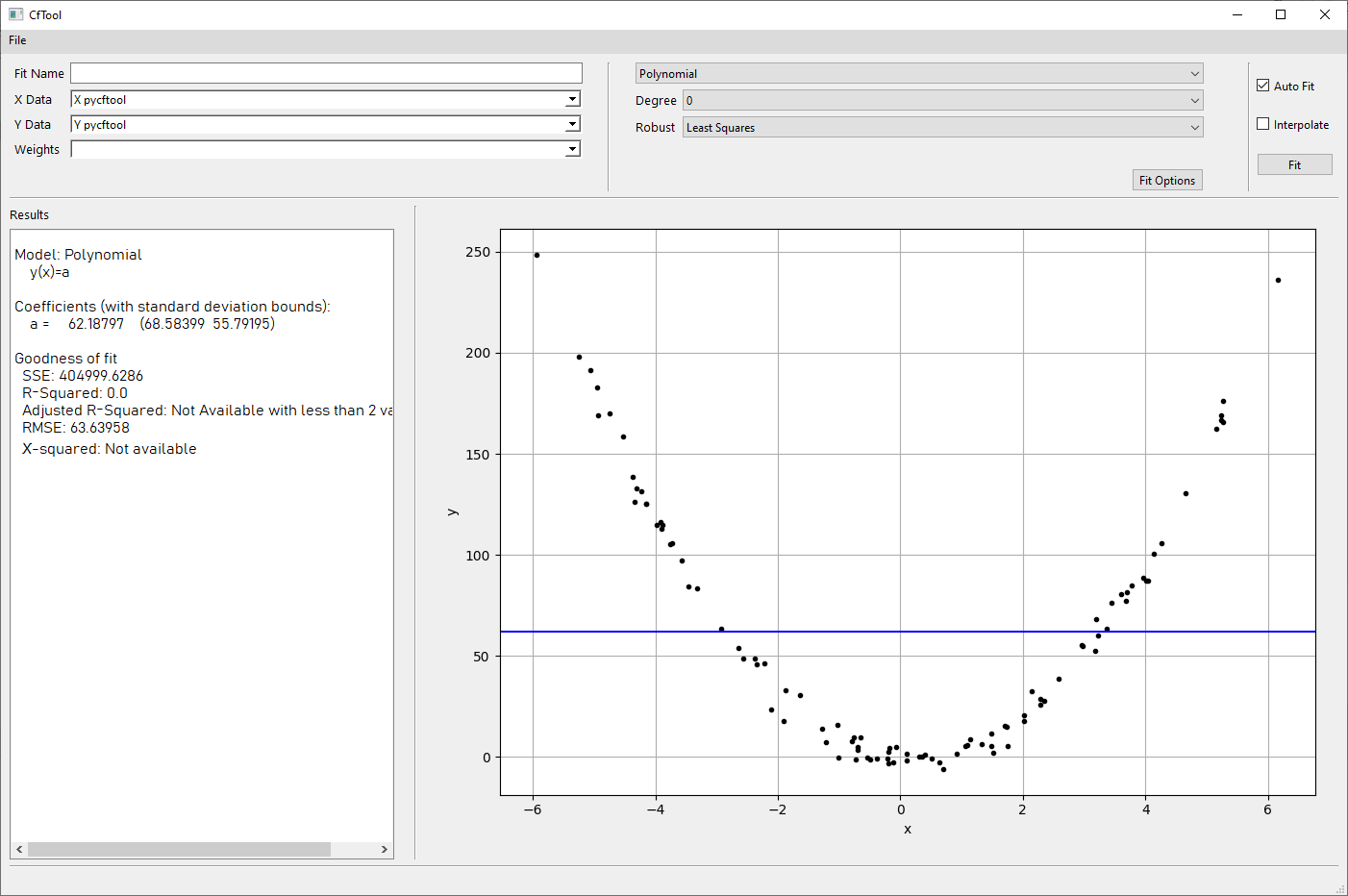
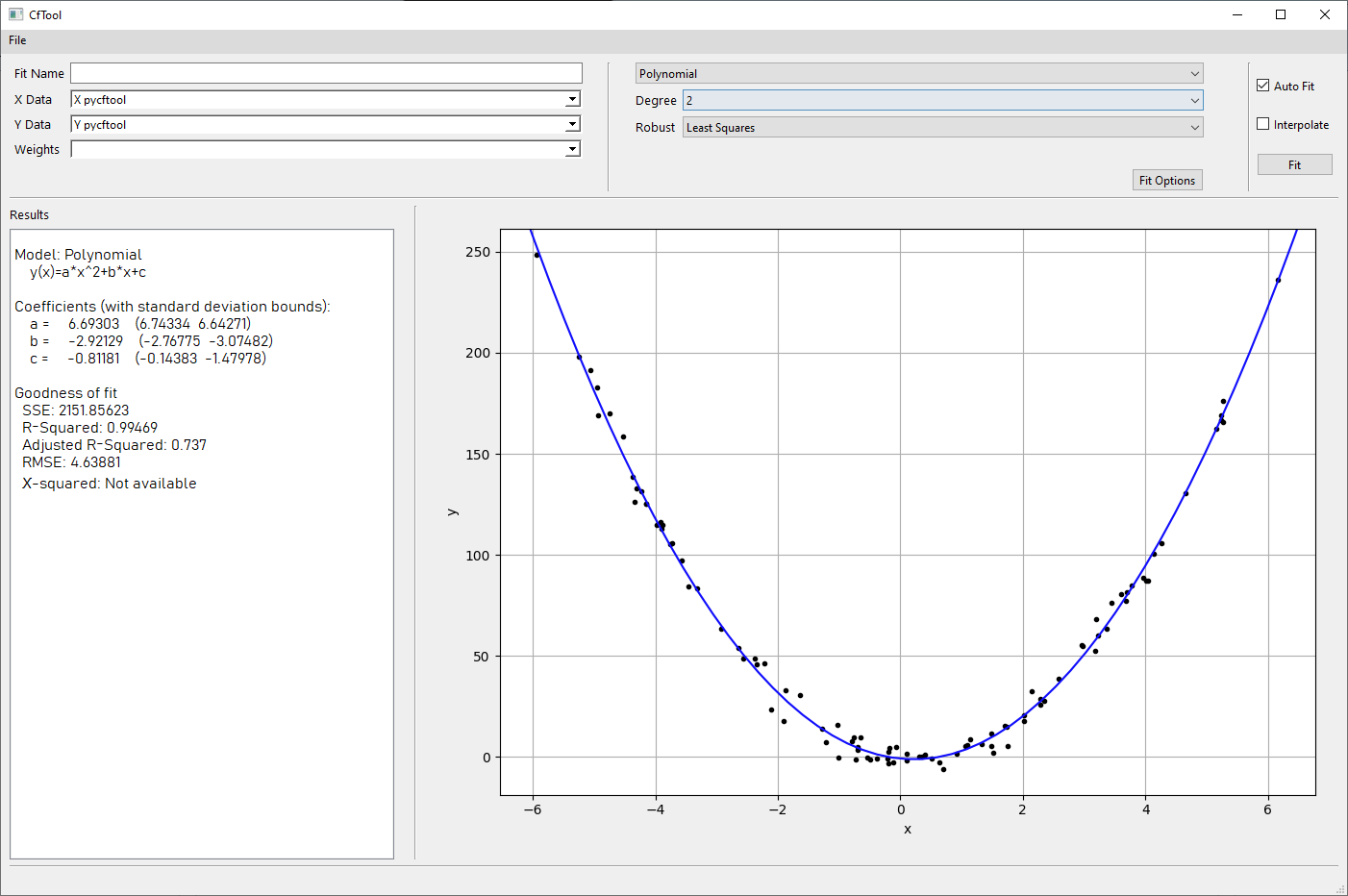
The 'best-fit' parameters are listed in the window on the right hand side. The bounds are within one σ (68%) standard deviation. Since this is a second order polynomial, we can select Degree = 2 from the dropdown menu. The fitter will automatically fit unless "Auto Fit" has been unchecked. The resultning image will become
Custom Fit
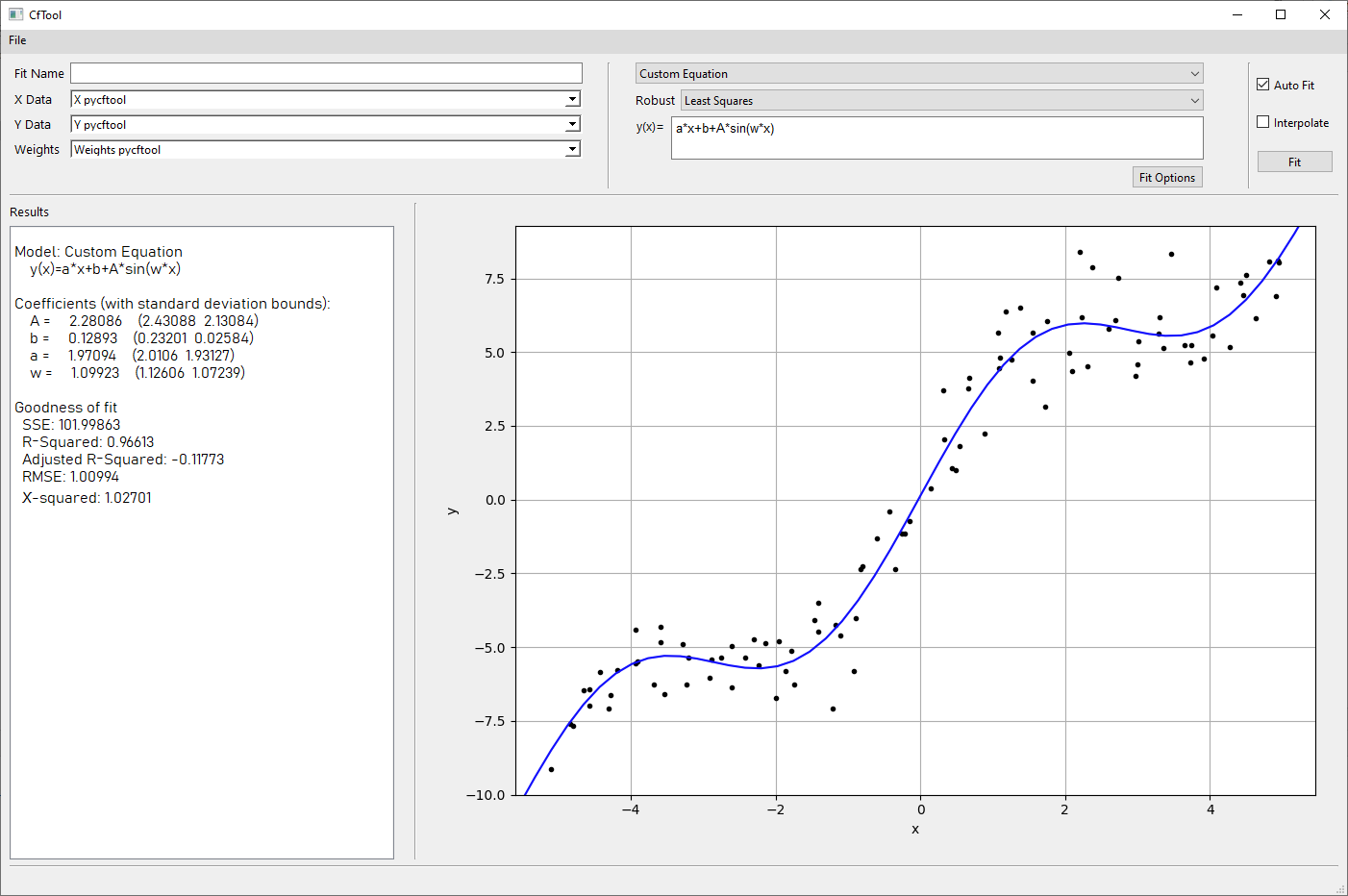
We can also make the program fit any function we desire.
import numpy as np
from pyCftool import cftool

x = np.linspace(-5,5,100)+np.random.normal(0,scale=0.01,size=100)
noise = np.random.normal(0,scale=0.1,size=100)
y = 2*x+0.2+2.2*np.sin(1.1*x)+noise # Linear with sinus wave
lv = locals().copy()
cftool(x,y,local_vars=lv)
By selecting Custom Equation from the dropdown menu at the top, we can input our own equations. In this case we want to use the formula $y=ax+b+A\sin(\omega x)$.
1 maintainer

Metadata
1 maintainer
Release files for pyCftool 1.0.1
For a detailed explanation of source distributions (sdists) and built distributions (wheels), please see the package formats documentation.
Source distribution (sdist)
| File | Size | Uploaded | Provenance | Actions |
|---|---|---|---|---|
| pycftool-1.0.1.tar.gz | 16.9 kB | Without provenance | Details for pycftool-1.0.1.tar.gz |
Built distribution (wheel)
| File | Interpreter | ABI | Platform | Actions Reset |
|---|---|---|---|---|
| pycftool-1.0.1-py3-none-any.whl | Python 3 | none | any | Details for pycftool-1.0.1-py3-none-any.whl |
Total release size: 32.5 kB
Release files / pycftool-1.0.1.tar.gz
| Download URL | pycftool-1.0.1.tar.gz |
|---|---|
| Size | 16.9 kB |
| Tags | Source |
|
SHA-256 checksum How to use checksums |
3606255fadd4619c46d64a39328dc736881c89358b577d0e1a8286492bd85018
|
|
BLAKE2b-256 checksum How to use checksums |
71b0fe03445383bb9d5b1d3be5274eaa7f0a2a208323e45a9bb277f1cf270328
|
| Upload date | |
|
Uploaded using Trusted Publishing? What is trusted publishing? |
No |
| Uploaded via |
twine/6.2.0 CPython/3.11.1
|
Release files / pycftool-1.0.1-py3-none-any.whl
| Download URL | pycftool-1.0.1-py3-none-any.whl |
|---|---|
| Size | 15.6 kB |
| Tags | Python 3 |
|
SHA-256 checksum How to use checksums |
6019c472b185970c7240b5fa2052e8c11befbece5c32c711fe8aa14a29d9f051
|
|
BLAKE2b-256 checksum How to use checksums |
1520d264c2c4a683d97eb1be85769a195830f31571067690de0fc2d47f3bbe9a
|
| Upload date | |
|
Uploaded using Trusted Publishing? What is trusted publishing? |
No |
| Uploaded via |
twine/6.2.0 CPython/3.11.1
|
Security for pyCftool 1.0.1
Provenance
Provenance describes where a file came from. On PyPI, provenance is shared via attestations, which provide a verifiable record of the build or publishing details. View details, limitations and caveats.
No provenance found
None of the files in this release were uploaded with provenance metadata.
A note on package security
PyPI is a repository for distributing packages, not a service for auditing them. While third-party security researchers and our staff do their best to detect and remove malicious packages, PyPI cannot guarantee the quality, security or suitability of any given package.
To learn more about protecting yourself from malicious actors, visit our package security documentation.














