
Interactive python fitting interface

Project description
PyCftool
Heavily inspired by matlabs interactive curvefitter (Cftool), this program attempts to copy its fantastic features for use in python.
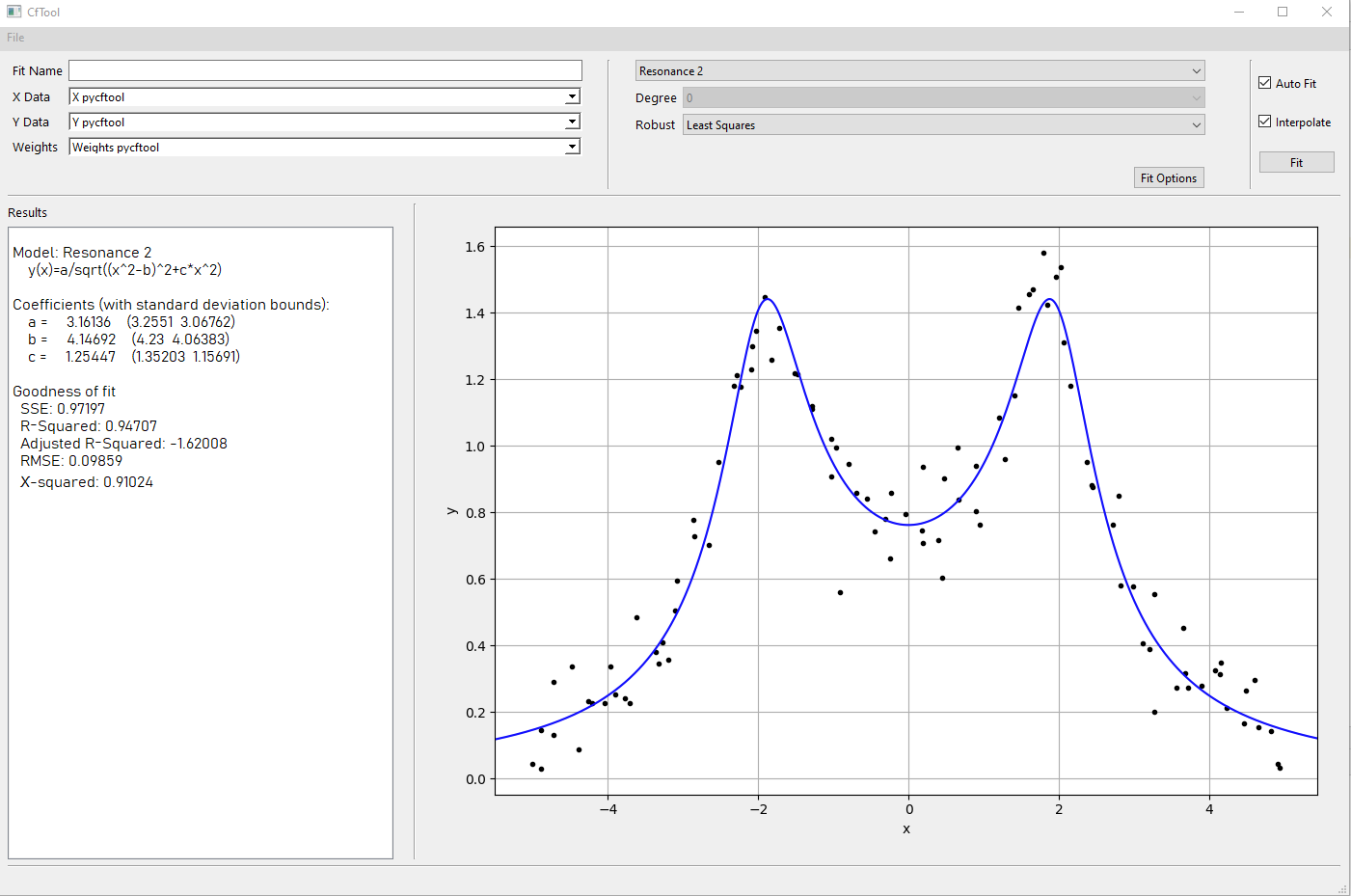
Features
Easy access to data via dropdown menu
Using the argument local_vars you can pass multiple arrays to the GUI. From two dropdown menus (X Data and Y Data) you can choose to select, which x and y data the program should fit to.
Automatic fitting
Everytime the program detects a change in any option, it will automatically fit a new line using these new options. This can be disabled by unchecking Auto Fit in the top right corner. By doing so, a fit will only be computed once the Fit button, located under Auto Fit, is pressed.
Multiple equation support
From a dropdown menu it's possible to use a wide variety of predefined functions. So far these include
| Name | Equation |
|---|---|
| Polynomial of N degree | $$y= \sum_{k=0}^N a_kx^{(N-k)}$$ |
| Exponential | $$y= be^{ax}$$ |
| Resonance 1 | $$y=\frac{ax}{\sqrt{(x^2-b)^2+cx^2}}$$ |
| Resonance 2 | $$y=\frac{a}{\sqrt{(x^2-b)^2+cx^2}}$$ |
| Custom Equation | Text input |
Custom Equation support
Choosing Custom Equation from the dropdown menu, it's possible to fit to any equation you desire!
Interpolation
The fit will by default contain as many datapoints as the input data. When using a small amount of datapoints or fitting "pointy" functions, checking the Interpolation box will give the fit line a smoother appearence. Note that this ONLY influences how the fit appear on the graph and not any of the actual fit parameters.
Display Window
The left hand side contains a window that displays the current fit model, best fit parameters and GOF analysis.
The best fit parameters come with a one $\sigma$ (68%) confidence interval. The program calculates the SSE, R-Squard, Adjusted R-Squared, RMSE, and
if weights have been given, the $\chi$-squared of the model.
Export to .py file
Under "File" you can choose to "Export", which will create a .py file. This file will contain code, that generates the fit parameters that are used in plotting the graph.
Robust
The dropdown menu Robust gives access to different fitting algorithms. Default is the Levenberg–Marquardt algorithm (least squares). For bounded problems, the algorithm is automatically set to TRF. For more information on the different fitting algorithms check the scipy.optimize.curve_fit documentation.
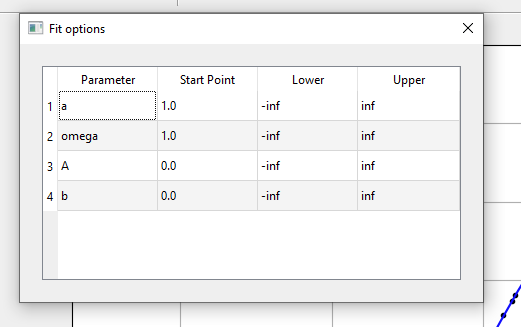
Fit Options
Fit options opens a window in which it's possible to adjust the initial variable guess as well as their boundaries.
To be implemented
- Residual options
- Save
- Multiple plots
- 3D curve fit
Prerequisite
Is currently supported for Python >=3.7.
Requires the following packages to be installed: PySide6, Matplotlib, Scipy and Numpy.
Installation
Will soon be on pip! For now the only way to install it to copy all the files into your working directory.
Usage
Import the function from pyCftool import pyCftool.
pyCftool
pyCftool(x=None ,y=None ,weights=None ,local_vars={})
Opens an interactive fitting program.
Parameters: x : one-dimensional numpy array of length N, optional
The x component of the data that will immediately be displayed and fitted for once the GUI opens.
y : one-dimensional numpy array of length N, optional
The y component of the data that will immediately be displayed and fitted for once the GUI opens.
weights : float or one-dimensional numpy arrayof length N, optional
The weights of each datapoint. Defined as being $w=1/\sigma$, where $\sigma$ is the uncertainty of the datapoints.
local_vars : dictionary, optional
A dictionary can be passed, but only values that are of type np.ndarray will be accessable by the GUI. A dropdown menu in the GUI allows the user to freely choose between the arrays contained in the dictionary. Passing the built-in function locals() will give the GUI access to all previously defined numpy arrays.
Examples
Polynomial fit
import numpy as np
from pyCftool import pyCftool

x = np.linspace(-5,5,100)+np.random.normal(0,scale=0.01,size=100)
noise = np.random.normal(0,scale=0.1,size=100)
y = 6.6*x**2-3*x+0.3+noise # Polynomial
lv = locals().copy()
pyCftool(x,y,local_vars=lv)
Will produce a window like this:
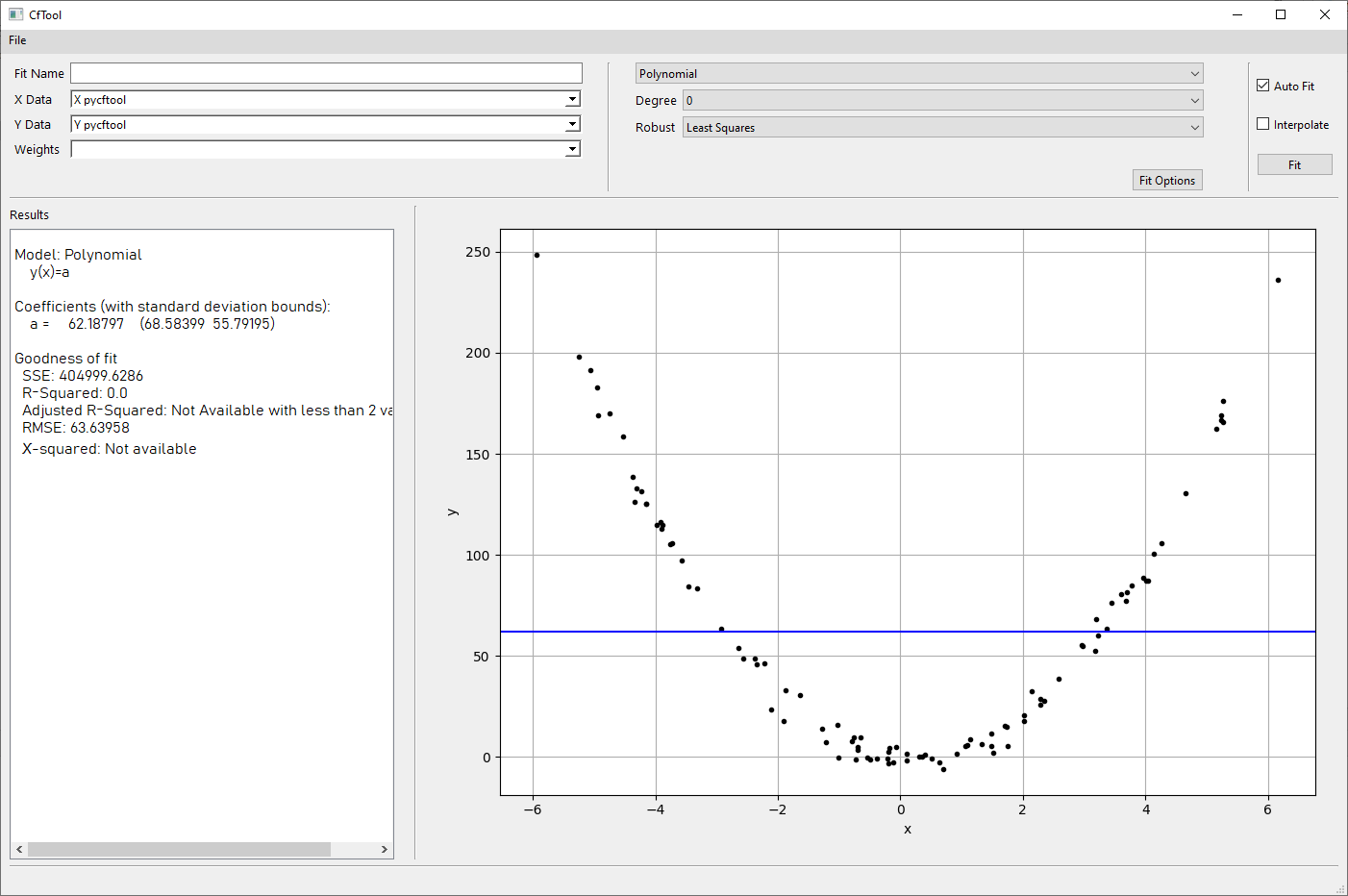
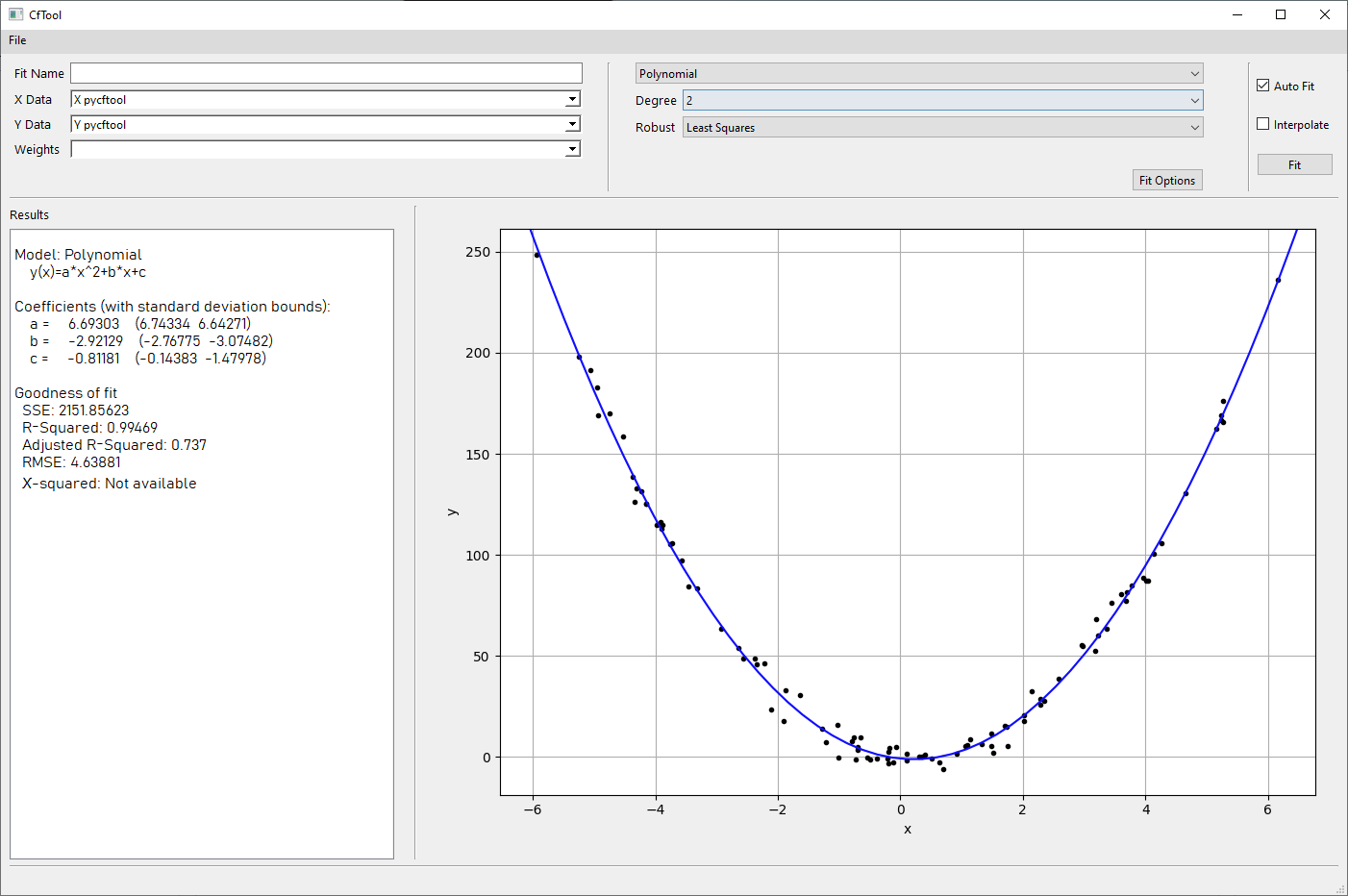
The 'best-fit' parameters are listed in the window on the right hand side. The bounds are within one σ (68%) standard deviation. Since this is a second order polynomial, we can select Degree = 2 from the dropdown menu. The fitter will automatically fit unless "Auto Fit" has been unchecked. The resultning image will become
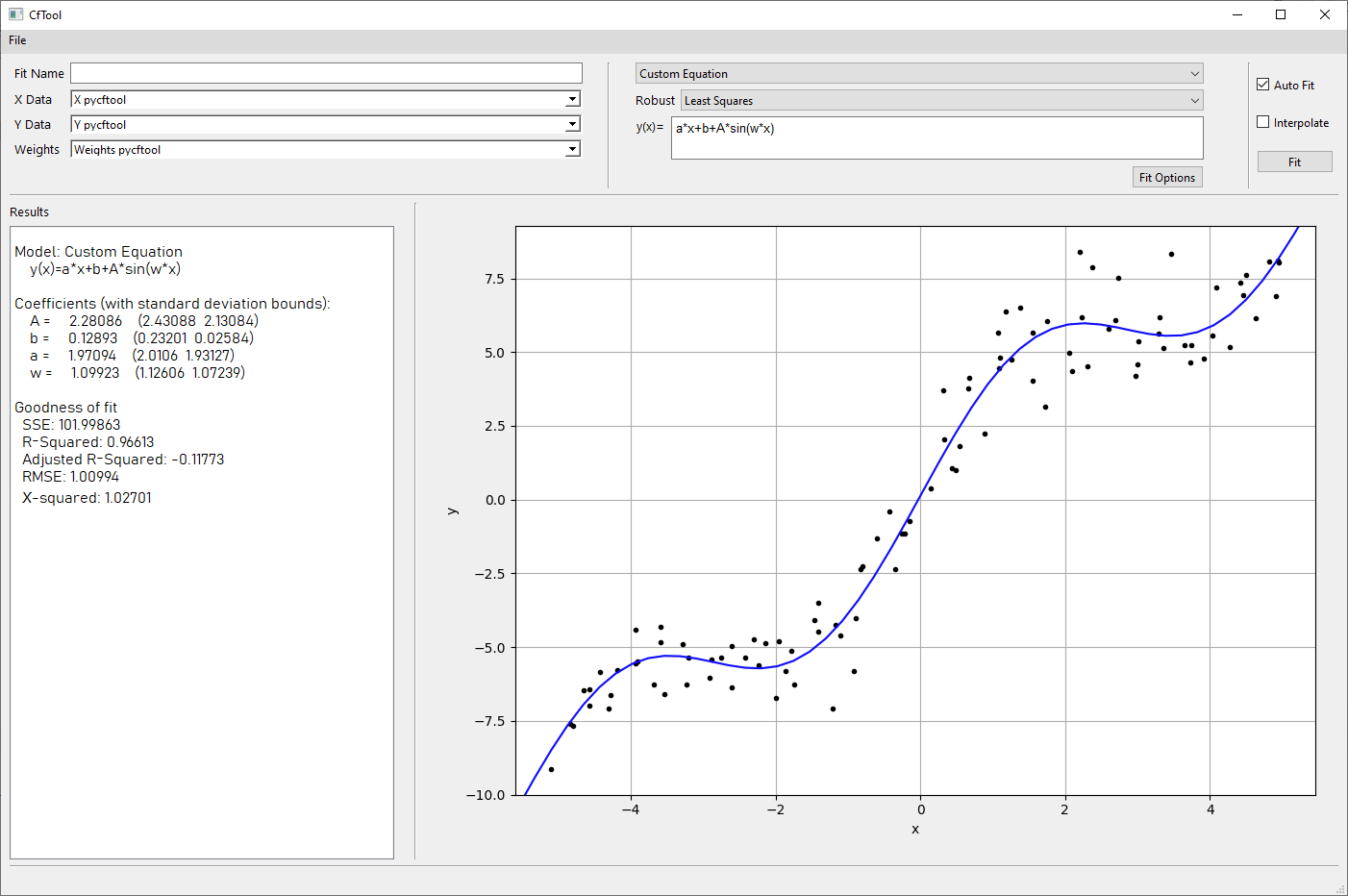
Custom Fit
We can also make the program fit any function we desire.
import numpy as np
from pyCftool import pyCftool

x = np.linspace(-5,5,100)+np.random.normal(0,scale=0.01,size=100)
noise = np.random.normal(0,scale=0.1,size=100)
y = 2*x+0.2+2.2*np.sin(1.1*x)+noise # Linear with sinus wave
lv = locals().copy()
pyCftool(x,y,local_vars=lv)
By selecting Custom Equation from the dropdown menu at the top, we can input our own equations. In this case we want to use the formula $y=ax+b+A\sin(\omega x)$.
Release history Release notifications | RSS feed


Download files
Download the file for your platform. If you're not sure which to choose, learn more about installing packages.
Source Distribution
Built Distribution
Filter files by name, interpreter, ABI, and platform.
If you're not sure about the file name format, learn more about wheel file names.
Copy a direct link to the current filters
File details
Details for the file pyCftool-0.0.21.tar.gz.
File metadata
- Download URL: pyCftool-0.0.21.tar.gz
- Upload date:
- Size: 17.4 kB
- Tags: Source
- Uploaded using Trusted Publishing? No
- Uploaded via: twine/4.0.2 CPython/3.11.1
File hashes
| Algorithm | Hash digest | |
|---|---|---|
| SHA256 |
3764bd8217ec388d0fd06f5e4bc9c0ab562611c38d61173af01c5bbb03afa183
|
|
| MD5 |
1bcf242f573098a8877910e0dac8d219
|
|
| BLAKE2b-256 |
cd93e7ea5b3d6f4fcf80acdc1a2a41bebf68c6b48f527e14e81c87885f3c70a5
|
File details
Details for the file pyCftool-0.0.21-py3-none-any.whl.
File metadata
- Download URL: pyCftool-0.0.21-py3-none-any.whl
- Upload date:
- Size: 15.5 kB
- Tags: Python 3
- Uploaded using Trusted Publishing? No
- Uploaded via: twine/4.0.2 CPython/3.11.1
File hashes
| Algorithm | Hash digest | |
|---|---|---|
| SHA256 |
01f7536bef3c6b4bb9b2385f29ae8ea0c2f0fa03f0e2be139cf431bf275f858c
|
|
| MD5 |
f1363570d7f3e15f2fa8fb6e1d40fea1
|
|
| BLAKE2b-256 |
45d965b48039825f26bc344f2e72829a03f397436e694fe5cf0f9a5e5816e1c6
|






