
pyFlightPlotter


Interactive, configurable and three-dimensional flight data plotting, with little boilerplate.
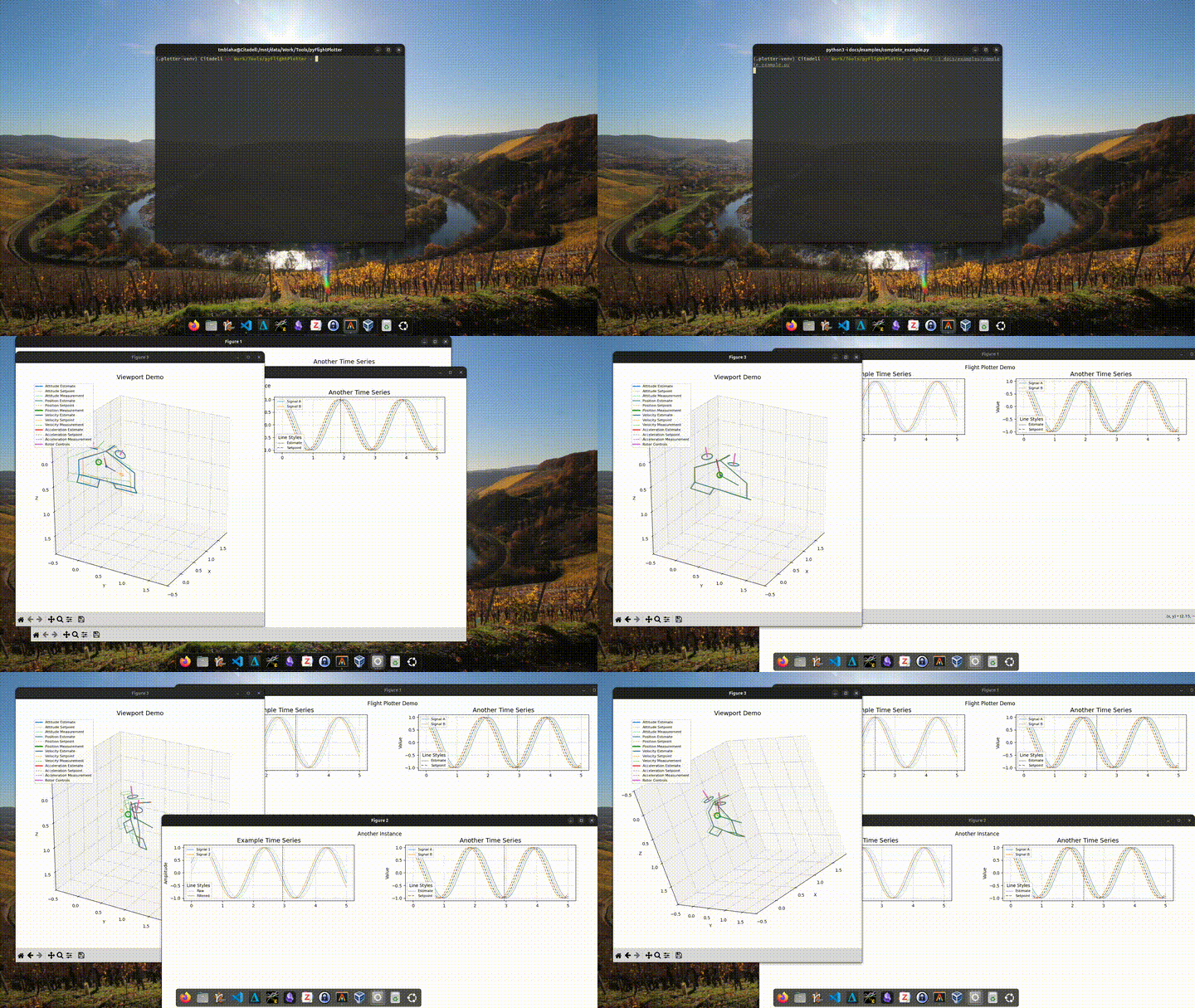
Hover over a time-series plot and every connected window follows along: the cursor moves in sync in all time-series axes, and a 3D viewport shows the vehicle's attitude, position, velocity, acceleration and actuator state at that moment. You can also sync an onboard or external video to the log.
Features
- 3D viewport showing estimates, setpoints and measurements of
- attitude (quaternions)
- position, velocity and acceleration
- rotor force commands
- control surface deflections
- Time-series plotting in a configurable grid layout.
_plot_timeseries()takes several line styles (light / solid / dashed / true value) and keeps colours consistent across series. - A synchronized vertical cursor across all time-series axes, even when they're spread over several figures. The 3D viewport updates on mouse hover.
- Playback: press Space to play or pause the log in real time.
- Video sync (
VideoViewport): show an MP4 next to the log, with an adjustable time offset. - Craft builder: the
Craft3Dclass hasaddRotorandaddSurfacemethods to define a vehicle quickly.- single-axis surface tilt
- dual-axis rotor tilt
- presets included:
Quadrotor,Tailsitter
Installation
pip install pyFlightPlotter
With video support (VideoViewport, which needs OpenCV):
pip install "pyFlightPlotter[video]"
The latest development version from GitHub:
pip install "pyFlightPlotter @ git+https://github.com/tudelft/pyFlightPlotter"
Requires Python 3.10 or newer. The dependencies are numpy, scipy and matplotlib. You also need an
interactive matplotlib backend (e.g. QtAgg or TkAgg).
Usage
You build a plotter by subclassing FlightPlotterBase and implementing _populate(), where you add the
subplots you want. BlittedCursor adds the synchronized cursor, and connect_viewport() links a 3D
Viewport (or a VideoViewport) to the mouse.
A minimal example (docs/examples/minimal_example.py):
import numpy as np

from pyFlightPlotter import FlightPlotterBase, BlittedCursor, Viewport, Quadrotor

class FlightPlotterMinimalExample(FlightPlotterBase):
    def __init__(self, time, data):
        self.data = data
        super().__init__(time, name="MWE")
        self.define_layout(nrows=1, ncols=1)
        self.plot()

    def _populate(self):
        self._plot_timeseries(
            self.fig.add_subplot(self.gs[0, 0]),
            light=None,
            solid=[self.data[2], self.data[3]],
            dashed=[self.data[0], self.data[1]],
            series_labels=["Signal 1", "Signal 2"],
            style_labels=[None, "Estimated", "Setpoint"],
            title="Example Time Series",
            ylabel="Amplitude",
        )

if __name__ == "__main__":
    t = np.linspace(0, 2, 101)
    data = [
        np.sin(2*np.pi*0.5*t), np.sin(2*np.pi*0.5*t + 0.2),
        np.cos(2*np.pi*0.5*t + 0.4), np.cos(2*np.pi*0.5*t + 0.6),
    ]

    fp = FlightPlotterMinimalExample(t, data)
    bc = BlittedCursor(fp.all_axes, sharex=True)

    vp = Viewport(craft=Quadrotor(),
                  time=np.array([0., 1., 2.]),
                  att=np.array([[1., 0., 0., 0.], [0.7, 0., 0., 0.7], [0., 0., 0., 1.]]),
                  # ... many more data can be passed here, but attitude is required
                  interpolation="linear",
                  follow=False,
                  title="Viewport Example",
                  )

    # connect mouse hover
    fp.connect_viewport(vp)
Run it with python -i so the windows stay open.
For a full example with several figures, a tailsitter, and position/velocity/actuator data, see
docs/examples/complete_example.py.
For an example of hooking pyFlightPlotter into your own log-data structure, see
indiflight.
Video synchronization
from pyFlightPlotter import VideoViewport

vv = VideoViewport(time=t, mp4_path="flight.mp4", offset_s=0.0)
fp.connect_viewport(vv)
The video time is data_time + offset. You can set the offset with the slider or text box in the video
window, or step one frame at a time with the arrow keys. You can also load a file from inside the window.
Controls
| Input | Action |
|---|---|
| Mouse hover over a time-series axis | Move the cursor; all connected viewports update |
| Space | Play / pause real-time playback |
| ← / → (video window) | Shift the video offset by one frame |
Conventions
Quaternions are scalar-first: [w, x, y, z]. Arrays are expected with time along the first axis, e.g.
Nx4 for attitude and Nx3 for position, velocity and acceleration. See the Viewport docstring for all
supported inputs.
Development
git clone https://github.com/tudelft/pyFlightPlotter
cd pyFlightPlotter
pip install -e ".[video]"
python -i docs/examples/complete_example.py
License
GPL-3.0-or-later. See LICENSE.
1 maintainer

Metadata
1 maintainer
Release files for pyFlightPlotter 0.3.1
For a detailed explanation of source distributions (sdists) and built distributions (wheels), please see the package formats documentation.
Source distribution (sdist)
| File | Size | Uploaded | Provenance | Actions |
|---|---|---|---|---|
| pyflightplotter-0.3.1.tar.gz | 29.6 kB | Without provenance | Details for pyflightplotter-0.3.1.tar.gz |
Built distribution (wheel)
| File | Interpreter | ABI | Platform | Actions Reset |
|---|---|---|---|---|
| pyflightplotter-0.3.1-py3-none-any.whl | Python 3 | none | any | Details for pyflightplotter-0.3.1-py3-none-any.whl |
Total release size: 57.4 kB
Release files / pyflightplotter-0.3.1.tar.gz
| Download URL | pyflightplotter-0.3.1.tar.gz |
|---|---|
| Size | 29.6 kB |
| Tags | Source |
|
SHA-256 checksum How to use checksums |
4bd3beb438008995db5af08ad373d7453abb0abdd57d81d134a1158317208f95
|
|
BLAKE2b-256 checksum How to use checksums |
e410a781628257a4152c4a0798b5a52b93ce0422413b2896f748fe826f0ffce3
|
| Upload date | |
|
Uploaded using Trusted Publishing? What is trusted publishing? |
Yes |
| Uploaded via |
uv/0.13.7 {"installer":{"name":"uv","version":"0.13.7","subcommand":["publish"]},"python":null,"implementation":{"name":null,"version":null},"distro":{"name":"Ubuntu","version":"26.04","id":"resolute","libc":null},"system":{"name":null,"release":null},"cpu":null,"openssl_version":null,"setuptools_version":null,"rustc_version":null,"ci":true}
|
Release files / pyflightplotter-0.3.1-py3-none-any.whl
| Download URL | pyflightplotter-0.3.1-py3-none-any.whl |
|---|---|
| Size | 27.9 kB |
| Tags | Python 3 |
|
SHA-256 checksum How to use checksums |
c4aac0e28b11f757c1ca7328ea8192da47a08eba941358d3a9f455e960fcc2e8
|
|
BLAKE2b-256 checksum How to use checksums |
e5b5c848ae3c80afd43c5ce96917252af59ea82c2a45ebb813abaa06ca36e1b0
|
| Upload date | |
|
Uploaded using Trusted Publishing? What is trusted publishing? |
Yes |
| Uploaded via |
uv/0.13.7 {"installer":{"name":"uv","version":"0.13.7","subcommand":["publish"]},"python":null,"implementation":{"name":null,"version":null},"distro":{"name":"Ubuntu","version":"26.04","id":"resolute","libc":null},"system":{"name":null,"release":null},"cpu":null,"openssl_version":null,"setuptools_version":null,"rustc_version":null,"ci":true}
|
Security for pyFlightPlotter 0.3.1
Provenance
Provenance describes where a file came from. On PyPI, provenance is shared via attestations, which provide a verifiable record of the build or publishing details. View details, limitations and caveats.
No provenance found
None of the files in this release were uploaded with provenance metadata.
A note on package security
PyPI is a repository for distributing packages, not a service for auditing them. While third-party security researchers and our staff do their best to detect and remove malicious packages, PyPI cannot guarantee the quality, security or suitability of any given package.
To learn more about protecting yourself from malicious actors, visit our package security documentation.














