
pyGEKO: Fast Generalized Covariance Kriging for Python


Full Documentation: pygeko.readthedocs.io

pyGEKO is a high-performance Python library designed for geostatistical interpolation and surface modeling. It is engineered for efficiency, making it ideal for both heavy-duty x86 workstations and low-power ARM devices like the Raspberry Pi 5. It honors the mining heritage of Kriging by treating sparse data points as valuable gems 💎 to be accurately modeled into continuous surfaces.
🚀 Key Features
- Generalized Covarianze Kriging No variograms. Generalized increments of order $k$ (GIK) are used for unbiased estimation and fitting of models.
- High-Performance Engine: Kriging implementation is fully vectorized (numpy) and optimized with KD-Tree spatial indexing.
- True Parallelism: Seamlessly scales across all CPU cores for grid and profile estimation.
- Advanced Visualization: 3D interactive surfaces (Plotly) and static scientific error analysis (Matplotlib/Seaborn), topographic, hypsometric/batimemetric maps. Interactive profiling.
- Geoscience Standards: Built-in support for industry-standard
.grdand.hdr(Sidecar) files and ESRI ASCII (.asc) format. - Smart Metadata: Saves model parameters directly within the project files.
- CLI Utilities: Include
pygeko, a custom python REPL with pre-imported modules for interactive analysis or scripting. Also includelsgckandcatgck, two command-line tools to inspect your experiment results instantly.
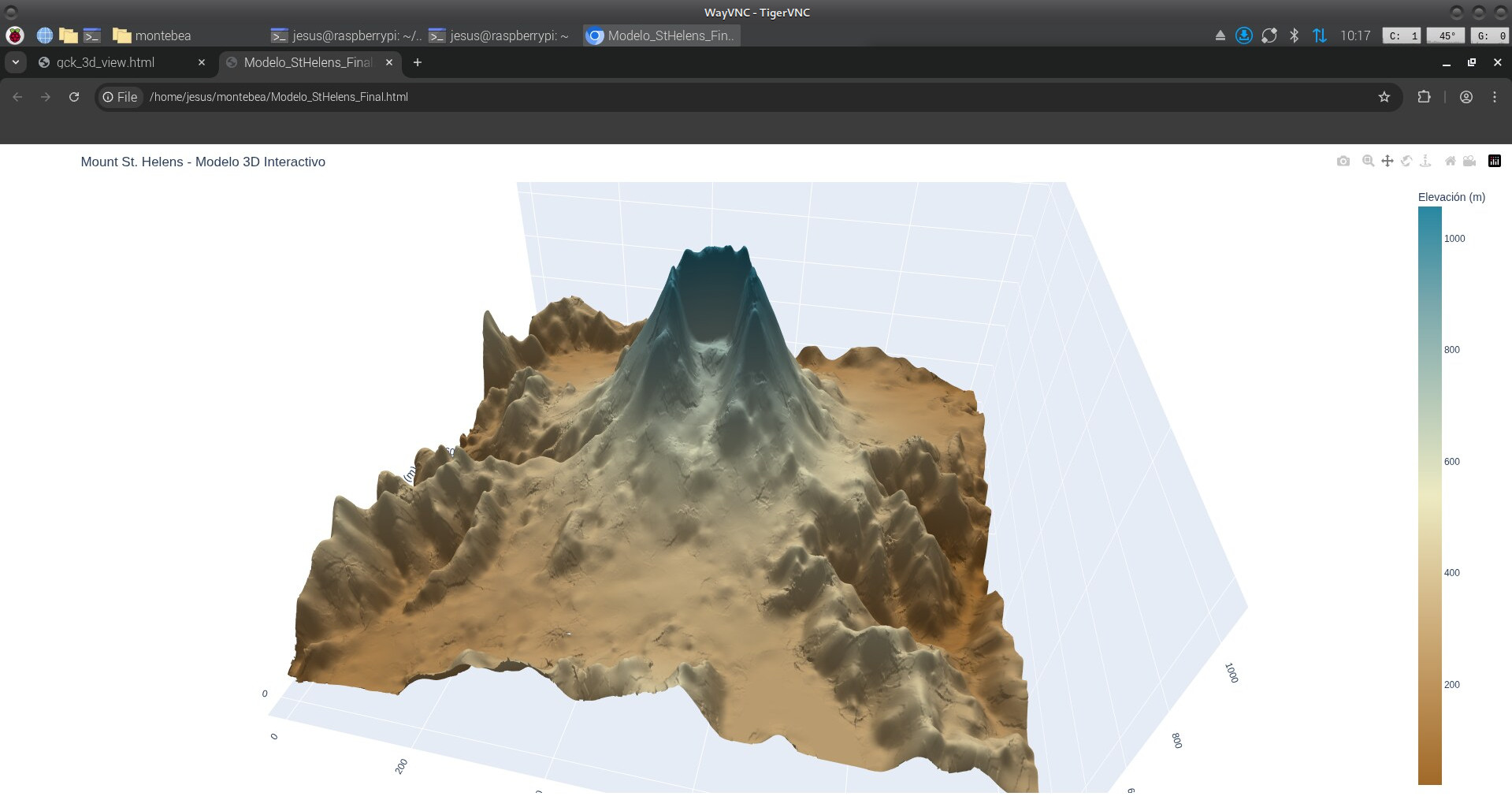
Click here to open the interactive 3D model (13 MB WebGL)
📊 Performance Benchmark
PyGEKO was benchmarked processing a 1,000,000 point grid (1000x1000) on Debian 12:
| Platform | CPU | Cores | Time (1M points) |
|---|---|---|---|
| Desktop PC | Intel i7-9700K | 8 | 36.3 s |
| Raspberry Pi 5 | Cortex-A76 | 3* | ~110 s |
*Recommended 3-core config for thermal stability on ARM.
🧠 Tuning & Optimization Benchmark
The following benchmark shows the time required to perform an exhaustive search of 30 model configurations (Testing 22 GIK models + Cross-Validation per config) using the St. Helens dataset (5,000 points):
| Platform | CPU | Workers | Time (30 configs) | Rate |
|---|---|---|---|---|
| Desktop PC | Intel i7-9700K | 8 | ~2 min 51 s | 5.7 s/it |
| Raspberry Pi 5 | Cortex-A76 | 3* | ~10 min 10 s | 20.4 s/it |
* Recommended 3-core config for thermal stability on rp5.
Note on Reliability: PyGEKO uses a multiprocessing isolation strategy for tuning. Each iteration runs in a dedicated child process, ensuring 100% memory reclamation and preventing RAM accumulation even during intensive 5K+ point explorations.
🛠 Installation
Use:
$ pip install pygeko
or
$ pipx install pygeko
This will install the CLI utilities on your system.
💻 Quick Start
$ pygeko

Welcome to pyGEKO-Kriger 0.9.0

Classes Kdata, Kgrid and Gplot imported.

Use exit() or Ctrl-D (i.e. EOF) to exit.

--> datafile = get_data_path("montebea.csv") # get path to included datafile
--> kd = Kdata(datafile)

Column names default to "X", "Y" and "Z"
nvec dafaults to: 12 and nork to: 1
Please, adapt these parameter to your problem!

--> kd.x_col = "easting"    # which column of the dataset to use as X
--> kd.y_col = "northing"   # which column of the dataset to use as Y
--> kd.z_col = "heigth"     # which column of the dataset to use as Z

--> kd.analyze()

Executing isolated analysis (NORK=1, NVEC=14)...
Mod  | MAE        | RMSE       | Corr     | Status
--------------------------------------------------
0    | 136.7571   | 178.9741   | 0.7321   | OK
1    | 121.3930   | 167.3451   | 0.7683   | OK
2    | 140.8116   | 200.0118   | 0.7005   | OK
3    | 205.2296   | 472.9836   | 0.4287   | OK
4    | 129.7364   | 183.6457   | 0.7347   | OK
5    | 121.3930   | 167.3451   | 0.7683   | OK
6    | 140.8116   | 200.0118   | 0.7005   | OK
7    | 205.2296   | 472.9836   | 0.4287   | OK
8    | 129.7364   | 183.6457   | 0.7347   | OK
9    | 121.3928   | 167.3443   | 0.7683   | OK
10   | 121.3930   | 167.3451   | 0.7683   | OK
11   | 121.3667   | 167.2586   | 0.7685   | OK
12   | 140.8084   | 200.0075   | 0.7005   | OK
13   | 129.7004   | 183.5840   | 0.7349   | OK
14   | 121.3928   | 167.3443   | 0.7683   | OK
15   | 121.3930   | 167.3451   | 0.7683   | OK
16   | 121.3667   | 167.2586   | 0.7685   | OK
17   | 121.3926   | 167.3437   | 0.7683   | OK
18   | 121.3317   | 167.1441   | 0.7688   | OK
19   | 121.3926   | 167.3437   | 0.7683   | OK
20   | 121.3317   | 167.1441   | 0.7688   | OK


Validating best model...
Starting Cross-Validation in 87 points...

--- CROSS-VALIDATION SUMMARY ---
Validated points: 85 / 87
Mean Absolute Error (MAE): 121.3317
Root Mean Square Error (RMSE): 167.1441
Correlation Coefficient: 0.7688

[OK] Saved: montebea_1_14.gck
     MAE: 121.33169956379052 | nork: 1 | nvec: 14


--> kg = Kgrid(kd, 0.0, 1000.0, 0.0, 1400.0, 500, 700)   # define estimation window and grid resolution (1000x1000)
--> kg.model = 20                                          # choose model
Exporting 500x700 grid in parallel to montebea_1_14_mod_20.grd...
Kriging: 100%|████████████████████████████████| 700/700 [00:12<00:00, 54.51it/s]
Export completed. Now writing metadata to montebea_1_14_mod_20.hdr...
Completed.
Completed. Data saved to montebea_1_14_mod_20.grd


--> gp = Gplot("montebea_1_12_mod_21")
montebea_1_12_mod_21 (1000x1000) grid successfully read

--> gp.contourd()
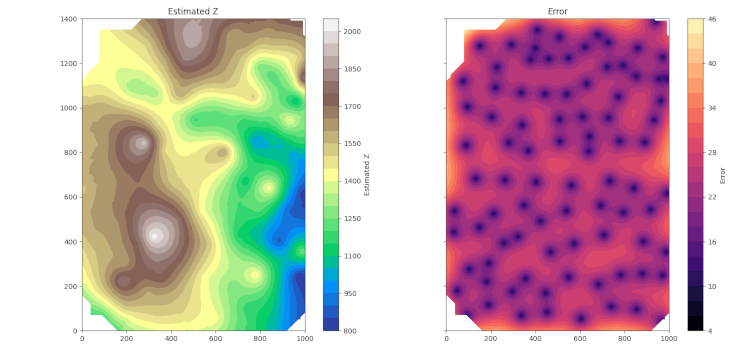
💻 Heatmap
Instead of using kd.analyze() above, you can start an automatic model analysis
config_report = kd.tune(nvec_list=range(8, 17, 2), nork_list=[0, 1, 2])
And after a long and boring list of results, it obtains a series of .gck files, one for each pair of nork and nvec values, which it can visualize as a heatmap:
kd.plot_tuning_results(config_report)
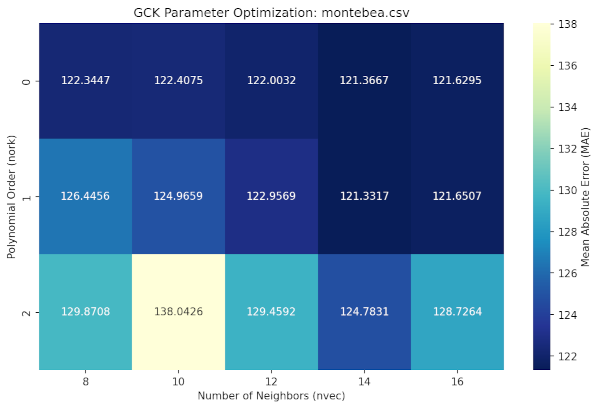
Which will quickly guide you to the best parameters to use for your interpolation (nork = 1, nvec = 14)
🔍 Command Line Interface (CLI)
The pygeko command will launch a Python REPL with the Kdata, Kgrid, and Gplot classes imported, allowing you to start working interactively in any directory.
$ pygeko

Welcome to pyGEKO-Kriger 0.9.0

Classes Kdata, Kgrid and Gplot imported.

Use exit() or Ctrl-D (i.e. EOF) to exit.

-->
pyGEKO provides the lsgck command to keep your workspace organized. No need to open Python to check your results:
$ lsgck
$ lsgck -v
Scanning directory: /home/jesus/Nextcloud/gck/pruebas

=====================================================================================================
File                           | N | Date   | nork  | nvec  | MAE      | RMSE     | CORR     | Model -----------------------------------------------------------------------------------------------------
montebea_0_10.gck              | N | 01-02  | 0     | 10    |  122.407 |  167.426 | 0.765566 | 16
montebea_0_12.gck              | N | 01-02  | 0     | 12    |  122.003 |  167.832 | 0.764883 | 11
montebea_0_14.gck              | N | 01-02  | 0     | 14    |  121.367 |  167.534 | 0.766684 | 16
montebea_0_16.gck              | N | 01-02  | 0     | 16    |  121.629 |  167.959 | 0.765885 | 11
montebea_0_8.gck               | N | 01-02  | 0     | 8     |  122.345 |   167.89 | 0.763376 | 17
montebea_1_10.gck              | N | 01-02  | 1     | 10    |  124.966 |  167.926 | 0.764731 | 0
montebea_1_12.gck              | N | 01-02  | 1     | 12    |  122.957 |  169.571 | 0.760423 | 20
montebea_1_14.gck              | N | 01-02  | 1     | 14    |  121.332 |  167.144 | 0.768756 | 20
montebea_1_16.gck              | N | 01-02  | 1     | 16    |  121.651 |  167.421 | 0.768497 | 18
montebea_1_8.gck               | N | 01-02  | 1     | 8     |  126.446 |  170.101 | 0.754191 | 0
montebea_2_10.gck              | N | 01-02  | 2     | 10    |  138.043 |  181.814 | 0.716072 | 0
montebea_2_12.gck              | N | 01-02  | 2     | 12    |  129.459 |  173.554 | 0.741762 | 0
montebea_2_14.gck              | N | 01-02  | 2     | 14    |  124.783 |  167.688 | 0.762002 | 0
montebea_2_16.gck              | N | 01-02  | 2     | 16    |  128.726 |  171.328 | 0.751042 | 0
montebea_2_8.gck               | N | 01-02  | 2     | 8     |  129.871 |  171.107 | 0.750874 | 0
=====================================================================================================
$ catgck montebea_1_12.gck

============================== GCK EXPLORER ===============================
File: montebea_1_12.gck                | From: montebea.csv
Date/Time:   2026-02-04 09:18:21       | Input points: 87
Col X: easting          | Col Y: northing         | Col Z: heigth
Conf:    nork=1 | nvec=12 | Norm=False | Best model is #20
---------------------------------------------------------------------------
Best MAE: 122.956935 | Best RMSE: 169.570788 | Best CORR: 0.760423
---------------------------------------------------------------------------

RANK  | MOD  | MAE          | RMSE         | CORR
-------------------------------------------------------
★1    | 20   | 122.956935   | 169.570788   | 0.760423
     ZK: [-2.947323e-15 -1.777211e+03 3.980609e-02 0.000000e+00 -1.596468e+01]
............................................................................
 2    | 18   | 122.956935   | 169.570788   | 0.760423
     ZK: [0.000000e+00 -1.777211e+03 3.980609e-02 0.000000e+00 -1.596468e+01]
............................................................................
 3    | 16   | 123.003751   | 169.701878   | 0.760124
     ZK: [2.008122e-16 -4.491929e+02 0.000000e+00 0.000000e+00 -1.067704e+00]
............................................................................
 4    | 11   | 123.003751   | 169.701878   | 0.760124
     ZK: [0.000000e+00 -4.491929e+02 0.000000e+00 0.000000e+00 -1.067704e+00]
............................................................................
 5    | 17   | 123.019572   | 169.747050   | 0.760021
     ZK: [0.000000e+00 -5.343903e+02 -1.264846e-02 3.892174e-08 0.000000e+00]
............................................................................

 (etc.)
📂 Output Formats
.gck: Binary object containing the full Python state and metadata..grd: Standard grid file (CSV format) for GIS software..prf: Profile file (CSV format).hdr: Human-readable metadata header file for grid and profile files..pdf,.svg,.png, ...: Exported high-quality topographic and hypsometric/bathymetric maps_meta.txt: metadata sidecar file for exported maps..html: WebGL HTML file with surface models.
📄 License
pyGEKO is distributed under the terms of the MIT license.
1 maintainer

Metadata
1 maintainer
Release files for pyGEKO 1.0.1
For a detailed explanation of source distributions (sdists) and built distributions (wheels), please see the package formats documentation.
Source distribution (sdist)
| File | Size | Uploaded | |
|---|---|---|---|
| pygeko-1.0.1.tar.gz | 88.6 kB | Details |
Built distribution (wheel)
| File | Interpreter | ABI | Platform | Reset |
|---|---|---|---|---|
| pygeko-1.0.1-py3-none-any.whl | Python 3 | none | any | Details |
Total release size: 185.6 kB
Release files / pygeko-1.0.1.tar.gz
| Download URL | pygeko-1.0.1.tar.gz |
|---|---|
| Size | 88.6 kB |
| Tags | Source |
|
SHA-256 checksum How to use checksums |
49cc042dea792213e205b121048982efae3508dd5375b2029c68c3d08cf5113e
|
|
BLAKE2b-256 checksum How to use checksums |
21f76c30af832bfc3057305c1d6776880dda99fffa99998d42341174dbe0d120
|
| Upload date | |
|
Uploaded using Trusted Publishing? What is trusted publishing? |
No |
| Uploaded via |
Hatch/1.16.1 cpython/3.11.2 HTTPX/0.28.1
|
Release files / pygeko-1.0.1-py3-none-any.whl
| Download URL | pygeko-1.0.1-py3-none-any.whl |
|---|---|
| Size | 97.0 kB |
| Tags | Python 3 |
|
SHA-256 checksum How to use checksums |
86842210cb79fa02a46c8efcabef37d40fbce22229eabcca21b23fb0d1309f7b
|
|
BLAKE2b-256 checksum How to use checksums |
f3b3e767f65e53df07a5fcd34eccc90f71fd19ecf826b33107d02e2895a9a570
|
| Upload date | |
|
Uploaded using Trusted Publishing? What is trusted publishing? |
No |
| Uploaded via |
Hatch/1.16.1 cpython/3.11.2 HTTPX/0.28.1
|














