
Fast Generalized Covariance Kriging for Python

Project description
pyGEKO: Fast Generalized Covariance Kriging for Python



Full Documentation: pygeko.readthedocs.io

pyGEKO is a high-performance Python library designed for geostatistical interpolation and surface modeling. It is engineered for efficiency, making it ideal for both heavy-duty x86 workstations and low-power ARM devices like the Raspberry Pi 5. It honors the mining heritage of Kriging by treating sparse data points as valuable gems 💎 to be accurately modeled into continuous surfaces.
🚀 Key Features
- High-Performance Engine: Kriging implementation is fully vectorized (numpy) and optimized with KD-Tree spatial indexing.
- True Parallelism: Seamlessly scales across all CPU cores for grid estimation.
- Advanced Visualization: 3D interactive surfaces (Plotly) and static scientific error analysis (Matplotlib/Seaborn).
- Geoscience Standards: Built-in support for industry-standard
.grdand.hdr(Sidecar) file formats. - Smart Metadata: Saves model parameters (, , ) directly within the project files.
- CLI Utilities: Include
pygeko, a python REPL with pre-imported modules for interactive analysis. Also includelsgck, a command-line tool to inspect your experiment results instantly.
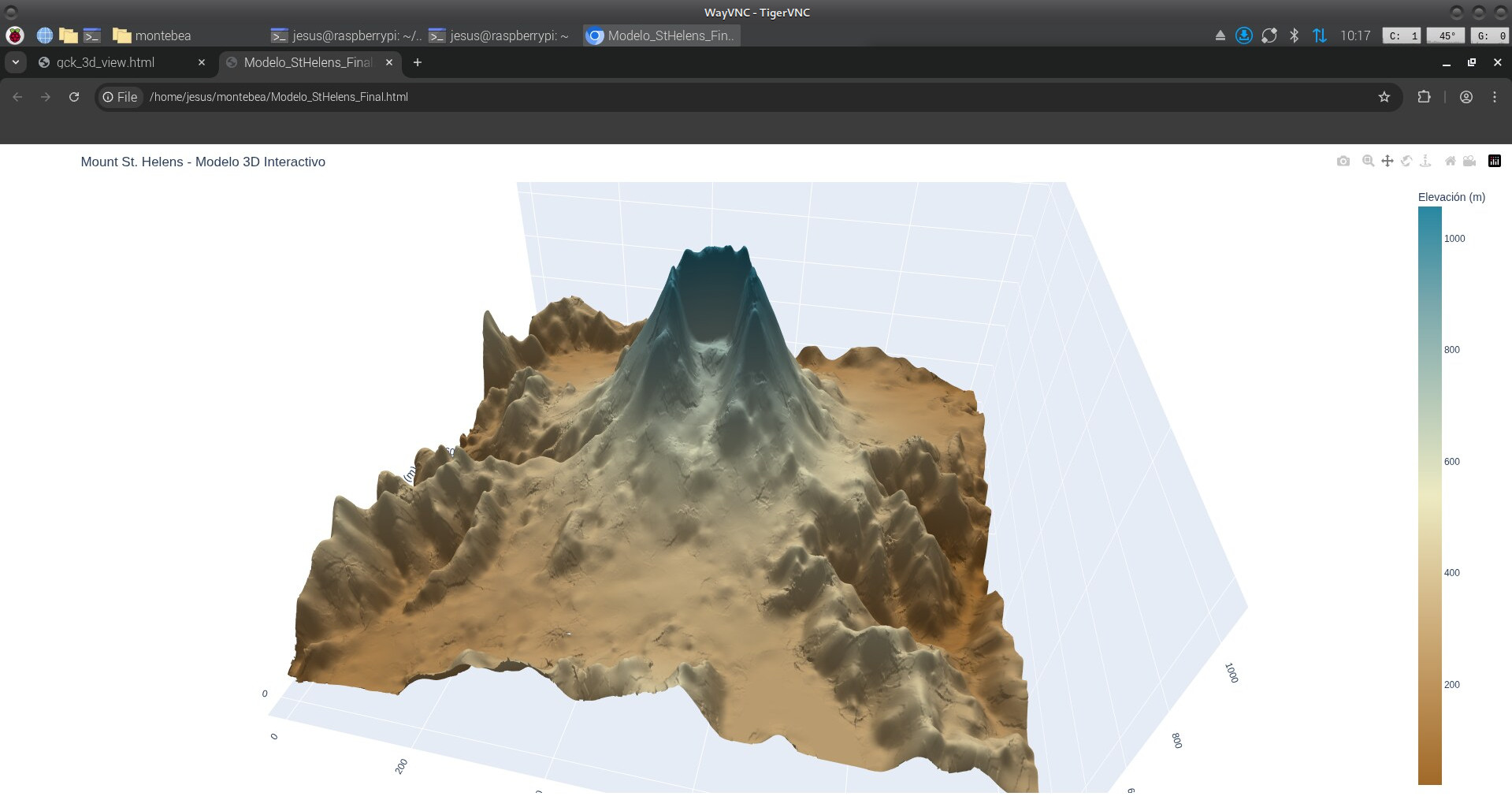
Click here to open the interactive 3D model (13 MB WebGL)
📊 Performance Benchmark
PyGEKO was benchmarked processing a 1,000,000 point grid (1000x1000) on Debian 12:
| Platform | CPU | Cores | Time (1M points) |
|---|---|---|---|
| Desktop PC | Intel i7-9700K | 8 | 36.3 s |
| Raspberry Pi 5 | Cortex-A76 | 3* | ~110 s |
*Recommended 3-core config for thermal stability on ARM.
🧠 Tuning & Optimization Benchmark
The following benchmark shows the time required to perform an exhaustive search of 30 model configurations (Testing 22 GIK models + Cross-Validation per config) using the St. Helens dataset (5,000 points):
| Platform | CPU | Workers | Time (30 configs) | Rate |
|---|---|---|---|---|
| Desktop PC | Intel i7-9700K | 8 | ~2 min 51 s | 5.7 s/it |
| Raspberry Pi 5 | Cortex-A76 | 3* | ~10 min 10 s | 20.4 s/it |
* Recommended 3-core config for thermal stability on ARM.
Note on Reliability: PyGEKO uses a multiprocessing isolation strategy for tuning. Each iteration runs in a dedicated child process, ensuring 100% memory reclamation and preventing RAM accumulation even during intensive 5K+ point explorations.
🛠 Installation (Development Mode)
Since pyGEKO is not yet on PyPI, you can test it by cloning the repository:
git clone [https://github.com/tu_usuario/pygeko.git](https://github.com/tu_usuario/pygeko.git)
cd pygeko
pip install -e .
Note: We recommend using Hatch for a seamless development experience.
💻 Quick Start
$ pygeko

Welcome to pyGEKO-Kriger 0.9.0

Classes Kdata, Kgrid and Gplot imported.

Use exit() or Ctrl-D (i.e. EOF) to exit.

--> datafile = get_data_path("montebea.csv") # get path to included datafile
--> kd = Kdata(datafile)

Column names default to "X", "Y" and "Z"
nvec dafaults to: 12 and nork to: 1
Please, adapt these parameter to your problem!

--> kd.x_col = "easting"    # which column of the dataset to use as X
--> kd.y_col = "northing"   # which column of the dataset to use as Y
--> kd.z_col = "heigth"     # which column of the dataset to use as Z

--> kd.analyze()

Executing isolated analysis (NORK=1, NVEC=14)...
Mod  | MAE        | RMSE       | Corr     | Status
--------------------------------------------------
0    | 136.7571   | 178.9741   | 0.7321   | OK
1    | 121.3930   | 167.3451   | 0.7683   | OK
2    | 140.8116   | 200.0118   | 0.7005   | OK
3    | 205.2296   | 472.9836   | 0.4287   | OK
4    | 129.7364   | 183.6457   | 0.7347   | OK
5    | 121.3930   | 167.3451   | 0.7683   | OK
6    | 140.8116   | 200.0118   | 0.7005   | OK
7    | 205.2296   | 472.9836   | 0.4287   | OK
8    | 129.7364   | 183.6457   | 0.7347   | OK
9    | 121.3928   | 167.3443   | 0.7683   | OK
10   | 121.3930   | 167.3451   | 0.7683   | OK
11   | 121.3667   | 167.2586   | 0.7685   | OK
12   | 140.8084   | 200.0075   | 0.7005   | OK
13   | 129.7004   | 183.5840   | 0.7349   | OK
14   | 121.3928   | 167.3443   | 0.7683   | OK
15   | 121.3930   | 167.3451   | 0.7683   | OK
16   | 121.3667   | 167.2586   | 0.7685   | OK
17   | 121.3926   | 167.3437   | 0.7683   | OK
18   | 121.3317   | 167.1441   | 0.7688   | OK
19   | 121.3926   | 167.3437   | 0.7683   | OK
20   | 121.3317   | 167.1441   | 0.7688   | OK


Validating best model...
Starting Cross-Validation in 87 points...

--- CROSS-VALIDATION SUMMARY ---
Validated points: 85 / 87
Mean Absolute Error (MAE): 121.3317
Root Mean Square Error (RMSE): 167.1441
Correlation Coefficient: 0.7688

[OK] Saved: montebea_1_14.gck
     MAE: 121.33169956379052 | nork: 1 | nvec: 14


--> kg = Kgrid(kd, 0.0, 1000.0, 0.0, 1400.0, 500, 700)   # define estimation window and grid resolution (1000x1000)
--> kg.model = 20                                          # choose model
Exporting 500x700 grid in parallel to montebea_1_14_mod_20.grd...
Kriging: 100%|████████████████████████████████| 700/700 [00:12<00:00, 54.51it/s]
Export completed. Now writing metadata to montebea_1_14_mod_20.hdr...
Completed.
Completed. Data saved to montebea_1_14_mod_20.grd


--> gp = Gplot("montebea_1_12_mod_21")
montebea_1_12_mod_21 (1000x1000) grid successfully read

--> gp.contourd()
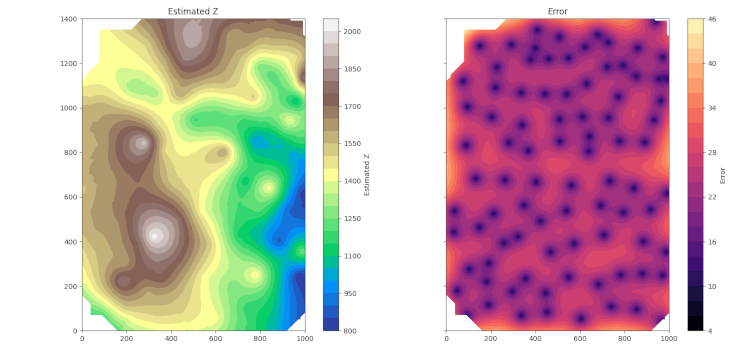
💻 Heatmap
Instead of using kd.analyze() above, you can start an automatic model analysis
config_report = kd.tune(nvec_list=range(8, 17, 2), nork_list=[0, 1, 2])
And after a long and boring list of results, it obtains a series of .gck files, one for each pair of nork and nvec values, which it can visualize as a heatmap:
kd.plot_tuning_results(config_report)
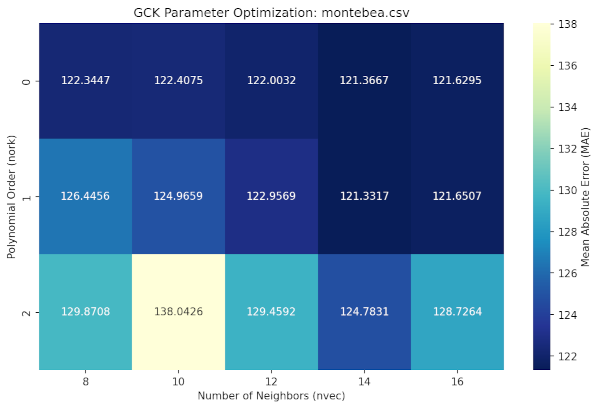
Which will quickly guide you to the best parameters to use for your interpolation (nork = 1, nvec = 14)
🔍 Command Line Interface (CLI)
pyGEKO provides the lsgck command to keep your workspace organized. No need to open Python to check your results:
$ lsgck
=====================================================================================================
File                           | Date   | nork  | nvec  | MAE      | RMSE     | CORR     | Model
-----------------------------------------------------------------------------------------------------
montebea_0_10.gck              | 12-27  | 0     | 10    |  122.407 |  167.426 | 0.765566 | 17
montebea_0_12.gck              | 12-27  | 0     | 12    |  122.003 |  167.832 | 0.764883 | 12
montebea_0_14.gck              | 12-27  | 0     | 14    |  121.367 |  167.534 | 0.766684 | 17
montebea_0_16.gck              | 12-27  | 0     | 16    |  121.629 |  167.959 | 0.765885 | 12
montebea_0_8.gck               | 12-27  | 0     | 8     |  122.345 |   167.89 | 0.763376 | 18
montebea_1_10.gck              | 12-27  | 1     | 10    |  124.966 |  167.926 | 0.764731 | 0
montebea_1_12.gck              | 12-27  | 1     | 12    |  122.957 |  169.571 | 0.760423 | 21
montebea_1_14.gck              | 12-27  | 1     | 14    |  121.332 |  167.144 | 0.768756 | 21
montebea_1_16.gck              | 12-27  | 1     | 16    |  121.651 |  167.421 | 0.768497 | 19
montebea_1_8.gck               | 12-27  | 1     | 8     |  126.446 |  170.101 | 0.754191 | 0
montebea_2_10.gck              | 12-27  | 2     | 10    |  138.043 |  181.814 | 0.716072 | 0
montebea_2_12.gck              | 12-27  | 2     | 12    |  129.459 |  173.554 | 0.741762 | 0
montebea_2_14.gck              | 12-27  | 2     | 14    |  124.783 |  167.688 | 0.762002 | 0
montebea_2_16.gck              | 12-27  | 2     | 16    |  128.726 |  171.328 | 0.751042 | 0
montebea_2_8.gck               | 12-27  | 2     | 8     |  129.871 |  171.107 | 0.750874 | 0
=====================================================================================================
The pygeko command will launch a Python REPL with the Kdata, Kgrid, and Gplot classes imported, allowing you to start working interactively in any directory.
$ pygeko

Welcome to pyGEKO-Kriger 0.9.0

Classes Kdata, Kgrid and Gplot imported.

Use exit() or Ctrl-D (i.e. EOF) to exit.

-->
📂 Output Formats
.gck: Binary object containing the full Python state and metadata..grd: Standard grid file (CSV format) for GIS software..hdr: Human-readable header file with model performance metrics..html: WebGL HTML file with surface models.
High-quality combined topographic and hypsometric/bathymetric maps can also be generated and exported to various graphic formats (.pdf, .svg, .png, etc.).
📄 License
pyGEKO is distributed under the terms of the MIT license.
Release history Release notifications | RSS feed


Download files
Download the file for your platform. If you're not sure which to choose, learn more about installing packages.
Source Distribution
Built Distribution
Filter files by name, interpreter, ABI, and platform.
If you're not sure about the file name format, learn more about wheel file names.
Copy a direct link to the current filters
File details
Details for the file pygeko-1.0.0.dev0.tar.gz.
File metadata
- Download URL: pygeko-1.0.0.dev0.tar.gz
- Upload date:
- Size: 77.5 kB
- Tags: Source
- Uploaded using Trusted Publishing? No
- Uploaded via: Hatch/1.16.1 cpython/3.11.2 HTTPX/0.28.1
File hashes
| Algorithm | Hash digest | |
|---|---|---|
| SHA256 |
f2d93c68699238321f1f18c79a522b29e2cf3fa4551a9de5f2d4d477f57073e5
|
|
| MD5 |
cab9d8bf2903ff083292f727b7b918ac
|
|
| BLAKE2b-256 |
684c60d24ae680f10e6b8275bb7c3fd084fbfc99bbb5699680a4f68187f3b19c
|
File details
Details for the file pygeko-1.0.0.dev0-py3-none-any.whl.
File metadata
- Download URL: pygeko-1.0.0.dev0-py3-none-any.whl
- Upload date:
- Size: 84.9 kB
- Tags: Python 3
- Uploaded using Trusted Publishing? No
- Uploaded via: Hatch/1.16.1 cpython/3.11.2 HTTPX/0.28.1
File hashes
| Algorithm | Hash digest | |
|---|---|---|
| SHA256 |
bf30b4fcedd1c9aa2deff60968ffc81c79fc89585d80f3d7846b4c82878fd63c
|
|
| MD5 |
bf3ad7c5522bf312a6bf795ca832666b
|
|
| BLAKE2b-256 |
74e38a6ab1f1b7cd9777a875bf28fd5bf84403e8435098c266403fd811a502df
|






