
pyMarkovClustering






Table of contents
Overview
pyMarkovClustering is a python package for Markov Clustering (MCL) and its graph visualization. While there is already a python library markov_clustering that implements the MCL algorithm, it has not been maintained for a long time and lacks some functionality. pyMarkovClustering was developed to enable easy MCL and graph visualization from edges consisting of a list of source, target, and weight.
Installation
Python 3.9 or later is required for installation.
For visualization, networkx and extra packages (e.g. matplotlib, pygraphviz) are also required.
Install PyPI package:
pip install pymarkovclustering
pip install networkx[default,extra] # For visualization
Install conda-forge package:
conda install -c conda-forge pymarkovclustering
conda install -c conda-forge networkx matplotlib-base pygraphviz pydot lxml # For visualization
API Usage
pyMarkovClustering provides a easy-to-use API to perform Markov Clustering from edges (list of source, target, weight). It also provides an API to visualize the clustering results using networkx. See notebooks and API docs in documents for more details.
Markov Clustering
Simple edges
import pymarkovclustering as pymcl

# List of edges (source, target, weight)
edges = [
    ("A", "B", 10),
    ("A", "C", 10),
    ("B", "C", 2),
    ("D", "E", 5),
    ("F", "G", 2),
    ("H", "I", 0.0),
]
# load edges as matrix, MCL, extract clusters
matrix, labels = pymcl.edges_to_sparse_matrix(edges)
mcl_matrix = pymcl.mcl(matrix, quiet=False)
clusters = pymcl.extract_clusters(mcl_matrix, labels)

for i, cluster in enumerate(clusters, 1):
    print(f"Cluster{i:03d}: {cluster}")
Output:
Cluster001: ['A', 'B', 'C']
Cluster002: ['D', 'E']
Cluster003: ['F', 'G']
Cluster004: ['H']
Cluster005: ['I']
Random generated edges
import pymarkovclustering as pymcl

# Generate random edges for MCL test
edges = pymcl.random_edges(30, min_cluster_size=2, max_cluster_size=6)
print(f"Edges: {edges}\n")

# easymcl automates load edges as matrix, MCL, extract clusters
clusters = pymcl.easymcl(edges, inflation=2.0)

for i, cluster in enumerate(clusters, 1):
    print(f"Cluster{i:03d}: {cluster}")
Output:
Edges: [('5_2', '5_5', 0.625), ('2_1', '2_5', 0.602), ('6_4', '6_5', 0.301), ('5_3', '5_6', 0.73), ('5_2', '5_6', 0.612), ('5_3', '5_5', 0.333), ('2_3', '2_5', 0.33), ('5_1', '5_3', 0.918), ('1_2', '1_4', 0.218), ('7_1', '7_2', 0.291), ('4_2', '4_3', 0.553), ('3_1', '3_2', 0.354), ('5_3', '5_4', 0.828), ('2_2', '2_4', 0.099), ('6_2', '6_5', 0.875), ('2_1', '2_3', 0.533), ('2_1', '2_4', 0.705), ('5_4', '5_5', 0.704), ('1_1', '1_4', 0.968), ('2_2', '2_5', 0.074), ('5_1', '5_5', 0.093), ('1_2', '1_3', 0.892), ('6_2', '6_3', 0.091), ('1_3', '1_5', 0.095), ('6_2', '6_4', 0.993), ('5_2', '5_4', 0.785), ('1_1', '1_3', 0.83), ('4_3', '4_4', 0.521), ('6_1', '6_2', 0.222), ('4_1', '4_3', 0.64), ('2_3', '2_4', 0.85), ('4_1', '4_2', 0.316), ('6_1', '6_5', 0.543), ('6_3', '6_5', 0.489), ('5_1', '5_6', 0.84), ('4_1', '4_4', 0.204), ('1_3', '1_4', 0.14), ('1_2', '1_5', 0.139), ('7_1', '7_3', 0.125), ('6_1', '6_3', 0.803), ('5_4', '5_6', 0.063), ('2_2', '2_3', 0.147), ('2_1', '2_2', 0.987), ('4_2', '4_4', 0.443), ('5_2', '5_3', 0.71), ('7_2', '7_3', 0.333), ('6_3', '6_4', 0.998), ('1_4', '1_5', 0.799), ('1_1', '1_5', 0.358), ('5_1', '5_4', 0.916), ('5_1', '5_2', 0.062), ('2_4', '2_5', 0.56), ('1_1', '1_2', 0.918), ('5_5', '5_6', 0.917), ('6_1', '6_4', 0.142)]

Cluster001: ['5_2', '5_5', '5_3', '5_6', '5_1', '5_4']
Cluster002: ['2_1', '2_5', '2_3', '2_2', '2_4']
Cluster003: ['6_4', '6_5', '6_2', '6_3', '6_1']
Cluster004: ['1_2', '1_4', '1_1', '1_3', '1_5']
Cluster005: ['4_2', '4_3', '4_4', '4_1']
Cluster006: ['7_1', '7_2', '7_3']
Cluster007: ['3_1', '3_2']
Visualization
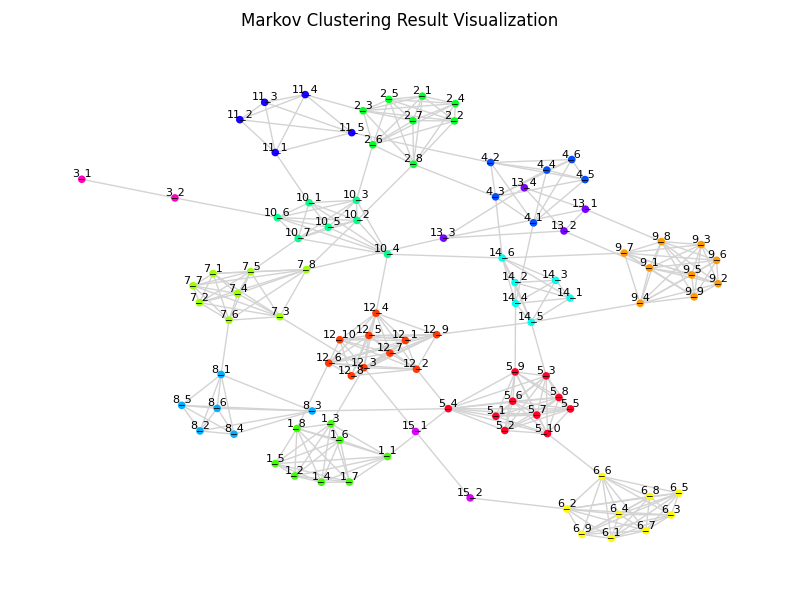
import pymarkovclustering as pymcl

# Generate random edges for MCL test
edges = pymcl.random_edges(100, random_add_rate=0.1, min_cluster_size=2)

# easymclviz automates load edges as matrix, MCL, extract clusters, visualization
fig = pymcl.easymclviz(edges, inflation=2.0, show_label=True)
fig.suptitle("Markov Clustering Result Visualization")
fig.savefig("clusters.png", dpi=100)
CLI Usage
pyMarkovClustering provides simple CLI for running MCL and extract clusters from edges file.
Option
$ pymcl --help
usage: pymcl [options] edges.tsv -o clusters.tsv

Markov Clustering in Python

positional arguments:
  edges              Input edges(source, target, weight) tab-delimited file

optional arguments:
  -o , --outfile     Output tab-delimited clusters file (default: stdout)
  -I , --inflation   Inflation factor (default: 2.0)
  --max_iter         Max number of iteration (default: 100)
  -q, --quiet        No print log on screen (default: OFF)
  -v, --version      Print version information
  -h, --help         Show this help message and exit
Example Command
pymcl edges.tsv -I 2.0 -o clusters.tsv
e.g. edges.tsv >>> clusters.tsv
1 maintainer

Metadata
1 maintainer
Release files for pyMarkovClustering 0.1.1
For a detailed explanation of source distributions (sdists) and built distributions (wheels), please see the package formats documentation.
Source distribution (sdist)
| File | Size | Uploaded | |
|---|---|---|---|
| pymarkovclustering-0.1.1.tar.gz | 277.9 kB | Details |
Built distribution (wheel)
| File | Interpreter | ABI | Platform | Reset |
|---|---|---|---|---|
| pymarkovclustering-0.1.1-py3-none-any.whl | Python 3 | none | any | Details |
Total release size: 293.0 kB
Release files / pymarkovclustering-0.1.1.tar.gz
| Download URL | pymarkovclustering-0.1.1.tar.gz |
|---|---|
| Size | 277.9 kB |
| Tags | Source |
|
SHA-256 checksum How to use checksums |
0a5f72ed7b15ea62c9e38c92a09e3e7445a3ecffe15b7fa246dfea0efd27c703
|
|
BLAKE2b-256 checksum How to use checksums |
f301dfa9767edc24b9b98ef589a42f5264e2addd2f228d0ab611c5fa0f12eb97
|
| Upload date | |
|
Uploaded using Trusted Publishing? What is trusted publishing? |
No |
| Uploaded via |
twine/5.1.1 CPython/3.12.9
|
Release files / pymarkovclustering-0.1.1-py3-none-any.whl
| Download URL | pymarkovclustering-0.1.1-py3-none-any.whl |
|---|---|
| Size | 15.1 kB |
| Tags | Python 3 |
|
SHA-256 checksum How to use checksums |
de9365a0948331b4945f6c83fb7794e3c7814db95505c77b71ab2f129aa1ff23
|
|
BLAKE2b-256 checksum How to use checksums |
a8d07fa625704eb552f934883db9da87ea4c39802f51584b4a3e8114e154135c
|
| Upload date | |
|
Uploaded using Trusted Publishing? What is trusted publishing? |
No |
| Uploaded via |
twine/5.1.1 CPython/3.12.9
|














