
pyRetroTerm

A modern terminal emulator built with PyQt6, featuring dynamic themes, real-time telemetry, and advanced terminal capabilities.
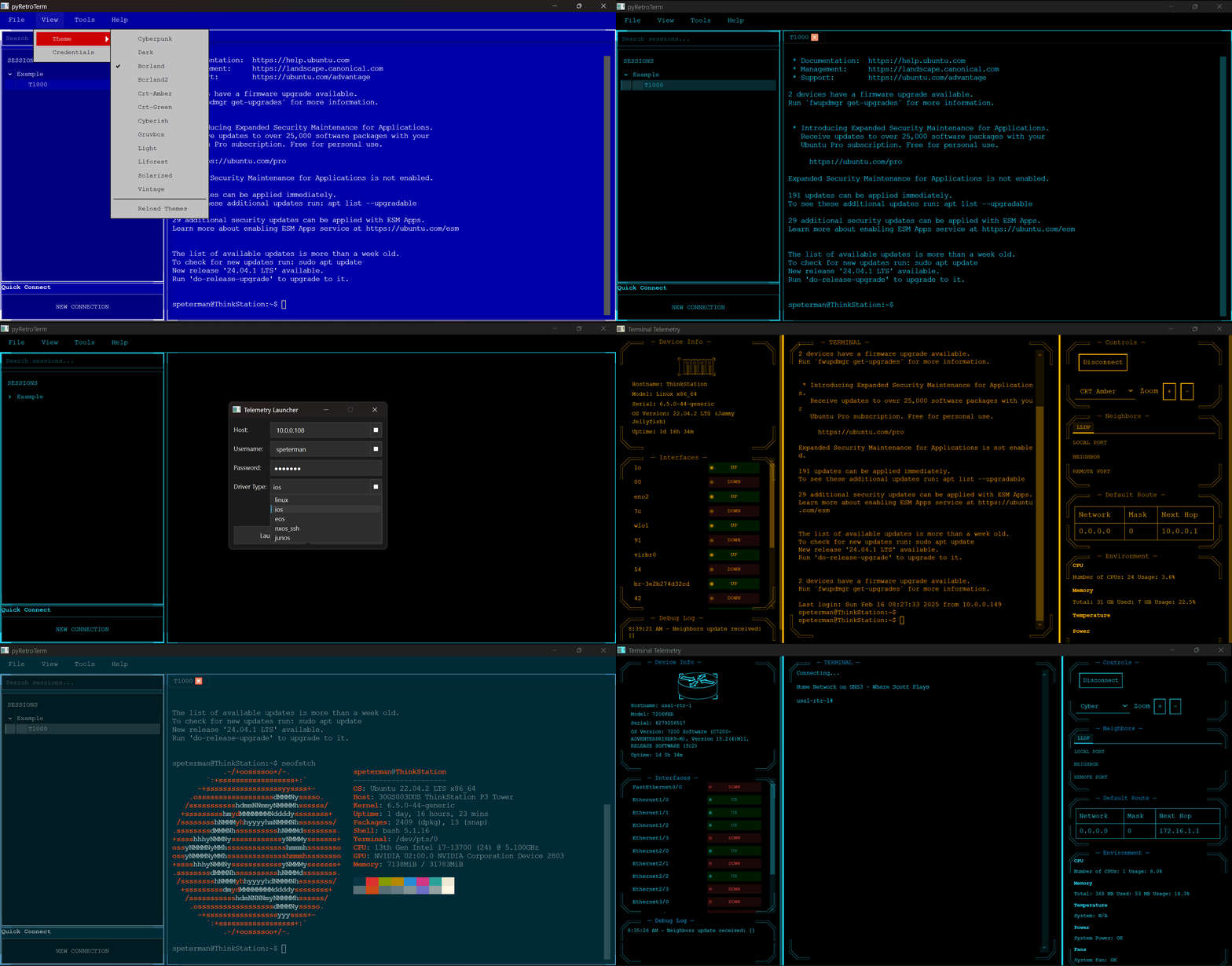


Features
Core Features
Telemetry Interface Features
- Modern terminal emulator with three-pane adaptive layout:
- Left: Session management and device navigation
- Center: Terminal interface with full emulation
- Right: Device telemetry and status panels
- Dynamic theme system with live preview and hot-reload
- Multi-tabbed terminal support with session persistence
- Quick connect functionality for rapid device access
- Session search and filtering capabilities
- Adjustable layouts with resizable panes
Device Monitoring
- Real-time interface status monitoring with UP/DOWN indicators
- Live system resource tracking (CPU, Memory, Temperature)
- Environmental monitoring dashboard
- Automatic neighbor discovery via LLDP
- Debug logging with timestamped events
- Default route and network topology visualization
Terminal Capabilities
- Full SSH terminal emulation
- Secure credential management with encryption
- Multiple device type support (Linux, Cisco IOS, Arista EOS, etc.)
- Sessions organization and persistence
- Customizable text rendering and display options
- Zoom controls for accessibility
Dynamic Theming System
- Theme configuration via external JSON files for easy customization
- Rich set of included themes: Cyberpunk, CRT (Amber/Green), Dark/Light, Borland, Gruvbox, Nord, and more
- Simple theme creation and modification without code changes
- Real-time theme switching and reloading
Real-Time Telemetry
- Live device monitoring and statistics
- Interface status tracking
- Environmental monitoring (CPU, Memory, Temperature, Power, Fans)
- Real-time device information updates
- LLDP neighbor discovery
Integration Capabilities
Netbox Integration
- Bulk export of device configurations, organizing folders by site
- Preserves device metadata (model, serial, vendor info)
- SSL verification options for internal deployments
- Progress tracking for large deployments
LogicMonitor Integration
- Automated device import from LogicMonitor monitoring platform
- Geographic site-based organization
- Secure API key authentication
- Support for custom SSL certificates (e.g., Zscaler)
- Intelligent property mapping (model, serial, version)
- Progress tracking and status updates
- Configurable batch processing
- Persistence to YAML file for sessions use
Additional Integration Features
- Portable session management with YAML configuration
- Plugin system for extensibility
- Automated credential management
- Bulk import/export capabilities
Installation
Via pip
pip install pyretroterm
pyretroterm
From source
git clone https://github.com/scottpeterman/pyretroterm.git
cd pyretroterm
pip install -r requirements.txt
python -m pyretroterm.pyretroterm
Quick Start
- Launch the application:
pyretroterm
- For console mode:
pyretroterm-con
-
Install theme pack (optional but recommended):
# Create themes directory in your installation
mkdir themes

# Download and extract theme pack
curl -LO https://raw.githubusercontent.com/scottpeterman/pyretroterm/main/themes.zip
unzip themes.zip -d themes/
-
On first launch:
- Set up a master password for credential management
- Configure your session settings
- Choose your preferred theme from the expanded theme collection
- If themes don't appear, ensure theme JSON files are in the 'themes' directory
Interface Overview
Main Window Layout
The interface is divided into three main sections:
- Left Panel: Session management, search, and quick connect
- Center Panel: Active terminal session with full terminal emulation
- Right Panel: Device telemetry, controls, and monitoring
Device Information Display
- Real-time device status and information
- Interface status monitoring with visual indicators
- Environmental metrics (CPU, Memory, Temperature, etc.)
- LLDP neighbor discovery and topology
- Routing table and network information
Theme System
The application includes several professionally designed themes:
- Cyberpunk (neon blue accents)
- CRT Amber/Green (classic terminal looks)
- Dark/Light modes for different environments
- Borland (nostalgic IDE style)
- Modern themes (Nord, Gruvbox, Solarized) Each theme provides consistent styling across all panels and includes:
- Custom border designs and panel layouts
- Color-coded status indicators
- Readable typography and contrast ratios
- Live preview and hot-reload capability
Device Support
Supported Network Operating Systems
- Cisco IOS
- Arista EOS
- Cisco NXOS (SSH)
- Juniper JUNOS
- Linux/Unix Systems
Telemetry Support
Each platform supports different levels of telemetry collection:
Full SSH Based Telemetry Support
- Interface status monitoring
- CPU and memory statistics
- Environmental monitoring (temperature, power, fans)
- LLDP neighbor discovery
- Routing table information
- Hardware inventory
- System information
Platform-Specific Capabilities
-
Linux/Unix:
- Dynamic hardware detection
- Detailed CPU core monitoring
- Memory usage with buffer/cache analysis
- VMware environment detection
- Temperature sensors with thresholds
- Power supply status
- Fan speed monitoring
- Hardware platform detection
- Enhanced security with sudo support
-
Network Devices (IOS, EOS, NXOS, JUNOS):
- Interface statistics
- Protocol states
- Hardware health monitoring
- Power and cooling status
- Configuration analysis
- Routing protocol information
Extensibility
Driver Architecture
pyRetroTerm features a modular driver architecture that allows easy addition of new device support:
class CustomDriver:
    def __init__(self, hostname, username, password, optional_args=None):
        self.hostname = hostname
        self.username = username
        self.password = password
        self.optional_args = optional_args or {}

    def get_facts(self):
        # Implement device fact collection
        pass

    def get_environment(self):
        # Implement environmental monitoring
        pass

    def get_interfaces(self):
        # Implement interface status collection
        pass
Adding New Device Support
- Create a new driver class implementing the standard interface
- Add device-specific command parsing
- Implement telemetry collection methods
- Register the driver with the platform
Example: Custom Linux Driver Features
- Robust error handling and recovery
- Flexible command execution
- Privilege escalation management
- Dynamic capability detection
- Comprehensive hardware discovery
- Detailed system information collection
Configuration
Integration Configuration
Netbox Setup
- Obtain your Netbox API token from your Netbox instance
- Configure the connection:
- Enter your Netbox URL (e.g., "http://netbox.yourcompany.com")
- Input your API token
- Optionally disable SSL verification for internal deployments
- Click "Download" to start the import process
- Save the generated YAML file
LogicMonitor Setup
- Gather your LogicMonitor credentials:
- Company name
- Access ID
- Access Key
- Optional: Configure SSL certificate path for Zscaler
- Run the import process
- Save the generated YAML configuration
Sessions
Sessions are configured via YAML files. Example configuration:
- folder_name: Example
  sessions:
  - DeviceType: linux
    Model: vm
    SerialNumber: ''
    SoftwareVersion: ''
    Vendor: ubuntu
    credsid: '1'
    display_name: T1000
    host: 10.0.0.104
    port: '22'
Custom Themes
Themes are defined in JSON files for easy customization and can be installed from the themes pack:
-
Download the official theme pack:
curl -LO https://raw.githubusercontent.com/scottpeterman/pyretroterm/main/themes.zip
-
Extract to your themes directory:
unzip themes.zip -d themes/
-
Themes folder is scanned at startup (or via UI) and dynamically loaded
-
Create new themes by adding JSON files to the themes directory
Example theme structure:
{
  "name": "my-custom-theme",
  "colors": {
    "background": "#1e1e1e",
    "text": "#ffffff",
    "primary": "#0affff",
    "secondary": "#888888",
    "border": "#444444"
  }
}
Security Features
- Protection of stored secrets
- PBKDF2-HMAC-SHA256 key derivation (480,000 iterations)
- Fernet (AES-128-CBC) encryption with HMAC authentication
- Platform-specific secure
1 maintainer

Metadata
1 maintainer
Release files for pyRetroTerm 0.2.1
For a detailed explanation of source distributions (sdists) and built distributions (wheels), please see the package formats documentation.
Built distribution (wheel)
| File | Interpreter | ABI | Platform | Reset |
|---|---|---|---|---|
| pyRetroTerm-0.2.1-py3-none-any.whl | Python 3 | none | any | Details |
Release files / pyRetroTerm-0.2.1-py3-none-any.whl
| Download URL | pyRetroTerm-0.2.1-py3-none-any.whl |
|---|---|
| Size | 23.4 MB |
| Tags | Python 3 |
|
SHA-256 checksum How to use checksums |
15cc44ee9321e1bb8541095181ee53291f25312ef5fc2cde4f3d216d610f362c
|
|
BLAKE2b-256 checksum How to use checksums |
ae07232ebcea281a949297581df2be376896a3aa9c95a8df39800ece689900af
|
| Upload date | |
|
Uploaded using Trusted Publishing? What is trusted publishing? |
No |
| Uploaded via |
twine/6.1.0 CPython/3.12.5
|














