
pyRetroTerm - A PyQt6 Terminal Emulator with Real-time Telemetry and Retro Themes

Project description
pyRetroTerm

A modern terminal emulator built with PyQt6, featuring dynamic themes, real-time telemetry, and advanced terminal capabilities.
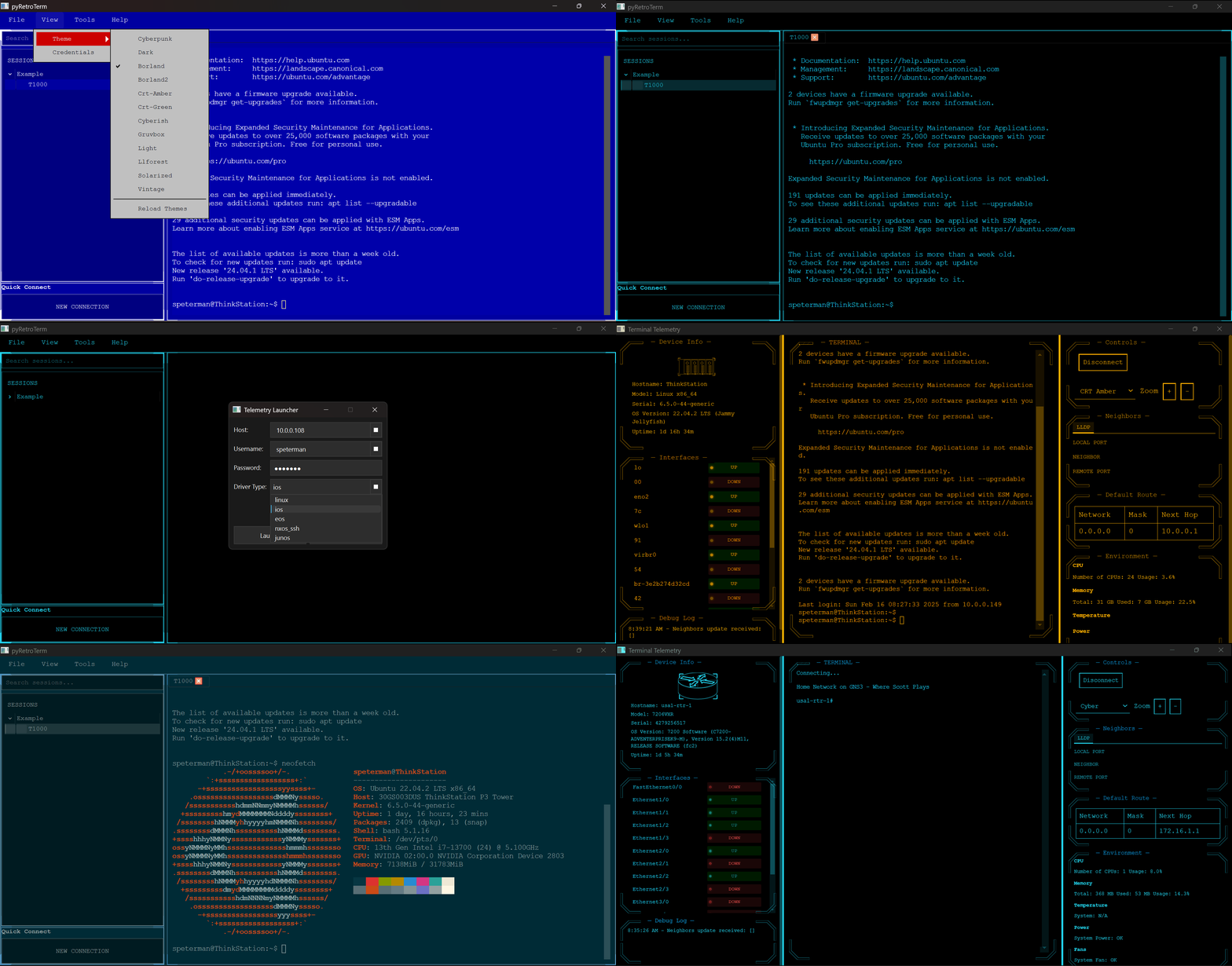


Features
Core Features
Telemetry Interface Features
- Modern terminal emulator with three-pane adaptive layout:
- Left: Session management and device navigation
- Center: Terminal interface with full emulation
- Right: Device telemetry and status panels
- Dynamic theme system with live preview and hot-reload
- Multi-tabbed terminal support with session persistence
- Quick connect functionality for rapid device access
- Session search and filtering capabilities
- Adjustable layouts with resizable panes
Device Monitoring
- Real-time interface status monitoring with UP/DOWN indicators
- Live system resource tracking (CPU, Memory, Temperature)
- Environmental monitoring dashboard
- Automatic neighbor discovery via LLDP
- Debug logging with timestamped events
- Default route and network topology visualization
Terminal Capabilities
- Full SSH terminal emulation
- Secure credential management with encryption
- Multiple device type support (Linux, Cisco IOS, Arista EOS, etc.)
- Sessions organization and persistence
- Customizable text rendering and display options
- Zoom controls for accessibility
Dynamic Theming System
- Theme configuration via external JSON files for easy customization
- Rich set of included themes: Cyberpunk, CRT (Amber/Green), Dark/Light, Borland, Gruvbox, Nord, and more
- Simple theme creation and modification without code changes
- Real-time theme switching and reloading
Real-Time Telemetry
- Live device monitoring and statistics
- Interface status tracking
- Environmental monitoring (CPU, Memory, Temperature, Power, Fans)
- Real-time device information updates
- LLDP neighbor discovery
Integration Capabilities
Netbox Integration
- Bulk export of device configurations, organizing folders by site
- Preserves device metadata (model, serial, vendor info)
- SSL verification options for internal deployments
- Progress tracking for large deployments
LogicMonitor Integration
- Automated device import from LogicMonitor monitoring platform
- Geographic site-based organization
- Secure API key authentication
- Support for custom SSL certificates (e.g., Zscaler)
- Intelligent property mapping (model, serial, version)
- Progress tracking and status updates
- Configurable batch processing
- Persistence to YAML file for sessions use
Additional Integration Features
- Portable session management with YAML configuration
- Plugin system for extensibility
- Automated credential management
- Bulk import/export capabilities
Installation
Via pip
pip install pyretroterm
pyretroterm
From source
git clone https://github.com/scottpeterman/pyretroterm.git
cd pyretroterm
pip install -r requirements.txt
python -m pyretroterm.pyretroterm
Quick Start
- Launch the application:
pyretroterm
- For console mode:
pyretroterm-con
-
Install theme pack (optional but recommended):
# Create themes directory in your installation
mkdir themes

# Download and extract theme pack
curl -LO https://raw.githubusercontent.com/scottpeterman/pyretroterm/main/themes.zip
unzip themes.zip -d themes/
-
On first launch:
- Set up a master password for credential management
- Configure your session settings
- Choose your preferred theme from the expanded theme collection
- If themes don't appear, ensure theme JSON files are in the 'themes' directory
Interface Overview
Main Window Layout
The interface is divided into three main sections:
- Left Panel: Session management, search, and quick connect
- Center Panel: Active terminal session with full terminal emulation
- Right Panel: Device telemetry, controls, and monitoring
Device Information Display
- Real-time device status and information
- Interface status monitoring with visual indicators
- Environmental metrics (CPU, Memory, Temperature, etc.)
- LLDP neighbor discovery and topology
- Routing table and network information
Theme System
The application includes several professionally designed themes:
- Cyberpunk (neon blue accents)
- CRT Amber/Green (classic terminal looks)
- Dark/Light modes for different environments
- Borland (nostalgic IDE style)
- Modern themes (Nord, Gruvbox, Solarized) Each theme provides consistent styling across all panels and includes:
- Custom border designs and panel layouts
- Color-coded status indicators
- Readable typography and contrast ratios
- Live preview and hot-reload capability
Device Support
Supported Network Operating Systems
- Cisco IOS
- Arista EOS
- Cisco NXOS (SSH)
- Juniper JUNOS
- Linux/Unix Systems
Telemetry Support
Each platform supports different levels of telemetry collection:
Full SSH Based Telemetry Support
- Interface status monitoring
- CPU and memory statistics
- Environmental monitoring (temperature, power, fans)
- LLDP neighbor discovery
- Routing table information
- Hardware inventory
- System information
Platform-Specific Capabilities
-
Linux/Unix:
- Dynamic hardware detection
- Detailed CPU core monitoring
- Memory usage with buffer/cache analysis
- VMware environment detection
- Temperature sensors with thresholds
- Power supply status
- Fan speed monitoring
- Hardware platform detection
- Enhanced security with sudo support
-
Network Devices (IOS, EOS, NXOS, JUNOS):
- Interface statistics
- Protocol states
- Hardware health monitoring
- Power and cooling status
- Configuration analysis
- Routing protocol information
Extensibility
Driver Architecture
pyRetroTerm features a modular driver architecture that allows easy addition of new device support:
class CustomDriver:
    def __init__(self, hostname, username, password, optional_args=None):
        self.hostname = hostname
        self.username = username
        self.password = password
        self.optional_args = optional_args or {}

    def get_facts(self):
        # Implement device fact collection
        pass

    def get_environment(self):
        # Implement environmental monitoring
        pass

    def get_interfaces(self):
        # Implement interface status collection
        pass
Adding New Device Support
- Create a new driver class implementing the standard interface
- Add device-specific command parsing
- Implement telemetry collection methods
- Register the driver with the platform
Example: Custom Linux Driver Features
- Robust error handling and recovery
- Flexible command execution
- Privilege escalation management
- Dynamic capability detection
- Comprehensive hardware discovery
- Detailed system information collection
Configuration
Integration Configuration
Netbox Setup
- Obtain your Netbox API token from your Netbox instance
- Configure the connection:
- Enter your Netbox URL (e.g., "http://netbox.yourcompany.com")
- Input your API token
- Optionally disable SSL verification for internal deployments
- Click "Download" to start the import process
- Save the generated YAML file
LogicMonitor Setup
- Gather your LogicMonitor credentials:
- Company name
- Access ID
- Access Key
- Optional: Configure SSL certificate path for Zscaler
- Run the import process
- Save the generated YAML configuration
Sessions
Sessions are configured via YAML files. Example configuration:
- folder_name: Example
  sessions:
  - DeviceType: linux
    Model: vm
    SerialNumber: ''
    SoftwareVersion: ''
    Vendor: ubuntu
    credsid: '1'
    display_name: T1000
    host: 10.0.0.104
    port: '22'
Custom Themes
Themes are defined in JSON files for easy customization and can be installed from the themes pack:
-
Download the official theme pack:
curl -LO https://raw.githubusercontent.com/scottpeterman/pyretroterm/main/themes.zip
-
Extract to your themes directory:
unzip themes.zip -d themes/
-
Themes folder is scanned at startup (or via UI) and dynamically loaded
-
Create new themes by adding JSON files to the themes directory
Example theme structure:
{
  "name": "my-custom-theme",
  "colors": {
    "background": "#1e1e1e",
    "text": "#ffffff",
    "primary": "#0affff",
    "secondary": "#888888",
    "border": "#444444"
  }
}
Security Features
- Protection of stored secrets
- PBKDF2-HMAC-SHA256 key derivation (480,000 iterations)
- Fernet (AES-128-CBC) encryption with HMAC authentication
- Platform-specific secure


Download files
Download the file for your platform. If you're not sure which to choose, learn more about installing packages.
Source Distributions
Built Distribution
Filter files by name, interpreter, ABI, and platform.
If you're not sure about the file name format, learn more about wheel file names.
Copy a direct link to the current filters
File details
Details for the file pyRetroTerm-0.2.1-py3-none-any.whl.
File metadata
- Download URL: pyRetroTerm-0.2.1-py3-none-any.whl
- Upload date:
- Size: 23.4 MB
- Tags: Python 3
- Uploaded using Trusted Publishing? No
- Uploaded via: twine/6.1.0 CPython/3.12.5
File hashes
| Algorithm | Hash digest | |
|---|---|---|
| SHA256 |
15cc44ee9321e1bb8541095181ee53291f25312ef5fc2cde4f3d216d610f362c
|
|
| MD5 |
0219961076bcb5e1826eb4764537c09e
|
|
| BLAKE2b-256 |
ae07232ebcea281a949297581df2be376896a3aa9c95a8df39800ece689900af
|






