
MCP server for simplest GUI agent 🕹️🤖
pyautogui_mcp_server packages a Streamable HTTP MCP server for running Python code with pyautogui instrumentation.
It is designed for GUI automation workflows where plain pyautogui execution is not enough. The package adds MCP-friendly output handling, and richer screenshots.
✨ What this package adds
Compared with running raw pyautogui calls directly, this library adds extra effort in the following areas:
- Shared Python globals across tool calls.
- Captured
stdout,stderr, and final expression results in one MCP response stream. - Inline screenshot delivery as MCP image content instead of requiring manual file handling.
- Annotated mouse-operation previews that show the target point or path before the action runs.
- Screenshot normalization so captured images line up better with logical screen coordinates.
🛠️ Tool response example
<stdout>
Cut the right rope by dragging left to right through it.
</stdout>
<pyautogui-mcp.dragTo x=860 y=430 duration=0.2 button='left'
    time_offset="T+1.1s" pyautogui.size=(1440, 900)>
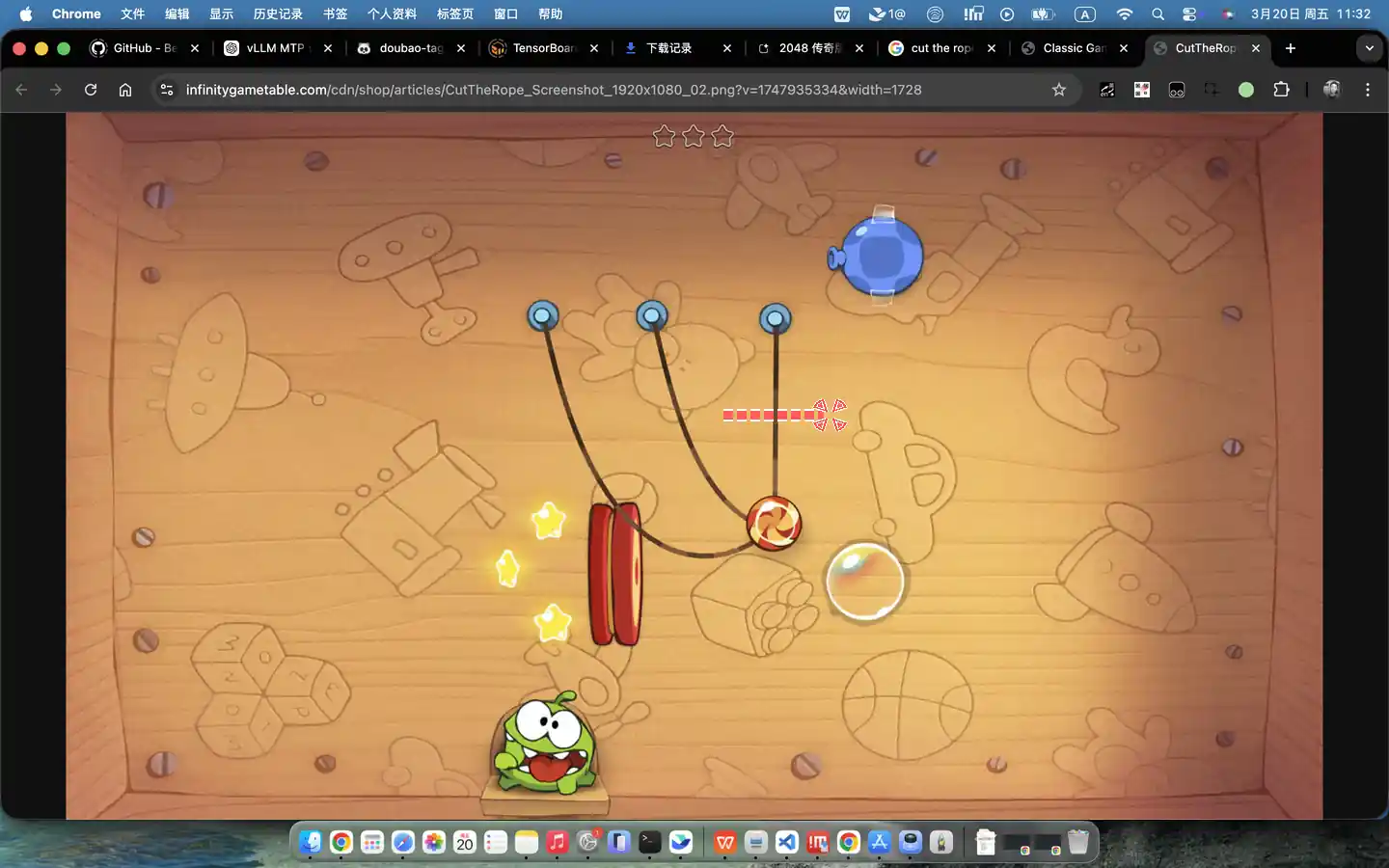
</pyautogui-mcp.dragTo>
📦 Installation
pip install pyautogui_mcp_server
For local development:
pip install -e .[dev]
🚀 Run the MCP server
Use the module entrypoint:
python -m pyautogui_mcp_server --host 127.0.0.1 --port 9300
Or use the installed console script:
pyautogui-mcp-server --port 9300
Show CLI help:
python -m pyautogui_mcp_server --help
The server exposes a run_python_with_pyautogui MCP tool that executes Python with instrumented pyautogui behavior.
📄 License
MIT
1 maintainer

Metadata
1 maintainer
Release files for pyautogui-mcp-server 0.1.3
For a detailed explanation of source distributions (sdists) and built distributions (wheels), please see the package formats documentation.
Source distribution (sdist)
| File | Size | Uploaded | |
|---|---|---|---|
| pyautogui_mcp_server-0.1.3.tar.gz | 16.0 kB | Details |
Built distribution (wheel)
| File | Interpreter | ABI | Platform | Reset |
|---|---|---|---|---|
| pyautogui_mcp_server-0.1.3-py3-none-any.whl | Python 3 | none | any | Details |
Total release size: 31.1 kB
Release files / pyautogui_mcp_server-0.1.3.tar.gz
| Download URL | pyautogui_mcp_server-0.1.3.tar.gz |
|---|---|
| Size | 16.0 kB |
| Tags | Source |
|
SHA-256 checksum How to use checksums |
e7b11f2cea62d2dad9b4f8c097a3892cf05482cfb9523e9eaedaa8807c769f64
|
|
BLAKE2b-256 checksum How to use checksums |
01f18fb8bfad0b28a2782dee14904efd166a4ccf4d12d50264b34cd33a9add26
|
| Upload date | |
|
Uploaded using Trusted Publishing? What is trusted publishing? |
No |
| Uploaded via |
twine/6.1.0 CPython/3.11.7
|
Release files / pyautogui_mcp_server-0.1.3-py3-none-any.whl
| Download URL | pyautogui_mcp_server-0.1.3-py3-none-any.whl |
|---|---|
| Size | 15.1 kB |
| Tags | Python 3 |
|
SHA-256 checksum How to use checksums |
20f162b69e1c562e09a7045e6aed0e94960b4892d4e39b386d42f00068a4fdc0
|
|
BLAKE2b-256 checksum How to use checksums |
6f8609a5f7414783d3cf2ebbf5ea82b31630189a3cb09797efbb4ead5236e3ad
|
| Upload date | |
|
Uploaded using Trusted Publishing? What is trusted publishing? |
No |
| Uploaded via |
twine/6.1.0 CPython/3.11.7
|














