
PyCForge
PyCForge is a focused Python-to-C source transpiler with a complete desktop workspace, command-line tools, and a Python API. It converts its documented, typed Python subset into readable C11 source. Unsupported input is rejected with clear diagnostics instead of being guessed or silently changed.
Install, upgrade, and open
PyCForge requires Python 3.11 or newer. PySide6 and the complete desktop application are installed automatically.
On Windows, install PyCForge and open the workspace with:
py -m pip install pycforge
py -m pycforge.ide
To upgrade an existing Windows installation and open it immediately:
py -m pip install --upgrade pycforge
py -m pycforge.ide
On macOS or Linux:
python -m pip install pycforge
python -m pycforge.ide
To upgrade on macOS or Linux:
python -m pip install --upgrade pycforge
python -m pycforge.ide
py -m pycforge.ide is the easiest Windows launch command because it works
immediately after either installation or upgrade. The installed
pycforge-workspace command opens the same application.
What PyCForge provides
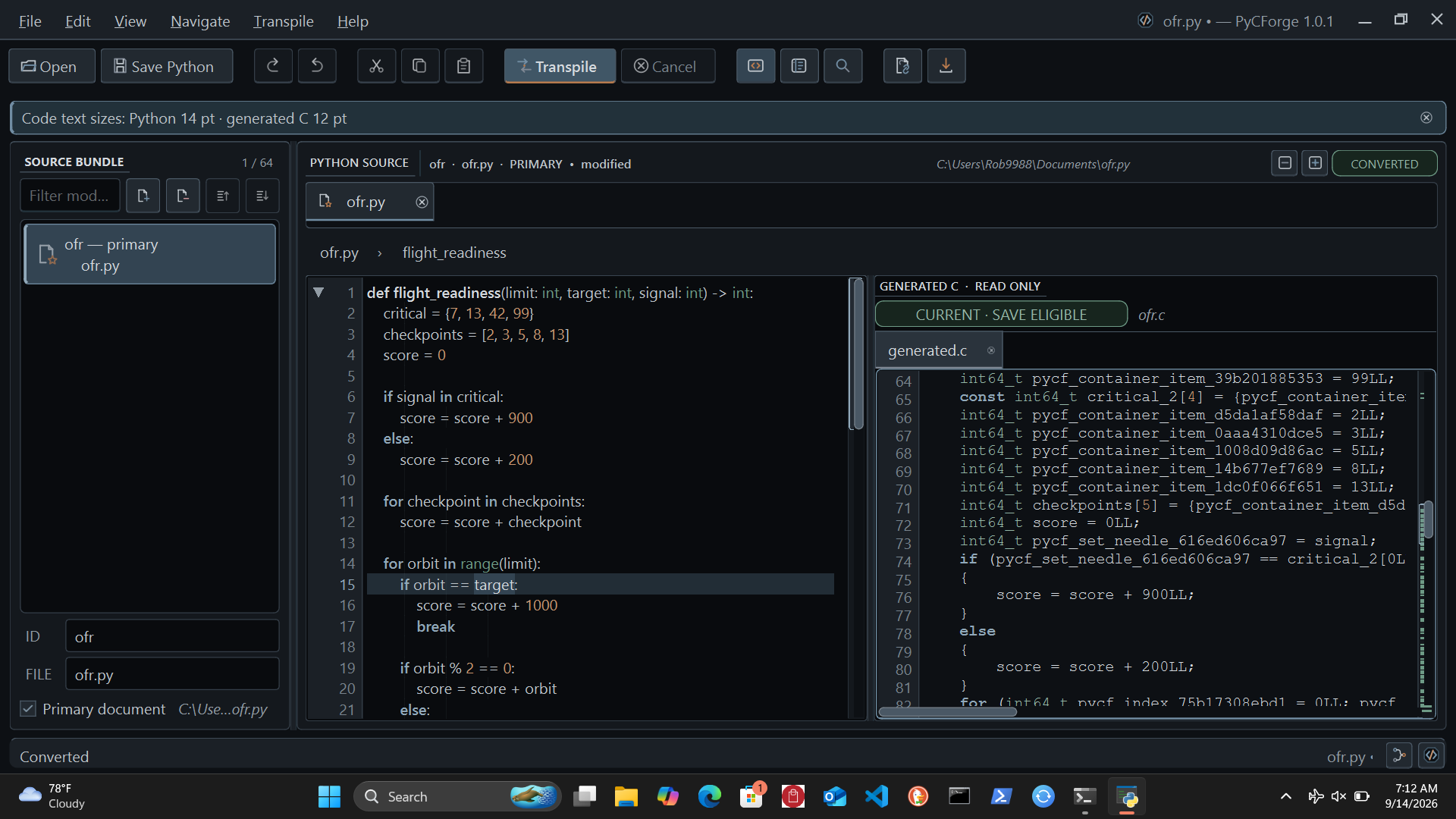
- A professional dark desktop workspace for opening, editing, organizing, and transpiling Python source bundles of up to 64 files.
- Side-by-side Python and generated C, with exact ForgeLens navigation between corresponding source locations.
- Tabs, split source view, function folding, outline, search and replace, command palette, conversion history, and remembered workspace sessions.
- Read-only generated C with diagnostics, mappings, conversion summaries, decision traces, and optional telemetry views.
- Cancellable background transpilation that keeps the interface responsive.
- Deterministic output for the same source bundle and settings.
- Clear rejection of Python outside the supported conversion boundary.
- A headless command-line interface and a structured Python API for automation.
- Independent Python and generated-C text sizing, accessible controls, and display-aware window sizing.
- Searchable documentation built directly into the application.
PyCForge supports typed functions, local declarations and assignments, module constants, selected string operations, conditionals, bounded loops, direct calls, fixed containers and records, set membership, multiple source files, and bounded UTF-8 file reading and writing. The in-app documentation gives working examples and explains the limits of each feature.
Ting agent integration
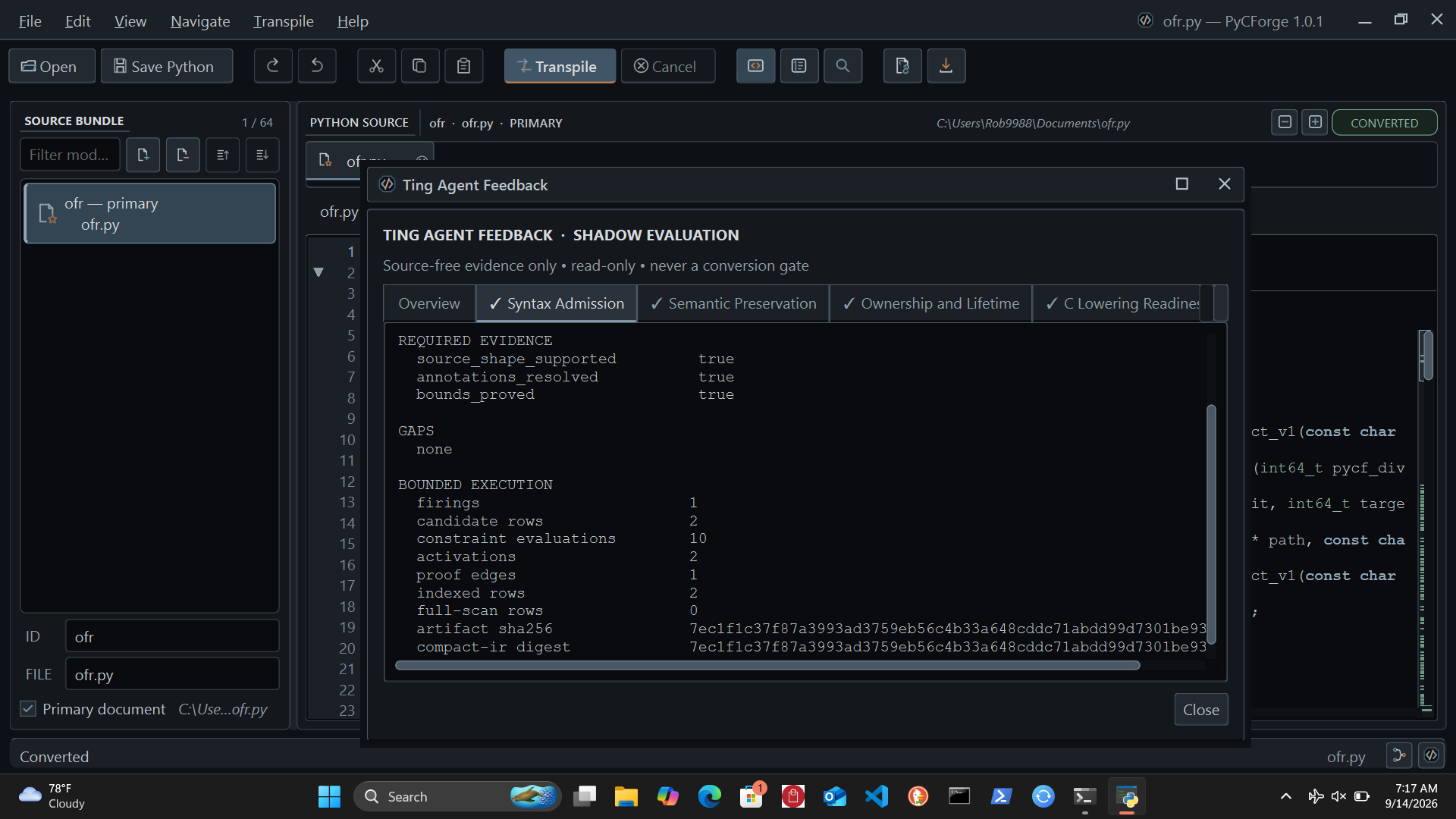
PyCForge includes six deterministic Ting agents that examine each completed or rejected conversion from different engineering perspectives:
- syntax admission;
- semantic preservation;
- ownership and lifetime;
- C lowering readiness;
- release verification; and
- capability and resource limits.
The Ting agents use authenticated local rulepacks and bounded work limits. They receive structural evidence rather than source text, run without a network connection, and report their evidence and gaps in a dedicated read-only feedback window. Its Flow Map shows the current evidence fan-out, all six agent decisions and bounded proof activity, and the advisory report fan-in.
Ting currently operates in shadow evaluation mode. Its feedback can help review a conversion, but it never changes, approves, blocks, or publishes the generated C.
Built-in help and documentation
Press F1 or choose Help → PyCForge Help… to open 14 searchable offline help pages. They include working variable and string examples, a supported-feature table, corrections for common errors, and a checklist for compiling and testing generated C. They also cover file operations, Ting feedback, shortcuts, the CLI, and the Python API. No browser or network connection is required.
Use the installed Help for the current conversion examples and supported forms.
Command line
Convert a Python file to C:
pycforge convert input.py --output generated.c
Return the structured conversion result as JSON:
pycforge --format json convert input.py
See every command and option:
pycforge --help
Python API
from pycforge import ConversionRequest, PythonToCConverter

source = """\
def add(left: int, right: int) -> int:
    return left + right
"""

result = PythonToCConverter().convert(
    ConversionRequest.from_source(source)
)

if result.generated_c is not None:
    print(result.generated_c)
else:
    for diagnostic in result.diagnostics:
        print(diagnostic)
The desktop workspace, CLI, and Python API use the same converter.
Safety boundary
PyCForge reads supplied Python as source data. It does not import or execute that Python, and it does not compile, link, load, or run the generated C. Review the built-in Conversion and input limits page before using generated code in another build system.
Current conversion support
Version 1.1.0 adds local type declarations with or without an initial value, chained assignment, flat unpacking and swaps, scalar augmented assignment, and module variables whose values can be calculated during conversion.
UTF-8 strings support runtime Unicode length, content comparisons,
startswith, endswith, find, and in/not in. Constant strings also support
concatenation, repetition, indexing/slicing, case conversion, trimming and
replacement when their inputs are known during conversion.
BASE: int = 4
PREFIX = "hé"

def score(text: str, amount: int) -> int:
    total: int = amount
    total += BASE
    if text.startswith(PREFIX):
        total += len(text)
    return total
For accepted forms, examples, and limitations, open Help → PyCForge Help… in the application. Mutable global state and runtime string construction remain unsupported. The six TING agents review the new strategy, while external C compilation and execution remain outside the product. This release preserves the existing desktop presentation and screenshots.
License
PyCForge is free software released under the GNU General Public License v3.0
only. The complete license text is included in LICENSE.
1 maintainer

Release files for pycforge 1.1.1
For a detailed explanation of source distributions (sdists) and built distributions (wheels), please see the package formats documentation.
Source distribution (sdist)
| File | Size | Uploaded | |
|---|---|---|---|
| pycforge-1.1.1.tar.gz | 4.3 MB | Details |
Built distribution (wheel)
| File | Interpreter | ABI | Platform | Reset |
|---|---|---|---|---|
| pycforge-1.1.1-py3-none-any.whl | Python 3 | none | any | Details |
Total release size: 5.9 MB
Release files / pycforge-1.1.1.tar.gz
| Download URL | pycforge-1.1.1.tar.gz |
|---|---|
| Size | 4.3 MB |
| Tags | Source |
|
SHA-256 checksum How to use checksums |
08911b2e2445fd238f3006e4fc7f899225dfa6a8f5f9162d0d33e6df98dc4aed
|
|
BLAKE2b-256 checksum How to use checksums |
7d5ac3c59631422f3b47e8c41a2540cdf2c28994e5f9e0d2e9e9bc171148a931
|
| Upload date | |
|
Uploaded using Trusted Publishing? What is trusted publishing? |
No |
| Uploaded via |
twine/0.0.0 importlib_metadata/4.0.1 pkginfo/1.12.1.2 requests/2.25.1 requests-toolbelt/0.9.1 tqdm/4.61.1 CPython/3.9.16
|
Release files / pycforge-1.1.1-py3-none-any.whl
| Download URL | pycforge-1.1.1-py3-none-any.whl |
|---|---|
| Size | 1.6 MB |
| Tags | Python 3 |
|
SHA-256 checksum How to use checksums |
74f5680d9d4897b4adc7e1484581fb0a263fc6cc811505f11851312cdc64d1ac
|
|
BLAKE2b-256 checksum How to use checksums |
f699662321dbdd68828fa53823c7ca6187bfb5cf4117ae6085a4b18ec7291de1
|
| Upload date | |
|
Uploaded using Trusted Publishing? What is trusted publishing? |
No |
| Uploaded via |
twine/0.0.0 importlib_metadata/4.0.1 pkginfo/1.12.1.2 requests/2.25.1 requests-toolbelt/0.9.1 tqdm/4.61.1 CPython/3.9.16
|














